Compare commits
| Author | SHA1 | Date | |
|---|---|---|---|
  DelucseandGitHub DelucseandGitHub
|
1e95d57139 |
@@ -1,6 +1,2 @@
|
||||
REACT_APP_COMPILER_URL=https://compiler.sensebox.de
|
||||
REACT_APP_BOARD=sensebox-mcu
|
||||
REACT_APP_BLOCKLY_API=https://api.blockly.sensebox.de
|
||||
|
||||
# in days
|
||||
REACT_APP_SHARE_LINK_EXPIRES=30
|
||||
|
||||
@@ -1,26 +0,0 @@
|
||||
# This CITATION.cff file was generated with cffinit.
|
||||
# Visit https://bit.ly/cffinit to generate yours today!
|
||||
|
||||
cff-version: 1.2.0
|
||||
title: senseBox Learn- and Programming Environment
|
||||
message: Please cite this software using these metadata.
|
||||
type: software
|
||||
version: 1.0.0
|
||||
date-released: 2021-09-30
|
||||
url: "https://github.com/sensebox/React-Ardublockly"
|
||||
authors:
|
||||
- given-names: Mario
|
||||
family-names: Pesch
|
||||
email: mario.pesch@uni-muenster.de
|
||||
affiliation: >-
|
||||
Institute for geoinformatics University of
|
||||
Muenster
|
||||
- given-names: Luc
|
||||
family-names: Niski
|
||||
affiliation: >-
|
||||
Institute for geoinformatics University of
|
||||
Muenster
|
||||
- given-names: Felix
|
||||
family-names: Erdmann
|
||||
email: f.erdmann@reedu.de
|
||||
affiliation: Reedu GmbH & Co. KG
|
||||
@@ -1,93 +0,0 @@
|
||||
# Blockly 2020
|
||||
|
||||
(aktuelles Preview unter: https://deploy-preview-37--blockly-react.netlify.app/)
|
||||
|
||||
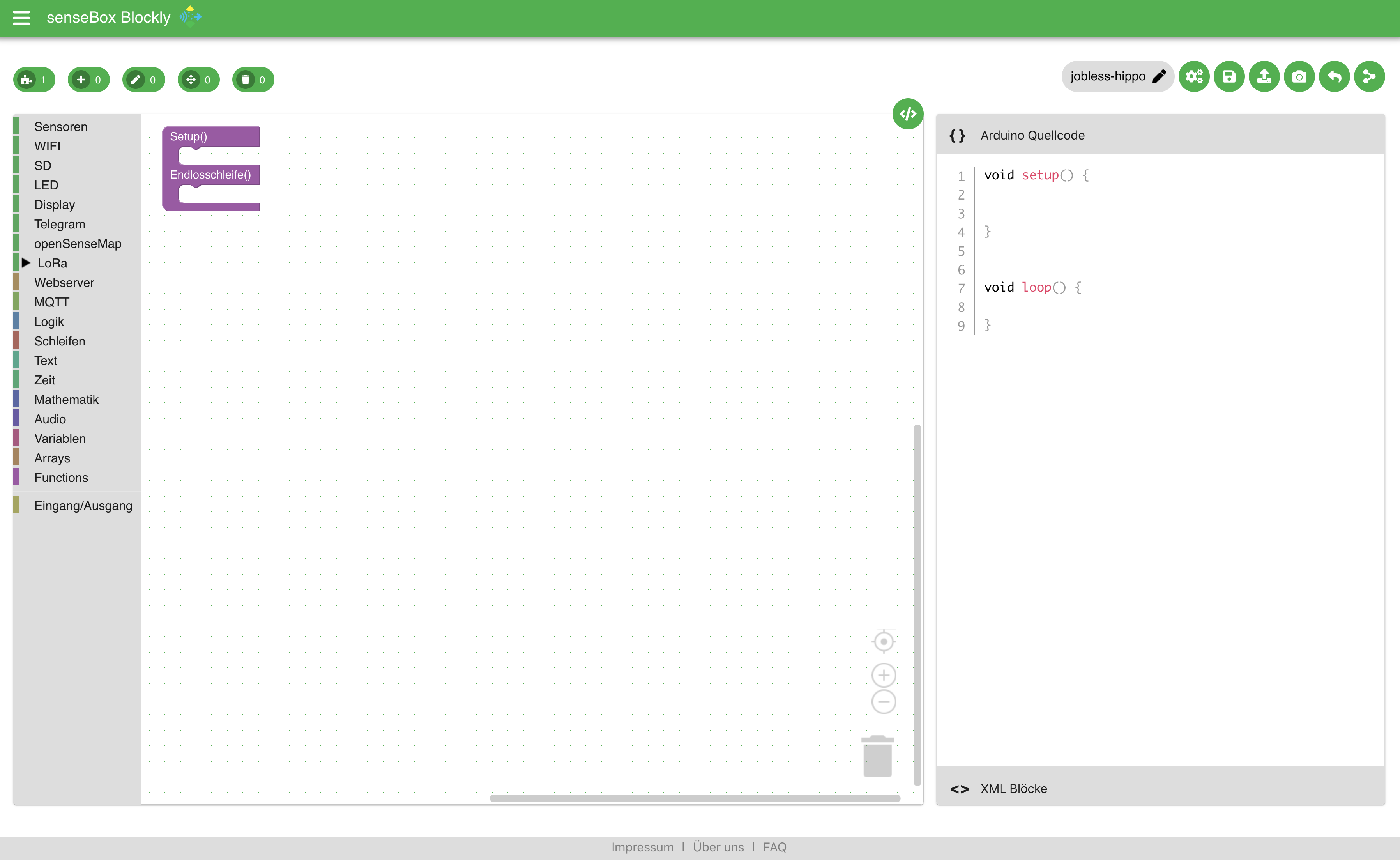
In den letzten Wochen haben wir eine komplett neue Lern- und Programmierumgebung für die senseBox geschaffen. Die Basis bildet hierbei weiterhin Google Blockly und das Frontend wird über React realisiert. Fast alle Blöcke wurden bereits aus der alten Version in die neue Version migriert.
|
||||
|
||||
|
||||
|
||||
|
||||
|
||||
|
||||
## Blockly Core
|
||||
Nachdem die bisherige Version, die unter [blockly.sensebox.de](https://blockly.sensebox.de) verfügbar ist, auf einen Google Blockly Core von 2016 aufbaut, wurde es Zeit ein großes Update durchzuführen. Durch den neuen Blockly Core lassen sich auch andere Renderer der Blöcke verwenden. In den Einstellungen kannst du zwischen den zwei Renderern Geras und Zelos auswählen. Geras ist der klassische Blockly Renderer während Zelos vor allem für Touchoberfläche optimiert worden ist.
|
||||
|
||||
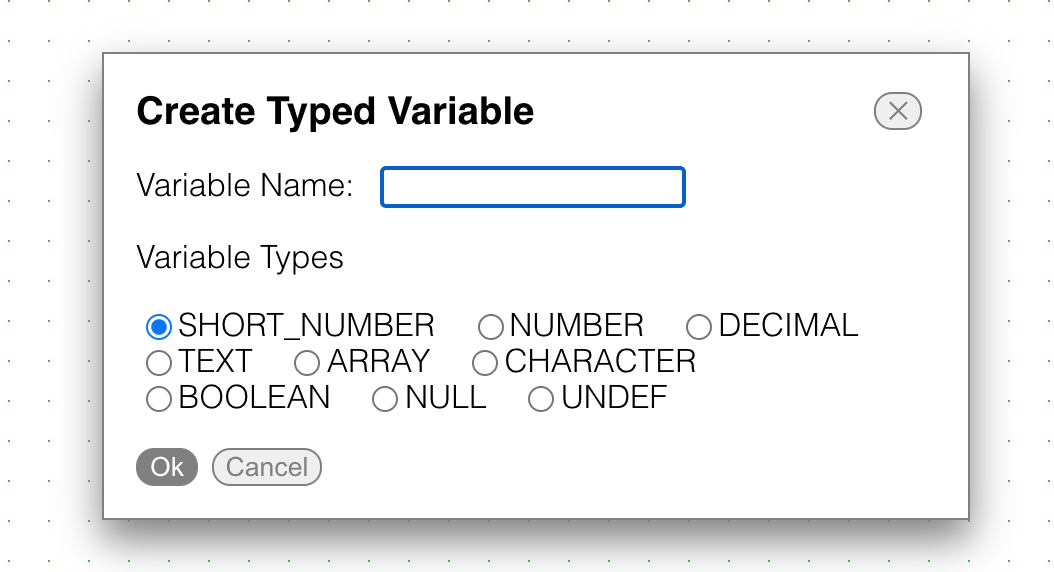
### Typed Variablen
|
||||
|
||||
Neue Variablen werden nun direkt mit einem bestimmten Datentyp angelegt. Ein einfacher Check überprüft ob der zurückgegeben Typ eines Blockes mit dem der Variablen kompatibel ist.
|
||||
|
||||
|
||||
|
||||
|
||||
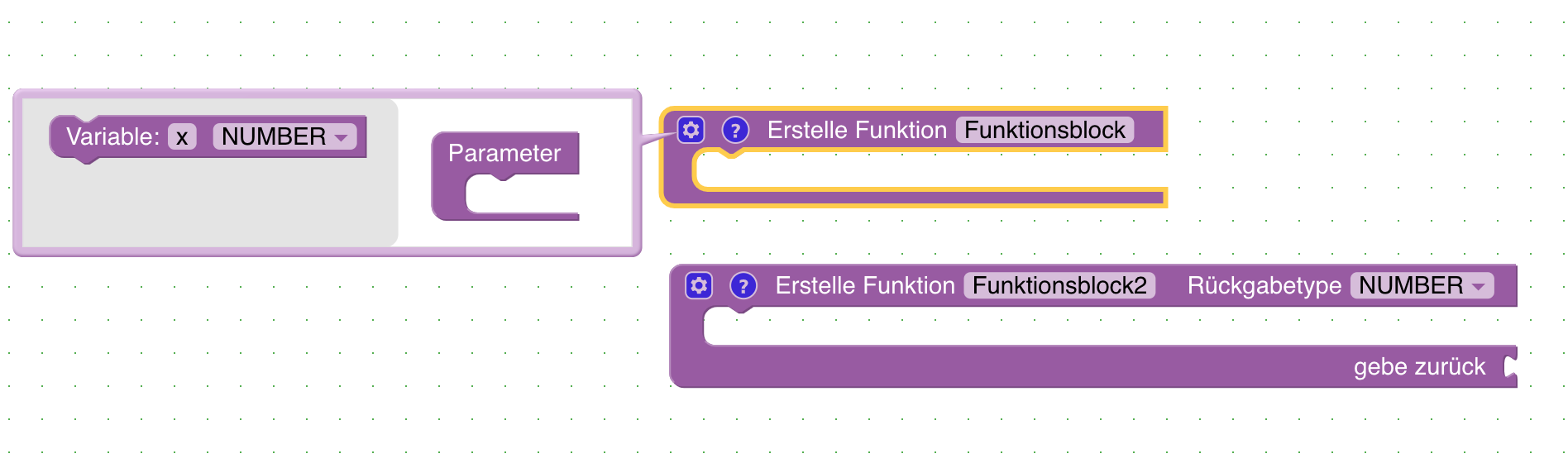
### Funktionen (funktioniert aktuell nicht!)
|
||||
|
||||
Funktionen mit Rückgabe Wert und Eingabeparametern können angelegt werden. Durch die Verwendung von Funktionen lassen sich auch komplexere Programme übersichtlicher darstellen und bearbeiten. Beim Anlegen einer Funktion kann über das Zahnrad weitere Eingabeparameter hinzuefügt werden.
|
||||
|
||||
|
||||
|
||||
|
||||
### GPS
|
||||
|
||||
Der Code für das GPS Modul wurde neu aufgebaut und ermöglicht es deutlich schneller einen GPS Fix zu bekommen. Zusätzlich lassen sich bald! die Koordinaten in zwei verschiedenen Formaten zurückgebenlassen. Zum einen als Kommazahl zum anderen als Zahl ohne nachkommastellen
|
||||
|
||||
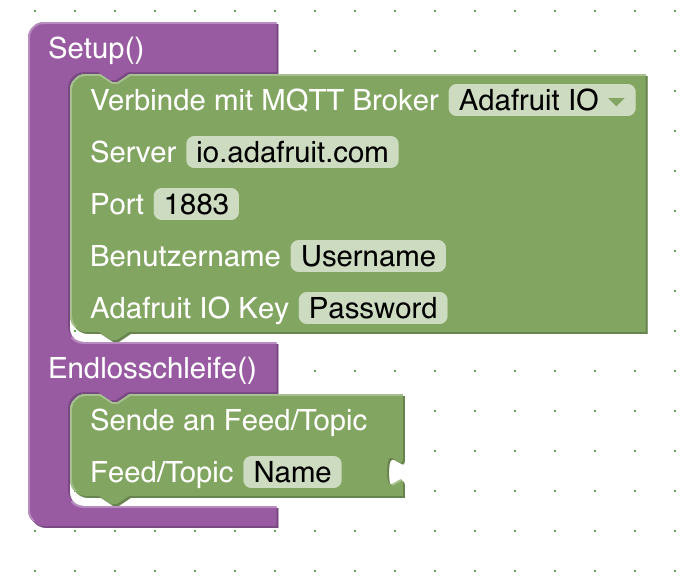
### MQTT
|
||||
Zwei einfache Blöcke ermöglichen es nun die Daten über MQTT an einen Broker zu versenden. Zwei Broker sind bereits "vorprogrammiert" (Adafruit IO und DIOTY). Natürlich können auch eigene Broker verwendet werden. Falls ihr gute freie Broker kennt, die wir hinzufügen sollten meldet euch einfach bei uns.
|
||||
|
||||
|
||||
|
||||
|
||||
### TTN Mapper
|
||||
Bisher war es möglich einen "kleinen" TTN Mapper zu bauen, der die Daten als Cayenne Payload versendet hat. Es gibt nun einen Block der es direkt ermöglicht einen vollständigen TTN Mapper zu Programmieren, der die Daten auch auf [TTNMapper](https://ttnmapper.org/) veröffentlichen kann.
|
||||
|
||||
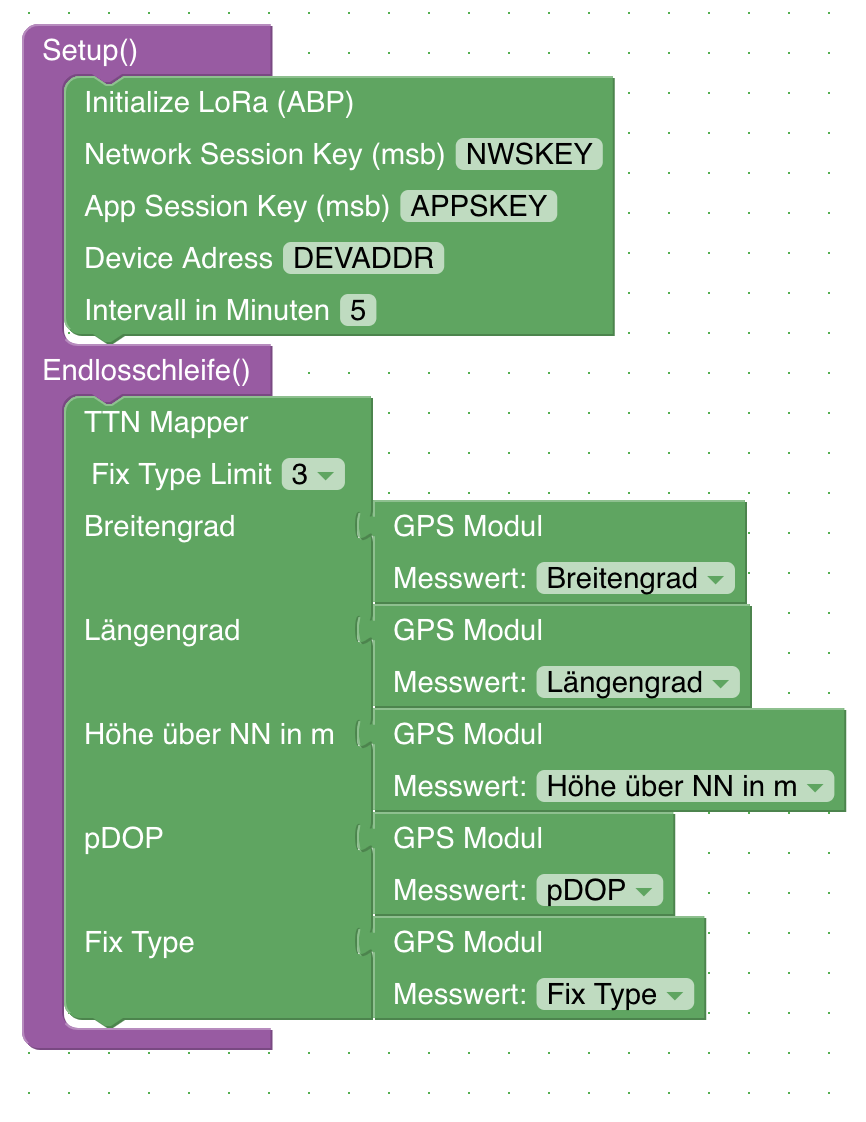
|
||||
|
||||
|
||||
## Fronted
|
||||
|
||||
In der Oberfläche gibt es einige Neuigkeiten. Ziel ist es Blockly für die senseBox zu einer vollständigen Lern- und Programmierumgebung weiterzuentwickeln.
|
||||
|
||||
Die Codeanzeige ist standardmäßig ausgeblendet kann aber einfach durch eine Klick auf das `</>` Icon hinzugefügt werden.
|
||||
|
||||
### Login mit openSenseMap/senseBox Account
|
||||
|
||||
Im Menü unter Login könnt ihr euch mit eurem openSenseMap Account anmelden. Sobald ihr angemeldet seid habt ihr die Möglichkeit Projekte online zu speichern.
|
||||
Sobald der Login mit dem openSenseMap Account erfolgreich war lassen sich die bereits registrierten senseBox unter Account einsehen.
|
||||
|
||||
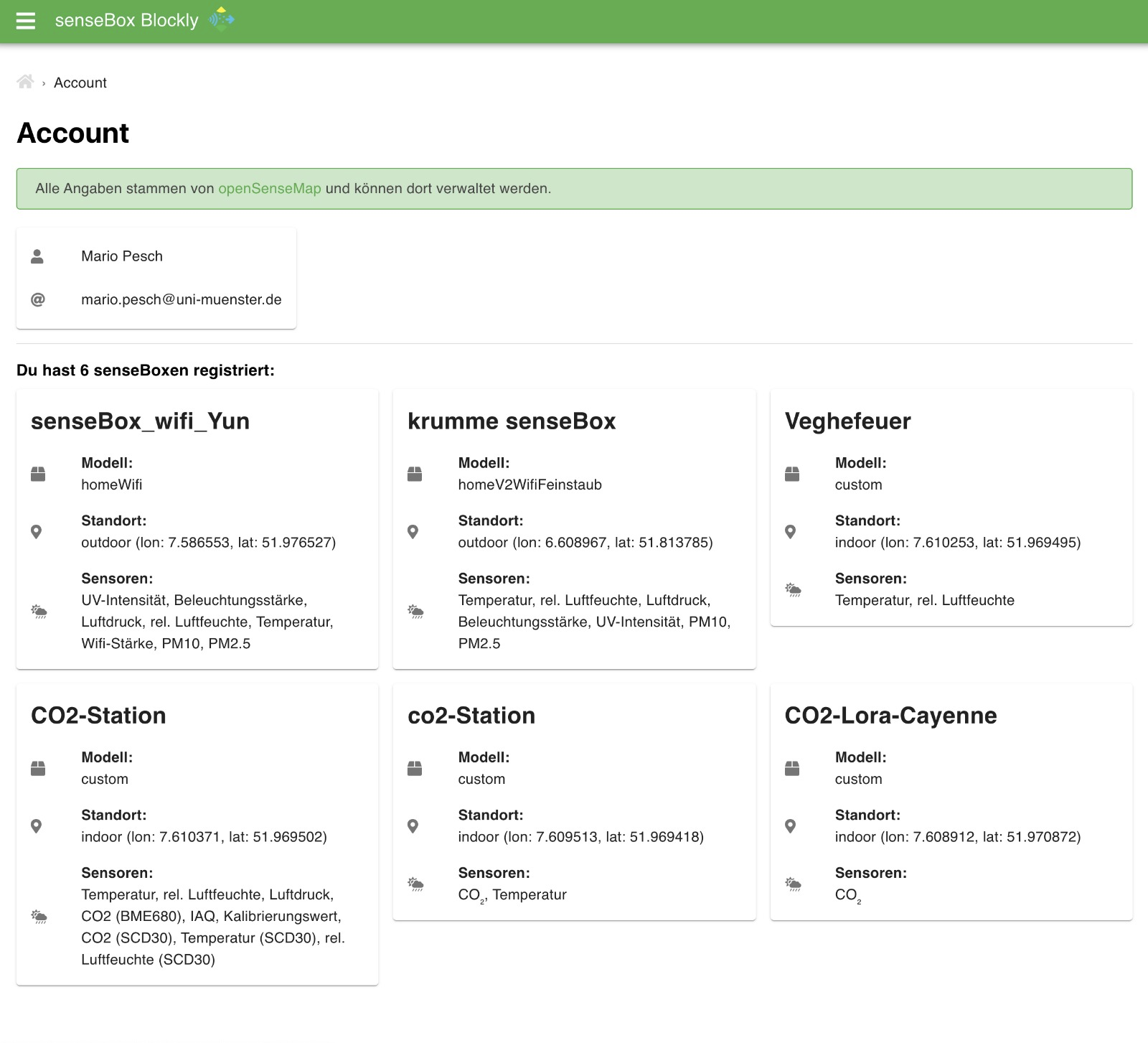
|
||||
|
||||
|
||||
Im Block zum senden an die openSenseMap müssen dann auch keine IDs mehr ausgewählt werden sondern die registrierten senseBox können einfach aus dem Dropdown Menü ausgewählt werden.
|
||||
|
||||
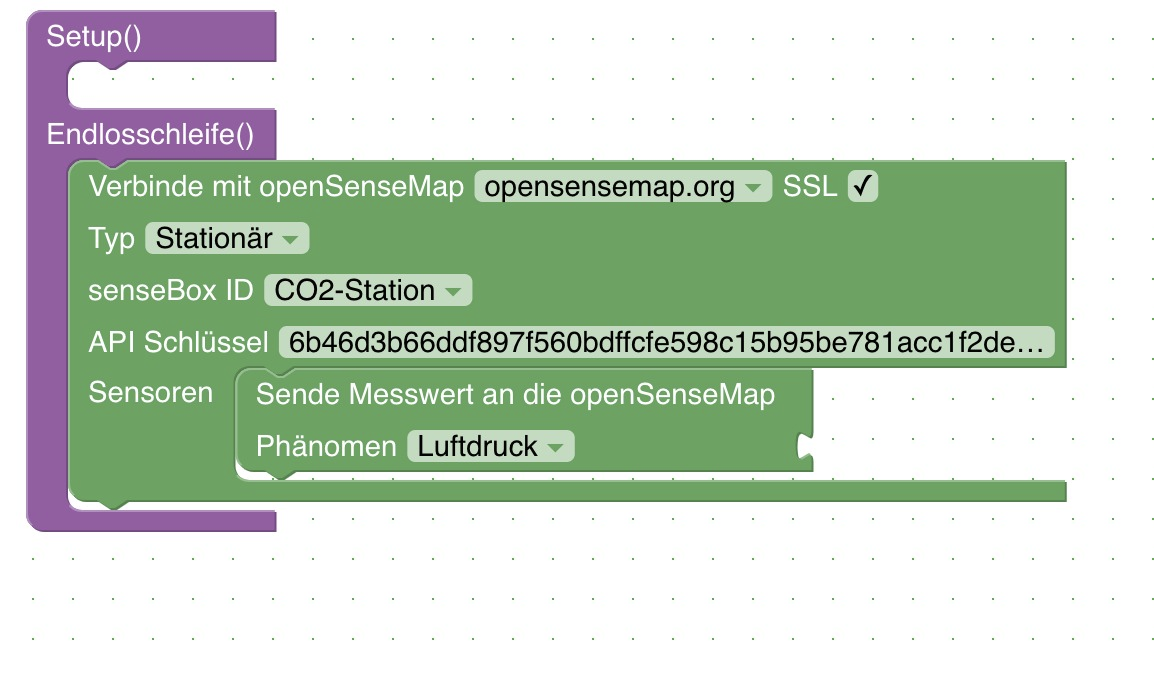
|
||||
|
||||
### Speichern von Projekten
|
||||
|
||||
Nach dem Login über den openSenseMap Account lassen sich Projekte online speichern und wieder abrufen
|
||||
|
||||
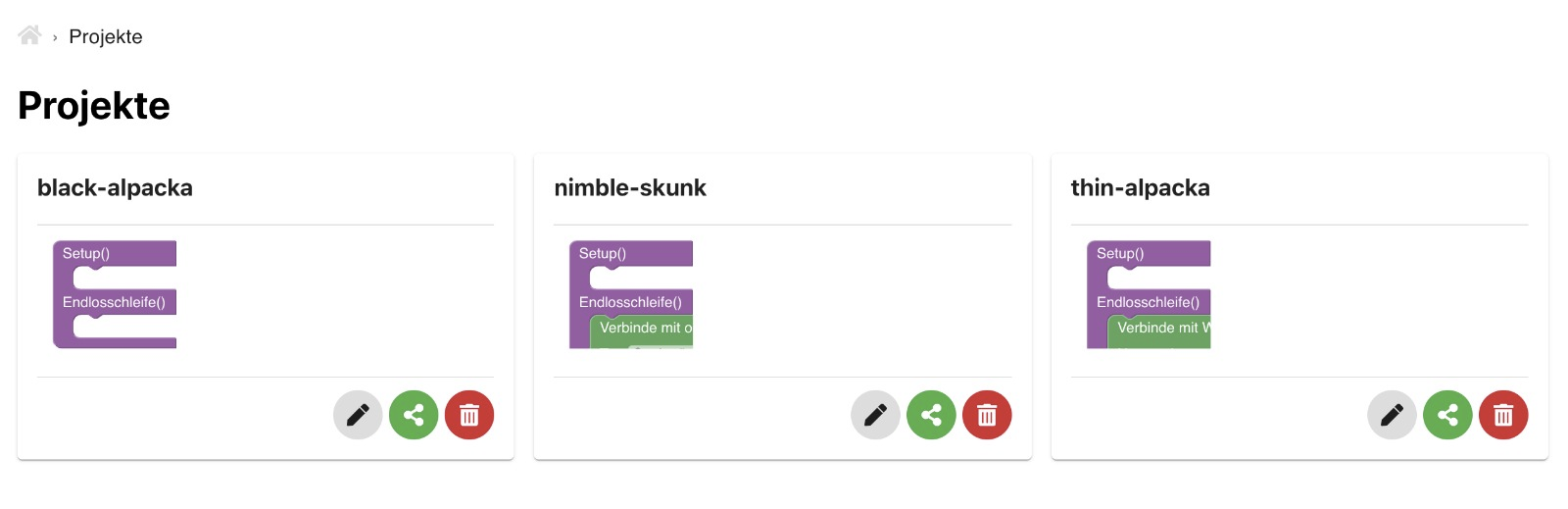
|
||||
|
||||
|
||||
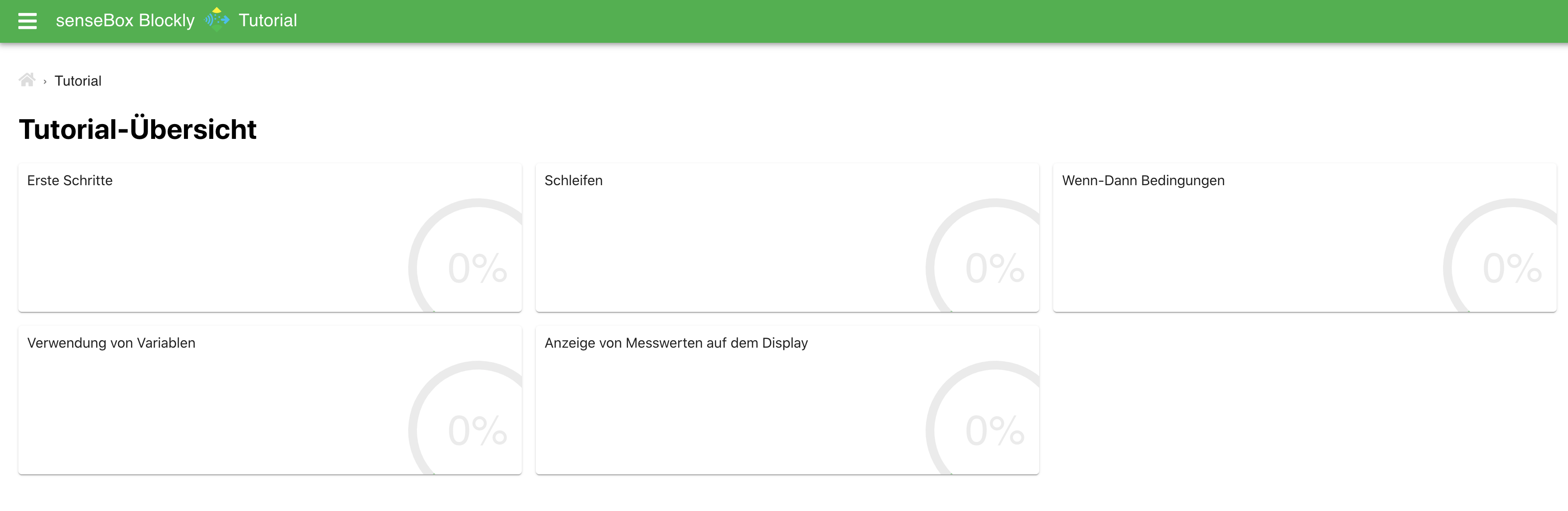
### Tutorials
|
||||
|
||||
Es gibt jetzt Tutorials! Eine reihe von verschiedenen Tutorials zeigt dir die ersten Schritte in der Programmierung mit Blockly. (Inhalte werden noch ausgebaut)
|
||||
|
||||
|
||||
|
||||
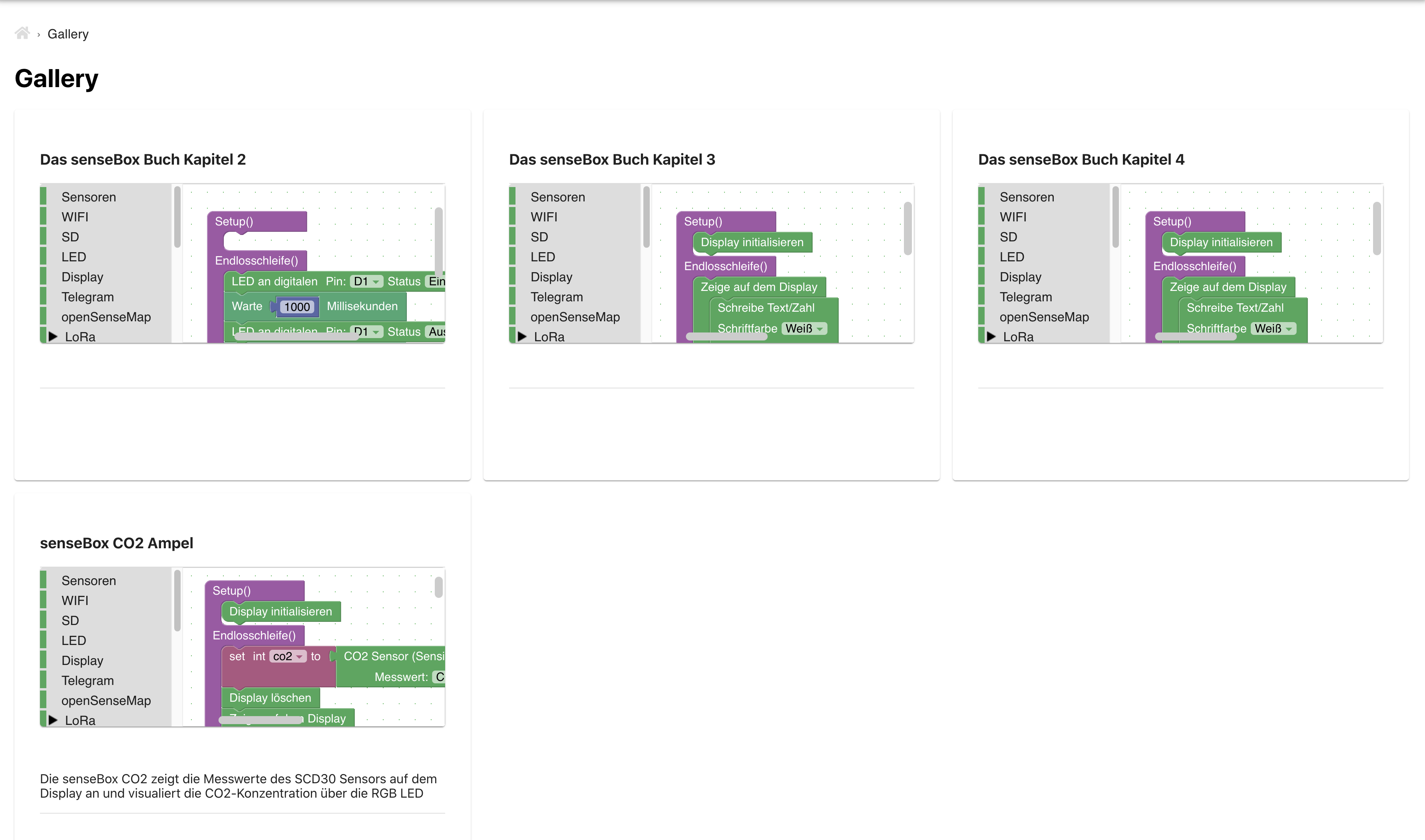
### Gallery
|
||||
|
||||
In der Gallery finden sich Beispiele mit verschiedenen Programmen. Die Beispiele können direkt in Blockly geöffnet werden, um Änderungen vorzunehmen oder das Programm direkt auf deine senseBox zu übertragen.
|
||||
|
||||
|
||||
|
||||
|
||||
### Teilen von Programmen
|
||||
|
||||
Über den Share Button kann ein Link zum Teilen der aktuellen Blöcke erstellt werden. Wann immer du dein Projekt mit anderen Teilen willst musst du nicht mehr eine XML Datei erstellen und verschicken sondern kannst einen Link erstellen, der direkt zu deinem Programm führt. Beachte, dass vor dem Teilen von Blöcken sämtliche sensiblen Daten, wie zum Beispiel Passwörter, Netzwerknamen, Lora oder openSenseMap Keys entfernt werden sollten. Die Links zum teilen von Programmen laufen nach 30 Tagen ab.
|
||||
|
||||

|
||||
|
||||
|
||||
## Fehler
|
||||
|
||||
Falls ihr Fehler findet legt bitte ein Issue in folgendem Repository an: https://github.com/sensebox/React-Ardublockly/issues
|
||||
|
||||
@@ -2,18 +2,18 @@
|
||||
|
||||
# React Ardublockly
|
||||
|
||||
This repository contains the source code and documentation of [sensebox-ardublockly](https://sensebox-ardublockly.netlify.app/).
|
||||
This repository contains the source code and documentation of [sensebox-ardublockly](https://sensebox-ardublockly.netlify.app/) :rocket:.
|
||||
|
||||
This project was created with [Create React App](https://github.com/facebook/create-react-app) and represents the continuation or improvement of [blockly.sensebox.de](https://blockly.sensebox.de/ardublockly/?lang=de&board=sensebox-mcu).
|
||||
|
||||
|
||||
## Getting Started
|
||||
|
||||
1. [Download](https://github.com/sensebox/React-Ardublockly/archive/master.zip) or clone the GitHub Repository ``git clone https://github.com/sensebox/React-Ardublockly`` and checkout to branch ``master``.
|
||||
1. [Download](https://github.com/sensebox/React-Ardublockly/archive/bachelor.zip) or clone the GitHub Repository ``git clone https://github.com/sensebox/React-Ardublockly`` and checkout to branch ``bachelor``.
|
||||
|
||||
2. install [Node.js v10.xx](https://nodejs.org/en/) on your local machine
|
||||
|
||||
3. open shell and navigate inside folder ``React-Ardublockly``
|
||||
3. open shell and navigate inside folder ``React-Ardublockly`` or rather ``Quellcode``
|
||||
* run ``npm install``
|
||||
* run ``npm start``
|
||||
4. open [localhost:3000](http://localhost:3000)
|
||||
@@ -22,4 +22,7 @@ This project was created with [Create React App](https://github.com/facebook/cre
|
||||
Ensure that line 14 in [store.js](https://github.com/sensebox/React-Ardublockly/blob/master/src/store.js#L14) is commented out or otherwise you have installed [Redux DevTools Extension](http://extension.remotedev.io/).
|
||||
|
||||
## Demo
|
||||
A demo of the current status of the master branch can be accessed via [https://blockly-react.netlify.app/](https://blockly-react.netlify.app/) :rocket:.
|
||||
A demo of the current status of the bachelor branch can be accessed via [sensebox-ardublockly.netlify.app](https://sensebox-ardublockly.netlify.app/) :rocket:.
|
||||
* [Home](https://sensebox-ardublockly.netlify.app/)
|
||||
* [Tutorial Overview](https://sensebox-ardublockly.netlify.app/tutorial)
|
||||
* [Tutorial-Builder](https://sensebox-ardublockly.netlify.app/tutorial/builder)
|
||||
|
||||
@@ -4,43 +4,29 @@
|
||||
"private": true,
|
||||
"dependencies": {
|
||||
"@blockly/block-plus-minus": "^2.0.10",
|
||||
"@blockly/field-grid-dropdown": "^1.0.25",
|
||||
"@blockly/field-slider": "^2.1.1",
|
||||
"@blockly/plugin-scroll-options": "^1.0.2",
|
||||
"@blockly/plugin-typed-variable-modal": "^3.1.26",
|
||||
"@blockly/zoom-to-fit": "^2.0.7",
|
||||
"@blockly/plugin-typed-variable-modal": "^3.1.1",
|
||||
"@fortawesome/fontawesome-svg-core": "^1.2.30",
|
||||
"@fortawesome/free-solid-svg-icons": "^5.14.0",
|
||||
"@fortawesome/react-fontawesome": "^0.1.11",
|
||||
"@material-ui/core": "^4.11.0",
|
||||
"@sentry/react": "^6.0.0",
|
||||
"@sentry/tracing": "^6.0.0",
|
||||
"@testing-library/jest-dom": "^5.16.1",
|
||||
"@testing-library/react": "^12.1.2",
|
||||
"@testing-library/jest-dom": "^4.2.4",
|
||||
"@testing-library/react": "^9.5.0",
|
||||
"@testing-library/user-event": "^7.2.1",
|
||||
"axios": "^0.22.0",
|
||||
"blockly": "^6.20210701.0",
|
||||
"blockly": "^3.20200924.0",
|
||||
"file-saver": "^2.0.2",
|
||||
"mnemonic-id": "^3.2.7",
|
||||
"moment": "^2.28.0",
|
||||
"prismjs": "^1.27.0",
|
||||
"react": "^17.0.2",
|
||||
"react-cookie-consent": "^7.0.0",
|
||||
"react-dom": "^17.0.2",
|
||||
"react-markdown": "^5.0.2",
|
||||
"react-mde": "^11.5.0",
|
||||
"react-redux": "^7.2.4",
|
||||
"prismjs": "^1.20.0",
|
||||
"react": "^16.13.1",
|
||||
"react-dom": "^16.13.1",
|
||||
"react-redux": "^7.2.0",
|
||||
"react-router-dom": "^5.2.0",
|
||||
"react-scripts": "^4.0.3",
|
||||
"reactour": "^1.18.0",
|
||||
"react-scripts": "3.4.1",
|
||||
"redux": "^4.0.5",
|
||||
"redux-thunk": "^2.3.0",
|
||||
"styled-components": "^4.4.1",
|
||||
"uuid": "^8.3.1"
|
||||
"redux-thunk": "^2.3.0"
|
||||
},
|
||||
"scripts": {
|
||||
"start": "react-scripts start",
|
||||
"dev": "set \"REACT_APP_BLOCKLY_API=http://localhost:8080\" && npm start",
|
||||
"build": "react-scripts build",
|
||||
"test": "react-scripts test",
|
||||
"eject": "react-scripts eject"
|
||||
|
||||
@@ -24,13 +24,6 @@
|
||||
</head>
|
||||
<body>
|
||||
<noscript>You need to enable JavaScript to run this app.</noscript>
|
||||
<!-- Matomo Image Tracker-->
|
||||
<img
|
||||
src="https://piwik.sensebox.kaufen/matomo.php?idsite=9&rec=1"
|
||||
style="border: 0; display: none"
|
||||
alt=""
|
||||
/>
|
||||
<!-- End Matomo -->
|
||||
<div id="root"></div>
|
||||
<!--
|
||||
This HTML file is a template.
|
||||
|
||||

|
Before Width: | Height: | Size: 194 KiB |

|
Before Width: | Height: | Size: 54 KiB After Width: | Height: | Size: 199 KiB |

|
Before Width: | Height: | Size: 90 KiB After Width: | Height: | Size: 381 KiB |

|
Before Width: | Height: | Size: 16 KiB After Width: | Height: | Size: 57 KiB |

|
Before Width: | Height: | Size: 106 KiB |

|
Before Width: | Height: | Size: 50 KiB After Width: | Height: | Size: 197 KiB |

|
Before Width: | Height: | Size: 46 KiB After Width: | Height: | Size: 185 KiB |

|
Before Width: | Height: | Size: 41 KiB After Width: | Height: | Size: 239 KiB |

|
Before Width: | Height: | Size: 45 KiB After Width: | Height: | Size: 319 KiB |

|
Before Width: | Height: | Size: 61 KiB After Width: | Height: | Size: 274 KiB |

|
Before Width: | Height: | Size: 22 KiB After Width: | Height: | Size: 85 KiB |

|
Before Width: | Height: | Size: 20 KiB After Width: | Height: | Size: 96 KiB |

|
Before Width: | Height: | Size: 84 KiB |

|
Before Width: | Height: | Size: 26 KiB After Width: | Height: | Size: 112 KiB |

|
Before Width: | Height: | Size: 47 KiB After Width: | Height: | Size: 196 KiB |

|
Before Width: | Height: | Size: 18 KiB After Width: | Height: | Size: 54 KiB |

|
Before Width: | Height: | Size: 26 KiB After Width: | Height: | Size: 69 KiB |

|
Before Width: | Height: | Size: 28 KiB After Width: | Height: | Size: 72 KiB |

|
Before Width: | Height: | Size: 41 KiB After Width: | Height: | Size: 197 KiB |

|
Before Width: | Height: | Size: 286 KiB |

|
Before Width: | Height: | Size: 52 KiB After Width: | Height: | Size: 218 KiB |

|
Before Width: | Height: | Size: 163 KiB After Width: | Height: | Size: 641 KiB |

|
Before Width: | Height: | Size: 54 KiB |

|
Before Width: | Height: | Size: 69 KiB |

|
Before Width: | Height: | Size: 46 KiB After Width: | Height: | Size: 171 KiB |

|
Before Width: | Height: | Size: 47 KiB After Width: | Height: | Size: 189 KiB |

|
Before Width: | Height: | Size: 59 KiB After Width: | Height: | Size: 253 KiB |

|
Before Width: | Height: | Size: 472 KiB |

|
Before Width: | Height: | Size: 117 KiB |

|
Before Width: | Height: | Size: 47 KiB |
@@ -5,47 +5,3 @@
|
||||
position: relative;
|
||||
padding-bottom: 60px; /* height of your footer + 30px*/
|
||||
}
|
||||
|
||||
|
||||
.tutorial img{
|
||||
display: flex;
|
||||
align-items: center;
|
||||
max-height: 40vH;
|
||||
max-width: 100%;
|
||||
margin: auto;
|
||||
}
|
||||
|
||||
.news img{
|
||||
display: flex;
|
||||
align-items: center;
|
||||
max-height: 40vH;
|
||||
max-width: 100%;
|
||||
margin: auto;
|
||||
}
|
||||
|
||||
.tutorial blockquote{
|
||||
background: #f9f9f9;
|
||||
border-left: 10px solid#4EAF47;
|
||||
margin: 1.5em 10px;
|
||||
padding: 0.5em 10px;
|
||||
quotes: "\201C""\201D""\2018""\2019";
|
||||
}
|
||||
blockquote:before {
|
||||
color:#4EAF47;
|
||||
content: open-quote;
|
||||
font-size: 4em;
|
||||
line-height: 0.1em;
|
||||
margin-right: 0.25em;
|
||||
vertical-align: -0.4em;
|
||||
}
|
||||
blockquote p {
|
||||
display: inline;
|
||||
}
|
||||
|
||||
.overlay {
|
||||
display: flex;
|
||||
flex-direction: column;
|
||||
align-items: center;
|
||||
}
|
||||
|
||||
|
||||
|
||||
@@ -1,17 +1,18 @@
|
||||
import React, { Component } from 'react';
|
||||
import React from 'react';
|
||||
|
||||
import { BrowserRouter as Router } from 'react-router-dom';
|
||||
import { createBrowserHistory } from "history";
|
||||
|
||||
import { Provider } from 'react-redux';
|
||||
import store from './store';
|
||||
import { loadUser } from './actions/authActions';
|
||||
|
||||
import './App.css';
|
||||
|
||||
import { ThemeProvider, createMuiTheme } from '@material-ui/core/styles';
|
||||
|
||||
import Content from './components/Content';
|
||||
import Navbar from './components/Navbar';
|
||||
import Footer from './components/Footer';
|
||||
import Routes from './components/Routes';
|
||||
|
||||
const theme = createMuiTheme({
|
||||
palette: {
|
||||
@@ -21,31 +22,27 @@ const theme = createMuiTheme({
|
||||
},
|
||||
secondary: {
|
||||
main: '#DDDDDD'
|
||||
},
|
||||
button: {
|
||||
compile: '#e27136'
|
||||
}
|
||||
}
|
||||
});
|
||||
|
||||
class App extends Component {
|
||||
const customHistory = createBrowserHistory();
|
||||
|
||||
componentDidMount() {
|
||||
store.dispatch(loadUser());
|
||||
}
|
||||
|
||||
render() {
|
||||
const customHistory = createBrowserHistory();
|
||||
return (
|
||||
<ThemeProvider theme={theme}>
|
||||
<Provider store={store}>
|
||||
<Router history={customHistory}>
|
||||
<Content />
|
||||
</Router>
|
||||
</Provider>
|
||||
</ThemeProvider>
|
||||
);
|
||||
}
|
||||
function App() {
|
||||
return (
|
||||
<ThemeProvider theme={theme}>
|
||||
<Provider store={store}>
|
||||
<Router history={customHistory}>
|
||||
<div className="wrapper">
|
||||
<Navbar />
|
||||
<Routes />
|
||||
<Footer />
|
||||
</div>
|
||||
</Router>
|
||||
</Provider>
|
||||
</ThemeProvider>
|
||||
);
|
||||
}
|
||||
|
||||
export default App;
|
||||
|
||||
@@ -1,264 +0,0 @@
|
||||
import {
|
||||
GET_STATUS,
|
||||
USER_LOADED,
|
||||
USER_LOADING,
|
||||
AUTH_ERROR,
|
||||
LOGIN_SUCCESS,
|
||||
LOGIN_FAIL,
|
||||
LOGOUT_SUCCESS,
|
||||
LOGOUT_FAIL,
|
||||
REFRESH_TOKEN_SUCCESS,
|
||||
} from "../actions/types";
|
||||
|
||||
import axios from "axios";
|
||||
import { returnErrors, returnSuccess } from "./messageActions";
|
||||
import { setLanguage } from "./generalActions";
|
||||
|
||||
// Check token & load user
|
||||
export const loadUser = () => (dispatch) => {
|
||||
// user loading
|
||||
dispatch({
|
||||
type: USER_LOADING,
|
||||
});
|
||||
const config = {
|
||||
success: (res) => {
|
||||
dispatch({
|
||||
type: GET_STATUS,
|
||||
payload: res.data.user.status,
|
||||
});
|
||||
dispatch(setLanguage(res.data.user.language));
|
||||
dispatch({
|
||||
type: USER_LOADED,
|
||||
payload: res.data.user,
|
||||
});
|
||||
},
|
||||
error: (err) => {
|
||||
if (err.response) {
|
||||
dispatch(returnErrors(err.response.data.message, err.response.status));
|
||||
}
|
||||
var status = [];
|
||||
if (window.localStorage.getItem("status")) {
|
||||
status = JSON.parse(window.localStorage.getItem("status"));
|
||||
}
|
||||
dispatch({
|
||||
type: GET_STATUS,
|
||||
payload: status,
|
||||
});
|
||||
dispatch({
|
||||
type: AUTH_ERROR,
|
||||
});
|
||||
},
|
||||
};
|
||||
axios
|
||||
.get(
|
||||
`${process.env.REACT_APP_BLOCKLY_API}/user`,
|
||||
config,
|
||||
dispatch(authInterceptor())
|
||||
)
|
||||
.then((res) => {
|
||||
res.config.success(res);
|
||||
})
|
||||
.catch((err) => {
|
||||
err.config.error(err);
|
||||
});
|
||||
};
|
||||
|
||||
var logoutTimerId;
|
||||
const timeToLogout = 14.9 * 60 * 1000; // nearly 15 minutes corresponding to the API
|
||||
|
||||
// Login user
|
||||
export const login =
|
||||
({ email, password }) =>
|
||||
(dispatch) => {
|
||||
dispatch({
|
||||
type: USER_LOADING,
|
||||
});
|
||||
// Headers
|
||||
const config = {
|
||||
headers: {
|
||||
"Content-Type": "application/json",
|
||||
},
|
||||
};
|
||||
// Request Body
|
||||
const body = JSON.stringify({ email, password });
|
||||
axios
|
||||
.post(`${process.env.REACT_APP_BLOCKLY_API}/user`, body, config)
|
||||
.then((res) => {
|
||||
// Logout automatically if refreshToken "expired"
|
||||
const logoutTimer = () =>
|
||||
setTimeout(() => dispatch(logout()), timeToLogout);
|
||||
logoutTimerId = logoutTimer();
|
||||
dispatch(setLanguage(res.data.user.language));
|
||||
dispatch({
|
||||
type: LOGIN_SUCCESS,
|
||||
payload: res.data,
|
||||
});
|
||||
dispatch({
|
||||
type: GET_STATUS,
|
||||
payload: res.data.user.status,
|
||||
});
|
||||
dispatch(returnSuccess(res.data.message, res.status, "LOGIN_SUCCESS"));
|
||||
})
|
||||
.catch((err) => {
|
||||
dispatch(
|
||||
returnErrors(
|
||||
err.response.data.message,
|
||||
err.response.status,
|
||||
"LOGIN_FAIL"
|
||||
)
|
||||
);
|
||||
dispatch({
|
||||
type: LOGIN_FAIL,
|
||||
});
|
||||
var status = [];
|
||||
if (window.localStorage.getItem("status")) {
|
||||
status = JSON.parse(window.localStorage.getItem("status"));
|
||||
}
|
||||
dispatch({
|
||||
type: GET_STATUS,
|
||||
payload: status,
|
||||
});
|
||||
});
|
||||
};
|
||||
|
||||
// Logout User
|
||||
export const logout = () => (dispatch) => {
|
||||
const config = {
|
||||
success: (res) => {
|
||||
dispatch({
|
||||
type: LOGOUT_SUCCESS,
|
||||
});
|
||||
var status = [];
|
||||
if (window.localStorage.getItem("status")) {
|
||||
status = JSON.parse(window.localStorage.getItem("status"));
|
||||
}
|
||||
dispatch({
|
||||
type: GET_STATUS,
|
||||
payload: status,
|
||||
});
|
||||
var locale = "en_US";
|
||||
if (window.localStorage.getItem("locale")) {
|
||||
locale = window.localStorage.getItem("locale");
|
||||
} else if (navigator.language === "de-DE") {
|
||||
locale = "de_DE";
|
||||
}
|
||||
dispatch(setLanguage(locale));
|
||||
dispatch(returnSuccess(res.data.message, res.status, "LOGOUT_SUCCESS"));
|
||||
clearTimeout(logoutTimerId);
|
||||
},
|
||||
error: (err) => {
|
||||
dispatch(
|
||||
returnErrors(
|
||||
err.response.data.message,
|
||||
err.response.status,
|
||||
"LOGOUT_FAIL"
|
||||
)
|
||||
);
|
||||
dispatch({
|
||||
type: LOGOUT_FAIL,
|
||||
});
|
||||
var status = [];
|
||||
if (window.localStorage.getItem("status")) {
|
||||
status = JSON.parse(window.localStorage.getItem("status"));
|
||||
}
|
||||
dispatch({
|
||||
type: GET_STATUS,
|
||||
payload: status,
|
||||
});
|
||||
clearTimeout(logoutTimerId);
|
||||
},
|
||||
};
|
||||
axios
|
||||
.post("https://api.opensensemap.org/users/sign-out", {}, config)
|
||||
.then((res) => {
|
||||
res.config.success(res);
|
||||
})
|
||||
.catch((err) => {
|
||||
if (err.response && err.response.status !== 401) {
|
||||
err.config.error(err);
|
||||
}
|
||||
});
|
||||
};
|
||||
|
||||
export const authInterceptor = () => (dispatch, getState) => {
|
||||
// Add a request interceptor
|
||||
axios.interceptors.request.use(
|
||||
(config) => {
|
||||
config.headers["Content-Type"] = "application/json";
|
||||
const token = getState().auth.token;
|
||||
if (token) {
|
||||
config.headers["Authorization"] = `Bearer ${token}`;
|
||||
}
|
||||
return config;
|
||||
},
|
||||
(error) => {
|
||||
Promise.reject(error);
|
||||
}
|
||||
);
|
||||
|
||||
// Add a response interceptor
|
||||
axios.interceptors.response.use(
|
||||
(response) => {
|
||||
// request was successfull
|
||||
return response;
|
||||
},
|
||||
(error) => {
|
||||
const originalRequest = error.config;
|
||||
const refreshToken = getState().auth.refreshToken;
|
||||
if (refreshToken) {
|
||||
// try to refresh the token failed
|
||||
if (error.response.status === 401 && originalRequest._retry) {
|
||||
// router.push('/login');
|
||||
return Promise.reject(error);
|
||||
}
|
||||
// token was not valid and 1st try to refresh the token
|
||||
if (error.response.status === 401 && !originalRequest._retry) {
|
||||
originalRequest._retry = true;
|
||||
const refreshToken = getState().auth.refreshToken;
|
||||
// request to refresh the token, in request-body is the refreshToken
|
||||
axios
|
||||
.post("https://api.opensensemap.org/users/refresh-auth", {
|
||||
token: refreshToken,
|
||||
})
|
||||
.then((res) => {
|
||||
if (res.status === 200) {
|
||||
clearTimeout(logoutTimerId);
|
||||
const logoutTimer = () =>
|
||||
setTimeout(() => dispatch(logout()), timeToLogout);
|
||||
logoutTimerId = logoutTimer();
|
||||
dispatch({
|
||||
type: REFRESH_TOKEN_SUCCESS,
|
||||
payload: res.data,
|
||||
});
|
||||
axios.defaults.headers.common["Authorization"] =
|
||||
"Bearer " + getState().auth.token;
|
||||
// request was successfull, new request with the old parameters and the refreshed token
|
||||
return axios(originalRequest)
|
||||
.then((res) => {
|
||||
originalRequest.success(res);
|
||||
})
|
||||
.catch((err) => {
|
||||
originalRequest.error(err);
|
||||
});
|
||||
}
|
||||
return Promise.reject(error);
|
||||
})
|
||||
.catch((err) => {
|
||||
// request failed, token could not be refreshed
|
||||
if (err.response) {
|
||||
dispatch(
|
||||
returnErrors(err.response.data.message, err.response.status)
|
||||
);
|
||||
}
|
||||
dispatch({
|
||||
type: AUTH_ERROR,
|
||||
});
|
||||
return Promise.reject(error);
|
||||
});
|
||||
}
|
||||
}
|
||||
// request status was unequal to 401, no possibility to refresh the token
|
||||
return Promise.reject(error);
|
||||
}
|
||||
);
|
||||
};
|
||||
@@ -1,52 +1,8 @@
|
||||
import {
|
||||
VISIT,
|
||||
LANGUAGE,
|
||||
RENDERER,
|
||||
SOUNDS,
|
||||
STATISTICS,
|
||||
PLATFORM,
|
||||
} from "./types";
|
||||
import { VISIT } from './types';
|
||||
|
||||
|
||||
export const visitPage = () => (dispatch) => {
|
||||
dispatch({
|
||||
type: VISIT,
|
||||
});
|
||||
};
|
||||
|
||||
export const setPlatform = (platform) => (dispatch) => {
|
||||
dispatch({
|
||||
type: PLATFORM,
|
||||
payload: platform,
|
||||
});
|
||||
};
|
||||
|
||||
export const setLanguage = (language) => (dispatch, getState) => {
|
||||
if (!getState().auth.progress && !getState().auth.isAuthenticated) {
|
||||
window.localStorage.setItem("locale", language);
|
||||
}
|
||||
dispatch({
|
||||
type: LANGUAGE,
|
||||
payload: language,
|
||||
});
|
||||
};
|
||||
|
||||
export const setRenderer = (renderer) => (dispatch) => {
|
||||
dispatch({
|
||||
type: RENDERER,
|
||||
payload: renderer,
|
||||
});
|
||||
};
|
||||
|
||||
export const setSounds = (sounds) => (dispatch) => {
|
||||
dispatch({
|
||||
type: SOUNDS,
|
||||
payload: sounds,
|
||||
});
|
||||
};
|
||||
|
||||
export const setStatistics = (showStatistics) => (dispatch) => {
|
||||
dispatch({
|
||||
type: STATISTICS,
|
||||
payload: showStatistics,
|
||||
type: VISIT
|
||||
});
|
||||
};
|
||||
|
||||
@@ -1,32 +0,0 @@
|
||||
import { GET_ERRORS, CLEAR_MESSAGES, GET_SUCCESS } from './types';
|
||||
|
||||
// RETURN Errors
|
||||
export const returnErrors = (msg, status, id = null) => {
|
||||
return {
|
||||
type: GET_ERRORS,
|
||||
payload: {
|
||||
msg: msg,
|
||||
status: status,
|
||||
id: id
|
||||
}
|
||||
};
|
||||
};
|
||||
|
||||
// RETURN Success
|
||||
export const returnSuccess = (msg, status, id = null) => {
|
||||
return {
|
||||
type: GET_SUCCESS,
|
||||
payload: {
|
||||
msg: msg,
|
||||
status: status,
|
||||
id: id
|
||||
}
|
||||
};
|
||||
};
|
||||
|
||||
// CLEAR_MESSAGES
|
||||
export const clearMessages = () => {
|
||||
return {
|
||||
type: CLEAR_MESSAGES
|
||||
};
|
||||
};
|
||||
@@ -1,204 +0,0 @@
|
||||
import { PROJECT_PROGRESS, GET_PROJECT, GET_PROJECTS, PROJECT_TYPE, PROJECT_DESCRIPTION } from './types';
|
||||
|
||||
import axios from 'axios';
|
||||
import { returnErrors, returnSuccess } from './messageActions';
|
||||
|
||||
export const setType = (type) => (dispatch) => {
|
||||
dispatch({
|
||||
type: PROJECT_TYPE,
|
||||
payload: type
|
||||
});
|
||||
};
|
||||
|
||||
export const setDescription = (description) => (dispatch) => {
|
||||
dispatch({
|
||||
type: PROJECT_DESCRIPTION,
|
||||
payload: description
|
||||
});
|
||||
};
|
||||
|
||||
export const getProject = (type, id) => (dispatch) => {
|
||||
dispatch({ type: PROJECT_PROGRESS });
|
||||
dispatch(setType(type));
|
||||
const config = {
|
||||
success: res => {
|
||||
var data = type === 'share' ? 'content' : type;
|
||||
var project = res.data[data];
|
||||
if (project) {
|
||||
dispatch({
|
||||
type: GET_PROJECT,
|
||||
payload: project
|
||||
});
|
||||
dispatch({
|
||||
type: PROJECT_DESCRIPTION,
|
||||
payload: project.description
|
||||
});
|
||||
dispatch({ type: PROJECT_PROGRESS });
|
||||
dispatch(returnSuccess(res.data.message, res.status, 'GET_PROJECT_SUCCESS'));
|
||||
}
|
||||
else {
|
||||
dispatch({ type: PROJECT_PROGRESS });
|
||||
dispatch(returnErrors(res.data.message, res.status, 'PROJECT_EMPTY'));
|
||||
}
|
||||
},
|
||||
error: err => {
|
||||
if (err.response) {
|
||||
dispatch(returnErrors(err.response.data.message, err.response.status, 'GET_PROJECT_FAIL'));
|
||||
}
|
||||
dispatch({ type: PROJECT_PROGRESS });
|
||||
}
|
||||
};
|
||||
axios.get(`${process.env.REACT_APP_BLOCKLY_API}/${type}/${id}`, config)
|
||||
.then(res => {
|
||||
res.config.success(res);
|
||||
})
|
||||
.catch(err => {
|
||||
err.config.error(err);
|
||||
});
|
||||
};
|
||||
|
||||
export const getProjects = (type) => (dispatch) => {
|
||||
dispatch({ type: PROJECT_PROGRESS });
|
||||
const config = {
|
||||
success: res => {
|
||||
var data = type === 'project' ? 'projects' : 'galleries';
|
||||
var projects = res.data[data];
|
||||
dispatch({
|
||||
type: GET_PROJECTS,
|
||||
payload: projects
|
||||
});
|
||||
dispatch({ type: PROJECT_PROGRESS });
|
||||
dispatch(returnSuccess(res.data.message, res.status));
|
||||
},
|
||||
error: err => {
|
||||
if (err.response) {
|
||||
dispatch(returnErrors(err.response.data.message, err.response.status, 'GET_PROJECTS_FAIL'));
|
||||
}
|
||||
dispatch({ type: PROJECT_PROGRESS });
|
||||
}
|
||||
};
|
||||
axios.get(`${process.env.REACT_APP_BLOCKLY_API}/${type}`, config)
|
||||
.then(res => {
|
||||
res.config.success(res);
|
||||
})
|
||||
.catch(err => {
|
||||
err.config.error(err);
|
||||
});
|
||||
};
|
||||
|
||||
export const updateProject = (type, id) => (dispatch, getState) => {
|
||||
var workspace = getState().workspace;
|
||||
var body = {
|
||||
xml: workspace.code.xml,
|
||||
title: workspace.name
|
||||
};
|
||||
var project = getState().project;
|
||||
if (type === 'gallery') {
|
||||
body.description = project.description;
|
||||
}
|
||||
const config = {
|
||||
success: res => {
|
||||
var project = res.data[type];
|
||||
var projects = getState().project.projects;
|
||||
var index = projects.findIndex(res => res._id === project._id);
|
||||
projects[index] = project;
|
||||
dispatch({
|
||||
type: GET_PROJECTS,
|
||||
payload: projects
|
||||
});
|
||||
if (type === 'project') {
|
||||
dispatch(returnSuccess(res.data.message, res.status, 'PROJECT_UPDATE_SUCCESS'));
|
||||
} else {
|
||||
dispatch(returnSuccess(res.data.message, res.status, 'GALLERY_UPDATE_SUCCESS'));
|
||||
}
|
||||
},
|
||||
error: err => {
|
||||
if (err.response) {
|
||||
if (type === 'project') {
|
||||
dispatch(returnErrors(err.response.data.message, err.response.status, 'PROJECT_UPDATE_FAIL'));
|
||||
} else {
|
||||
dispatch(returnErrors(err.response.data.message, err.response.status, 'GALLERY_UPDATE_FAIL'));
|
||||
}
|
||||
}
|
||||
}
|
||||
};
|
||||
axios.put(`${process.env.REACT_APP_BLOCKLY_API}/${type}/${id}`, body, config)
|
||||
.then(res => {
|
||||
res.config.success(res);
|
||||
})
|
||||
.catch(err => {
|
||||
err.config.error(err);
|
||||
});
|
||||
};
|
||||
|
||||
export const deleteProject = (type, id) => (dispatch, getState) => {
|
||||
const config = {
|
||||
success: res => {
|
||||
var projects = getState().project.projects;
|
||||
var index = projects.findIndex(res => res._id === id);
|
||||
projects.splice(index, 1)
|
||||
dispatch({
|
||||
type: GET_PROJECTS,
|
||||
payload: projects
|
||||
});
|
||||
if (type === 'project') {
|
||||
dispatch(returnSuccess(res.data.message, res.status, 'PROJECT_DELETE_SUCCESS'));
|
||||
} else {
|
||||
dispatch(returnSuccess(res.data.message, res.status, 'GALLERY_DELETE_SUCCESS'));
|
||||
}
|
||||
},
|
||||
error: err => {
|
||||
dispatch(returnErrors(err.response.data.message, err.response.status, 'PROJECT_DELETE_FAIL'));
|
||||
}
|
||||
};
|
||||
axios.delete(`${process.env.REACT_APP_BLOCKLY_API}/${type}/${id}`, config)
|
||||
.then(res => {
|
||||
res.config.success(res);
|
||||
})
|
||||
.catch(err => {
|
||||
if (err.response && err.response.status !== 401) {
|
||||
err.config.error(err);
|
||||
}
|
||||
});
|
||||
};
|
||||
|
||||
|
||||
export const shareProject = (title, type, id) => (dispatch, getState) => {
|
||||
var body = {
|
||||
title: title
|
||||
};
|
||||
if (type === 'project') {
|
||||
body.projectId = id;
|
||||
} else {
|
||||
body.xml = getState().workspace.code.xml;
|
||||
}
|
||||
axios.post(`${process.env.REACT_APP_BLOCKLY_API}/share`, body)
|
||||
.then(res => {
|
||||
var shareContent = res.data.content;
|
||||
if (body.projectId) {
|
||||
var projects = getState().project.projects;
|
||||
var index = projects.findIndex(res => res._id === id);
|
||||
projects[index].shared = shareContent.expiresAt;
|
||||
dispatch({
|
||||
type: GET_PROJECTS,
|
||||
payload: projects
|
||||
});
|
||||
}
|
||||
dispatch(returnSuccess(res.data.message, shareContent._id, 'SHARE_SUCCESS'));
|
||||
})
|
||||
.catch(err => {
|
||||
if (err.response) {
|
||||
dispatch(returnErrors(err.response.data.message, err.response.status, 'SHARE_FAIL'));
|
||||
}
|
||||
});
|
||||
};
|
||||
|
||||
|
||||
export const resetProject = () => (dispatch) => {
|
||||
dispatch({
|
||||
type: GET_PROJECTS,
|
||||
payload: []
|
||||
});
|
||||
dispatch(setType(''));
|
||||
dispatch(setDescription(''));
|
||||
};
|
||||
@@ -1,274 +1,61 @@
|
||||
import {
|
||||
TUTORIAL_PROGRESS,
|
||||
GET_TUTORIAL,
|
||||
GET_TUTORIALS,
|
||||
TUTORIAL_SUCCESS,
|
||||
TUTORIAL_ERROR,
|
||||
TUTORIAL_CHANGE,
|
||||
TUTORIAL_XML,
|
||||
TUTORIAL_STEP,
|
||||
} from "./types";
|
||||
import { TUTORIAL_SUCCESS, TUTORIAL_ERROR, TUTORIAL_CHANGE, TUTORIAL_XML, TUTORIAL_ID, TUTORIAL_STEP } from './types';
|
||||
|
||||
import axios from "axios";
|
||||
import { returnErrors, returnSuccess } from "./messageActions";
|
||||
|
||||
export const tutorialProgress = () => (dispatch) => {
|
||||
dispatch({ type: TUTORIAL_PROGRESS });
|
||||
};
|
||||
|
||||
export const getTutorial = (id) => (dispatch, getState) => {
|
||||
axios
|
||||
.get(`${process.env.REACT_APP_BLOCKLY_API}/tutorial/${id}`)
|
||||
.then((res) => {
|
||||
var tutorial = res.data.tutorial;
|
||||
existingTutorial(tutorial, getState().tutorial.status).then((status) => {
|
||||
dispatch({
|
||||
type: TUTORIAL_SUCCESS,
|
||||
payload: status,
|
||||
});
|
||||
dispatch(updateStatus(status));
|
||||
dispatch({
|
||||
type: GET_TUTORIAL,
|
||||
payload: tutorial,
|
||||
});
|
||||
dispatch({ type: TUTORIAL_PROGRESS });
|
||||
dispatch(returnSuccess(res.data.message, res.status));
|
||||
});
|
||||
})
|
||||
.catch((err) => {
|
||||
if (err.response) {
|
||||
dispatch(
|
||||
returnErrors(
|
||||
err.response.data.message,
|
||||
err.response.status,
|
||||
"GET_TUTORIAL_FAIL"
|
||||
)
|
||||
);
|
||||
}
|
||||
dispatch({ type: TUTORIAL_PROGRESS });
|
||||
});
|
||||
};
|
||||
|
||||
export const getTutorials = () => (dispatch, getState) => {
|
||||
axios
|
||||
.get(`${process.env.REACT_APP_BLOCKLY_API}/tutorial`)
|
||||
.then((res) => {
|
||||
var tutorials = res.data.tutorials;
|
||||
existingTutorials(tutorials, getState().tutorial.status).then(
|
||||
(status) => {
|
||||
dispatch({
|
||||
type: TUTORIAL_SUCCESS,
|
||||
payload: status,
|
||||
});
|
||||
dispatch(updateStatus(status));
|
||||
dispatch({
|
||||
type: GET_TUTORIALS,
|
||||
payload: tutorials,
|
||||
});
|
||||
dispatch({ type: TUTORIAL_PROGRESS });
|
||||
dispatch(returnSuccess(res.data.message, res.status));
|
||||
}
|
||||
);
|
||||
})
|
||||
.catch((err) => {
|
||||
if (err.response) {
|
||||
dispatch(
|
||||
returnErrors(
|
||||
err.response.data.message,
|
||||
err.response.status,
|
||||
"GET_TUTORIALS_FAIL"
|
||||
)
|
||||
);
|
||||
}
|
||||
dispatch({ type: TUTORIAL_PROGRESS });
|
||||
});
|
||||
};
|
||||
|
||||
export const updateStatus = (status) => (dispatch, getState) => {
|
||||
if (getState().auth.isAuthenticated) {
|
||||
// update user account in database - sync with redux store
|
||||
axios
|
||||
.put(`${process.env.REACT_APP_BLOCKLY_API}/user/status`, {
|
||||
status: status,
|
||||
})
|
||||
.then((res) => {})
|
||||
.catch((err) => {
|
||||
if (err.response) {
|
||||
// dispatch(returnErrors(err.response.data.message, err.response.status, 'UPDATE_STATUS_FAIL'));
|
||||
}
|
||||
});
|
||||
} else {
|
||||
// update locale storage - sync with redux store
|
||||
window.localStorage.setItem("status", JSON.stringify(status));
|
||||
}
|
||||
};
|
||||
|
||||
export const deleteTutorial = (id) => (dispatch, getState) => {
|
||||
var tutorial = getState().tutorial;
|
||||
var id = getState().builder.id;
|
||||
const config = {
|
||||
success: (res) => {
|
||||
var tutorials = tutorial.tutorials;
|
||||
var index = tutorials.findIndex((res) => res._id === id);
|
||||
tutorials.splice(index, 1);
|
||||
dispatch({
|
||||
type: GET_TUTORIALS,
|
||||
payload: tutorials,
|
||||
});
|
||||
dispatch(
|
||||
returnSuccess(res.data.message, res.status, "TUTORIAL_DELETE_SUCCESS")
|
||||
);
|
||||
},
|
||||
error: (err) => {
|
||||
dispatch(
|
||||
returnErrors(
|
||||
err.response.data.message,
|
||||
err.response.status,
|
||||
"TUTORIAL_DELETE_FAIL"
|
||||
)
|
||||
);
|
||||
},
|
||||
};
|
||||
axios
|
||||
.delete(`${process.env.REACT_APP_BLOCKLY_API}/tutorial/${id}`, config)
|
||||
.then((res) => {
|
||||
res.config.success(res);
|
||||
})
|
||||
.catch((err) => {
|
||||
if (err.response && err.response.status !== 401) {
|
||||
err.config.error(err);
|
||||
}
|
||||
});
|
||||
};
|
||||
|
||||
export const resetTutorial = () => (dispatch) => {
|
||||
dispatch({
|
||||
type: GET_TUTORIALS,
|
||||
payload: [],
|
||||
});
|
||||
dispatch({
|
||||
type: TUTORIAL_STEP,
|
||||
payload: 0,
|
||||
});
|
||||
};
|
||||
import tutorials from '../data/tutorials';
|
||||
|
||||
export const tutorialChange = () => (dispatch) => {
|
||||
dispatch({
|
||||
type: TUTORIAL_CHANGE,
|
||||
type: TUTORIAL_CHANGE
|
||||
});
|
||||
};
|
||||
|
||||
export const tutorialCheck = (status, step) => (dispatch, getState) => {
|
||||
var tutorialsStatus = getState().tutorial.status;
|
||||
var id = getState().tutorial.tutorials[0]._id;
|
||||
var tutorialsStatusIndex = tutorialsStatus.findIndex(
|
||||
(tutorialStatus) => tutorialStatus._id === id
|
||||
);
|
||||
var tasksIndex = tutorialsStatus[tutorialsStatusIndex].tasks.findIndex(
|
||||
(task) => task._id === step._id
|
||||
);
|
||||
var id = getState().tutorial.currentId;
|
||||
var tutorialsStatusIndex = tutorialsStatus.findIndex(tutorialStatus => tutorialStatus.id === id);
|
||||
var tasksIndex = tutorialsStatus[tutorialsStatusIndex].tasks.findIndex(task => task.id === step.id);
|
||||
tutorialsStatus[tutorialsStatusIndex].tasks[tasksIndex] = {
|
||||
...tutorialsStatus[tutorialsStatusIndex].tasks[tasksIndex],
|
||||
type: status,
|
||||
type: status
|
||||
};
|
||||
dispatch({
|
||||
type: status === "success" ? TUTORIAL_SUCCESS : TUTORIAL_ERROR,
|
||||
payload: tutorialsStatus,
|
||||
type: status === 'success' ? TUTORIAL_SUCCESS : TUTORIAL_ERROR,
|
||||
payload: tutorialsStatus
|
||||
});
|
||||
dispatch(updateStatus(tutorialsStatus));
|
||||
dispatch(tutorialChange());
|
||||
dispatch(returnSuccess("", "", "TUTORIAL_CHECK_SUCCESS"));
|
||||
};
|
||||
|
||||
export const storeTutorialXml = (code) => (dispatch, getState) => {
|
||||
var tutorial = getState().tutorial.tutorials[0];
|
||||
if (tutorial) {
|
||||
var id = tutorial._id;
|
||||
var id = getState().tutorial.currentId;
|
||||
if (id !== null) {
|
||||
var activeStep = getState().tutorial.activeStep;
|
||||
var steps = tutorial.steps;
|
||||
if (steps && steps[activeStep].type === "task") {
|
||||
var steps = tutorials.filter(tutorial => tutorial.id === id)[0].steps;
|
||||
if (steps[activeStep].type === 'task') {
|
||||
var tutorialsStatus = getState().tutorial.status;
|
||||
var tutorialsStatusIndex = tutorialsStatus.findIndex(
|
||||
(tutorialStatus) => tutorialStatus._id === id
|
||||
);
|
||||
var tasksIndex = tutorialsStatus[tutorialsStatusIndex].tasks.findIndex(
|
||||
(task) => task._id === steps[activeStep]._id
|
||||
);
|
||||
var tutorialsStatusIndex = tutorialsStatus.findIndex(tutorialStatus => tutorialStatus.id === id);
|
||||
var tasksIndex = tutorialsStatus[tutorialsStatusIndex].tasks.findIndex(task => task.id === steps[activeStep].id);
|
||||
tutorialsStatus[tutorialsStatusIndex].tasks[tasksIndex] = {
|
||||
...tutorialsStatus[tutorialsStatusIndex].tasks[tasksIndex],
|
||||
xml: code,
|
||||
xml: code
|
||||
};
|
||||
dispatch({
|
||||
type: TUTORIAL_XML,
|
||||
payload: tutorialsStatus,
|
||||
payload: tutorialsStatus
|
||||
});
|
||||
dispatch(updateStatus(tutorialsStatus));
|
||||
}
|
||||
}
|
||||
};
|
||||
|
||||
|
||||
export const tutorialId = (id) => (dispatch) => {
|
||||
dispatch({
|
||||
type: TUTORIAL_ID,
|
||||
payload: id
|
||||
});
|
||||
};
|
||||
|
||||
export const tutorialStep = (step) => (dispatch) => {
|
||||
dispatch({
|
||||
type: TUTORIAL_STEP,
|
||||
payload: step,
|
||||
payload: step
|
||||
});
|
||||
};
|
||||
|
||||
const existingTutorials = (tutorials, status) =>
|
||||
new Promise(function (resolve, reject) {
|
||||
var newstatus;
|
||||
new Promise(function (resolve, reject) {
|
||||
var existingTutorialIds = tutorials.map((tutorial, i) => {
|
||||
existingTutorial(tutorial, status).then((status) => {
|
||||
newstatus = status;
|
||||
});
|
||||
return tutorial._id;
|
||||
});
|
||||
resolve(existingTutorialIds);
|
||||
}).then((existingTutorialIds) => {
|
||||
// deleting old tutorials which do not longer exist
|
||||
if (existingTutorialIds.length > 0) {
|
||||
status = newstatus.filter(
|
||||
(status) => existingTutorialIds.indexOf(status._id) > -1
|
||||
);
|
||||
}
|
||||
resolve(status);
|
||||
});
|
||||
});
|
||||
|
||||
const existingTutorial = (tutorial, status) =>
|
||||
new Promise(function (resolve, reject) {
|
||||
var tutorialsId = tutorial._id;
|
||||
var statusIndex = status.findIndex((status) => status._id === tutorialsId);
|
||||
if (statusIndex > -1) {
|
||||
var tasks = tutorial.steps.filter((step) => step.type === "task");
|
||||
var existingTaskIds = tasks.map((task, j) => {
|
||||
var tasksId = task._id;
|
||||
if (
|
||||
status[statusIndex].tasks.findIndex(
|
||||
(task) => task._id === tasksId
|
||||
) === -1
|
||||
) {
|
||||
// task does not exist
|
||||
status[statusIndex].tasks.push({ _id: tasksId });
|
||||
}
|
||||
return tasksId;
|
||||
});
|
||||
// deleting old tasks which do not longer exist
|
||||
if (existingTaskIds.length > 0) {
|
||||
status[statusIndex].tasks = status[statusIndex].tasks.filter(
|
||||
(task) => existingTaskIds.indexOf(task._id) > -1
|
||||
);
|
||||
}
|
||||
} else {
|
||||
status.push({
|
||||
_id: tutorialsId,
|
||||
tasks: tutorial.steps
|
||||
.filter((step) => step.type === "task")
|
||||
.map((task) => {
|
||||
return { _id: task._id };
|
||||
}),
|
||||
});
|
||||
}
|
||||
resolve(status);
|
||||
});
|
||||
|
||||
@@ -1,36 +1,24 @@
|
||||
import {
|
||||
PROGRESS,
|
||||
JSON_STRING,
|
||||
BUILDER_CHANGE,
|
||||
BUILDER_ERROR,
|
||||
BUILDER_TITLE,
|
||||
BUILDER_ID,
|
||||
BUILDER_ADD_STEP,
|
||||
BUILDER_DELETE_STEP,
|
||||
BUILDER_CHANGE_STEP,
|
||||
BUILDER_CHANGE_ORDER,
|
||||
BUILDER_DELETE_PROPERTY,
|
||||
} from "./types";
|
||||
import { PROGRESS, JSON_STRING, BUILDER_CHANGE, BUILDER_ERROR, BUILDER_TITLE, BUILDER_ID, BUILDER_ADD_STEP, BUILDER_DELETE_STEP, BUILDER_CHANGE_STEP, BUILDER_CHANGE_ORDER, BUILDER_DELETE_PROPERTY } from './types';
|
||||
|
||||
import data from "../data/hardware.json";
|
||||
import data from '../data/hardware.json';
|
||||
|
||||
export const changeTutorialBuilder = () => (dispatch) => {
|
||||
dispatch({
|
||||
type: BUILDER_CHANGE,
|
||||
type: BUILDER_CHANGE
|
||||
});
|
||||
};
|
||||
|
||||
export const jsonString = (json) => (dispatch) => {
|
||||
dispatch({
|
||||
type: JSON_STRING,
|
||||
payload: json,
|
||||
payload: json
|
||||
});
|
||||
};
|
||||
|
||||
export const tutorialTitle = (title) => (dispatch) => {
|
||||
dispatch({
|
||||
type: BUILDER_TITLE,
|
||||
payload: title,
|
||||
payload: title
|
||||
});
|
||||
dispatch(changeTutorialBuilder());
|
||||
};
|
||||
@@ -38,7 +26,7 @@ export const tutorialTitle = (title) => (dispatch) => {
|
||||
export const tutorialSteps = (steps) => (dispatch) => {
|
||||
dispatch({
|
||||
type: BUILDER_ADD_STEP,
|
||||
payload: steps,
|
||||
payload: steps
|
||||
});
|
||||
dispatch(changeTutorialBuilder());
|
||||
};
|
||||
@@ -46,7 +34,7 @@ export const tutorialSteps = (steps) => (dispatch) => {
|
||||
export const tutorialId = (id) => (dispatch) => {
|
||||
dispatch({
|
||||
type: BUILDER_ID,
|
||||
payload: id,
|
||||
payload: id
|
||||
});
|
||||
dispatch(changeTutorialBuilder());
|
||||
};
|
||||
@@ -55,14 +43,14 @@ export const addStep = (index) => (dispatch, getState) => {
|
||||
var steps = getState().builder.steps;
|
||||
var step = {
|
||||
id: index + 1,
|
||||
type: "instruction",
|
||||
headline: "",
|
||||
text: "",
|
||||
type: 'instruction',
|
||||
headline: '',
|
||||
text: ''
|
||||
};
|
||||
steps.splice(index, 0, step);
|
||||
dispatch({
|
||||
type: BUILDER_ADD_STEP,
|
||||
payload: steps,
|
||||
payload: steps
|
||||
});
|
||||
dispatch(addErrorStep(index));
|
||||
dispatch(changeTutorialBuilder());
|
||||
@@ -73,7 +61,7 @@ export const addErrorStep = (index) => (dispatch, getState) => {
|
||||
error.steps.splice(index, 0, {});
|
||||
dispatch({
|
||||
type: BUILDER_ERROR,
|
||||
payload: error,
|
||||
payload: error
|
||||
});
|
||||
};
|
||||
|
||||
@@ -82,7 +70,7 @@ export const removeStep = (index) => (dispatch, getState) => {
|
||||
steps.splice(index, 1);
|
||||
dispatch({
|
||||
type: BUILDER_DELETE_STEP,
|
||||
payload: steps,
|
||||
payload: steps
|
||||
});
|
||||
dispatch(removeErrorStep(index));
|
||||
dispatch(changeTutorialBuilder());
|
||||
@@ -93,47 +81,45 @@ export const removeErrorStep = (index) => (dispatch, getState) => {
|
||||
error.steps.splice(index, 1);
|
||||
dispatch({
|
||||
type: BUILDER_ERROR,
|
||||
payload: error,
|
||||
payload: error
|
||||
});
|
||||
};
|
||||
|
||||
export const changeContent =
|
||||
(content, index, property1, property2) => (dispatch, getState) => {
|
||||
var steps = getState().builder.steps;
|
||||
var step = steps[index];
|
||||
if (property2) {
|
||||
if (step[property1] && step[property1][property2]) {
|
||||
step[property1][property2] = content;
|
||||
} else {
|
||||
step[property1] = { [property2]: content };
|
||||
}
|
||||
export const changeContent = (content, index, property1, property2) => (dispatch, getState) => {
|
||||
var steps = getState().builder.steps;
|
||||
var step = steps[index];
|
||||
if (property2) {
|
||||
if (step[property1] && step[property1][property2]) {
|
||||
step[property1][property2] = content;
|
||||
} else {
|
||||
step[property1] = content;
|
||||
step[property1] = { [property2]: content };
|
||||
}
|
||||
dispatch({
|
||||
type: BUILDER_CHANGE_STEP,
|
||||
payload: steps,
|
||||
});
|
||||
dispatch(changeTutorialBuilder());
|
||||
};
|
||||
} else {
|
||||
step[property1] = content;
|
||||
}
|
||||
dispatch({
|
||||
type: BUILDER_CHANGE_STEP,
|
||||
payload: steps
|
||||
});
|
||||
dispatch(changeTutorialBuilder());
|
||||
};
|
||||
|
||||
export const deleteProperty =
|
||||
(index, property1, property2) => (dispatch, getState) => {
|
||||
var steps = getState().builder.steps;
|
||||
var step = steps[index];
|
||||
if (property2) {
|
||||
if (step[property1] && step[property1][property2]) {
|
||||
delete step[property1][property2];
|
||||
}
|
||||
} else {
|
||||
delete step[property1];
|
||||
export const deleteProperty = (index, property1, property2) => (dispatch, getState) => {
|
||||
var steps = getState().builder.steps;
|
||||
var step = steps[index];
|
||||
if (property2) {
|
||||
if (step[property1] && step[property1][property2]) {
|
||||
delete step[property1][property2];
|
||||
}
|
||||
dispatch({
|
||||
type: BUILDER_DELETE_PROPERTY,
|
||||
payload: steps,
|
||||
});
|
||||
dispatch(changeTutorialBuilder());
|
||||
};
|
||||
} else {
|
||||
delete step[property1];
|
||||
}
|
||||
dispatch({
|
||||
type: BUILDER_DELETE_PROPERTY,
|
||||
payload: steps
|
||||
});
|
||||
dispatch(changeTutorialBuilder());
|
||||
};
|
||||
|
||||
export const changeStepIndex = (fromIndex, toIndex) => (dispatch, getState) => {
|
||||
var steps = getState().builder.steps;
|
||||
@@ -142,34 +128,34 @@ export const changeStepIndex = (fromIndex, toIndex) => (dispatch, getState) => {
|
||||
steps.splice(toIndex, 0, step);
|
||||
dispatch({
|
||||
type: BUILDER_CHANGE_ORDER,
|
||||
payload: steps,
|
||||
payload: steps
|
||||
});
|
||||
dispatch(changeErrorStepIndex(fromIndex, toIndex));
|
||||
dispatch(changeTutorialBuilder());
|
||||
};
|
||||
|
||||
export const changeErrorStepIndex =
|
||||
(fromIndex, toIndex) => (dispatch, getState) => {
|
||||
var error = getState().builder.error;
|
||||
var errorStep = error.steps[fromIndex];
|
||||
error.steps.splice(fromIndex, 1);
|
||||
error.steps.splice(toIndex, 0, errorStep);
|
||||
dispatch({
|
||||
type: BUILDER_ERROR,
|
||||
payload: error,
|
||||
});
|
||||
};
|
||||
export const changeErrorStepIndex = (fromIndex, toIndex) => (dispatch, getState) => {
|
||||
var error = getState().builder.error;
|
||||
var errorStep = error.steps[fromIndex];
|
||||
error.steps.splice(fromIndex, 1);
|
||||
error.steps.splice(toIndex, 0, errorStep);
|
||||
dispatch({
|
||||
type: BUILDER_ERROR,
|
||||
payload: error
|
||||
});
|
||||
};
|
||||
|
||||
export const setError = (index, property) => (dispatch, getState) => {
|
||||
var error = getState().builder.error;
|
||||
if (index !== undefined) {
|
||||
error.steps[index][property] = true;
|
||||
} else {
|
||||
}
|
||||
else {
|
||||
error[property] = true;
|
||||
}
|
||||
dispatch({
|
||||
type: BUILDER_ERROR,
|
||||
payload: error,
|
||||
payload: error
|
||||
});
|
||||
dispatch(changeTutorialBuilder());
|
||||
};
|
||||
@@ -178,12 +164,13 @@ export const deleteError = (index, property) => (dispatch, getState) => {
|
||||
var error = getState().builder.error;
|
||||
if (index !== undefined) {
|
||||
delete error.steps[index][property];
|
||||
} else {
|
||||
}
|
||||
else {
|
||||
delete error[property];
|
||||
}
|
||||
dispatch({
|
||||
type: BUILDER_ERROR,
|
||||
payload: error,
|
||||
payload: error
|
||||
});
|
||||
dispatch(changeTutorialBuilder());
|
||||
};
|
||||
@@ -193,11 +180,8 @@ export const setSubmitError = () => (dispatch, getState) => {
|
||||
// if(builder.id === undefined || builder.id === ''){
|
||||
// dispatch(setError(undefined, 'id'));
|
||||
// }
|
||||
if (builder.title === "") {
|
||||
dispatch(setError(undefined, "title"));
|
||||
}
|
||||
if (builder.title === null) {
|
||||
dispatch(setError(undefined, "title"));
|
||||
if (builder.id === undefined || builder.title === '') {
|
||||
dispatch(setError(undefined, 'title'));
|
||||
}
|
||||
var type = builder.steps.map((step, i) => {
|
||||
// media and xml are directly checked for errors in their components and
|
||||
@@ -205,43 +189,36 @@ export const setSubmitError = () => (dispatch, getState) => {
|
||||
step.id = i + 1;
|
||||
if (i === 0) {
|
||||
if (step.requirements && step.requirements.length > 0) {
|
||||
var requirements = step.requirements.filter((requirement) =>
|
||||
/^[0-9a-fA-F]{24}$/.test(requirement)
|
||||
);
|
||||
var requirements = step.requirements.filter(requirement => typeof (requirement) === 'number');
|
||||
if (requirements.length < step.requirements.length) {
|
||||
dispatch(changeContent(requirements, i, "requirements"));
|
||||
dispatch(changeContent(requirements, i, 'requirements'));
|
||||
}
|
||||
}
|
||||
if (step.hardware === undefined || step.hardware.length < 1) {
|
||||
dispatch(setError(i, "hardware"));
|
||||
} else {
|
||||
var hardwareIds = data.map((hardware) => hardware.id);
|
||||
var hardware = step.hardware.filter((hardware) =>
|
||||
hardwareIds.includes(hardware)
|
||||
);
|
||||
dispatch(setError(i, 'hardware'));
|
||||
}
|
||||
else {
|
||||
var hardwareIds = data.map(hardware => hardware.id);
|
||||
var hardware = step.hardware.filter(hardware => hardwareIds.includes(hardware));
|
||||
if (hardware.length < step.hardware.length) {
|
||||
dispatch(changeContent(hardware, i, "hardware"));
|
||||
dispatch(changeContent(hardware, i, 'hardware'));
|
||||
}
|
||||
}
|
||||
}
|
||||
if (step.headline === undefined || step.headline === "") {
|
||||
dispatch(setError(i, "headline"));
|
||||
if (step.headline === undefined || step.headline === '') {
|
||||
dispatch(setError(i, 'headline'));
|
||||
}
|
||||
if (step.text === undefined || step.text === "") {
|
||||
dispatch(setError(i, "text"));
|
||||
if (step.text === undefined || step.text === '') {
|
||||
dispatch(setError(i, 'text'));
|
||||
}
|
||||
return step.type;
|
||||
});
|
||||
if (
|
||||
!(
|
||||
type.filter((item) => item === "task").length > 0 &&
|
||||
type.filter((item) => item === "instruction").length > 0
|
||||
)
|
||||
) {
|
||||
dispatch(setError(undefined, "type"));
|
||||
if (!(type.filter(item => item === 'task').length > 0 && type.filter(item => item === 'instruction').length > 0)) {
|
||||
dispatch(setError(undefined, 'type'));
|
||||
}
|
||||
};
|
||||
|
||||
|
||||
export const checkError = () => (dispatch, getState) => {
|
||||
dispatch(setSubmitError());
|
||||
var error = getState().builder.error;
|
||||
@@ -250,37 +227,39 @@ export const checkError = () => (dispatch, getState) => {
|
||||
}
|
||||
for (var i = 0; i < error.steps.length; i++) {
|
||||
if (Object.keys(error.steps[i]).length > 0) {
|
||||
return true;
|
||||
return true
|
||||
}
|
||||
}
|
||||
return false;
|
||||
};
|
||||
}
|
||||
|
||||
export const progress = (inProgress) => (dispatch) => {
|
||||
dispatch({
|
||||
type: PROGRESS,
|
||||
payload: inProgress,
|
||||
});
|
||||
payload: inProgress
|
||||
})
|
||||
};
|
||||
|
||||
export const resetTutorial = () => (dispatch, getState) => {
|
||||
dispatch(jsonString(""));
|
||||
dispatch(tutorialTitle(""));
|
||||
dispatch(jsonString(''));
|
||||
dispatch(tutorialTitle(''));
|
||||
dispatch(tutorialId(''));
|
||||
var steps = [
|
||||
{
|
||||
type: "instruction",
|
||||
headline: "",
|
||||
text: "",
|
||||
id: 1,
|
||||
type: 'instruction',
|
||||
headline: '',
|
||||
text: '',
|
||||
hardware: [],
|
||||
requirements: [],
|
||||
},
|
||||
requirements: []
|
||||
}
|
||||
];
|
||||
dispatch(tutorialSteps(steps));
|
||||
dispatch({
|
||||
type: BUILDER_ERROR,
|
||||
payload: {
|
||||
steps: [{}],
|
||||
},
|
||||
steps: [{}]
|
||||
}
|
||||
});
|
||||
};
|
||||
|
||||
@@ -289,18 +268,16 @@ export const readJSON = (json) => (dispatch, getState) => {
|
||||
dispatch({
|
||||
type: BUILDER_ERROR,
|
||||
payload: {
|
||||
steps: json.steps.map(() => {
|
||||
return {};
|
||||
}),
|
||||
},
|
||||
steps: json.steps.map(() => { return {}; })
|
||||
}
|
||||
});
|
||||
// accept only valid attributes
|
||||
var steps = json.steps.map((step, i) => {
|
||||
var object = {
|
||||
_id: step._id,
|
||||
id: step.id,
|
||||
type: step.type,
|
||||
headline: step.headline,
|
||||
text: step.text,
|
||||
text: step.text
|
||||
};
|
||||
if (i === 0) {
|
||||
object.hardware = step.hardware;
|
||||
@@ -309,17 +286,19 @@ export const readJSON = (json) => (dispatch, getState) => {
|
||||
if (step.xml) {
|
||||
object.xml = step.xml;
|
||||
}
|
||||
if (step.media && step.type === "instruction") {
|
||||
if (step.media && step.type === 'instruction') {
|
||||
object.media = {};
|
||||
if (step.media.picture) {
|
||||
object.media.picture = step.media.picture;
|
||||
} else if (step.media.youtube) {
|
||||
}
|
||||
else if (step.media.youtube) {
|
||||
object.media.youtube = step.media.youtube;
|
||||
}
|
||||
}
|
||||
return object;
|
||||
});
|
||||
dispatch(tutorialTitle(json.title));
|
||||
dispatch(tutorialId(json.id));
|
||||
dispatch(tutorialSteps(steps));
|
||||
dispatch(setSubmitError());
|
||||
dispatch(progress(false));
|
||||
|
||||
@@ -1,61 +1,32 @@
|
||||
// authentication
|
||||
export const USER_LOADING = "USER_LOADING";
|
||||
export const USER_LOADED = "USER_LOADED";
|
||||
export const AUTH_ERROR = "AUTH_ERROR";
|
||||
export const LOGIN_SUCCESS = "LOGIN_SUCCESS";
|
||||
export const LOGIN_FAIL = "LOGIN_FAIL";
|
||||
export const LOGOUT_SUCCESS = "LOGOUT_SUCCESS";
|
||||
export const LOGOUT_FAIL = "LOGOUT_FAIL";
|
||||
export const REFRESH_TOKEN_FAIL = "REFRESH_TOKEN_FAIL";
|
||||
export const REFRESH_TOKEN_SUCCESS = "REFRESH_TOKEN_SUCCESS";
|
||||
export const NEW_CODE = 'NEW_CODE';
|
||||
export const CHANGE_WORKSPACE = 'CHANGE_WORKSPACE';
|
||||
export const CREATE_BLOCK = 'CREATE_BLOCK';
|
||||
export const MOVE_BLOCK = 'MOVE_BLOCK';
|
||||
export const CHANGE_BLOCK = 'CHANGE_BLOCK';
|
||||
export const DELETE_BLOCK = 'DELETE_BLOCK';
|
||||
export const CLEAR_STATS = 'CLEAR_STATS';
|
||||
export const NAME = 'NAME';
|
||||
|
||||
export const NEW_CODE = "NEW_CODE";
|
||||
export const CHANGE_WORKSPACE = "CHANGE_WORKSPACE";
|
||||
export const CREATE_BLOCK = "CREATE_BLOCK";
|
||||
export const MOVE_BLOCK = "MOVE_BLOCK";
|
||||
export const CHANGE_BLOCK = "CHANGE_BLOCK";
|
||||
export const DELETE_BLOCK = "DELETE_BLOCK";
|
||||
export const CLEAR_STATS = "CLEAR_STATS";
|
||||
export const NAME = "NAME";
|
||||
|
||||
export const TUTORIAL_PROGRESS = "TUTORIAL_PROGRESS";
|
||||
export const GET_TUTORIAL = "GET_TUTORIAL";
|
||||
export const GET_TUTORIALS = "GET_TUTORIALS";
|
||||
export const GET_STATUS = "GET_STATUS";
|
||||
export const TUTORIAL_SUCCESS = "TUTORIAL_SUCCESS";
|
||||
export const TUTORIAL_ERROR = "TUTORIAL_ERROR";
|
||||
export const TUTORIAL_CHANGE = "TUTORIAL_CHANGE";
|
||||
export const TUTORIAL_XML = "TUTORIAL_XML";
|
||||
export const TUTORIAL_ID = "TUTORIAL_ID";
|
||||
export const TUTORIAL_STEP = "TUTORIAL_STEP";
|
||||
export const JSON_STRING = "JSON_STRING";
|
||||
export const TUTORIAL_SUCCESS = 'TUTORIAL_SUCCESS';
|
||||
export const TUTORIAL_ERROR = 'TUTORIAL_ERROR';
|
||||
export const TUTORIAL_CHANGE = 'TUTORIAL_CHANGE';
|
||||
export const TUTORIAL_XML = 'TUTORIAL_XML';
|
||||
export const TUTORIAL_ID = 'TUTORIAL_ID';
|
||||
export const TUTORIAL_STEP = 'TUTORIAL_STEP';
|
||||
export const JSON_STRING = 'JSON_STRING';
|
||||
|
||||
export const BUILDER_CHANGE = "BUILDER_CHANGE";
|
||||
export const BUILDER_TITLE = "BUILDER_TITLE";
|
||||
export const BUILDER_ID = "BUILDER_ID";
|
||||
export const BUILDER_ADD_STEP = "BUILDER_ADD_STEP";
|
||||
export const BUILDER_DELETE_STEP = "BUILDER_DELETE_STEP";
|
||||
export const BUILDER_CHANGE_STEP = "BUILDER_CHANGE_STEP";
|
||||
export const BUILDER_CHANGE_ORDER = "BUILDER_CHANGE_ORDER";
|
||||
export const BUILDER_DELETE_PROPERTY = "BUILDER_DELETE_PROPERTY";
|
||||
export const BUILDER_ERROR = "BUILDER_ERROR";
|
||||
export const PROGRESS = "PROGRESS";
|
||||
|
||||
export const VISIT = "VISIT";
|
||||
export const LANGUAGE = "LANGUAGE";
|
||||
export const PLATFORM = "PLATFORM";
|
||||
export const RENDERER = "RENDERER";
|
||||
export const SOUNDS = "SOUNDS";
|
||||
export const STATISTICS = "STATISTICS";
|
||||
export const BUILDER_CHANGE = 'BUILDER_CHANGE';
|
||||
export const BUILDER_TITLE = 'BUILDER_TITLE';
|
||||
export const BUILDER_ID = 'BUILDER_ID';
|
||||
export const BUILDER_ADD_STEP = 'BUILDER_ADD_STEP';
|
||||
export const BUILDER_DELETE_STEP = 'BUILDER_DELETE_STEP';
|
||||
export const BUILDER_CHANGE_STEP = 'BUILDER_CHANGE_STEP';
|
||||
export const BUILDER_CHANGE_ORDER = 'BUILDER_CHANGE_ORDER';
|
||||
export const BUILDER_DELETE_PROPERTY = 'BUILDER_DELETE_PROPERTY';
|
||||
export const BUILDER_ERROR = 'BUILDER_ERROR';
|
||||
export const PROGRESS = 'PROGRESS';
|
||||
|
||||
// messages
|
||||
export const GET_ERRORS = "GET_ERRORS";
|
||||
export const GET_SUCCESS = "GET_SUCCESS";
|
||||
export const CLEAR_MESSAGES = "CLEAR_MESSAGES";
|
||||
|
||||
// projects: share, gallery, project
|
||||
export const PROJECT_PROGRESS = "PROJECT_PROGRESS";
|
||||
export const GET_PROJECT = "GET_PROJECT";
|
||||
export const GET_PROJECTS = "GET_PROJECTS";
|
||||
export const PROJECT_TYPE = "PROJECT_TYPE";
|
||||
export const PROJECT_DESCRIPTION = "PROJECT_DESCRIPTION";
|
||||
export const VISIT = 'VISIT';
|
||||
|
||||
@@ -16,16 +16,6 @@ export const onChangeCode = () => (dispatch, getState) => {
|
||||
code.arduino = Blockly.Arduino.workspaceToCode(workspace);
|
||||
var xmlDom = Blockly.Xml.workspaceToDom(workspace);
|
||||
code.xml = Blockly.Xml.domToPrettyText(xmlDom);
|
||||
var selectedBlock = Blockly.selected
|
||||
if (selectedBlock !== null) {
|
||||
code.helpurl = selectedBlock.helpUrl
|
||||
code.tooltip = selectedBlock.tooltip
|
||||
} else if (selectedBlock === null) {
|
||||
code.tooltip = Blockly.Msg.tooltip_hint
|
||||
code.helpurl = ''
|
||||
}
|
||||
|
||||
|
||||
dispatch({
|
||||
type: NEW_CODE,
|
||||
payload: code
|
||||
|
||||
@@ -1,34 +0,0 @@
|
||||
import React, { Component } from 'react';
|
||||
|
||||
import { withStyles } from '@material-ui/core/styles';
|
||||
import { fade } from '@material-ui/core/styles/colorManipulator';
|
||||
|
||||
import Typography from '@material-ui/core/Typography';
|
||||
|
||||
const styles = (theme) => ({
|
||||
alert: {
|
||||
marginBottom: '20px',
|
||||
border: `1px solid ${theme.palette.primary.main}`,
|
||||
padding: '10px 20px',
|
||||
borderRadius: '4px',
|
||||
background: fade(theme.palette.primary.main, 0.3),
|
||||
color: 'rgb(70,70,70)'
|
||||
}
|
||||
});
|
||||
|
||||
|
||||
export class Alert extends Component {
|
||||
|
||||
render(){
|
||||
return(
|
||||
<div className={this.props.classes.alert}>
|
||||
<Typography>
|
||||
{this.props.children}
|
||||
</Typography>
|
||||
</div>
|
||||
);
|
||||
}
|
||||
}
|
||||
|
||||
|
||||
export default withStyles(styles, { withTheme: true })(Alert);
|
||||
@@ -21,74 +21,57 @@
|
||||
* @author samelh@google.com (Sam El-Husseini)
|
||||
*/
|
||||
|
||||
import React from "react";
|
||||
import React from 'react';
|
||||
|
||||
import Blockly from "blockly/core";
|
||||
import "blockly/blocks";
|
||||
import Toolbox from "./toolbox/Toolbox";
|
||||
import Blockly from 'blockly/core';
|
||||
import locale from 'blockly/msg/en';
|
||||
import 'blockly/blocks';
|
||||
import Toolbox from './toolbox/Toolbox';
|
||||
|
||||
import { Card } from "@material-ui/core";
|
||||
import {
|
||||
ScrollOptions,
|
||||
ScrollBlockDragger,
|
||||
ScrollMetricsManager,
|
||||
} from "@blockly/plugin-scroll-options";
|
||||
import { Card } from '@material-ui/core';
|
||||
|
||||
|
||||
Blockly.setLocale(locale);
|
||||
|
||||
class BlocklyComponent extends React.Component {
|
||||
constructor(props) {
|
||||
super(props);
|
||||
this.blocklyDiv = React.createRef();
|
||||
this.toolbox = React.createRef();
|
||||
this.state = { workspace: undefined };
|
||||
}
|
||||
|
||||
componentDidMount() {
|
||||
const { initialXml, children, ...rest } = this.props;
|
||||
this.primaryWorkspace = Blockly.inject(this.blocklyDiv.current, {
|
||||
toolbox: this.toolbox.current,
|
||||
plugins: {
|
||||
// These are both required.
|
||||
blockDragger: ScrollBlockDragger,
|
||||
metricsManager: ScrollMetricsManager,
|
||||
},
|
||||
...rest,
|
||||
});
|
||||
// Initialize plugin.
|
||||
|
||||
this.setState({ workspace: this.primaryWorkspace });
|
||||
const plugin = new ScrollOptions(this.workspace);
|
||||
plugin.init({ enableWheelScroll: true, enableEdgeScroll: false });
|
||||
if (initialXml) {
|
||||
Blockly.Xml.domToWorkspace(
|
||||
Blockly.Xml.textToDom(initialXml),
|
||||
this.primaryWorkspace
|
||||
);
|
||||
constructor(props) {
|
||||
super(props);
|
||||
this.blocklyDiv = React.createRef();
|
||||
this.toolbox = React.createRef();
|
||||
this.state = {workspace: undefined};
|
||||
}
|
||||
}
|
||||
|
||||
get workspace() {
|
||||
return this.primaryWorkspace;
|
||||
}
|
||||
componentDidMount() {
|
||||
const { initialXml, children, ...rest } = this.props;
|
||||
this.primaryWorkspace = Blockly.inject(
|
||||
this.blocklyDiv.current,
|
||||
{
|
||||
toolbox: this.toolbox.current,
|
||||
...rest
|
||||
},
|
||||
);
|
||||
this.setState({workspace: this.primaryWorkspace})
|
||||
|
||||
setXml(xml) {
|
||||
Blockly.Xml.domToWorkspace(
|
||||
Blockly.Xml.textToDom(xml),
|
||||
this.primaryWorkspace
|
||||
);
|
||||
}
|
||||
if (initialXml) {
|
||||
Blockly.Xml.domToWorkspace(Blockly.Xml.textToDom(initialXml), this.primaryWorkspace);
|
||||
}
|
||||
}
|
||||
|
||||
render() {
|
||||
return (
|
||||
<React.Fragment>
|
||||
<Card
|
||||
ref={this.blocklyDiv}
|
||||
id="blocklyDiv"
|
||||
style={this.props.style ? this.props.style : {}}
|
||||
/>
|
||||
<Toolbox toolbox={this.toolbox} workspace={this.state.workspace} />
|
||||
</React.Fragment>
|
||||
);
|
||||
}
|
||||
get workspace() {
|
||||
return this.primaryWorkspace;
|
||||
}
|
||||
|
||||
setXml(xml) {
|
||||
Blockly.Xml.domToWorkspace(Blockly.Xml.textToDom(xml), this.primaryWorkspace);
|
||||
}
|
||||
|
||||
render() {
|
||||
return <React.Fragment>
|
||||
<Card ref={this.blocklyDiv} id="blocklyDiv" style={this.props.style ? this.props.style : {}}/>
|
||||
<Toolbox toolbox={this.toolbox} workspace={this.state.workspace} />
|
||||
</React.Fragment>;
|
||||
}
|
||||
}
|
||||
|
||||
export default BlocklyComponent;
|
||||
|
||||
@@ -53,6 +53,7 @@ class BlocklySvg extends Component {
|
||||
var css = '<defs><style type="text/css" xmlns="http://www.w3.org/1999/xhtml"><![CDATA[' + cssContent + ']]></style></defs>';
|
||||
var bbox = document.getElementsByClassName("blocklyBlockCanvas")[0].getBBox();
|
||||
var content = new XMLSerializer().serializeToString(canvas);
|
||||
|
||||
var xml = `<svg version="1.1" xmlns="http://www.w3.org/2000/svg" xmlns:xlink="http://www.w3.org/1999/xlink"
|
||||
width="${bbox.width}" height="${bbox.height}" viewBox="${bbox.x} ${bbox.y} ${bbox.width} ${bbox.height}">
|
||||
${css}">${content}</svg>`;
|
||||
@@ -64,7 +65,7 @@ class BlocklySvg extends Component {
|
||||
render() {
|
||||
return (
|
||||
<div
|
||||
style={{display: 'inline-flex', justifyContent: 'center', transform: 'scale(0.8) translate(0, calc(100% * -0.2 / 2))'}}
|
||||
style={{display: 'flex', justifyContent: 'center', transform: 'scale(0.8) translate(0, calc(100% * -0.2 / 2))'}}
|
||||
dangerouslySetInnerHTML={{ __html: this.state.svg }}
|
||||
/>
|
||||
);
|
||||
|
||||
@@ -1,22 +1,24 @@
|
||||
import React, { Component } from "react";
|
||||
import PropTypes from "prop-types";
|
||||
import { connect } from "react-redux";
|
||||
import { onChangeWorkspace, clearStats } from "../../actions/workspaceActions";
|
||||
import React, { Component } from 'react';
|
||||
import PropTypes from 'prop-types';
|
||||
import { connect } from 'react-redux';
|
||||
import { onChangeWorkspace, clearStats } from '../../actions/workspaceActions';
|
||||
// import * as De from 'blockly/msg/de';
|
||||
import {De} from './msg/de';
|
||||
import BlocklyComponent from './BlocklyComponent';
|
||||
import BlocklySvg from './BlocklySvg';
|
||||
import * as Blockly from 'blockly/core';
|
||||
import './blocks/index';
|
||||
import './generator/index';
|
||||
import { initialXml } from './initialXml.js';
|
||||
|
||||
import BlocklyComponent from "./BlocklyComponent";
|
||||
import BlocklySvg from "./BlocklySvg";
|
||||
|
||||
import * as Blockly from "blockly/core";
|
||||
import "./blocks/index";
|
||||
import "./generator/index";
|
||||
import { ZoomToFitControl } from "@blockly/zoom-to-fit";
|
||||
import { initialXml } from "./initialXml.js";
|
||||
import { getMaxInstances } from "./helpers/maxInstances";
|
||||
|
||||
class BlocklyWindow extends Component {
|
||||
|
||||
constructor(props) {
|
||||
super(props);
|
||||
this.simpleWorkspace = React.createRef();
|
||||
Blockly.setLocale(De);
|
||||
}
|
||||
|
||||
componentDidMount() {
|
||||
@@ -25,7 +27,6 @@ class BlocklyWindow extends Component {
|
||||
this.props.clearStats();
|
||||
workspace.addChangeListener((event) => {
|
||||
this.props.onChangeWorkspace(event);
|
||||
|
||||
// switch on that a block is displayed disabled or not depending on whether it is correctly connected
|
||||
// for SVG display, a deactivated block in the display is undesirable
|
||||
if (this.props.blockDisabled) {
|
||||
@@ -33,13 +34,10 @@ class BlocklyWindow extends Component {
|
||||
}
|
||||
});
|
||||
Blockly.svgResize(workspace);
|
||||
const zoomToFit = new ZoomToFitControl(workspace);
|
||||
zoomToFit.init();
|
||||
}
|
||||
|
||||
componentDidUpdate(props) {
|
||||
const workspace = Blockly.getMainWorkspace();
|
||||
|
||||
var xml = this.props.initialXml;
|
||||
// if svg is true, then the update process is done in the BlocklySvg component
|
||||
if (props.initialXml !== xml && !this.props.svg) {
|
||||
@@ -48,92 +46,52 @@ class BlocklyWindow extends Component {
|
||||
if (!xml) xml = initialXml;
|
||||
Blockly.Xml.domToWorkspace(Blockly.Xml.textToDom(xml), workspace);
|
||||
}
|
||||
if (props.language !== this.props.language) {
|
||||
// change language
|
||||
if (!xml) xml = initialXml;
|
||||
var xmlDom = Blockly.Xml.textToDom(xml);
|
||||
Blockly.Xml.clearWorkspaceAndLoadFromXml(xmlDom, workspace);
|
||||
// var toolbox = workspace.getToolbox();
|
||||
// workspace.updateToolbox(toolbox.toolboxDef_);
|
||||
}
|
||||
Blockly.svgResize(workspace);
|
||||
}
|
||||
|
||||
render() {
|
||||
return (
|
||||
<div>
|
||||
<BlocklyComponent
|
||||
ref={this.simpleWorkspace}
|
||||
<BlocklyComponent ref={this.simpleWorkspace}
|
||||
style={this.props.svg ? { height: 0 } : this.props.blocklyCSS}
|
||||
readOnly={
|
||||
this.props.readOnly !== undefined ? this.props.readOnly : false
|
||||
}
|
||||
trashcan={
|
||||
this.props.trashcan !== undefined ? this.props.trashcan : true
|
||||
}
|
||||
renderer={this.props.renderer}
|
||||
sounds={this.props.sounds}
|
||||
maxInstances={getMaxInstances()}
|
||||
zoom={{
|
||||
// https://developers.google.com/blockly/guides/configure/web/zoom
|
||||
controls:
|
||||
this.props.zoomControls !== undefined
|
||||
? this.props.zoomControls
|
||||
: true,
|
||||
readOnly={this.props.readOnly !== undefined ? this.props.readOnly : false}
|
||||
trashcan={this.props.trashcan !== undefined ? this.props.trashcan : true}
|
||||
renderer='geras'
|
||||
zoom={{ // https://developers.google.com/blockly/guides/configure/web/zoom
|
||||
controls: this.props.zoomControls !== undefined ? this.props.zoomControls : true,
|
||||
wheel: false,
|
||||
startScale: 1,
|
||||
maxScale: 3,
|
||||
minScale: 0.3,
|
||||
scaleSpeed: 1.2,
|
||||
scaleSpeed: 1.2
|
||||
}}
|
||||
grid={
|
||||
this.props.grid !== undefined && !this.props.grid
|
||||
? {}
|
||||
: {
|
||||
// https://developers.google.com/blockly/guides/configure/web/grid
|
||||
spacing: 20,
|
||||
length: 1,
|
||||
colour: "#4EAF47", // senseBox-green
|
||||
snap: false,
|
||||
}
|
||||
}
|
||||
media={"/media/blockly/"}
|
||||
move={
|
||||
this.props.move !== undefined && !this.props.move
|
||||
? {}
|
||||
: {
|
||||
// https://developers.google.com/blockly/guides/configure/web/move
|
||||
scrollbars: true,
|
||||
drag: true,
|
||||
wheel: true,
|
||||
}
|
||||
}
|
||||
initialXml={
|
||||
this.props.initialXml ? this.props.initialXml : initialXml
|
||||
}
|
||||
></BlocklyComponent>
|
||||
{this.props.svg && this.props.initialXml ? (
|
||||
<BlocklySvg initialXml={this.props.initialXml} />
|
||||
) : null}
|
||||
grid={this.props.grid !== undefined && !this.props.grid ? {} :
|
||||
{ // https://developers.google.com/blockly/guides/configure/web/grid
|
||||
spacing: 20,
|
||||
length: 1,
|
||||
colour: '#4EAF47', // senseBox-green
|
||||
snap: false
|
||||
}}
|
||||
media={'/media/blockly/'}
|
||||
move={this.props.move !== undefined && !this.props.move ? {} :
|
||||
{ // https://developers.google.com/blockly/guides/configure/web/move
|
||||
scrollbars: true,
|
||||
drag: true,
|
||||
wheel: false
|
||||
}}
|
||||
initialXml={this.props.initialXml ? this.props.initialXml : initialXml}
|
||||
>
|
||||
</BlocklyComponent >
|
||||
{this.props.svg && this.props.initialXml ? <BlocklySvg initialXml={this.props.initialXml} /> : null}
|
||||
</div>
|
||||
);
|
||||
}
|
||||
};
|
||||
}
|
||||
|
||||
BlocklyWindow.propTypes = {
|
||||
onChangeWorkspace: PropTypes.func.isRequired,
|
||||
clearStats: PropTypes.func.isRequired,
|
||||
renderer: PropTypes.string.isRequired,
|
||||
sounds: PropTypes.string.isRequired,
|
||||
language: PropTypes.string.isRequired,
|
||||
clearStats: PropTypes.func.isRequired
|
||||
};
|
||||
|
||||
const mapStateToProps = (state) => ({
|
||||
renderer: state.general.renderer,
|
||||
sounds: state.general.sounds,
|
||||
language: state.general.language,
|
||||
});
|
||||
|
||||
export default connect(mapStateToProps, { onChangeWorkspace, clearStats })(
|
||||
BlocklyWindow
|
||||
);
|
||||
export default connect(null, { onChangeWorkspace, clearStats })(BlocklyWindow);
|
||||
|
||||
@@ -1,28 +1,21 @@
|
||||
import "./loops";
|
||||
import "./sensebox";
|
||||
import "./logic";
|
||||
import "./sensebox-sensors";
|
||||
import "./sensebox-telegram";
|
||||
import "./sensebox-osem";
|
||||
import "./sensebox-web";
|
||||
import "./sensebox-display";
|
||||
import "./sensebox-lora";
|
||||
import "./sensebox-led";
|
||||
import "./sensebox-rtc";
|
||||
import "./sensebox-ble";
|
||||
import "./sensebox-sd";
|
||||
import "./mqtt";
|
||||
import "./text";
|
||||
import "./io";
|
||||
import "./audio";
|
||||
import "./math";
|
||||
import "./map";
|
||||
import "./procedures";
|
||||
import "./serial";
|
||||
import "./time";
|
||||
import "./variables";
|
||||
import "./lists";
|
||||
import "./watchdog";
|
||||
import "./webserver";
|
||||
import './loops';
|
||||
import './sensebox';
|
||||
import './logic';
|
||||
import './sensebox-sensors';
|
||||
import './sensebox-telegram';
|
||||
import './sensebox-osem';
|
||||
import './sensebox-web';
|
||||
import './sensebox-display';
|
||||
import './sensebox-lora';
|
||||
import './sensebox-led';
|
||||
import './sensebox-sd';
|
||||
import './text';
|
||||
import './io';
|
||||
import './audio';
|
||||
import './math';
|
||||
import './map';
|
||||
import './procedures';
|
||||
import './time';
|
||||
import './variables';
|
||||
|
||||
import "../helpers/types";
|
||||
import '../helpers/types'
|
||||
@@ -10,271 +10,248 @@
|
||||
*
|
||||
* TODO: maybe change this to a "PIN" BlocklyType
|
||||
*/
|
||||
import Blockly from "blockly/core";
|
||||
import { selectedBoard } from "../helpers/board";
|
||||
import * as Types from "../helpers/types";
|
||||
import Blockly from 'blockly/core';
|
||||
import { selectedBoard } from '../helpers/board'
|
||||
import * as Types from '../helpers/types'
|
||||
|
||||
Blockly.Blocks["io_digitalwrite"] = {
|
||||
/**
|
||||
* Block for creating a 'set pin' to a state.
|
||||
* @this Blockly.Block
|
||||
*/
|
||||
init: function () {
|
||||
this.setHelpUrl("http://arduino.cc/en/Reference/DigitalWrite");
|
||||
this.setColour(250);
|
||||
this.appendValueInput("STATE")
|
||||
.appendField(Blockly.Msg.ARD_DIGITALWRITE)
|
||||
.appendField(
|
||||
new Blockly.FieldDropdown(selectedBoard().digitalPins),
|
||||
"PIN"
|
||||
)
|
||||
.appendField(Blockly.Msg.ARD_WRITE_TO)
|
||||
.setCheck(Types.BOOLEAN.checkList);
|
||||
this.setInputsInline(false);
|
||||
this.setPreviousStatement(true, null);
|
||||
this.setNextStatement(true, null);
|
||||
this.setTooltip(Blockly.Msg.ARD_DIGITALWRITE_TIP);
|
||||
},
|
||||
/**
|
||||
* Updates the content of the the pin related fields.
|
||||
* @this Blockly.Block
|
||||
*/
|
||||
updateFields: function () {
|
||||
Blockly.Arduino.Boards.refreshBlockFieldDropdown(
|
||||
this,
|
||||
"PIN",
|
||||
"digitalPins"
|
||||
);
|
||||
},
|
||||
|
||||
Blockly.Blocks['io_digitalwrite'] = {
|
||||
/**
|
||||
* Block for creating a 'set pin' to a state.
|
||||
* @this Blockly.Block
|
||||
*/
|
||||
init: function () {
|
||||
this.setHelpUrl('http://arduino.cc/en/Reference/DigitalWrite');
|
||||
this.setColour(250);
|
||||
this.appendValueInput('STATE')
|
||||
.appendField(Blockly.Msg.ARD_DIGITALWRITE)
|
||||
.appendField(new Blockly.FieldDropdown(
|
||||
selectedBoard().digitalPins), 'PIN')
|
||||
.appendField(Blockly.Msg.ARD_WRITE_TO)
|
||||
.setCheck(Types.BOOLEAN.checkList);
|
||||
this.setInputsInline(false);
|
||||
this.setPreviousStatement(true, null);
|
||||
this.setNextStatement(true, null);
|
||||
this.setTooltip(Blockly.Msg.ARD_DIGITALWRITE_TIP);
|
||||
},
|
||||
/**
|
||||
* Updates the content of the the pin related fields.
|
||||
* @this Blockly.Block
|
||||
*/
|
||||
updateFields: function () {
|
||||
Blockly.Arduino.Boards.refreshBlockFieldDropdown(
|
||||
this, 'PIN', 'digitalPins');
|
||||
}
|
||||
};
|
||||
|
||||
Blockly.Blocks["io_digitalread"] = {
|
||||
/**
|
||||
* Block for creating a 'read pin'.
|
||||
* @this Blockly.Block
|
||||
*/
|
||||
init: function () {
|
||||
this.setHelpUrl("http://arduino.cc/en/Reference/DigitalRead");
|
||||
this.setColour(250);
|
||||
this.appendDummyInput()
|
||||
.appendField(Blockly.Msg.ARD_DIGITALREAD)
|
||||
.appendField(
|
||||
new Blockly.FieldDropdown(selectedBoard().digitalPins),
|
||||
"PIN"
|
||||
);
|
||||
this.setOutput(true, "boolean");
|
||||
this.setTooltip(Blockly.Msg.ARD_DIGITALREAD_TIP);
|
||||
},
|
||||
/** @return {!string} The type of return value for the block, an integer. */
|
||||
getBlockType: function () {
|
||||
return Types.BOOLEAN;
|
||||
},
|
||||
/**
|
||||
* Updates the content of the the pin related fields.
|
||||
* @this Blockly.Block
|
||||
*/
|
||||
updateFields: function () {
|
||||
Blockly.Arduino.Boards.refreshBlockFieldDropdown(
|
||||
this,
|
||||
"PIN",
|
||||
"digitalPins"
|
||||
);
|
||||
},
|
||||
Blockly.Blocks['io_digitalread'] = {
|
||||
/**
|
||||
* Block for creating a 'read pin'.
|
||||
* @this Blockly.Block
|
||||
*/
|
||||
init: function () {
|
||||
this.setHelpUrl('http://arduino.cc/en/Reference/DigitalRead');
|
||||
this.setColour(250);
|
||||
this.appendDummyInput()
|
||||
.appendField(Blockly.Msg.ARD_DIGITALREAD)
|
||||
.appendField(new Blockly.FieldDropdown(
|
||||
selectedBoard().digitalPins), 'PIN');
|
||||
this.setOutput(true, 'boolean');
|
||||
this.setTooltip(Blockly.Msg.ARD_DIGITALREAD_TIP);
|
||||
},
|
||||
/** @return {!string} The type of return value for the block, an integer. */
|
||||
getBlockType: function () {
|
||||
return Types.BOOLEAN;
|
||||
},
|
||||
/**
|
||||
* Updates the content of the the pin related fields.
|
||||
* @this Blockly.Block
|
||||
*/
|
||||
updateFields: function () {
|
||||
Blockly.Arduino.Boards.refreshBlockFieldDropdown(
|
||||
this, 'PIN', 'digitalPins');
|
||||
}
|
||||
};
|
||||
|
||||
Blockly.Blocks["io_builtin_led"] = {
|
||||
/**
|
||||
* Block for setting built-in LED to a state.
|
||||
* @this Blockly.Block
|
||||
*/
|
||||
init: function () {
|
||||
this.setHelpUrl("http://arduino.cc/en/Reference/DigitalWrite");
|
||||
this.setColour(250);
|
||||
this.appendValueInput("STATE")
|
||||
.appendField(Blockly.Msg.ARD_BUILTIN_LED)
|
||||
.appendField(
|
||||
new Blockly.FieldDropdown(selectedBoard().builtinLed),
|
||||
"BUILT_IN_LED"
|
||||
)
|
||||
.appendField(Blockly.Msg.ARD_WRITE_TO)
|
||||
.setCheck(Types.BOOLEAN.compatibleTypes);
|
||||
this.setInputsInline(false);
|
||||
this.setPreviousStatement(true, null);
|
||||
this.setNextStatement(true, null);
|
||||
this.setTooltip(Blockly.Msg.ARD_BUILTIN_LED_TIP);
|
||||
},
|
||||
/**
|
||||
* Updates the content of the the pin related fields.
|
||||
* @this Blockly.Block
|
||||
*/
|
||||
updateFields: function () {
|
||||
Blockly.Arduino.Boards.refreshBlockFieldDropdown(
|
||||
this,
|
||||
"BUILT_IN_LED",
|
||||
"builtinLed"
|
||||
);
|
||||
},
|
||||
/** @return {!string} The type of input value for the block, an integer. */
|
||||
getBlockType: function () {
|
||||
return Types.BOOLEAN;
|
||||
},
|
||||
Blockly.Blocks['io_builtin_led'] = {
|
||||
/**
|
||||
* Block for setting built-in LED to a state.
|
||||
* @this Blockly.Block
|
||||
*/
|
||||
init: function () {
|
||||
this.setHelpUrl('http://arduino.cc/en/Reference/DigitalWrite');
|
||||
this.setColour(250);
|
||||
this.appendValueInput('STATE')
|
||||
.appendField(Blockly.Msg.ARD_BUILTIN_LED)
|
||||
.appendField(new Blockly.FieldDropdown(
|
||||
selectedBoard().builtinLed), 'BUILT_IN_LED')
|
||||
.appendField(Blockly.Msg.ARD_WRITE_TO)
|
||||
.setCheck(Types.BOOLEAN.compatibleTypes);
|
||||
this.setInputsInline(false);
|
||||
this.setPreviousStatement(true, null);
|
||||
this.setNextStatement(true, null);
|
||||
this.setTooltip(Blockly.Msg.ARD_BUILTIN_LED_TIP);
|
||||
},
|
||||
/**
|
||||
* Updates the content of the the pin related fields.
|
||||
* @this Blockly.Block
|
||||
*/
|
||||
updateFields: function () {
|
||||
Blockly.Arduino.Boards.refreshBlockFieldDropdown(
|
||||
this, 'BUILT_IN_LED', 'builtinLed');
|
||||
},
|
||||
/** @return {!string} The type of input value for the block, an integer. */
|
||||
getBlockType: function () {
|
||||
return Types.BOOLEAN;
|
||||
},
|
||||
};
|
||||
|
||||
Blockly.Blocks["io_analogwrite"] = {
|
||||
/**
|
||||
* Block for creating a 'set pin' to an analogue value.
|
||||
* @this Blockly.Block
|
||||
*/
|
||||
init: function () {
|
||||
this.setHelpUrl("http://arduino.cc/en/Reference/AnalogWrite");
|
||||
this.setColour(250);
|
||||
this.appendValueInput("NUM")
|
||||
.appendField(Blockly.Msg.ARD_ANALOGWRITE)
|
||||
.appendField(new Blockly.FieldDropdown(selectedBoard().pwmPins), "PIN")
|
||||
.appendField(Blockly.Msg.ARD_WRITE_TO)
|
||||
.setCheck(Types.NUMBER.compatibleTypes);
|
||||
this.setInputsInline(false);
|
||||
this.setPreviousStatement(true, null);
|
||||
this.setNextStatement(true, null);
|
||||
this.setTooltip(Blockly.Msg.ARD_ANALOGWRITE_TIP);
|
||||
},
|
||||
/**
|
||||
* Updates the content of the the pin related fields.
|
||||
* @this Blockly.Block
|
||||
*/
|
||||
updateFields: function () {
|
||||
Blockly.Arduino.Boards.refreshBlockFieldDropdown(this, "PIN", "pwmPins");
|
||||
},
|
||||
/** @return {!string} The type of input value for the block, an integer. */
|
||||
getBlockType: function () {
|
||||
return Types.NUMBER;
|
||||
},
|
||||
Blockly.Blocks['io_analogwrite'] = {
|
||||
/**
|
||||
* Block for creating a 'set pin' to an analogue value.
|
||||
* @this Blockly.Block
|
||||
*/
|
||||
init: function () {
|
||||
this.setHelpUrl('http://arduino.cc/en/Reference/AnalogWrite');
|
||||
this.setColour(250);
|
||||
this.appendValueInput('NUM')
|
||||
.appendField(Blockly.Msg.ARD_ANALOGWRITE)
|
||||
.appendField(new Blockly.FieldDropdown(
|
||||
selectedBoard().pwmPins), 'PIN')
|
||||
.appendField(Blockly.Msg.ARD_WRITE_TO)
|
||||
.setCheck(Types.NUMBER.compatibleTypes);
|
||||
this.setInputsInline(false);
|
||||
this.setPreviousStatement(true, null);
|
||||
this.setNextStatement(true, null);
|
||||
this.setTooltip(Blockly.Msg.ARD_ANALOGWRITE_TIP);
|
||||
},
|
||||
/**
|
||||
* Updates the content of the the pin related fields.
|
||||
* @this Blockly.Block
|
||||
*/
|
||||
updateFields: function () {
|
||||
Blockly.Arduino.Boards.refreshBlockFieldDropdown(this, 'PIN', 'pwmPins');
|
||||
},
|
||||
/** @return {!string} The type of input value for the block, an integer. */
|
||||
getBlockType: function () {
|
||||
return Types.NUMBER;
|
||||
},
|
||||
};
|
||||
|
||||
Blockly.Blocks["io_analogread"] = {
|
||||
/**
|
||||
* Block for reading an analogue input.
|
||||
* @this Blockly.Block
|
||||
*/
|
||||
init: function () {
|
||||
this.setHelpUrl("http://arduino.cc/en/Reference/AnalogRead");
|
||||
this.setColour(250);
|
||||
this.appendDummyInput()
|
||||
.appendField(Blockly.Msg.ARD_ANALOGREAD)
|
||||
.appendField(
|
||||
new Blockly.FieldDropdown(selectedBoard().analogPins),
|
||||
"PIN"
|
||||
);
|
||||
this.setOutput(true, Types.NUMBER.typeName);
|
||||
this.setTooltip(Blockly.Msg.ARD_ANALOGREAD_TIP);
|
||||
},
|
||||
/** @return {!string} The type of return value for the block, an integer. */
|
||||
getBlockType: function () {
|
||||
return Types.NUMBER.typeName;
|
||||
},
|
||||
/**
|
||||
* Updates the content of the the pin related fields.
|
||||
* @this Blockly.Block
|
||||
*/
|
||||
updateFields: function () {
|
||||
Blockly.Arduino.Boards.refreshBlockFieldDropdown(this, "PIN", "analogPins");
|
||||
},
|
||||
Blockly.Blocks['io_analogread'] = {
|
||||
/**
|
||||
* Block for reading an analogue input.
|
||||
* @this Blockly.Block
|
||||
*/
|
||||
init: function () {
|
||||
this.setHelpUrl('http://arduino.cc/en/Reference/AnalogRead');
|
||||
this.setColour(250);
|
||||
this.appendDummyInput()
|
||||
.appendField(Blockly.Msg.ARD_ANALOGREAD)
|
||||
.appendField(new Blockly.FieldDropdown(
|
||||
selectedBoard().analogPins), 'PIN');
|
||||
this.setOutput(true, Types.NUMBER.typeId);
|
||||
this.setTooltip(Blockly.Msg.ARD_ANALOGREAD_TIP);
|
||||
},
|
||||
/** @return {!string} The type of return value for the block, an integer. */
|
||||
getBlockType: function () {
|
||||
return Types.NUMBER.typeId;
|
||||
},
|
||||
/**
|
||||
* Updates the content of the the pin related fields.
|
||||
* @this Blockly.Block
|
||||
*/
|
||||
updateFields: function () {
|
||||
Blockly.Arduino.Boards.refreshBlockFieldDropdown(this, 'PIN', 'analogPins');
|
||||
}
|
||||
};
|
||||
|
||||
Blockly.Blocks["io_highlow"] = {
|
||||
/**
|
||||
* Block for creating a pin state.
|
||||
* @this Blockly.Block
|
||||
*/
|
||||
init: function () {
|
||||
this.setHelpUrl("http://arduino.cc/en/Reference/Constants");
|
||||
this.setColour(250);
|
||||
this.appendDummyInput().appendField(
|
||||
new Blockly.FieldDropdown([
|
||||
[Blockly.Msg.ARD_HIGH, "HIGH"],
|
||||
[Blockly.Msg.ARD_LOW, "LOW"],
|
||||
]),
|
||||
"STATE"
|
||||
);
|
||||
this.setOutput(true, Types.BOOLEAN.typeName);
|
||||
this.setTooltip(Blockly.Msg.ARD_HIGHLOW_TIP);
|
||||
},
|
||||
/** @return {!string} The type of return value for the block, an integer. */
|
||||
getBlockType: function () {
|
||||
return Types.BOOLEAN;
|
||||
},
|
||||
Blockly.Blocks['io_highlow'] = {
|
||||
/**
|
||||
* Block for creating a pin state.
|
||||
* @this Blockly.Block
|
||||
*/
|
||||
init: function () {
|
||||
this.setHelpUrl('http://arduino.cc/en/Reference/Constants');
|
||||
this.setColour(250);
|
||||
this.appendDummyInput()
|
||||
.appendField(
|
||||
new Blockly.FieldDropdown([[Blockly.Msg.ARD_HIGH, 'HIGH'], [Blockly.Msg.ARD_LOW, 'LOW']]),
|
||||
'STATE');
|
||||
this.setOutput(true, Types.BOOLEAN.typeId);
|
||||
this.setTooltip(Blockly.Msg.ARD_HIGHLOW_TIP);
|
||||
},
|
||||
/** @return {!string} The type of return value for the block, an integer. */
|
||||
getBlockType: function () {
|
||||
return Types.BOOLEAN;
|
||||
}
|
||||
};
|
||||
|
||||
Blockly.Blocks["io_pulsein"] = {
|
||||
/**
|
||||
* Block for measuring the duration of a pulse in an input pin.
|
||||
* @this Blockly.Block
|
||||
*/
|
||||
init: function () {
|
||||
this.jsonInit({
|
||||
type: "math_foo",
|
||||
message0: Blockly.Msg.ARD_PULSE_READ,
|
||||
args0: [
|
||||
{
|
||||
type: "input_value",
|
||||
name: "PULSETYPE",
|
||||
check: Types.BOOLEAN.compatibleTypes,
|
||||
},
|
||||
{
|
||||
type: "field_dropdown",
|
||||
name: "PULSEPIN",
|
||||
options: selectedBoard().digitalPins,
|
||||
},
|
||||
],
|
||||
output: Types.NUMBER.typeName,
|
||||
inputsInline: true,
|
||||
colour: 250,
|
||||
tooltip: Blockly.Msg.ARD_PULSE_TIP,
|
||||
helpUrl: "https://www.arduino.cc/en/Reference/PulseIn",
|
||||
});
|
||||
},
|
||||
/** @return {!string} The type of input value for the block, an integer. */
|
||||
getBlockType: function () {
|
||||
return Types.NUMBER.typeName;
|
||||
},
|
||||
Blockly.Blocks['io_pulsein'] = {
|
||||
/**
|
||||
* Block for measuring the duration of a pulse in an input pin.
|
||||
* @this Blockly.Block
|
||||
*/
|
||||
init: function () {
|
||||
this.jsonInit({
|
||||
"type": "math_foo",
|
||||
"message0": Blockly.Msg.ARD_PULSE_READ,
|
||||
"args0": [{
|
||||
"type": "input_value",
|
||||
"name": "PULSETYPE",
|
||||
"check": Types.BOOLEAN.compatibleTypes
|
||||
}, {
|
||||
"type": "field_dropdown",
|
||||
"name": "PULSEPIN",
|
||||
"options": selectedBoard().digitalPins,
|
||||
}
|
||||
],
|
||||
"output": Types.NUMBER.typeId,
|
||||
"inputsInline": true,
|
||||
"colour": 250,
|
||||
"tooltip": Blockly.Msg.ARD_PULSE_TIP,
|
||||
"helpUrl": 'https://www.arduino.cc/en/Reference/PulseIn'
|
||||
});
|
||||
},
|
||||
/** @return {!string} The type of input value for the block, an integer. */
|
||||
getBlockType: function () {
|
||||
return Types.NUMBER.typeId;
|
||||
}
|
||||
};
|
||||
|
||||
Blockly.Blocks["io_pulsetimeout"] = {
|
||||
/**
|
||||
* Block for measuring (with a time-out) the duration of a pulse in an input
|
||||
* pin.
|
||||
* @this Blockly.Block
|
||||
*/
|
||||
init: function () {
|
||||
this.jsonInit({
|
||||
type: "math_foo",
|
||||
message0: Blockly.Msg.ARD_PULSE_READ_TIMEOUT,
|
||||
args0: [
|
||||
{
|
||||
type: "input_value",
|
||||
name: "PULSETYPE",
|
||||
check: Types.BOOLEAN.compatibleTypes,
|
||||
},
|
||||
{
|
||||
type: "field_dropdown",
|
||||
name: "PULSEPIN",
|
||||
options: selectedBoard().digitalPins,
|
||||
},
|
||||
{
|
||||
type: "input_value",
|
||||
name: "TIMEOUT",
|
||||
check: Types.NUMBER.compatibleTypes,
|
||||
},
|
||||
],
|
||||
output: Types.NUMBER.typeName,
|
||||
inputsInline: true,
|
||||
colour: 250,
|
||||
tooltip: Blockly.Msg.ARD_PULSETIMEOUT_TIP,
|
||||
helpUrl: "https://www.arduino.cc/en/Reference/PulseIn",
|
||||
});
|
||||
},
|
||||
/** @return {!string} The type of input value for the block, an integer. */
|
||||
getBlockType: function () {
|
||||
return Types.NUMBER.typeName;
|
||||
},
|
||||
Blockly.Blocks['io_pulsetimeout'] = {
|
||||
/**
|
||||
* Block for measuring (with a time-out) the duration of a pulse in an input
|
||||
* pin.
|
||||
* @this Blockly.Block
|
||||
*/
|
||||
init: function () {
|
||||
this.jsonInit({
|
||||
"type": "math_foo",
|
||||
"message0": Blockly.Msg.ARD_PULSE_READ_TIMEOUT,
|
||||
"args0": [{
|
||||
"type": "input_value",
|
||||
"name": "PULSETYPE",
|
||||
"check": Types.BOOLEAN.compatibleTypes
|
||||
}, {
|
||||
"type": "field_dropdown",
|
||||
"name": "PULSEPIN",
|
||||
"options": selectedBoard().digitalPins,
|
||||
}, {
|
||||
"type": "input_value",
|
||||
"name": "TIMEOUT",
|
||||
"check": Types.NUMBER.compatibleTypes
|
||||
}
|
||||
],
|
||||
"output": Types.NUMBER.typeId,
|
||||
"inputsInline": true,
|
||||
"colour": 250,
|
||||
"tooltip": Blockly.Msg.ARD_PULSETIMEOUT_TIP,
|
||||
"helpUrl": 'https://www.arduino.cc/en/Reference/PulseIn'
|
||||
});
|
||||
},
|
||||
/** @return {!string} The type of input value for the block, an integer. */
|
||||
getBlockType: function () {
|
||||
return Types.NUMBER.typeId;
|
||||
}
|
||||
};
|
||||
|
||||
@@ -1,54 +0,0 @@
|
||||
import Blockly, { FieldDropdown } from "blockly/core";
|
||||
import * as Types from "../helpers/types";
|
||||
import { getColour } from "../helpers/colour";
|
||||
|
||||
Blockly.Blocks["lists_create_empty"] = {
|
||||
/**
|
||||
* Elapsed time in milliseconds block definition
|
||||
* @this Blockly.Block
|
||||
*/
|
||||
init: function () {
|
||||
this.setHelpUrl("http://arduino.cc/en/Reference/Millis");
|
||||
this.setColour(getColour().arrays);
|
||||
this.appendDummyInput().appendField("create List with");
|
||||
this.appendValueInput("NUMBER");
|
||||
this.appendDummyInput()
|
||||
.appendField("Items of Type")
|
||||
.appendField(new FieldDropdown(Types.VARIABLE_TYPES), "type");
|
||||
this.setOutput(true, Types.ARRAY.typeName);
|
||||
this.setTooltip(Blockly.Msg.ARD_TIME_MILLIS_TIP);
|
||||
},
|
||||
};
|
||||
|
||||
Blockly.Blocks["array_getIndex"] = {
|
||||
/**
|
||||
* Elapsed time in milliseconds block definition
|
||||
* @this Blockly.Block
|
||||
*/
|
||||
init: function () {
|
||||
this.setHelpUrl("http://arduino.cc/en/Reference/Millis");
|
||||
this.setColour(getColour().arrays);
|
||||
this.appendDummyInput().appendField(
|
||||
new Blockly.FieldVariable("X", null, ["Array"], "Array"),
|
||||
"FIELDNAME"
|
||||
);
|
||||
this.setOutput(true, Types.ARRAY.typeName);
|
||||
this.setTooltip(Blockly.Msg.ARD_TIME_MILLIS_TIP);
|
||||
},
|
||||
};
|
||||
|
||||
Blockly.Blocks["lists_length"] = {
|
||||
/**
|
||||
* Elapsed time in milliseconds block definition
|
||||
* @this Blockly.Block
|
||||
*/
|
||||
init: function () {
|
||||
this.setHelpUrl("http://arduino.cc/en/Reference/Millis");
|
||||
this.setColour(getColour().arrays);
|
||||
this.appendValueInput("ARRAY")
|
||||
.appendField("length of")
|
||||
.setCheck(Types.ARRAY.compatibleTypes);
|
||||
this.setOutput(true, Types.NUMBER.typeName);
|
||||
this.setTooltip(Blockly.Msg.ARD_TIME_MILLIS_TIP);
|
||||
},
|
||||
};
|
||||
@@ -2,7 +2,7 @@
|
||||
import Blockly from 'blockly';
|
||||
import { getColour } from '../helpers/colour';
|
||||
import { getCompatibleTypes } from '../helpers/types'
|
||||
import * as Types from '../helpers/types';
|
||||
|
||||
|
||||
Blockly.Blocks['controls_whileUntil'] = {
|
||||
/**
|
||||
@@ -16,7 +16,7 @@ Blockly.Blocks['controls_whileUntil'] = {
|
||||
this.setHelpUrl(Blockly.Msg.CONTROLS_WHILEUNTIL_HELPURL);
|
||||
this.setColour(getColour().loops);
|
||||
this.appendValueInput('BOOL')
|
||||
.setCheck(getCompatibleTypes('boolean'))
|
||||
.setCheck(getCompatibleTypes(Boolean))
|
||||
.appendField(new Blockly.FieldDropdown(OPERATORS), 'MODE');
|
||||
this.appendStatementInput('DO')
|
||||
.appendField(Blockly.Msg.CONTROLS_WHILEUNTIL_INPUT_DO);
|
||||
@@ -47,25 +47,24 @@ Blockly.Blocks['controls_for'] = {
|
||||
{
|
||||
"type": "field_variable",
|
||||
"name": "VAR",
|
||||
"defaultType": Types.NUMBER.typeName,
|
||||
"variable": null
|
||||
},
|
||||
{
|
||||
"type": "input_value",
|
||||
"name": "FROM",
|
||||
"check": getCompatibleTypes('int'),
|
||||
"check": getCompatibleTypes(Number),
|
||||
"align": "RIGHT"
|
||||
},
|
||||
{
|
||||
"type": "input_value",
|
||||
"name": "TO",
|
||||
"check": getCompatibleTypes('int'),
|
||||
"check": getCompatibleTypes(Number),
|
||||
"align": "RIGHT"
|
||||
},
|
||||
{
|
||||
"type": "input_value",
|
||||
"name": "BY",
|
||||
"check": getCompatibleTypes('int'),
|
||||
"check": getCompatibleTypes(Number),
|
||||
"align": "RIGHT"
|
||||
}
|
||||
],
|
||||
@@ -98,13 +97,12 @@ Blockly.Blocks['controls_forEach'] = {
|
||||
{
|
||||
"type": "field_variable",
|
||||
"name": "VAR",
|
||||
"defaultType": Types.NUMBER.typeName,
|
||||
"variable": null
|
||||
},
|
||||
{
|
||||
"type": "input_value",
|
||||
"name": "LIST",
|
||||
"check": getCompatibleTypes('Array')
|
||||
"check": getCompatibleTypes(Array)
|
||||
}
|
||||
],
|
||||
"previousStatement": null,
|
||||
@@ -197,7 +195,7 @@ Blockly.Blocks['controls_repeat_ext'] = {
|
||||
{
|
||||
"type": "input_value",
|
||||
"name": "TIMES",
|
||||
"check": getCompatibleTypes('int'),
|
||||
"check": getCompatibleTypes(Number),
|
||||
}
|
||||
],
|
||||
"previousStatement": null,
|
||||
|
||||
@@ -11,39 +11,40 @@
|
||||
* TODO: This block can be improved to set the new range properly.
|
||||
*/
|
||||
|
||||
import * as Blockly from "blockly/core";
|
||||
import { getColour } from "../helpers/colour";
|
||||
import * as Types from "../helpers/types";
|
||||
|
||||
Blockly.Blocks["base_map"] = {
|
||||
/**
|
||||
* Block for creating a the map function.
|
||||
* @this Blockly.Block
|
||||
*/
|
||||
init: function () {
|
||||
this.setHelpUrl("http://arduino.cc/en/Reference/map");
|
||||
this.setColour(getColour().math);
|
||||
this.appendValueInput("NUM")
|
||||
.appendField(Blockly.Msg.ARD_MAP)
|
||||
.setCheck(Types.NUMBER.compatibleTypes);
|
||||
this.appendValueInput("FMIN")
|
||||
.appendField(Blockly.Msg.ARD_MAP_FROMMIN)
|
||||
.setCheck(Types.NUMBER.compatibleTypes);
|
||||
this.appendValueInput("FMAX")
|
||||
.appendField(Blockly.Msg.ARD_MAP_FROMMAX)
|
||||
.setCheck(Types.NUMBER.compatibleTypes);
|
||||
this.appendValueInput("DMIN")
|
||||
.appendField(Blockly.Msg.ARD_MAP_TOMIN)
|
||||
.setCheck(Types.NUMBER.compatibleTypes);
|
||||
this.appendValueInput("DMAX")
|
||||
.appendField(Blockly.Msg.ARD_MAP_TOMAX)
|
||||
.setCheck(Types.NUMBER.compatibleTypes);
|
||||
this.setOutput(true);
|
||||
this.setInputsInline(false);
|
||||
this.setTooltip(Blockly.Msg.ARD_MAP_TIP);
|
||||
},
|
||||
/** @return {string} The type of return value for the block, an integer. */
|
||||
getBlockType: function () {
|
||||
return Types.NUMBER.typeName;
|
||||
},
|
||||
import * as Blockly from 'blockly/core';
|
||||
import { getColour } from '../helpers/colour';
|
||||
import * as Types from '../helpers/types'
|
||||
|
||||
Blockly.Blocks['base_map'] = {
|
||||
/**
|
||||
* Block for creating a the map function.
|
||||
* @this Blockly.Block
|
||||
*/
|
||||
init: function () {
|
||||
this.setHelpUrl('http://arduino.cc/en/Reference/map');
|
||||
this.setColour(getColour().math);
|
||||
this.appendValueInput('NUM')
|
||||
.appendField(Blockly.Msg.ARD_MAP)
|
||||
.setCheck(Types.NUMBER.compatibleTypes);
|
||||
this.appendValueInput('FMIN')
|
||||
.appendField(Blockly.Msg.ARD_MAP_FROMMIN)
|
||||
.setCheck(Types.NUMBER.compatibleTypes);
|
||||
this.appendValueInput('FMAX')
|
||||
.appendField(Blockly.Msg.ARD_MAP_FROMMAX)
|
||||
.setCheck(Types.NUMBER.compatibleTypes);
|
||||
this.appendValueInput('DMIN')
|
||||
.appendField(Blockly.Msg.ARD_MAP_TOMIN)
|
||||
.setCheck(Types.NUMBER.compatibleTypes);
|
||||
this.appendValueInput('DMAX')
|
||||
.appendField(Blockly.Msg.ARD_MAP_TOMAX)
|
||||
.setCheck(Types.NUMBER.compatibleTypes);
|
||||
this.setOutput(true);
|
||||
this.setInputsInline(false);
|
||||
this.setTooltip(Blockly.Msg.ARD_MAP_TIP);
|
||||
},
|
||||
/** @return {string} The type of return value for the block, an integer. */
|
||||
getBlockType: function () {
|
||||
return Types.NUMBER.typeId;
|
||||
}
|
||||
};
|
||||
|
||||
@@ -287,8 +287,7 @@ Blockly.Blocks['math_change'] = {
|
||||
{
|
||||
"type": "field_variable",
|
||||
"name": "VAR",
|
||||
"defaultType": Types.NUMBER.typeName,
|
||||
"variable": null
|
||||
"variable": Blockly.Msg.MATH_CHANGE_TITLE_ITEM
|
||||
},
|
||||
{
|
||||
"type": "input_value",
|
||||
|
||||
@@ -1,86 +0,0 @@
|
||||
import * as Blockly from 'blockly/core';
|
||||
import { getColour } from '../helpers/colour';
|
||||
|
||||
/**
|
||||
* MQTT Blocks
|
||||
*/
|
||||
|
||||
Blockly.Blocks["sensebox_mqtt_setup"] = {
|
||||
init: function () {
|
||||
|
||||
//this.setTooltip(Blockly.Msg.senseBox_wifi_);
|
||||
this.setHelpUrl('');
|
||||
this.setColour(getColour().mqtt);
|
||||
this.appendDummyInput()
|
||||
.appendField(Blockly.Msg.senseBox_mqtt_init)
|
||||
.appendField(new Blockly.FieldDropdown([["Adafruit IO", 'adafruitio'], ["DIOTY", 'dioty'], ["Other Service", 'custom']]), "service");
|
||||
this.appendDummyInput()
|
||||
.setAlign(Blockly.ALIGN_LEFT)
|
||||
.appendField(Blockly.Msg.senseBox_mqtt_server)
|
||||
.appendField(new Blockly.FieldTextInput("Server"), "server");
|
||||
this.appendDummyInput()
|
||||
.setAlign(Blockly.ALIGN_LEFT)
|
||||
.appendField(Blockly.Msg.senseBox_mqtt_port)
|
||||
.appendField(new Blockly.FieldTextInput("Port"), "port");
|
||||
this.appendDummyInput()
|
||||
.setAlign(Blockly.ALIGN_LEFT)
|
||||
.appendField(Blockly.Msg.senseBox_mqtt_username)
|
||||
.appendField(new Blockly.FieldTextInput("Username"), "username");
|
||||
this.appendDummyInput()
|
||||
.setAlign(Blockly.ALIGN_LEFT)
|
||||
.appendField(Blockly.Msg.senseBox_mqtt_password, "passwordmsg")
|
||||
.appendField(new Blockly.FieldTextInput("Password"), "password");
|
||||
this.setPreviousStatement(true, null);
|
||||
this.setNextStatement(true, null);
|
||||
this.setTooltip(Blockly.Msg.senseBox_mqtt_init_tooltip);
|
||||
},
|
||||
onchange: function (e) {
|
||||
let service = this.getFieldValue('service');
|
||||
switch (service) {
|
||||
case 'adafruitio':
|
||||
this.getField('server').setValue("io.adafruit.com");
|
||||
this.getField('port').setValue("1883");
|
||||
this.getField('passwordmsg').setValue("Adafruit IO Key");
|
||||
break;
|
||||
case 'dioty':
|
||||
this.getField('server').setValue("mqtt.dioty.co");
|
||||
this.getField('port').setValue("1883");
|
||||
this.getField('passwordmsg').setValue(Blockly.Msg.senseBox_mqtt_password);
|
||||
break;
|
||||
|
||||
case "custom":
|
||||
break;
|
||||
default:
|
||||
|
||||
break;
|
||||
}
|
||||
}
|
||||
};
|
||||
|
||||
|
||||
Blockly.Blocks["sensebox_mqtt_publish"] = {
|
||||
init: function () {
|
||||
this.setColour(getColour().mqtt);
|
||||
this.appendDummyInput()
|
||||
.appendField(Blockly.Msg.senseBox_mqtt_publish);
|
||||
this.appendValueInput('value')
|
||||
.setCheck(null)
|
||||
.appendField('Feed/Topic')
|
||||
.appendField(new Blockly.FieldTextInput('Name'), 'publishfeed');
|
||||
this.setPreviousStatement(true, null);
|
||||
this.setNextStatement(true, null);
|
||||
this.setTooltip(Blockly.Msg.senseBox_mqtt_publish_tooltip);
|
||||
}
|
||||
};
|
||||
|
||||
Blockly.Blocks["sensebox_mqtt_subscribe"] = {
|
||||
init: function () {
|
||||
this.setColour(getColour().mqtt);
|
||||
this.appendDummyInput()
|
||||
.appendField(Blockly.Msg.sensebox_mqtt_subscribe);
|
||||
this.appendDummyInput()
|
||||
.appendField(new Blockly.FieldTextInput('Feedname'), 'subscribefeed');
|
||||
this.setOutput(true, null);
|
||||
}
|
||||
};
|
||||
|
||||
@@ -1,152 +0,0 @@
|
||||
import * as Blockly from "blockly";
|
||||
import { getColour } from "../helpers/colour";
|
||||
|
||||
Blockly.Blocks["sensebox_phyphox_init"] = {
|
||||
init: function () {
|
||||
this.setColour(getColour().phyphox);
|
||||
this.setHelpUrl(Blockly.Msg.sensebox_phyphox_helpurl);
|
||||
this.appendDummyInput()
|
||||
.appendField(Blockly.Msg.sensebox_phyphox_init)
|
||||
.appendField(new Blockly.FieldTextInput("Geräte Name"), "devicename");
|
||||
|
||||
this.setPreviousStatement(true, null);
|
||||
this.setNextStatement(true, null);
|
||||
this.setTooltip(Blockly.Msg.sensebox_phyphox_init_tooltip);
|
||||
},
|
||||
};
|
||||
|
||||
Blockly.Blocks["sensebox_phyphox_experiment"] = {
|
||||
init: function () {
|
||||
this.setColour(getColour().phyphox);
|
||||
this.appendDummyInput().appendField(
|
||||
Blockly.Msg.sensebox_phyphox_createExperiment
|
||||
);
|
||||
this.appendDummyInput()
|
||||
.appendField(Blockly.Msg.sensebox_phyphox_experimentTitle)
|
||||
.appendField(new Blockly.FieldTextInput("Experiment Title"), "title");
|
||||
this.appendDummyInput()
|
||||
.appendField(Blockly.Msg.sensebox_phyphox_experimentDescription)
|
||||
.appendField(
|
||||
new Blockly.FieldTextInput(
|
||||
Blockly.Msg.sensebox_phyphox_experiment_description
|
||||
),
|
||||
"description"
|
||||
);
|
||||
this.appendStatementInput("view").appendField(
|
||||
Blockly.Msg.sensebox_phyphox_createView
|
||||
);
|
||||
this.setPreviousStatement(true, null);
|
||||
this.setNextStatement(true, null);
|
||||
this.setTooltip(Blockly.Msg.sensebox_phyphox_experiment_tooltip);
|
||||
this.setHelpUrl(Blockly.Msg.sensebox_phyphox_helpurl);
|
||||
},
|
||||
};
|
||||
|
||||
Blockly.Blocks["sensebox_phyphox_graph"] = {
|
||||
init: function () {
|
||||
this.setColour(getColour().phyphox);
|
||||
this.appendDummyInput()
|
||||
.appendField(Blockly.Msg.sensebox_phyphox_createGraph)
|
||||
.appendField(Blockly.Msg.sensebox_phyphox_graphLabel)
|
||||
.appendField(new Blockly.FieldTextInput("Label"), "label");
|
||||
this.appendDummyInput()
|
||||
.appendField(Blockly.Msg.sensebox_phyphox_unitx)
|
||||
.appendField(new Blockly.FieldTextInput("Unit X"), "unitx");
|
||||
this.appendDummyInput()
|
||||
.appendField(Blockly.Msg.sensebox_phyphox_unity)
|
||||
.appendField(new Blockly.FieldTextInput("Unit Y"), "unity");
|
||||
this.appendDummyInput()
|
||||
.appendField(Blockly.Msg.sensebox_phyphox_labelx)
|
||||
.appendField(new Blockly.FieldTextInput("Label X"), "labelx");
|
||||
this.appendDummyInput()
|
||||
.appendField(Blockly.Msg.sensebox_phyphox_labely)
|
||||
.appendField(new Blockly.FieldTextInput("Label Y"), "labely");
|
||||
this.appendDummyInput()
|
||||
.appendField(Blockly.Msg.sensebox_phyphox_graphStyle)
|
||||
.appendField(
|
||||
new Blockly.FieldDropdown([
|
||||
[Blockly.Msg.sensebox_phyphox_style_line, "line"],
|
||||
[Blockly.Msg.sensebox_phyphox_style_dots, "dots"],
|
||||
]),
|
||||
"style"
|
||||
);
|
||||
this.appendValueInput("channel0").appendField(
|
||||
Blockly.Msg.sensebox_phyphox_channel0
|
||||
);
|
||||
this.appendValueInput("channel1").appendField(
|
||||
Blockly.Msg.sensebox_phyphox_channel1
|
||||
);
|
||||
this.setPreviousStatement(true, null);
|
||||
this.setNextStatement(true, null);
|
||||
this.setTooltip(Blockly.Msg.sensebox_phyphox_graph_tooltip);
|
||||
this.setHelpUrl(Blockly.Msg.sensebox_phyphox_helpurl);
|
||||
},
|
||||
};
|
||||
|
||||
Blockly.Blocks["sensebox_phyphox_timestamp"] = {
|
||||
init: function () {
|
||||
this.setColour(getColour().phyphox);
|
||||
this.appendDummyInput().appendField(Blockly.Msg.sensebox_phyphox_timestamp);
|
||||
this.setOutput(true);
|
||||
this.setTooltip(Blockly.Msg.sensebox_phyphox_timestamp_tooltip);
|
||||
this.setHelpUrl(Blockly.Msg.sensebox_phyphox_helpurl);
|
||||
},
|
||||
};
|
||||
|
||||
Blockly.Blocks["sensebox_phyphox_channel"] = {
|
||||
init: function () {
|
||||
this.setColour(getColour().phyphox);
|
||||
this.appendDummyInput()
|
||||
.appendField(Blockly.Msg.sensebox_phyphox_channel)
|
||||
.appendField(
|
||||
new Blockly.FieldDropdown([
|
||||
["1", "1"],
|
||||
["2", "2"],
|
||||
["3", "3"],
|
||||
["4", "4"],
|
||||
["5", "5"],
|
||||
]),
|
||||
"channel"
|
||||
);
|
||||
|
||||
this.setOutput(true);
|
||||
this.setTooltip(Blockly.Msg.sensebox_phyphox_channel_tooltip);
|
||||
this.setHelpUrl(Blockly.Msg.sensebox_phyphox_helpurl);
|
||||
},
|
||||
};
|
||||
|
||||
Blockly.Blocks["sensebox_phyphox_sendchannel"] = {
|
||||
init: function () {
|
||||
this.setColour(getColour().phyphox);
|
||||
this.appendValueInput("value")
|
||||
.appendField(Blockly.Msg.sensebox_phyphox_sendchannel)
|
||||
.appendField(
|
||||
new Blockly.FieldDropdown([
|
||||
["1", "1"],
|
||||
["2", "2"],
|
||||
["3", "3"],
|
||||
["4", "4"],
|
||||
["5", "5"],
|
||||
]),
|
||||
"channel"
|
||||
);
|
||||
|
||||
this.setPreviousStatement(true, null);
|
||||
this.setNextStatement(true, null);
|
||||
this.setTooltip(Blockly.Msg.sensebox_phyphox_sendchannel_tooltip);
|
||||
this.setHelpUrl(Blockly.Msg.sensebox_phyphox_helpurl);
|
||||
},
|
||||
};
|
||||
|
||||
Blockly.Blocks["sensebox_phyphox_experiment_send"] = {
|
||||
init: function () {
|
||||
this.setColour(getColour().phyphox);
|
||||
this.appendStatementInput("sendValues").appendField(
|
||||
Blockly.Msg.sensebox_phyphox_writeValues
|
||||
);
|
||||
this.setPreviousStatement(true, null);
|
||||
this.setNextStatement(true, null);
|
||||
this.setTooltip(Blockly.Msg.sensebox_phyphox_experiment_send_tooltip);
|
||||
this.setHelpUrl(Blockly.Msg.sensebox_phyphox_helpurl);
|
||||
},
|
||||
};
|
||||
@@ -1,329 +1,254 @@
|
||||
import * as Blockly from "blockly/core";
|
||||
import { getColour } from "../helpers/colour";
|
||||
import * as Types from "../helpers/types";
|
||||
import { FieldSlider } from "@blockly/field-slider";
|
||||
import * as Blockly from 'blockly/core';
|
||||
import { getColour } from '../helpers/colour';
|
||||
import * as Types from '../helpers/types'
|
||||
import { FieldSlider } from '@blockly/field-slider';
|
||||
|
||||
Blockly.Blocks["sensebox_display_beginDisplay"] = {
|
||||
init: function () {
|
||||
this.appendDummyInput().appendField(
|
||||
Blockly.Msg.senseBox_display_beginDisplay
|
||||
);
|
||||
this.setPreviousStatement(true, null);
|
||||
this.setNextStatement(true, null);
|
||||
this.setColour(getColour().sensebox);
|
||||
this.setTooltip(Blockly.Msg.senseBox_display_beginDisplay_tooltip);
|
||||
this.setHelpUrl(Blockly.Msg.senseBox_display_helpurl);
|
||||
},
|
||||
|
||||
Blockly.Blocks['sensebox_display_beginDisplay'] = {
|
||||
init: function () {
|
||||
this.appendDummyInput()
|
||||
.appendField(Blockly.Msg.senseBox_display_beginDisplay)
|
||||
this.setPreviousStatement(true, null);
|
||||
this.setNextStatement(true, null);
|
||||
this.setColour(getColour().sensebox);
|
||||
this.setTooltip(Blockly.Msg.senseBox_display_beginDisplay_tip);
|
||||
this.setHelpUrl('https://sensebox.de/books');
|
||||
}
|
||||
};
|
||||
|
||||
Blockly.Blocks["sensebox_display_clearDisplay"] = {
|
||||
init: function () {
|
||||
this.appendDummyInput().appendField(
|
||||
Blockly.Msg.senseBox_display_clearDisplay
|
||||
);
|
||||
this.setPreviousStatement(true, null);
|
||||
this.setNextStatement(true, null);
|
||||
this.setColour(getColour().sensebox);
|
||||
this.setTooltip(Blockly.Msg.senseBox_display_clearDisplay_tooltip);
|
||||
this.setHelpUrl(Blockly.Msg.senseBox_display_helpurl);
|
||||
},
|
||||
Blockly.Blocks['sensebox_display_clearDisplay'] = {
|
||||
init: function () {
|
||||
this.appendDummyInput()
|
||||
.appendField(Blockly.Msg.senseBox_display_clearDisplay)
|
||||
this.setPreviousStatement(true, null);
|
||||
this.setNextStatement(true, null);
|
||||
this.setColour(getColour().sensebox);
|
||||
this.setTooltip(Blockly.Msg.senseBox_display_clearDisplay_tip);
|
||||
this.setHelpUrl('https://sensebox.de/books');
|
||||
}
|
||||
};
|
||||
|
||||
Blockly.Blocks["sensebox_display_printDisplay"] = {
|
||||
init: function (block) {
|
||||
this.setColour(getColour().sensebox);
|
||||
this.appendDummyInput().appendField(
|
||||
Blockly.Msg.senseBox_display_printDisplay
|
||||
);
|
||||
this.appendDummyInput()
|
||||
.appendField(Blockly.Msg.senseBox_display_color)
|
||||
.appendField(
|
||||
new Blockly.FieldDropdown([
|
||||
[Blockly.Msg.senseBox_display_white, "WHITE,BLACK"],
|
||||
[Blockly.Msg.senseBox_display_black, "BLACK,WHITE"],
|
||||
]),
|
||||
"COLOR"
|
||||
);
|
||||
this.appendDummyInput()
|
||||
.appendField(Blockly.Msg.senseBox_display_setSize)
|
||||
.appendField(new FieldSlider(1, 1, 4), "SIZE");
|
||||
this.appendDummyInput()
|
||||
.appendField(Blockly.Msg.senseBox_display_printDisplay_x)
|
||||
.appendField(new FieldSlider(0, 0, 127), "X");
|
||||
this.appendDummyInput()
|
||||
.appendField(Blockly.Msg.senseBox_display_printDisplay_y)
|
||||
.appendField(new FieldSlider(0, 0, 63), "Y");
|
||||
this.appendValueInput("printDisplay")
|
||||
.appendField(Blockly.Msg.senseBox_display_printDisplay_value)
|
||||
.setCheck(null);
|
||||
this.setPreviousStatement(true, null);
|
||||
this.setNextStatement(true, null);
|
||||
this.setTooltip(Blockly.Msg.senseBox_display_printDisplay_tooltip);
|
||||
this.setHelpUrl(Blockly.Msg.senseBox_display_helpurl);
|
||||
},
|
||||
/**
|
||||
Blockly.Blocks['sensebox_display_printDisplay'] = {
|
||||
init: function (block) {
|
||||
this.setColour(getColour().sensebox);
|
||||
this.appendDummyInput()
|
||||
.appendField(Blockly.Msg.senseBox_display_printDisplay);
|
||||
this.appendDummyInput()
|
||||
.appendField(Blockly.Msg.senseBox_display_color)
|
||||
.appendField(new Blockly.FieldDropdown([[Blockly.Msg.senseBox_display_white, "WHITE,BLACK"], [Blockly.Msg.senseBox_display_black, "BLACK,WHITE"]]), "COLOR");
|
||||
this.appendDummyInput()
|
||||
.appendField(Blockly.Msg.senseBox_display_setSize)
|
||||
.appendField(new FieldSlider(1, 1, 4), "SIZE");
|
||||
this.appendDummyInput()
|
||||
.appendField(Blockly.Msg.senseBox_display_printDisplay_x)
|
||||
.appendField(new FieldSlider(0, 0, 64), "X");
|
||||
this.appendDummyInput()
|
||||
.appendField(Blockly.Msg.senseBox_display_printDisplay_y)
|
||||
.appendField(new FieldSlider(0, 0, 128), "Y");
|
||||
this.appendValueInput('printDisplay')
|
||||
.appendField(Blockly.Msg.senseBox_display_printDisplay_value)
|
||||
.setCheck(null);
|
||||
this.setPreviousStatement(true, null);
|
||||
this.setNextStatement(true, null);
|
||||
let variableName = this.getField('COLOR');
|
||||
console.log(variableName.getValue());
|
||||
this.setTooltip(Blockly.Msg.senseBox_display_printDisplay_tip);
|
||||
this.setHelpUrl('https://sensebox.de/books');
|
||||
},
|
||||
/**
|
||||
* Called whenever anything on the workspace changes.
|
||||
* Add warning if block is not nested inside a the correct loop.
|
||||
* @param {!Blockly.Events.Abstract} e Change event.
|
||||
* @this Blockly.Block
|
||||
*/
|
||||
onchange: function (e) {
|
||||
var legal = false;
|
||||
// Is the block nested in a loop?
|
||||
var block = this;
|
||||
do {
|
||||
if (this.LOOP_TYPES.indexOf(block.type) !== -1) {
|
||||
legal = true;
|
||||
break;
|
||||
}
|
||||
block = block.getSurroundParent();
|
||||
} while (block);
|
||||
if (legal) {
|
||||
this.setWarningText(null);
|
||||
} else {
|
||||
this.setWarningText(Blockly.Msg.CONTROLS_FLOW_STATEMENTS_WARNING);
|
||||
}
|
||||
},
|
||||
LOOP_TYPES: ['sensebox_display_show'],
|
||||
};
|
||||
|
||||
|
||||
Blockly.Blocks['sensebox_display_plotDisplay'] = {
|
||||
init: function () {
|
||||
this.setColour(getColour().sensebox);
|
||||
this.appendDummyInput()
|
||||
.appendField(Blockly.Msg.senseBox_display_plotDisplay)
|
||||
this.appendValueInput("Title", 'Text')
|
||||
.appendField(Blockly.Msg.senseBox_display_plotTitle);
|
||||
this.appendValueInput("YLabel", 'Text')
|
||||
.appendField(Blockly.Msg.senseBox_display_plotYLabel);
|
||||
this.appendValueInput("XLabel", 'Text')
|
||||
.appendField(Blockly.Msg.senseBox_display_plotXLabel);
|
||||
this.appendValueInput("XRange1", 'Number')
|
||||
.appendField(Blockly.Msg.senseBox_display_plotXRange1);
|
||||
this.appendValueInput("XRange2", 'Number')
|
||||
.appendField(Blockly.Msg.senseBox_display_plotXRange2)
|
||||
this.appendValueInput("YRange1", 'Number')
|
||||
.appendField(Blockly.Msg.senseBox_display_plotYRange1);
|
||||
this.appendValueInput("YRange2", 'Number')
|
||||
.appendField(Blockly.Msg.senseBox_display_plotYRange2);
|
||||
this.setInputsInline(false);
|
||||
this.appendValueInput("XTick", 'Number')
|
||||
.appendField(Blockly.Msg.senseBox_display_plotXTick);
|
||||
this.appendValueInput("YTick", 'Number')
|
||||
.appendField(Blockly.Msg.senseBox_display_plotYTick);
|
||||
this.appendValueInput("TimeFrame", 'Number')
|
||||
.appendField(Blockly.Msg.senseBox_display_plotTimeFrame);
|
||||
this.appendValueInput('plotDisplay')
|
||||
.appendField(Blockly.Msg.senseBox_display_printDisplay_value)
|
||||
.setCheck(null);
|
||||
this.setPreviousStatement(true, null);
|
||||
this.setNextStatement(true, null);
|
||||
this.setTooltip(Blockly.Msg.senseBox_display_printDisplay_tip);
|
||||
this.setHelpUrl('https://sensebox.de/books');
|
||||
},
|
||||
/**
|
||||
* Called whenever anything on the workspace changes.
|
||||
* Add warning if block is not nested inside a the correct loop.
|
||||
* @param {!Blockly.Events.Abstract} e Change event.
|
||||
* @this Blockly.Block
|
||||
*/
|
||||
onchange: function (e) {
|
||||
var legal = false;
|
||||
// Is the block nested in a loop?
|
||||
var block = this;
|
||||
do {
|
||||
if (this.LOOP_TYPES.indexOf(block.type) !== -1) {
|
||||
legal = true;
|
||||
break;
|
||||
}
|
||||
block = block.getSurroundParent();
|
||||
} while (block);
|
||||
if (legal) {
|
||||
this.setWarningText(null);
|
||||
} else {
|
||||
this.setWarningText(Blockly.Msg.CONTROLS_FLOW_STATEMENTS_WARNING);
|
||||
}
|
||||
},
|
||||
LOOP_TYPES: ['sensebox_display_show'],
|
||||
};
|
||||
|
||||
Blockly.Blocks['sensebox_display_show'] = {
|
||||
init: function () {
|
||||
|
||||
this.setColour(getColour().sensebox);
|
||||
this.appendDummyInput()
|
||||
.appendField(Blockly.Msg.sensebox_display_show);
|
||||
this.appendStatementInput('SHOW');
|
||||
this.setTooltip(Blockly.Msg.sensebox_display_show_tip);
|
||||
this.setHelpUrl('');
|
||||
this.setPreviousStatement(true, null);
|
||||
this.setNextStatement(true, null);
|
||||
}
|
||||
};
|
||||
|
||||
Blockly.Blocks['sensebox_display_fillCircle'] = {
|
||||
init: function () {
|
||||
this.setColour(getColour().sensebox);
|
||||
this.appendDummyInput()
|
||||
.appendField(Blockly.Msg.sensebox_display_fillCircle);
|
||||
this.appendValueInput('X')
|
||||
.appendField(Blockly.Msg.senseBox_display_printDisplay_x)
|
||||
.setCheck(Types.NUMBER.compatibleTypes);
|
||||
this.appendValueInput('Y')
|
||||
.appendField(Blockly.Msg.senseBox_display_printDisplay_y)
|
||||
.setCheck(Types.NUMBER.compatibleTypes);
|
||||
this.appendValueInput('Radius')
|
||||
.appendField(Blockly.Msg.sensebox_display_fillCircle_radius)
|
||||
.setCheck(Types.NUMBER.compatibleTypes);
|
||||
this.appendDummyInput('fill')
|
||||
.appendField(Blockly.Msg.senseBox_display_filled)
|
||||
.appendField(new Blockly.FieldCheckbox("TRUE"), "FILL");
|
||||
this.setInputsInline(false);
|
||||
this.setPreviousStatement(true, null);
|
||||
this.setNextStatement(true, null);
|
||||
},
|
||||
/**
|
||||
* Called whenever anything on the workspace changes.
|
||||
* Add warning if block is not nested inside a the correct loop.
|
||||
* @param {!Blockly.Events.Abstract} e Change event.
|
||||
* @this Blockly.Block
|
||||
*/
|
||||
onchange: function (e) {
|
||||
var legal = false;
|
||||
// Is the block nested in a loop?
|
||||
var block = this;
|
||||
do {
|
||||
if (this.LOOP_TYPES.indexOf(block.type) !== -1) {
|
||||
legal = true;
|
||||
break;
|
||||
}
|
||||
block = block.getSurroundParent();
|
||||
} while (block);
|
||||
if (legal) {
|
||||
this.setWarningText(null);
|
||||
} else {
|
||||
this.setWarningText(Blockly.Msg.CONTROLS_FLOW_STATEMENTS_WARNING);
|
||||
}
|
||||
},
|
||||
LOOP_TYPES: ["sensebox_display_show"],
|
||||
onchange: function (e) {
|
||||
var legal = false;
|
||||
// Is the block nested in a loop?
|
||||
var block = this;
|
||||
do {
|
||||
if (this.LOOP_TYPES.indexOf(block.type) !== -1) {
|
||||
legal = true;
|
||||
break;
|
||||
}
|
||||
block = block.getSurroundParent();
|
||||
} while (block);
|
||||
if (legal) {
|
||||
this.setWarningText(null);
|
||||
} else {
|
||||
this.setWarningText(Blockly.Msg.CONTROLS_FLOW_STATEMENTS_WARNING);
|
||||
}
|
||||
},
|
||||
LOOP_TYPES: ['sensebox_display_show'],
|
||||
};
|
||||
|
||||
Blockly.Blocks["sensebox_display_fastPrint"] = {
|
||||
init: function (block) {
|
||||
this.setColour(getColour().sensebox);
|
||||
this.appendDummyInput().appendField(
|
||||
Blockly.Msg.senseBox_display_fastPrint_show
|
||||
);
|
||||
this.appendValueInput("Title1", "Title1").appendField(
|
||||
Blockly.Msg.senseBox_display_fastPrint_title
|
||||
);
|
||||
this.appendValueInput("Value1", "Value1").appendField(
|
||||
Blockly.Msg.senseBox_display_fastPrint_value
|
||||
);
|
||||
this.appendValueInput("Dimension1", "Dimension1").appendField(
|
||||
Blockly.Msg.senseBox_display_fastPrint_dimension
|
||||
);
|
||||
this.appendValueInput("Title2", "Title2").appendField(
|
||||
Blockly.Msg.senseBox_display_fastPrint_title
|
||||
);
|
||||
this.appendValueInput("Value2", "Value2").appendField(
|
||||
Blockly.Msg.senseBox_display_fastPrint_value
|
||||
);
|
||||
this.appendValueInput("Dimension2", "Dimension2").appendField(
|
||||
Blockly.Msg.senseBox_display_fastPrint_dimension
|
||||
);
|
||||
this.setPreviousStatement(true, null);
|
||||
this.setNextStatement(true, null);
|
||||
this.setTooltip(Blockly.Msg.sensebox_display_fastPrint_tooltip);
|
||||
this.setHelpUrl(Blockly.Msg.senseBox_display_helpurl);
|
||||
},
|
||||
/**
|
||||
Blockly.Blocks['sensebox_display_drawRectangle'] = {
|
||||
init: function () {
|
||||
this.setColour(getColour().sensebox);
|
||||
this.appendDummyInput()
|
||||
.appendField(Blockly.Msg.sensebox_display_drawRectangle);
|
||||
this.appendValueInput('X')
|
||||
.appendField(Blockly.Msg.senseBox_display_printDisplay_x)
|
||||
.setCheck(Types.NUMBER.compatibleTypes);
|
||||
this.appendValueInput('Y')
|
||||
.appendField(Blockly.Msg.senseBox_display_printDisplay_y)
|
||||
.setCheck(Types.NUMBER.compatibleTypes);
|
||||
this.appendValueInput('width')
|
||||
.appendField(Blockly.Msg.sensebox_display_drawRectangle_width)
|
||||
.setCheck(Types.NUMBER.compatibleTypes);
|
||||
this.appendValueInput('height')
|
||||
.appendField(Blockly.Msg.sensebox_display_drawRectangle_height)
|
||||
.setCheck(Types.NUMBER.compatibleTypes);
|
||||
this.appendDummyInput('fill')
|
||||
.appendField(Blockly.Msg.senseBox_display_filled)
|
||||
.appendField(new Blockly.FieldCheckbox("TRUE"), "FILL");
|
||||
this.setInputsInline(false);
|
||||
this.setPreviousStatement(true, null);
|
||||
this.setNextStatement(true, null);
|
||||
},
|
||||
/**
|
||||
* Called whenever anything on the workspace changes.
|
||||
* Add warning if block is not nested inside a the correct loop.
|
||||
* @param {!Blockly.Events.Abstract} e Change event.
|
||||
* @this Blockly.Block
|
||||
*/
|
||||
onchange: function (e) {
|
||||
var legal = false;
|
||||
// Is the block nested in a loop?
|
||||
var block = this;
|
||||
do {
|
||||
if (this.LOOP_TYPES.indexOf(block.type) !== -1) {
|
||||
legal = true;
|
||||
break;
|
||||
}
|
||||
block = block.getSurroundParent();
|
||||
} while (block);
|
||||
if (legal) {
|
||||
this.setWarningText(null);
|
||||
} else {
|
||||
this.setWarningText(Blockly.Msg.CONTROLS_FLOW_STATEMENTS_WARNING);
|
||||
}
|
||||
},
|
||||
LOOP_TYPES: ["sensebox_display_show"],
|
||||
};
|
||||
|
||||
Blockly.Blocks["sensebox_display_plotDisplay"] = {
|
||||
init: function () {
|
||||
this.setColour(getColour().sensebox);
|
||||
this.appendDummyInput().appendField(
|
||||
Blockly.Msg.senseBox_display_plotDisplay
|
||||
);
|
||||
this.appendValueInput("Title", "Text").appendField(
|
||||
Blockly.Msg.senseBox_display_plotTitle
|
||||
);
|
||||
this.appendValueInput("YLabel", "Text").appendField(
|
||||
Blockly.Msg.senseBox_display_plotYLabel
|
||||
);
|
||||
this.appendValueInput("XLabel", "Text").appendField(
|
||||
Blockly.Msg.senseBox_display_plotXLabel
|
||||
);
|
||||
this.appendValueInput("XRange1", "Number").appendField(
|
||||
Blockly.Msg.senseBox_display_plotXRange1
|
||||
);
|
||||
this.appendValueInput("XRange2", "Number").appendField(
|
||||
Blockly.Msg.senseBox_display_plotXRange2
|
||||
);
|
||||
this.appendValueInput("YRange1", "Number").appendField(
|
||||
Blockly.Msg.senseBox_display_plotYRange1
|
||||
);
|
||||
this.appendValueInput("YRange2", "Number").appendField(
|
||||
Blockly.Msg.senseBox_display_plotYRange2
|
||||
);
|
||||
this.setInputsInline(false);
|
||||
this.appendValueInput("XTick", "Number").appendField(
|
||||
Blockly.Msg.senseBox_display_plotXTick
|
||||
);
|
||||
this.appendValueInput("YTick", "Number").appendField(
|
||||
Blockly.Msg.senseBox_display_plotYTick
|
||||
);
|
||||
this.appendValueInput("TimeFrame", "Number").appendField(
|
||||
Blockly.Msg.senseBox_display_plotTimeFrame
|
||||
);
|
||||
this.appendValueInput("plotDisplay")
|
||||
.appendField(Blockly.Msg.senseBox_display_printDisplay_value)
|
||||
.setCheck(null);
|
||||
this.setPreviousStatement(true, null);
|
||||
this.setNextStatement(true, null);
|
||||
this.setTooltip(Blockly.Msg.senseBox_display_printDisplay_tooltip);
|
||||
this.setHelpUrl(Blockly.Msg.senseBox_display_helpurl);
|
||||
},
|
||||
/**
|
||||
* Called whenever anything on the workspace changes.
|
||||
* Add warning if block is not nested inside a the correct loop.
|
||||
* @param {!Blockly.Events.Abstract} e Change event.
|
||||
* @this Blockly.Block
|
||||
*/
|
||||
onchange: function (e) {
|
||||
var legal = false;
|
||||
// Is the block nested in a loop?
|
||||
var block = this;
|
||||
do {
|
||||
if (this.LOOP_TYPES.indexOf(block.type) !== -1) {
|
||||
legal = true;
|
||||
break;
|
||||
}
|
||||
block = block.getSurroundParent();
|
||||
} while (block);
|
||||
if (legal) {
|
||||
this.setWarningText(null);
|
||||
} else {
|
||||
this.setWarningText(Blockly.Msg.CONTROLS_FLOW_STATEMENTS_WARNING);
|
||||
}
|
||||
},
|
||||
LOOP_TYPES: ["sensebox_display_show"],
|
||||
};
|
||||
|
||||
Blockly.Blocks["sensebox_display_show"] = {
|
||||
init: function () {
|
||||
this.setColour(getColour().sensebox);
|
||||
this.appendDummyInput().appendField(Blockly.Msg.sensebox_display_show);
|
||||
this.appendStatementInput("SHOW");
|
||||
this.setTooltip(Blockly.Msg.sensebox_display_show_tip);
|
||||
this.setHelpUrl("");
|
||||
this.setPreviousStatement(true, null);
|
||||
this.setNextStatement(true, null);
|
||||
},
|
||||
};
|
||||
|
||||
Blockly.Blocks["sensebox_display_fillCircle"] = {
|
||||
init: function () {
|
||||
this.setColour(getColour().sensebox);
|
||||
this.appendDummyInput().appendField(
|
||||
Blockly.Msg.sensebox_display_fillCircle
|
||||
);
|
||||
this.appendValueInput("X")
|
||||
.appendField(Blockly.Msg.senseBox_display_printDisplay_x)
|
||||
.setCheck(Types.NUMBER.compatibleTypes);
|
||||
this.appendValueInput("Y")
|
||||
.appendField(Blockly.Msg.senseBox_display_printDisplay_y)
|
||||
.setCheck(Types.NUMBER.compatibleTypes);
|
||||
this.appendValueInput("Radius")
|
||||
.appendField(Blockly.Msg.sensebox_display_fillCircle_radius)
|
||||
.setCheck(Types.NUMBER.compatibleTypes);
|
||||
this.appendDummyInput("fill")
|
||||
.appendField(Blockly.Msg.senseBox_display_filled)
|
||||
.appendField(new Blockly.FieldCheckbox("TRUE"), "FILL");
|
||||
this.setInputsInline(false);
|
||||
this.setTooltip(Blockly.Msg.senseBox_display_fillCircle_tooltip);
|
||||
this.setHelpUrl(Blockly.Msg.senseBox_display_helpurl);
|
||||
this.setPreviousStatement(true, null);
|
||||
this.setNextStatement(true, null);
|
||||
},
|
||||
/**
|
||||
* Called whenever anything on the workspace changes.
|
||||
* Add warning if block is not nested inside a the correct loop.
|
||||
* @param {!Blockly.Events.Abstract} e Change event.
|
||||
* @this Blockly.Block
|
||||
*/
|
||||
onchange: function (e) {
|
||||
var legal = false;
|
||||
// Is the block nested in a loop?
|
||||
var block = this;
|
||||
do {
|
||||
if (this.LOOP_TYPES.indexOf(block.type) !== -1) {
|
||||
legal = true;
|
||||
break;
|
||||
}
|
||||
block = block.getSurroundParent();
|
||||
} while (block);
|
||||
if (legal) {
|
||||
this.setWarningText(null);
|
||||
} else {
|
||||
this.setWarningText(Blockly.Msg.CONTROLS_FLOW_STATEMENTS_WARNING);
|
||||
}
|
||||
},
|
||||
LOOP_TYPES: ["sensebox_display_show"],
|
||||
};
|
||||
|
||||
Blockly.Blocks["sensebox_display_drawRectangle"] = {
|
||||
init: function () {
|
||||
this.setColour(getColour().sensebox);
|
||||
this.appendDummyInput().appendField(
|
||||
Blockly.Msg.sensebox_display_drawRectangle
|
||||
);
|
||||
this.appendValueInput("X")
|
||||
.appendField(Blockly.Msg.senseBox_display_printDisplay_x)
|
||||
.setCheck(Types.NUMBER.compatibleTypes);
|
||||
this.appendValueInput("Y")
|
||||
.appendField(Blockly.Msg.senseBox_display_printDisplay_y)
|
||||
.setCheck(Types.NUMBER.compatibleTypes);
|
||||
this.appendValueInput("width")
|
||||
.appendField(Blockly.Msg.sensebox_display_drawRectangle_width)
|
||||
.setCheck(Types.NUMBER.compatibleTypes);
|
||||
this.appendValueInput("height")
|
||||
.appendField(Blockly.Msg.sensebox_display_drawRectangle_height)
|
||||
.setCheck(Types.NUMBER.compatibleTypes);
|
||||
this.appendDummyInput("fill")
|
||||
.appendField(Blockly.Msg.senseBox_display_filled)
|
||||
.appendField(new Blockly.FieldCheckbox("TRUE"), "FILL");
|
||||
this.setInputsInline(false);
|
||||
this.setTooltip(Blockly.Msg.senseBox_display_drawRectangle_tooltip);
|
||||
this.setHelpUrl(Blockly.Msg.senseBox_display_helpurl);
|
||||
this.setPreviousStatement(true, null);
|
||||
this.setNextStatement(true, null);
|
||||
},
|
||||
/**
|
||||
* Called whenever anything on the workspace changes.
|
||||
* Add warning if block is not nested inside a the correct loop.
|
||||
* @param {!Blockly.Events.Abstract} e Change event.
|
||||
* @this Blockly.Block
|
||||
*/
|
||||
onchange: function (e) {
|
||||
var legal = false;
|
||||
// Is the block nested in a loop?
|
||||
var block = this;
|
||||
do {
|
||||
if (this.LOOP_TYPES.indexOf(block.type) !== -1) {
|
||||
legal = true;
|
||||
break;
|
||||
}
|
||||
block = block.getSurroundParent();
|
||||
} while (block);
|
||||
if (legal) {
|
||||
this.setWarningText(null);
|
||||
} else {
|
||||
this.setWarningText(Blockly.Msg.CONTROLS_FLOW_STATEMENTS_WARNING);
|
||||
}
|
||||
},
|
||||
LOOP_TYPES: ["sensebox_display_show"],
|
||||
onchange: function (e) {
|
||||
var legal = false;
|
||||
// Is the block nested in a loop?
|
||||
var block = this;
|
||||
do {
|
||||
if (this.LOOP_TYPES.indexOf(block.type) !== -1) {
|
||||
legal = true;
|
||||
break;
|
||||
}
|
||||
block = block.getSurroundParent();
|
||||
} while (block);
|
||||
if (legal) {
|
||||
this.setWarningText(null);
|
||||
} else {
|
||||
this.setWarningText(Blockly.Msg.CONTROLS_FLOW_STATEMENTS_WARNING);
|
||||
}
|
||||
},
|
||||
LOOP_TYPES: ['sensebox_display_show'],
|
||||
};
|
||||
|
||||
@@ -1,7 +1,8 @@
|
||||
import * as Blockly from 'blockly';
|
||||
import { FieldSlider } from '@blockly/field-slider';
|
||||
import { getColour } from '../helpers/colour'
|
||||
import { selectedBoard } from '../helpers/board'
|
||||
import * as Types from '../helpers/types'
|
||||
|
||||
|
||||
|
||||
Blockly.Blocks['sensebox_led'] = {
|
||||
@@ -15,7 +16,7 @@ Blockly.Blocks['sensebox_led'] = {
|
||||
.appendField(new Blockly.FieldDropdown([[Blockly.Msg.senseBox_on, "HIGH"], [Blockly.Msg.senseBox_off, "LOW"]]), "STAT");
|
||||
this.setPreviousStatement(true, null);
|
||||
this.setNextStatement(true, null);
|
||||
this.setTooltip(Blockly.Msg.senseBox_led_tooltip);
|
||||
this.setTooltip(Blockly.Msg.senseBox_led_tip);
|
||||
}
|
||||
};
|
||||
|
||||
@@ -26,155 +27,18 @@ Blockly.Blocks['sensebox_rgb_led'] = {
|
||||
.appendField(Blockly.Msg.senseBox_rgb_led)
|
||||
.appendField("Pin:")
|
||||
.appendField(new Blockly.FieldDropdown(selectedBoard().digitalPins), "PIN");
|
||||
|
||||
this.appendValueInput("COLOR", 'Number')
|
||||
.appendField(Blockly.Msg.senseBox_ws2818_rgb_led_color)
|
||||
.setCheck("Colour");
|
||||
// this.appendValueInput("RED", 'Number')
|
||||
// .appendField(Blockly.Msg.COLOUR_RGB_RED);//Blockly.Msg.senseBox_basic_red
|
||||
// this.appendValueInput("GREEN", 'Number')
|
||||
// .appendField(Blockly.Msg.COLOUR_RGB_GREEN);//Blockly.Msg.senseBox_basic_green
|
||||
// this.appendValueInput("BLUE", 'Number')
|
||||
// .appendField(Blockly.Msg.COLOUR_RGB_BLUE);
|
||||
this.appendDummyInput()
|
||||
.appendField(Blockly.Msg.COLOUR_RGB_RED)//Blockly.Msg.senseBox_basic_red
|
||||
.appendField(new FieldSlider(255, 0, 255), "RED");
|
||||
this.appendDummyInput()
|
||||
.appendField(Blockly.Msg.COLOUR_RGB_GREEN)//Blockly.Msg.senseBox_basic_green
|
||||
.appendField(new FieldSlider(255, 0, 255), "GREEN");
|
||||
this.appendDummyInput()
|
||||
.appendField(Blockly.Msg.COLOUR_RGB_BLUE)//Blockly.Msg.senseBox_basic_green
|
||||
.appendField(new FieldSlider(255, 0, 255), "BLUE");
|
||||
this.setPreviousStatement(true, null);
|
||||
this.setNextStatement(true, null);
|
||||
this.setTooltip(Blockly.Msg.senseBox_rgb_led_tip);
|
||||
this.setHelpUrl('https://sensebox.de/books');
|
||||
}
|
||||
};
|
||||
|
||||
|
||||
Blockly.Blocks['sensebox_ws2818_led_init'] = {
|
||||
init: function () {
|
||||
|
||||
var dropdownOptions = [[Blockly.Msg.senseBox_ultrasonic_port_A, '1'],
|
||||
[Blockly.Msg.senseBox_ultrasonic_port_B, '3'], [Blockly.Msg.senseBox_ultrasonic_port_C, '5']];
|
||||
|
||||
this.setColour(getColour().sensebox);
|
||||
this.appendDummyInput()
|
||||
.appendField(Blockly.Msg.senseBox_ws2818_rgb_led_init)
|
||||
.appendField("Port:")
|
||||
.appendField(new Blockly.FieldDropdown(dropdownOptions), "Port")
|
||||
this.appendValueInput("BRIGHTNESS", "brightness")
|
||||
.appendField((Blockly.Msg.senseBox_ws2818_rgb_led_brightness));
|
||||
this.appendValueInput("NUMBER", "number")
|
||||
.appendField((Blockly.Msg.senseBox_ws2818_rgb_led_number));
|
||||
this.setPreviousStatement(true, null);
|
||||
this.setNextStatement(true, null);
|
||||
this.setTooltip(Blockly.Msg.senseBox_ws2818_rgb_led_init_tooltip);
|
||||
}
|
||||
};
|
||||
|
||||
Blockly.Blocks['sensebox_ws2818_led'] = {
|
||||
init: function () {
|
||||
|
||||
var dropdownOptions = [[Blockly.Msg.senseBox_ultrasonic_port_A, '1'],
|
||||
[Blockly.Msg.senseBox_ultrasonic_port_B, '3'], [Blockly.Msg.senseBox_ultrasonic_port_C, '5']];
|
||||
|
||||
this.setColour(getColour().sensebox);
|
||||
this.appendDummyInput()
|
||||
.appendField(Blockly.Msg.senseBox_ws2818_rgb_led)
|
||||
.appendField("Port:")
|
||||
.appendField(new Blockly.FieldDropdown(dropdownOptions), "Port")
|
||||
this.appendValueInput("POSITION", "position")
|
||||
.appendField((Blockly.Msg.senseBox_ws2818_rgb_led_position));
|
||||
this.appendValueInput("COLOR", 'Number')
|
||||
.appendField(Blockly.Msg.senseBox_ws2818_rgb_led_color)
|
||||
.setCheck("Colour");
|
||||
this.setPreviousStatement(true, null);
|
||||
this.setNextStatement(true, null);
|
||||
this.setTooltip(Blockly.Msg.senseBox_ws2818_rgb_led_tooltip);
|
||||
}
|
||||
};
|
||||
|
||||
|
||||
Blockly.defineBlocksWithJsonArray([ // BEGIN JSON EXTRACT
|
||||
// Block for colour picker.
|
||||
{
|
||||
"type": "colour_picker",
|
||||
"message0": "%1",
|
||||
"args0": [
|
||||
{
|
||||
"type": "field_colour",
|
||||
"name": "COLOUR",
|
||||
"colour": "#ff0000"
|
||||
}
|
||||
],
|
||||
"output": "Colour",
|
||||
"helpUrl": "%{BKY_COLOUR_PICKER_HELPURL}",
|
||||
"colour": getColour().sensebox,
|
||||
"tooltip": "%{BKY_COLOUR_PICKER_TOOLTIP}",
|
||||
"extensions": ["parent_tooltip_when_inline"]
|
||||
},
|
||||
|
||||
// Block for random colour.
|
||||
{
|
||||
"type": "colour_random",
|
||||
"message0": "%{BKY_COLOUR_RANDOM_TITLE}",
|
||||
"output": "Colour",
|
||||
"helpUrl": "%{BKY_COLOUR_RANDOM_HELPURL}",
|
||||
"colour": getColour().sensebox,
|
||||
"tooltip": "%{BKY_COLOUR_RANDOM_TOOLTIP}"
|
||||
},
|
||||
|
||||
// Block for composing a colour from RGB components.
|
||||
{
|
||||
"type": "colour_rgb",
|
||||
"message0": "%{BKY_COLOUR_RGB_TITLE} %{BKY_COLOUR_RGB_RED} %1 %{BKY_COLOUR_RGB_GREEN} %2 %{BKY_COLOUR_RGB_BLUE} %3",
|
||||
"args0": [
|
||||
{
|
||||
"type": "input_value",
|
||||
"name": "RED",
|
||||
"check": Types.getCompatibleTypes('int'),
|
||||
"align": "RIGHT"
|
||||
},
|
||||
{
|
||||
"type": "input_value",
|
||||
"name": "GREEN",
|
||||
"check": Types.getCompatibleTypes('int'),
|
||||
"align": "RIGHT"
|
||||
},
|
||||
{
|
||||
"type": "input_value",
|
||||
"name": "BLUE",
|
||||
"check": Types.getCompatibleTypes('int'),
|
||||
"align": "RIGHT"
|
||||
}
|
||||
],
|
||||
"output": "Colour",
|
||||
"helpUrl": "%{BKY_COLOUR_RGB_HELPURL}",
|
||||
"colour": getColour().sensebox,
|
||||
"tooltip": "%{BKY_COLOUR_RGB_TOOLTIP}"
|
||||
},
|
||||
|
||||
// Block for blending two colours together.
|
||||
{
|
||||
"type": "colour_blend",
|
||||
"message0": "%{BKY_COLOUR_BLEND_TITLE} %{BKY_COLOUR_BLEND_COLOUR1} " +
|
||||
"%1 %{BKY_COLOUR_BLEND_COLOUR2} %2 %{BKY_COLOUR_BLEND_RATIO} %3",
|
||||
"args0": [
|
||||
{
|
||||
"type": "input_value",
|
||||
"name": "COLOUR1",
|
||||
"check": "Colour",
|
||||
"align": "RIGHT"
|
||||
},
|
||||
{
|
||||
"type": "input_value",
|
||||
"name": "COLOUR2",
|
||||
"check": "Colour",
|
||||
"align": "RIGHT"
|
||||
},
|
||||
{
|
||||
"type": "input_value",
|
||||
"name": "RATIO",
|
||||
"check": "Number",
|
||||
"align": "RIGHT"
|
||||
}
|
||||
],
|
||||
"output": "Colour",
|
||||
"helpUrl": "%{BKY_COLOUR_BLEND_HELPURL}",
|
||||
"style": "colour_blocks",
|
||||
"tooltip": "%{BKY_COLOUR_BLEND_TOOLTIP}"
|
||||
}
|
||||
]); // END JSON EXTRACT (Do not delete this comment.)
|
||||
|
||||
|
||||
@@ -1,320 +1,253 @@
|
||||
import * as Blockly from "blockly/core";
|
||||
import { getColour } from "../helpers/colour";
|
||||
import * as Blockly from 'blockly/core';
|
||||
import { getColour } from '../helpers/colour';
|
||||
|
||||
|
||||
/*
|
||||
----------------------------------LoRa--------------------------------------------------
|
||||
*/
|
||||
|
||||
Blockly.Blocks["sensebox_lora_initialize_otaa"] = {
|
||||
init: function () {
|
||||
this.setTooltip(Blockly.Msg.senseBox_LoRa_init_otaa_tooltip);
|
||||
this.setHelpUrl(Blockly.Msg.senseBox_LoRa_init_helpurl);
|
||||
this.setColour(getColour().sensebox);
|
||||
this.appendDummyInput().appendField("Initialize LoRa (OTAA)");
|
||||
this.appendDummyInput()
|
||||
.setAlign(Blockly.ALIGN_LEFT)
|
||||
.appendField(Blockly.Msg.senseBox_LoRa_device_id)
|
||||
.appendField("{")
|
||||
.appendField(new Blockly.FieldTextInput("DEVICE ID"), "DEVICEID")
|
||||
.appendField("}");
|
||||
this.appendDummyInput()
|
||||
.setAlign(Blockly.ALIGN_LEFT)
|
||||
.appendField(Blockly.Msg.senseBox_LoRa_app_id)
|
||||
.appendField("{")
|
||||
.appendField(new Blockly.FieldTextInput("APP ID"), "APPID")
|
||||
.appendField("}");
|
||||
this.appendDummyInput()
|
||||
.setAlign(Blockly.ALIGN_LEFT)
|
||||
.appendField(Blockly.Msg.senseBox_LoRa_app_key)
|
||||
.appendField("{")
|
||||
.appendField(new Blockly.FieldTextInput("APP KEY"), "APPKEY")
|
||||
.appendField("}");
|
||||
this.appendDummyInput()
|
||||
.setAlign(Blockly.ALIGN_LEFT)
|
||||
.appendField(Blockly.Msg.senseBox_LoRa_interval)
|
||||
.appendField(new Blockly.FieldTextInput("5"), "INTERVAL");
|
||||
this.setPreviousStatement(true, null);
|
||||
this.setNextStatement(true, null);
|
||||
},
|
||||
Blockly.Blocks['sensebox_lora_initialize_otaa'] = {
|
||||
init: function () {
|
||||
this.setTooltip(Blockly.Msg.senseBox_LoRa_init_otaa_tip);
|
||||
this.setHelpUrl('');
|
||||
this.setColour(getColour().sensebox);
|
||||
this.appendDummyInput()
|
||||
.appendField("Initialize LoRa (OTAA)");
|
||||
|
||||
this.appendDummyInput()
|
||||
.setAlign(Blockly.ALIGN_LEFT)
|
||||
.appendField(Blockly.Msg.senseBox_LoRa_device_id)
|
||||
.appendField(new Blockly.FieldTextInput("DEVICE ID"), "DEVICEID");
|
||||
this.appendDummyInput()
|
||||
.setAlign(Blockly.ALIGN_LEFT)
|
||||
.appendField(Blockly.Msg.senseBox_LoRa_app_id)
|
||||
.appendField(new Blockly.FieldTextInput("APP ID"), "APPID");
|
||||
this.appendDummyInput()
|
||||
.setAlign(Blockly.ALIGN_LEFT)
|
||||
.appendField(Blockly.Msg.senseBox_LoRa_app_key)
|
||||
.appendField(new Blockly.FieldTextInput("APP KEY"), "APPKEY");
|
||||
this.appendDummyInput()
|
||||
.setAlign(Blockly.ALIGN_LEFT)
|
||||
.appendField(Blockly.Msg.senseBox_LoRa_interval)
|
||||
.appendField(new Blockly.FieldTextInput("5"), "INTERVAL");
|
||||
this.setPreviousStatement(true, null);
|
||||
this.setNextStatement(true, null);
|
||||
},
|
||||
};
|
||||
|
||||
Blockly.Blocks["sensebox_lora_initialize_abp"] = {
|
||||
init: function () {
|
||||
this.setTooltip(Blockly.Msg.senseBox_LoRa_init_abp_tooltip);
|
||||
this.setHelpUrl(Blockly.Msg.senseBox_LoRa_init_helpurl);
|
||||
this.setColour(getColour().sensebox);
|
||||
this.appendDummyInput().appendField("Initialize LoRa (ABP)");
|
||||
this.appendDummyInput()
|
||||
.setAlign(Blockly.ALIGN_LEFT)
|
||||
.appendField(Blockly.Msg.senseBox_LoRa_nwskey_id)
|
||||
.appendField("{")
|
||||
.appendField(new Blockly.FieldTextInput("NWSKEY"), "NWSKEY")
|
||||
.appendField("}");
|
||||
this.appendDummyInput()
|
||||
.setAlign(Blockly.ALIGN_LEFT)
|
||||
.appendField(Blockly.Msg.senseBox_LoRa_appskey_id)
|
||||
.appendField("{")
|
||||
.appendField(new Blockly.FieldTextInput("APPSKEY"), "APPSKEY")
|
||||
.appendField("}");
|
||||
this.appendDummyInput()
|
||||
.setAlign(Blockly.ALIGN_LEFT)
|
||||
.appendField(Blockly.Msg.senseBox_LoRa_devaddr_id)
|
||||
.appendField(new Blockly.FieldTextInput("DEVADDR"), "DEVADDR");
|
||||
this.appendDummyInput()
|
||||
.setAlign(Blockly.ALIGN_LEFT)
|
||||
.appendField(Blockly.Msg.senseBox_LoRa_interval)
|
||||
.appendField(new Blockly.FieldTextInput("5"), "INTERVAL");
|
||||
// this.appendStatementInput('DO')
|
||||
// .appendField(Blockly.Msg.senseBox_measurements)
|
||||
// .setCheck(null);
|
||||
this.setPreviousStatement(true, null);
|
||||
this.setNextStatement(true, null);
|
||||
},
|
||||
Blockly.Blocks['sensebox_lora_initialize_abp'] = {
|
||||
init: function () {
|
||||
this.setTooltip(Blockly.Msg.senseBox_LoRa_init_abp_tip);
|
||||
this.setHelpUrl('');
|
||||
this.setColour(getColour().sensebox);
|
||||
this.appendDummyInput()
|
||||
.appendField("Initialize LoRa (ABP)");
|
||||
this.appendDummyInput()
|
||||
.setAlign(Blockly.ALIGN_LEFT)
|
||||
.appendField(Blockly.Msg.senseBox_LoRa_nwskey_id)
|
||||
.appendField(new Blockly.FieldTextInput("NWSKEY"), "NWSKEY");
|
||||
this.appendDummyInput()
|
||||
.setAlign(Blockly.ALIGN_LEFT)
|
||||
.appendField(Blockly.Msg.senseBox_LoRa_appskey_id)
|
||||
.appendField(new Blockly.FieldTextInput("APPSKEY"), "APPSKEY");
|
||||
this.appendDummyInput()
|
||||
.setAlign(Blockly.ALIGN_LEFT)
|
||||
.appendField(Blockly.Msg.senseBox_LoRa_devaddr_id)
|
||||
.appendField(new Blockly.FieldTextInput("DEVADDR"), "DEVADDR");
|
||||
this.appendDummyInput()
|
||||
.setAlign(Blockly.ALIGN_LEFT)
|
||||
.appendField(Blockly.Msg.senseBox_LoRa_interval)
|
||||
.appendField(new Blockly.FieldTextInput("5"), "INTERVAL");
|
||||
// this.appendStatementInput('DO')
|
||||
// .appendField(Blockly.Msg.senseBox_measurements)
|
||||
// .setCheck(null);
|
||||
this.setPreviousStatement(true, null);
|
||||
this.setNextStatement(true, null);
|
||||
},
|
||||
};
|
||||
|
||||
Blockly.Blocks["sensebox_lora_message_send"] = {
|
||||
init: function () {
|
||||
this.setTooltip(Blockly.Msg.senseBox_LoRa_message_tooltip);
|
||||
this.setHelpUrl("");
|
||||
this.setColour(getColour().sensebox);
|
||||
this.appendStatementInput("DO")
|
||||
.appendField(Blockly.Msg.senseBox_LoRa_send_message)
|
||||
.setCheck(null);
|
||||
this.setPreviousStatement(true, null);
|
||||
this.setNextStatement(true, null);
|
||||
},
|
||||
};
|
||||
|
||||
Blockly.Blocks["sensebox_send_lora_sensor_value"] = {
|
||||
init: function () {
|
||||
this.setTooltip(Blockly.Msg.senseBox_LoRa_sensor_tip);
|
||||
this.setHelpUrl("");
|
||||
this.setColour(getColour().sensebox);
|
||||
this.appendValueInput("Value").appendField(
|
||||
Blockly.Msg.senseBox_measurement
|
||||
);
|
||||
this.appendDummyInput()
|
||||
.setAlign(Blockly.ALIGN_LEFT)
|
||||
.appendField("Bytes")
|
||||
.appendField(new Blockly.FieldTextInput("2"), "MESSAGE_BYTES");
|
||||
this.setPreviousStatement(true, null);
|
||||
this.setNextStatement(true, null);
|
||||
},
|
||||
/**
|
||||
* Called whenever anything on the workspace changes.
|
||||
* Add warning if block is not nested inside a the correct loop.
|
||||
* @param {!Blockly.Events.Abstract} e Change event.
|
||||
* @this Blockly.Block
|
||||
*/
|
||||
onchange: function (e) {
|
||||
var legal = false;
|
||||
// Is the block nested in a loop?
|
||||
var block = this;
|
||||
do {
|
||||
if (this.LOOP_TYPES.indexOf(block.type) !== -1) {
|
||||
legal = true;
|
||||
break;
|
||||
}
|
||||
block = block.getSurroundParent();
|
||||
} while (block);
|
||||
if (legal) {
|
||||
this.setWarningText(null);
|
||||
} else {
|
||||
this.setWarningText(Blockly.Msg.CONTROLS_FLOW_STATEMENTS_WARNING);
|
||||
Blockly.Blocks['sensebox_lora_message_send'] = {
|
||||
init: function () {
|
||||
this.setTooltip(Blockly.Msg.senseBox_LoRa_message_tip);
|
||||
this.setHelpUrl('');
|
||||
this.setColour(getColour().sensebox);
|
||||
this.appendStatementInput('DO')
|
||||
.appendField(Blockly.Msg.senseBox_LoRa_send_message)
|
||||
.setCheck(null);
|
||||
this.setPreviousStatement(true, null);
|
||||
this.setNextStatement(true, null);
|
||||
}
|
||||
},
|
||||
LOOP_TYPES: ["sensebox_lora_message_send"],
|
||||
};
|
||||
|
||||
Blockly.Blocks["sensebox_lora_ttn_mapper"] = {
|
||||
init: function (block) {
|
||||
this.setColour(getColour().sensebox);
|
||||
this.appendDummyInput().appendField("TTN Mapper");
|
||||
this.appendDummyInput()
|
||||
.setAlign(Blockly.ALIGN_RIGHT)
|
||||
.appendField("Fix Type Limit")
|
||||
.appendField(
|
||||
new Blockly.FieldDropdown(
|
||||
[
|
||||
["0", "0"],
|
||||
["1", "1"],
|
||||
["2", "2"],
|
||||
["3", "3"],
|
||||
].reverse()
|
||||
),
|
||||
"dropdown"
|
||||
);
|
||||
// reverse() because i want 3 be be at first and i'm to lazy to write the array again
|
||||
this.appendValueInput("Latitude")
|
||||
.appendField(Blockly.Msg.senseBox_gps_lat)
|
||||
.setCheck(null);
|
||||
this.appendValueInput("Longitude")
|
||||
.appendField(Blockly.Msg.senseBox_gps_lng)
|
||||
.setCheck(null);
|
||||
this.appendValueInput("Altitude")
|
||||
.appendField(Blockly.Msg.senseBox_gps_alt)
|
||||
.setCheck(null);
|
||||
this.appendValueInput("pDOP").appendField("pDOP").setCheck(null);
|
||||
this.appendValueInput("Fix Type").appendField("Fix Type").setCheck(null);
|
||||
this.setPreviousStatement(true, null);
|
||||
this.setNextStatement(true, null);
|
||||
this.setTooltip(Blockly.Msg.sensebox_lora_ttn_mapper_tip);
|
||||
this.setHelpUrl(Blockly.Msg.sensebox_lora_ttn_mapper_helpurl);
|
||||
},
|
||||
Blockly.Blocks['sensebox_send_lora_sensor_value'] = {
|
||||
init: function () {
|
||||
this.setTooltip(Blockly.Msg.senseBox_LoRa_sensor_tip);
|
||||
this.setHelpUrl('');
|
||||
this.setColour(getColour().sensebox);
|
||||
this.appendValueInput('Value')
|
||||
.appendField(Blockly.Msg.senseBox_measurement)
|
||||
this.appendDummyInput()
|
||||
.setAlign(Blockly.ALIGN_LEFT)
|
||||
.appendField("Bytes")
|
||||
.appendField(new Blockly.FieldTextInput("2"), "MESSAGE_BYTES");
|
||||
this.setPreviousStatement(true, null);
|
||||
this.setNextStatement(true, null);
|
||||
},
|
||||
/**
|
||||
* Called whenever anything on the workspace changes.
|
||||
* Add warning if block is not nested inside a the correct loop.
|
||||
* @param {!Blockly.Events.Abstract} e Change event.
|
||||
* @this Blockly.Block
|
||||
*/
|
||||
onchange: function (e) {
|
||||
var legal = false;
|
||||
// Is the block nested in a loop?
|
||||
var block = this;
|
||||
do {
|
||||
if (this.LOOP_TYPES.indexOf(block.type) !== -1) {
|
||||
legal = true;
|
||||
break;
|
||||
}
|
||||
block = block.getSurroundParent();
|
||||
} while (block);
|
||||
if (legal) {
|
||||
this.setWarningText(null);
|
||||
} else {
|
||||
this.setWarningText(Blockly.Msg.CONTROLS_FLOW_STATEMENTS_WARNING);
|
||||
}
|
||||
},
|
||||
LOOP_TYPES: ['sensebox_lora_message_send'],
|
||||
};
|
||||
|
||||
Blockly.Blocks["sensebox_lora_cayenne_send"] = {
|
||||
init: function () {
|
||||
this.setTooltip(Blockly.Msg.senseBox_LoRa_cayenne_tip);
|
||||
this.setHelpUrl("");
|
||||
this.setColour(getColour().sensebox);
|
||||
this.appendStatementInput("DO")
|
||||
.appendField(Blockly.Msg.senseBox_LoRa_send_cayenne)
|
||||
.setCheck(null);
|
||||
this.setPreviousStatement(true, null);
|
||||
this.setNextStatement(true, null);
|
||||
},
|
||||
Blockly.Blocks['sensebox_lora_cayenne_send'] = {
|
||||
init: function () {
|
||||
this.setTooltip(Blockly.Msg.senseBox_LoRa_cayenne_tip);
|
||||
this.setHelpUrl('');
|
||||
this.setColour(getColour().sensebox);
|
||||
this.appendStatementInput('DO')
|
||||
.appendField(Blockly.Msg.senseBox_LoRa_send_cayenne)
|
||||
.setCheck(null);
|
||||
this.setPreviousStatement(true, null);
|
||||
this.setNextStatement(true, null);
|
||||
}
|
||||
};
|
||||
Blockly.Blocks["sensebox_lora_cayenne_temperature"] = {
|
||||
init: function () {
|
||||
this.setTooltip(Blockly.Msg.senseBox_LoRa_cayenne_temperature_tip);
|
||||
this.setHelpUrl("");
|
||||
this.setColour(getColour().sensebox);
|
||||
this.appendValueInput("Value").appendField(
|
||||
Blockly.Msg.senseBox_LoRa_cayenne_temperature
|
||||
);
|
||||
this.appendDummyInput()
|
||||
.setAlign(Blockly.ALIGN_LEFT)
|
||||
.appendField(Blockly.Msg.senseBox_LoRa_cayenne_channel)
|
||||
.appendField(new Blockly.FieldTextInput("1"), "CHANNEL");
|
||||
this.setPreviousStatement(true, null);
|
||||
this.setNextStatement(true, null);
|
||||
},
|
||||
LOOP_TYPES: ["sensebox_lora_cayenne_send"],
|
||||
Blockly.Blocks['sensebox_lora_cayenne_temperature'] = {
|
||||
init: function () {
|
||||
this.setTooltip(Blockly.Msg.senseBox_LoRa_cayenne_temperature_tip);
|
||||
this.setHelpUrl('');
|
||||
this.setColour(getColour().sensebox);
|
||||
this.appendValueInput('Value')
|
||||
.appendField(Blockly.Msg.senseBox_LoRa_cayenne_temperature)
|
||||
this.appendDummyInput()
|
||||
.setAlign(Blockly.ALIGN_LEFT)
|
||||
.appendField(Blockly.Msg.senseBox_LoRa_cayenne_channel)
|
||||
.appendField(new Blockly.FieldTextInput("1"), "CHANNEL");
|
||||
this.setPreviousStatement(true, null);
|
||||
this.setNextStatement(true, null);
|
||||
},
|
||||
LOOP_TYPES: ['sensebox_lora_cayenne_send'],
|
||||
};
|
||||
Blockly.Blocks["sensebox_lora_cayenne_humidity"] = {
|
||||
init: function () {
|
||||
this.setTooltip(Blockly.Msg.senseBox_LoRa_cayenne_humidity_tip);
|
||||
this.setHelpUrl("");
|
||||
this.setColour(getColour().sensebox);
|
||||
this.appendValueInput("Value").appendField(
|
||||
Blockly.Msg.senseBox_LoRa_cayenne_humidity
|
||||
);
|
||||
this.appendDummyInput()
|
||||
.setAlign(Blockly.ALIGN_LEFT)
|
||||
.appendField(Blockly.Msg.senseBox_LoRa_cayenne_channel)
|
||||
.appendField(new Blockly.FieldTextInput("1"), "CHANNEL");
|
||||
this.setPreviousStatement(true, null);
|
||||
this.setNextStatement(true, null);
|
||||
},
|
||||
LOOP_TYPES: ["sensebox_lora_cayenne_send"],
|
||||
Blockly.Blocks['sensebox_lora_cayenne_humidity'] = {
|
||||
init: function () {
|
||||
this.setTooltip(Blockly.Msg.senseBox_LoRa_cayenne_humidity_tip);
|
||||
this.setHelpUrl('');
|
||||
this.setColour(getColour().sensebox);
|
||||
this.appendValueInput('Value')
|
||||
.appendField(Blockly.Msg.senseBox_LoRa_cayenne_humidity)
|
||||
this.appendDummyInput()
|
||||
.setAlign(Blockly.ALIGN_LEFT)
|
||||
.appendField(Blockly.Msg.senseBox_LoRa_cayenne_channel)
|
||||
.appendField(new Blockly.FieldTextInput("1"), "CHANNEL");
|
||||
this.setPreviousStatement(true, null);
|
||||
this.setNextStatement(true, null);
|
||||
},
|
||||
LOOP_TYPES: ['sensebox_lora_cayenne_send'],
|
||||
};
|
||||
Blockly.Blocks["sensebox_lora_cayenne_pressure"] = {
|
||||
init: function () {
|
||||
this.setTooltip(Blockly.Msg.senseBox_LoRa_cayenne_pressure_tip);
|
||||
this.setHelpUrl("");
|
||||
this.setColour(getColour().sensebox);
|
||||
this.appendValueInput("Value").appendField(
|
||||
Blockly.Msg.senseBox_LoRa_cayenne_pressure
|
||||
);
|
||||
this.appendDummyInput()
|
||||
.setAlign(Blockly.ALIGN_LEFT)
|
||||
.appendField(Blockly.Msg.senseBox_LoRa_cayenne_channel)
|
||||
.appendField(new Blockly.FieldTextInput("1"), "CHANNEL");
|
||||
this.setPreviousStatement(true, null);
|
||||
this.setNextStatement(true, null);
|
||||
},
|
||||
LOOP_TYPES: ["sensebox_lora_cayenne_send"],
|
||||
Blockly.Blocks['sensebox_lora_cayenne_pressure'] = {
|
||||
init: function () {
|
||||
this.setTooltip(Blockly.Msg.senseBox_LoRa_cayenne_pressure_tip);
|
||||
this.setHelpUrl('');
|
||||
this.setColour(getColour().sensebox);
|
||||
this.appendValueInput('Value')
|
||||
.appendField(Blockly.Msg.senseBox_LoRa_cayenne_pressure)
|
||||
this.appendDummyInput()
|
||||
.setAlign(Blockly.ALIGN_LEFT)
|
||||
.appendField(Blockly.Msg.senseBox_LoRa_cayenne_channel)
|
||||
.appendField(new Blockly.FieldTextInput("1"), "CHANNEL");
|
||||
this.setPreviousStatement(true, null);
|
||||
this.setNextStatement(true, null);
|
||||
},
|
||||
LOOP_TYPES: ['sensebox_lora_cayenne_send'],
|
||||
};
|
||||
Blockly.Blocks["sensebox_lora_cayenne_luminosity"] = {
|
||||
init: function () {
|
||||
this.setTooltip(Blockly.Msg.senseBox_LoRa_cayenne_luminosity_tip);
|
||||
this.setHelpUrl("");
|
||||
this.setColour(getColour().sensebox);
|
||||
this.appendValueInput("Value").appendField(
|
||||
Blockly.Msg.senseBox_LoRa_cayenne_luminosity
|
||||
);
|
||||
this.appendDummyInput()
|
||||
.setAlign(Blockly.ALIGN_LEFT)
|
||||
.appendField(Blockly.Msg.senseBox_LoRa_cayenne_channel)
|
||||
.appendField(new Blockly.FieldTextInput("1"), "CHANNEL");
|
||||
this.setPreviousStatement(true, null);
|
||||
this.setNextStatement(true, null);
|
||||
},
|
||||
LOOP_TYPES: ["sensebox_lora_cayenne_send"],
|
||||
Blockly.Blocks['sensebox_lora_cayenne_luminosity'] = {
|
||||
init: function () {
|
||||
this.setTooltip(Blockly.Msg.senseBox_LoRa_cayenne_luminosity_tip);
|
||||
this.setHelpUrl('');
|
||||
this.setColour(getColour().sensebox);
|
||||
this.appendValueInput('Value')
|
||||
.appendField(Blockly.Msg.senseBox_LoRa_cayenne_luminosity)
|
||||
this.appendDummyInput()
|
||||
.setAlign(Blockly.ALIGN_LEFT)
|
||||
.appendField(Blockly.Msg.senseBox_LoRa_cayenne_channel)
|
||||
.appendField(new Blockly.FieldTextInput("1"), "CHANNEL");
|
||||
this.setPreviousStatement(true, null);
|
||||
this.setNextStatement(true, null);
|
||||
},
|
||||
LOOP_TYPES: ['sensebox_lora_cayenne_send'],
|
||||
};
|
||||
Blockly.Blocks["sensebox_lora_cayenne_sensor"] = {
|
||||
init: function () {
|
||||
this.setTooltip(Blockly.Msg.senseBox_LoRa_cayenne_analog_tip);
|
||||
this.setHelpUrl("");
|
||||
this.setColour(getColour().sensebox);
|
||||
this.appendValueInput("Value").appendField(
|
||||
Blockly.Msg.senseBox_LoRa_cayenne_analog
|
||||
);
|
||||
this.appendDummyInput()
|
||||
.setAlign(Blockly.ALIGN_LEFT)
|
||||
.appendField(Blockly.Msg.senseBox_LoRa_cayenne_channel)
|
||||
.appendField(new Blockly.FieldTextInput("1"), "CHANNEL");
|
||||
this.setPreviousStatement(true, null);
|
||||
this.setNextStatement(true, null);
|
||||
},
|
||||
LOOP_TYPES: ["sensebox_lora_cayenne_send"],
|
||||
Blockly.Blocks['sensebox_lora_cayenne_sensor'] = {
|
||||
init: function () {
|
||||
this.setTooltip(Blockly.Msg.senseBox_LoRa_cayenne_analog_tip);
|
||||
this.setHelpUrl('');
|
||||
this.setColour(getColour().sensebox);
|
||||
this.appendValueInput('Value')
|
||||
.appendField(Blockly.Msg.senseBox_LoRa_cayenne_analog)
|
||||
this.appendDummyInput()
|
||||
.setAlign(Blockly.ALIGN_LEFT)
|
||||
.appendField(Blockly.Msg.senseBox_LoRa_cayenne_channel)
|
||||
.appendField(new Blockly.FieldTextInput("1"), "CHANNEL");
|
||||
this.setPreviousStatement(true, null);
|
||||
this.setNextStatement(true, null);
|
||||
},
|
||||
LOOP_TYPES: ['sensebox_lora_cayenne_send'],
|
||||
};
|
||||
Blockly.Blocks["sensebox_lora_cayenne_accelerometer"] = {
|
||||
init: function () {
|
||||
this.setTooltip(Blockly.Msg.senseBox_LoRa_cayenne_gyros_tip);
|
||||
this.setHelpUrl("");
|
||||
this.setColour(getColour().sensebox);
|
||||
this.appendValueInput("X").appendField(Blockly.Msg.senseBox_LoRa_cayenne_x);
|
||||
this.appendValueInput("Y").appendField(Blockly.Msg.senseBox_LoRa_cayenne_y);
|
||||
this.appendValueInput("Z").appendField(Blockly.Msg.senseBox_LoRa_cayenne_z);
|
||||
this.appendDummyInput()
|
||||
.setAlign(Blockly.ALIGN_LEFT)
|
||||
.appendField(Blockly.Msg.senseBox_LoRa_cayenne_channel)
|
||||
.appendField(new Blockly.FieldTextInput("1"), "CHANNEL");
|
||||
this.setPreviousStatement(true, null);
|
||||
this.setNextStatement(true, null);
|
||||
},
|
||||
LOOP_TYPES: ["sensebox_lora_cayenne_send"],
|
||||
Blockly.Blocks['sensebox_lora_cayenne_accelerometer'] = {
|
||||
init: function () {
|
||||
this.setTooltip(Blockly.Msg.senseBox_LoRa_cayenne_gyros_tip);
|
||||
this.setHelpUrl('');
|
||||
this.setColour(getColour().sensebox);
|
||||
this.appendValueInput('X')
|
||||
.appendField(Blockly.Msg.senseBox_LoRa_cayenne_x)
|
||||
this.appendValueInput('Y')
|
||||
.appendField(Blockly.Msg.senseBox_LoRa_cayenne_y)
|
||||
this.appendValueInput('Z')
|
||||
.appendField(Blockly.Msg.senseBox_LoRa_cayenne_z)
|
||||
this.appendDummyInput()
|
||||
.setAlign(Blockly.ALIGN_LEFT)
|
||||
.appendField(Blockly.Msg.senseBox_LoRa_cayenne_channel)
|
||||
.appendField(new Blockly.FieldTextInput("1"), "CHANNEL");
|
||||
this.setPreviousStatement(true, null);
|
||||
this.setNextStatement(true, null);
|
||||
},
|
||||
LOOP_TYPES: ['sensebox_lora_cayenne_send'],
|
||||
};
|
||||
Blockly.Blocks["sensebox_lora_cayenne_gps"] = {
|
||||
init: function () {
|
||||
this.setTooltip(Blockly.Msg.senseBox_LoRa_cayenne_gps_tip);
|
||||
this.setHelpUrl("");
|
||||
this.setColour(getColour().sensebox);
|
||||
this.appendValueInput("LAT").appendField(
|
||||
Blockly.Msg.senseBox_LoRa_cayenne_lat
|
||||
);
|
||||
this.appendValueInput("LNG").appendField(
|
||||
Blockly.Msg.senseBox_LoRa_cayenne_lng
|
||||
);
|
||||
this.appendValueInput("ALT").appendField(
|
||||
Blockly.Msg.senseBox_LoRa_cayenne_alt
|
||||
);
|
||||
this.appendDummyInput()
|
||||
.setAlign(Blockly.ALIGN_LEFT)
|
||||
.appendField(Blockly.Msg.senseBox_LoRa_cayenne_channel)
|
||||
.appendField(new Blockly.FieldTextInput("1"), "CHANNEL");
|
||||
this.setPreviousStatement(true, null);
|
||||
this.setNextStatement(true, null);
|
||||
},
|
||||
LOOP_TYPES: ["sensebox_lora_cayenne_send"],
|
||||
};
|
||||
|
||||
Blockly.Blocks["sensebox_lora_cayenne_concentration"] = {
|
||||
init: function () {
|
||||
this.setTooltip(Blockly.Msg.senseBox_LoRa_cayenne_concentration_tip);
|
||||
this.setHelpUrl("");
|
||||
this.setColour(getColour().sensebox);
|
||||
this.appendValueInput("Value").appendField(
|
||||
Blockly.Msg.senseBox_LoRa_cayenne_concentration
|
||||
);
|
||||
this.appendDummyInput()
|
||||
.setAlign(Blockly.ALIGN_LEFT)
|
||||
.appendField(Blockly.Msg.senseBox_LoRa_cayenne_channel)
|
||||
.appendField(new Blockly.FieldTextInput("1"), "CHANNEL");
|
||||
this.setPreviousStatement(true, null);
|
||||
this.setNextStatement(true, null);
|
||||
},
|
||||
LOOP_TYPES: ["sensebox_lora_cayenne_send"],
|
||||
Blockly.Blocks['sensebox_lora_cayenne_gps'] = {
|
||||
init: function () {
|
||||
this.setTooltip(Blockly.Msg.senseBox_LoRa_cayenne_gps_tip);
|
||||
this.setHelpUrl('');
|
||||
this.setColour(getColour().sensebox);
|
||||
this.appendValueInput('LAT')
|
||||
.appendField(Blockly.Msg.senseBox_LoRa_cayenne_lat)
|
||||
this.appendValueInput('LNG')
|
||||
.appendField(Blockly.Msg.senseBox_LoRa_cayenne_lng)
|
||||
this.appendValueInput('ALT')
|
||||
.appendField(Blockly.Msg.senseBox_LoRa_cayenne_alt)
|
||||
this.appendDummyInput()
|
||||
.setAlign(Blockly.ALIGN_LEFT)
|
||||
.appendField(Blockly.Msg.senseBox_LoRa_cayenne_channel)
|
||||
.appendField(new Blockly.FieldTextInput("1"), "CHANNEL");
|
||||
this.setPreviousStatement(true, null);
|
||||
this.setNextStatement(true, null);
|
||||
},
|
||||
LOOP_TYPES: ['sensebox_lora_cayenne_send'],
|
||||
};
|
||||
|
||||
@@ -1,199 +1,112 @@
|
||||
import * as Blockly from "blockly/core";
|
||||
import { getColour } from "../helpers/colour";
|
||||
import * as Blockly from 'blockly/core';
|
||||
import { getColour } from '../helpers/colour';
|
||||
|
||||
import store from "../../../store";
|
||||
|
||||
var boxes = store.getState().auth.user
|
||||
? store.getState().auth.user.boxes
|
||||
: null;
|
||||
store.subscribe(() => {
|
||||
boxes = store.getState().auth.user ? store.getState().auth.user.boxes : null;
|
||||
});
|
||||
var selectedBox = "";
|
||||
Blockly.Blocks['sensebox_osem_connection'] = {
|
||||
init: function () {
|
||||
this.setTooltip(Blockly.Msg.senseBox_osem_connection_tip);
|
||||
this.setHelpUrl('');
|
||||
this.setColour(getColour().sensebox);
|
||||
this.appendDummyInput()
|
||||
.appendField(Blockly.Msg.senseBox_osem_connection)
|
||||
.appendField(new Blockly.FieldDropdown([[Blockly.Msg.senseBox_osem_host, '"ingress.opensensemap.org"'], [Blockly.Msg.senseBox_osem_host_workshop, '"ingress.workshop.opensensemap.org"']]), "host")
|
||||
.appendField('SSL')
|
||||
.appendField(new Blockly.FieldCheckbox("TRUE"), "SSL");
|
||||
this.appendDummyInput()
|
||||
.setAlign(Blockly.ALIGN_LEFT)
|
||||
.appendField(Blockly.Msg.senseBox_osem_exposure)
|
||||
.appendField(new Blockly.FieldDropdown([[Blockly.Msg.senseBox_osem_stationary, 'Stationary'], [Blockly.Msg.senseBox_osem_mobile, 'Mobile']]), "type");
|
||||
this.appendDummyInput()
|
||||
.setAlign(Blockly.ALIGN_LEFT)
|
||||
.appendField("senseBox ID")
|
||||
.appendField(new Blockly.FieldTextInput("senseBox ID"), "BoxID");
|
||||
this.appendStatementInput('DO')
|
||||
.appendField(Blockly.Msg.senseBox_sensor)
|
||||
.setCheck(null);
|
||||
this.setPreviousStatement(true, null);
|
||||
this.setNextStatement(true, null);
|
||||
},
|
||||
onchange: function (e) {
|
||||
|
||||
Blockly.Blocks["sensebox_osem_connection"] = {
|
||||
init: function () {
|
||||
var ssl = "TRUE";
|
||||
this.setTooltip(Blockly.Msg.senseBox_osem_connection_tip);
|
||||
this.setHelpUrl(Blockly.Msg.senseBox_osem_connection_helpurl);
|
||||
this.setColour(getColour().sensebox);
|
||||
this.appendDummyInput()
|
||||
.appendField(Blockly.Msg.senseBox_osem_connection)
|
||||
.appendField("SSL")
|
||||
.appendField(new Blockly.FieldCheckbox(ssl), "SSL");
|
||||
this.appendDummyInput()
|
||||
.appendField(Blockly.Msg.senseBox_osem_restart)
|
||||
.appendField(new Blockly.FieldCheckbox("TRUE"), "RESTART");
|
||||
this.appendDummyInput()
|
||||
.setAlign(Blockly.ALIGN_LEFT)
|
||||
.appendField(Blockly.Msg.senseBox_osem_exposure)
|
||||
.appendField(
|
||||
new Blockly.FieldDropdown([
|
||||
[Blockly.Msg.senseBox_osem_stationary, "Stationary"],
|
||||
[Blockly.Msg.senseBox_osem_mobile, "Mobile"],
|
||||
]),
|
||||
"type"
|
||||
);
|
||||
if (!boxes) {
|
||||
this.appendDummyInput()
|
||||
.setAlign(Blockly.ALIGN_LEFT)
|
||||
.appendField("senseBox ID")
|
||||
.appendField(new Blockly.FieldTextInput("senseBox ID"), "BoxID");
|
||||
} else {
|
||||
var dropdown = [];
|
||||
for (var i = 0; i < boxes.length; i++) {
|
||||
dropdown.push([boxes[i].name, boxes[i]._id]);
|
||||
}
|
||||
this.appendDummyInput()
|
||||
.setAlign(Blockly.ALIGN_LEFT)
|
||||
.appendField("senseBox ID")
|
||||
.appendField(new Blockly.FieldDropdown(dropdown), "BoxID");
|
||||
}
|
||||
this.appendDummyInput()
|
||||
.setAlign(Blockly.ALIGN_LEFT)
|
||||
.appendField(Blockly.Msg.senseBox_osem_access_token)
|
||||
.appendField(new Blockly.FieldTextInput("access_token"), "access_token");
|
||||
this.appendStatementInput("DO")
|
||||
.appendField(Blockly.Msg.senseBox_sensor)
|
||||
.setCheck(null);
|
||||
this.setPreviousStatement(true, null);
|
||||
this.setNextStatement(true, null);
|
||||
this.getField("type").setValidator(
|
||||
function (val) {
|
||||
this.updateShape_(val === "Mobile");
|
||||
}.bind(this)
|
||||
);
|
||||
},
|
||||
onchange: function (e) {
|
||||
var legal = false;
|
||||
// Is the block nested in a loop?
|
||||
var block = this;
|
||||
do {
|
||||
if (this.LOOP_TYPES.indexOf(block.type) !== -1) {
|
||||
legal = true;
|
||||
break;
|
||||
}
|
||||
block = block.getSurroundParent();
|
||||
} while (block);
|
||||
if (legal) {
|
||||
this.setWarningText(null);
|
||||
} else {
|
||||
this.setWarningText(Blockly.Msg.CONTROLS_FLOW_STATEMENTS_WARNING);
|
||||
}
|
||||
//Blockly.Blocks.sensebox.getDescendants = blocks;
|
||||
|
||||
},
|
||||
mutationToDom: function () {
|
||||
var container = document.createElement('mutation');
|
||||
var input = this.getFieldValue('type');
|
||||
this.updateShape_(input);
|
||||
container.setAttribute('type', input);
|
||||
return container;
|
||||
},
|
||||
|
||||
domToMutation: function (xmlElement) {
|
||||
var connections = xmlElement.getAttribute('connections');
|
||||
this.updateShape_(connections);
|
||||
},
|
||||
/**
|
||||
* List of block types that are loops and thus do not need warnings.
|
||||
* To add a new loop type add this to your code:
|
||||
* Blockly.Blocks['controls_flow_statements'].LOOP_TYPES.push('custom_loop');
|
||||
* Modify this block to have the correct number of pins available.
|
||||
* @param {boolean}
|
||||
* @private
|
||||
* @this Blockly.Block
|
||||
*/
|
||||
selectedBox = this.getFieldValue("BoxID");
|
||||
if (selectedBox !== "" && boxes) {
|
||||
var accessToken = boxes.find(
|
||||
(element) => element._id === selectedBox
|
||||
).access_token;
|
||||
if (accessToken !== undefined) {
|
||||
this.getField("access_token").setValue(accessToken);
|
||||
} else {
|
||||
this.getField("access_token").setValue("access_token");
|
||||
}
|
||||
}
|
||||
},
|
||||
updateShape_(isMobile) {
|
||||
if (isMobile) {
|
||||
if (this.getInput("lat") == null) {
|
||||
this.appendValueInput("lat", "Number").appendField(
|
||||
Blockly.Msg.senseBox_gps_lat,
|
||||
"gps"
|
||||
);
|
||||
this.appendValueInput("lng", "Number").appendField(
|
||||
Blockly.Msg.senseBox_gps_lng
|
||||
);
|
||||
this.appendValueInput("altitude", "Number").appendField(
|
||||
Blockly.Msg.senseBox_gps_alt
|
||||
);
|
||||
this.appendValueInput("timeStamp", "Number").appendField(
|
||||
Blockly.Msg.senseBox_gps_timeStamp
|
||||
);
|
||||
}
|
||||
} else {
|
||||
this.removeInput("lat", true);
|
||||
this.removeInput("lng", true);
|
||||
this.removeInput("altitude", true);
|
||||
this.removeInput("timeStamp", true);
|
||||
}
|
||||
},
|
||||
LOOP_TYPES: ["sensebox_interval_timer"],
|
||||
};
|
||||
Blockly.Blocks["sensebox_send_to_osem"] = {
|
||||
init: function () {
|
||||
this.setTooltip(Blockly.Msg.senseBox_send_to_osem_tip);
|
||||
this.setHelpUrl("");
|
||||
this.setColour(getColour().sensebox);
|
||||
this.appendDummyInput().appendField(Blockly.Msg.senseBox_send_to_osem);
|
||||
if (boxes) {
|
||||
this.appendValueInput("Value")
|
||||
.appendField("Phänomen")
|
||||
.appendField(
|
||||
new Blockly.FieldDropdown(this.generateOptions),
|
||||
"SensorID"
|
||||
);
|
||||
} else {
|
||||
this.appendValueInput("Value")
|
||||
.setAlign(Blockly.ALIGN_LEFT)
|
||||
.appendField("Phänomen")
|
||||
.appendField(new Blockly.FieldTextInput("sensorID"), "SensorID");
|
||||
}
|
||||
|
||||
this.setPreviousStatement(true, null);
|
||||
this.setNextStatement(true, null);
|
||||
},
|
||||
|
||||
generateOptions: function () {
|
||||
var dropdown = [["", ""]];
|
||||
var boxID = selectedBox;
|
||||
if (boxID !== "" && boxes) {
|
||||
let box = boxes.find((el) => el._id === boxID);
|
||||
if (box !== undefined) {
|
||||
for (var i = 0; i < box.sensors.length; i++) {
|
||||
dropdown.push([box.sensors[i].title, box.sensors[i]._id]);
|
||||
updateShape_: function () {
|
||||
var extraFieldExist = this.getFieldValue('gps');
|
||||
var input = this.getFieldValue('type');
|
||||
if ((input === 'Mobile') && extraFieldExist === null) {
|
||||
this.appendValueInput('lat', 'Number')
|
||||
.appendField(Blockly.Msg.senseBox_gps_lat, 'gps');
|
||||
this.appendValueInput('lng', 'Number')
|
||||
.appendField(Blockly.Msg.senseBox_gps_lng);
|
||||
this.appendValueInput('altitude', 'Number')
|
||||
.appendField(Blockly.Msg.senseBox_gps_alt);
|
||||
this.appendValueInput('timeStamp', 'Number')
|
||||
.appendField(Blockly.Msg.senseBox_gps_timeStamp);
|
||||
}
|
||||
}
|
||||
if (dropdown.length > 1) {
|
||||
var options = dropdown.slice(1);
|
||||
return options;
|
||||
} else {
|
||||
return dropdown;
|
||||
}
|
||||
}
|
||||
return dropdown;
|
||||
},
|
||||
/**
|
||||
* Called whenever anything on the workspace changes.
|
||||
* Add warning if block is not nested inside a the correct loop.
|
||||
* @param {!Blockly.Events.Abstract} e Change event.
|
||||
* @this Blockly.Block
|
||||
*/
|
||||
onchange: function () {
|
||||
var legal = false;
|
||||
// Is the block nested in a loop?
|
||||
var block = this;
|
||||
do {
|
||||
if (this.LOOP_TYPES.indexOf(block.type) !== -1) {
|
||||
legal = true;
|
||||
break;
|
||||
}
|
||||
block = block.getSurroundParent();
|
||||
} while (block);
|
||||
if (legal) {
|
||||
this.setWarningText(null);
|
||||
} else {
|
||||
this.setWarningText(Blockly.Msg.CONTROLS_FLOW_STATEMENTS_WARNING);
|
||||
}
|
||||
},
|
||||
/**
|
||||
* List of block types that are loops and thus do not need warnings.
|
||||
* To add a new loop type add this to your code:
|
||||
* Blockly.Blocks['controls_flow_statements'].LOOP_TYPES.push('custom_loop');
|
||||
*/
|
||||
LOOP_TYPES: ["sensebox_osem_connection"],
|
||||
|
||||
if (input === 'Stationary' && extraFieldExist !== null) {
|
||||
this.removeInput('lat');
|
||||
this.removeInput('lng');
|
||||
this.removeInput('altitude');
|
||||
this.removeInput('timeStamp');
|
||||
}
|
||||
},
|
||||
};
|
||||
Blockly.Blocks['sensebox_send_to_osem'] = {
|
||||
init: function () {
|
||||
this.setTooltip(Blockly.Msg.senseBox_send_to_osem_tip);
|
||||
this.setHelpUrl('');
|
||||
this.setColour(getColour().sensebox);
|
||||
this.appendDummyInput()
|
||||
.appendField(Blockly.Msg.senseBox_send_to_osem);
|
||||
this.appendValueInput('Value')
|
||||
.setCheck(null)
|
||||
.appendField('Sensor ID')
|
||||
.appendField(new Blockly.FieldTextInput('Sensor ID'), 'SensorID');
|
||||
this.setPreviousStatement(true, null);
|
||||
this.setNextStatement(true, null);
|
||||
},
|
||||
/**
|
||||
* Called whenever anything on the workspace changes.
|
||||
* Add warning if block is not nested inside a the correct loop.
|
||||
* @param {!Blockly.Events.Abstract} e Change event.
|
||||
* @this Blockly.Block
|
||||
*/
|
||||
onchange: function (e) {
|
||||
var legal = false;
|
||||
// Is the block nested in a loop?
|
||||
var block = this;
|
||||
do {
|
||||
if (this.LOOP_TYPES.indexOf(block.type) !== -1) {
|
||||
legal = true;
|
||||
break;
|
||||
}
|
||||
block = block.getSurroundParent();
|
||||
} while (block);
|
||||
if (legal) {
|
||||
this.setWarningText(null);
|
||||
} else {
|
||||
this.setWarningText(Blockly.Msg.CONTROLS_FLOW_STATEMENTS_WARNING);
|
||||
}
|
||||
},
|
||||
LOOP_TYPES: ['sensebox_osem_connection'],
|
||||
};
|
||||
@@ -1,78 +0,0 @@
|
||||
import * as Blockly from "blockly";
|
||||
import { getColour } from "../helpers/colour";
|
||||
import * as Types from "../helpers/types";
|
||||
|
||||
Blockly.Blocks["sensebox_rtc_init"] = {
|
||||
init: function () {
|
||||
this.setHelpUrl(Blockly.Msg.sensebox_rtc_helpurl);
|
||||
this.setColour(getColour().time);
|
||||
this.appendDummyInput().appendField(Blockly.Msg.sensebox_rtc_init);
|
||||
this.setPreviousStatement(true);
|
||||
this.setNextStatement(true);
|
||||
this.setTooltip(Blockly.Msg.sensebox_rtc_init_tooltip);
|
||||
},
|
||||
};
|
||||
|
||||
Blockly.Blocks["sensebox_rtc_set"] = {
|
||||
init: function () {
|
||||
this.setHelpUrl(Blockly.Msg.sensebox_rtc_helpurl);
|
||||
this.setColour(getColour().time);
|
||||
this.appendDummyInput().appendField(Blockly.Msg.sensebox_rtc_set);
|
||||
this.appendValueInput("second").appendField(
|
||||
Blockly.Msg.sensebox_rtc_second
|
||||
);
|
||||
this.appendValueInput("minutes").appendField(
|
||||
Blockly.Msg.sensebox_rtc_minutes
|
||||
);
|
||||
this.appendValueInput("hour").appendField(Blockly.Msg.sensebox_rtc_hour);
|
||||
this.appendValueInput("day").appendField(Blockly.Msg.sensebox_rtc_day);
|
||||
this.appendValueInput("month").appendField(Blockly.Msg.sensebox_rtc_month);
|
||||
this.appendValueInput("year").appendField(Blockly.Msg.sensebox_rtc_year);
|
||||
this.setPreviousStatement(true);
|
||||
this.setNextStatement(true);
|
||||
this.setTooltip(Blockly.Msg.sensebox_rtc_set_tooltip);
|
||||
},
|
||||
};
|
||||
|
||||
Blockly.Blocks["sensebox_rtc_set_ntp"] = {
|
||||
init: function () {
|
||||
this.setHelpUrl(Blockly.Msg.sensebox_rtc_helpurl);
|
||||
this.setColour(getColour().time);
|
||||
this.appendValueInput("time").appendField(Blockly.Msg.sensebox_rtc_set_ntp);
|
||||
this.setPreviousStatement(true);
|
||||
this.setNextStatement(true);
|
||||
this.setTooltip(Blockly.Msg.sensebox_rtc_set_ntp_tooltip);
|
||||
},
|
||||
};
|
||||
|
||||
Blockly.Blocks["sensebox_rtc_get"] = {
|
||||
init: function () {
|
||||
this.setHelpUrl(Blockly.Msg.sensebox_rtc_helpurl);
|
||||
this.setColour(getColour().time);
|
||||
this.appendDummyInput()
|
||||
.appendField(Blockly.Msg.sensebox_rtc_get)
|
||||
.appendField(
|
||||
new Blockly.FieldDropdown([
|
||||
[Blockly.Msg.sensebox_rtc_hour, "hour"],
|
||||
[Blockly.Msg.sensebox_rtc_minutes, "minutes"],
|
||||
[Blockly.Msg.sensebox_rtc_second, "seconds"],
|
||||
[Blockly.Msg.sensebox_rtc_day, "day"],
|
||||
[Blockly.Msg.sensebox_rtc_month, "month"],
|
||||
[Blockly.Msg.sensebox_rtc_year, "year"],
|
||||
]),
|
||||
"dropdown"
|
||||
);
|
||||
this.setOutput(true, Types.LARGE_NUMBER.typeName);
|
||||
this.setTooltip(Blockly.Msg.sensebox_rtc_get_tooltip);
|
||||
},
|
||||
};
|
||||
|
||||
Blockly.Blocks["sensebox_rtc_get_timestamp"] = {
|
||||
init: function () {
|
||||
this.setHelpUrl(Blockly.Msg.sensebox_rtc_helpurl);
|
||||
this.setColour(getColour().time);
|
||||
this.appendDummyInput().appendField(Blockly.Msg.sensebox_rtc_get_timestamp);
|
||||
this.setOutput(true);
|
||||
this.setTooltip(Blockly.Msg.sensebox_rtc_get_timestamp_tooltip);
|
||||
},
|
||||
};
|
||||
@@ -1,174 +1,80 @@
|
||||
import * as Blockly from "blockly/core";
|
||||
import { getColour } from "../helpers/colour";
|
||||
import * as Blockly from 'blockly/core';
|
||||
import { getColour } from '../helpers/colour';
|
||||
|
||||
var checkFileName = function (filename) {
|
||||
var length = filename.length;
|
||||
if (length > 8) {
|
||||
alert("dateiname sollte kleiner als 8 Zeichen sein");
|
||||
return filename.slice(0, 8);
|
||||
}
|
||||
return filename;
|
||||
};
|
||||
|
||||
Blockly.Blocks["sensebox_sd_open_file"] = {
|
||||
init: function () {
|
||||
this.appendDummyInput()
|
||||
.appendField(Blockly.Msg.senseBox_sd_open_file)
|
||||
.setAlign(Blockly.ALIGN_LEFT)
|
||||
.appendField(
|
||||
new Blockly.FieldTextInput("Data", checkFileName),
|
||||
"Filename"
|
||||
)
|
||||
.appendField(".")
|
||||
.appendField(
|
||||
new Blockly.FieldDropdown([
|
||||
["txt", "txt"],
|
||||
["csv", "csv"],
|
||||
]),
|
||||
"extension"
|
||||
);
|
||||
this.appendStatementInput("SD").setCheck(null);
|
||||
this.setPreviousStatement(true, null);
|
||||
this.setNextStatement(true, null);
|
||||
this.setColour(getColour().sensebox);
|
||||
this.setTooltip(Blockly.Msg.senseBox_sd_open_file_tooltip);
|
||||
this.setHelpUrl(Blockly.Msg.sensebox_sd_helpurl);
|
||||
},
|
||||
};
|
||||
|
||||
Blockly.Blocks["sensebox_sd_create_file"] = {
|
||||
init: function () {
|
||||
this.appendDummyInput()
|
||||
.appendField(Blockly.Msg.senseBox_sd_create_file)
|
||||
.setAlign(Blockly.ALIGN_LEFT)
|
||||
.appendField(Blockly.Msg.senseBox_output_filename)
|
||||
.appendField(
|
||||
new Blockly.FieldTextInput("Data", checkFileName),
|
||||
"Filename"
|
||||
)
|
||||
.appendField(".")
|
||||
.appendField(
|
||||
new Blockly.FieldDropdown([
|
||||
["txt", "txt"],
|
||||
["csv", "csv"],
|
||||
]),
|
||||
"extension"
|
||||
);
|
||||
this.setPreviousStatement(true, null);
|
||||
this.setNextStatement(true, null);
|
||||
this.setColour(getColour().sensebox);
|
||||
this.setTooltip(Blockly.Msg.senseBox_sd_create_file_tooltip);
|
||||
this.setHelpUrl(Blockly.Msg.sensebox_sd_helpurl);
|
||||
},
|
||||
};
|
||||
|
||||
Blockly.Blocks["sensebox_sd_write_file"] = {
|
||||
init: function () {
|
||||
this.appendDummyInput()
|
||||
.appendField(Blockly.Msg.senseBox_sd_write_file)
|
||||
.setAlign(Blockly.ALIGN_LEFT);
|
||||
this.appendValueInput("DATA").setCheck(null);
|
||||
this.appendDummyInput("CheckboxText")
|
||||
.appendField(Blockly.Msg.senseBox_output_linebreak)
|
||||
.appendField(new Blockly.FieldCheckbox("TRUE"), "linebreak");
|
||||
this.setPreviousStatement(true, null);
|
||||
this.setNextStatement(true, null);
|
||||
this.setColour(getColour().sensebox);
|
||||
this.setTooltip(Blockly.Msg.senseBox_sd_write_file_tooltip);
|
||||
this.setHelpUrl(Blockly.Msg.sensebox_sd_helpurl);
|
||||
},
|
||||
/**
|
||||
* Called whenever anything on the workspace changes.
|
||||
* Add warning if block is not nested inside a the correct loop.
|
||||
* @param {!Blockly.Events.Abstract} e Change event.
|
||||
* @this Blockly.Block
|
||||
*/
|
||||
onchange: function (e) {
|
||||
var legal = false;
|
||||
// Is the block nested in a loop?
|
||||
var block = this;
|
||||
do {
|
||||
if (this.LOOP_TYPES.indexOf(block.type) !== -1) {
|
||||
legal = true;
|
||||
break;
|
||||
}
|
||||
block = block.getSurroundParent();
|
||||
} while (block);
|
||||
if (legal) {
|
||||
this.setWarningText(null);
|
||||
} else {
|
||||
this.setWarningText(Blockly.Msg.CONTROLS_FLOW_STATEMENTS_WARNING);
|
||||
Blockly.Blocks['sensebox_sd_open_file'] = {
|
||||
init: function () {
|
||||
this.appendDummyInput()
|
||||
.appendField(Blockly.Msg.senseBox_sd_open_file)
|
||||
.setAlign(Blockly.ALIGN_LEFT)
|
||||
.appendField(
|
||||
new Blockly.FieldTextInput('Data.txt'),
|
||||
'Filename');
|
||||
this.appendStatementInput('SD')
|
||||
.setCheck(null);
|
||||
this.setPreviousStatement(true, null);
|
||||
this.setNextStatement(true, null);
|
||||
this.setColour(getColour().sensebox);
|
||||
this.setTooltip(Blockly.Msg.senseBox_output_safetosd_tip);
|
||||
this.setHelpUrl('https://sensebox.de/books');
|
||||
}
|
||||
},
|
||||
LOOP_TYPES: ["sensebox_sd_open_file"],
|
||||
};
|
||||
|
||||
Blockly.Blocks["sensebox_sd_osem"] = {
|
||||
init: function () {
|
||||
this.setTooltip(Blockly.Msg.sensebox_sd_osem_tip);
|
||||
this.setHelpUrl(Blockly.Msg.sensebox_sd_helpurl);
|
||||
this.setColour(getColour().sensebox);
|
||||
this.appendDummyInput()
|
||||
.setAlign(Blockly.ALIGN_LEFT)
|
||||
.appendField(Blockly.Msg.sensebox_sd_osem);
|
||||
this.appendDummyInput()
|
||||
.setAlign(Blockly.ALIGN_LEFT)
|
||||
.appendField(Blockly.Msg.senseBox_osem_exposure)
|
||||
.appendField(
|
||||
new Blockly.FieldDropdown([
|
||||
[Blockly.Msg.senseBox_osem_stationary, "Stationary"],
|
||||
[Blockly.Msg.senseBox_osem_mobile, "Mobile"],
|
||||
]),
|
||||
"type"
|
||||
);
|
||||
this.appendValueInput("timeStamp", "Number").appendField(
|
||||
Blockly.Msg.senseBox_gps_timeStamp
|
||||
);
|
||||
this.appendStatementInput("DO")
|
||||
.appendField(Blockly.Msg.sensebox_sd_measurement)
|
||||
.setCheck(null);
|
||||
this.setPreviousStatement(true, null);
|
||||
this.setNextStatement(true, null);
|
||||
this.getField("type").setValidator(
|
||||
function (val) {
|
||||
this.updateShape_(val === "Mobile");
|
||||
}.bind(this)
|
||||
);
|
||||
},
|
||||
|
||||
updateShape_(isMobile) {
|
||||
if (isMobile) {
|
||||
if (this.getInput("lat") == null) {
|
||||
this.appendValueInput("lat", "Number").appendField(
|
||||
Blockly.Msg.senseBox_gps_lat,
|
||||
"gps"
|
||||
);
|
||||
this.appendValueInput("lng", "Number").appendField(
|
||||
Blockly.Msg.senseBox_gps_lng
|
||||
);
|
||||
this.appendValueInput("altitude", "Number").appendField(
|
||||
Blockly.Msg.senseBox_gps_alt
|
||||
);
|
||||
}
|
||||
} else {
|
||||
this.removeInput("lat", true);
|
||||
this.removeInput("lng", true);
|
||||
this.removeInput("altitude", true);
|
||||
Blockly.Blocks['sensebox_sd_create_file'] = {
|
||||
init: function () {
|
||||
this.appendDummyInput()
|
||||
.appendField(Blockly.Msg.senseBox_sd_create_file)
|
||||
.setAlign(Blockly.ALIGN_LEFT)
|
||||
.appendField(Blockly.Msg.senseBox_output_filename)
|
||||
.appendField(
|
||||
new Blockly.FieldTextInput('Data.txt'),
|
||||
'Filename');
|
||||
this.setPreviousStatement(true, null);
|
||||
this.setNextStatement(true, null);
|
||||
this.setColour(getColour().sensebox);
|
||||
this.setTooltip(Blockly.Msg.senseBox_output_safetosd_tip);
|
||||
this.setHelpUrl('https://sensebox.de/books');
|
||||
}
|
||||
},
|
||||
};
|
||||
|
||||
Blockly.Blocks["sensebox_sd_save_for_osem"] = {
|
||||
init: function () {
|
||||
this.setTooltip(Blockly.Msg.sensebox_sd_save_for_osem_tip);
|
||||
this.setHelpUrl(Blockly.Msg.sensebox_sd_helpurl);
|
||||
this.setColour(getColour().sensebox);
|
||||
this.appendDummyInput().appendField(Blockly.Msg.sensebox_sd_save_for_osem);
|
||||
this.appendValueInput("Value")
|
||||
.setAlign(Blockly.ALIGN_LEFT)
|
||||
.appendField(Blockly.Msg.sensebox_sd_save_for_osem_id)
|
||||
.appendField(new Blockly.FieldTextInput("sensorID"), "SensorID");
|
||||
this.setPreviousStatement(true, null);
|
||||
this.setNextStatement(true, null);
|
||||
},
|
||||
Blockly.Blocks['sensebox_sd_write_file'] = {
|
||||
init: function () {
|
||||
this.appendDummyInput()
|
||||
.appendField(Blockly.Msg.senseBox_sd_write_file)
|
||||
.setAlign(Blockly.ALIGN_LEFT);
|
||||
this.appendValueInput('DATA')
|
||||
.setCheck(null);
|
||||
this.appendDummyInput('CheckboxText')
|
||||
.appendField(Blockly.Msg.senseBox_output_linebreak)
|
||||
.appendField(new Blockly.FieldCheckbox('TRUE'), 'linebreak');
|
||||
this.setPreviousStatement(true, null);
|
||||
this.setNextStatement(true, null);
|
||||
this.setColour(getColour().sensebox);
|
||||
this.setTooltip(Blockly.Msg.senseBox_output_safetosd_tip);
|
||||
this.setHelpUrl('https://sensebox.de/books');
|
||||
},
|
||||
/**
|
||||
* Called whenever anything on the workspace changes.
|
||||
* Add warning if block is not nested inside a the correct loop.
|
||||
* @param {!Blockly.Events.Abstract} e Change event.
|
||||
* @this Blockly.Block
|
||||
*/
|
||||
onchange: function (e) {
|
||||
var legal = false;
|
||||
// Is the block nested in a loop?
|
||||
var block = this;
|
||||
do {
|
||||
if (this.LOOP_TYPES.indexOf(block.type) !== -1) {
|
||||
legal = true;
|
||||
break;
|
||||
}
|
||||
block = block.getSurroundParent();
|
||||
} while (block);
|
||||
if (legal) {
|
||||
this.setWarningText(null);
|
||||
} else {
|
||||
this.setWarningText(Blockly.Msg.CONTROLS_FLOW_STATEMENTS_WARNING);
|
||||
}
|
||||
},
|
||||
LOOP_TYPES: ['sensebox_sd_open_file'],
|
||||
};
|
||||
|
||||
@@ -1,32 +1,26 @@
|
||||
import Blockly from "blockly";
|
||||
import { getColour } from "../helpers/colour";
|
||||
import * as Types from "../helpers/types";
|
||||
import { selectedBoard } from "../helpers/board";
|
||||
import { FieldGridDropdown } from "@blockly/field-grid-dropdown";
|
||||
import Blockly from 'blockly';
|
||||
import { getColour } from '../helpers/colour'
|
||||
import * as Types from '../helpers/types'
|
||||
import { selectedBoard } from '../helpers/board'
|
||||
|
||||
/**
|
||||
* HDC1080 Temperature and Humidity Sensor
|
||||
*
|
||||
*/
|
||||
|
||||
Blockly.Blocks["sensebox_sensor_temp_hum"] = {
|
||||
Blockly.Blocks['sensebox_sensor_temp_hum'] = {
|
||||
init: function () {
|
||||
this.appendDummyInput().appendField(Blockly.Msg.senseBox_temp_hum);
|
||||
this.appendDummyInput()
|
||||
.appendField(Blockly.Msg.senseBox_temp_hum);
|
||||
this.appendDummyInput()
|
||||
.setAlign(Blockly.ALIGN_RIGHT)
|
||||
.appendField(Blockly.Msg.senseBox_value)
|
||||
.appendField(
|
||||
new Blockly.FieldDropdown([
|
||||
[Blockly.Msg.senseBox_temp, "Temperature"],
|
||||
[Blockly.Msg.senseBox_hum, "Humidity"],
|
||||
]),
|
||||
"NAME"
|
||||
);
|
||||
.appendField(new Blockly.FieldDropdown([[Blockly.Msg.senseBox_temp, "Temperature"], [Blockly.Msg.senseBox_hum, "Humidity"]]), "NAME");
|
||||
this.setOutput(true, Types.DECIMAL.typeName);
|
||||
this.setColour(getColour().sensebox);
|
||||
this.setTooltip(Blockly.Msg.senseBox_temp_hum_tooltip);
|
||||
this.setHelpUrl(Blockly.Msg.senseBox_temp_hum_helpurl);
|
||||
},
|
||||
this.setTooltip(Blockly.Msg.senseBox_temp_hum_tip);
|
||||
this.setHelpUrl('https://edu.books.sensebox.de/de/projekte/diy_umweltstation/temp_und_luftfeuchte.html');
|
||||
}
|
||||
};
|
||||
|
||||
/**
|
||||
@@ -34,64 +28,43 @@ Blockly.Blocks["sensebox_sensor_temp_hum"] = {
|
||||
*
|
||||
*/
|
||||
|
||||
Blockly.Blocks["sensebox_sensor_uv_light"] = {
|
||||
|
||||
Blockly.Blocks['sensebox_sensor_uv_light'] = {
|
||||
init: function () {
|
||||
this.appendDummyInput().appendField(Blockly.Msg.senseBox_uv_light);
|
||||
this.appendDummyInput()
|
||||
.appendField(Blockly.Msg.senseBox_uv_light);
|
||||
this.appendDummyInput()
|
||||
.setAlign(Blockly.ALIGN_RIGHT)
|
||||
.appendField(Blockly.Msg.senseBox_value)
|
||||
.appendField(
|
||||
new Blockly.FieldDropdown([
|
||||
[Blockly.Msg.senseBox_light, "Illuminance"],
|
||||
[Blockly.Msg.senseBox_uv, "UvIntensity"],
|
||||
]),
|
||||
"NAME"
|
||||
);
|
||||
.appendField(new Blockly.FieldDropdown([[Blockly.Msg.senseBox_light, "Illuminance"], [Blockly.Msg.senseBox_uv, "UvIntensity"]]), "NAME");
|
||||
this.setOutput(true, Types.DECIMAL.typeName);
|
||||
this.setColour(getColour().sensebox);
|
||||
this.setTooltip(Blockly.Msg.senseBox_uv_light_tooltip);
|
||||
this.setHelpUrl(Blockly.Msg.senseBox_uv_light_helpurl);
|
||||
},
|
||||
this.setTooltip(Blockly.Msg.senseBox_uv_light_tip);
|
||||
this.setHelpUrl('https://edu.books.sensebox.de/de/projekte/diy_umweltstation/temp_und_luftfeuchte.html');
|
||||
}
|
||||
};
|
||||
|
||||
/*
|
||||
BMX055 Three differen Blocks for Accelerometer, Gyroscope, Compass
|
||||
*/
|
||||
|
||||
Blockly.Blocks["sensebox_sensor_bmx055_accelerometer"] = {
|
||||
Blockly.Blocks['sensebox_sensor_bmx055_accelerometer'] = {
|
||||
init: function () {
|
||||
this.appendDummyInput().appendField(
|
||||
Blockly.Msg.senseBox_bmx055_accelerometer
|
||||
);
|
||||
this.appendDummyInput()
|
||||
.appendField(Blockly.Msg.senseBox_bmx055_accelerometer);
|
||||
this.appendDummyInput()
|
||||
.setAlign(Blockly.ALIGN_LEFT)
|
||||
.appendField(Blockly.Msg.senseBox_bmx055_accelerometer_direction)
|
||||
.appendField(
|
||||
new Blockly.FieldDropdown([
|
||||
[Blockly.Msg.senseBox_bmx055_accelerometer_direction_x, "X"],
|
||||
[Blockly.Msg.senseBox_bmx055_accelerometer_direction_y, "Y"],
|
||||
[Blockly.Msg.senseBox_bmx055_accelerometer_direction_z, "Z"],
|
||||
[Blockly.Msg.senseBox_bmx055_accelerometer_direction_total, "Total"],
|
||||
]),
|
||||
"VALUE"
|
||||
);
|
||||
.appendField(new Blockly.FieldDropdown([[Blockly.Msg.senseBox_bmx055_accelerometer_direction_x, "X"], [Blockly.Msg.senseBox_bmx055_accelerometer_direction_y, "Y"], [Blockly.Msg.senseBox_bmx055_accelerometer_direction_z, "Z"], [Blockly.Msg.senseBox_bmx055_accelerometer_direction_total, "Total"]]), "VALUE");
|
||||
this.appendDummyInput()
|
||||
.setAlign(Blockly.ALIGN_LEFT)
|
||||
.appendField(Blockly.Msg.senseBox_bmx055_accelerometer_range)
|
||||
.appendField(
|
||||
new Blockly.FieldDropdown([
|
||||
[Blockly.Msg.senseBox_bmx055_accelerometer_range_2g, "0x3"],
|
||||
[Blockly.Msg.senseBox_bmx055_accelerometer_range_4g, "0x5"],
|
||||
[Blockly.Msg.senseBox_bmx055_accelerometer_range_8g, "0x8"],
|
||||
[Blockly.Msg.senseBox_bmx055_accelerometer_range_16g, "0x0C"],
|
||||
]),
|
||||
"RANGE"
|
||||
);
|
||||
.appendField(new Blockly.FieldDropdown([[Blockly.Msg.senseBox_bmx055_accelerometer_range_2g, "0x3"], [Blockly.Msg.senseBox_bmx055_accelerometer_range_4g, "0x5"], [Blockly.Msg.senseBox_bmx055_accelerometer_range_8g, "0x8"], [Blockly.Msg.senseBox_bmx055_accelerometer_range_16g, "0x0C"]]), "RANGE");
|
||||
this.setOutput(true, Types.DECIMAL.typeName);
|
||||
this.setColour(getColour().sensebox);
|
||||
this.setTooltip(Blockly.Msg.senseBox_bmx055_accelerometer_tooltip);
|
||||
this.setHelpUrl(Blockly.Msg.senseBox_bmx055_helpurl);
|
||||
},
|
||||
this.setTooltip(Blockly.Msg.senseBox_bmx055_accelerometer_tip);
|
||||
this.setHelpUrl('https://edu.books.sensebox.de/de/projekte/diy_umweltstation/temp_und_luftfeuchte.html');
|
||||
}
|
||||
};
|
||||
|
||||
/**
|
||||
@@ -99,111 +72,111 @@ Blockly.Blocks["sensebox_sensor_bmx055_accelerometer"] = {
|
||||
*
|
||||
*/
|
||||
|
||||
Blockly.Blocks["sensebox_sensor_sds011"] = {
|
||||
Blockly.Blocks['sensebox_sensor_sds011'] = {
|
||||
init: function () {
|
||||
this.appendDummyInput().appendField(Blockly.Msg.senseBox_sds011);
|
||||
this.appendDummyInput()
|
||||
.appendField(Blockly.Msg.senseBox_sds011);
|
||||
this.appendDummyInput()
|
||||
.setAlign(Blockly.ALIGN_RIGHT)
|
||||
.appendField(Blockly.Msg.senseBox_value)
|
||||
.appendField(
|
||||
new Blockly.FieldDropdown([
|
||||
[Blockly.Msg.senseBox_sds011_pm25, "pm25"],
|
||||
[Blockly.Msg.senseBox_sds011_pm10, "pm10"],
|
||||
]),
|
||||
"NAME"
|
||||
)
|
||||
.appendField(new Blockly.FieldDropdown([[Blockly.Msg.senseBox_sds011_pm25, "Pm25"], [Blockly.Msg.senseBox_sds011_pm10, "Pm10"]]), "NAME")
|
||||
.appendField(Blockly.Msg.senseBox_sds011_dimension)
|
||||
.appendField(
|
||||
new Blockly.FieldDropdown([
|
||||
[Blockly.Msg.senseBox_sds011_serial1, "Serial1"],
|
||||
[Blockly.Msg.senseBox_sds011_serial2, "Serial2"],
|
||||
]),
|
||||
"SERIAL"
|
||||
);
|
||||
.appendField(new Blockly.FieldDropdown([[Blockly.Msg.senseBox_sds011_serial1, "Serial1"], [Blockly.Msg.senseBox_sds011_serial2, "Serial2"]]), "SERIAL");
|
||||
this.setOutput(true, Types.DECIMAL.typeName);
|
||||
this.setColour(getColour().sensebox);
|
||||
this.setTooltip(Blockly.Msg.senseBox_sds011_tooltip);
|
||||
this.setHelpUrl(Blockly.Msg.senseBox_sds011_helpurl);
|
||||
},
|
||||
this.setTooltip(Blockly.Msg.senseBox_sds011_tip);
|
||||
this.setHelpUrl('https://edu.books.sensebox.de/de/projekte/diy_umweltstation/temp_und_luftfeuchte.html');
|
||||
}
|
||||
};
|
||||
|
||||
|
||||
/**
|
||||
* BMP280 Pressure Sensor
|
||||
*
|
||||
*/
|
||||
|
||||
Blockly.Blocks["sensebox_sensor_pressure"] = {
|
||||
Blockly.Blocks['sensebox_sensor_pressure'] = {
|
||||
init: function () {
|
||||
var dropdownOptions = [
|
||||
[Blockly.Msg.senseBox_pressure, "Pressure"],
|
||||
[Blockly.Msg.senseBox_temp, "Temperature"],
|
||||
[Blockly.Msg.senseBox_gps_alt, "Altitude"],
|
||||
];
|
||||
var dropdown = new Blockly.FieldDropdown(dropdownOptions, function (
|
||||
option
|
||||
) {
|
||||
var input =
|
||||
option === "Pressure" ||
|
||||
option === "Temperature" ||
|
||||
option === "Altitude";
|
||||
var dropdownOptions = [[Blockly.Msg.senseBox_pressure, "Pressure"], [Blockly.Msg.senseBox_temp, "Temperature"], [Blockly.Msg.senseBox_gps_alt, "Altitude"]];
|
||||
var dropdown = new Blockly.FieldDropdown(dropdownOptions, function (option) {
|
||||
var input = (option === 'Pressure') || (option === 'Temperature') || (option === 'Altitude');
|
||||
this.sourceBlock_.updateShape_(input);
|
||||
});
|
||||
this.appendDummyInput().appendField(Blockly.Msg.senseBox_pressure_sensor);
|
||||
this.appendDummyInput()
|
||||
.appendField(Blockly.Msg.senseBox_pressure_sensor);
|
||||
this.appendDummyInput()
|
||||
.setAlign(Blockly.ALIGN_RIGHT)
|
||||
.appendField(Blockly.Msg.senseBox_value)
|
||||
.appendField(dropdown, "NAME");
|
||||
this.setColour(getColour().sensebox);
|
||||
this.setOutput(true, Types.DECIMAL.typeName);
|
||||
this.setTooltip(Blockly.Msg.senseBox_pressure_tooltip);
|
||||
this.setHelpUrl(Blockly.Msg.senseBox_pressure_helpurl);
|
||||
this.getField("NAME").setValidator(
|
||||
function (val) {
|
||||
this.updateShape_(val === "Altitude");
|
||||
}.bind(this)
|
||||
);
|
||||
this.setTooltip(Blockly.Msg.senseBox_pressure_tip);
|
||||
this.setHelpUrl('https://edu.books.sensebox.de/de/projekte/diy_umweltstation/luftdruck.html');
|
||||
},
|
||||
updateShape_(isAltitude) {
|
||||
if (isAltitude) {
|
||||
if (this.getInput("extraField") == null) {
|
||||
this.appendDummyInput("extraField")
|
||||
.setAlign(Blockly.ALIGN_RIGHT)
|
||||
.appendField(Blockly.Msg.senseBox_pressure_referencePressure)
|
||||
.appendField(new Blockly.FieldTextInput("1013"), "referencePressure")
|
||||
.appendField(Blockly.Msg.senseBox_pressure_referencePressure_dim);
|
||||
}
|
||||
} else {
|
||||
this.removeInput("extraField", true);
|
||||
/**
|
||||
* Parse XML to restore the number of pins available.
|
||||
* @param {!Element} xmlElement XML storage element.
|
||||
* @this Blockly.Block
|
||||
*/
|
||||
|
||||
domToMutation: function (xmlElement) {
|
||||
(xmlElement.getAttribute('port'));
|
||||
|
||||
},
|
||||
/**
|
||||
* Create XML to represent number of pins selection.
|
||||
* @return {!Element} XML storage element.
|
||||
* @this Blockly.Block
|
||||
*/
|
||||
mutationToDom: function () {
|
||||
var container = document.createElement('mutation');
|
||||
var input = this.getFieldValue('NAME');
|
||||
this.updateShape_(input);
|
||||
container.setAttribute('NAME', input);
|
||||
return container;
|
||||
},
|
||||
/**
|
||||
* Modify this block to have the correct number of pins available.
|
||||
* @param {boolean}
|
||||
* @private
|
||||
* @this Blockly.Block
|
||||
*/
|
||||
updateShape_: function () {
|
||||
var extraFieldExist = this.getFieldValue('referencePressure');
|
||||
var input = this.getFieldValue('NAME');
|
||||
if (input === 'Altitude' && extraFieldExist === null) {
|
||||
this.appendDummyInput('extraField')
|
||||
.setAlign(Blockly.ALIGN_RIGHT)
|
||||
.appendField(Blockly.Msg.senseBox_pressure_referencePressure)
|
||||
.appendField(new Blockly.FieldTextInput("1013"), "referencePressure")
|
||||
.appendField(Blockly.Msg.senseBox_pressure_referencePressure_dim);
|
||||
}
|
||||
},
|
||||
|
||||
if ((input === 'Pressure' || input === 'Temperature') && extraFieldExist !== null) {
|
||||
this.removeInput('extraField');
|
||||
}
|
||||
}
|
||||
};
|
||||
|
||||
|
||||
/**
|
||||
* BME680 Environmental Sensor
|
||||
*
|
||||
*/
|
||||
|
||||
Blockly.Blocks["sensebox_sensor_bme680_bsec"] = {
|
||||
Blockly.Blocks['sensebox_sensor_bme680_bsec'] = {
|
||||
init: function () {
|
||||
var dropdownOptions = [
|
||||
[Blockly.Msg.senseBox_temp, "temperature"],
|
||||
[Blockly.Msg.senseBox_hum, "humidity"],
|
||||
[Blockly.Msg.senseBox_pressure, "pressure"],
|
||||
[Blockly.Msg.senseBox_bme_iaq, "IAQ"],
|
||||
[Blockly.Msg.senseBox_bme_iaq_accuracy, "IAQAccuracy"],
|
||||
[Blockly.Msg.senseBox_bme_co2, "CO2"],
|
||||
[Blockly.Msg.senseBox_bme_breatheVocEquivalent, "breathVocEquivalent"],
|
||||
];
|
||||
this.appendDummyInput().appendField(Blockly.Msg.senseBox_bme680);
|
||||
var dropdownOptions = [[Blockly.Msg.senseBox_temp, "temperature"], [Blockly.Msg.senseBox_hum, "humidity"], [Blockly.Msg.senseBox_pressure, "pressure"], [Blockly.Msg.senseBox_bme_iaq, "IAQ"], [Blockly.Msg.senseBox_bme_iaq_accuracy, "IAQAccuracy"], [Blockly.Msg.senseBox_bme_co2, "CO2"], [Blockly.Msg.senseBox_bme_breatheVocEquivalent, "breathVocEquivalent"]];
|
||||
this.appendDummyInput()
|
||||
.appendField(Blockly.Msg.senseBox_bme680);
|
||||
this.appendDummyInput()
|
||||
.setAlign(Blockly.ALIGN_RIGHT)
|
||||
.appendField(Blockly.Msg.senseBox_value)
|
||||
.appendField(new Blockly.FieldDropdown(dropdownOptions), "dropdown");
|
||||
.appendField(new Blockly.FieldDropdown(dropdownOptions), "dropdown")
|
||||
this.setOutput(true, Types.DECIMAL.typeName);
|
||||
this.setColour(getColour().sensebox);
|
||||
this.setTooltip(Blockly.Msg.senseBox_bme_tooltip);
|
||||
this.setHelpUrl(Blockly.Msg.senseBox_bme680_helpurl);
|
||||
},
|
||||
this.setTooltip(Blockly.Msg.senseBox_bme_tip);
|
||||
}
|
||||
};
|
||||
|
||||
/**
|
||||
@@ -212,15 +185,14 @@ Blockly.Blocks["sensebox_sensor_bme680_bsec"] = {
|
||||
*
|
||||
*/
|
||||
|
||||
Blockly.Blocks["sensebox_sensor_ultrasonic_ranger"] = {
|
||||
|
||||
Blockly.Blocks['sensebox_sensor_ultrasonic_ranger'] = {
|
||||
init: function () {
|
||||
var dropdownOptions = [
|
||||
[Blockly.Msg.senseBox_ultrasonic_port_A, "A"],
|
||||
[Blockly.Msg.senseBox_ultrasonic_port_B, "B"],
|
||||
[Blockly.Msg.senseBox_ultrasonic_port_C, "C"],
|
||||
];
|
||||
var dropdown = new FieldGridDropdown(dropdownOptions, function (option) {
|
||||
var input = option === "A" || option === "B" || option === "C";
|
||||
|
||||
var dropdownOptions = [[Blockly.Msg.senseBox_ultrasonic_port_A, 'A'],
|
||||
[Blockly.Msg.senseBox_ultrasonic_port_B, 'B'], [Blockly.Msg.senseBox_ultrasonic_port_C, 'C']];
|
||||
var dropdown = new Blockly.FieldDropdown(dropdownOptions, function (option) {
|
||||
var input = (option === 'A') || (option === 'B') || (option === 'C');
|
||||
this.sourceBlock_.updateShape_(input);
|
||||
});
|
||||
|
||||
@@ -228,25 +200,17 @@ Blockly.Blocks["sensebox_sensor_ultrasonic_ranger"] = {
|
||||
this.appendDummyInput()
|
||||
.appendField(Blockly.Msg.senseBox_ultrasonic)
|
||||
.appendField(dropdown, "port");
|
||||
this.appendDummyInput("TrigEcho")
|
||||
this.appendDummyInput('TrigEcho')
|
||||
.setAlign(Blockly.ALIGN_RIGHT)
|
||||
.appendField(Blockly.Msg.senseBox_ultrasonic_trigger)
|
||||
.appendField(
|
||||
new Blockly.FieldDropdown(selectedBoard().digitalPins),
|
||||
"ultrasonic_trigger"
|
||||
)
|
||||
.appendField(new Blockly.FieldDropdown(
|
||||
selectedBoard().digitalPins), 'ultrasonic_trigger')
|
||||
.appendField(Blockly.Msg.senseBox_ultrasonic_echo)
|
||||
.appendField(
|
||||
new Blockly.FieldDropdown(selectedBoard().digitalPins),
|
||||
"ultrasonic_echo"
|
||||
);
|
||||
this.appendDummyInput("maxDistance")
|
||||
.appendField(Blockly.Msg.senseBox_ultrasonic_maxDistance)
|
||||
.appendField(new Blockly.FieldTextInput("250"), "maxDistance")
|
||||
.appendField("cm");
|
||||
.appendField(new Blockly.FieldDropdown(
|
||||
selectedBoard().digitalPins), 'ultrasonic_echo');
|
||||
this.setOutput(true, Types.NUMBER.typeName);
|
||||
this.setTooltip(Blockly.Msg.senseBox_ultrasonic_tooltip);
|
||||
this.setHelpUrl(Blockly.Msg.senseBox_ultrasonic_helpurl);
|
||||
this.setTooltip(Blockly.Msg.senseBox_ultrasonic_tip);
|
||||
this.setHelpUrl('https://sensebox.de/books');
|
||||
},
|
||||
/**
|
||||
* Parse XML to restore the number of pins available.
|
||||
@@ -254,7 +218,8 @@ Blockly.Blocks["sensebox_sensor_ultrasonic_ranger"] = {
|
||||
* @this Blockly.Block
|
||||
*/
|
||||
domToMutation: function (xmlElement) {
|
||||
xmlElement.getAttribute("port");
|
||||
(xmlElement.getAttribute('port'));
|
||||
|
||||
},
|
||||
/**
|
||||
* Create XML to represent number of pins selection.
|
||||
@@ -262,8 +227,8 @@ Blockly.Blocks["sensebox_sensor_ultrasonic_ranger"] = {
|
||||
* @this Blockly.Block
|
||||
*/
|
||||
mutationToDom: function () {
|
||||
var container = document.createElement("mutation");
|
||||
var input = this.getFieldValue("port");
|
||||
var container = document.createElement('mutation');
|
||||
var input = this.getFieldValue('port');
|
||||
this.updateShape_(input);
|
||||
container.setAttribute("port", input);
|
||||
return container;
|
||||
@@ -275,326 +240,84 @@ Blockly.Blocks["sensebox_sensor_ultrasonic_ranger"] = {
|
||||
* @this Blockly.Block
|
||||
*/
|
||||
updateShape_: function () {
|
||||
var input = this.getFieldValue("port");
|
||||
var input = this.getFieldValue('port');
|
||||
switch (input) {
|
||||
case "A":
|
||||
this.setFieldValue("1", "ultrasonic_trigger");
|
||||
this.setFieldValue("2", "ultrasonic_echo");
|
||||
case 'A':
|
||||
this.setFieldValue('1', 'ultrasonic_trigger');
|
||||
this.setFieldValue('2', 'ultrasonic_echo');
|
||||
break;
|
||||
case "B":
|
||||
this.setFieldValue("3", "ultrasonic_trigger");
|
||||
this.setFieldValue("4", "ultrasonic_echo");
|
||||
case 'B':
|
||||
this.setFieldValue('3', 'ultrasonic_trigger');
|
||||
this.setFieldValue('4', 'ultrasonic_echo');
|
||||
break;
|
||||
case "C":
|
||||
this.setFieldValue("5", "ultrasonic_trigger");
|
||||
this.setFieldValue("6", "ultrasonic_echo");
|
||||
case 'C':
|
||||
this.setFieldValue('5', 'ultrasonic_trigger');
|
||||
this.setFieldValue('6', 'ultrasonic_echo');
|
||||
break;
|
||||
default:
|
||||
break;
|
||||
}
|
||||
},
|
||||
}
|
||||
};
|
||||
|
||||
|
||||
/**
|
||||
* Microphone
|
||||
*
|
||||
*/
|
||||
|
||||
Blockly.Blocks["sensebox_sensor_sound"] = {
|
||||
Blockly.Blocks['sensebox_sensor_sound'] = {
|
||||
init: function () {
|
||||
this.setColour(getColour().sensebox);
|
||||
this.appendDummyInput()
|
||||
.appendField(Blockly.Msg.senseBox_sound)
|
||||
.appendField("Pin:")
|
||||
.appendField(
|
||||
new Blockly.FieldDropdown(selectedBoard().analogPins),
|
||||
"PIN"
|
||||
);
|
||||
.appendField(new Blockly.FieldDropdown(selectedBoard().analogPins), "PIN")
|
||||
this.setOutput(true, Types.NUMBER.typeName);
|
||||
this.setHelpUrl(Blockly.Msg.senseBox_sound_helpurl);
|
||||
this.setTooltip(Blockly.Msg.senseBox_sound_tooltip);
|
||||
},
|
||||
this.setHelpUrl(Blockly.Msg.senseBox_sound_tip);
|
||||
this.setTooltip('Dieser Sensor mist den Geräuschpegel.');
|
||||
}
|
||||
};
|
||||
|
||||
|
||||
/**
|
||||
* Button
|
||||
*
|
||||
*
|
||||
*/
|
||||
|
||||
Blockly.Blocks["sensebox_button"] = {
|
||||
Blockly.Blocks['sensebox_button'] = {
|
||||
init: function () {
|
||||
this.appendDummyInput()
|
||||
.appendField(Blockly.Msg.senseBox_button)
|
||||
.appendField(
|
||||
new Blockly.FieldDropdown([
|
||||
[Blockly.Msg.senseBox_button_isPressed, "isPressed"],
|
||||
[Blockly.Msg.senseBox_button_wasPressed, "wasPressed"],
|
||||
[Blockly.Msg.senseBox_button_longPress, "longPress"],
|
||||
]),
|
||||
"FUNCTION"
|
||||
)
|
||||
.appendField(new Blockly.FieldDropdown([[Blockly.Msg.senseBox_button_isPressed, "isPressed"], [Blockly.Msg.senseBox_button_wasPressed, "wasPressed"], [Blockly.Msg.senseBox_button_switch, "Switch"]]), "FUNCTION")
|
||||
.appendField("Pin:")
|
||||
.appendField(
|
||||
new Blockly.FieldDropdown(selectedBoard().digitalPinsButton),
|
||||
"PIN"
|
||||
);
|
||||
.appendField(new Blockly.FieldDropdown(selectedBoard().digitalPinsButton), "PIN");
|
||||
this.setOutput(true, Types.BOOLEAN.typeName);
|
||||
this.setColour(getColour().sensebox);
|
||||
this.setTooltip(Blockly.Msg.senseBox_button_tooltip);
|
||||
this.getField("FUNCTION").setValidator(
|
||||
function (val) {
|
||||
this.updateShape_(val === "longPress");
|
||||
}.bind(this)
|
||||
);
|
||||
},
|
||||
updateShape_(isLongPress) {
|
||||
if (isLongPress) {
|
||||
if (this.getInput("extraField") == null) {
|
||||
this.appendDummyInput("extraField")
|
||||
.setAlign(Blockly.ALIGN_RIGHT)
|
||||
.appendField(Blockly.Msg.senseBox_button_longPress_time)
|
||||
.appendField(new Blockly.FieldTextInput("1000"), "time")
|
||||
.appendField("ms");
|
||||
}
|
||||
} else {
|
||||
this.removeInput("extraField", true);
|
||||
}
|
||||
},
|
||||
this.setTooltip(Blockly.Msg.senseBox_button_tip);
|
||||
this.setHelpUrl('https://sensebox.de/books');
|
||||
}
|
||||
};
|
||||
|
||||
|
||||
/**
|
||||
* SCD30 CO2 Sensor
|
||||
*
|
||||
*/
|
||||
|
||||
Blockly.Blocks["sensebox_scd30"] = {
|
||||
|
||||
Blockly.Blocks['sensebox_scd30'] = {
|
||||
init: function () {
|
||||
var dropdownOptions = [
|
||||
[Blockly.Msg.senseBox_scd_co2, "CO2"],
|
||||
[Blockly.Msg.senseBox_temp, "temperature"],
|
||||
[Blockly.Msg.senseBox_hum, "humidity"],
|
||||
];
|
||||
this.appendDummyInput().appendField(Blockly.Msg.senseBox_scd30);
|
||||
var dropdownOptions = [[Blockly.Msg.senseBox_temp, "temperature"], [Blockly.Msg.senseBox_hum, "humidity"], [Blockly.Msg.senseBox_bme_co2, "CO2"]];
|
||||
this.appendDummyInput()
|
||||
.appendField(Blockly.Msg.senseBox_scd30);
|
||||
this.appendDummyInput()
|
||||
.setAlign(Blockly.ALIGN_RIGHT)
|
||||
.appendField(Blockly.Msg.senseBox_value)
|
||||
.appendField(new Blockly.FieldDropdown(dropdownOptions), "dropdown");
|
||||
.appendField(new Blockly.FieldDropdown(dropdownOptions), "dropdown")
|
||||
this.setOutput(true, Types.NUMBER.typeName);
|
||||
this.setColour(getColour().sensebox);
|
||||
this.setTooltip(Blockly.Msg.senseBox_scd_tooltip);
|
||||
this.setHelpUrl(Blockly.Msg.senseBox_scd_helpurl);
|
||||
},
|
||||
onchange: function (e) {
|
||||
var dropdown = this.getFieldValue("dropdown");
|
||||
if (dropdown === "temperature" || dropdown === "humidity") {
|
||||
this.setOutput(true, Types.DECIMAL.typeName);
|
||||
} else if (dropdown === "CO2") {
|
||||
this.setOutput(true, Types.NUMBER.typeName);
|
||||
}
|
||||
},
|
||||
};
|
||||
|
||||
/**
|
||||
* GPS Module
|
||||
*
|
||||
*/
|
||||
|
||||
Blockly.Blocks["sensebox_gps"] = {
|
||||
init: function () {
|
||||
var dropdownOptions = [
|
||||
[Blockly.Msg.senseBox_gps_lat, "latitude"],
|
||||
[Blockly.Msg.senseBox_gps_lng, "longitude"],
|
||||
[Blockly.Msg.senseBox_gps_alt, "altitude"],
|
||||
[Blockly.Msg.senseBox_gps_timeStamp, "timestamp"],
|
||||
[Blockly.Msg.senseBox_gps_speed, "speed"],
|
||||
["pDOP", "pDOP"],
|
||||
["Fix Type", "fixType"],
|
||||
];
|
||||
this.appendDummyInput().appendField("GPS Modul");
|
||||
this.appendDummyInput()
|
||||
.setAlign(Blockly.ALIGN_RIGHT)
|
||||
.appendField(Blockly.Msg.senseBox_value)
|
||||
.appendField(new Blockly.FieldDropdown(dropdownOptions), "dropdown");
|
||||
this.setOutput(true, Types.NUMBER.typeName);
|
||||
this.setColour(getColour().sensebox);
|
||||
this.setTooltip(Blockly.Msg.senseBox_gps_tooltip);
|
||||
},
|
||||
};
|
||||
|
||||
/**
|
||||
* Block for Truebner STM50
|
||||
*/
|
||||
|
||||
Blockly.Blocks["sensebox_sensor_truebner_smt50"] = {
|
||||
init: function () {
|
||||
var dropdownOptions = [
|
||||
[Blockly.Msg.senseBox_ultrasonic_port_A, "A"],
|
||||
[Blockly.Msg.senseBox_ultrasonic_port_B, "B"],
|
||||
[Blockly.Msg.senseBox_ultrasonic_port_C, "C"],
|
||||
];
|
||||
this.setColour(getColour().sensebox);
|
||||
this.appendDummyInput().appendField(Blockly.Msg.senseBox_smt50);
|
||||
this.appendDummyInput()
|
||||
.appendField("Port:")
|
||||
.appendField(new Blockly.FieldDropdown(dropdownOptions), "Port");
|
||||
this.appendDummyInput()
|
||||
.appendField(Blockly.Msg.senseBox_value)
|
||||
.appendField(
|
||||
new Blockly.FieldDropdown([
|
||||
[Blockly.Msg.senseBox_temp, "temp"],
|
||||
[Blockly.Msg.senseBox_soil, "soil"],
|
||||
]),
|
||||
"value"
|
||||
);
|
||||
this.setOutput(true, Types.NUMBER.typeName);
|
||||
this.setTooltip(Blockly.Msg.senseBox_smt50_tooltip);
|
||||
this.setHelpUrl(Blockly.Msg.senseBox_smt50_helpurl);
|
||||
},
|
||||
};
|
||||
|
||||
/**
|
||||
* DS18B20 Watertemperature
|
||||
*
|
||||
*/
|
||||
|
||||
Blockly.Blocks["sensebox_sensor_watertemperature"] = {
|
||||
init: function () {
|
||||
var dropdownOptions = [
|
||||
[Blockly.Msg.senseBox_ultrasonic_port_A, "A"],
|
||||
[Blockly.Msg.senseBox_ultrasonic_port_B, "B"],
|
||||
[Blockly.Msg.senseBox_ultrasonic_port_C, "C"],
|
||||
];
|
||||
this.setColour(getColour().sensebox);
|
||||
this.appendDummyInput()
|
||||
.appendField(Blockly.Msg.senseBox_watertemperature)
|
||||
.appendField("Port:")
|
||||
.appendField(new Blockly.FieldDropdown(dropdownOptions), "Port");
|
||||
this.setOutput(true, Types.NUMBER.typeName);
|
||||
this.setTooltip(Blockly.Msg.senseBox_watertemperature_tip);
|
||||
},
|
||||
};
|
||||
|
||||
/**
|
||||
* Windspeed
|
||||
* removed for now
|
||||
|
||||
|
||||
Blockly.Blocks['sensebox_windspeed'] = {
|
||||
init: function () {
|
||||
this.setColour(getColour().sensebox);
|
||||
this.appendDummyInput()
|
||||
.appendField(Blockly.Msg.senseBox_windspeed)
|
||||
.appendField("Pin:")
|
||||
.appendField(new Blockly.FieldDropdown(selectedBoard().analogPins), "PIN")
|
||||
this.setOutput(true, Types.DECIMAL.typeName);
|
||||
this.setTooltip(Blockly.Msg.senseBox_bme_tip);
|
||||
}
|
||||
};
|
||||
*/
|
||||
|
||||
/**
|
||||
* DF Robot Soundsensor
|
||||
*/
|
||||
|
||||
Blockly.Blocks["sensebox_soundsensor_dfrobot"] = {
|
||||
init: function () {
|
||||
var dropdownOptions = [
|
||||
[Blockly.Msg.senseBox_ultrasonic_port_A, "A"],
|
||||
[Blockly.Msg.senseBox_ultrasonic_port_B, "B"],
|
||||
[Blockly.Msg.senseBox_ultrasonic_port_C, "C"],
|
||||
];
|
||||
this.setColour(getColour().sensebox);
|
||||
this.appendDummyInput()
|
||||
.appendField(Blockly.Msg.senseBox_soundsensor_dfrobot)
|
||||
.appendField("Port:")
|
||||
.appendField(new Blockly.FieldDropdown(dropdownOptions), "Port");
|
||||
this.setOutput(true, Types.DECIMAL.typeName);
|
||||
this.setTooltip(Blockly.Msg.senseBox_soundsensor_dfrobot_tooltip);
|
||||
this.setHelpUrl(Blockly.Msg.senseBox_soundsensor_dfrobot_helpurl);
|
||||
},
|
||||
};
|
||||
|
||||
|
||||
|
||||
/**
|
||||
* rainsensor hydreon rg-15
|
||||
*/
|
||||
|
||||
Blockly.Blocks["sensebox_rainsensor_hydreon_rg15"] = {
|
||||
init: function () {
|
||||
var dropdownOptionsPorts = [
|
||||
[Blockly.Msg.sensebox_rainsensor_hydreon_rg15_serial1, "Serial1"],
|
||||
[Blockly.Msg.sensebox_rainsensor_hydreon_rg15_serial2, "Serial2"],
|
||||
];
|
||||
var dropdownOptionsValues = [
|
||||
[Blockly.Msg.sensebox_rainsensor_hydreon_rg15_acc, "getAccumulation"],
|
||||
[Blockly.Msg.sensebox_rainsensor_hydreon_rg15_totalAcc, "getTotalAccumulation"],
|
||||
[Blockly.Msg.sensebox_rainsensor_hydreon_rg15_eventAcc, "getEventAccumulation"],
|
||||
[Blockly.Msg.sensebox_rainsensor_hydreon_rg15_rainInt, "getRainfallIntensity"],
|
||||
];
|
||||
this.setColour(getColour().sensebox);
|
||||
this.appendDummyInput()
|
||||
.appendField(Blockly.Msg.sensebox_rainsensor_hydreon_rg15);
|
||||
this.appendDummyInput()
|
||||
.appendField(Blockly.Msg.sensebox_rainsensor_hydreon_rg15_port)
|
||||
.appendField(new Blockly.FieldDropdown(dropdownOptionsPorts), "SERIAL");
|
||||
this.appendDummyInput()
|
||||
.appendField(Blockly.Msg.sensebox_rainsensor_hydreon_rg15_value)
|
||||
.appendField(new Blockly.FieldDropdown(dropdownOptionsValues), "VALUE");
|
||||
this.setOutput(true, Types.DECIMAL.typeName);
|
||||
this.setTooltip(Blockly.Msg.sensebox_rainsensor_hydreon_rg15_tooltip);
|
||||
this.setHelpUrl(Blockly.Msg.sensebox_rainsensor_hydreon_rg15_helpurl);
|
||||
},
|
||||
};
|
||||
|
||||
|
||||
/**
|
||||
* Infineon DPS310 Pressure Sensor
|
||||
*
|
||||
*/
|
||||
|
||||
Blockly.Blocks["sensebox_sensor_dps310"] = {
|
||||
init: function () {
|
||||
var dropdownOptions = [
|
||||
[Blockly.Msg.senseBox_pressure, "Pressure"],
|
||||
[Blockly.Msg.senseBox_temp, "Temperature"],
|
||||
[Blockly.Msg.senseBox_gps_alt, "Altitude"],
|
||||
];
|
||||
var dropdown = new Blockly.FieldDropdown(dropdownOptions, function (
|
||||
option
|
||||
) {
|
||||
var input =
|
||||
option === "Pressure" ||
|
||||
option === "Temperature" ||
|
||||
option === "Altitude";
|
||||
this.sourceBlock_.updateShape_(input);
|
||||
});
|
||||
this.appendDummyInput().appendField(Blockly.Msg.senseBox_sensor_dps310);
|
||||
this.appendDummyInput()
|
||||
.setAlign(Blockly.ALIGN_RIGHT)
|
||||
.appendField(Blockly.Msg.senseBox_value)
|
||||
.appendField(dropdown, "NAME");
|
||||
this.setColour(getColour().sensebox);
|
||||
this.setOutput(true, Types.DECIMAL.typeName);
|
||||
this.setTooltip(Blockly.Msg.senseBox_sensor_dps310_tooltip);
|
||||
this.setHelpUrl(Blockly.Msg.senseBox_sensor_dps310_helpurl);
|
||||
this.getField("NAME").setValidator(
|
||||
function (val) {
|
||||
this.updateShape_(val === "Altitude");
|
||||
}.bind(this)
|
||||
);
|
||||
},
|
||||
updateShape_(isAltitude) {
|
||||
if (isAltitude) {
|
||||
if (this.getInput("extraField") == null) {
|
||||
this.appendDummyInput("extraField")
|
||||
.setAlign(Blockly.ALIGN_RIGHT)
|
||||
.appendField(Blockly.Msg.senseBox_pressure_referencePressure)
|
||||
.appendField(new Blockly.FieldTextInput("1013"), "referencePressure")
|
||||
.appendField(Blockly.Msg.senseBox_pressure_referencePressure_dim);
|
||||
}
|
||||
} else {
|
||||
this.removeInput("extraField", true);
|
||||
}
|
||||
},
|
||||
};
|
||||
|
||||
@@ -12,7 +12,6 @@ Blockly.Blocks["sensebox_telegram"] = {
|
||||
.appendField("telegram")
|
||||
.appendField(new Blockly.FieldTextInput("token"), "telegram_token");
|
||||
this.setPreviousStatement(true, null);
|
||||
this.setTooltip(Blockly.Msg.senseBox_telegram_init_tooltip);
|
||||
this.setNextStatement(true, null);
|
||||
}
|
||||
};
|
||||
@@ -25,7 +24,6 @@ Blockly.Blocks["sensebox_telegram_do"] = {
|
||||
this.appendStatementInput("telegram_do");
|
||||
this.setPreviousStatement(true, null);
|
||||
this.setNextStatement(true, null);
|
||||
this.setTooltip(Blockly.Msg.senseBox_telegram_do_tooltip)
|
||||
}
|
||||
};
|
||||
|
||||
@@ -38,7 +36,6 @@ Blockly.Blocks["sensebox_telegram_do_on_message"] = {
|
||||
.appendField(Blockly.Msg.senseBox_telegram_message)
|
||||
.appendField(new Blockly.FieldTextInput("/message"), 'telegram_message');
|
||||
this.appendStatementInput("telegram_do_on_message").setCheck(null);
|
||||
this.setTooltip(Blockly.Msg.senseBox_telegram_message_tooltip)
|
||||
this.setPreviousStatement(true, null);
|
||||
this.setNextStatement(true, null);
|
||||
}
|
||||
@@ -49,10 +46,8 @@ Blockly.Blocks["sensebox_telegram_send"] = {
|
||||
this.setColour(getColour().sensebox);
|
||||
this.appendDummyInput().appendField(Blockly.Msg.senseBox_telegram_send);
|
||||
this.appendValueInput("telegram_text_to_send").setCheck(null);
|
||||
this.setTooltip(Blockly.Msg.senseBox_telegram_send_tooltip)
|
||||
this.setPreviousStatement(true, null);
|
||||
this.setNextStatement(true, null);
|
||||
|
||||
},
|
||||
LOOP_TYPES: ["sensebox_telegram_do_on_message"]
|
||||
};
|
||||
@@ -1,153 +1,58 @@
|
||||
import Blockly from "blockly";
|
||||
import { getColour } from "../helpers/colour";
|
||||
import * as Types from "../helpers/types";
|
||||
import Blockly from 'blockly';
|
||||
import { getColour } from '../helpers/colour'
|
||||
|
||||
Blockly.Blocks["sensebox_wifi"] = {
|
||||
init: function () {
|
||||
this.setTooltip(Blockly.Msg.senseBox_wifi_tooltip);
|
||||
this.setHelpUrl("");
|
||||
this.setColour(getColour().sensebox);
|
||||
this.appendDummyInput().appendField(Blockly.Msg.senseBox_wifi_connect);
|
||||
this.appendDummyInput()
|
||||
.setAlign(Blockly.ALIGN_LEFT)
|
||||
.appendField(Blockly.Msg.senseBox_wifi_ssid)
|
||||
.appendField(new Blockly.FieldTextInput("SSID"), "SSID");
|
||||
this.appendDummyInput()
|
||||
.setAlign(Blockly.ALIGN_LEFT)
|
||||
.appendField(Blockly.Msg.senseBox_output_password)
|
||||
.appendField(new Blockly.FieldTextInput("Password"), "Password");
|
||||
this.setHelpUrl(Blockly.Msg.senseBox_wifi_helpurl);
|
||||
this.setPreviousStatement(true, null);
|
||||
this.setNextStatement(true, null);
|
||||
},
|
||||
onchange: function (e) {
|
||||
var legal = false;
|
||||
// Is the block nested in a loop?
|
||||
var block = this;
|
||||
do {
|
||||
if (this.LOOP_TYPES.indexOf(block.type) !== -1) {
|
||||
legal = true;
|
||||
break;
|
||||
}
|
||||
block = block.getSurroundParent();
|
||||
} while (block);
|
||||
if (legal) {
|
||||
this.setWarningText(null);
|
||||
} else {
|
||||
this.setWarningText(Blockly.Msg.CONTROLS_FLOW_STATEMENTS_WARNING);
|
||||
Blockly.Blocks['sensebox_wifi'] = {
|
||||
init: function () {
|
||||
this.setTooltip(Blockly.Msg.senseBox_wifi_tip);
|
||||
this.setHelpUrl('');
|
||||
this.setColour(getColour().sensebox);
|
||||
this.appendDummyInput()
|
||||
.appendField(Blockly.Msg.senseBox_wifi_connect);
|
||||
this.appendDummyInput()
|
||||
.setAlign(Blockly.ALIGN_LEFT)
|
||||
.appendField(Blockly.Msg.senseBox_wifi_ssid)
|
||||
.appendField(new Blockly.FieldTextInput("SSID"), "SSID");
|
||||
this.appendDummyInput()
|
||||
.setAlign(Blockly.ALIGN_LEFT)
|
||||
.appendField(Blockly.Msg.senseBox_output_password)
|
||||
.appendField(new Blockly.FieldTextInput("Password"), "Password");
|
||||
this.setPreviousStatement(true, null);
|
||||
this.setNextStatement(true, null);
|
||||
},
|
||||
onchange: function (e) {
|
||||
var legal = false;
|
||||
// Is the block nested in a loop?
|
||||
var block = this;
|
||||
do {
|
||||
if (this.LOOP_TYPES.indexOf(block.type) !== -1) {
|
||||
legal = true;
|
||||
break;
|
||||
}
|
||||
block = block.getSurroundParent();
|
||||
} while (block);
|
||||
if (legal) {
|
||||
this.setWarningText(null);
|
||||
|
||||
} else {
|
||||
this.setWarningText(Blockly.Msg.CONTROLS_FLOW_STATEMENTS_WARNING);
|
||||
|
||||
}
|
||||
},
|
||||
LOOP_TYPES: ['arduino_functions'],
|
||||
};
|
||||
|
||||
Blockly.Blocks['sensebox_startap'] = {
|
||||
init: function () {
|
||||
this.setTooltip(Blockly.Msg.senseBox_wifi_tip);
|
||||
this.setHelpUrl('');
|
||||
this.setColour(getColour().sensebox);
|
||||
this.appendDummyInput()
|
||||
.appendField(Blockly.Msg.senseBox_wifi_startap);
|
||||
this.appendDummyInput()
|
||||
.setAlign(Blockly.ALIGN_LEFT)
|
||||
.appendField(Blockly.Msg.senseBox_wifi_ssid)
|
||||
.appendField(new Blockly.FieldTextInput("SSID"), "SSID");
|
||||
this.setPreviousStatement(true, null);
|
||||
this.setNextStatement(true, null);
|
||||
}
|
||||
},
|
||||
LOOP_TYPES: ["arduino_functions"],
|
||||
};
|
||||
|
||||
Blockly.Blocks["sensebox_startap"] = {
|
||||
init: function () {
|
||||
this.setTooltip(Blockly.Msg.senseBox_wifi_startap_tooltip);
|
||||
this.setHelpUrl("");
|
||||
this.setColour(getColour().sensebox);
|
||||
this.appendDummyInput().appendField(Blockly.Msg.senseBox_wifi_startap);
|
||||
this.appendDummyInput()
|
||||
.setAlign(Blockly.ALIGN_LEFT)
|
||||
.appendField(Blockly.Msg.senseBox_wifi_ssid)
|
||||
.appendField(new Blockly.FieldTextInput("SSID"), "SSID");
|
||||
this.setHelpUrl(Blockly.Msg.senseBox_wifi_helpurl);
|
||||
this.setPreviousStatement(true, null);
|
||||
this.setNextStatement(true, null);
|
||||
},
|
||||
};
|
||||
|
||||
Blockly.Blocks["sensebox_ethernet"] = {
|
||||
init: function () {
|
||||
this.setTooltip(Blockly.Msg.senseBox_ethernet_tooltip);
|
||||
this.setHelpUrl("");
|
||||
this.setColour(getColour().sensebox);
|
||||
this.appendDummyInput()
|
||||
.appendField(Blockly.Msg.senseBox_ethernet)
|
||||
.appendField(
|
||||
new Blockly.FieldDropdown([
|
||||
[Blockly.Msg.senseBox_ethernet_dhcp, "Dhcp"],
|
||||
[Blockly.Msg.senseBox_ethernet_manuel_config, "Manual"],
|
||||
]),
|
||||
"dhcp"
|
||||
);
|
||||
this.appendDummyInput()
|
||||
.appendField(Blockly.Msg.senseBox_ethernet_mac)
|
||||
.appendField(
|
||||
new Blockly.FieldTextInput("0xDE, 0xAD, 0xBE, 0xEF, 0xFE, 0xED"),
|
||||
"mac"
|
||||
);
|
||||
|
||||
this.setHelpUrl(Blockly.Msg.senseBox_ethernet_helpurl);
|
||||
this.setPreviousStatement(true, null);
|
||||
this.setNextStatement(true, null);
|
||||
this.getField("dhcp").setValidator(
|
||||
function (val) {
|
||||
this.updateShape_(val === "Manual");
|
||||
}.bind(this)
|
||||
);
|
||||
},
|
||||
|
||||
updateShape_(isManual) {
|
||||
if (isManual) {
|
||||
this.appendDummyInput("ip-field")
|
||||
.appendField(Blockly.Msg.senseBox_ethernet_ip)
|
||||
.appendField(new Blockly.FieldTextInput("192.168.1.100"), "ip");
|
||||
this.appendDummyInput("subnetmask-field")
|
||||
.appendField(Blockly.Msg.senseBox_ethernet_subnetmask)
|
||||
.appendField(new Blockly.FieldTextInput("255.255.255.0"), "subnetmask");
|
||||
this.appendDummyInput("gateway-field")
|
||||
.appendField(Blockly.Msg.senseBox_ethernet_gateway)
|
||||
.appendField(new Blockly.FieldTextInput("192.168.1.1"), "gateway");
|
||||
this.appendDummyInput("dns-field")
|
||||
.appendField(Blockly.Msg.senseBox_ethernet_dns)
|
||||
.appendField(new Blockly.FieldTextInput("8.8.8.8"), "dns");
|
||||
} else {
|
||||
this.removeInput("ip-field", true);
|
||||
this.removeInput("subnetmask-field", true);
|
||||
this.removeInput("gateway-field", true);
|
||||
this.removeInput("dns-field", true);
|
||||
}
|
||||
},
|
||||
};
|
||||
|
||||
Blockly.Blocks["sensebox_ethernetIp"] = {
|
||||
init: function () {
|
||||
this.appendDummyInput().appendField(Blockly.Msg.senseBox_ethernet_ip);
|
||||
|
||||
this.setColour(getColour().sensebox);
|
||||
this.setHelpUrl(Blockly.Msg.senseBox_ethernetIp_helpurl);
|
||||
this.setTooltip(Blockly.Msg.senseBox_ethernet_ip_tooltip);
|
||||
this.setOutput(true, null);
|
||||
}
|
||||
};
|
||||
|
||||
Blockly.Blocks["sensebox_wifi_status"] = {
|
||||
init: function () {
|
||||
this.setTooltip(Blockly.Msg.senseBox_wifi_status_tooltip);
|
||||
this.setColour(getColour().sensebox);
|
||||
this.appendDummyInput().appendField(Blockly.Msg.senseBox_wifi_status);
|
||||
this.setOutput(true, Types.BOOLEAN.typeName);
|
||||
this.setHelpUrl(Blockly.Msg.senseBox_wifi_status_helpurl);
|
||||
},
|
||||
};
|
||||
|
||||
Blockly.Blocks["sensebox_get_ip"] = {
|
||||
init: function () {
|
||||
this.setTooltip(Blockly.Msg.senseBox_wifi_ip_tooltip);
|
||||
this.setColour(getColour().sensebox);
|
||||
this.appendDummyInput().appendField(Blockly.Msg.senseBox_wifi_ip);
|
||||
this.setOutput(true, Types.TEXT.typeName);
|
||||
this.setHelpUrl(Blockly.Msg.senseBox_wifi_ip_helpurl);
|
||||
},
|
||||
};
|
||||
|
||||
Blockly.Blocks["sensebox_wifi_rssi"] = {
|
||||
init: function () {
|
||||
this.setTooltip(Blockly.Msg.senseBox_wifi_rssi_tooltip);
|
||||
this.setColour(getColour().sensebox);
|
||||
this.appendDummyInput().appendField(Blockly.Msg.senseBox_wifi_rssi);
|
||||
this.setOutput(true, Types.NUMBER.typeName);
|
||||
this.setHelpUrl(Blockly.Msg.senseBox_wifi_rssi_helpurl);
|
||||
},
|
||||
};
|
||||
|
||||
|
||||
@@ -1,36 +1,4 @@
|
||||
import * as Blockly from "blockly/core";
|
||||
import { getColour } from "../helpers/colour";
|
||||
import * as Types from "../helpers/types";
|
||||
|
||||
Blockly.Blocks["sensebox_multiplexer_init"] = {
|
||||
init: function () {
|
||||
this.appendDummyInput().appendField(Blockly.Msg.senseBox_multiplexer_init);
|
||||
this.appendValueInput("nrChannels").setCheck(
|
||||
Types.getCompatibleTypes("int")
|
||||
);
|
||||
this.appendDummyInput().appendField(
|
||||
Blockly.Msg.senseBox_multplexer_nchannels
|
||||
);
|
||||
this.setPreviousStatement(true, null);
|
||||
this.setNextStatement(true, null);
|
||||
this.setInputsInline("true");
|
||||
this.setColour(getColour().sensebox);
|
||||
this.setTooltip(Blockly.Msg.senseBox_multiplexer_init_tooltip);
|
||||
this.setHelpUrl(Blockly.Msg.senseBox_multiplexer_init_helpurl);
|
||||
},
|
||||
};
|
||||
|
||||
Blockly.Blocks["sensebox_multiplexer_changeChannel"] = {
|
||||
init: function () {
|
||||
this.appendDummyInput().appendField(
|
||||
Blockly.Msg.senseBox_multiplexer_changeChannel
|
||||
);
|
||||
this.appendValueInput("Channel").setCheck(Types.getCompatibleTypes("int"));
|
||||
this.setInputsInline("true");
|
||||
this.setPreviousStatement(true, null);
|
||||
this.setNextStatement(true, null);
|
||||
this.setColour(getColour().sensebox);
|
||||
this.setTooltip(Blockly.Msg.sensebox_multiplexer_changeChannel_tooltip);
|
||||
this.setHelpUrl(Blockly.Msg.sensebox_multiplexer_changeChannel_helpurl);
|
||||
},
|
||||
};
|
||||
|
||||
|
||||
|
||||
@@ -1,47 +0,0 @@
|
||||
import * as Blockly from "blockly/core";
|
||||
import { getColour } from "../helpers/colour";
|
||||
import { selectedBoard } from "../helpers/board";
|
||||
|
||||
Blockly.Blocks["init_serial_monitor"] = {
|
||||
init: function () {
|
||||
this.setPreviousStatement(true);
|
||||
this.setNextStatement(true);
|
||||
this.setColour(getColour().serial);
|
||||
this.setHelpUrl("http://arduino.cc/en/Serial/Begin");
|
||||
this.appendDummyInput()
|
||||
.appendField(Blockly.Msg.ARD_SERIAL_SETUP)
|
||||
.appendField(
|
||||
new Blockly.FieldDropdown(selectedBoard().serial),
|
||||
"SERIAL_ID"
|
||||
)
|
||||
.appendField(Blockly.Msg.ARD_SERIAL_SPEED)
|
||||
.appendField(
|
||||
new Blockly.FieldDropdown(selectedBoard().serialSpeed),
|
||||
"SPEED"
|
||||
)
|
||||
.appendField(Blockly.Msg.ARD_SERIAL_BPS);
|
||||
this.setInputsInline(true);
|
||||
this.setTooltip(Blockly.Msg.ARD_SERIAL_SETUP_TIP);
|
||||
},
|
||||
};
|
||||
|
||||
Blockly.Blocks["print_serial_monitor"] = {
|
||||
init: function () {
|
||||
this.setPreviousStatement(true);
|
||||
this.setNextStatement(true);
|
||||
this.setColour(getColour().serial);
|
||||
this.setHelpUrl("http://www.arduino.cc/en/Serial/Print");
|
||||
this.appendDummyInput()
|
||||
.appendField(
|
||||
new Blockly.FieldDropdown(selectedBoard().serial),
|
||||
"SERIAL_ID"
|
||||
)
|
||||
.appendField(Blockly.Msg.ARD_SERIAL_PRINT);
|
||||
this.appendValueInput("CONTENT");
|
||||
this.appendDummyInput()
|
||||
.appendField(new Blockly.FieldCheckbox("TRUE"), "NEW_LINE")
|
||||
.appendField(Blockly.Msg.ARD_SERIAL_PRINT_NEWLINE);
|
||||
this.setInputsInline(true);
|
||||
this.setTooltip(Blockly.Msg.ARD_SERIAL_PRINT_TIP);
|
||||
},
|
||||
};
|
||||
@@ -8,135 +8,123 @@
|
||||
* The arduino built in functions syntax can be found in
|
||||
* http://arduino.cc/en/Reference/HomePage
|
||||
*/
|
||||
import Blockly from "blockly";
|
||||
import { getColour } from "../helpers/colour";
|
||||
import * as Types from "../helpers/types";
|
||||
import Blockly from 'blockly';
|
||||
import { getColour } from '../helpers/colour'
|
||||
import * as Types from '../helpers/types'
|
||||
|
||||
Blockly.Blocks["time_delay"] = {
|
||||
/**
|
||||
* Delay block definition
|
||||
* @this Blockly.Block
|
||||
*/
|
||||
init: function () {
|
||||
this.setHelpUrl("http://arduino.cc/en/Reference/Delay");
|
||||
this.setColour(getColour().time);
|
||||
this.appendValueInput("DELAY_TIME_MILI")
|
||||
.setCheck(Types.NUMBER.checkList)
|
||||
.appendField(Blockly.Msg.ARD_TIME_DELAY);
|
||||
this.appendDummyInput().appendField(Blockly.Msg.ARD_TIME_MS);
|
||||
this.setInputsInline(true);
|
||||
this.setPreviousStatement(true, null);
|
||||
this.setNextStatement(true, null);
|
||||
this.setTooltip(Blockly.Msg.ARD_TIME_DELAY_TIP);
|
||||
},
|
||||
|
||||
Blockly.Blocks['time_delay'] = {
|
||||
/**
|
||||
* Delay block definition
|
||||
* @this Blockly.Block
|
||||
*/
|
||||
init: function () {
|
||||
this.setHelpUrl('http://arduino.cc/en/Reference/Delay');
|
||||
this.setColour(getColour().time);
|
||||
this.appendValueInput('DELAY_TIME_MILI')
|
||||
.setCheck(Types.NUMBER.checkList)
|
||||
.appendField(Blockly.Msg.ARD_TIME_DELAY);
|
||||
this.appendDummyInput()
|
||||
.appendField(Blockly.Msg.ARD_TIME_MS);
|
||||
this.setInputsInline(true);
|
||||
this.setPreviousStatement(true, null);
|
||||
this.setNextStatement(true, null);
|
||||
this.setTooltip(Blockly.Msg.ARD_TIME_DELAY_TIP);
|
||||
}
|
||||
};
|
||||
|
||||
Blockly.Blocks["time_delaymicros"] = {
|
||||
/**
|
||||
* delayMicroseconds block definition
|
||||
* @this Blockly.Block
|
||||
*/
|
||||
init: function () {
|
||||
this.setHelpUrl("http://arduino.cc/en/Reference/DelayMicroseconds");
|
||||
this.setColour(getColour().time);
|
||||
this.appendValueInput("DELAY_TIME_MICRO")
|
||||
.setCheck(Types.NUMBER.checkList)
|
||||
.appendField(Blockly.Msg.ARD_TIME_DELAY);
|
||||
this.appendDummyInput().appendField(Blockly.Msg.ARD_TIME_DELAY_MICROS);
|
||||
this.setInputsInline(true);
|
||||
this.setPreviousStatement(true, null);
|
||||
this.setNextStatement(true, null);
|
||||
this.setTooltip(Blockly.Msg.ARD_TIME_DELAY_MICRO_TIP);
|
||||
},
|
||||
Blockly.Blocks['time_delaymicros'] = {
|
||||
/**
|
||||
* delayMicroseconds block definition
|
||||
* @this Blockly.Block
|
||||
*/
|
||||
init: function () {
|
||||
this.setHelpUrl('http://arduino.cc/en/Reference/DelayMicroseconds');
|
||||
this.setColour(getColour().time);
|
||||
this.appendValueInput('DELAY_TIME_MICRO')
|
||||
.setCheck(Types.NUMBER.checkList)
|
||||
.appendField(Blockly.Msg.ARD_TIME_DELAY);
|
||||
this.appendDummyInput()
|
||||
.appendField(Blockly.Msg.ARD_TIME_DELAY_MICROS);
|
||||
this.setInputsInline(true);
|
||||
this.setPreviousStatement(true, null);
|
||||
this.setNextStatement(true, null);
|
||||
this.setTooltip(Blockly.Msg.ARD_TIME_DELAY_MICRO_TIP);
|
||||
}
|
||||
};
|
||||
|
||||
Blockly.Blocks["time_millis"] = {
|
||||
/**
|
||||
* Elapsed time in milliseconds block definition
|
||||
* @this Blockly.Block
|
||||
*/
|
||||
init: function () {
|
||||
this.setHelpUrl("http://arduino.cc/en/Reference/Millis");
|
||||
this.setColour(getColour().time);
|
||||
this.appendDummyInput().appendField(Blockly.Msg.ARD_TIME_MILLIS);
|
||||
this.setOutput(true, Types.LARGE_NUMBER.typeName);
|
||||
this.setTooltip(Blockly.Msg.ARD_TIME_MILLIS_TIP);
|
||||
},
|
||||
/** @return {string} The type of return value for the block, an integer. */
|
||||
getBlockType: function () {
|
||||
return Blockly.Types.LARGE_NUMBER;
|
||||
},
|
||||
Blockly.Blocks['time_millis'] = {
|
||||
/**
|
||||
* Elapsed time in milliseconds block definition
|
||||
* @this Blockly.Block
|
||||
*/
|
||||
init: function () {
|
||||
this.setHelpUrl('http://arduino.cc/en/Reference/Millis');
|
||||
this.setColour(getColour().time);
|
||||
this.appendDummyInput()
|
||||
.appendField(Blockly.Msg.ARD_TIME_MILLIS);
|
||||
this.setOutput(true, Types.LARGE_NUMBER.typeId);
|
||||
this.setTooltip(Blockly.Msg.ARD_TIME_MILLIS_TIP);
|
||||
},
|
||||
/** @return {string} The type of return value for the block, an integer. */
|
||||
getBlockType: function () {
|
||||
return Blockly.Types.LARGE_NUMBER;
|
||||
}
|
||||
};
|
||||
|
||||
Blockly.Blocks["time_micros"] = {
|
||||
/**
|
||||
* Elapsed time in microseconds block definition
|
||||
* @this Blockly.Block
|
||||
*/
|
||||
init: function () {
|
||||
this.setHelpUrl("http://arduino.cc/en/Reference/Micros");
|
||||
this.setColour(getColour().time);
|
||||
this.appendDummyInput().appendField(Blockly.Msg.ARD_TIME_MICROS);
|
||||
this.setOutput(true, Types.LARGE_NUMBER.typeName);
|
||||
this.setTooltip(Blockly.Msg.ARD_TIME_MICROS_TIP);
|
||||
},
|
||||
/**
|
||||
* Should be a long (32bit), but for for now an int.
|
||||
* @return {string} The type of return value for the block, an integer.
|
||||
*/
|
||||
getBlockType: function () {
|
||||
return Types.LARGE_NUMBER;
|
||||
},
|
||||
Blockly.Blocks['time_micros'] = {
|
||||
/**
|
||||
* Elapsed time in microseconds block definition
|
||||
* @this Blockly.Block
|
||||
*/
|
||||
init: function () {
|
||||
this.setHelpUrl('http://arduino.cc/en/Reference/Micros');
|
||||
this.setColour(getColour().time);
|
||||
this.appendDummyInput()
|
||||
.appendField(Blockly.Msg.ARD_TIME_MICROS);
|
||||
this.setOutput(true, Types.LARGE_NUMBER.typeId);
|
||||
this.setTooltip(Blockly.Msg.ARD_TIME_MICROS_TIP);
|
||||
},
|
||||
/**
|
||||
* Should be a long (32bit), but for for now an int.
|
||||
* @return {string} The type of return value for the block, an integer.
|
||||
*/
|
||||
getBlockType: function () {
|
||||
return Types.LARGE_NUMBER;
|
||||
}
|
||||
};
|
||||
|
||||
Blockly.Blocks["infinite_loop"] = {
|
||||
/**
|
||||
* Waits forever, end of program.
|
||||
* @this Blockly.Block
|
||||
*/
|
||||
init: function () {
|
||||
this.setHelpUrl("");
|
||||
this.setColour(getColour().time);
|
||||
this.appendDummyInput().appendField(Blockly.Msg.ARD_TIME_INF);
|
||||
this.setInputsInline(true);
|
||||
this.setPreviousStatement(true);
|
||||
this.setTooltip(Blockly.Msg.ARD_TIME_INF_TIP);
|
||||
},
|
||||
Blockly.Blocks['infinite_loop'] = {
|
||||
/**
|
||||
* Waits forever, end of program.
|
||||
* @this Blockly.Block
|
||||
*/
|
||||
init: function () {
|
||||
this.setHelpUrl('');
|
||||
this.setColour(getColour().time);
|
||||
this.appendDummyInput()
|
||||
.appendField(Blockly.Msg.ARD_TIME_INF);
|
||||
this.setInputsInline(true);
|
||||
this.setPreviousStatement(true);
|
||||
this.setTooltip(Blockly.Msg.ARD_TIME_INF_TIP);
|
||||
}
|
||||
};
|
||||
|
||||
// Blockly.Blocks["sensebox_interval_timer"] = {
|
||||
// init: function () {
|
||||
// this.setTooltip(Blockly.Msg.senseBox_interval_timer_tip);
|
||||
// this.setInputsInline(true);
|
||||
// this.setHelpUrl("");
|
||||
// this.setColour(getColour().time);
|
||||
// this.appendDummyInput().appendField(Blockly.Msg.senseBox_interval_timer);
|
||||
// this.appendDummyInput()
|
||||
// .setAlign(Blockly.ALIGN_LEFT)
|
||||
// .appendField(new Blockly.FieldTextInput("10000"), "interval")
|
||||
// .appendField(Blockly.Msg.senseBox_interval);
|
||||
// this.appendStatementInput("DO").setCheck(null);
|
||||
// this.setPreviousStatement(true, null);
|
||||
// this.setNextStatement(true, null);
|
||||
// },
|
||||
// };
|
||||
|
||||
Blockly.Blocks["sensebox_interval_timer"] = {
|
||||
init: function () {
|
||||
this.setTooltip(Blockly.Msg.senseBox_interval_timer_tip);
|
||||
this.setInputsInline(true);
|
||||
this.setHelpUrl("");
|
||||
this.setColour(getColour().time);
|
||||
this.appendDummyInput()
|
||||
.appendField(Blockly.Msg.senseBox_interval_timer)
|
||||
.appendField(new Blockly.FieldTextInput("Interval"), "name");
|
||||
this.appendDummyInput()
|
||||
.appendField(Blockly.Msg.senseBox_interval_time)
|
||||
.setAlign(Blockly.ALIGN_LEFT)
|
||||
.appendField(new Blockly.FieldTextInput("10000"), "interval")
|
||||
.appendField(Blockly.Msg.senseBox_interval);
|
||||
this.appendStatementInput("DO").setCheck(null);
|
||||
this.setPreviousStatement(true, null);
|
||||
this.setNextStatement(true, null);
|
||||
},
|
||||
Blockly.Blocks['sensebox_interval_timer'] = {
|
||||
init: function () {
|
||||
this.setTooltip(Blockly.Msg.senseBox_interval_timer_tip);
|
||||
this.setInputsInline(true);
|
||||
this.setHelpUrl('');
|
||||
this.setColour(getColour().time);
|
||||
this.appendDummyInput()
|
||||
.appendField(Blockly.Msg.senseBox_interval_timer);
|
||||
this.appendDummyInput()
|
||||
.setAlign(Blockly.ALIGN_LEFT)
|
||||
.appendField(new Blockly.FieldTextInput("10000"), "interval")
|
||||
.appendField(Blockly.Msg.senseBox_interval);
|
||||
this.appendStatementInput('DO')
|
||||
.setCheck(null);
|
||||
this.setPreviousStatement(true, null);
|
||||
this.setNextStatement(true, null);
|
||||
}
|
||||
};
|
||||
|
||||
@@ -1,46 +1,43 @@
|
||||
import Blockly from "blockly/core";
|
||||
import { getColour } from "../helpers/colour";
|
||||
import { getCompatibleTypes } from "../helpers/types";
|
||||
import Blockly from 'blockly/core';
|
||||
import { getColour } from '../helpers/colour';
|
||||
import { getCompatibleTypes } from '../helpers/types'
|
||||
|
||||
Blockly.Blocks["variables_set_dynamic"] = {
|
||||
init: function () {
|
||||
// const type = myVar.type;
|
||||
this.setColour(getColour().variables);
|
||||
this.setPreviousStatement(true, null);
|
||||
this.setNextStatement(true, null);
|
||||
this.appendValueInput("VALUE")
|
||||
.appendField("set", "set")
|
||||
.appendField("", "type")
|
||||
.appendField(new Blockly.FieldVariable("VAR"), "VAR")
|
||||
.appendField("to");
|
||||
},
|
||||
onchange: function (e) {
|
||||
let variableID = this.getFieldValue("VAR");
|
||||
let variable = Blockly.getMainWorkspace()
|
||||
.getVariableMap()
|
||||
.getVariableById(variableID);
|
||||
if (variable !== null) {
|
||||
this.getField("type").setValue(variable.type);
|
||||
this.getInput("VALUE").setCheck(getCompatibleTypes(variable.type));
|
||||
}
|
||||
},
|
||||
};
|
||||
|
||||
Blockly.Blocks["variables_get_dynamic"] = {
|
||||
init: function () {
|
||||
this.setColour(getColour().variables);
|
||||
this.appendDummyInput()
|
||||
.appendField("", "type")
|
||||
.appendField(new Blockly.FieldVariable("VAR"), "VAR");
|
||||
this.setOutput(true);
|
||||
},
|
||||
onchange: function (e) {
|
||||
let variableID = this.getFieldValue("VAR");
|
||||
let variable = Blockly.getMainWorkspace()
|
||||
.getVariableMap()
|
||||
.getVariableById(variableID);
|
||||
if (variable !== null) {
|
||||
this.getField("type").setValue(variable.type);
|
||||
Blockly.Blocks['variables_set_dynamic'] = {
|
||||
init: function () {
|
||||
|
||||
// const type = myVar.type;
|
||||
this.setColour(getColour().variables);
|
||||
this.setPreviousStatement(true, null);
|
||||
this.setNextStatement(true, null);
|
||||
this.appendValueInput('VALUE')
|
||||
.appendField('set', 'set')
|
||||
.appendField('', 'type')
|
||||
.appendField(new Blockly.FieldVariable('VAR'), 'VAR')
|
||||
.appendField('to');
|
||||
},
|
||||
onchange: function (e) {
|
||||
let variableID = this.getFieldValue('VAR');
|
||||
let variable = Blockly.getMainWorkspace().getVariableMap().getVariableById(variableID)
|
||||
this.getField('type').setValue(variable.type);
|
||||
this.getInput('VALUE').setCheck(getCompatibleTypes(variable.type));
|
||||
|
||||
}
|
||||
},
|
||||
};
|
||||
}
|
||||
|
||||
Blockly.Blocks['variables_get_dynamic'] = {
|
||||
init: function () {
|
||||
this.setColour(getColour().variables);
|
||||
this.appendDummyInput()
|
||||
.appendField('', 'type')
|
||||
.appendField(new Blockly.FieldVariable('VAR'), 'VAR');
|
||||
this.setOutput(true);
|
||||
},
|
||||
onchange: function (e) {
|
||||
let variableID = this.getFieldValue('VAR');
|
||||
let variable = Blockly.getMainWorkspace().getVariableMap().getVariableById(variableID)
|
||||
this.getField('type').setValue(variable.type);
|
||||
|
||||
}
|
||||
}
|
||||
|
||||
|
||||
@@ -1,28 +0,0 @@
|
||||
import Blockly from "blockly/core";
|
||||
import { getColour } from "../helpers/colour";
|
||||
|
||||
Blockly.Blocks["watchdog_enable"] = {
|
||||
init: function () {
|
||||
this.appendDummyInput()
|
||||
.appendField("Watchdog aktivieren")
|
||||
.appendField(new Blockly.FieldTextInput("10000"), "TIME")
|
||||
.appendField("ms");
|
||||
|
||||
this.setPreviousStatement(true, null);
|
||||
this.setNextStatement(true, null);
|
||||
this.setColour(getColour().io);
|
||||
this.setTooltip("");
|
||||
this.setHelpUrl("");
|
||||
},
|
||||
};
|
||||
|
||||
Blockly.Blocks["watchdog_reset"] = {
|
||||
init: function () {
|
||||
this.appendDummyInput().appendField("Watchdog zurücksetzen");
|
||||
this.setPreviousStatement(true, null);
|
||||
this.setNextStatement(true, null);
|
||||
this.setColour(getColour().io);
|
||||
this.setTooltip("");
|
||||
this.setHelpUrl("");
|
||||
},
|
||||
};
|
||||
@@ -1,334 +0,0 @@
|
||||
import Blockly from 'blockly/core';
|
||||
import { getColour } from '../helpers/colour';
|
||||
import { getCompatibleTypes } from '../helpers/types'
|
||||
import * as Types from '../helpers/types';
|
||||
|
||||
/**
|
||||
* Webserver Blocks By Lucas Steinmann
|
||||
* */
|
||||
|
||||
Blockly.Blocks['sensebox_initialize_http_server'] = {
|
||||
init: function () {
|
||||
this.setTooltip(Blockly.Msg.senseBox_init_http_server_tip);
|
||||
this.setHelpUrl('https://sensebox.de/books');
|
||||
this.setColour(getColour().webserver);
|
||||
this.appendDummyInput()
|
||||
.appendField(Blockly.Msg.senseBox_init_http_server);
|
||||
this.appendDummyInput()
|
||||
.setAlign(Blockly.ALIGN_LEFT)
|
||||
.appendField("Port")
|
||||
.appendField(new Blockly.FieldNumber(80), "Port");
|
||||
this.setPreviousStatement(true, null);
|
||||
this.setNextStatement(true, null);
|
||||
},
|
||||
onchange: function (e) {
|
||||
// Is the block nested in a loop?
|
||||
var block = this;
|
||||
do {
|
||||
if (this.LOOP_TYPES.indexOf(block.type) !== -1) {
|
||||
break;
|
||||
}
|
||||
block = block.getSurroundParent();
|
||||
} while (block);
|
||||
},
|
||||
LOOP_TYPES: ['arduino_functions'],
|
||||
};
|
||||
|
||||
|
||||
Blockly.Blocks['sensebox_http_on_client_connect'] = {
|
||||
init: function () {
|
||||
this.setTooltip(Blockly.Msg.senseBox_http_on_client_connect_tip);
|
||||
this.setColour(getColour().webserver);
|
||||
this.appendDummyInput().appendField(Blockly.Msg.senseBox_http_on_client_connect);
|
||||
this.appendStatementInput('ON_CONNECT');
|
||||
this.setHelpUrl('https://sensebox.de/books');
|
||||
this.setPreviousStatement(true, null);
|
||||
this.setNextStatement(true, null);
|
||||
}
|
||||
};
|
||||
|
||||
|
||||
Blockly.Blocks['sensebox_http_method'] = {
|
||||
init: function () {
|
||||
this.appendDummyInput()
|
||||
.appendField(Blockly.Msg.senseBox_http_method)
|
||||
this.setOutput(true, Types.TEXT.typeName);
|
||||
this.setColour(getColour().webserver);
|
||||
this.setTooltip(Blockly.Msg.senseBox_http_method_tip);
|
||||
this.setHelpUrl('https://sensebox.de/books');
|
||||
},
|
||||
getBlockType: function () {
|
||||
return Blockly.Types.TEXT;
|
||||
},
|
||||
};
|
||||
|
||||
|
||||
Blockly.Blocks['sensebox_http_uri'] = {
|
||||
init: function () {
|
||||
this.appendDummyInput()
|
||||
.appendField(Blockly.Msg.senseBox_http_uri)
|
||||
this.setOutput(true, Types.TEXT.typeName);
|
||||
this.setColour(getColour().webserver);
|
||||
this.setTooltip(Blockly.Msg.senseBox_http_uri_tip);
|
||||
this.setHelpUrl('https://sensebox.de/books');
|
||||
}
|
||||
};
|
||||
|
||||
|
||||
Blockly.Blocks['sensebox_http_protocol_version'] = {
|
||||
init: function () {
|
||||
this.appendDummyInput()
|
||||
.appendField(Blockly.Msg.senseBox_http_protocol_version)
|
||||
this.setOutput(true, Types.TEXT.typeName);
|
||||
this.setColour(getColour().webserver);
|
||||
this.setTooltip(Blockly.Msg.senseBox_http_protocol_version_tip);
|
||||
this.setHelpUrl('https://sensebox.de/books');
|
||||
}
|
||||
};
|
||||
|
||||
Blockly.Blocks['sensebox_ip_address'] = {
|
||||
init: function () {
|
||||
this.appendDummyInput()
|
||||
.appendField(Blockly.Msg.senseBox_ip_address);
|
||||
this.setTooltip(Blockly.Msg.senseBox_ip_address_tip);
|
||||
this.setHelpUrl('');
|
||||
this.setOutput(true, Types.TEXT.typeName);
|
||||
this.setColour(getColour().webserver);
|
||||
}
|
||||
};
|
||||
|
||||
Blockly.Blocks['sensebox_http_user_agent'] = {
|
||||
init: function () {
|
||||
this.appendDummyInput()
|
||||
.appendField(Blockly.Msg.senseBox_http_user_agent)
|
||||
this.setOutput(true, Types.TEXT.typeName);
|
||||
this.setColour(getColour().webserver);
|
||||
this.setTooltip(Blockly.Msg.senseBox_http_user_agent_tip);
|
||||
this.setHelpUrl('https://sensebox.de/books');
|
||||
}
|
||||
};
|
||||
|
||||
Blockly.Blocks['sensebox_generate_html_doc'] = {
|
||||
init: function () {
|
||||
this.appendDummyInput()
|
||||
.appendField(Blockly.Msg.senseBox_html_document);
|
||||
this.appendValueInput('HEADER')
|
||||
.setAlign(Blockly.ALIGN_LEFT)
|
||||
.setCheck(getCompatibleTypes('String'))
|
||||
.appendField(Blockly.Msg.senseBox_html_header);
|
||||
this.appendValueInput('BODY')
|
||||
.setAlign(Blockly.ALIGN_LEFT)
|
||||
.setCheck(getCompatibleTypes('String'))
|
||||
.appendField(Blockly.Msg.senseBox_html_body);
|
||||
this.setInputsInline(false);
|
||||
this.setOutput(true, Types.TEXT.typeName);
|
||||
this.setColour(getColour().webserver);
|
||||
this.setTooltip(Blockly.Msg.senseBox_html_document_tip);
|
||||
this.setHelpUrl('https://sensebox.de/books');
|
||||
},
|
||||
};
|
||||
|
||||
Blockly.Blocks['sensebox_generate_http_succesful_response'] = {
|
||||
init: function () {
|
||||
this.setColour(getColour().webserver);
|
||||
this.appendDummyInput()
|
||||
.appendField(Blockly.Msg.senseBox_http_success);
|
||||
this.appendDummyInput()
|
||||
.appendField(Blockly.Msg.senseBox_http_success_l2);
|
||||
this.appendValueInput('CONTENT')
|
||||
.appendField(Blockly.Msg.senseBox_http_success_buildhtml)
|
||||
.setCheck(getCompatibleTypes('String'));
|
||||
this.setTooltip(Blockly.Msg.senseBox_http_success_tip);
|
||||
this.setInputsInline(false);
|
||||
this.setHelpUrl('https://sensebox.de/books');
|
||||
this.setPreviousStatement(true, null);
|
||||
this.setNextStatement(true, null);
|
||||
}
|
||||
};
|
||||
|
||||
Blockly.Blocks['sensebox_generate_http_not_found_response'] = {
|
||||
init: function () {
|
||||
this.setTooltip(Blockly.Msg.senseBox);
|
||||
this.setColour(getColour().webserver);
|
||||
this.appendDummyInput().appendField(Blockly.Msg.senseBox_http_not_found);
|
||||
this.setTooltip(Blockly.Msg.senseBox_http_not_found_tip);
|
||||
this.setHelpUrl('https://sensebox.de/books');
|
||||
this.setPreviousStatement(true, null);
|
||||
this.setNextStatement(true, null);
|
||||
}
|
||||
};
|
||||
|
||||
|
||||
Blockly.Blocks['sensebox_general_html_tag'] = {
|
||||
init: function () {
|
||||
this.setTooltip(Blockly.Msg.senseBox_html_general_tag_tip);
|
||||
this.setColour(getColour().webserver);
|
||||
this.appendDummyInput()
|
||||
.appendField("<")
|
||||
.appendField(new Blockly.FieldTextInput("Tag"), "TAG")
|
||||
.appendField(">");
|
||||
this.appendValueInput('DO0')
|
||||
.setCheck(getCompatibleTypes('String'));
|
||||
this.setInputsInline(false);
|
||||
this.setOutput(true, Types.TEXT.typeName);
|
||||
this.setHelpUrl('https://sensebox.de/books');
|
||||
this.setPreviousStatement(false);
|
||||
this.setNextStatement(false);
|
||||
this.setMutator(new Blockly.Mutator(['additional_child']));
|
||||
this.additionalChildCount_ = 0;
|
||||
},
|
||||
/**
|
||||
* Create XML to represent the number of else-if and else inputs.
|
||||
* @return {Element} XML storage element.
|
||||
* @this Blockly.Block
|
||||
*/
|
||||
mutationToDom: function () {
|
||||
if (!this.additionalChildCount_) {
|
||||
return null;
|
||||
}
|
||||
var container = document.createElement('mutation');
|
||||
if (this.additionalChildCount_) {
|
||||
container.setAttribute('add_child', this.additionalChildCount_);
|
||||
}
|
||||
return container;
|
||||
},
|
||||
/**
|
||||
* Parse XML to restore the else-if and else inputs.
|
||||
* @param {!Element} xmlElement XML storage element.
|
||||
* @this Blockly.Block
|
||||
*/
|
||||
domToMutation: function (xmlElement) {
|
||||
this.additionalChildCount_ = parseInt(xmlElement.getAttribute('add_child'), 10) || 0;
|
||||
this.updateShape_();
|
||||
},
|
||||
/**
|
||||
* Populate the mutator's dialog with this block's components.
|
||||
* @param {!Blockly.Workspace} workspace Mutator's workspace.
|
||||
* @return {!Blockly.Block} Root block in mutator.
|
||||
* @this Blockly.Block
|
||||
*/
|
||||
decompose: function (workspace) {
|
||||
var containerBlock = workspace.newBlock('first_child');
|
||||
containerBlock.initSvg();
|
||||
var connection = containerBlock.nextConnection;
|
||||
for (var i = 1; i <= this.additionalChildCount_; i++) {
|
||||
var elseifBlock = workspace.newBlock('additional_child');
|
||||
elseifBlock.initSvg();
|
||||
connection.connect(elseifBlock.previousConnection);
|
||||
connection = elseifBlock.nextConnection;
|
||||
}
|
||||
return containerBlock;
|
||||
},
|
||||
/**
|
||||
* Reconfigure this block based on the mutator dialog's components.
|
||||
* @param {!Blockly.Block} containerBlock Root block in mutator.
|
||||
* @this Blockly.Block
|
||||
*/
|
||||
compose: function (containerBlock) {
|
||||
var clauseBlock = containerBlock.nextConnection.targetBlock();
|
||||
// Count number of inputs.
|
||||
this.additionalChildCount_ = 0;
|
||||
var statementConnections = [null];
|
||||
while (clauseBlock) {
|
||||
switch (clauseBlock.type) {
|
||||
case 'additional_child':
|
||||
this.additionalChildCount_++;
|
||||
statementConnections.push(clauseBlock.statementConnection_);
|
||||
break;
|
||||
default:
|
||||
throw new Error("Unknown block type.");
|
||||
}
|
||||
clauseBlock = clauseBlock.nextConnection &&
|
||||
clauseBlock.nextConnection.targetBlock();
|
||||
}
|
||||
this.updateShape_();
|
||||
// Reconnect any child blocks.
|
||||
for (var i = 1; i <= this.additionalChildCount_; i++) {
|
||||
Blockly.Mutator.reconnect(statementConnections[i], this, 'DO' + i);
|
||||
}
|
||||
},
|
||||
/**
|
||||
* Store pointers to any connected child blocks.
|
||||
* @param {!Blockly.Block} containerBlock Root block in mutator.
|
||||
* @this Blockly.Block
|
||||
*/
|
||||
saveConnections: function (containerBlock) {
|
||||
var clauseBlock = containerBlock.nextConnection.targetBlock();
|
||||
var i = 1;
|
||||
while (clauseBlock) {
|
||||
switch (clauseBlock.type) {
|
||||
case 'additional_child':
|
||||
var inputDo = this.getInput('DO' + i);
|
||||
clauseBlock.statementConnection_ =
|
||||
inputDo && inputDo.connection.targetConnection;
|
||||
i++;
|
||||
break;
|
||||
default:
|
||||
throw new Error('Unknown block type.');
|
||||
}
|
||||
clauseBlock = clauseBlock.nextConnection &&
|
||||
clauseBlock.nextConnection.targetBlock();
|
||||
}
|
||||
},
|
||||
/**
|
||||
* Modify this block to have the correct number of inputs.
|
||||
* @private
|
||||
* @this Blockly.Block
|
||||
*/
|
||||
updateShape_: function () {
|
||||
// Delete everything.
|
||||
var i = 1;
|
||||
while (this.getInput('DO' + i)) {
|
||||
this.removeInput('DO' + i);
|
||||
i++;
|
||||
}
|
||||
// Rebuild block.
|
||||
for (i = 1; i <= this.additionalChildCount_; i++) {
|
||||
this.appendValueInput('DO' + i, Blockly.Arduino.ORDER_NONE);
|
||||
}
|
||||
}
|
||||
};
|
||||
|
||||
Blockly.Blocks['first_child'] = {
|
||||
init: function () {
|
||||
this.setColour(getColour().webserver);
|
||||
this.appendDummyInput()
|
||||
.appendField("<Tag>");
|
||||
this.setNextStatement(true);
|
||||
this.setInputsInline(true);
|
||||
this.setTooltip(Blockly.Msg.senseBox_tag_first_mutator_tip);
|
||||
this.contextMenu = false;
|
||||
}
|
||||
};
|
||||
|
||||
|
||||
Blockly.Blocks['additional_child'] = {
|
||||
init: function () {
|
||||
this.setColour(getColour().webserver);
|
||||
this.appendDummyInput()
|
||||
.appendField("<Tag>");
|
||||
this.setPreviousStatement(true);
|
||||
this.setInputsInline(true);
|
||||
this.setNextStatement(true);
|
||||
this.setTooltip(Blockly.Msg.senseBox_tag_optional_mutator_tip);
|
||||
this.contextMenu = false;
|
||||
}
|
||||
};
|
||||
|
||||
// Additional Webserver Blocks
|
||||
|
||||
Blockly.Blocks['sensebox_web_readHTML'] = {
|
||||
init: function () {
|
||||
this.appendDummyInput()
|
||||
.appendField(Blockly.Msg.senseBox_sd_web_readHTML)
|
||||
.setAlign(Blockly.ALIGN_LEFT);
|
||||
this.appendDummyInput()
|
||||
.setAlign(Blockly.ALIGN_LEFT)
|
||||
.appendField(Blockly.Msg.sensebox_web_readHTML_filename)
|
||||
.appendField(new Blockly.FieldTextInput("index.txt"), "FILENAME");
|
||||
this.setOutput(true, Types.TEXT.typeName);
|
||||
this.setColour(getColour().webserver);
|
||||
this.setTooltip(Blockly.Msg.senseBox_output_safetosd_tip);
|
||||
this.setHelpUrl('https://sensebox.de/books');
|
||||
}
|
||||
};
|
||||
@@ -24,24 +24,13 @@
|
||||
// More on generating code:
|
||||
// https://developers.google.com/blockly/guides/create-custom-blocks/generating-code
|
||||
|
||||
import * as Blockly from "blockly/core";
|
||||
|
||||
import store from "../../../store";
|
||||
|
||||
var ota = store.getState().general.platform
|
||||
? store.getState().general.platform
|
||||
: null;
|
||||
store.subscribe(() => {
|
||||
ota = store.getState().general.platform
|
||||
? store.getState().general.platform
|
||||
: null;
|
||||
});
|
||||
import * as Blockly from 'blockly/core';
|
||||
|
||||
/**
|
||||
* Arduino code generator.
|
||||
* @type !Blockly.Generator
|
||||
*/
|
||||
Blockly["Arduino"] = new Blockly.Generator("Arduino");
|
||||
Blockly['Arduino'] = new Blockly.Generator('Arduino');
|
||||
|
||||
/**
|
||||
* List of illegal variable names.
|
||||
@@ -50,44 +39,49 @@ Blockly["Arduino"] = new Blockly.Generator("Arduino");
|
||||
* accidentally clobbering a built-in object or function.
|
||||
* @private
|
||||
*/
|
||||
Blockly["Arduino"].addReservedWords(
|
||||
// http://arduino.cc/en/Reference/HomePage
|
||||
"setup,loop,if,else,for,switch,case,while," +
|
||||
"do,break,continue,return,goto,define,include," +
|
||||
"HIGH,LOW,INPUT,OUTPUT,INPUT_PULLUP,true,false," +
|
||||
"interger, constants,floating,point,void,boolean,char," +
|
||||
"unsigned,byte,int,word,long,float,double,string,String,array," +
|
||||
"static, volatile,const,sizeof,pinMode,digitalWrite,digitalRead," +
|
||||
"analogReference,analogRead,analogWrite,tone,noTone,shiftOut,shitIn," +
|
||||
"pulseIn,millis,micros,delay,delayMicroseconds,min,max,abs,constrain," +
|
||||
"map,pow,sqrt,sin,cos,tan,randomSeed,random,lowByte,highByte,bitRead," +
|
||||
"bitWrite,bitSet,bitClear,ultraSonicDistance,parseDouble,setNeoPixelColor," +
|
||||
"bit,attachInterrupt,detachInterrupt,interrupts,noInterrupts,short,isBtnPressed"
|
||||
Blockly['Arduino'].addReservedWords(
|
||||
// http://arduino.cc/en/Reference/HomePage
|
||||
'setup,loop,if,else,for,switch,case,while,' +
|
||||
'do,break,continue,return,goto,define,include,' +
|
||||
'HIGH,LOW,INPUT,OUTPUT,INPUT_PULLUP,true,false,' +
|
||||
'interger, constants,floating,point,void,bookean,char,' +
|
||||
'unsigned,byte,int,word,long,float,double,string,String,array,' +
|
||||
'static, volatile,const,sizeof,pinMode,digitalWrite,digitalRead,' +
|
||||
'analogReference,analogRead,analogWrite,tone,noTone,shiftOut,shitIn,' +
|
||||
'pulseIn,millis,micros,delay,delayMicroseconds,min,max,abs,constrain,' +
|
||||
'map,pow,sqrt,sin,cos,tan,randomSeed,random,lowByte,highByte,bitRead,' +
|
||||
'bitWrite,bitSet,bitClear,ultraSonicDistance,parseDouble,setNeoPixelColor,' +
|
||||
'bit,attachInterrupt,detachInterrupt,interrupts,noInterrupts',
|
||||
'short',
|
||||
'isBtnPressed'
|
||||
);
|
||||
|
||||
/**
|
||||
* Order of operation ENUMs.
|
||||
*
|
||||
*/
|
||||
Blockly["Arduino"].ORDER_ATOMIC = 0; // 0 "" ...
|
||||
Blockly["Arduino"].ORDER_UNARY_POSTFIX = 1; // expr++ expr-- () [] .
|
||||
Blockly["Arduino"].ORDER_UNARY_PREFIX = 2; // -expr !expr ~expr ++expr --expr
|
||||
Blockly["Arduino"].ORDER_MULTIPLICATIVE = 3; // * / % ~/
|
||||
Blockly["Arduino"].ORDER_ADDITIVE = 4; // + -
|
||||
Blockly["Arduino"].ORDER_LOGICAL_NOT = 4.4; // !
|
||||
Blockly["Arduino"].ORDER_SHIFT = 5; // << >>
|
||||
Blockly["Arduino"].ORDER_MODULUS = 5.3; // %
|
||||
Blockly["Arduino"].ORDER_RELATIONAL = 6; // is is! >= > <= <
|
||||
Blockly["Arduino"].ORDER_EQUALITY = 7; // === !== === !==
|
||||
Blockly["Arduino"].ORDER_BITWISE_AND = 8; // &
|
||||
Blockly["Arduino"].ORDER_BITWISE_XOR = 9; // ^
|
||||
Blockly["Arduino"].ORDER_BITWISE_OR = 10; // |
|
||||
Blockly["Arduino"].ORDER_LOGICAL_AND = 11; // &&
|
||||
Blockly["Arduino"].ORDER_LOGICAL_OR = 12; // ||
|
||||
Blockly["Arduino"].ORDER_CONDITIONAL = 13; // expr ? expr : expr
|
||||
Blockly["Arduino"].ORDER_ASSIGNMENT = 14; // = *= /= ~/= %= += -= <<= >>= &= ^= |=
|
||||
Blockly["Arduino"].ORDER_COMMA = 18; // ,
|
||||
Blockly["Arduino"].ORDER_NONE = 99; // (...)
|
||||
Blockly['Arduino'].ORDER_ATOMIC = 0; // 0 "" ...
|
||||
Blockly['Arduino'].ORDER_UNARY_POSTFIX = 1; // expr++ expr-- () [] .
|
||||
Blockly['Arduino'].ORDER_UNARY_PREFIX = 2; // -expr !expr ~expr ++expr --expr
|
||||
Blockly['Arduino'].ORDER_MULTIPLICATIVE = 3; // * / % ~/
|
||||
Blockly['Arduino'].ORDER_ADDITIVE = 4; // + -
|
||||
Blockly['Arduino'].ORDER_LOGICAL_NOT = 4.4; // !
|
||||
Blockly['Arduino'].ORDER_SHIFT = 5; // << >>
|
||||
Blockly['Arduino'].ORDER_MODULUS = 5.3; // %
|
||||
Blockly['Arduino'].ORDER_RELATIONAL = 6; // is is! >= > <= <
|
||||
Blockly['Arduino'].ORDER_EQUALITY = 7; // === !== === !==
|
||||
Blockly['Arduino'].ORDER_BITWISE_AND = 8; // &
|
||||
Blockly['Arduino'].ORDER_BITWISE_XOR = 9; // ^
|
||||
Blockly['Arduino'].ORDER_BITWISE_OR = 10; // |
|
||||
Blockly['Arduino'].ORDER_LOGICAL_AND = 11; // &&
|
||||
Blockly['Arduino'].ORDER_LOGICAL_OR = 12; // ||
|
||||
Blockly['Arduino'].ORDER_CONDITIONAL = 13; // expr ? expr : expr
|
||||
Blockly['Arduino'].ORDER_ASSIGNMENT = 14; // = *= /= ~/= %= += -= <<= >>= &= ^= |=
|
||||
Blockly['Arduino'].ORDER_COMMA = 18; // ,
|
||||
Blockly['Arduino'].ORDER_NONE = 99; // (...)
|
||||
|
||||
|
||||
|
||||
|
||||
/**
|
||||
*
|
||||
@@ -96,105 +90,102 @@ Blockly["Arduino"].ORDER_NONE = 99; // (...)
|
||||
* Blockly Types
|
||||
*/
|
||||
|
||||
|
||||
|
||||
|
||||
/**
|
||||
* Initialise the database of variable names.
|
||||
* @param {!Blockly.Workspace} workspace Workspace to generate code from.
|
||||
*/
|
||||
Blockly["Arduino"].init = function (workspace) {
|
||||
// Create a dictionary of definitions to be printed before the code.
|
||||
Blockly["Arduino"].libraries_ = Object.create(null);
|
||||
Blockly['Arduino'].init = function (workspace) {
|
||||
// Create a dictionary of definitions to be printed before the code.
|
||||
Blockly['Arduino'].libraries_ = Object.create(null);
|
||||
|
||||
Blockly["Arduino"].definitions_ = Object.create(null);
|
||||
Blockly['Arduino'].definitions_ = Object.create(null);
|
||||
|
||||
// creates a list of code to be setup before the setup block
|
||||
Blockly["Arduino"].setupCode_ = Object.create(null);
|
||||
// creates a list of code to be setup before the setup block
|
||||
Blockly['Arduino'].setupCode_ = Object.create(null);
|
||||
|
||||
// creates a list of code to be setup before the setup block
|
||||
Blockly["Arduino"].phyphoxSetupCode_ = Object.create(null);
|
||||
// creates a list of code for the loop to be runned once
|
||||
Blockly['Arduino'].loopCodeOnce_ = Object.create(null)
|
||||
|
||||
// creates a list of code to be setup before the setup block
|
||||
Blockly["Arduino"].loraSetupCode_ = Object.create(null);
|
||||
// creates a list of code for the loop to be runned once
|
||||
Blockly['Arduino'].codeFunctions_ = Object.create(null)
|
||||
|
||||
// creates a list of code for the loop to be runned once
|
||||
Blockly["Arduino"].loopCodeOnce_ = Object.create(null);
|
||||
// creates a list of code variables
|
||||
Blockly['Arduino'].variables_ = Object.create(null)
|
||||
|
||||
// creates a list of code for the loop to be runned once
|
||||
Blockly["Arduino"].codeFunctions_ = Object.create(null);
|
||||
// Create a dictionary mapping desired function names in definitions_
|
||||
// to actual function names (to avoid collisions with user functions).
|
||||
Blockly['Arduino'].functionNames_ = Object.create(null);
|
||||
|
||||
// creates a list of code variables
|
||||
Blockly["Arduino"].variables_ = Object.create(null);
|
||||
Blockly['Arduino'].variablesInitCode_ = '';
|
||||
|
||||
// Create a dictionary mapping desired function names in definitions_
|
||||
// to actual function names (to avoid collisions with user functions).
|
||||
Blockly["Arduino"].functionNames_ = Object.create(null);
|
||||
if (!Blockly['Arduino'].variableDB_) {
|
||||
Blockly['Arduino'].variableDB_ = new Blockly.Names(
|
||||
Blockly['Arduino'].RESERVED_WORDS_
|
||||
);
|
||||
} else {
|
||||
Blockly['Arduino'].variableDB_.reset();
|
||||
}
|
||||
|
||||
Blockly["Arduino"].variablesInitCode_ = "";
|
||||
Blockly['Arduino'].variableDB_.setVariableMap(workspace.getVariableMap());
|
||||
|
||||
if (!Blockly["Arduino"].nameDB_) {
|
||||
Blockly["Arduino"].nameDB_ = new Blockly.Names(
|
||||
Blockly["Arduino"].RESERVED_WORDS_
|
||||
);
|
||||
} else {
|
||||
Blockly["Arduino"].nameDB_.reset();
|
||||
}
|
||||
// We don't have developer variables for now
|
||||
// // Add developer variables (not created or named by the user).
|
||||
// var devVarList = Blockly.Variables.allDeveloperVariables(workspace);
|
||||
// for (var i = 0; i < devVarList.length; i++) {
|
||||
// defvars.push(Blockly['Arduino'].variableDB_.getName(devVarList[i],
|
||||
// Blockly.Names.DEVELOPER_VARIABLE_TYPE));
|
||||
// }
|
||||
|
||||
Blockly["Arduino"].nameDB_.setVariableMap(workspace.getVariableMap());
|
||||
const doubleVariables = workspace.getVariablesOfType('Number');
|
||||
let i = 0;
|
||||
let variableCode = '';
|
||||
for (i = 0; i < doubleVariables.length; i += 1) {
|
||||
variableCode +=
|
||||
'double ' +
|
||||
Blockly['Arduino'].variableDB_.getName(
|
||||
doubleVariables[i].getId(),
|
||||
Blockly.Variables.NAME_TYPE
|
||||
) +
|
||||
' = 0; \n\n';
|
||||
}
|
||||
|
||||
// We don't have developer variables for now
|
||||
// // Add developer variables (not created or named by the user).
|
||||
// var devVarList = Blockly.Variables.allDeveloperVariables(workspace);
|
||||
// for (var i = 0; i < devVarList.length; i++) {
|
||||
// defvars.push(Blockly['Arduino'].nameDB_.getName(devVarList[i],
|
||||
// Blockly.Names.DEVELOPER_VARIABLE_TYPE));
|
||||
// }
|
||||
const stringVariables = workspace.getVariablesOfType('String');
|
||||
for (i = 0; i < stringVariables.length; i += 1) {
|
||||
variableCode +=
|
||||
'String ' +
|
||||
Blockly['Arduino'].variableDB_.getName(
|
||||
stringVariables[i].getId(),
|
||||
Blockly.Variables.NAME_TYPE
|
||||
) +
|
||||
' = ""; \n\n';
|
||||
}
|
||||
|
||||
const doubleVariables = workspace.getVariablesOfType("Number");
|
||||
let i = 0;
|
||||
let variableCode = "";
|
||||
for (i = 0; i < doubleVariables.length; i += 1) {
|
||||
variableCode +=
|
||||
"double " +
|
||||
Blockly["Arduino"].nameDB_.getName(
|
||||
doubleVariables[i].getId(),
|
||||
Blockly.Variables.NAME_TYPE
|
||||
) +
|
||||
" = 0; \n\n";
|
||||
}
|
||||
const booleanVariables = workspace.getVariablesOfType('Boolean');
|
||||
for (i = 0; i < booleanVariables.length; i += 1) {
|
||||
variableCode +=
|
||||
'boolean ' +
|
||||
Blockly['Arduino'].variableDB_.getDistinctName(
|
||||
booleanVariables[i].getId(),
|
||||
Blockly.Variables.NAME_TYPE
|
||||
) +
|
||||
' = false; \n\n';
|
||||
}
|
||||
|
||||
const stringVariables = workspace.getVariablesOfType("String");
|
||||
for (i = 0; i < stringVariables.length; i += 1) {
|
||||
variableCode +=
|
||||
"String " +
|
||||
Blockly["Arduino"].nameDB_.getName(
|
||||
stringVariables[i].getId(),
|
||||
Blockly.Variables.NAME_TYPE
|
||||
) +
|
||||
' = ""; \n\n';
|
||||
}
|
||||
const colourVariables = workspace.getVariablesOfType('Colour');
|
||||
for (i = 0; i < colourVariables.length; i += 1) {
|
||||
variableCode +=
|
||||
'RGB ' +
|
||||
Blockly['Arduino'].variableDB_.getName(
|
||||
colourVariables[i].getId(),
|
||||
Blockly.Variables.NAME_TYPE
|
||||
) +
|
||||
' = {0, 0, 0}; \n\n';
|
||||
}
|
||||
|
||||
const booleanVariables = workspace.getVariablesOfType("Boolean");
|
||||
for (i = 0; i < booleanVariables.length; i += 1) {
|
||||
variableCode +=
|
||||
"boolean " +
|
||||
Blockly["Arduino"].nameDB_.getDistinctName(
|
||||
booleanVariables[i].getId(),
|
||||
Blockly.Variables.NAME_TYPE
|
||||
) +
|
||||
" = false; \n\n";
|
||||
}
|
||||
|
||||
const colourVariables = workspace.getVariablesOfType("Colour");
|
||||
for (i = 0; i < colourVariables.length; i += 1) {
|
||||
variableCode +=
|
||||
"RGB " +
|
||||
Blockly["Arduino"].nameDB_.getName(
|
||||
colourVariables[i].getId(),
|
||||
Blockly.Variables.NAME_TYPE
|
||||
) +
|
||||
" = {0, 0, 0}; \n\n";
|
||||
}
|
||||
|
||||
Blockly["Arduino"].variablesInitCode_ = variableCode;
|
||||
Blockly['Arduino'].variablesInitCode_ = variableCode;
|
||||
};
|
||||
|
||||
/**
|
||||
@@ -202,120 +193,81 @@ Blockly["Arduino"].init = function (workspace) {
|
||||
* @param {string} code Generated code.
|
||||
* @return {string} Completed code.
|
||||
*/
|
||||
Blockly["Arduino"].finish = function (code) {
|
||||
let libraryCode = "";
|
||||
let variablesCode = "";
|
||||
let codeFunctions = "";
|
||||
let functionsCode = "";
|
||||
let definitionsCode = "";
|
||||
let phyphoxSetupCode = "";
|
||||
let loopCodeOnce = "";
|
||||
let setupCode = "";
|
||||
let preSetupCode = "";
|
||||
let loraSetupCode = "";
|
||||
let devVariables = "\n";
|
||||
Blockly['Arduino'].finish = function (code) {
|
||||
let libraryCode = '';
|
||||
let variablesCode = '';
|
||||
let codeFunctions = '';
|
||||
let functionsCode = '';
|
||||
let definitionsCode = '';
|
||||
let loopCodeOnce = '';
|
||||
let setupCode = '';
|
||||
let preSetupCode = '';
|
||||
let devVariables = '\n';
|
||||
|
||||
for (const key in Blockly["Arduino"].libraries_) {
|
||||
libraryCode += Blockly["Arduino"].libraries_[key] + "\n";
|
||||
}
|
||||
for (const key in Blockly['Arduino'].libraries_) {
|
||||
libraryCode += Blockly['Arduino'].libraries_[key] + '\n';
|
||||
}
|
||||
|
||||
for (const key in Blockly["Arduino"].variables_) {
|
||||
variablesCode += Blockly["Arduino"].variables_[key] + "\n";
|
||||
}
|
||||
for (const key in Blockly['Arduino'].variables_) {
|
||||
variablesCode += Blockly['Arduino'].variables_[key] + '\n';
|
||||
}
|
||||
|
||||
for (const key in Blockly["Arduino"].definitions_) {
|
||||
definitionsCode += Blockly["Arduino"].definitions_[key] + "\n";
|
||||
}
|
||||
for (const key in Blockly['Arduino'].definitions_) {
|
||||
definitionsCode += Blockly['Arduino'].definitions_[key] + '\n';
|
||||
}
|
||||
|
||||
for (const key in Blockly["Arduino"].loopCodeOnce_) {
|
||||
loopCodeOnce += Blockly["Arduino"].loopCodeOnce_[key] + "\n";
|
||||
}
|
||||
for (const key in Blockly['Arduino'].loopCodeOnce_) {
|
||||
loopCodeOnce += Blockly['Arduino'].loopCodeOnce_[key] + '\n';
|
||||
}
|
||||
|
||||
for (const key in Blockly["Arduino"].codeFunctions_) {
|
||||
codeFunctions += Blockly["Arduino"].codeFunctions_[key] + "\n";
|
||||
}
|
||||
for (const key in Blockly['Arduino'].codeFunctions_) {
|
||||
codeFunctions += Blockly['Arduino'].codeFunctions_[key] + '\n';
|
||||
}
|
||||
|
||||
for (const key in Blockly["Arduino"].functionNames_) {
|
||||
functionsCode += Blockly["Arduino"].functionNames_[key] + "\n";
|
||||
}
|
||||
for (const key in Blockly['Arduino'].functionNames_) {
|
||||
functionsCode += Blockly['Arduino'].functionNames_[key] + '\n';
|
||||
}
|
||||
|
||||
for (const key in Blockly["Arduino"].setupCode_) {
|
||||
preSetupCode += Blockly["Arduino"].setupCode_[key] + "\n" || "";
|
||||
}
|
||||
|
||||
for (const key in Blockly["Arduino"].loraSetupCode_) {
|
||||
loraSetupCode += Blockly["Arduino"].loraSetupCode_[key] + "\n" || "";
|
||||
}
|
||||
|
||||
setupCode =
|
||||
"\nvoid setup() { \n" + preSetupCode + "\n" + loraSetupCode + "\n}\n";
|
||||
for (const key in Blockly["Arduino"].phyphoxSetupCode_) {
|
||||
phyphoxSetupCode += Blockly["Arduino"].phyphoxSetupCode_[key] + "\n" || "";
|
||||
}
|
||||
for (const key in Blockly['Arduino'].setupCode_) {
|
||||
preSetupCode += Blockly['Arduino'].setupCode_[key] || '';
|
||||
}
|
||||
setupCode = '\nvoid setup() { \n' + preSetupCode + '\n}\n';
|
||||
|
||||
let loopCode = '\nvoid loop() { \n' + loopCodeOnce + code + '\n}\n';
|
||||
|
||||
setupCode =
|
||||
"\nvoid setup() { \n" +
|
||||
preSetupCode +
|
||||
"\n" +
|
||||
phyphoxSetupCode +
|
||||
"\n" +
|
||||
loraSetupCode +
|
||||
"\n}\n";
|
||||
|
||||
let loopCode = "\nvoid loop() { \n" + loopCodeOnce + code + "\n}\n";
|
||||
// only add OTA code if tablet mode is enabled
|
||||
if (ota === true) {
|
||||
code =
|
||||
devVariables +
|
||||
"\n" +
|
||||
"#include <SenseBoxOTA.h>" +
|
||||
"\n" +
|
||||
libraryCode +
|
||||
"\n" +
|
||||
variablesCode +
|
||||
"\n" +
|
||||
definitionsCode +
|
||||
"\n" +
|
||||
codeFunctions +
|
||||
"\n" +
|
||||
Blockly["Arduino"].variablesInitCode_ +
|
||||
"\n" +
|
||||
functionsCode +
|
||||
"\n" +
|
||||
setupCode +
|
||||
"\n" +
|
||||
loopCode;
|
||||
} else {
|
||||
// Convert the definitions dictionary into a list.
|
||||
code =
|
||||
devVariables +
|
||||
"\n" +
|
||||
libraryCode +
|
||||
"\n" +
|
||||
variablesCode +
|
||||
"\n" +
|
||||
definitionsCode +
|
||||
"\n" +
|
||||
codeFunctions +
|
||||
"\n" +
|
||||
Blockly["Arduino"].variablesInitCode_ +
|
||||
"\n" +
|
||||
functionsCode +
|
||||
"\n" +
|
||||
setupCode +
|
||||
"\n" +
|
||||
loopCode;
|
||||
}
|
||||
devVariables +
|
||||
'\n' +
|
||||
libraryCode +
|
||||
'\n' +
|
||||
variablesCode +
|
||||
'\n' +
|
||||
definitionsCode +
|
||||
'\n' +
|
||||
codeFunctions +
|
||||
'\n' +
|
||||
Blockly['Arduino'].variablesInitCode_ +
|
||||
'\n' +
|
||||
functionsCode +
|
||||
'\n' +
|
||||
setupCode +
|
||||
'\n' +
|
||||
loopCode
|
||||
;
|
||||
|
||||
// Clean up temporary data.
|
||||
delete Blockly["Arduino"].definitions_;
|
||||
delete Blockly["Arduino"].functionNames_;
|
||||
delete Blockly["Arduino"].loopCodeOnce_;
|
||||
delete Blockly["Arduino"].variablesInitCode_;
|
||||
delete Blockly["Arduino"].libraries_;
|
||||
Blockly["Arduino"].nameDB_.reset();
|
||||
// Clean up temporary data.
|
||||
delete Blockly['Arduino'].definitions_;
|
||||
delete Blockly['Arduino'].functionNames_;
|
||||
delete Blockly['Arduino'].loopCodeOnce_;
|
||||
delete Blockly['Arduino'].variablesInitCode_;
|
||||
delete Blockly['Arduino'].libraries_;
|
||||
Blockly['Arduino'].variableDB_.reset();
|
||||
|
||||
return code;
|
||||
return code;
|
||||
};
|
||||
|
||||
/**
|
||||
@@ -324,8 +276,8 @@ Blockly["Arduino"].finish = function (code) {
|
||||
* @param {string} line Line of generated code.
|
||||
* @return {string} Legal line of code.
|
||||
*/
|
||||
Blockly["Arduino"].scrubNakedValue = function (line) {
|
||||
return line + ";\n";
|
||||
Blockly['Arduino'].scrubNakedValue = function (line) {
|
||||
return line + ';\n';
|
||||
};
|
||||
|
||||
/**
|
||||
@@ -335,14 +287,14 @@ Blockly["Arduino"].scrubNakedValue = function (line) {
|
||||
* @return {string} Arduino string.
|
||||
* @private
|
||||
*/
|
||||
Blockly["Arduino"].quote_ = function (string) {
|
||||
// Can't use goog.string.quote since Google's style guide recommends
|
||||
// JS string literals use single quotes.
|
||||
string = string
|
||||
.replace(/\\/g, "\\\\")
|
||||
.replace(/\n/g, "\\\n")
|
||||
.replace(/'/g, "\\'");
|
||||
return '"' + string + '"';
|
||||
Blockly['Arduino'].quote_ = function (string) {
|
||||
// Can't use goog.string.quote since Google's style guide recommends
|
||||
// JS string literals use single quotes.
|
||||
string = string
|
||||
.replace(/\\/g, '\\\\')
|
||||
.replace(/\n/g, '\\\n')
|
||||
.replace(/'/g, "\\'");
|
||||
return '"' + string + '"';
|
||||
};
|
||||
|
||||
/**
|
||||
@@ -355,42 +307,43 @@ Blockly["Arduino"].quote_ = function (string) {
|
||||
* @return {string} Arduino code with comments and subsequent blocks added.
|
||||
* @private
|
||||
*/
|
||||
Blockly["Arduino"].scrub_ = function (block, code) {
|
||||
let commentCode = "";
|
||||
// Only collect comments for blocks that aren't inline.
|
||||
if (!block.outputConnection || !block.outputConnection.targetConnection) {
|
||||
// Collect comment for this block.
|
||||
let comment = block.getCommentText();
|
||||
//@ts-ignore
|
||||
comment = comment
|
||||
? Blockly.utils.string.wrap(comment, Blockly["Arduino"].COMMENT_WRAP - 3)
|
||||
: null;
|
||||
if (comment) {
|
||||
if (block.getProcedureDef) {
|
||||
// Use a comment block for function comments.
|
||||
commentCode +=
|
||||
"/**\n" +
|
||||
Blockly["Arduino"].prefixLines(comment + "\n", " * ") +
|
||||
" */\n";
|
||||
} else {
|
||||
commentCode += Blockly["Arduino"].prefixLines(comment + "\n", "// ");
|
||||
}
|
||||
}
|
||||
// Collect comments for all value arguments.
|
||||
// Don't collect comments for nested statements.
|
||||
for (let i = 0; i < block.inputList.length; i++) {
|
||||
if (block.inputList[i].type === Blockly.INPUT_VALUE) {
|
||||
const childBlock = block.inputList[i].connection.targetBlock();
|
||||
if (childBlock) {
|
||||
const comment = Blockly["Arduino"].allNestedComments(childBlock);
|
||||
if (comment) {
|
||||
commentCode += Blockly["Arduino"].prefixLines(comment, "// ");
|
||||
}
|
||||
Blockly['Arduino'].scrub_ = function (block, code) {
|
||||
let commentCode = '';
|
||||
// Only collect comments for blocks that aren't inline.
|
||||
if (!block.outputConnection || !block.outputConnection.targetConnection) {
|
||||
// Collect comment for this block.
|
||||
let comment = block.getCommentText();
|
||||
//@ts-ignore
|
||||
comment = comment ? Blockly.utils.string.wrap(
|
||||
comment,
|
||||
Blockly['Arduino'].COMMENT_WRAP - 3
|
||||
) : null;
|
||||
if (comment) {
|
||||
if (block.getProcedureDef) {
|
||||
// Use a comment block for function comments.
|
||||
commentCode +=
|
||||
'/**\n' +
|
||||
Blockly['Arduino'].prefixLines(comment + '\n', ' * ') +
|
||||
' */\n';
|
||||
} else {
|
||||
commentCode += Blockly['Arduino'].prefixLines(comment + '\n', '// ');
|
||||
}
|
||||
}
|
||||
// Collect comments for all value arguments.
|
||||
// Don't collect comments for nested statements.
|
||||
for (let i = 0; i < block.inputList.length; i++) {
|
||||
if (block.inputList[i].type === Blockly.INPUT_VALUE) {
|
||||
const childBlock = block.inputList[i].connection.targetBlock();
|
||||
if (childBlock) {
|
||||
const comment = Blockly['Arduino'].allNestedComments(childBlock);
|
||||
if (comment) {
|
||||
commentCode += Blockly['Arduino'].prefixLines(comment, '// ');
|
||||
}
|
||||
}
|
||||
}
|
||||
}
|
||||
}
|
||||
}
|
||||
}
|
||||
const nextBlock = block.nextConnection && block.nextConnection.targetBlock();
|
||||
const nextCode = Blockly["Arduino"].blockToCode(nextBlock);
|
||||
return commentCode + code + nextCode;
|
||||
const nextBlock = block.nextConnection && block.nextConnection.targetBlock();
|
||||
const nextCode = Blockly['Arduino'].blockToCode(nextBlock);
|
||||
return commentCode + code + nextCode;
|
||||
};
|
||||
@@ -1,27 +1,21 @@
|
||||
import "./generator";
|
||||
import "./loops";
|
||||
import "./sensebox-sensors";
|
||||
import "./sensebox-telegram";
|
||||
import "./sensebox-osem";
|
||||
import "./sensebox-web";
|
||||
import "./sensebox-display";
|
||||
import "./sensebox-lora";
|
||||
import "./sensebox-led";
|
||||
import "./sensebox";
|
||||
import "./sensebox-rtc";
|
||||
import "./sensebox-ble";
|
||||
import "./sensebox-sd";
|
||||
import "./mqtt";
|
||||
import "./logic";
|
||||
import "./text";
|
||||
import "./math";
|
||||
import "./map";
|
||||
import "./io";
|
||||
import "./audio";
|
||||
import "./procedures";
|
||||
import "./serial";
|
||||
import "./time";
|
||||
import "./variables";
|
||||
import "./lists";
|
||||
import "./watchdog";
|
||||
import "./webserver";
|
||||
import './generator';
|
||||
import './loops';
|
||||
import './sensebox-sensors';
|
||||
import './sensebox-telegram';
|
||||
import './sensebox-osem';
|
||||
import './sensebox-web';
|
||||
import './sensebox-display';
|
||||
import './sensebox-lora';
|
||||
import './sensebox-led';
|
||||
import './sensebox-sd';
|
||||
import './logic';
|
||||
import './text';
|
||||
import './math';
|
||||
import './map';
|
||||
import './io';
|
||||
import './audio';
|
||||
import './procedures';
|
||||
import './time';
|
||||
import './variables';
|
||||
|
||||
|
||||
|
||||
@@ -1,19 +0,0 @@
|
||||
import * as Blockly from 'blockly/core';
|
||||
|
||||
|
||||
Blockly.Arduino['lists_create_empty'] = function () {
|
||||
var code = '';
|
||||
return [code, Blockly.Arduino.ORDER_ATOMIC];
|
||||
}
|
||||
|
||||
Blockly.Arduino['array_getIndex'] = function () {
|
||||
var code = '';
|
||||
return [code, Blockly.Arduino.ORDER_ATOMIC];
|
||||
}
|
||||
|
||||
|
||||
Blockly.Arduino['lists_length'] = function () {
|
||||
var array = Blockly.Arduino.valueToCode(this, 'ARRAY', Blockly.Arduino.ORDER_ATOMIC);
|
||||
var code = `${array}.length`;
|
||||
return [code, Blockly.Arduino.ORDER_ATOMIC];
|
||||
}
|
||||
@@ -74,14 +74,14 @@ Blockly.Arduino['controls_if'] = function (Block) {
|
||||
conditionCode +
|
||||
') {\n' +
|
||||
branchCode +
|
||||
'}\n';
|
||||
'}';
|
||||
|
||||
++n;
|
||||
} while (Block.getInput('IF' + n));
|
||||
|
||||
if (Block.getInput('ELSE')) {
|
||||
branchCode = Blockly.Arduino.statementToCode(Block, 'ELSE');
|
||||
code += ' else {\n' + branchCode + '}\n';
|
||||
code += ' else {\n' + branchCode + '}';
|
||||
}
|
||||
return code + '\n';
|
||||
};
|
||||
@@ -106,14 +106,14 @@ Blockly.Arduino['controls_ifelse'] = function (Block) {
|
||||
conditionCode +
|
||||
') {\n' +
|
||||
branchCode +
|
||||
'}\n';
|
||||
'}';
|
||||
|
||||
++n;
|
||||
} while (Block.getInput('IF' + n));
|
||||
|
||||
if (Block.getInput('ELSE')) {
|
||||
branchCode = Blockly.Arduino.statementToCode(Block, 'ELSE');
|
||||
code += ' else {\n' + branchCode + '}\n';
|
||||
code += ' else {\n' + branchCode + '}';
|
||||
}
|
||||
return code + '\n';
|
||||
}
|
||||
@@ -127,6 +127,9 @@ Blockly.Arduino['logic_negate'] = function (Block) {
|
||||
};
|
||||
|
||||
|
||||
|
||||
|
||||
|
||||
Blockly.Arduino['switch_case'] = function (block) {
|
||||
var n = 0;
|
||||
var argument = Blockly.Arduino.valueToCode(this, 'CONDITION',
|
||||
|
||||
@@ -1,4 +1,5 @@
|
||||
import * as Blockly from "blockly/core";
|
||||
|
||||
import * as Blockly from 'blockly/core';
|
||||
|
||||
/**
|
||||
* @license Licensed under the Apache License, Version 2.0 (the "License"):
|
||||
@@ -18,15 +19,15 @@ import * as Blockly from "blockly/core";
|
||||
* @param {!Blockly.Block} block Block to generate the code from.
|
||||
* @return {array} Completed code with order of operation.
|
||||
*/
|
||||
Blockly.Arduino["math_number"] = function (block) {
|
||||
// Numeric value.
|
||||
var code = parseFloat(block.getFieldValue("NUM"));
|
||||
if (code === Infinity) {
|
||||
code = "INFINITY";
|
||||
} else if (code === -Infinity) {
|
||||
code = "-INFINITY";
|
||||
}
|
||||
return [code, Blockly.Arduino.ORDER_ATOMIC];
|
||||
Blockly.Arduino['math_number'] = function (block) {
|
||||
// Numeric value.
|
||||
var code = parseFloat(block.getFieldValue('NUM'));
|
||||
if (code === Infinity) {
|
||||
code = 'INFINITY';
|
||||
} else if (code === -Infinity) {
|
||||
code = '-INFINITY';
|
||||
}
|
||||
return [code, Blockly.Arduino.ORDER_ATOMIC];
|
||||
};
|
||||
|
||||
/**
|
||||
@@ -36,27 +37,27 @@ Blockly.Arduino["math_number"] = function (block) {
|
||||
* @param {!Blockly.Block} block Block to generate the code from.
|
||||
* @return {array} Completed code with order of operation.
|
||||
*/
|
||||
Blockly.Arduino["math_arithmetic"] = function (block) {
|
||||
var OPERATORS = {
|
||||
ADD: [" + ", Blockly.Arduino.ORDER_ADDITIVE],
|
||||
MINUS: [" - ", Blockly.Arduino.ORDER_ADDITIVE],
|
||||
MULTIPLY: [" * ", Blockly.Arduino.ORDER_MULTIPLICATIVE],
|
||||
DIVIDE: [" / ", Blockly.Arduino.ORDER_MULTIPLICATIVE],
|
||||
POWER: [null, Blockly.Arduino.ORDER_NONE], // Handle power separately.
|
||||
};
|
||||
var tuple = OPERATORS[block.getFieldValue("OP")];
|
||||
var operator = tuple[0];
|
||||
var order = tuple[1];
|
||||
var argument0 = Blockly.Arduino.valueToCode(block, "A", order) || "0";
|
||||
var argument1 = Blockly.Arduino.valueToCode(block, "B", order) || "0";
|
||||
var code;
|
||||
// Power in C++ requires a special case since it has no operator.
|
||||
if (!operator) {
|
||||
code = "Math.pow(" + argument0 + ", " + argument1 + ")";
|
||||
return [code, Blockly.Arduino.ORDER_UNARY_POSTFIX];
|
||||
}
|
||||
code = argument0 + operator + argument1;
|
||||
return [code, order];
|
||||
Blockly.Arduino['math_arithmetic'] = function (block) {
|
||||
var OPERATORS = {
|
||||
ADD: [' + ', Blockly.Arduino.ORDER_ADDITIVE],
|
||||
MINUS: [' - ', Blockly.Arduino.ORDER_ADDITIVE],
|
||||
MULTIPLY: [' * ', Blockly.Arduino.ORDER_MULTIPLICATIVE],
|
||||
DIVIDE: [' / ', Blockly.Arduino.ORDER_MULTIPLICATIVE],
|
||||
POWER: [null, Blockly.Arduino.ORDER_NONE] // Handle power separately.
|
||||
};
|
||||
var tuple = OPERATORS[block.getFieldValue('OP')];
|
||||
var operator = tuple[0];
|
||||
var order = tuple[1];
|
||||
var argument0 = Blockly.Arduino.valueToCode(block, 'A', order) || '0';
|
||||
var argument1 = Blockly.Arduino.valueToCode(block, 'B', order) || '0';
|
||||
var code;
|
||||
// Power in C++ requires a special case since it has no operator.
|
||||
if (!operator) {
|
||||
code = 'Math.pow(' + argument0 + ', ' + argument1 + ')';
|
||||
return [code, Blockly.Arduino.ORDER_UNARY_POSTFIX];
|
||||
}
|
||||
code = argument0 + operator + argument1;
|
||||
return [code, order];
|
||||
};
|
||||
|
||||
/**
|
||||
@@ -65,103 +66,90 @@ Blockly.Arduino["math_arithmetic"] = function (block) {
|
||||
* @param {!Blockly.Block} block Block to generate the code from.
|
||||
* @return {array} Completed code with order of operation.
|
||||
*/
|
||||
Blockly.Arduino["math_single"] = function (block) {
|
||||
var operator = block.getFieldValue("OP");
|
||||
var code;
|
||||
var arg;
|
||||
if (operator === "NEG") {
|
||||
// Negation is a special case given its different operator precedents.
|
||||
arg =
|
||||
Blockly.Arduino.valueToCode(
|
||||
block,
|
||||
"NUM",
|
||||
Blockly.Arduino.ORDER_UNARY_PREFIX
|
||||
) || "0";
|
||||
if (arg[0] === "-") {
|
||||
// --3 is not legal in C++ in this context.
|
||||
arg = " " + arg;
|
||||
Blockly.Arduino['math_single'] = function (block) {
|
||||
var operator = block.getFieldValue('OP');
|
||||
var code;
|
||||
var arg;
|
||||
if (operator === 'NEG') {
|
||||
// Negation is a special case given its different operator precedents.
|
||||
arg = Blockly.Arduino.valueToCode(block, 'NUM',
|
||||
Blockly.Arduino.ORDER_UNARY_PREFIX) || '0';
|
||||
if (arg[0] === '-') {
|
||||
// --3 is not legal in C++ in this context.
|
||||
arg = ' ' + arg;
|
||||
}
|
||||
code = '-' + arg;
|
||||
return [code, Blockly.Arduino.ORDER_UNARY_PREFIX];
|
||||
}
|
||||
code = "-" + arg;
|
||||
return [code, Blockly.Arduino.ORDER_UNARY_PREFIX];
|
||||
}
|
||||
if (operator === "ABS" || operator.substring(0, 5) === "ROUND") {
|
||||
arg =
|
||||
Blockly.Arduino.valueToCode(
|
||||
block,
|
||||
"NUM",
|
||||
Blockly.Arduino.ORDER_UNARY_POSTFIX
|
||||
) || "0";
|
||||
} else if (operator === "SIN" || operator === "COS" || operator === "TAN") {
|
||||
arg =
|
||||
Blockly.Arduino.valueToCode(
|
||||
block,
|
||||
"NUM",
|
||||
Blockly.Arduino.ORDER_MULTIPLICATIVE
|
||||
) || "0";
|
||||
} else {
|
||||
arg =
|
||||
Blockly.Arduino.valueToCode(block, "NUM", Blockly.Arduino.ORDER_NONE) ||
|
||||
"0";
|
||||
}
|
||||
// First, handle cases which generate values that don't need parentheses.
|
||||
switch (operator) {
|
||||
case "ABS":
|
||||
code = "abs(" + arg + ")";
|
||||
break;
|
||||
case "ROOT":
|
||||
code = "sqrt(" + arg + ")";
|
||||
break;
|
||||
case "LN":
|
||||
code = "log(" + arg + ")";
|
||||
break;
|
||||
case "EXP":
|
||||
code = "exp(" + arg + ")";
|
||||
break;
|
||||
case "POW10":
|
||||
code = "pow(10," + arg + ")";
|
||||
break;
|
||||
case "ROUND":
|
||||
code = "round(" + arg + ")";
|
||||
break;
|
||||
case "ROUNDUP":
|
||||
code = "ceil(" + arg + ")";
|
||||
break;
|
||||
case "ROUNDDOWN":
|
||||
code = "floor(" + arg + ")";
|
||||
break;
|
||||
case "SIN":
|
||||
code = "sin(" + arg + " / 180 * Math.PI)";
|
||||
break;
|
||||
case "COS":
|
||||
code = "cos(" + arg + " / 180 * Math.PI)";
|
||||
break;
|
||||
case "TAN":
|
||||
code = "tan(" + arg + " / 180 * Math.PI)";
|
||||
break;
|
||||
default:
|
||||
break;
|
||||
}
|
||||
if (code) {
|
||||
return [code, Blockly.Arduino.ORDER_UNARY_POSTFIX];
|
||||
}
|
||||
// Second, handle cases which generate values that may need parentheses.
|
||||
switch (operator) {
|
||||
case "LOG10":
|
||||
code = "log(" + arg + ") / log(10)";
|
||||
break;
|
||||
case "ASIN":
|
||||
code = "asin(" + arg + ") / M_PI * 180";
|
||||
break;
|
||||
case "ACOS":
|
||||
code = "acos(" + arg + ") / M_PI * 180";
|
||||
break;
|
||||
case "ATAN":
|
||||
code = "atan(" + arg + ") / M_PI * 180";
|
||||
break;
|
||||
default:
|
||||
throw new Error("Unknown math operator: " + operator);
|
||||
}
|
||||
return [code, Blockly.Arduino.ORDER_MULTIPLICATIVE];
|
||||
if (operator === 'ABS' || operator.substring(0, 5) === 'ROUND') {
|
||||
arg = Blockly.Arduino.valueToCode(block, 'NUM',
|
||||
Blockly.Arduino.ORDER_UNARY_POSTFIX) || '0';
|
||||
} else if (operator === 'SIN' || operator === 'COS' || operator === 'TAN') {
|
||||
arg = Blockly.Arduino.valueToCode(block, 'NUM',
|
||||
Blockly.Arduino.ORDER_MULTIPLICATIVE) || '0';
|
||||
} else {
|
||||
arg = Blockly.Arduino.valueToCode(block, 'NUM',
|
||||
Blockly.Arduino.ORDER_NONE) || '0';
|
||||
}
|
||||
// First, handle cases which generate values that don't need parentheses.
|
||||
switch (operator) {
|
||||
case 'ABS':
|
||||
code = 'abs(' + arg + ')';
|
||||
break;
|
||||
case 'ROOT':
|
||||
code = 'sqrt(' + arg + ')';
|
||||
break;
|
||||
case 'LN':
|
||||
code = 'log(' + arg + ')';
|
||||
break;
|
||||
case 'EXP':
|
||||
code = 'exp(' + arg + ')';
|
||||
break;
|
||||
case 'POW10':
|
||||
code = 'pow(10,' + arg + ')';
|
||||
break;
|
||||
case 'ROUND':
|
||||
code = 'round(' + arg + ')';
|
||||
break;
|
||||
case 'ROUNDUP':
|
||||
code = 'ceil(' + arg + ')';
|
||||
break;
|
||||
case 'ROUNDDOWN':
|
||||
code = 'floor(' + arg + ')';
|
||||
break;
|
||||
case 'SIN':
|
||||
code = 'sin(' + arg + ' / 180 * Math.PI)';
|
||||
break;
|
||||
case 'COS':
|
||||
code = 'cos(' + arg + ' / 180 * Math.PI)';
|
||||
break;
|
||||
case 'TAN':
|
||||
code = 'tan(' + arg + ' / 180 * Math.PI)';
|
||||
break;
|
||||
default:
|
||||
break;
|
||||
}
|
||||
if (code) {
|
||||
return [code, Blockly.Arduino.ORDER_UNARY_POSTFIX];
|
||||
}
|
||||
// Second, handle cases which generate values that may need parentheses.
|
||||
switch (operator) {
|
||||
case 'LOG10':
|
||||
code = 'log(' + arg + ') / log(10)';
|
||||
break;
|
||||
case 'ASIN':
|
||||
code = 'asin(' + arg + ') / M_PI * 180';
|
||||
break;
|
||||
case 'ACOS':
|
||||
code = 'acos(' + arg + ') / M_PI * 180';
|
||||
break;
|
||||
case 'ATAN':
|
||||
code = 'atan(' + arg + ') / M_PI * 180';
|
||||
break;
|
||||
default:
|
||||
throw new Error('Unknown math operator: ' + operator);
|
||||
}
|
||||
return [code, Blockly.Arduino.ORDER_MULTIPLICATIVE];
|
||||
};
|
||||
|
||||
/**
|
||||
@@ -173,16 +161,16 @@ Blockly.Arduino["math_single"] = function (block) {
|
||||
* @param {!Blockly.Block} block Block to generate the code from.
|
||||
* @return {string} Completed code.
|
||||
*/
|
||||
Blockly.Arduino["math_constant"] = function (block) {
|
||||
var CONSTANTS = {
|
||||
PI: ["M_PI", Blockly.Arduino.ORDER_UNARY_POSTFIX],
|
||||
E: ["M_E", Blockly.Arduino.ORDER_UNARY_POSTFIX],
|
||||
GOLDEN_RATIO: ["(1 + sqrt(5)) / 2", Blockly.Arduino.ORDER_MULTIPLICATIVE],
|
||||
SQRT2: ["M_SQRT2", Blockly.Arduino.ORDER_UNARY_POSTFIX],
|
||||
SQRT1_2: ["M_SQRT1_2", Blockly.Arduino.ORDER_UNARY_POSTFIX],
|
||||
INFINITY: ["INFINITY", Blockly.Arduino.ORDER_ATOMIC],
|
||||
};
|
||||
return CONSTANTS[block.getFieldValue("CONSTANT")];
|
||||
Blockly.Arduino['math_constant'] = function (block) {
|
||||
var CONSTANTS = {
|
||||
'PI': ['M_PI', Blockly.Arduino.ORDER_UNARY_POSTFIX],
|
||||
'E': ['M_E', Blockly.Arduino.ORDER_UNARY_POSTFIX],
|
||||
'GOLDEN_RATIO': ['(1 + sqrt(5)) / 2', Blockly.Arduino.ORDER_MULTIPLICATIVE],
|
||||
'SQRT2': ['M_SQRT2', Blockly.Arduino.ORDER_UNARY_POSTFIX],
|
||||
'SQRT1_2': ['M_SQRT1_2', Blockly.Arduino.ORDER_UNARY_POSTFIX],
|
||||
'INFINITY': ['INFINITY', Blockly.Arduino.ORDER_ATOMIC]
|
||||
};
|
||||
return CONSTANTS[block.getFieldValue('CONSTANT')];
|
||||
};
|
||||
|
||||
/**
|
||||
@@ -192,72 +180,63 @@ Blockly.Arduino["math_constant"] = function (block) {
|
||||
* @param {!Blockly.Block} block Block to generate the code from.
|
||||
* @return {array} Completed code with order of operation.
|
||||
*/
|
||||
Blockly.Arduino["math_number_property"] = function (block) {
|
||||
var number_to_check =
|
||||
Blockly.Arduino.valueToCode(
|
||||
block,
|
||||
"NUMBER_TO_CHECK",
|
||||
Blockly.Arduino.ORDER_MULTIPLICATIVE
|
||||
) || "0";
|
||||
var dropdown_property = block.getFieldValue("PROPERTY");
|
||||
var code;
|
||||
if (dropdown_property === "PRIME") {
|
||||
var func = [
|
||||
"boolean " + Blockly.Arduino.DEF_FUNC_NAME + "(int n) {",
|
||||
" // https://en.wikipedia.org/wiki/Primality_test#Naive_methods",
|
||||
" if (n == 2 || n == 3) {",
|
||||
" return true;",
|
||||
" }",
|
||||
" // False if n is NaN, negative, is 1.",
|
||||
" // And false if n is divisible by 2 or 3.",
|
||||
" if (isnan(n) || (n <= 1) || (n == 1) || (n % 2 == 0) || " +
|
||||
"(n % 3 == 0)) {",
|
||||
" return false;",
|
||||
" }",
|
||||
" // Check all the numbers of form 6k +/- 1, up to sqrt(n).",
|
||||
" for (int x = 6; x <= sqrt(n) + 1; x += 6) {",
|
||||
" if (n % (x - 1) == 0 || n % (x + 1) == 0) {",
|
||||
" return false;",
|
||||
" }",
|
||||
" }",
|
||||
" return true;",
|
||||
"}",
|
||||
];
|
||||
var funcName = Blockly.Arduino.addFunction("mathIsPrime", func.join("\n"));
|
||||
Blockly.Arduino.addInclude("math", "#include <math.h>");
|
||||
code = funcName + "(" + number_to_check + ")";
|
||||
return [code, Blockly.Arduino.ORDER_UNARY_POSTFIX];
|
||||
}
|
||||
switch (dropdown_property) {
|
||||
case "EVEN":
|
||||
code = number_to_check + " % 2 == 0";
|
||||
break;
|
||||
case "ODD":
|
||||
code = number_to_check + " % 2 == 1";
|
||||
break;
|
||||
case "WHOLE":
|
||||
Blockly.Arduino.addInclude("math", "#include <math.h>");
|
||||
code = "(floor(" + number_to_check + ") == " + number_to_check + ")";
|
||||
break;
|
||||
case "POSITIVE":
|
||||
code = number_to_check + " > 0";
|
||||
break;
|
||||
case "NEGATIVE":
|
||||
code = number_to_check + " < 0";
|
||||
break;
|
||||
case "DIVISIBLE_BY":
|
||||
var divisor =
|
||||
Blockly.Arduino.valueToCode(
|
||||
block,
|
||||
"DIVISOR",
|
||||
Blockly.Arduino.ORDER_MULTIPLICATIVE
|
||||
) || "0";
|
||||
code = number_to_check + " % " + divisor + " == 0";
|
||||
break;
|
||||
default:
|
||||
break;
|
||||
}
|
||||
return [code, Blockly.Arduino.ORDER_EQUALITY];
|
||||
Blockly.Arduino['math_number_property'] = function (block) {
|
||||
var number_to_check = Blockly.Arduino.valueToCode(block, 'NUMBER_TO_CHECK',
|
||||
Blockly.Arduino.ORDER_MULTIPLICATIVE) || '0';
|
||||
var dropdown_property = block.getFieldValue('PROPERTY');
|
||||
var code;
|
||||
if (dropdown_property === 'PRIME') {
|
||||
var func = [
|
||||
'boolean ' + Blockly.Arduino.DEF_FUNC_NAME + '(int n) {',
|
||||
' // https://en.wikipedia.org/wiki/Primality_test#Naive_methods',
|
||||
' if (n == 2 || n == 3) {',
|
||||
' return true;',
|
||||
' }',
|
||||
' // False if n is NaN, negative, is 1.',
|
||||
' // And false if n is divisible by 2 or 3.',
|
||||
' if (isnan(n) || (n <= 1) || (n == 1) || (n % 2 == 0) || ' +
|
||||
'(n % 3 == 0)) {',
|
||||
' return false;',
|
||||
' }',
|
||||
' // Check all the numbers of form 6k +/- 1, up to sqrt(n).',
|
||||
' for (int x = 6; x <= sqrt(n) + 1; x += 6) {',
|
||||
' if (n % (x - 1) == 0 || n % (x + 1) == 0) {',
|
||||
' return false;',
|
||||
' }',
|
||||
' }',
|
||||
' return true;',
|
||||
'}'];
|
||||
var funcName = Blockly.Arduino.addFunction('mathIsPrime', func.join('\n'));
|
||||
Blockly.Arduino.addInclude('math', '#include <math.h>');
|
||||
code = funcName + '(' + number_to_check + ')';
|
||||
return [code, Blockly.Arduino.ORDER_UNARY_POSTFIX];
|
||||
}
|
||||
switch (dropdown_property) {
|
||||
case 'EVEN':
|
||||
code = number_to_check + ' % 2 == 0';
|
||||
break;
|
||||
case 'ODD':
|
||||
code = number_to_check + ' % 2 == 1';
|
||||
break;
|
||||
case 'WHOLE':
|
||||
Blockly.Arduino.addInclude('math', '#include <math.h>');
|
||||
code = '(floor(' + number_to_check + ') == ' + number_to_check + ')';
|
||||
break;
|
||||
case 'POSITIVE':
|
||||
code = number_to_check + ' > 0';
|
||||
break;
|
||||
case 'NEGATIVE':
|
||||
code = number_to_check + ' < 0';
|
||||
break;
|
||||
case 'DIVISIBLE_BY':
|
||||
var divisor = Blockly.Arduino.valueToCode(block, 'DIVISOR',
|
||||
Blockly.Arduino.ORDER_MULTIPLICATIVE) || '0';
|
||||
code = number_to_check + ' % ' + divisor + ' == 0';
|
||||
break;
|
||||
default:
|
||||
break;
|
||||
}
|
||||
return [code, Blockly.Arduino.ORDER_EQUALITY];
|
||||
};
|
||||
|
||||
/**
|
||||
@@ -268,25 +247,19 @@ Blockly.Arduino["math_number_property"] = function (block) {
|
||||
* @param {!Blockly.Block} block Block to generate the code from.
|
||||
* @return {array} Completed code with order of operation.
|
||||
*/
|
||||
Blockly.Arduino["math_change"] = function (block) {
|
||||
var argument0 =
|
||||
Blockly.Arduino.valueToCode(
|
||||
block,
|
||||
"DELTA",
|
||||
Blockly.Arduino.ORDER_ADDITIVE
|
||||
) || "0";
|
||||
var varName = Blockly.Arduino.nameDB_.getName(
|
||||
block.getFieldValue("VAR"),
|
||||
Blockly.Variables.NAME_TYPE
|
||||
);
|
||||
return varName + " += " + argument0 + ";\n";
|
||||
Blockly.Arduino['math_change'] = function (block) {
|
||||
var argument0 = Blockly.Arduino.valueToCode(block, 'DELTA',
|
||||
Blockly.Arduino.ORDER_ADDITIVE) || '0';
|
||||
var varName = Blockly.Arduino.variableDB_.getName(
|
||||
block.getFieldValue('VAR'), Blockly.Variables.NAME_TYPE);
|
||||
return varName + ' += ' + argument0 + ';\n';
|
||||
};
|
||||
|
||||
/** Rounding functions have a single operand. */
|
||||
Blockly.Arduino["math_round"] = Blockly.Arduino["math_single"];
|
||||
Blockly.Arduino['math_round'] = Blockly.Arduino['math_single'];
|
||||
|
||||
/** Trigonometry functions have a single operand. */
|
||||
Blockly.Arduino["math_trig"] = Blockly.Arduino["math_single"];
|
||||
Blockly.Arduino['math_trig'] = Blockly.Arduino['math_single'];
|
||||
|
||||
/**
|
||||
* Generator for the math function to a list.
|
||||
@@ -295,7 +268,7 @@ Blockly.Arduino["math_trig"] = Blockly.Arduino["math_single"];
|
||||
* @param {!Blockly.Block} block Block to generate the code from.
|
||||
* @return {array} Completed code with order of operation.
|
||||
*/
|
||||
Blockly.Arduino["math_on_list"] = Blockly.Arduino.noGeneratorCodeInline;
|
||||
Blockly.Arduino['math_on_list'] = Blockly.Arduino.noGeneratorCodeInline;
|
||||
|
||||
/**
|
||||
* Generator for the math modulo function (calculates remainder of X/Y).
|
||||
@@ -303,21 +276,13 @@ Blockly.Arduino["math_on_list"] = Blockly.Arduino.noGeneratorCodeInline;
|
||||
* @param {!Blockly.Block} block Block to generate the code from.
|
||||
* @return {array} Completed code with order of operation.
|
||||
*/
|
||||
Blockly.Arduino["math_modulo"] = function (block) {
|
||||
var argument0 =
|
||||
Blockly.Arduino.valueToCode(
|
||||
block,
|
||||
"DIVIDEND",
|
||||
Blockly.Arduino.ORDER_MULTIPLICATIVE
|
||||
) || "0";
|
||||
var argument1 =
|
||||
Blockly.Arduino.valueToCode(
|
||||
block,
|
||||
"DIVISOR",
|
||||
Blockly.Arduino.ORDER_MULTIPLICATIVE
|
||||
) || "0";
|
||||
var code = argument0 + " % " + argument1;
|
||||
return [code, Blockly.Arduino.ORDER_MULTIPLICATIVE];
|
||||
Blockly.Arduino['math_modulo'] = function (block) {
|
||||
var argument0 = Blockly.Arduino.valueToCode(block, 'DIVIDEND',
|
||||
Blockly.Arduino.ORDER_MULTIPLICATIVE) || '0';
|
||||
var argument1 = Blockly.Arduino.valueToCode(block, 'DIVISOR',
|
||||
Blockly.Arduino.ORDER_MULTIPLICATIVE) || '0';
|
||||
var code = argument0 + ' % ' + argument1;
|
||||
return [code, Blockly.Arduino.ORDER_MULTIPLICATIVE];
|
||||
};
|
||||
|
||||
/**
|
||||
@@ -326,34 +291,18 @@ Blockly.Arduino["math_modulo"] = function (block) {
|
||||
* @param {!Blockly.Block} block Block to generate the code from.
|
||||
* @return {array} Completed code with order of operation.
|
||||
*/
|
||||
Blockly.Arduino["math_constrain"] = function (block) {
|
||||
// Constrain a number between two limits.
|
||||
var argument0 =
|
||||
Blockly.Arduino.valueToCode(block, "VALUE", Blockly.Arduino.ORDER_NONE) ||
|
||||
"0";
|
||||
var argument1 =
|
||||
Blockly.Arduino.valueToCode(block, "LOW", Blockly.Arduino.ORDER_NONE) ||
|
||||
"0";
|
||||
var argument2 =
|
||||
Blockly.Arduino.valueToCode(block, "HIGH", Blockly.Arduino.ORDER_NONE) ||
|
||||
"0";
|
||||
var code =
|
||||
"(" +
|
||||
argument0 +
|
||||
" < " +
|
||||
argument1 +
|
||||
" ? " +
|
||||
argument1 +
|
||||
" : ( " +
|
||||
argument0 +
|
||||
" > " +
|
||||
argument2 +
|
||||
" ? " +
|
||||
argument2 +
|
||||
" : " +
|
||||
argument0 +
|
||||
"))";
|
||||
return [code, Blockly.Arduino.ORDER_UNARY_POSTFIX];
|
||||
Blockly.Arduino['math_constrain'] = function (block) {
|
||||
// Constrain a number between two limits.
|
||||
var argument0 = Blockly.Arduino.valueToCode(block, 'VALUE',
|
||||
Blockly.Arduino.ORDER_NONE) || '0';
|
||||
var argument1 = Blockly.Arduino.valueToCode(block, 'LOW',
|
||||
Blockly.Arduino.ORDER_NONE) || '0';
|
||||
var argument2 = Blockly.Arduino.valueToCode(block, 'HIGH',
|
||||
Blockly.Arduino.ORDER_NONE) || '0';
|
||||
var code = '(' + argument0 + ' < ' + argument1 + ' ? ' + argument1 +
|
||||
' : ( ' + argument0 + ' > ' + argument2 + ' ? ' + argument2 + ' : ' +
|
||||
argument0 + '))';
|
||||
return [code, Blockly.Arduino.ORDER_UNARY_POSTFIX];
|
||||
};
|
||||
|
||||
/**
|
||||
@@ -363,26 +312,28 @@ Blockly.Arduino["math_constrain"] = function (block) {
|
||||
* @param {!Blockly.Block} block Block to generate the code from.
|
||||
* @return {array} Completed code with order of operation.
|
||||
*/
|
||||
Blockly.Arduino["math_random_int"] = function (block) {
|
||||
var argument0 =
|
||||
Blockly.Arduino.valueToCode(block, "FROM", Blockly.Arduino.ORDER_NONE) ||
|
||||
"0";
|
||||
var argument1 =
|
||||
Blockly.Arduino.valueToCode(block, "TO", Blockly.Arduino.ORDER_NONE) || "0";
|
||||
Blockly.Arduino.setupCode_["init_rand"] = "randomSeed(analogRead(0));";
|
||||
Blockly.Arduino.functionNames_[
|
||||
"math_random_int"
|
||||
] = `int mathRandomInt (int min, int max) {\n
|
||||
if (min > max) {
|
||||
int temp = min;
|
||||
min = max;
|
||||
max = temp;
|
||||
}
|
||||
return min + (rand() % (max - min + 1));
|
||||
}
|
||||
`;
|
||||
var code = `mathRandomInt(${argument0},${argument1});`;
|
||||
return [code, Blockly.Arduino.ORDER_ATOMIC];
|
||||
Blockly.Arduino['math_random_int'] = function (block) {
|
||||
var argument0 = Blockly.Arduino.valueToCode(block, 'FROM',
|
||||
Blockly.Arduino.ORDER_NONE) || '0';
|
||||
var argument1 = Blockly.Arduino.valueToCode(block, 'TO',
|
||||
Blockly.Arduino.ORDER_NONE) || '0';
|
||||
var functionName = Blockly.Arduino.variableDB_.getDistinctName(
|
||||
'math_random_int', Blockly.Generator.NAME_TYPE);
|
||||
Blockly.Arduino.setups_['init_rand'] = 'randomSeed(analogRead(0));';
|
||||
Blockly.Arduino.math_random_int.random_function = functionName;
|
||||
var func = [
|
||||
'int ' + Blockly.Arduino.DEF_FUNC_NAME + '(int min, int max) {',
|
||||
' if (min > max) {',
|
||||
' // Swap min and max to ensure min is smaller.',
|
||||
' int temp = min;',
|
||||
' min = max;',
|
||||
' max = temp;',
|
||||
' }',
|
||||
' return min + (rand() % (max - min + 1));',
|
||||
'}'];
|
||||
var funcName = Blockly.Arduino.addFunction('mathRandomInt', func.join('\n'));
|
||||
var code = funcName + '(' + argument0 + ', ' + argument1 + ')';
|
||||
return [code, Blockly.Arduino.ORDER_UNARY_POSTFIX];
|
||||
};
|
||||
|
||||
/**
|
||||
@@ -391,6 +342,6 @@ Blockly.Arduino["math_random_int"] = function (block) {
|
||||
* @param {!Blockly.Block} block Block to generate the code from.
|
||||
* @return {string} Completed code.
|
||||
*/
|
||||
Blockly.Arduino["math_random_float"] = function (block) {
|
||||
return ["(rand() / RAND_MAX)", Blockly.Arduino.ORDER_UNARY_POSTFIX];
|
||||
Blockly.Arduino['math_random_float'] = function (block) {
|
||||
return ['(rand() / RAND_MAX)', Blockly.Arduino.ORDER_UNARY_POSTFIX];
|
||||
};
|
||||
|
||||
@@ -1,117 +0,0 @@
|
||||
import * as Blockly from "blockly/core";
|
||||
/**
|
||||
* MQTT Blocks
|
||||
*/
|
||||
|
||||
let service;
|
||||
|
||||
Blockly.Arduino.sensebox_mqtt_setup = function () {
|
||||
var server = this.getFieldValue("server");
|
||||
var port = this.getFieldValue("port");
|
||||
var username = this.getFieldValue("username");
|
||||
var pass = this.getFieldValue("password");
|
||||
service = this.getFieldValue("service");
|
||||
Blockly.Arduino.libraries_["library_senseBoxIO"] = "#include <senseBoxIO.h>";
|
||||
Blockly.Arduino.libraries_["library_adafruitmqtt"] =
|
||||
'#include <Adafruit_MQTT.h> //http://librarymanager/All#Adafruit_MQTT_Library"';
|
||||
Blockly.Arduino.libraries_["library_adafruitmqttclient"] =
|
||||
'#include <Adafruit_MQTT_Client.h>';
|
||||
Blockly.Arduino.definitions_["mqtt_server"] =
|
||||
'#define SERVER "' + server + '"';
|
||||
Blockly.Arduino.definitions_["mqtt_port"] =
|
||||
"#define SERVERPORT " + port + "";
|
||||
Blockly.Arduino.definitions_["mqtt_username"] =
|
||||
'#define USERNAME "' + username + '"';
|
||||
Blockly.Arduino.definitions_["mqtt_pass"] =
|
||||
'#define PASS "' + pass + '"';
|
||||
Blockly.Arduino.definitions_["wifi_client"] = "WiFiClient client;";
|
||||
Blockly.Arduino.definitions_["mqtt_client"] =
|
||||
"Adafruit_MQTT_Client mqtt(&client, SERVER, SERVERPORT, USERNAME, PASS);";
|
||||
var code = "";
|
||||
return code;
|
||||
};
|
||||
|
||||
Blockly.Arduino.sensebox_mqtt_publish = function (block) {
|
||||
var feedname = this.getFieldValue("publishfeed");
|
||||
var res = feedname.split("/");
|
||||
var feed_client = res[res.length - 1];
|
||||
var value =
|
||||
Blockly.Arduino.valueToCode(this, "value", Blockly.Arduino.ORDER_ATOMIC) ||
|
||||
'"No Block connected"';
|
||||
|
||||
switch (service) {
|
||||
case "adafruitio":
|
||||
Blockly.Arduino.definitions_["mqtt_" + feed_client + ""] =
|
||||
"Adafruit_MQTT_Publish " +
|
||||
feed_client +
|
||||
' = Adafruit_MQTT_Publish(&mqtt, USERNAME "/feeds/' +
|
||||
feedname +
|
||||
'");';
|
||||
break;
|
||||
case "dioty":
|
||||
Blockly.Arduino.definitions_["mqtt_" + feed_client + ""] =
|
||||
"Adafruit_MQTT_Publish " +
|
||||
feed_client +
|
||||
' = Adafruit_MQTT_Publish(&mqtt, "/"USERNAME"/' +
|
||||
feedname +
|
||||
'");';
|
||||
break;
|
||||
case "custom":
|
||||
Blockly.Arduino.definitions_["mqtt_" + feed_client + ""] =
|
||||
"Adafruit_MQTT_Publish " +
|
||||
feed_client +
|
||||
' = Adafruit_MQTT_Publish(&mqtt, "' +
|
||||
feedname +
|
||||
'");';
|
||||
break;
|
||||
default:
|
||||
break;
|
||||
}
|
||||
|
||||
//Blockly.Arduino.definitions_['mqtt_' + feed_client + ''] = 'Adafruit_MQTT_Publish ' + feed_client + ' = Adafruit_MQTT_Publish(&mqtt, USERNAME "/feeds/' + feedname + '");'
|
||||
Blockly.Arduino.codeFunctions_[
|
||||
"mqtt_connect_function"
|
||||
] = `// Function to connect and reconnect as necessary to the MQTT server.
|
||||
// Should be called in the loop function and it will take care if connecting.
|
||||
void MQTT_connect() {
|
||||
int8_t ret;
|
||||
// Stop if already connected.
|
||||
if (mqtt.connected()) {
|
||||
return;
|
||||
}
|
||||
while ((ret = mqtt.connect()) != 0) { // connect will return 0 for connected
|
||||
mqtt.disconnect();
|
||||
delay(5000); // wait 5 seconds
|
||||
}
|
||||
}`;
|
||||
Blockly.Arduino.loopCodeOnce_["mqtt_connect"] = "MQTT_connect();";
|
||||
var code = "" + feed_client + ".publish(" + value + ");";
|
||||
return code;
|
||||
};
|
||||
|
||||
Blockly.Arduino.sensebox_mqtt_subscribe = function (block) {
|
||||
var feedname = this.getFieldValue("subscribefeed");
|
||||
var x = 5,
|
||||
feed_client;
|
||||
feed_client = feedname.substr(feedname.length - x, x);
|
||||
Blockly.Arduino.definitions_["mqtt_" + feed_client + ""] =
|
||||
"Adafruit_MQTT_Subscribe " +
|
||||
feed_client +
|
||||
"= Adafruit_MQTT_Subscribe(&mqtt," +
|
||||
feedname +
|
||||
");";
|
||||
Blockly.Arduino.codeFunctions_["mqtt_" + feed_client + "callbackFunction"] =
|
||||
`void ` +
|
||||
feed_client +
|
||||
`Callback (double x){
|
||||
Serial.println(x);
|
||||
}`;
|
||||
Blockly.Arduino.setupCode_["mqtt_" + feed_client + "_callback"] =
|
||||
"" + feed_client + ".setCallback(" + feed_client + "Callback);";
|
||||
Blockly.Arduino.setupCode_["mqtt_" + feed_client + "_subscribe"] =
|
||||
"mqtt.subscribe(&" + feed_client + ");";
|
||||
Blockly.Arduino.loopCodeOnce_["mqtt_processPackages"] =
|
||||
"mqtt.processPackets(10);";
|
||||
var code = "";
|
||||
return code;
|
||||
};
|
||||
@@ -1,4 +1,5 @@
|
||||
import * as Blockly from "blockly/core";
|
||||
import * as Blockly from 'blockly/core';
|
||||
|
||||
|
||||
/**
|
||||
* Code generator to add code into the setup() and loop() functions.
|
||||
@@ -6,122 +7,24 @@ import * as Blockly from "blockly/core";
|
||||
* @param {!Blockly.Block} block Block to generate the code from.
|
||||
* @return {string} Completed code.
|
||||
*/
|
||||
Blockly.Arduino["arduino_functions"] = function (block) {
|
||||
// Edited version of Blockly.Generator.prototype.statementToCode
|
||||
function statementToCodeNoTab(block, name) {
|
||||
var targetBlock = block.getInputTargetBlock(name);
|
||||
var code = Blockly.Arduino.blockToCode(targetBlock);
|
||||
if (typeof code != "string") {
|
||||
throw new Error(
|
||||
'Expecting code from statement block "' + targetBlock.type + '".'
|
||||
);
|
||||
Blockly.Arduino['arduino_functions'] = function (block) {
|
||||
// Edited version of Blockly.Generator.prototype.statementToCode
|
||||
function statementToCodeNoTab(block, name) {
|
||||
var targetBlock = block.getInputTargetBlock(name);
|
||||
var code = Blockly.Arduino.blockToCode(targetBlock);
|
||||
if (typeof code != 'string') {
|
||||
throw new Error('Expecting code from statement block "' + targetBlock.type + '".');
|
||||
}
|
||||
return code;
|
||||
}
|
||||
return code;
|
||||
}
|
||||
|
||||
var setupBranch = Blockly.Arduino.statementToCode(block, "SETUP_FUNC");
|
||||
// //var setupCode = Blockly.Arduino.scrub_(block, setupBranch); No comment block
|
||||
if (setupBranch) {
|
||||
Blockly.Arduino.setupCode_["mainsetup"] = setupBranch;
|
||||
}
|
||||
var setupBranch = Blockly.Arduino.statementToCode(block, 'SETUP_FUNC');
|
||||
// //var setupCode = Blockly.Arduino.scrub_(block, setupBranch); No comment block
|
||||
if (setupBranch) {
|
||||
Blockly.Arduino.setupCode_['mainsetup'] = setupBranch;
|
||||
}
|
||||
|
||||
var loopBranch = statementToCodeNoTab(block, "LOOP_FUNC");
|
||||
//var loopcode = Blockly.Arduino.scrub_(block, loopBranch); No comment block
|
||||
return loopBranch;
|
||||
};
|
||||
|
||||
Blockly.Arduino["procedures_defreturn"] = function (block) {
|
||||
// Define a procedure with a return value.
|
||||
const funcName = Blockly.Arduino.nameDB_.getName(
|
||||
block.getFieldValue("NAME"),
|
||||
Blockly.Procedures.NAME_TYPE
|
||||
);
|
||||
const branch = Blockly.Arduino.statementToCode(block, "STACK");
|
||||
const returnType = block.getFieldValue("RETURN TYPE") || "void";
|
||||
|
||||
let returnValue =
|
||||
Blockly.Arduino.valueToCode(block, "RETURN", Blockly.Arduino.ORDER_NONE) ||
|
||||
"";
|
||||
if (returnValue) {
|
||||
returnValue = Blockly.Arduino.INDENT + "return " + returnValue + ";\n";
|
||||
}
|
||||
const args = [];
|
||||
for (let i = 0; i < block.argumentVarModels_.length; i++) {
|
||||
args[i] =
|
||||
translateType(block.argumentVarModels_[i].type) +
|
||||
" " +
|
||||
block.argumentVarModels_[i].name;
|
||||
}
|
||||
let code =
|
||||
translateType(returnType) +
|
||||
" " +
|
||||
funcName +
|
||||
"(" +
|
||||
args.join(", ") +
|
||||
") {\n" +
|
||||
branch +
|
||||
returnValue +
|
||||
"}";
|
||||
code = Blockly.Arduino.scrub_(block, code);
|
||||
// Add % so as not to collide with helper functions in definitions list.
|
||||
Blockly.Arduino.functionNames_["%" + funcName] = code;
|
||||
return null;
|
||||
};
|
||||
|
||||
function translateType(type) {
|
||||
switch (type) {
|
||||
case "int":
|
||||
return "int";
|
||||
case "String":
|
||||
return "String";
|
||||
case "void":
|
||||
return "void";
|
||||
case "boolean":
|
||||
return "boolean";
|
||||
case "float":
|
||||
return "float";
|
||||
default:
|
||||
throw new Error("Invalid Parameter Type");
|
||||
}
|
||||
}
|
||||
|
||||
Blockly.Arduino["procedures_defnoreturn"] =
|
||||
Blockly.Arduino["procedures_defreturn"];
|
||||
|
||||
Blockly.Arduino["procedures_callreturn"] = function (block) {
|
||||
// Call a procedure with a return value.
|
||||
const funcName = Blockly.Arduino.nameDB_.getName(
|
||||
block.getFieldValue("NAME"),
|
||||
Blockly.Procedures.NAME_TYPE
|
||||
);
|
||||
const args = [];
|
||||
for (let i = 0; i < block.arguments_.length; i++) {
|
||||
args[i] =
|
||||
Blockly.Arduino.valueToCode(
|
||||
block,
|
||||
"ARG" + i,
|
||||
Blockly.Arduino.ORDER_COMMA
|
||||
) || "null";
|
||||
}
|
||||
const code = funcName + "(" + args.join(", ") + ")";
|
||||
return [code, Blockly.Arduino.ORDER_ATOMIC];
|
||||
};
|
||||
|
||||
Blockly.Arduino["procedures_callnoreturn"] = function (block) {
|
||||
// Call a procedure with no return value.
|
||||
const funcName = Blockly.Arduino.nameDB_.getName(
|
||||
block.getFieldValue("NAME"),
|
||||
Blockly.Procedures.NAME_TYPE
|
||||
);
|
||||
const args = [];
|
||||
for (let i = 0; i < block.arguments_.length; i++) {
|
||||
args[i] =
|
||||
Blockly.Arduino.valueToCode(
|
||||
block,
|
||||
"ARG" + i,
|
||||
Blockly.Arduino.ORDER_COMMA
|
||||
) || "null";
|
||||
}
|
||||
|
||||
return funcName + "(" + args.join(", ") + ");\n";
|
||||
var loopBranch = statementToCodeNoTab(block, 'LOOP_FUNC');
|
||||
//var loopcode = Blockly.Arduino.scrub_(block, loopBranch); No comment block
|
||||
return loopBranch;
|
||||
};
|
||||
|
||||
@@ -1,128 +0,0 @@
|
||||
import * as Blockly from "blockly/core";
|
||||
|
||||
Blockly.Arduino.sensebox_phyphox_init = function () {
|
||||
var name = this.getFieldValue("devicename");
|
||||
Blockly.Arduino.libraries_["library_senseBoxIO"] = "#include <senseBoxIO.h>";
|
||||
Blockly.Arduino.libraries_["phyphox_library"] = `#include <phyphoxBle.h>`;
|
||||
Blockly.Arduino.phyphoxSetupCode_[
|
||||
"phyphox_start"
|
||||
] = `PhyphoxBLE::start("${name}");`;
|
||||
var code = ``;
|
||||
return code;
|
||||
};
|
||||
|
||||
Blockly.Arduino.sensebox_phyphox_experiment = function () {
|
||||
var experimentname = "experiment";
|
||||
var title = this.getFieldValue("title").replace(/[^a-zA-Z0-9]/g, "");
|
||||
var description = this.getFieldValue("description");
|
||||
var branch = Blockly.Arduino.statementToCode(this, "view");
|
||||
Blockly.Arduino.phyphoxSetupCode_[
|
||||
`PhyphoxBleExperiment_${experimentname}`
|
||||
] = `PhyphoxBleExperiment ${experimentname};`;
|
||||
Blockly.Arduino.phyphoxSetupCode_[
|
||||
`setTitle_${title}`
|
||||
] = `${experimentname}.setTitle("${title}");`;
|
||||
Blockly.Arduino.phyphoxSetupCode_[
|
||||
`setCategory_senseBoxExperiments}`
|
||||
] = `${experimentname}.setCategory("senseBox Experimente");`;
|
||||
Blockly.Arduino.phyphoxSetupCode_[
|
||||
`setDescription_${description}`
|
||||
] = `${experimentname}.setDescription("${description}");`;
|
||||
Blockly.Arduino.phyphoxSetupCode_[
|
||||
`addView_${experimentname}`
|
||||
] = `PhyphoxBleExperiment::View firstView;\nfirstView.setLabel("Messwerte"); //Create a "view"`;
|
||||
Blockly.Arduino.phyphoxSetupCode_[`addGraph`] = `${branch}`;
|
||||
Blockly.Arduino.phyphoxSetupCode_[
|
||||
`addView_firstview`
|
||||
] = `${experimentname}.addView(firstView);`; //Attach view to experiment
|
||||
Blockly.Arduino.phyphoxSetupCode_[
|
||||
`addExperiment_${experimentname}`
|
||||
] = `PhyphoxBLE::addExperiment(${experimentname});`; //Attach experiment to server
|
||||
|
||||
var code = ``;
|
||||
return code;
|
||||
};
|
||||
|
||||
Blockly.Arduino["sensebox_phyphox_timestamp"] = function () {
|
||||
var code = 0;
|
||||
return [code, Blockly.Arduino.ORDER_ATOMIC];
|
||||
};
|
||||
|
||||
Blockly.Arduino["sensebox_phyphox_channel"] = function () {
|
||||
var channel = parseFloat(this.getFieldValue("channel"));
|
||||
var code = channel;
|
||||
return [code, Blockly.Arduino.ORDER_ATOMIC];
|
||||
};
|
||||
|
||||
Blockly.Arduino.sensebox_phyphox_sendchannel = function (block) {
|
||||
var channel = this.getFieldValue("channel");
|
||||
var value =
|
||||
Blockly.Arduino.valueToCode(this, "value", Blockly.Arduino.ORDER_ATOMIC) ||
|
||||
"1";
|
||||
|
||||
var code = `float channel${channel} = ${value};\n`;
|
||||
return code;
|
||||
};
|
||||
|
||||
Blockly.Arduino.sensebox_phyphox_graph = function () {
|
||||
var label = this.getFieldValue("label").replace(/[^a-zA-Z0-9]/g, "");
|
||||
var unitx = this.getFieldValue("unitx");
|
||||
var unity = this.getFieldValue("unity");
|
||||
var labelx = this.getFieldValue("labelx");
|
||||
var labely = this.getFieldValue("labely");
|
||||
var style = this.getFieldValue("style");
|
||||
var channelX =
|
||||
Blockly.Arduino.valueToCode(
|
||||
this,
|
||||
"channel0",
|
||||
Blockly.Arduino.ORDER_ATOMIC
|
||||
) || 0;
|
||||
var channelY =
|
||||
Blockly.Arduino.valueToCode(
|
||||
this,
|
||||
"channel1",
|
||||
Blockly.Arduino.ORDER_ATOMIC
|
||||
) || 1;
|
||||
|
||||
var code = `PhyphoxBleExperiment::Graph ${label};\n`; //Create graph which will plot random numbers over time
|
||||
code += `${label}.setLabel("${label}");\n`;
|
||||
code += `${label}.setUnitX("${unitx}");\n`;
|
||||
code += `${label}.setUnitY("${unity}");\n`;
|
||||
code += `${label}.setLabelX("${labelx}");\n`;
|
||||
code += `${label}.setLabelY("${labely}");\n`;
|
||||
if (style === "dots"){
|
||||
code += `${label}.setStyle("${style}");\n`;
|
||||
}
|
||||
code += `${label}.setChannel(${channelX}, ${channelY});\n`;
|
||||
code += `firstView.addElement(${label});\n`;
|
||||
return code;
|
||||
};
|
||||
|
||||
Blockly.Arduino.sensebox_phyphox_experiment_send = function () {
|
||||
var branch = Blockly.Arduino.statementToCode(this, "sendValues");
|
||||
var blocks = this.getDescendants();
|
||||
console.log(blocks);
|
||||
var count = 0;
|
||||
if (blocks !== undefined) {
|
||||
for (var i = 0; i < blocks.length; i++) {
|
||||
if (blocks[i].type === "sensebox_phyphox_sendchannel") {
|
||||
count++;
|
||||
}
|
||||
}
|
||||
}
|
||||
if (count === 5) {
|
||||
}
|
||||
var string = "";
|
||||
|
||||
for (var j = 1; j <= count; j++) {
|
||||
console.log("append");
|
||||
if (string === "") {
|
||||
string += `channel${j}`;
|
||||
} else if (string !== "") {
|
||||
string += `, channel${j}`;
|
||||
}
|
||||
}
|
||||
Blockly.Arduino.loopCodeOnce_["phyphox_poll"] = `PhyphoxBLE::poll();`;
|
||||
var code = `${branch}\nPhyphoxBLE::write(${string});`;
|
||||
return code;
|
||||
};
|
||||
@@ -1,236 +1,92 @@
|
||||
import * as Blockly from "blockly/core";
|
||||
import * as Blockly from 'blockly/core';
|
||||
|
||||
/*Display Blocks*/
|
||||
Blockly.Arduino.sensebox_display_beginDisplay = function () {
|
||||
Blockly.Arduino.libraries_["library_spi"] = "#include <SPI.h>";
|
||||
Blockly.Arduino.libraries_["library_wire"] = "#include <Wire.h>";
|
||||
Blockly.Arduino.libraries_["library_AdafruitGFX"] =
|
||||
"#include <Adafruit_GFX.h> // http://librarymanager/All#Adafruit_GFX_Library";
|
||||
Blockly.Arduino.libraries_["library_AdafruitSSD1306"] =
|
||||
"#include <Adafruit_SSD1306.h> // http://librarymanager/All#Adafruit_SSD1306";
|
||||
Blockly.Arduino.libraries_["library_senseBoxIO"] = "#include <senseBoxIO.h>";
|
||||
Blockly.Arduino.definitions_[
|
||||
"define_display_size"
|
||||
] = `#define SCREEN_WIDTH 128\n#define SCREEN_HEIGHT 64`;
|
||||
Blockly.Arduino.definitions_["define_display"] =
|
||||
"#define OLED_RESET -1\nAdafruit_SSD1306 display(SCREEN_WIDTH, SCREEN_HEIGHT, &Wire, OLED_RESET);";
|
||||
|
||||
Blockly.Arduino.setupCode_["sensebox_display_begin"] =
|
||||
"senseBoxIO.powerI2C(true);\ndelay(2000);\ndisplay.begin(SSD1306_SWITCHCAPVCC, 0x3D);\ndisplay.display();\ndelay(100);\ndisplay.clearDisplay();";
|
||||
var code = "";
|
||||
return code;
|
||||
Blockly.Arduino.libraries_['library_spi'] = '#include <SPI.h>';
|
||||
Blockly.Arduino.libraries_['library_wire'] = '#include <Wire.h>';
|
||||
Blockly.Arduino.libraries_['library_AdafruitGFX'] = '#include <Adafruit_GFX.h>';
|
||||
Blockly.Arduino.libraries_['library_AdafruitSSD1306'] = '#include <Adafruit_SSD1306.h>';
|
||||
Blockly.Arduino.libraries_['library_senseBoxMCU'] = '#include "SenseBoxMCU.h"';
|
||||
Blockly.Arduino.definitions_['define_display'] = '#define OLED_RESET 4\nAdafruit_SSD1306 display(OLED_RESET);';
|
||||
Blockly.Arduino.setupCode_['sensebox_display_begin'] = 'senseBoxIO.powerI2C(true);\ndelay(2000);\ndisplay.begin(SSD1306_SWITCHCAPVCC, 0x3D);\ndisplay.display();\ndelay(100);\ndisplay.clearDisplay();';
|
||||
var code = '';
|
||||
return code;
|
||||
};
|
||||
|
||||
Blockly.Arduino.sensebox_display_clearDisplay = function () {
|
||||
var code = "display.clearDisplay();\n";
|
||||
return code;
|
||||
var code = 'display.clearDisplay();\n';
|
||||
return code;
|
||||
};
|
||||
|
||||
Blockly.Arduino.sensebox_display_printDisplay = function () {
|
||||
var x = this.getFieldValue("X");
|
||||
var y = this.getFieldValue("Y");
|
||||
var printDisplay =
|
||||
Blockly.Arduino.valueToCode(
|
||||
this,
|
||||
"printDisplay",
|
||||
Blockly.Arduino.ORDER_ATOMIC
|
||||
) || '"Keine Eingabe"';
|
||||
var size = this.getFieldValue("SIZE");
|
||||
var color = this.getFieldValue("COLOR");
|
||||
var code = "display.setCursor(" + x + "," + y + ");\n";
|
||||
code += "display.setTextSize(" + size + ");\n";
|
||||
code += "display.setTextColor(" + color + ");\n";
|
||||
code += "display.println(" + printDisplay + ");\n";
|
||||
return code;
|
||||
};
|
||||
|
||||
Blockly.Arduino.sensebox_display_fastPrint = function () {
|
||||
var title1 =
|
||||
Blockly.Arduino.valueToCode(this, "Title1", Blockly.Arduino.ORDER_ATOMIC) ||
|
||||
"0";
|
||||
var value1 = Blockly.Arduino.valueToCode(
|
||||
this,
|
||||
"Value1",
|
||||
Blockly.Arduino.ORDER_ATOMIC
|
||||
);
|
||||
var dimension1 =
|
||||
Blockly.Arduino.valueToCode(
|
||||
this,
|
||||
"Dimension1",
|
||||
Blockly.Arduino.ORDER_ATOMIC
|
||||
) || "0";
|
||||
var title2 =
|
||||
Blockly.Arduino.valueToCode(this, "Title2", Blockly.Arduino.ORDER_ATOMIC) ||
|
||||
"0";
|
||||
var value2 = Blockly.Arduino.valueToCode(
|
||||
this,
|
||||
"Value2",
|
||||
Blockly.Arduino.ORDER_ATOMIC
|
||||
);
|
||||
var dimension2 =
|
||||
Blockly.Arduino.valueToCode(
|
||||
this,
|
||||
"Dimension2",
|
||||
Blockly.Arduino.ORDER_ATOMIC
|
||||
) || "0";
|
||||
Blockly.Arduino.codeFunctions_["sensebox_fastPrint"] = `
|
||||
void printOnDisplay(String title1, String measurement1, String unit1, String title2, String measurement2, String unit2) {
|
||||
|
||||
display.setCursor(0, 0);
|
||||
display.setTextSize(1);
|
||||
display.setTextColor(WHITE, BLACK);
|
||||
display.println(title1);
|
||||
display.setCursor(0, 10);
|
||||
display.setTextSize(2);
|
||||
display.print(measurement1);
|
||||
display.print(" ");
|
||||
display.setTextSize(1);
|
||||
display.println(unit1);
|
||||
display.setCursor(0, 30);
|
||||
display.setTextSize(1);
|
||||
display.println(title2);
|
||||
display.setCursor(0, 40);
|
||||
display.setTextSize(2);
|
||||
display.print(measurement2);
|
||||
display.print(" ");
|
||||
display.setTextSize(1);
|
||||
display.println(unit2);
|
||||
}
|
||||
`;
|
||||
var code = ` printOnDisplay(${title1}, String(${value1}), ${dimension1}, ${title2}, String(${value2}), ${dimension2});\n`;
|
||||
return code;
|
||||
var x = Blockly.Arduino.valueToCode(this, 'X', Blockly.Arduino.ORDER_ATOMIC) || '0'
|
||||
var y = Blockly.Arduino.valueToCode(this, 'Y', Blockly.Arduino.ORDER_ATOMIC) || '0'
|
||||
var printDisplay = Blockly.Arduino.valueToCode(this, 'printDisplay', Blockly.Arduino.ORDER_ATOMIC) || '"Keine Eingabe"';
|
||||
var size = Blockly.Arduino.valueToCode(this, 'SIZE', Blockly.Arduino.ORDER_ATOMIC) || '1'
|
||||
var color = this.getFieldValue('COLOR');
|
||||
var code = 'display.setCursor(' + x + ',' + y + ');\n';
|
||||
code += 'display.setTextSize(' + size + ');\n';
|
||||
code += 'display.setTextColor(' + color + ');\n';
|
||||
code += 'display.println(' + printDisplay + ');\n';
|
||||
return code;
|
||||
};
|
||||
|
||||
Blockly.Arduino.sensebox_display_show = function (block) {
|
||||
var show = Blockly.Arduino.statementToCode(block, "SHOW");
|
||||
var code = "";
|
||||
code += show;
|
||||
code += "display.display();\n";
|
||||
return code;
|
||||
var show = Blockly.Arduino.statementToCode(block, 'SHOW');
|
||||
var code = '';
|
||||
code += show;
|
||||
code += 'display.display();\n';
|
||||
return code;
|
||||
};
|
||||
Blockly.Arduino.sensebox_display_plotDisplay = function () {
|
||||
var YLabel =
|
||||
Blockly.Arduino.valueToCode(this, "YLabel", Blockly.Arduino.ORDER_ATOMIC) ||
|
||||
"Y";
|
||||
var XLabel =
|
||||
Blockly.Arduino.valueToCode(this, "XLabel", Blockly.Arduino.ORDER_ATOMIC) ||
|
||||
"X";
|
||||
var Title =
|
||||
Blockly.Arduino.valueToCode(this, "Title", Blockly.Arduino.ORDER_ATOMIC) ||
|
||||
"Title";
|
||||
var XRange1 =
|
||||
Blockly.Arduino.valueToCode(
|
||||
this,
|
||||
"XRange1",
|
||||
Blockly.Arduino.ORDER_ATOMIC
|
||||
) || "0";
|
||||
var XRange2 =
|
||||
Blockly.Arduino.valueToCode(
|
||||
this,
|
||||
"XRange2",
|
||||
Blockly.Arduino.ORDER_ATOMIC
|
||||
) || "0";
|
||||
var YRange1 =
|
||||
Blockly.Arduino.valueToCode(
|
||||
this,
|
||||
"YRange1",
|
||||
Blockly.Arduino.ORDER_ATOMIC
|
||||
) || "0";
|
||||
var YRange2 =
|
||||
Blockly.Arduino.valueToCode(
|
||||
this,
|
||||
"YRange2",
|
||||
Blockly.Arduino.ORDER_ATOMIC
|
||||
) || "0";
|
||||
var XTick =
|
||||
Blockly.Arduino.valueToCode(this, "XTick", Blockly.Arduino.ORDER_ATOMIC) ||
|
||||
"0";
|
||||
var YTick =
|
||||
Blockly.Arduino.valueToCode(this, "YTick", Blockly.Arduino.ORDER_ATOMIC) ||
|
||||
"0";
|
||||
var TimeFrame =
|
||||
Blockly.Arduino.valueToCode(
|
||||
this,
|
||||
"TimeFrame",
|
||||
Blockly.Arduino.ORDER_ATOMIC
|
||||
) || "0";
|
||||
var plotDisplay =
|
||||
Blockly.Arduino.valueToCode(
|
||||
this,
|
||||
"plotDisplay",
|
||||
Blockly.Arduino.ORDER_ATOMIC
|
||||
) || '"Keine Eingabe"';
|
||||
Blockly.Arduino.libraries_["library_plot"] = "#include <Plot.h>";
|
||||
Blockly.Arduino.definitions_["define_plot_class"] =
|
||||
"Plot DataPlot(&display);\n";
|
||||
Blockly.Arduino.variables_["define_plot_class"] =
|
||||
"const double TIMEFRAME = " + TimeFrame + ";\n";
|
||||
Blockly.Arduino.setupCode_["sensebox_plot_setup"] =
|
||||
"DataPlot.setTitle(" +
|
||||
Title +
|
||||
");\nDataPlot.setXLabel(" +
|
||||
XLabel +
|
||||
");\nDataPlot.setYLabel(" +
|
||||
YLabel +
|
||||
");\nDataPlot.setXRange(" +
|
||||
XRange1 +
|
||||
"," +
|
||||
XRange2 +
|
||||
");\nDataPlot.setYRange(" +
|
||||
YRange1 +
|
||||
"," +
|
||||
YRange2 +
|
||||
");\nDataPlot.setXTick(" +
|
||||
XTick +
|
||||
");\nDataPlot.setYTick(" +
|
||||
YTick +
|
||||
");\nDataPlot.setXPrecision(0);\nDataPlot.setYPrecision(0);\n";
|
||||
var code = "DataPlot.clear();";
|
||||
code +=
|
||||
"double starttime = millis();\ndouble t = 0;\nwhile (t <= TIMEFRAME) {\nt = (millis() - starttime) / 1000.0;\nfloat value = " +
|
||||
plotDisplay +
|
||||
";\n";
|
||||
code += "DataPlot.addDataPoint(t,value);\n}\n";
|
||||
return code;
|
||||
var YLabel = Blockly.Arduino.valueToCode(this, 'YLabel', Blockly.Arduino.ORDER_ATOMIC) || 'Y'
|
||||
var XLabel = Blockly.Arduino.valueToCode(this, 'XLabel', Blockly.Arduino.ORDER_ATOMIC) || 'X'
|
||||
var Title = Blockly.Arduino.valueToCode(this, 'Title', Blockly.Arduino.ORDER_ATOMIC) || 'Title'
|
||||
var XRange1 = Blockly.Arduino.valueToCode(this, 'XRange1', Blockly.Arduino.ORDER_ATOMIC) || '0'
|
||||
var XRange2 = Blockly.Arduino.valueToCode(this, 'XRange2', Blockly.Arduino.ORDER_ATOMIC) || '0'
|
||||
var YRange1 = Blockly.Arduino.valueToCode(this, 'YRange1', Blockly.Arduino.ORDER_ATOMIC) || '0'
|
||||
var YRange2 = Blockly.Arduino.valueToCode(this, 'YRange2', Blockly.Arduino.ORDER_ATOMIC) || '0'
|
||||
var XTick = Blockly.Arduino.valueToCode(this, 'XTick', Blockly.Arduino.ORDER_ATOMIC) || '0'
|
||||
var YTick = Blockly.Arduino.valueToCode(this, 'YTick', Blockly.Arduino.ORDER_ATOMIC) || '0'
|
||||
var TimeFrame = Blockly.Arduino.valueToCode(this, 'TimeFrame', Blockly.Arduino.ORDER_ATOMIC) || '0'
|
||||
var plotDisplay = Blockly.Arduino.valueToCode(this, 'plotDisplay', Blockly.Arduino.ORDER_ATOMIC) || '"Keine Eingabe"';
|
||||
Blockly.Arduino.libraries_['library_plot'] = '#include <Plot.h>';
|
||||
Blockly.Arduino.definitions_['define_plot_class'] = 'Plot DataPlot(&display);\n';
|
||||
Blockly.Arduino.variables_['define_plot_class'] = 'const double TIMEFRAME = ' + TimeFrame + ';\n';
|
||||
Blockly.Arduino.setupCode_['sensebox_plot_setup'] = 'DataPlot.setTitle(' + Title + ');\nDataPlot.setXLabel(' + XLabel + ');\nDataPlot.setYLabel(' + YLabel + ');\nDataPlot.setXRange(' + XRange1 + ',' + XRange2 + ');\nDataPlot.setYRange(' + YRange1 + ',' + YRange2 + ');\nDataPlot.setXTick(' + XTick + ');\nDataPlot.setYTick(' + YTick + ');\nDataPlot.setXPrecision(0);\nDataPlot.setYPrecision(0);\n';
|
||||
var code = 'DataPlot.clear();'
|
||||
code += 'double starttime = millis();\ndouble t = 0;\nwhile (t <= TIMEFRAME) {\nt = (millis() - starttime) / 1000.0;\nfloat value = ' + plotDisplay + ';\n';
|
||||
code += 'DataPlot.addDataPoint(t,value);\n}\n';
|
||||
return code;
|
||||
};
|
||||
|
||||
Blockly.Arduino.sensebox_display_fillCircle = function () {
|
||||
let code = "";
|
||||
var x =
|
||||
Blockly.Arduino.valueToCode(this, "X", Blockly.Arduino.ORDER_ATOMIC) || "0";
|
||||
var y =
|
||||
Blockly.Arduino.valueToCode(this, "Y", Blockly.Arduino.ORDER_ATOMIC) || "0";
|
||||
var radius =
|
||||
Blockly.Arduino.valueToCode(this, "Radius", Blockly.Arduino.ORDER_ATOMIC) ||
|
||||
"0";
|
||||
var fill = this.getFieldValue("FILL");
|
||||
if (fill === "TRUE") {
|
||||
code = "display.fillCircle(" + x + "," + y + "," + radius + ",1);\n";
|
||||
} else {
|
||||
code = "display.drawCircle(" + x + "," + y + "," + radius + ",1);\n";
|
||||
}
|
||||
return code;
|
||||
};
|
||||
let code = '';
|
||||
var x = Blockly.Arduino.valueToCode(this, 'X', Blockly.Arduino.ORDER_ATOMIC) || '0'
|
||||
var y = Blockly.Arduino.valueToCode(this, 'Y', Blockly.Arduino.ORDER_ATOMIC) || '0'
|
||||
var radius = Blockly.Arduino.valueToCode(this, 'Radius', Blockly.Arduino.ORDER_ATOMIC) || '0'
|
||||
var fill = this.getFieldValue('FILL');
|
||||
if (fill === 'TRUE') {
|
||||
code = 'display.fillCircle(' + x + ',' + y + ',' + radius + ',1);\n';
|
||||
}
|
||||
else {
|
||||
code = 'display.drawCircle(' + x + ',' + y + ',' + radius + ',1);\n';
|
||||
}
|
||||
return code;
|
||||
}
|
||||
|
||||
Blockly.Arduino.sensebox_display_drawRectangle = function () {
|
||||
let code = "";
|
||||
var x =
|
||||
Blockly.Arduino.valueToCode(this, "X", Blockly.Arduino.ORDER_ATOMIC) || "0";
|
||||
var y =
|
||||
Blockly.Arduino.valueToCode(this, "Y", Blockly.Arduino.ORDER_ATOMIC) || "0";
|
||||
var width =
|
||||
Blockly.Arduino.valueToCode(this, "width", Blockly.Arduino.ORDER_ATOMIC) ||
|
||||
"0";
|
||||
var height =
|
||||
Blockly.Arduino.valueToCode(this, "height", Blockly.Arduino.ORDER_ATOMIC) ||
|
||||
"0";
|
||||
var fill = this.getFieldValue("FILL");
|
||||
if (fill === "TRUE") {
|
||||
code =
|
||||
"display.fillRect(" + x + "," + y + "," + width + "," + height + ",1);\n";
|
||||
} else {
|
||||
code =
|
||||
"display.drawRect(" + x + "," + y + "," + width + "," + height + ",1);\n";
|
||||
}
|
||||
return code;
|
||||
};
|
||||
let code = '';
|
||||
var x = Blockly.Arduino.valueToCode(this, 'X', Blockly.Arduino.ORDER_ATOMIC) || '0'
|
||||
var y = Blockly.Arduino.valueToCode(this, 'Y', Blockly.Arduino.ORDER_ATOMIC) || '0'
|
||||
var width = Blockly.Arduino.valueToCode(this, 'width', Blockly.Arduino.ORDER_ATOMIC) || '0'
|
||||
var height = Blockly.Arduino.valueToCode(this, 'height', Blockly.Arduino.ORDER_ATOMIC) || '0'
|
||||
var fill = this.getFieldValue('FILL');
|
||||
if (fill === 'TRUE') {
|
||||
code = 'display.fillRect(' + x + ',' + y + ',' + width + ',' + height + ',1);\n';
|
||||
}
|
||||
else {
|
||||
code = 'display.drawRect(' + x + ',' + y + ',' + width + ',' + height + ',1);\n';
|
||||
}
|
||||
return code;
|
||||
}
|
||||
@@ -3,7 +3,6 @@ import * as Blockly from 'blockly/core';
|
||||
Blockly.Arduino.sensebox_led = function () {
|
||||
var dropdown_pin = this.getFieldValue('PIN');
|
||||
var dropdown_stat = this.getFieldValue('STAT');
|
||||
Blockly.Arduino.libraries_["library_senseBoxIO"] = "#include <senseBoxIO.h>";
|
||||
Blockly.Arduino.setupCode_['setup_led_' + dropdown_pin] = 'pinMode(' + dropdown_pin + ', OUTPUT);';
|
||||
var code = 'digitalWrite(' + dropdown_pin + ',' + dropdown_stat + ');\n'
|
||||
return code;
|
||||
@@ -11,62 +10,13 @@ Blockly.Arduino.sensebox_led = function () {
|
||||
|
||||
Blockly.Arduino.sensebox_rgb_led = function () {
|
||||
var dropdown_pin = this.getFieldValue('PIN');
|
||||
var color = Blockly.Arduino.valueToCode(this, 'COLOR', Blockly.Arduino.ORDER_ATOMIC) || '0'
|
||||
Blockly.Arduino.libraries_["library_senseBoxIO"] = "#include <senseBoxIO.h>";
|
||||
var red = this.getFieldValue('RED') || '0'
|
||||
var green = this.getFieldValue('GREEN') || '0'
|
||||
var blue = this.getFieldValue('BLUE') || '0'
|
||||
Blockly.Arduino.libraries_['define_rgb_led' + dropdown_pin] = '#include <Adafruit_NeoPixel.h>\n Adafruit_NeoPixel rgb_led_' + dropdown_pin + ' = Adafruit_NeoPixel(1,' + dropdown_pin + ',NEO_RGB + NEO_KHZ800);\n';
|
||||
Blockly.Arduino.setupCode_['setup_rgb_led' + dropdown_pin] = 'rgb_led_' + dropdown_pin + '.begin();';
|
||||
var code = 'rgb_led_' + dropdown_pin + '.setPixelColor(0,rgb_led_' + dropdown_pin + '.Color(' + color + '));\n';
|
||||
|
||||
var code = 'rgb_led_' + dropdown_pin + '.setPixelColor(0,rgb_led_' + dropdown_pin + '.Color(' + red + ',' + green + ',' + blue + '));\n';
|
||||
code += 'rgb_led_' + dropdown_pin + '.show();';
|
||||
return code;
|
||||
};
|
||||
|
||||
|
||||
Blockly.Arduino.sensebox_ws2818_led_init = function () {
|
||||
var dropdown_pin = this.getFieldValue('Port');
|
||||
var numPixel = Blockly.Arduino.valueToCode(this, 'NUMBER', Blockly.Arduino.ORDER_ATOMIC) || '1';
|
||||
var brightness = Blockly.Arduino.valueToCode(this, 'BRIGHTNESS', Blockly.Arduino.ORDER_ATOMIC) || '50'
|
||||
Blockly.Arduino.libraries_["library_senseBoxIO"] = "#include <senseBoxIO.h>";
|
||||
Blockly.Arduino.definitions_['define_rgb_led' + dropdown_pin] = `#include <Adafruit_NeoPixel.h>\n Adafruit_NeoPixel rgb_led_${dropdown_pin}= Adafruit_NeoPixel(${numPixel}, ${dropdown_pin},NEO_GRB + NEO_KHZ800);\n`;
|
||||
Blockly.Arduino.setupCode_['setup_rgb_led' + dropdown_pin] = 'rgb_led_' + dropdown_pin + '.begin();\n';
|
||||
Blockly.Arduino.setupCode_['setup_rgb_led_brightness' + dropdown_pin] = `rgb_led_${dropdown_pin}.setBrightness(${brightness});\n`;
|
||||
return '';
|
||||
};
|
||||
|
||||
Blockly.Arduino.sensebox_ws2818_led = function () {
|
||||
Blockly.Arduino.libraries_["library_senseBoxIO"] = "#include <senseBoxIO.h>";
|
||||
var dropdown_pin = this.getFieldValue('Port');
|
||||
var position = Blockly.Arduino.valueToCode(this, 'POSITION', Blockly.Arduino.ORDER_ATOMIC) || '0';
|
||||
var color = Blockly.Arduino.valueToCode(this, 'COLOR', Blockly.Arduino.ORDER_ATOMIC) || '0'
|
||||
var code = `rgb_led_${dropdown_pin}.setPixelColor(${position},rgb_led_${dropdown_pin}.Color(${color}));\nrgb_led_${dropdown_pin}.show();\n`;
|
||||
return code;
|
||||
};
|
||||
|
||||
|
||||
function hexToRgb(hex) {
|
||||
const result = /^#?([a-f\d]{2})([a-f\d]{2})([a-f\d]{2})$/i.exec(hex);
|
||||
return result ? {
|
||||
r: parseInt(result[1], 16),
|
||||
g: parseInt(result[2], 16),
|
||||
b: parseInt(result[3], 16)
|
||||
} : null;
|
||||
}
|
||||
|
||||
Blockly.Arduino['colour_picker'] = function (block) {
|
||||
Blockly.Arduino.libraries_["library_senseBoxIO"] = "#include <senseBoxIO.h>";
|
||||
const rgb = hexToRgb(block.getFieldValue('COLOUR'));
|
||||
|
||||
return [rgb.r + ', ' + rgb.g + ', ' + rgb.b, Blockly.Arduino.ORDER_ATOMIC];
|
||||
};
|
||||
|
||||
Blockly.Arduino['colour_random'] = function (block) {
|
||||
return ['random(0, 255), random(0, 255), random(0, 255)', Blockly.Arduino.ORDER_ATOMIC];
|
||||
};
|
||||
|
||||
Blockly.Arduino['colour_rgb'] = function (block) {
|
||||
Blockly.Arduino.libraries_["library_senseBoxIO"] = "#include <senseBoxIO.h>";
|
||||
const red = Blockly.Arduino.valueToCode(block, 'RED', Blockly.Arduino.ORDER_ATOMIC);
|
||||
const green = Blockly.Arduino.valueToCode(block, 'GREEN', Blockly.Arduino.ORDER_ATOMIC);
|
||||
const blue = Blockly.Arduino.valueToCode(block, 'BLUE', Blockly.Arduino.ORDER_ATOMIC);
|
||||
|
||||
return [red + ', ' + green + ', ' + blue, Blockly.Arduino.ORDER_ATOMIC];
|
||||
};
|
||||
@@ -1,27 +1,27 @@
|
||||
import * as Blockly from "blockly/core";
|
||||
import * as Blockly from 'blockly/core';
|
||||
|
||||
|
||||
Blockly.Arduino.sensebox_lora_initialize_otaa = function (block) {
|
||||
var deivceID = this.getFieldValue("DEVICEID");
|
||||
var appID = this.getFieldValue("APPID");
|
||||
var appKey = this.getFieldValue("APPKEY");
|
||||
var interval = this.getFieldValue("INTERVAL");
|
||||
Blockly.Arduino.libraries_["library_senseBoxIO"] = "#include <senseBoxIO.h>";
|
||||
Blockly.Arduino.libraries_["library_spi"] = "#include <SPI.h>";
|
||||
Blockly.Arduino.libraries_["library_lmic"] =
|
||||
"#include <lmic.h> // http://librarymanager/All#IBM_LMIC_framework";
|
||||
Blockly.Arduino.libraries_["library_hal"] = "#include <hal/hal.h>";
|
||||
Blockly.Arduino.definitions_["define_LoRaVariablesOTAA"] = `
|
||||
static const u1_t PROGMEM APPEUI[8]= {${appID}};
|
||||
var deivceID = this.getFieldValue('DEVICEID');
|
||||
var appID = this.getFieldValue('APPID');
|
||||
var appKey = this.getFieldValue('APPKEY');
|
||||
var interval = this.getFieldValue('INTERVAL');
|
||||
Blockly.Arduino.libraries_['library_senseBoxMCU'] = '#include "SenseBoxMCU.h"';
|
||||
Blockly.Arduino.libraries_['library_spi'] = '#include <SPI.h>';
|
||||
Blockly.Arduino.libraries_['library_lmic'] = '#include <lmic.h>';
|
||||
Blockly.Arduino.libraries_['library_hal'] = '#include <hal/hal.h>';
|
||||
Blockly.Arduino.definitions_['define_LoRaVariablesOTAA'] = `
|
||||
static const u1_t PROGMEM APPEUI[8]= `+ appID + ` ;
|
||||
void os_getArtEui (u1_t* buf) { memcpy_P(buf, APPEUI , 8);}
|
||||
|
||||
static const u1_t PROGMEM DEVEUI[8]= {${deivceID}};
|
||||
static const u1_t PROGMEM DEVEUI[8]= `+ deivceID + `;
|
||||
void os_getDevEui (u1_t* buf) { memcpy_P(buf, DEVEUI , 8);}
|
||||
|
||||
// This key should be in big endian format (or, since it is not really a
|
||||
// number but a block of memory, endianness does not really apply). In
|
||||
// practice, a key taken from ttnctl can be copied as-is.
|
||||
// The key shown here is the semtech default key.
|
||||
static const u1_t PROGMEM APPKEY[16] = {${appKey}};
|
||||
static const u1_t PROGMEM APPKEY[16] = `+ appKey + `;
|
||||
void os_getDevKey (u1_t* buf) { memcpy_P(buf, APPKEY , 16);}
|
||||
|
||||
static osjob_t sendjob;
|
||||
@@ -38,7 +38,7 @@ Blockly.Arduino.sensebox_lora_initialize_otaa = function (block) {
|
||||
.dio = {PIN_XB1_INT, PIN_XB1_INT, LMIC_UNUSED_PIN},
|
||||
};`;
|
||||
|
||||
Blockly.Arduino.codeFunctions_["functions_initLora"] = `
|
||||
Blockly.Arduino.codeFunctions_['functions_initLora'] = `
|
||||
void initLora() {
|
||||
delay(2000);
|
||||
// LMIC init
|
||||
@@ -48,9 +48,9 @@ Blockly.Arduino.sensebox_lora_initialize_otaa = function (block) {
|
||||
|
||||
// Start job (sending automatically starts OTAA too)
|
||||
do_send(&sendjob);
|
||||
}`;
|
||||
}`
|
||||
|
||||
Blockly.Arduino.codeFunctions_["functions_onEvent"] = `
|
||||
Blockly.Arduino.codeFunctions_['functions_onEvent'] = `
|
||||
void onEvent (ev_t ev) {
|
||||
Serial.print(os_getTime());
|
||||
Serial.print(": ");
|
||||
@@ -120,18 +120,16 @@ Blockly.Arduino.sensebox_lora_initialize_otaa = function (block) {
|
||||
break;
|
||||
}
|
||||
}`;
|
||||
Blockly.Arduino.loraSetupCode_["initLora"] = "initLora();\n";
|
||||
Blockly.Arduino.setupCode_["serial.begin"] =
|
||||
"Serial.begin(9600);\ndelay(1000);\n";
|
||||
var code = "";
|
||||
return code;
|
||||
Blockly.Arduino.setupCode_['initLora'] = 'initLora();';
|
||||
Blockly.Arduino.setupCode_['serial.begin'] = 'Serial.begin(9600);';
|
||||
var code = ''
|
||||
return code;
|
||||
};
|
||||
|
||||
Blockly.Arduino.sensebox_lora_message_send = function (block) {
|
||||
Blockly.Arduino.libraries_["library_lora_message"] =
|
||||
"#include <LoraMessage.h>";
|
||||
var lora_sensor_values = Blockly.Arduino.statementToCode(block, "DO");
|
||||
Blockly.Arduino.functionNames_["functions_do_send"] = `
|
||||
Blockly.Arduino.libraries_['library_lora_message'] = '#include <LoraMessage.h>';
|
||||
var lora_sensor_values = Blockly.Arduino.statementToCode(block, 'DO');
|
||||
Blockly.Arduino.functionNames_['functions_do_send'] = `
|
||||
void do_send(osjob_t* j){
|
||||
// Check if there is not a current TX/RX job running
|
||||
if (LMIC.opmode & OP_TXRXPEND) {
|
||||
@@ -146,42 +144,39 @@ Blockly.Arduino.sensebox_lora_message_send = function (block) {
|
||||
}
|
||||
// Next TX is scheduled after TX_COMPLETE event.
|
||||
}`;
|
||||
Blockly.Arduino.loopCodeOnce_["os_runloop"] = "os_runloop_once();";
|
||||
return "";
|
||||
};
|
||||
Blockly.Arduino.loopCodeOnce_['os_runloop'] = 'os_runloop_once();'
|
||||
return ''
|
||||
}
|
||||
|
||||
/**
|
||||
* Block send Data to TTN
|
||||
*/
|
||||
Blockly.Arduino.sensebox_send_lora_sensor_value = function (block) {
|
||||
const reading =
|
||||
Blockly.Arduino.valueToCode(this, "Value", Blockly.Arduino.ORDER_ATOMIC) ||
|
||||
'"Keine Eingabe"';
|
||||
var messageBytes = this.getFieldValue("MESSAGE_BYTES");
|
||||
var code = "";
|
||||
switch (Number(messageBytes)) {
|
||||
case 1:
|
||||
code = `message.addUint8(${reading});\n`;
|
||||
break;
|
||||
case 2:
|
||||
code = `message.addUint16(${reading});\n`;
|
||||
break;
|
||||
case 3:
|
||||
code = `message.addUint8(${reading});
|
||||
message.addUint16(${reading} >> 8);\n`;
|
||||
break;
|
||||
default:
|
||||
code = `message.addUint16(${reading});\n`;
|
||||
}
|
||||
return code;
|
||||
const reading = Blockly.Arduino.valueToCode(this, 'Value', Blockly.Arduino.ORDER_ATOMIC) || '"Keine Eingabe"';
|
||||
var messageBytes = this.getFieldValue('MESSAGE_BYTES');
|
||||
var code = ''
|
||||
switch (Number(messageBytes)) {
|
||||
case 1:
|
||||
code = `message.addUint8(${reading});\n`
|
||||
break;
|
||||
case 2:
|
||||
code = `message.addUint16(${reading});\n`
|
||||
break;
|
||||
case 3:
|
||||
code = `message.addUint8(${reading});
|
||||
message.addUint16(${reading} >> 8);\n`
|
||||
break;
|
||||
default:
|
||||
code = `message.addUint16(${reading});\n`
|
||||
}
|
||||
return code;
|
||||
};
|
||||
|
||||
Blockly.Arduino.sensebox_lora_cayenne_send = function (block) {
|
||||
Blockly.Arduino.libraries_["library_cayene"] =
|
||||
"#include <CayenneLPP.h> // http://librarymanager/All#CayenneLPP";
|
||||
Blockly.Arduino.variables_["variable_cayenne"] = "CayenneLPP lpp(51);";
|
||||
var lora_sensor_values = Blockly.Arduino.statementToCode(block, "DO");
|
||||
Blockly.Arduino.functionNames_["functions_do_send"] = `
|
||||
Blockly.Arduino.libraries_['library_cayene'] = '#include <CayenneLPP.h>';
|
||||
Blockly.Arduino.variables_['variable_cayenne'] = 'CayenneLPP lpp(51);'
|
||||
var lora_sensor_values = Blockly.Arduino.statementToCode(block, 'DO');
|
||||
Blockly.Arduino.functionNames_['functions_do_send'] = `
|
||||
void do_send(osjob_t* j){
|
||||
// Check if there is not a current TX/RX job running
|
||||
if (LMIC.opmode & OP_TXRXPEND) {
|
||||
@@ -196,103 +191,29 @@ Blockly.Arduino.sensebox_lora_cayenne_send = function (block) {
|
||||
}
|
||||
// Next TX is scheduled after TX_COMPLETE event.
|
||||
}`;
|
||||
Blockly.Arduino.loopCodeOnce_["os_runloop"] = "os_runloop_once();";
|
||||
return "";
|
||||
};
|
||||
|
||||
Blockly.Arduino.sensebox_lora_ttn_mapper = function (block) {
|
||||
var latitude = Blockly.Arduino.valueToCode(
|
||||
this,
|
||||
"Latitude",
|
||||
Blockly.Arduino.ORDER_ATOMIC
|
||||
);
|
||||
var longitude = Blockly.Arduino.valueToCode(
|
||||
this,
|
||||
"Longitude",
|
||||
Blockly.Arduino.ORDER_ATOMIC
|
||||
);
|
||||
var altitude = Blockly.Arduino.valueToCode(
|
||||
this,
|
||||
"Altitude",
|
||||
Blockly.Arduino.ORDER_ATOMIC
|
||||
);
|
||||
var pDOP = Blockly.Arduino.valueToCode(
|
||||
this,
|
||||
"pDOP",
|
||||
Blockly.Arduino.ORDER_ATOMIC
|
||||
);
|
||||
var fixType = Blockly.Arduino.valueToCode(
|
||||
this,
|
||||
"Fix Type",
|
||||
Blockly.Arduino.ORDER_ATOMIC
|
||||
);
|
||||
var fixTypeLimit = this.getFieldValue("dropdown");
|
||||
Blockly.Arduino.functionNames_["functions_do_send"] = `
|
||||
void do_send(osjob_t* j){
|
||||
// Check if there is not a current TX/RX job running
|
||||
if (LMIC.opmode & OP_TXRXPEND) {
|
||||
Serial.println(F("OP_TXRXPEND, not sending"));
|
||||
} else {
|
||||
|
||||
int fixType = ${fixType};
|
||||
if (fixType >= ${fixTypeLimit}) { // we have a 3D fix
|
||||
int32_t latitude = ${latitude}; // in degrees * 10^-7
|
||||
int32_t longitude = ${longitude}; // in degrees * 10^-7
|
||||
int32_t altitude = ${altitude} / 100; // in dm above mean sea level
|
||||
uint16_t pDOP = ${pDOP}; // positional dillution of precision
|
||||
|
||||
uint8_t data[12];
|
||||
|
||||
data[0] = latitude;
|
||||
data[1] = latitude >> 8;
|
||||
data[2] = latitude >> 16;
|
||||
data[3] = latitude >> 24;
|
||||
|
||||
data[4] = longitude;
|
||||
data[5] = longitude >> 8;
|
||||
data[6] = longitude >> 16;
|
||||
data[7] = longitude >> 24;
|
||||
|
||||
data[8] = altitude;
|
||||
data[9] = altitude >> 8;
|
||||
|
||||
data[10] = pDOP;
|
||||
data[11] = pDOP >> 8;
|
||||
|
||||
|
||||
// Prepare upstream data transmission at the next possible time.
|
||||
LMIC_setTxData2(1, data, sizeof(data), 0);
|
||||
Serial.println(F("Packet queued"));
|
||||
} else {
|
||||
// wait for better fix type
|
||||
os_setTimedCallback(&sendjob, os_getTime() + sec2osticks(TX_INTERVAL), do_send);
|
||||
}
|
||||
}
|
||||
// Next TX is scheduled after TX_COMPLETE event.
|
||||
}`;
|
||||
Blockly.Arduino.loopCodeOnce_["os_runloop"] = "os_runloop_once();";
|
||||
return "";
|
||||
};
|
||||
Blockly.Arduino.loopCodeOnce_['os_runloop'] = 'os_runloop_once();'
|
||||
return '';
|
||||
}
|
||||
|
||||
Blockly.Arduino.sensebox_lora_initialize_abp = function (block) {
|
||||
var nwskey = this.getFieldValue("NWSKEY");
|
||||
var appskey = this.getFieldValue("APPSKEY");
|
||||
var devaddr = this.getFieldValue("DEVADDR");
|
||||
var interval = this.getFieldValue("INTERVAL");
|
||||
Blockly.Arduino.libraries_["library_senseBoxIO"] = "#include <senseBoxIO.h>";
|
||||
Blockly.Arduino.libraries_["library_spi"] = "#include <SPI.h>";
|
||||
Blockly.Arduino.libraries_["library_lmic"] = "#include <lmic.h>";
|
||||
Blockly.Arduino.libraries_["library_hal"] = "#include <hal/hal.h>";
|
||||
Blockly.Arduino.definitions_["define_LoRaVariablesABP"] = `
|
||||
var nwskey = this.getFieldValue('NWSKEY');
|
||||
var appskey = this.getFieldValue('APPSKEY');
|
||||
var devaddr = this.getFieldValue('DEVADDR');
|
||||
var interval = this.getFieldValue('INTERVAL');
|
||||
Blockly.Arduino.libraries_['library_senseBoxMCU'] = '#include "SenseBoxMCU.h"';
|
||||
Blockly.Arduino.libraries_['library_spi'] = '#include <SPI.h>';
|
||||
Blockly.Arduino.libraries_['library_lmic'] = '#include <lmic.h>';
|
||||
Blockly.Arduino.libraries_['library_hal'] = '#include <hal/hal.h>';
|
||||
Blockly.Arduino.definitions_['define_LoRaVariablesABP'] = `
|
||||
// LoRaWAN NwkSKey, network session key
|
||||
// This is the default Semtech key, which is used by the early prototype TTN
|
||||
// network.
|
||||
static const PROGMEM u1_t NWKSKEY[16] = { ${nwskey} };
|
||||
static const PROGMEM u1_t NWKSKEY[16] = ${nwskey};
|
||||
|
||||
// LoRaWAN AppSKey, application session key
|
||||
// This is the default Semtech key, which is used by the early prototype TTN
|
||||
// network.
|
||||
static const u1_t PROGMEM APPSKEY[16] = { ${appskey} };
|
||||
static const u1_t PROGMEM APPSKEY[16] = ${appskey};
|
||||
|
||||
// LoRaWAN end-device address (DevAddr)
|
||||
static const u4_t DEVADDR = 0x${devaddr};
|
||||
@@ -318,7 +239,7 @@ Blockly.Arduino.sensebox_lora_initialize_abp = function (block) {
|
||||
.dio = {PIN_XB1_INT, PIN_XB1_INT, LMIC_UNUSED_PIN},
|
||||
};`;
|
||||
|
||||
Blockly.Arduino.codeFunctions_["functions_initLora"] = `
|
||||
Blockly.Arduino.codeFunctions_['functions_initLora'] = `
|
||||
void initLora() {
|
||||
delay(2000);
|
||||
// LMIC init
|
||||
@@ -384,9 +305,9 @@ Blockly.Arduino.sensebox_lora_initialize_abp = function (block) {
|
||||
|
||||
// Start job
|
||||
do_send(&sendjob);
|
||||
}`;
|
||||
}`
|
||||
|
||||
Blockly.Arduino.codeFunctions_["functions_onEvent"] = `
|
||||
Blockly.Arduino.codeFunctions_['functions_onEvent'] = `
|
||||
void onEvent (ev_t ev) {
|
||||
Serial.print(os_getTime());
|
||||
Serial.print(": ");
|
||||
@@ -451,86 +372,60 @@ Blockly.Arduino.sensebox_lora_initialize_abp = function (block) {
|
||||
break;
|
||||
}
|
||||
}`;
|
||||
Blockly.Arduino.loraSetupCode_["initLora"] = "initLora();\n";
|
||||
Blockly.Arduino.setupCode_["serial.begin"] =
|
||||
"Serial.begin(9600);\ndelay(1000);\n";
|
||||
return "";
|
||||
};
|
||||
Blockly.Arduino.setupCode_['initLora'] = 'initLora();';
|
||||
Blockly.Arduino.setupCode_['serial.begin'] = 'Serial.begin(9600);';
|
||||
return '';
|
||||
}
|
||||
|
||||
Blockly.Arduino.sensebox_lora_cayenne_temperature = function (block) {
|
||||
var temperature =
|
||||
Blockly.Arduino.valueToCode(this, "Value", Blockly.Arduino.ORDER_ATOMIC) ||
|
||||
0;
|
||||
var channel = this.getFieldValue("CHANNEL");
|
||||
var code = `lpp.addTemperature(${channel}, ${temperature});\n`;
|
||||
return code;
|
||||
};
|
||||
var temperature = Blockly.Arduino.valueToCode(this, 'Value', Blockly.Arduino.ORDER_ATOMIC) || 0
|
||||
var channel = this.getFieldValue('CHANNEL');
|
||||
var code = `lpp.addTemperature(${channel}, ${temperature});\n`;
|
||||
return code;
|
||||
}
|
||||
|
||||
Blockly.Arduino.sensebox_lora_cayenne_humidity = function (block) {
|
||||
var humidity =
|
||||
Blockly.Arduino.valueToCode(this, "Value", Blockly.Arduino.ORDER_ATOMIC) ||
|
||||
0;
|
||||
var channel = this.getFieldValue("CHANNEL");
|
||||
var code = `lpp.addRelativeHumidity(${channel}, ${humidity});\n`;
|
||||
return code;
|
||||
};
|
||||
var humidity = Blockly.Arduino.valueToCode(this, 'Value', Blockly.Arduino.ORDER_ATOMIC) || 0
|
||||
var channel = this.getFieldValue('CHANNEL');
|
||||
var code = `lpp.addRelativeHumidity(${channel}, ${humidity});\n`;
|
||||
return code;
|
||||
}
|
||||
|
||||
Blockly.Arduino.sensebox_lora_cayenne_pressure = function (block) {
|
||||
var pressure =
|
||||
Blockly.Arduino.valueToCode(this, "Value", Blockly.Arduino.ORDER_ATOMIC) ||
|
||||
0;
|
||||
var channel = this.getFieldValue("CHANNEL");
|
||||
var code = `lpp.addBarometricPressure(${channel}, ${pressure});\n`;
|
||||
return code;
|
||||
};
|
||||
var pressure = Blockly.Arduino.valueToCode(this, 'Value', Blockly.Arduino.ORDER_ATOMIC) || 0
|
||||
var channel = this.getFieldValue('CHANNEL');
|
||||
var code = `lpp.addBarometricPressure(${channel}, ${pressure});\n`;
|
||||
return code;
|
||||
}
|
||||
|
||||
Blockly.Arduino.sensebox_lora_cayenne_luminosity = function (block) {
|
||||
var luminosity =
|
||||
Blockly.Arduino.valueToCode(this, "Value", Blockly.Arduino.ORDER_ATOMIC) ||
|
||||
0;
|
||||
var channel = this.getFieldValue("CHANNEL");
|
||||
var code = `lpp.addLuminosity(${channel}, ${luminosity});\n`;
|
||||
return code;
|
||||
};
|
||||
var luminosity = Blockly.Arduino.valueToCode(this, 'Value', Blockly.Arduino.ORDER_ATOMIC) || 0
|
||||
var channel = this.getFieldValue('CHANNEL');
|
||||
var code = `lpp.addLuminosity(${channel}, ${luminosity});\n`;
|
||||
return code;
|
||||
}
|
||||
|
||||
Blockly.Arduino.sensebox_lora_cayenne_sensor = function (block) {
|
||||
var sensorValue =
|
||||
Blockly.Arduino.valueToCode(this, "Value", Blockly.Arduino.ORDER_ATOMIC) ||
|
||||
0;
|
||||
var channel = this.getFieldValue("CHANNEL");
|
||||
var code = `lpp.addAnalogInput(${channel}, ${sensorValue});\n`;
|
||||
return code;
|
||||
};
|
||||
var sensorValue = Blockly.Arduino.valueToCode(this, 'Value', Blockly.Arduino.ORDER_ATOMIC) || 0
|
||||
var channel = this.getFieldValue('CHANNEL');
|
||||
var code = `lpp.addAnalogInput(${channel}, ${sensorValue});\n`;
|
||||
return code;
|
||||
}
|
||||
|
||||
Blockly.Arduino.sensebox_lora_cayenne_accelerometer = function (block) {
|
||||
var x =
|
||||
Blockly.Arduino.valueToCode(this, "X", Blockly.Arduino.ORDER_ATOMIC) || 0;
|
||||
var y =
|
||||
Blockly.Arduino.valueToCode(this, "Y", Blockly.Arduino.ORDER_ATOMIC) || 0;
|
||||
var z =
|
||||
Blockly.Arduino.valueToCode(this, "Z", Blockly.Arduino.ORDER_ATOMIC) || 0;
|
||||
var channel = this.getFieldValue("CHANNEL");
|
||||
var code = `lpp.addAccelerometer(${channel}, ${x}, ${y}, ${z});\n`;
|
||||
return code;
|
||||
};
|
||||
var x = Blockly.Arduino.valueToCode(this, 'X', Blockly.Arduino.ORDER_ATOMIC) || 0
|
||||
var y = Blockly.Arduino.valueToCode(this, 'Y', Blockly.Arduino.ORDER_ATOMIC) || 0
|
||||
var z = Blockly.Arduino.valueToCode(this, 'Z', Blockly.Arduino.ORDER_ATOMIC) || 0
|
||||
var channel = this.getFieldValue('CHANNEL');
|
||||
var code = `lpp.addAccelerometer(${channel}, ${x}, ${y}, ${z});\n`;
|
||||
return code;
|
||||
}
|
||||
|
||||
Blockly.Arduino.sensebox_lora_cayenne_gps = function (block) {
|
||||
var lat =
|
||||
Blockly.Arduino.valueToCode(this, "LAT", Blockly.Arduino.ORDER_ATOMIC) || 0;
|
||||
var lng =
|
||||
Blockly.Arduino.valueToCode(this, "LNG", Blockly.Arduino.ORDER_ATOMIC) || 0;
|
||||
var alt =
|
||||
Blockly.Arduino.valueToCode(this, "ALT", Blockly.Arduino.ORDER_ATOMIC) || 0;
|
||||
var channel = this.getFieldValue("CHANNEL");
|
||||
var code = `lpp.addGPS(${channel}, ${lat}, ${lng}, ${alt});\n`;
|
||||
return code;
|
||||
};
|
||||
|
||||
Blockly.Arduino.sensebox_lora_cayenne_concentration = function (block) {
|
||||
var value =
|
||||
Blockly.Arduino.valueToCode(this, "Value", Blockly.Arduino.ORDER_ATOMIC) ||
|
||||
0;
|
||||
var channel = this.getFieldValue("CHANNEL");
|
||||
var code = `lpp.addConcentration(${channel}, ${value});\n`;
|
||||
return code;
|
||||
};
|
||||
var lat = Blockly.Arduino.valueToCode(this, 'LAT', Blockly.Arduino.ORDER_ATOMIC) || 0
|
||||
var lng = Blockly.Arduino.valueToCode(this, 'LNG', Blockly.Arduino.ORDER_ATOMIC) || 0
|
||||
var alt = Blockly.Arduino.valueToCode(this, 'ALT', Blockly.Arduino.ORDER_ATOMIC) || 0
|
||||
var channel = this.getFieldValue('CHANNEL');
|
||||
var code = `lpp.addGPS(${channel}, ${lat}, ${lng}, ${alt});\n`
|
||||
return code;
|
||||
}
|
||||
@@ -1,125 +1,63 @@
|
||||
import Blockly from "blockly";
|
||||
import Blockly from 'blockly';
|
||||
|
||||
|
||||
/**
|
||||
* Block send Data to the openSenseMap
|
||||
*/
|
||||
* Block send Data to the openSenseMap
|
||||
*/
|
||||
Blockly.Arduino.sensebox_send_to_osem = function (block) {
|
||||
var code = "";
|
||||
var sensor_id = this.getFieldValue("SensorID");
|
||||
var code = '';
|
||||
var sensor_id = this.getFieldValue('SensorID');
|
||||
var id = sensor_id.slice(-3).toUpperCase();
|
||||
var sensor_value =
|
||||
Blockly.Arduino.valueToCode(this, "Value", Blockly.Arduino.ORDER_ATOMIC) ||
|
||||
'"Keine Eingabe"';
|
||||
Blockly.Arduino.definitions_["SENSOR_ID" + id + ""] =
|
||||
"const char SENSOR_ID" + id + '[] PROGMEM = "' + sensor_id + '";';
|
||||
code += "addMeasurement(SENSOR_ID" + id + "," + sensor_value + ");\n";
|
||||
var sensor_value = Blockly.Arduino.valueToCode(this, 'Value', Blockly.Arduino.ORDER_ATOMIC) || '"Keine Eingabe"';
|
||||
Blockly.Arduino.definitions_['SENSOR_ID' + id + ''] = 'const char SENSOR_ID' + id + '[] PROGMEM = "' + sensor_id + '";';
|
||||
code += 'addMeasurement(SENSOR_ID' + id + ',' + sensor_value + ');\n';
|
||||
return code;
|
||||
};
|
||||
|
||||
Blockly.Arduino.sensebox_osem_connection = function (Block) {
|
||||
var workspace = Blockly.getMainWorkspace();
|
||||
var wifi = false;
|
||||
var ethernet = false;
|
||||
if (workspace.getBlocksByType("sensebox_wifi").length > 0) {
|
||||
wifi = true;
|
||||
ethernet = false;
|
||||
} else if (workspace.getBlocksByType("sensebox_ethernet").length > 0) {
|
||||
ethernet = true;
|
||||
wifi = false;
|
||||
}
|
||||
var box_id = this.getFieldValue("BoxID");
|
||||
var branch = Blockly.Arduino.statementToCode(Block, "DO");
|
||||
var access_token = this.getFieldValue("access_token");
|
||||
var blocks = this.getDescendants();
|
||||
var type = this.getFieldValue("type");
|
||||
var ssl = this.getFieldValue("SSL");
|
||||
var restart = this.getFieldValue("RESTART");
|
||||
var box_id = this.getFieldValue('BoxID');
|
||||
var host = this.getFieldValue('host');
|
||||
var branch = Blockly.Arduino.statementToCode(Block, 'DO');
|
||||
//var blocks = Blockly.Block.getDescendants;
|
||||
var type = this.getFieldValue('type');
|
||||
var ssl = this.getFieldValue('SSL');
|
||||
var port = 0;
|
||||
var count = 0;
|
||||
if (blocks !== undefined) {
|
||||
for (var i = 0; i < blocks.length; i++) {
|
||||
if (blocks[i].type === "sensebox_send_to_osem") {
|
||||
count++;
|
||||
}
|
||||
}
|
||||
}
|
||||
var num_sensors = count;
|
||||
Blockly.Arduino.libraries_["library_senseBoxIO"] = "#include <senseBoxIO.h>";
|
||||
Blockly.Arduino.definitions_["num_sensors"] =
|
||||
"static const uint8_t NUM_SENSORS = " + num_sensors + ";";
|
||||
Blockly.Arduino.definitions_["SenseBoxID"] =
|
||||
'const char SENSEBOX_ID [] PROGMEM = "' + box_id + '";';
|
||||
Blockly.Arduino.definitions_["host"] =
|
||||
'const char server [] PROGMEM ="ingress.opensensemap.org";';
|
||||
if (wifi === true) {
|
||||
if (ssl === "TRUE") {
|
||||
Blockly.Arduino.libraries_["library_bearSSL"] =
|
||||
"#include <ArduinoBearSSL.h>";
|
||||
Blockly.Arduino.libraries_["library_arduinoECC08"] =
|
||||
"#include <ArduinoECCX08.h>";
|
||||
Blockly.Arduino.definitions_["WiFiClient"] = "WiFiClient wifiClient;";
|
||||
Blockly.Arduino.definitions_["BearSSLClient"] =
|
||||
"BearSSLClient client(wifiClient);";
|
||||
Blockly.Arduino.functionNames_["getTime"] = `unsigned long getTime() {
|
||||
return WiFi.getTime();
|
||||
}`;
|
||||
Blockly.Arduino.setupCode_["initBearSSL"] =
|
||||
"ArduinoBearSSL.onGetTime(getTime);";
|
||||
port = 443;
|
||||
} else if (ssl === "FALSE") {
|
||||
Blockly.Arduino.definitions_["WiFiClient"] = "WiFiClient client;";
|
||||
port = 80;
|
||||
}
|
||||
} else if (ethernet === true) {
|
||||
if (ssl === "TRUE") {
|
||||
Blockly.Arduino.libraries_["library_bearSSL"] =
|
||||
"#include <ArduinoBearSSL.h>";
|
||||
Blockly.Arduino.libraries_["library_arduinoECC08"] =
|
||||
"#include <ArduinoECCX08.h>";
|
||||
Blockly.Arduino.libraries_["library_ethernetUdp"] =
|
||||
"#include <EthernetUdp.h>";
|
||||
Blockly.Arduino.libraries_["library_NTPClient"] =
|
||||
"#include <NTPClient.h>";
|
||||
Blockly.Arduino.definitions_["EthernetClient"] =
|
||||
"EthernetClient eclient;";
|
||||
Blockly.Arduino.definitions_["BearSSLClient"] =
|
||||
"BearSSLClient client(eclient);";
|
||||
Blockly.Arduino.definitions_["EthernetUDP"] = "EthernetUDP Udp;";
|
||||
Blockly.Arduino.definitions_["NTPClient"] = "NTPClient timeClient(Udp);";
|
||||
Blockly.Arduino.functionNames_["getTime"] = `
|
||||
unsigned long getTime() {
|
||||
timeClient.update();
|
||||
return timeClient.getEpochTime();
|
||||
}`;
|
||||
// for (var i = 0; i < blocks.length; i++) {
|
||||
// if (blocks[i].type === 'sensebox_send_to_osem') {
|
||||
// count++;
|
||||
|
||||
Blockly.Arduino.setupCode_["timeClient_begin"] = "timeClient.begin();";
|
||||
Blockly.Arduino.setupCode_["initBearSSL"] =
|
||||
"ArduinoBearSSL.onGetTime(getTime);";
|
||||
port = 443;
|
||||
} else if (ssl === "FALSE") {
|
||||
Blockly.Arduino.definitions_["EthernetClient"] = "EthernetClient client;";
|
||||
port = 80;
|
||||
}
|
||||
// }
|
||||
// }
|
||||
var num_sensors = count;
|
||||
Blockly.Arduino.libraries_['library_senseBoxMCU'] = '#include "SenseBoxMCU.h"';
|
||||
Blockly.Arduino.definitions_['num_sensors'] = 'static const uint8_t NUM_SENSORS = ' + num_sensors + ';'
|
||||
Blockly.Arduino.definitions_['SenseBoxID'] = 'const char SENSEBOX_ID [] PROGMEM = "' + box_id + '";';
|
||||
Blockly.Arduino.definitions_['host'] = 'const char server [] PROGMEM =' + host + ';';
|
||||
if (ssl === 'TRUE') {
|
||||
Blockly.Arduino.definitions_['WiFiSSLClient'] = 'WiFiSSLClient client;';
|
||||
port = 443;
|
||||
} else if (ssl === 'FALSE') {
|
||||
Blockly.Arduino.definitions_['WiFiClient'] = 'WiFiClient client;';
|
||||
port = 80;
|
||||
}
|
||||
Blockly.Arduino.definitions_["measurement"] = `typedef struct measurement {
|
||||
|
||||
Blockly.Arduino.definitions_['measurement'] = `typedef struct measurement {
|
||||
const char *sensorId;
|
||||
float value;
|
||||
} measurement;`;
|
||||
Blockly.Arduino.definitions_["buffer"] = "char buffer[750];";
|
||||
Blockly.Arduino.definitions_[
|
||||
"num_measurement"
|
||||
] = `measurement measurements[NUM_SENSORS];
|
||||
Blockly.Arduino.definitions_['buffer'] = 'char buffer[750];';
|
||||
Blockly.Arduino.definitions_['num_measurement'] = `measurement measurements[NUM_SENSORS];
|
||||
uint8_t num_measurements = 0;`;
|
||||
Blockly.Arduino.definitions_["lengthMultiplikator"] =
|
||||
"const int lengthMultiplikator = 35;";
|
||||
Blockly.Arduino.functionNames_["addMeasurement"] = `
|
||||
Blockly.Arduino.definitions_['lengthMultiplikator'] = 'const int lengthMultiplikator = 35;';
|
||||
Blockly.Arduino.functionNames_['addMeasurement'] = `
|
||||
void addMeasurement(const char *sensorId, float value) {
|
||||
measurements[num_measurements].sensorId = sensorId;
|
||||
measurements[num_measurements].value = value;
|
||||
num_measurements++;
|
||||
}`;
|
||||
if (type === "Stationary") {
|
||||
Blockly.Arduino.functionNames_["writeMeasurementsToClient"] = `
|
||||
if (type === 'Stationary') {
|
||||
Blockly.Arduino.functionNames_['writeMeasurementsToClient'] = `
|
||||
void writeMeasurementsToClient() {
|
||||
// iterate throug the measurements array
|
||||
for (uint8_t i = 0; i < num_measurements; i++) {
|
||||
@@ -131,30 +69,22 @@ unsigned long getTime() {
|
||||
// reset num_measurements
|
||||
num_measurements = 0;
|
||||
}`;
|
||||
Blockly.Arduino.functionNames_["submitValues"] =
|
||||
`
|
||||
void submitValues() {
|
||||
${
|
||||
wifi === true
|
||||
? "if (WiFi.status() != WL_CONNECTED) {\nWiFi.disconnect();\ndelay(1000); // wait 1s\nWiFi.begin(ssid, pass);\ndelay(5000); // wait 5s\n}"
|
||||
: ""
|
||||
}
|
||||
Blockly.Arduino.functionNames_['submitValues'] = `
|
||||
void submitValues() {
|
||||
if (client.connected()) {
|
||||
client.stop();
|
||||
delay(1000);
|
||||
}
|
||||
client.stop();
|
||||
delay(10);
|
||||
}
|
||||
bool connected = false;
|
||||
char _server[strlen_P(server)];
|
||||
strcpy_P(_server, server);
|
||||
for (uint8_t timeout = 2; timeout != 0; timeout--) {
|
||||
Serial.println(F("connecting..."));
|
||||
connected = client.connect(_server, ` +
|
||||
port +
|
||||
`);
|
||||
connected = client.connect(_server, `+ port + `);
|
||||
if (connected == true) {
|
||||
// construct the HTTP POST request:
|
||||
sprintf_P(buffer,
|
||||
PSTR("POST /boxes/%s/data HTTP/1.1\\nAuthorization: ${access_token}\\nHost: %s\\nContent-Type: "
|
||||
PSTR("POST /boxes/%s/data HTTP/1.1\\nHost: %s\\nContent-Type: "
|
||||
"text/csv\\nConnection: close\\nContent-Length: %i\\n\\n"),
|
||||
SENSEBOX_ID, server, num_measurements * lengthMultiplikator);
|
||||
// send the HTTP POST request:
|
||||
@@ -172,56 +102,22 @@ ${
|
||||
break;
|
||||
}
|
||||
}
|
||||
|
||||
while (client.available()) {
|
||||
char c = client.read();
|
||||
// if the server's disconnected, stop the client:
|
||||
if (!client.connected()) {
|
||||
client.stop();
|
||||
break;
|
||||
}
|
||||
}
|
||||
|
||||
num_measurements = 0;
|
||||
break;
|
||||
}
|
||||
delay(1000);
|
||||
}
|
||||
|
||||
${
|
||||
restart === "TRUE"
|
||||
? "if (connected == false) {\n delay(5000);\n noInterrupts();\n NVIC_SystemReset();\n while (1)\n ;\n }"
|
||||
: ""
|
||||
}
|
||||
}`;
|
||||
|
||||
var code = "";
|
||||
var code = '';
|
||||
code += branch;
|
||||
code += "submitValues();\n";
|
||||
} else if (type === "Mobile") {
|
||||
var lat = Blockly.Arduino.valueToCode(
|
||||
Block,
|
||||
"lat",
|
||||
Blockly.Arduino.ORDER_ATOMIC
|
||||
);
|
||||
var lng = Blockly.Arduino.valueToCode(
|
||||
Block,
|
||||
"lng",
|
||||
Blockly.Arduino.ORDER_ATOMIC
|
||||
);
|
||||
var timestamp = Blockly.Arduino.valueToCode(
|
||||
Block,
|
||||
"timeStamp",
|
||||
Blockly.Arduino.ORDER_ATOMIC
|
||||
);
|
||||
var altitude = Blockly.Arduino.valueToCode(
|
||||
Block,
|
||||
"altitude",
|
||||
Blockly.Arduino.ORDER_ATOMIC
|
||||
);
|
||||
Blockly.Arduino.definitions_["lengthMultiplikator"] =
|
||||
"const int lengthMultiplikator = 77;";
|
||||
Blockly.Arduino.functionNames_["writeMeasurementsToClient"] = `
|
||||
}
|
||||
else if (type === 'Mobile') {
|
||||
var lat = Blockly.Arduino.valueToCode(Block, 'lat', Blockly.Arduino.ORDER_ATOMIC);
|
||||
var lng = Blockly.Arduino.valueToCode(Block, 'lng', Blockly.Arduino.ORDER_ATOMIC);
|
||||
var timestamp = Blockly.Arduino.valueToCode(Block, 'timeStamp', Blockly.Arduino.ORDER_ATOMIC);
|
||||
var altitude = Blockly.Arduino.valueToCode(Block, 'altitude', Blockly.Arduino.ORDER_ATOMIC);
|
||||
Blockly.Arduino.definitions_['lengthMultiplikator'] = 'const int lengthMultiplikator = 77;';
|
||||
Blockly.Arduino.functionNames_['writeMeasurementsToClient'] = `
|
||||
void writeMeasurementsToClient(float lat, float lng, float altitude, char* timeStamp) {
|
||||
// iterate throug the measurements array
|
||||
for (uint8_t i = 0; i < num_measurements; i++) {
|
||||
@@ -233,10 +129,7 @@ ${
|
||||
// reset num_measurements
|
||||
num_measurements = 0;
|
||||
}`;
|
||||
Blockly.Arduino.variables_["latitude"] = "float latitude;";
|
||||
Blockly.Arduino.variables_["longitude"] = "float longitude;";
|
||||
Blockly.Arduino.functionNames_["submitValues"] =
|
||||
`
|
||||
Blockly.Arduino.functionNames_['submitValues'] = `
|
||||
void submitValues(float lat, float lng, float altitude, char* timeStamp) {
|
||||
if (client.connected()) {
|
||||
client.stop();
|
||||
@@ -247,13 +140,11 @@ ${
|
||||
strcpy_P(_server, server);
|
||||
for (uint8_t timeout = 2; timeout != 0; timeout--) {
|
||||
Serial.println(F("connecting..."));
|
||||
connected = client.connect(_server, ` +
|
||||
port +
|
||||
`);
|
||||
connected = client.connect(_server, `+ port + `);
|
||||
if (connected == true) {
|
||||
// construct the HTTP POST request:
|
||||
sprintf_P(buffer,
|
||||
PSTR("POST /boxes/%s/data HTTP/1.1\\nAuthorization: ${access_token}\\nHost: %s\\nContent-Type: "
|
||||
PSTR("POST /boxes/%s/data HTTP/1.1\\nHost: %s\\nContent-Type: "
|
||||
"text/csv\\nConnection: close\\nContent-Length: %i\\n\\n"),
|
||||
SENSEBOX_ID, server, num_measurements * lengthMultiplikator);
|
||||
// send the HTTP POST request:
|
||||
@@ -271,40 +162,15 @@ ${
|
||||
break;
|
||||
}
|
||||
}
|
||||
while (client.available()) {
|
||||
char c = client.read();
|
||||
// if the server's disconnected, stop the client:
|
||||
if (!client.connected()) {
|
||||
client.stop();
|
||||
break;
|
||||
}
|
||||
delay(1000);
|
||||
}
|
||||
|
||||
num_measurements = 0;
|
||||
break;
|
||||
}
|
||||
}
|
||||
|
||||
${
|
||||
restart === "TRUE"
|
||||
? "if (connected == false) {\n delay(5000);\n noInterrupts();\n NVIC_SystemReset();\n while (1)\n ;\n }"
|
||||
: ""
|
||||
}
|
||||
|
||||
}`;
|
||||
code = "";
|
||||
}`
|
||||
code = '';
|
||||
code += branch;
|
||||
code +=
|
||||
"submitValues((" +
|
||||
lat +
|
||||
"/float(10000000)),(" +
|
||||
lng +
|
||||
"/float(10000000)),(" +
|
||||
altitude +
|
||||
"/float(100))," +
|
||||
timestamp +
|
||||
");\n";
|
||||
code += 'submitValues(' + lat + ',' + lng + ',' + altitude + ',' + timestamp + ');\n';
|
||||
}
|
||||
return code;
|
||||
};
|
||||
|
||||
@@ -1,96 +0,0 @@
|
||||
import Blockly from "blockly";
|
||||
|
||||
Blockly.Arduino.sensebox_rtc_init = function () {
|
||||
Blockly.Arduino.libraries_["RV8523"] = `#include <RV8523.h>`;
|
||||
Blockly.Arduino.definitions_["RTC"] = `RV8523 rtc;`;
|
||||
Blockly.Arduino.libraries_["library_senseBoxIO"] = "#include <senseBoxIO.h>";
|
||||
Blockly.Arduino.setupCode_["rtc.begin"] = `rtc.begin();`;
|
||||
var code = ``;
|
||||
return code;
|
||||
};
|
||||
|
||||
Blockly.Arduino.sensebox_rtc_set = function () {
|
||||
var second =
|
||||
Blockly.Arduino.valueToCode(this, "second", Blockly.Arduino.ORDER_ATOMIC) ||
|
||||
"0";
|
||||
var minutes =
|
||||
Blockly.Arduino.valueToCode(
|
||||
this,
|
||||
"minutes",
|
||||
Blockly.Arduino.ORDER_ATOMIC
|
||||
) || "0";
|
||||
var hour =
|
||||
Blockly.Arduino.valueToCode(this, "hour", Blockly.Arduino.ORDER_ATOMIC) ||
|
||||
"0";
|
||||
var day =
|
||||
Blockly.Arduino.valueToCode(this, "day", Blockly.Arduino.ORDER_ATOMIC) ||
|
||||
"0";
|
||||
var month =
|
||||
Blockly.Arduino.valueToCode(this, "month", Blockly.Arduino.ORDER_ATOMIC) ||
|
||||
"0";
|
||||
var year =
|
||||
Blockly.Arduino.valueToCode(this, "year", Blockly.Arduino.ORDER_ATOMIC) ||
|
||||
"0";
|
||||
Blockly.Arduino.libraries_["RV8523"] = `#include <RV8523.h>`;
|
||||
Blockly.Arduino.setupCode_["rtc.start"] = `rtc.start();`;
|
||||
Blockly.Arduino.setupCode_[
|
||||
"rtc.batterySwitchOver"
|
||||
] = `rtc.batterySwitchOver(1);`;
|
||||
Blockly.Arduino.setupCode_[
|
||||
"rtc.set"
|
||||
] = `rtc.set(${second}, ${minutes}, ${hour}, ${day}, ${month}, ${year});`;
|
||||
var code = ``;
|
||||
return code;
|
||||
};
|
||||
|
||||
Blockly.Arduino.sensebox_rtc_ntp = function () {
|
||||
Blockly.Arduino.libraries_["RV8523"] = `#include <RV8523.h>`;
|
||||
Blockly.Arduino.setupCode_["rtc.start"] = `rtc.start();`;
|
||||
Blockly.Arduino.setupCode_[
|
||||
"rtc.batterySwitchOver"
|
||||
] = `rtc.batterySwitchOver(1);`;
|
||||
Blockly.Arduino.setupCode_[
|
||||
"rtc.set"
|
||||
] = `rtc.set(SECOND, MINUTE, HOUR, DAY, MONTH, YEAR);`;
|
||||
var code = ``;
|
||||
return code;
|
||||
};
|
||||
|
||||
Blockly.Arduino.sensebox_rtc_get = function () {
|
||||
var dropdown = this.getFieldValue("dropdown");
|
||||
Blockly.Arduino.libraries_["RV8523"] = `#include <RV8523.h>`;
|
||||
Blockly.Arduino.setupCode_["rtc.start"] = `rtc.start();`;
|
||||
Blockly.Arduino.setupCode_[
|
||||
"rtc.batterySwitchOver"
|
||||
] = `rtc.batterySwitchOver(1);`;
|
||||
Blockly.Arduino.loopCodeOnce_[
|
||||
"rtc_variables"
|
||||
] = `uint8_t sec, min, hour, day, month;\nuint16_t year;`;
|
||||
|
||||
Blockly.Arduino.loopCodeOnce_[
|
||||
"rtc_get"
|
||||
] = `rtc.get(&sec, &min, &hour, &day, &month, &year);`;
|
||||
|
||||
var code = `${dropdown}`;
|
||||
return [code, Blockly.Arduino.ORDER_ATOMIC];
|
||||
};
|
||||
|
||||
Blockly.Arduino.sensebox_rtc_get_timestamp = function () {
|
||||
Blockly.Arduino.libraries_["RV8523"] = `#include <RV8523.h>`;
|
||||
Blockly.Arduino.setupCode_["rtc.start"] = `rtc.start();`;
|
||||
Blockly.Arduino.setupCode_[
|
||||
"rtc.batterySwitchOver"
|
||||
] = `rtc.batterySwitchOver(1);`;
|
||||
Blockly.Arduino.variables_["rtc_timestamp"] = `char timestamp[20];`;
|
||||
Blockly.Arduino.codeFunctions_["getTimeStamp"] = `
|
||||
char* getTimeStamp() {
|
||||
uint8_t sec, min, hour, day, month;
|
||||
uint16_t year;
|
||||
rtc.get(&sec, &min, &hour, &day, &month, &year);
|
||||
sprintf(timestamp, "%02d-%02d-%02dT%02d:%02d:%02dZ", year, month, day, hour, min, sec);
|
||||
return timestamp;
|
||||
}
|
||||
`;
|
||||
var code = `getTimeStamp()`;
|
||||
return [code, Blockly.Arduino.ORDER_ATOMIC];
|
||||
};
|
||||
@@ -1,4 +1,5 @@
|
||||
import Blockly from "blockly";
|
||||
import Blockly from 'blockly';
|
||||
|
||||
|
||||
/* SD-Card Blocks using the Standard SD Library*/
|
||||
/**
|
||||
@@ -9,200 +10,45 @@ import Blockly from "blockly";
|
||||
*/
|
||||
|
||||
Blockly.Arduino.sensebox_sd_create_file = function (block) {
|
||||
var filename = this.getFieldValue("Filename");
|
||||
var extension = this.getFieldValue("extension");
|
||||
var newFileName = filename.concat(".", extension);
|
||||
Blockly.Arduino.libraries_["library_spi"] = "#include <SPI.h>";
|
||||
Blockly.Arduino.libraries_["library_sd"] = "#include <SD.h>";
|
||||
Blockly.Arduino.definitions_["define_" + filename] = `File ${filename};`;
|
||||
Blockly.Arduino.setupCode_["sensebox_sd"] = "SD.begin(28);\n";
|
||||
Blockly.Arduino.setupCode_[
|
||||
"sensebox_sd" + filename
|
||||
] = `${filename} = SD.open("${newFileName}", FILE_WRITE);\n${filename}.close();\n`;
|
||||
var code = "";
|
||||
return code;
|
||||
var filename = this.getFieldValue('Filename');
|
||||
var res = filename.slice(0, 4);
|
||||
Blockly.Arduino.libraries_['library_spi'] = '#include <SPI.h>';
|
||||
Blockly.Arduino.libraries_['library_sd'] = '#include <SD.h>';
|
||||
Blockly.Arduino.definitions_['define_' + res] = 'File dataFile' + res + ';';
|
||||
Blockly.Arduino.setupCode_['sensebox_sd'] = 'SD.begin(28);';
|
||||
Blockly.Arduino.setupCode_['sensebox_sd' + filename] = 'dataFile' + res + ' = SD.open("' + filename + '", FILE_WRITE);\ndataFile' + res + '.close();\n';
|
||||
var code = '';
|
||||
return code;
|
||||
};
|
||||
|
||||
Blockly.Arduino.sensebox_sd_open_file = function (block) {
|
||||
var filename = this.getFieldValue("Filename");
|
||||
var extension = this.getFieldValue("extension");
|
||||
var newFileName = filename.concat(".", extension);
|
||||
var branch = Blockly.Arduino.statementToCode(block, "SD");
|
||||
var code = `${filename} = SD.open("${newFileName}", FILE_WRITE);\n`;
|
||||
code += branch;
|
||||
code += `${filename}.close();\n`;
|
||||
return code;
|
||||
var filename = this.getFieldValue('Filename');
|
||||
var res = filename.slice(0, 4);
|
||||
var branch = Blockly.Arduino.statementToCode(block, 'SD');
|
||||
var code = 'dataFile' + res + ' = SD.open("' + filename + '", FILE_WRITE);\n'
|
||||
code += branch;
|
||||
code += 'dataFile' + res + '.close();\n'
|
||||
return code;
|
||||
};
|
||||
|
||||
Blockly.Arduino.sensebox_sd_write_file = function (block) {
|
||||
if (this.parentBlock_ != null) {
|
||||
var filename = this.getSurroundParent().getFieldValue("Filename");
|
||||
}
|
||||
var branch =
|
||||
Blockly.Arduino.valueToCode(this, "DATA", Blockly.Arduino.ORDER_ATOMIC) ||
|
||||
'"Keine Eingabe"';
|
||||
var linebreak = this.getFieldValue("linebreak");
|
||||
if (linebreak === "TRUE") {
|
||||
linebreak = "ln";
|
||||
} else {
|
||||
linebreak = "";
|
||||
}
|
||||
var code = "";
|
||||
if (branch === "gps.getLongitude()" || branch === "gps.getLatitude()") {
|
||||
code = `${filename}.print${linebreak}(${branch},5);\n`;
|
||||
} else {
|
||||
code = `${filename}.print${linebreak}(${branch});\n`;
|
||||
}
|
||||
return code;
|
||||
};
|
||||
|
||||
Blockly.Arduino.sensebox_sd_osem = function () {
|
||||
if (this.parentBlock_ != null) {
|
||||
var filename = this.getSurroundParent().getFieldValue("Filename");
|
||||
}
|
||||
|
||||
var type = this.getFieldValue("type");
|
||||
var blocks = this.getDescendants();
|
||||
var branch = Blockly.Arduino.statementToCode(this, "DO");
|
||||
var count = 0;
|
||||
if (blocks !== undefined) {
|
||||
for (var i = 0; i < blocks.length; i++) {
|
||||
if (blocks[i].type === "sensebox_sd_save_for_osem") {
|
||||
count++;
|
||||
}
|
||||
if (this.parentBlock_ != null) {
|
||||
var filename = this.getSurroundParent().getFieldValue('Filename');
|
||||
}
|
||||
}
|
||||
var num_sensors = count;
|
||||
var timestamp = Blockly.Arduino.valueToCode(
|
||||
this,
|
||||
"timeStamp",
|
||||
Blockly.Arduino.ORDER_ATOMIC
|
||||
);
|
||||
Blockly.Arduino.definitions_["num_sensors"] =
|
||||
"static const uint8_t NUM_SENSORS = " + num_sensors + ";";
|
||||
|
||||
Blockly.Arduino.definitions_["measurement"] = `typedef struct measurement {
|
||||
const char *sensorId;
|
||||
float value;
|
||||
} measurement;`;
|
||||
Blockly.Arduino.definitions_["buffer"] = "char buffer[750];";
|
||||
Blockly.Arduino.definitions_[
|
||||
"num_measurement"
|
||||
] = `measurement measurements[NUM_SENSORS];
|
||||
uint8_t num_measurements = 0;`;
|
||||
if (type === "Stationary") {
|
||||
Blockly.Arduino.functionNames_["addMeasurement"] = `
|
||||
void addMeasurement(const char *sensorId, float value) {
|
||||
measurements[num_measurements].sensorId = sensorId;
|
||||
measurements[num_measurements].value = value;
|
||||
num_measurements++;
|
||||
var res = filename.slice(0, 4);
|
||||
var text = Blockly.Arduino.valueToCode(this, 'DATA', Blockly.Arduino.ORDER_ATOMIC) || '"Keine Eingabe"';
|
||||
var linebreak = this.getFieldValue('linebreak');
|
||||
if (linebreak === "TRUE") {
|
||||
linebreak = "ln";
|
||||
} else {
|
||||
linebreak = "";
|
||||
}
|
||||
`;
|
||||
Blockly.Arduino.functionNames_["writeMeasurementsToSdCard"] = `
|
||||
void writeMeasurementsToSdCard(char* timeStamp) {
|
||||
// iterate throug the measurements array
|
||||
for (uint8_t i = 0; i < num_measurements; i++) {
|
||||
sprintf_P(buffer, PSTR("%s,%9.2f,%s"), measurements[i].sensorId, measurements[i].value, timeStamp);
|
||||
// transmit buffer to client
|
||||
${filename}.println(buffer);
|
||||
var code = '';
|
||||
if (text === "gps.getLongitude()" || text === "gps.getLatitude()") {
|
||||
code = 'dataFile' + res + '.print' + linebreak + '(' + text + ',5);\n'
|
||||
}
|
||||
// reset num_measurements
|
||||
num_measurements = 0;
|
||||
}
|
||||
`;
|
||||
Blockly.Arduino.functionNames_["saveValues"] = `
|
||||
void saveValues() {
|
||||
|
||||
|
||||
// send measurements
|
||||
writeMeasurementsToSdCard(${timestamp});
|
||||
num_measurements = 0;
|
||||
}
|
||||
`;
|
||||
var code = "";
|
||||
code += branch;
|
||||
code += "saveValues();";
|
||||
} else if (type === "Mobile") {
|
||||
/**
|
||||
* add mobile functions here
|
||||
*/
|
||||
Blockly.Arduino.libraries_["dtostrf.h"] = "#include <avr/dtostrf.h>";
|
||||
var lat = Blockly.Arduino.valueToCode(
|
||||
this,
|
||||
"lat",
|
||||
Blockly.Arduino.ORDER_ATOMIC
|
||||
);
|
||||
var lng = Blockly.Arduino.valueToCode(
|
||||
this,
|
||||
"lng",
|
||||
Blockly.Arduino.ORDER_ATOMIC
|
||||
);
|
||||
// var altitude = Blockly.Arduino.valueToCode(
|
||||
// this,
|
||||
// "altitude",
|
||||
// Blockly.Arduino.ORDER_ATOMIC
|
||||
// );
|
||||
Blockly.Arduino.definitions_["num_sensors"] =
|
||||
"static const uint8_t NUM_SENSORS = " + num_sensors + ";";
|
||||
|
||||
Blockly.Arduino.definitions_["measurement"] = `typedef struct measurement {
|
||||
const char *sensorId;
|
||||
float value;
|
||||
} measurement;`;
|
||||
Blockly.Arduino.definitions_["buffer"] = "char buffer[750];";
|
||||
Blockly.Arduino.definitions_[
|
||||
"num_measurement"
|
||||
] = `measurement measurements[NUM_SENSORS];
|
||||
uint8_t num_measurements = 0;`;
|
||||
Blockly.Arduino.functionNames_["addMeasurement"] = `
|
||||
void addMeasurement(const char *sensorId, float value) {
|
||||
measurements[num_measurements].sensorId = sensorId;
|
||||
measurements[num_measurements].value = value;
|
||||
num_measurements++;
|
||||
}
|
||||
`;
|
||||
Blockly.Arduino.functionNames_["writeMeasurementsToSdCard"] = `
|
||||
void writeMeasurementsToSdCard(char* timeStamp, int32_t latitudes, int32_t longitudes) {
|
||||
// iterate throug the measurements array
|
||||
for (uint8_t i = 0; i < num_measurements; i++) {
|
||||
char lng[20];
|
||||
char lat[20];
|
||||
float longitude = longitudes / (float)10000000;
|
||||
float latitude = latitudes / (float)10000000;
|
||||
dtostrf(longitude, 8, 7, lng);
|
||||
dtostrf(latitude, 8, 7, lat);
|
||||
sprintf_P(buffer, PSTR("%s,%9.2f,%s,%02s,%02s"), measurements[i].sensorId, measurements[i].value, timeStamp, lng, lat);
|
||||
// transmit buffer to client
|
||||
${filename}.println(buffer);
|
||||
}
|
||||
// reset num_measurements
|
||||
num_measurements = 0;
|
||||
}
|
||||
`;
|
||||
Blockly.Arduino.functionNames_["saveValues"] = `
|
||||
void saveValues() {
|
||||
// send measurements
|
||||
writeMeasurementsToSdCard(${timestamp}, ${lat}, ${lng});
|
||||
num_measurements = 0;
|
||||
else {
|
||||
code = 'dataFile' + res + '.print' + linebreak + '(' + text + ');\n'
|
||||
}
|
||||
`;
|
||||
code = "";
|
||||
code += branch;
|
||||
code += "saveValues();\n";
|
||||
}
|
||||
return code;
|
||||
};
|
||||
|
||||
Blockly.Arduino.sensebox_sd_save_for_osem = function (block) {
|
||||
var code = "";
|
||||
var sensor_id = this.getFieldValue("SensorID");
|
||||
var id = sensor_id.slice(-3).toUpperCase();
|
||||
var sensor_value =
|
||||
Blockly.Arduino.valueToCode(block, "Value", Blockly.Arduino.ORDER_ATOMIC) ||
|
||||
'"Keine Eingabe"';
|
||||
Blockly.Arduino.definitions_["SENSOR_ID" + id + ""] =
|
||||
"const char SENSOR_ID" + id + '[] PROGMEM = "' + sensor_id + '";';
|
||||
code += "addMeasurement(SENSOR_ID" + id + "," + sensor_value + ");\n";
|
||||
console.log(code);
|
||||
return code;
|
||||
return code;
|
||||
};
|
||||
|
||||
@@ -1,4 +1,4 @@
|
||||
import Blockly from "blockly";
|
||||
import Blockly from 'blockly';
|
||||
|
||||
/**
|
||||
* HDC1080 Temperature and Humidity Sensor
|
||||
@@ -6,14 +6,11 @@ import Blockly from "blockly";
|
||||
*/
|
||||
|
||||
Blockly.Arduino.sensebox_sensor_temp_hum = function () {
|
||||
var dropdown_name = this.getFieldValue("NAME");
|
||||
|
||||
Blockly.Arduino.libraries_["library_adafruithdc1000"] =
|
||||
"#include <Adafruit_HDC1000.h> // http://librarymanager/All#Adafruit_HDC1000_Library";
|
||||
Blockly.Arduino.definitions_["define_hdc"] =
|
||||
"Adafruit_HDC1000 hdc = Adafruit_HDC1000();";
|
||||
Blockly.Arduino.setupCode_["sensebox_sensor_temp_hum"] = "hdc.begin();";
|
||||
var code = `hdc.read${dropdown_name}()`;
|
||||
var dropdown_name = this.getFieldValue('NAME');
|
||||
Blockly.Arduino.libraries_['library_senseBoxMCU'] = '#include "SenseBoxMCU.h"';
|
||||
Blockly.Arduino.definitions_['define_hdc'] = 'HDC1080 hdc;';
|
||||
Blockly.Arduino.setupCode_['sensebox_sensor_temp_hum'] = 'hdc.begin();';
|
||||
var code = 'hdc.get' + dropdown_name + '()';
|
||||
return [code, Blockly.Arduino.ORDER_ATOMIC];
|
||||
};
|
||||
|
||||
@@ -23,125 +20,35 @@ Blockly.Arduino.sensebox_sensor_temp_hum = function () {
|
||||
*/
|
||||
|
||||
Blockly.Arduino.sensebox_sensor_uv_light = function () {
|
||||
var dropdown_name = this.getFieldValue("NAME");
|
||||
let code = "";
|
||||
Blockly.Arduino.libraries_["library_senseBoxIO"] = "#include <senseBoxIO.h>";
|
||||
|
||||
if (dropdown_name === "UvIntensity") {
|
||||
Blockly.Arduino.libraries_["library_veml6070"] = "#include <VEML6070.h>";
|
||||
Blockly.Arduino.definitions_["define_veml"] = "VEML6070 veml;";
|
||||
Blockly.Arduino.setupCode_["sensebox_sensor_uv_light"] = "veml.begin();";
|
||||
code = "veml.getUV()";
|
||||
var dropdown_name = this.getFieldValue('NAME');
|
||||
let code = '';
|
||||
Blockly.Arduino.libraries_['library_senseBoxMCU'] = '#include "SenseBoxMCU.h"';
|
||||
if (dropdown_name === 'UvIntensity') {
|
||||
Blockly.Arduino.definitions_['define_veml'] = 'VEML6070 veml;'
|
||||
Blockly.Arduino.setupCode_['sensebox_sensor_uv_light'] = 'veml.begin();'
|
||||
code = 'veml.get' + dropdown_name + '()';
|
||||
}
|
||||
if (dropdown_name === "Illuminance") {
|
||||
Blockly.Arduino.libraries_["library_ltr329"] = `#include <LTR329.h>`;
|
||||
Blockly.Arduino.libraries_["library_wire"] = "#include <Wire.h>";
|
||||
Blockly.Arduino.codeFunctions_["read_reg"] = `
|
||||
int read_reg(byte address, uint8_t reg)
|
||||
{
|
||||
int i = 0;
|
||||
Wire.beginTransmission(address);
|
||||
Wire.write(reg);
|
||||
Wire.endTransmission();
|
||||
Wire.requestFrom((uint8_t)address, (uint8_t)1);
|
||||
delay(1);
|
||||
if(Wire.available())
|
||||
i = Wire.read();
|
||||
return i;
|
||||
if (dropdown_name === 'Illuminance') {
|
||||
Blockly.Arduino.definitions_['define_tsl'] = 'TSL45315 tsl;'
|
||||
Blockly.Arduino.setupCode_['sensebox_sensor_illuminance'] = 'tsl.begin();'
|
||||
code = 'tsl.get' + dropdown_name + '()';
|
||||
}
|
||||
`;
|
||||
Blockly.Arduino.codeFunctions_["write_reg"] = `
|
||||
void write_reg(byte address, uint8_t reg, uint8_t val)
|
||||
{
|
||||
Wire.beginTransmission(address);
|
||||
Wire.write(reg);
|
||||
Wire.write(val);
|
||||
Wire.endTransmission();
|
||||
}`;
|
||||
|
||||
Blockly.Arduino.codeFunctions_["Lightsensor_begin"] = `
|
||||
void Lightsensor_begin()
|
||||
{
|
||||
Wire.begin();
|
||||
unsigned int u = 0;
|
||||
u = read_reg(0x29, 0x80 | 0x0A); //id register
|
||||
if ((u & 0xF0) == 0xA0) // TSL45315
|
||||
{
|
||||
write_reg(0x29, 0x80 | 0x00, 0x03); //control: power on
|
||||
write_reg(0x29, 0x80 | 0x01, 0x02); //config: M=4 T=100ms
|
||||
delay(120);
|
||||
lightsensortype = 0; //TSL45315
|
||||
}
|
||||
else
|
||||
{
|
||||
LTR.begin();
|
||||
LTR.setControl(gain, false, false);
|
||||
LTR.setMeasurementRate(integrationTime, measurementRate);
|
||||
LTR.setPowerUp(); //power on with default settings
|
||||
delay(10); //Wait 10 ms (max) - wakeup time from standby
|
||||
lightsensortype = 1; //
|
||||
}
|
||||
}
|
||||
`;
|
||||
|
||||
Blockly.Arduino.codeFunctions_["Lightsensor_getIlluminance"] = `
|
||||
unsigned int Lightsensor_getIlluminance()
|
||||
{
|
||||
unsigned int lux = 0;
|
||||
if (lightsensortype == 0) // TSL45315
|
||||
{
|
||||
unsigned int u = (read_reg(0x29, 0x80 | 0x04) << 0); //data low
|
||||
u |= (read_reg(0x29, 0x80 | 0x05) << 8); //data high
|
||||
lux = u * 4; // calc lux with M=4 and T=100ms
|
||||
}
|
||||
else if (lightsensortype == 1) //LTR-329ALS-01
|
||||
{
|
||||
delay(100);
|
||||
unsigned int data0, data1;
|
||||
for (int i = 0; i < 5; i++) {
|
||||
if (LTR.getData(data0, data1)) {
|
||||
if(LTR.getLux(gain, integrationTime, data0, data1, lux));
|
||||
if(lux > 0) break;
|
||||
else delay(10);
|
||||
}
|
||||
else {
|
||||
byte error = LTR.getError();
|
||||
}
|
||||
}
|
||||
}
|
||||
return lux;
|
||||
}
|
||||
`;
|
||||
Blockly.Arduino.definitions_["define_lightsensor"] = `
|
||||
bool lightsensortype = 0; //0 for tsl - 1 for ltr
|
||||
//settings for LTR sensor
|
||||
LTR329 LTR;
|
||||
unsigned char gain = 1;
|
||||
unsigned char integrationTime = 0;
|
||||
unsigned char measurementRate = 3;
|
||||
`;
|
||||
Blockly.Arduino.setupCode_["sensebox_sensor_illuminance"] =
|
||||
"Lightsensor_begin();";
|
||||
code = "Lightsensor_getIlluminance()";
|
||||
}
|
||||
|
||||
return [code, Blockly.Arduino.ORDER_ATOMIC];
|
||||
};
|
||||
|
||||
|
||||
/**
|
||||
* BMX055 Accelerometer
|
||||
*
|
||||
*/
|
||||
|
||||
Blockly.Arduino.sensebox_sensor_bmx055_accelerometer = function () {
|
||||
var dropdown_value = this.getFieldValue("VALUE");
|
||||
var range = this.getFieldValue("RANGE");
|
||||
Blockly.Arduino.libraries_["library_senseBoxIO"] = "#include <senseBoxIO.h>";
|
||||
Blockly.Arduino.libraries_["library_bmx055"] = `#include <BMX055.h>`;
|
||||
Blockly.Arduino.definitions_["define_bmx"] = "BMX055 bmx;";
|
||||
Blockly.Arduino.setupCode_["sensebox_sensor_bmx055"] =
|
||||
"bmx.beginAcc(" + range + ");";
|
||||
var code = "bmx.getAcceleration" + dropdown_value + "()";
|
||||
var dropdown_value = this.getFieldValue('VALUE');
|
||||
var range = this.getFieldValue('RANGE');
|
||||
Blockly.Arduino.libraries_['library_senseBoxMCU'] = '#include "SenseBoxMCU.h"';
|
||||
Blockly.Arduino.definitions_['define_bmx'] = 'BMX055 bmx;';
|
||||
Blockly.Arduino.setupCode_['sensebox_sensor_bmx055'] = 'bmx.beginAcc(' + range + ');';
|
||||
var code = 'bmx.getAcceleration' + dropdown_value + '()';
|
||||
return [code, Blockly.Arduino.ORDER_ATOMIC];
|
||||
};
|
||||
|
||||
@@ -151,21 +58,13 @@ Blockly.Arduino.sensebox_sensor_bmx055_accelerometer = function () {
|
||||
*/
|
||||
|
||||
Blockly.Arduino.sensebox_sensor_sds011 = function () {
|
||||
var dropdown_name = this.getFieldValue("NAME");
|
||||
var serial_name = this.getFieldValue("SERIAL");
|
||||
Blockly.Arduino.libraries_["library_senseBoxIO"] = "#include <senseBoxIO.h>";
|
||||
Blockly.Arduino.libraries_[
|
||||
"SdsDustSensor"
|
||||
] = `#include <SdsDustSensor.h> // http://librarymanager/All#Nova_Fitness_Sds_dust_sensors_library`;
|
||||
Blockly.Arduino.definitions_["define_sds011"] =
|
||||
"SdsDustSensor sds(" + serial_name + ");";
|
||||
Blockly.Arduino.setupCode_["sds011_begin"] = "sds.begin();";
|
||||
Blockly.Arduino.setupCode_["sds011_setQueryReportingMode"] =
|
||||
"sds.setQueryReportingMode();";
|
||||
Blockly.Arduino.loopCodeOnce_[
|
||||
"sds011_getData"
|
||||
] = `PmResult pm = sds.queryPm();`;
|
||||
var code = `pm.${dropdown_name}`;
|
||||
var dropdown_name = this.getFieldValue('NAME');
|
||||
var serial_name = this.getFieldValue('SERIAL');
|
||||
Blockly.Arduino.libraries_['library_senseBoxMCU'] = '#include "SenseBoxMCU.h"';
|
||||
Blockly.Arduino.codeFunctions_['define_sds011'] = 'SDS011 my_sds(' + serial_name + ');';
|
||||
Blockly.Arduino.variables_['variables_sds011'] = 'float p10,p25;\n';
|
||||
Blockly.Arduino.setupCode_['sensebox_sensor_sds011'] = serial_name + '.begin(9600);';
|
||||
var code = 'my_sds.get' + dropdown_name + '()';
|
||||
return [code, Blockly.Arduino.ORDER_ATOMIC];
|
||||
};
|
||||
|
||||
@@ -175,60 +74,42 @@ Blockly.Arduino.sensebox_sensor_sds011 = function () {
|
||||
*/
|
||||
|
||||
Blockly.Arduino.sensebox_sensor_pressure = function () {
|
||||
var dropdown_name = this.getFieldValue("NAME");
|
||||
var code = "";
|
||||
var referencePressure = this.getFieldValue("referencePressure");
|
||||
Blockly.Arduino.libraries_["library_senseBoxIO"] = "#include <senseBoxIO.h>";
|
||||
Blockly.Arduino.libraries_[
|
||||
"adafruit_bmp280"
|
||||
] = `#include <Adafruit_BMP280.h> // http://librarymanager/All#Adafruit_BMP280_Library`;
|
||||
Blockly.Arduino.definitions_["define_pressure"] = "Adafruit_BMP280 bmp;";
|
||||
Blockly.Arduino.setupCode_["sensebox_bmp_sensor"] = "bmp.begin(0x76);";
|
||||
Blockly.Arduino.setupCode_["bmp_setSampling"] = `
|
||||
bmp.setSampling(Adafruit_BMP280::MODE_NORMAL,
|
||||
Adafruit_BMP280::SAMPLING_X2,
|
||||
Adafruit_BMP280::SAMPLING_X16,
|
||||
Adafruit_BMP280::FILTER_X16,
|
||||
Adafruit_BMP280::STANDBY_MS_500);
|
||||
`;
|
||||
switch (dropdown_name) {
|
||||
case "Temperature":
|
||||
code = "bmp.readTemperature()";
|
||||
break;
|
||||
case "Pressure":
|
||||
code = "bmp.readPressure()/100";
|
||||
break;
|
||||
case "Altitude":
|
||||
code = "bmp.readAltitude(" + referencePressure + ")";
|
||||
break;
|
||||
default:
|
||||
code = "";
|
||||
var dropdown_name = this.getFieldValue('NAME');
|
||||
var code = '';
|
||||
var referencePressure = this.getFieldValue('referencePressure');
|
||||
Blockly.Arduino.libraries_['library_senseBoxMCU'] = '#include "SenseBoxMCU.h"';
|
||||
Blockly.Arduino.definitions_['define_pressure'] = 'BMP280 bmp_sensor;';
|
||||
Blockly.Arduino.setupCode_['sensebox_bmp_sensor'] = 'bmp_sensor.begin();';
|
||||
if (dropdown_name === 'Pressure' || dropdown_name === 'Temperature') {
|
||||
code = 'bmp_sensor.get' + dropdown_name + '()';
|
||||
}
|
||||
else if (dropdown_name === 'Altitude') {
|
||||
code = 'bmp_sensor.getAltitude(' + referencePressure + ')';
|
||||
}
|
||||
return [code, Blockly.Arduino.ORDER_ATOMIC];
|
||||
};
|
||||
|
||||
|
||||
/**
|
||||
* BME680 Environmental Sensor
|
||||
*
|
||||
*/
|
||||
|
||||
Blockly.Arduino.sensebox_sensor_bme680_bsec = function () {
|
||||
var dropdown_name = this.getFieldValue("dropdown");
|
||||
let code = "";
|
||||
Blockly.Arduino.libraries_["library_senseBoxIO"] = "#include <senseBoxIO.h>";
|
||||
Blockly.Arduino.libraries_["library_bsec"] =
|
||||
"#include <bsec.h> // http://librarymanager/All#BSEC_Software_Library";
|
||||
Blockly.Arduino.definitions_["bsec_iaqSensor"] = "Bsec iaqSensor;";
|
||||
Blockly.Arduino.variables_["bmeTemperatur"] = "float bmeTemperatur;";
|
||||
Blockly.Arduino.variables_["bmeHumidity"] = "float bmeHumidity;";
|
||||
Blockly.Arduino.variables_["bmePressure"] = "double bmePressure;";
|
||||
Blockly.Arduino.variables_["bmeIAQ"] = "float bmeIAQ;";
|
||||
Blockly.Arduino.variables_["bmeIAQAccuracy"] = "float bmeIAQAccuracy;";
|
||||
Blockly.Arduino.variables_["bmeCO2"] = "int bmeCO2;";
|
||||
Blockly.Arduino.variables_["bmeBreathVocEquivalent"] =
|
||||
"float bmeBreathVocEquivalent;";
|
||||
|
||||
Blockly.Arduino.functionNames_["checkIaqSensorStatus"] = `
|
||||
Blockly.Arduino.sensebox_sensor_bme680_bsec = function () {
|
||||
var dropdown_name = this.getFieldValue('dropdown');
|
||||
let code = '';
|
||||
Blockly.Arduino.libraries_['library_bsec'] = '#include "bsec.h"';
|
||||
Blockly.Arduino.definitions_['bsec_iaqSensor'] = 'Bsec iaqSensor;'
|
||||
Blockly.Arduino.variables_['bmeTemperatur'] = 'float bmeTemperatur;';
|
||||
Blockly.Arduino.variables_['bmeHumidity'] = 'float bmeHumidity;';
|
||||
Blockly.Arduino.variables_['bmePressure'] = 'double bmePressure;';
|
||||
Blockly.Arduino.variables_['bmeIAQ'] = 'float bmeIAQ;';
|
||||
Blockly.Arduino.variables_['bmeIAQAccuracy'] = 'float bmeIAQAccuracy;';
|
||||
Blockly.Arduino.variables_['bmeCO2'] = 'int bmeCO2;';
|
||||
Blockly.Arduino.variables_['bmeBreathVocEquivalent'] = 'float bmeBreathVocEquivalent;'
|
||||
|
||||
Blockly.Arduino.functionNames_['checkIaqSensorStatus'] = `
|
||||
void checkIaqSensorStatus(void)
|
||||
{
|
||||
if (iaqSensor.status != BSEC_OK) {
|
||||
@@ -246,7 +127,7 @@ Blockly.Arduino.sensebox_sensor_bme680_bsec = function () {
|
||||
}
|
||||
}
|
||||
`;
|
||||
Blockly.Arduino.functionNames_["errLeds"] = `
|
||||
Blockly.Arduino.functionNames_['errLeds'] = `
|
||||
void errLeds(void)
|
||||
{
|
||||
pinMode(LED_BUILTIN, OUTPUT);
|
||||
@@ -256,12 +137,10 @@ Blockly.Arduino.sensebox_sensor_bme680_bsec = function () {
|
||||
delay(100);
|
||||
}`;
|
||||
//Setup Code
|
||||
Blockly.Arduino.setupCode_["Wire.begin"] = "Wire.begin();";
|
||||
Blockly.Arduino.setupCode_["iaqSensor.begin"] =
|
||||
"iaqSensor.begin(BME680_I2C_ADDR_PRIMARY, Wire);";
|
||||
Blockly.Arduino.setupCode_["checkIaqSensorStatus"] =
|
||||
"checkIaqSensorStatus();";
|
||||
Blockly.Arduino.setupCode_["bsec_sensorlist"] = `
|
||||
Blockly.Arduino.setupCode_['Wire.begin'] = 'Wire.begin();';
|
||||
Blockly.Arduino.setupCode_['iaqSensor.begin'] = 'iaqSensor.begin(BME680_I2C_ADDR_PRIMARY, Wire);';
|
||||
Blockly.Arduino.setupCode_['checkIaqSensorStatus'] = 'checkIaqSensorStatus();';
|
||||
Blockly.Arduino.setupCode_['bsec_sensorlist'] = `
|
||||
bsec_virtual_sensor_t sensorList[10] = {
|
||||
BSEC_OUTPUT_RAW_TEMPERATURE,
|
||||
BSEC_OUTPUT_RAW_PRESSURE,
|
||||
@@ -275,10 +154,9 @@ Blockly.Arduino.sensebox_sensor_bme680_bsec = function () {
|
||||
BSEC_OUTPUT_SENSOR_HEAT_COMPENSATED_HUMIDITY,
|
||||
};
|
||||
`;
|
||||
Blockly.Arduino.setupCode_["iaqSensorUpdateSubscription"] =
|
||||
"iaqSensor.updateSubscription(sensorList, 10, BSEC_SAMPLE_RATE_LP);\ncheckIaqSensorStatus();";
|
||||
Blockly.Arduino.setupCode_['iaqSensorUpdateSubscription'] = 'iaqSensor.updateSubscription(sensorList, 10, BSEC_SAMPLE_RATE_LP);\ncheckIaqSensorStatus();';
|
||||
//Loop Code
|
||||
Blockly.Arduino.loopCodeOnce_["iaqloop"] = `
|
||||
Blockly.Arduino.loopCodeOnce_['iaqloop'] = `
|
||||
if (iaqSensor.run()) {
|
||||
bmeTemperatur = iaqSensor.temperature;
|
||||
bmeHumidity = iaqSensor.humidity;
|
||||
@@ -292,26 +170,26 @@ Blockly.Arduino.sensebox_sensor_bme680_bsec = function () {
|
||||
}
|
||||
`;
|
||||
switch (dropdown_name) {
|
||||
case "temperature":
|
||||
code = "bmeTemperatur";
|
||||
case 'temperature':
|
||||
code = 'bmeTemperatur';
|
||||
break;
|
||||
case "humidity":
|
||||
code = "bmeHumidity";
|
||||
case 'humidity':
|
||||
code = 'bmeHumidity';
|
||||
break;
|
||||
case "pressure":
|
||||
code = "bmePressure";
|
||||
case 'pressure':
|
||||
code = 'bmePressure'
|
||||
break;
|
||||
case "IAQ":
|
||||
code = "bmeIAQ";
|
||||
case 'IAQ':
|
||||
code = 'bmeIAQ';
|
||||
break;
|
||||
case "IAQAccuracy":
|
||||
code = "bmeIAQAccuracy";
|
||||
case 'IAQAccuracy':
|
||||
code = 'bmeIAQAccuracy';
|
||||
break;
|
||||
case "CO2":
|
||||
code = "bmeCO2";
|
||||
case 'CO2':
|
||||
code = 'bmeCO2';
|
||||
break;
|
||||
case "breathVocEquivalent":
|
||||
code = "bmeBreathVocEquivalent";
|
||||
case 'breathVocEquivalent':
|
||||
code = 'bmeBreathVocEquivalent';
|
||||
break;
|
||||
default:
|
||||
break;
|
||||
@@ -319,30 +197,20 @@ Blockly.Arduino.sensebox_sensor_bme680_bsec = function () {
|
||||
return [code, Blockly.Arduino.ORDER_ATOMIC];
|
||||
};
|
||||
|
||||
|
||||
/**
|
||||
* Ultrasonic Distance Sensor
|
||||
*
|
||||
*/
|
||||
|
||||
Blockly.Arduino.sensebox_sensor_ultrasonic_ranger = function () {
|
||||
var dropdown_pin_RX = this.getFieldValue("ultrasonic_trigger");
|
||||
var dropdown_pin_TX = this.getFieldValue("ultrasonic_echo");
|
||||
var port = this.getFieldValue("port");
|
||||
var maxDistance = this.getFieldValue("maxDistance");
|
||||
Blockly.Arduino.libraries_["library_senseBoxIO"] = "#include <senseBoxIO.h>";
|
||||
Blockly.Arduino.libraries_[
|
||||
"library_newPing"
|
||||
] = `#include <NewPing.h> // http://librarymanager/All#NewPing`;
|
||||
Blockly.Arduino.variables_["define_newPingVariables" + port] = `
|
||||
#define TRIGGER_PIN_${port} ${dropdown_pin_RX}
|
||||
#define ECHO_PIN_${port} ${dropdown_pin_TX}
|
||||
#define MAX_DISTANCE_${port} ${maxDistance}
|
||||
`;
|
||||
Blockly.Arduino.definitions_[
|
||||
"define_newPing" + port
|
||||
] = `NewPing sonar${port}(TRIGGER_PIN_${port}, ECHO_PIN_${port}, MAX_DISTANCE_${port});`;
|
||||
var dropdown_pin_RX = this.getFieldValue('ultrasonic_trigger');
|
||||
var dropdown_pin_TX = this.getFieldValue('ultrasonic_echo');
|
||||
var port = this.getFieldValue('port');
|
||||
Blockly.Arduino.libraries_['library_senseBoxMCU'] = '#include "SenseBoxMCU.h"';
|
||||
Blockly.Arduino.definitions_['var_ultrasonic' + port] = 'Ultrasonic Ultrasonic' + port + '(' + dropdown_pin_RX + ',' + dropdown_pin_TX + ');';
|
||||
var code;
|
||||
code = `sonar${port}.ping_cm()`;
|
||||
code = 'Ultrasonic' + port + '.getDistance()';
|
||||
return [code, Blockly.Arduino.ORDER_ATOMIC];
|
||||
};
|
||||
|
||||
@@ -352,67 +220,35 @@ Blockly.Arduino.sensebox_sensor_ultrasonic_ranger = function () {
|
||||
*/
|
||||
|
||||
Blockly.Arduino.sensebox_sensor_sound = function () {
|
||||
var dropdown_pin = this.getFieldValue("PIN");
|
||||
Blockly.Arduino.libraries_["library_senseBoxIO"] = "#include <senseBoxIO.h>";
|
||||
Blockly.Arduino.codeFunctions_["define_sound"] = `
|
||||
float getSoundValue(int pin) {
|
||||
unsigned long start = millis(); // Start des Messintervalls
|
||||
unsigned int peakToPeak = 0; // Abstand von maximalem zu minimalem Amplitudenausschlag
|
||||
unsigned int signalMax = 0;
|
||||
unsigned int signalMin = 1023;
|
||||
const int sampleTime = 100;
|
||||
unsigned int micValue;
|
||||
|
||||
// Sammle Daten für 100 Millisekunden
|
||||
while (millis() - start < sampleTime)
|
||||
{
|
||||
micValue = analogRead(pin); // Messe den aktuellen Wert
|
||||
if (micValue < 1023) // sortiere Fehlmessungen aus, deren Werte über dem max Wert 1024 liegen
|
||||
{
|
||||
if (micValue > signalMax)
|
||||
{
|
||||
signalMax = micValue; // speichere den maximal gemessenen Wert
|
||||
}
|
||||
else if (micValue < signalMin)
|
||||
{
|
||||
signalMin = micValue; // speichere den minimal gemessenen Wert
|
||||
}
|
||||
}
|
||||
}
|
||||
peakToPeak = signalMax - signalMin; // max - min = Abstand von maximalem zu minimalem Amplitudenausschlag
|
||||
double volts = (peakToPeak * 5.0) / 1023; // wandle in Volt um
|
||||
return volts;
|
||||
}`;
|
||||
var code = "getSoundValue(" + dropdown_pin + ")";
|
||||
var dropdown_pin = this.getFieldValue('PIN');
|
||||
Blockly.Arduino.libraries_['library_senseBoxMCU'] = '#include "SenseBoxMCU.h"';
|
||||
Blockly.Arduino.definitions_['define_microphone'] = 'Microphone microphone(' + dropdown_pin + ');'
|
||||
var code = 'microphone.getValue()';
|
||||
return [code, Blockly.Arduino.ORDER_ATOMIC];
|
||||
};
|
||||
|
||||
|
||||
/**
|
||||
* Button
|
||||
*
|
||||
*/
|
||||
|
||||
|
||||
Blockly.Arduino.sensebox_button = function () {
|
||||
var dropdown_pin = this.getFieldValue("PIN");
|
||||
var dropown_function = this.getFieldValue("FUNCTION");
|
||||
Blockly.Arduino.libraries_["library_senseBoxIO"] = "#include <senseBoxIO.h>";
|
||||
Blockly.Arduino.libraries_[
|
||||
"library_jcButtons"
|
||||
] = `#include <JC_Button.h> // http://librarymanager/All#JC_Button`;
|
||||
Blockly.Arduino.definitions_["define_button" + dropdown_pin + ""] =
|
||||
"Button button_" + dropdown_pin + "(" + dropdown_pin + ");";
|
||||
Blockly.Arduino.setupCode_["setup_button" + dropdown_pin + ""] =
|
||||
"button_" + dropdown_pin + ".begin();";
|
||||
Blockly.Arduino.loopCodeOnce_["loop_button" + dropdown_pin + ""] =
|
||||
"button_" + dropdown_pin + ".read();";
|
||||
var code = "";
|
||||
if (dropown_function === "isPressed") {
|
||||
code = "button_" + dropdown_pin + ".isPressed()";
|
||||
} else if (dropown_function === "wasPressed") {
|
||||
code = "button_" + dropdown_pin + ".wasPressed()";
|
||||
} else if (dropown_function === "longPress") {
|
||||
var time = this.getFieldValue("time");
|
||||
code = "button_" + dropdown_pin + ".pressedFor(" + time + ")";
|
||||
var dropdown_pin = this.getFieldValue('PIN');
|
||||
var dropown_function = this.getFieldValue('FUNCTION');
|
||||
Blockly.Arduino.libraries_['library_senseBoxMCU'] = '#include "SenseBoxMCU.h"';
|
||||
Blockly.Arduino.definitions_['define_button' + dropdown_pin + ''] = 'Button button_' + dropdown_pin + '(' + dropdown_pin + ');';
|
||||
Blockly.Arduino.setupCode_['setup_button' + dropdown_pin + ''] = 'button_' + dropdown_pin + '.begin();';
|
||||
var code = '';
|
||||
if (dropown_function === 'isPressed') {
|
||||
code = 'button_' + dropdown_pin + '.isPressed()';
|
||||
}
|
||||
else if (dropown_function === 'Switch') {
|
||||
code = 'button_' + dropdown_pin + '.getSwitch()';
|
||||
}
|
||||
else if (dropown_function === 'wasPressed') {
|
||||
code = 'button_' + dropdown_pin + '.wasPressed()';
|
||||
}
|
||||
return [code, Blockly.Arduino.ORDER_ATOMIC];
|
||||
};
|
||||
@@ -423,289 +259,40 @@ Blockly.Arduino.sensebox_button = function () {
|
||||
*/
|
||||
|
||||
Blockly.Arduino.sensebox_scd30 = function () {
|
||||
var dropdown = this.getFieldValue("dropdown");
|
||||
Blockly.Arduino.libraries_["library_senseBoxIO"] = "#include <senseBoxIO.h>";
|
||||
Blockly.Arduino.libraries_["scd30_library"] =
|
||||
"#include <SparkFun_SCD30_Arduino_Library.h> // http://librarymanager/All#SparkFun_SCD30_Arduino_Library";
|
||||
Blockly.Arduino.definitions_["SCD30"] = "SCD30 airSensor;";
|
||||
Blockly.Arduino.setupCode_["init_scd30"] = ` Wire.begin();
|
||||
var dropdown = this.getFieldValue('dropdown');
|
||||
Blockly.Arduino.libraries_['scd30_library'] = '#include "SparkFun_SCD30_Arduino_Library.h"'
|
||||
Blockly.Arduino.libraries_['library_senseBoxMCU'] = '#include "SenseBoxMCU.h"';
|
||||
Blockly.Arduino.definitions_['SCD30'] = 'SCD30 airSensor;';
|
||||
Blockly.Arduino.variables_['scd30_temp'] = 'float scd30_temp;';
|
||||
Blockly.Arduino.variables_['scd30_humi'] = 'float scd30_humi;';
|
||||
Blockly.Arduino.variables_['scd30_co2'] = 'float scd30_co2;';
|
||||
Blockly.Arduino.setupCode_['init_scd30'] = ` Wire.begin();
|
||||
if (airSensor.begin() == false)
|
||||
{
|
||||
Serial.println("Air sensor not detected. Please check wiring. Freezing...");
|
||||
while (1)
|
||||
;
|
||||
}`;
|
||||
var code = "";
|
||||
switch (dropdown) {
|
||||
case "temperature":
|
||||
code = "airSensor.getTemperature()";
|
||||
break;
|
||||
case "humidity":
|
||||
code = "airSensor.getHumidity()";
|
||||
break;
|
||||
case "CO2":
|
||||
code = "airSensor.getCO2()";
|
||||
break;
|
||||
default:
|
||||
code = "";
|
||||
}
|
||||
return [code, Blockly.Arduino.ORDER_ATOMIC];
|
||||
};
|
||||
|
||||
/**
|
||||
* GPS Module
|
||||
*
|
||||
*/
|
||||
|
||||
Blockly.Arduino.sensebox_gps = function () {
|
||||
var dropdown = this.getFieldValue("dropdown");
|
||||
Blockly.Arduino.libraries_["library_senseBoxIO"] = "#include <senseBoxIO.h>";
|
||||
Blockly.Arduino.libraries_["gps_library"] =
|
||||
"#include <SparkFun_u-blox_GNSS_Arduino_Library.h> // http://librarymanager/All#SparkFun_u-blox_GNSS_Arduino_Library";
|
||||
Blockly.Arduino.libraries_["library_wire"] = "#include <Wire.h>";
|
||||
Blockly.Arduino.definitions_["GPS"] = "SFE_UBLOX_GNSS myGNSS;";
|
||||
Blockly.Arduino.setupCode_["init_gps"] = ` Wire.begin();
|
||||
|
||||
if (myGNSS.begin() == false) //Connect to the Ublox module using Wire port
|
||||
Blockly.Arduino.loopCodeOnce_['scd30_getData'] = `if (airSensor.dataAvailable())
|
||||
{
|
||||
Serial.println(F("Ublox GPS not detected at default I2C address. Please check wiring. Freezing."));
|
||||
while (1);
|
||||
}
|
||||
|
||||
myGNSS.setI2COutput(COM_TYPE_UBX); //Set the I2C port to output UBX only (turn off NMEA noise)
|
||||
myGNSS.saveConfiguration(); //Save the current settings to flash and BBR`;
|
||||
var code = "";
|
||||
scd30_co2 = airSensor.getCO2();
|
||||
scd30_temp = airSensor.getTemperature();
|
||||
scd30_humi = airSensor.getHumidity();
|
||||
}`
|
||||
var code = '';
|
||||
switch (dropdown) {
|
||||
case "latitude":
|
||||
code = "myGNSS.getLatitude()";
|
||||
case 'temperature':
|
||||
code = 'scd30_temp';
|
||||
break;
|
||||
case "longitude":
|
||||
code = "myGNSS.getLongitude()";
|
||||
case 'humidity':
|
||||
code = 'scd30_humi';
|
||||
break;
|
||||
case "altitude":
|
||||
code = "myGNSS.getAltitudeMSL()";
|
||||
case 'CO2':
|
||||
code = 'scd30_co2';
|
||||
break;
|
||||
case "pDOP":
|
||||
code = "myGNSS.getPDOP()";
|
||||
break;
|
||||
case "fixType":
|
||||
code = "myGNSS.getFixType()";
|
||||
break;
|
||||
case "timestamp":
|
||||
Blockly.Arduino.variables_["timestampVars"] = `
|
||||
char tsBuffer[21];
|
||||
`;
|
||||
Blockly.Arduino.codeFunctions_["getTimeStamp()"] = `
|
||||
char* getTimeStamp()
|
||||
{
|
||||
if (myGNSS.getTimeValid() == true)
|
||||
{
|
||||
sprintf(tsBuffer, "%04d-%02d-%02dT%02d:%02d:%02dZ",
|
||||
myGNSS.getYear(), myGNSS.getMonth(), myGNSS.getDay(), myGNSS.getHour(), myGNSS.getMinute(), myGNSS.getSecond());
|
||||
}
|
||||
return tsBuffer;
|
||||
default:
|
||||
code = ''
|
||||
}
|
||||
return [code, Blockly.Arduino.ORDER_ATOMIC];
|
||||
|
||||
}
|
||||
`;
|
||||
code = "getTimeStamp()";
|
||||
break;
|
||||
case "speed":
|
||||
code = "myGNSS.getGroundSpeed()";
|
||||
break;
|
||||
default:
|
||||
code = "";
|
||||
}
|
||||
return [code, Blockly.Arduino.ORDER_ATOMIC];
|
||||
};
|
||||
|
||||
/**
|
||||
* Block for Truebner STM50
|
||||
*/
|
||||
|
||||
Blockly.Arduino.sensebox_sensor_truebner_smt50 = function () {
|
||||
Blockly.Arduino.libraries_["library_senseBoxIO"] = "#include <senseBoxIO.h>";
|
||||
var dropdown_port = this.getFieldValue("Port");
|
||||
var dropdown_value = this.getFieldValue("value");
|
||||
var dropdown_pin = 1;
|
||||
var code = "";
|
||||
if (dropdown_value === "temp") {
|
||||
if (dropdown_port === "A") {
|
||||
dropdown_pin = 1;
|
||||
}
|
||||
if (dropdown_port === "B") {
|
||||
dropdown_pin = 3;
|
||||
}
|
||||
if (dropdown_port === "C") {
|
||||
dropdown_pin = 5;
|
||||
}
|
||||
Blockly.Arduino.codeFunctions_["sensebox_smt50_temp"] =
|
||||
"float getSMT50Temperature(int analogPin){\n int sensorValue = analogRead(analogPin);\n float voltage = sensorValue * (3.3 / 1024.0);\n return (voltage - 0.5) * 100;\n}";
|
||||
code = "getSMT50Temperature(" + dropdown_pin + ")";
|
||||
return [code, Blockly.Arduino.ORDER_ATOMIC];
|
||||
} else if (dropdown_value === "soil") {
|
||||
if (dropdown_port === "A") {
|
||||
dropdown_pin = 2;
|
||||
}
|
||||
if (dropdown_port === "B") {
|
||||
dropdown_pin = 4;
|
||||
}
|
||||
if (dropdown_port === "C") {
|
||||
dropdown_pin = 6;
|
||||
}
|
||||
Blockly.Arduino.codeFunctions_["sensebox_smt50_soil"] =
|
||||
"float getSMT50Moisture(int analogPin){\n int sensorValue = analogRead(analogPin);\n float voltage = sensorValue * (3.3 / 1024.0);\n return (voltage * 50) / 3;\n}";
|
||||
code = "getSMT50Moisture(" + dropdown_pin + ")";
|
||||
return [code, Blockly.Arduino.ORDER_ATOMIC];
|
||||
}
|
||||
};
|
||||
|
||||
/**
|
||||
* DS18B20 Watertemperature
|
||||
*
|
||||
*/
|
||||
|
||||
Blockly.Arduino.sensebox_sensor_watertemperature = function () {
|
||||
var dropdown_port = this.getFieldValue("Port");
|
||||
var dropdown_pin = 1;
|
||||
if (dropdown_port === "A") {
|
||||
dropdown_pin = 1;
|
||||
}
|
||||
if (dropdown_port === "B") {
|
||||
dropdown_pin = 3;
|
||||
}
|
||||
if (dropdown_port === "C") {
|
||||
dropdown_pin = 5;
|
||||
}
|
||||
Blockly.Arduino.libraries_["library_senseBoxIO"] = "#include <senseBoxIO.h>";
|
||||
Blockly.Arduino.libraries_["library_oneWire"] =
|
||||
"#include <OneWire.h> // http://librarymanager/All#OneWire";
|
||||
Blockly.Arduino.libraries_["library_oneDallasTemperature"] =
|
||||
"#include <DallasTemperature.h> // http://librarymanager/All#DallasTemperature";
|
||||
Blockly.Arduino.definitions_["define_OneWire"] =
|
||||
"#define ONE_WIRE_BUS " +
|
||||
dropdown_pin +
|
||||
"\nOneWire oneWire(ONE_WIRE_BUS);\nDallasTemperature sensors(&oneWire);";
|
||||
Blockly.Arduino.setupCode_["sensebox_oneWireSetup"] = "sensors.begin();";
|
||||
Blockly.Arduino.codeFunctions_["sensebox_requestTemp"] =
|
||||
"float getWaterTemp(){\nsensors.requestTemperatures();\nsensors.getTempCByIndex(0);\n}";
|
||||
var code = "getWaterTemp()";
|
||||
return [code, Blockly.Arduino.ORDER_ATOMIC];
|
||||
};
|
||||
|
||||
/**
|
||||
* Windspeed
|
||||
* remove for now
|
||||
|
||||
|
||||
|
||||
Blockly.Arduino.sensebox_windspeed = function () {
|
||||
var dropdown_pin = this.getFieldValue('PIN');
|
||||
Blockly.Arduino.codeFunctions_['windspeed'] = `
|
||||
float getWindspeed(){
|
||||
float voltageWind = analogRead(`+ dropdown_pin + `) * (3.3 / 1024.0);
|
||||
float windspeed = 0.0;
|
||||
if (voltageWind >= 0.018){
|
||||
float poly1 = pow(voltageWind, 3);
|
||||
poly1 = 17.0359801998299 * poly1;
|
||||
float poly2 = pow(voltageWind, 2);
|
||||
poly2 = 47.9908168343362 * poly2;
|
||||
float poly3 = 122.899677524413 * voltageWind;
|
||||
float poly4 = 0.657504127272728;
|
||||
windspeed = poly1 - poly2 + poly3 - poly4;
|
||||
windspeed = windspeed * 0.2777777777777778; //conversion in m/s
|
||||
}
|
||||
return windspeed;
|
||||
}`
|
||||
var code = 'getWindspeed()';
|
||||
return [code, Blockly.Arduino.ORDER_ATOMIC];
|
||||
};
|
||||
*/
|
||||
|
||||
/**
|
||||
* DF Robot Soundsensor
|
||||
*/
|
||||
|
||||
/**
|
||||
*
|
||||
*
|
||||
*/
|
||||
|
||||
Blockly.Arduino.sensebox_soundsensor_dfrobot = function () {
|
||||
Blockly.Arduino.libraries_["library_senseBoxIO"] = "#include <senseBoxIO.h>";
|
||||
var dropdown_port = this.getFieldValue("Port");
|
||||
var dropdown_pin = 1;
|
||||
if (dropdown_port === "A") {
|
||||
dropdown_pin = 1;
|
||||
}
|
||||
if (dropdown_port === "B") {
|
||||
dropdown_pin = 3;
|
||||
}
|
||||
if (dropdown_port === "C") {
|
||||
dropdown_pin = 5;
|
||||
}
|
||||
Blockly.Arduino.codeFunctions_["soundsensor"] =
|
||||
`
|
||||
float getSoundValue(){
|
||||
float v = analogRead(` +
|
||||
dropdown_pin +
|
||||
`) * (3.3 / 1024.0);
|
||||
float decibel = v * 50;
|
||||
return decibel;
|
||||
}`;
|
||||
var code = "getSoundValue()";
|
||||
return [code, Blockly.Arduino.ORDER_ATOMIC];
|
||||
};
|
||||
|
||||
/**
|
||||
* rainsensor hydreon rg-15
|
||||
*/
|
||||
|
||||
Blockly.Arduino.sensebox_rainsensor_hydreon_rg15 = function () {
|
||||
var port = this.getFieldValue("SERIAL");
|
||||
var value = this.getFieldValue("VALUE");
|
||||
Blockly.Arduino.libraries_["library_senseBoxIO"] = "#include <senseBoxIO.h>";
|
||||
Blockly.Arduino.libraries_["library_rainsensor_rg15"] = "#include <hydreon.h>";
|
||||
Blockly.Arduino.definitions_["def_rainsensor_rg15_" + port] = "HYDREON rainsensor_" + port + "(" + port + ");";
|
||||
Blockly.Arduino.setupCode_["setup_rainsensor_rg15_" + port] = "rainsensor_" + port + ".begin();";
|
||||
Blockly.Arduino.loopCodeOnce_["loop_rainsensor_rg15_" + port] = "rainsensor_" + port + ".readAllData();"
|
||||
|
||||
var code = "rainsensor_" + port + "." + value + "()";
|
||||
return [code, Blockly.Arduino.ORDER_ATOMIC];
|
||||
};
|
||||
|
||||
/**
|
||||
* Infineon DPS310 Pressure Sensor
|
||||
*
|
||||
*/
|
||||
|
||||
Blockly.Arduino.sensebox_sensor_dps310 = function () {
|
||||
var dropdown_name = this.getFieldValue("NAME");
|
||||
var code = "";
|
||||
var referencePressure = this.getFieldValue("referencePressure");
|
||||
Blockly.Arduino.libraries_["library_senseBoxIO"] = "#include <senseBoxIO.h>";
|
||||
Blockly.Arduino.libraries_[
|
||||
"adafruit_dps310"
|
||||
] = `#include <Adafruit_DPS310.h> // http://librarymanager/All#Adafruit_DPS310`;
|
||||
Blockly.Arduino.definitions_["define_dps"] = "Adafruit_DPS310 dps;";
|
||||
Blockly.Arduino.setupCode_["dps_begin"] = "dps.begin_I2C(0x76);";
|
||||
Blockly.Arduino.setupCode_["dps_configuration"] = `
|
||||
dps.configurePressure(DPS310_64HZ, DPS310_64SAMPLES);
|
||||
dps.configureTemperature(DPS310_64HZ, DPS310_64SAMPLES);
|
||||
`;
|
||||
Blockly.Arduino.loopCodeOnce_["dps_events"] =
|
||||
"sensors_event_t temp_event, pressure_event;";
|
||||
Blockly.Arduino.loopCodeOnce_["dps_getEvents"] =
|
||||
"dps.getEvents(&temp_event, &pressure_event);";
|
||||
switch (dropdown_name) {
|
||||
case "Temperature":
|
||||
code = "temp_event.temperature";
|
||||
break;
|
||||
case "Pressure":
|
||||
code = "pressure_event.pressure";
|
||||
break;
|
||||
case "Altitude":
|
||||
code = "dps.readAltitude(" + referencePressure + ")";
|
||||
break;
|
||||
default:
|
||||
code = "";
|
||||
}
|
||||
return [code, Blockly.Arduino.ORDER_ATOMIC];
|
||||
};
|
||||
|
||||
@@ -1,40 +1,29 @@
|
||||
import * as Blockly from "blockly/core";
|
||||
import * as Blockly from 'blockly/core';
|
||||
|
||||
|
||||
/**
|
||||
* Telegram Bot by re:edu
|
||||
*/
|
||||
Blockly.Arduino.sensebox_telegram = function (Block) {
|
||||
let token = Block.getFieldValue("telegram_token");
|
||||
Blockly.Arduino.libraries_["library_senseBoxIO"] = "#include <senseBoxIO.h>";
|
||||
Blockly["Arduino"].libraries_[
|
||||
"library_telegram"
|
||||
] = `#include <UniversalTelegramBot.h>`;
|
||||
Blockly["Arduino"].functionNames_["WiFiSSLClient"] = "WiFiSSLClient client;";
|
||||
Blockly["Arduino"].functionNames_[
|
||||
"telegram_objects"
|
||||
] = `#define BOTtoken "${token}" // your Bot Token (Get from Botfather)
|
||||
let token = Block.getFieldValue('telegram_token');
|
||||
Blockly['Arduino'].libraries_['library_senseBoxMCU'] = '#include "SenseBoxMCU.h"';
|
||||
Blockly['Arduino'].libraries_['library_telegram'] = `#include <UniversalTelegramBot.h>`
|
||||
Blockly['Arduino'].functionNames_['WiFiSSLClient'] = 'WiFiSSLClient client;';
|
||||
Blockly['Arduino'].functionNames_['telegram_objects'] = `#define BOTtoken "${token}" // your Bot Token (Get from Botfather)
|
||||
|
||||
UniversalTelegramBot bot(BOTtoken, client);`;
|
||||
UniversalTelegramBot bot(BOTtoken, client);`
|
||||
|
||||
let code = "";
|
||||
let code = '';
|
||||
return code;
|
||||
};
|
||||
|
||||
Blockly.Arduino.sensebox_telegram_do = function (block) {
|
||||
var messageProcessing = Blockly.Arduino.statementToCode(
|
||||
block,
|
||||
"telegram_do",
|
||||
Blockly.Arduino.ORDER_ATOMIC
|
||||
);
|
||||
var messageProcessing = Blockly.Arduino.statementToCode(block, 'telegram_do', Blockly.Arduino.ORDER_ATOMIC);
|
||||
|
||||
Blockly.Arduino.definitions_[
|
||||
"telegram_variables"
|
||||
] = `int Bot_mtbs = 1000; //mean time between scan messages
|
||||
long Bot_lasttime; //last time messages' scan has been done`;
|
||||
Blockly.Arduino.definitions_['telegram_variables'] = `int Bot_mtbs = 1000; //mean time between scan messages
|
||||
long Bot_lasttime; //last time messages' scan has been done`
|
||||
|
||||
Blockly.Arduino.loopCodeOnce_[
|
||||
"sensebox_telegram_loop"
|
||||
] = `if (millis() > Bot_lasttime + Bot_mtbs) {
|
||||
Blockly.Arduino.loopCodeOnce_['sensebox_telegram_loop'] = `if (millis() > Bot_lasttime + Bot_mtbs) {
|
||||
int numNewMessages = bot.getUpdates(bot.last_message_received + 1);
|
||||
while(numNewMessages) {
|
||||
for(int i=0; i<numNewMessages; i++) {
|
||||
@@ -47,17 +36,13 @@ Blockly.Arduino.sensebox_telegram_do = function (block) {
|
||||
}
|
||||
Bot_lasttime = millis();
|
||||
}`;
|
||||
var code = "";
|
||||
var code = '';
|
||||
return code;
|
||||
};
|
||||
|
||||
Blockly.Arduino.sensebox_telegram_do_on_message = function (block) {
|
||||
var message = this.getFieldValue("telegram_message");
|
||||
var stuffToDo = Blockly.Arduino.statementToCode(
|
||||
block,
|
||||
"telegram_do_on_message",
|
||||
Blockly.Arduino.ORDER_ATOMIC
|
||||
);
|
||||
var message = this.getFieldValue('telegram_message');
|
||||
var stuffToDo = Blockly.Arduino.statementToCode(block, 'telegram_do_on_message', Blockly.Arduino.ORDER_ATOMIC);
|
||||
var code = `
|
||||
if (text == "${message}") {
|
||||
${stuffToDo}
|
||||
@@ -66,12 +51,7 @@ Blockly.Arduino.sensebox_telegram_do_on_message = function (block) {
|
||||
};
|
||||
|
||||
Blockly.Arduino.sensebox_telegram_send = function (block) {
|
||||
var textToSend =
|
||||
Blockly.Arduino.valueToCode(
|
||||
this,
|
||||
"telegram_text_to_send",
|
||||
Blockly.Arduino.ORDER_ATOMIC
|
||||
) || '"Keine Eingabe"';
|
||||
var textToSend = Blockly.Arduino.valueToCode(this, 'telegram_text_to_send', Blockly.Arduino.ORDER_ATOMIC) || '"Keine Eingabe"';
|
||||
var code = `bot.sendMessage(chat_id, String(${textToSend}), "");\n`;
|
||||
return code;
|
||||
};
|
||||
|
||||
@@ -1,112 +1,25 @@
|
||||
import Blockly from "blockly";
|
||||
import Blockly from 'blockly';
|
||||
|
||||
|
||||
/* Wifi connection and openSenseMap Blocks*/
|
||||
Blockly.Arduino.sensebox_wifi = function (block) {
|
||||
var pw = this.getFieldValue("Password");
|
||||
var ssid = this.getFieldValue("SSID");
|
||||
Blockly.Arduino.libraries_["library_senseBoxIO"] = "#include <senseBoxIO.h>";
|
||||
Blockly.Arduino.libraries_["library_WiFi"] = "#include <WiFi101.h>";
|
||||
Blockly.Arduino.variables_["ssid"] = `char ssid[] = "${ssid}";`;
|
||||
Blockly.Arduino.variables_["pass"] = `char pass[] = "${pw}";`;
|
||||
Blockly.Arduino.variables_["wifi_Status"] = "int status = WL_IDLE_STATUS;";
|
||||
if (pw === "") {
|
||||
Blockly.Arduino.setupCode_["wifi_begin"] = `
|
||||
if (WiFi.status() == WL_NO_SHIELD) {
|
||||
while (true);
|
||||
}
|
||||
while (status != WL_CONNECTED) {
|
||||
status = WiFi.begin(ssid);
|
||||
delay(5000);
|
||||
}
|
||||
`;
|
||||
} else
|
||||
Blockly.Arduino.setupCode_["wifi_begin"] = `
|
||||
if (WiFi.status() == WL_NO_SHIELD) {
|
||||
while (true);
|
||||
}
|
||||
while (status != WL_CONNECTED) {
|
||||
status = WiFi.begin(ssid, pass);
|
||||
delay(5000);
|
||||
}
|
||||
`;
|
||||
var code = "";
|
||||
return code;
|
||||
};
|
||||
|
||||
Blockly.Arduino.sensebox_wifi_status = function () {
|
||||
var code = "WiFi.status()";
|
||||
return [code, Blockly.Arduino.ORDER_ATOMIC];
|
||||
};
|
||||
|
||||
Blockly.Arduino.sensebox_wifi_rssi = function () {
|
||||
var code = "WiFi.RSSI()";
|
||||
return [code, Blockly.Arduino.ORDER_ATOMIC];
|
||||
};
|
||||
|
||||
Blockly.Arduino.sensebox_get_ip = function () {
|
||||
Blockly.Arduino.definitions_["define_ipadress"] = "IPAddress ip;";
|
||||
Blockly.Arduino.setupCode_["sensebox_get_ip"] = " ip = WiFi.localIP();";
|
||||
var code = "ip";
|
||||
return [code, Blockly.Arduino.ORDER_ATOMIC];
|
||||
var pw = this.getFieldValue('Password');
|
||||
var ssid = this.getFieldValue('SSID');
|
||||
Blockly.Arduino.libraries_['library_senseBoxMCU'] = '#include "SenseBoxMCU.h"';
|
||||
Blockly.Arduino.definitions_['define_network'] = 'Bee* b = new Bee();';
|
||||
if (pw === "") {
|
||||
Blockly.Arduino.setupCode_['sensebox_network'] = 'b->connectToWifi("' + ssid + '");\ndelay(1000);';
|
||||
} else
|
||||
Blockly.Arduino.setupCode_['sensebox_network'] = 'b->connectToWifi("' + ssid + '","' + pw + '");\ndelay(1000);';
|
||||
var code = '';
|
||||
return code;
|
||||
};
|
||||
|
||||
Blockly.Arduino.sensebox_startap = function (block) {
|
||||
var ssid = this.getFieldValue("SSID");
|
||||
Blockly.Arduino.libraries_["library_senseBoxIO"] = "#include <senseBoxIO.h>";
|
||||
Blockly.Arduino.libraries_["library_WiFi"] = "#include <WiFi101.h>";
|
||||
Blockly.Arduino.setupCode_["wifi_startAP"] = `WiFi.beginAP(${ssid});`;
|
||||
var code = "";
|
||||
return code;
|
||||
};
|
||||
|
||||
Blockly.Arduino.sensebox_ethernet = function () {
|
||||
var ip = this.getFieldValue("ip");
|
||||
var gateway = this.getFieldValue("gateway");
|
||||
var subnetmask = this.getFieldValue("subnetmask");
|
||||
var dns = this.getFieldValue("dns");
|
||||
var mac = this.getFieldValue("mac");
|
||||
var dhcp = this.getFieldValue("dhcp");
|
||||
|
||||
Blockly.Arduino.libraries_["library_senseBoxIO"] = "#include <senseBoxIO.h>";
|
||||
Blockly.Arduino.libraries_["library_ethernet"] =
|
||||
"#include <Ethernet.h> // http://librarymanager/All#Ethernet";
|
||||
|
||||
Blockly.Arduino.definitions_["ethernet_config"] = `
|
||||
byte mac[] = { ${mac}};`;
|
||||
if (dhcp === "Manual") {
|
||||
Blockly.Arduino.definitions_["ethernet_manual_config"] = `
|
||||
//Configure static IP setup (only needed if DHCP is disabled)
|
||||
IPAddress myIp(${ip.replaceAll(".", ", ")});
|
||||
IPAddress myDns(${dns.replaceAll(".", ",")});
|
||||
IPAddress myGateway(${gateway.replaceAll(".", ",")});
|
||||
IPAddress mySubnet(${subnetmask.replaceAll(".", ",")});
|
||||
`;
|
||||
Blockly.Arduino.setupCode_["ethernet_setup"] = `
|
||||
Ethernet.init(23);
|
||||
// start the Ethernet connection:
|
||||
if (Ethernet.begin(mac) == 0) {
|
||||
// no point in carrying on, so do nothing forevermore:
|
||||
// try to congifure using IP address instead of DHCP:
|
||||
Ethernet.begin(mac, myIp);
|
||||
}
|
||||
// give the Ethernet shield a second to initialize:
|
||||
delay(1000);
|
||||
`;
|
||||
} else {
|
||||
Blockly.Arduino.setupCode_["ethernet_setup"] = `
|
||||
Ethernet.init(23);
|
||||
// start the Ethernet connection:
|
||||
Ethernet.begin(mac);
|
||||
// give the Ethernet shield a second to initialize:
|
||||
delay(1000);
|
||||
`;
|
||||
}
|
||||
|
||||
var code = "";
|
||||
return code;
|
||||
};
|
||||
|
||||
Blockly.Arduino.sensebox_ethernetIp = function () {
|
||||
var code = "Ethernet.localIP()";
|
||||
return [code, Blockly.Arduino.ORDER_ATOMIC];
|
||||
var ssid = this.getFieldValue('SSID');
|
||||
Blockly.Arduino.libraries_['library_senseBoxMCU'] = '#include "SenseBoxMCU.h"';
|
||||
Blockly.Arduino.definitions_['define_network'] = 'Bee* b = new Bee();';
|
||||
Blockly.Arduino.setupCode_['sensebox_network'] = 'b->startAP("' + ssid + '");'
|
||||
var code = '';
|
||||
return code;
|
||||
};
|
||||
@@ -1,38 +1,3 @@
|
||||
import * as Blockly from "blockly/core";
|
||||
import * as Blockly from 'blockly/core';
|
||||
import { Block } from 'blockly';
|
||||
|
||||
/*
|
||||
* Multiplexer
|
||||
*/
|
||||
Blockly.Arduino.sensebox_multiplexer_init = function () {
|
||||
// Blockly.Arduino.libraries_['library_spi'] = '#include <SPI.h>';
|
||||
var nrChannels =
|
||||
Blockly.Arduino.valueToCode(
|
||||
this,
|
||||
"nrChannels",
|
||||
Blockly.Arduino.ORDER_ATOMIC
|
||||
) | 0;
|
||||
var array = [];
|
||||
for (var i = 0; i < nrChannels; i++) {
|
||||
array.push(i);
|
||||
}
|
||||
Blockly.Arduino.libraries_["library_wire"] = "#include <Wire.h>";
|
||||
Blockly.Arduino.definitions_[
|
||||
"define_multiplexer"
|
||||
] = `byte multiplexAddress = 0x77;
|
||||
byte channels[] = {${array}};`;
|
||||
// Blockly.Arduino.setupCode_['sensebox_display_begin'] = 'senseBoxIO.powerI2C(true);\ndelay(2000);\ndisplay.begin(SSD1306_SWITCHCAPVCC, 0x3D);\ndisplay.display();\ndelay(100);\ndisplay.clearDisplay();';
|
||||
var code = "";
|
||||
return code;
|
||||
};
|
||||
|
||||
Blockly.Arduino.sensebox_multiplexer_changeChannel = function () {
|
||||
var channel = Blockly.Arduino.valueToCode(
|
||||
this,
|
||||
"Channel",
|
||||
Blockly.Arduino.ORDER_ATOMIC
|
||||
);
|
||||
var code = `Wire.beginTransmission(0x77);
|
||||
Wire.write(1 << channels[${channel - 1}]);
|
||||
Wire.endTransmission();`;
|
||||
return code;
|
||||
};
|
||||
|
||||
@@ -1,35 +0,0 @@
|
||||
import * as Blockly from "blockly/core";
|
||||
|
||||
Blockly.Arduino["print_serial_monitor"] = function (block) {
|
||||
var serialId = block.getFieldValue("SERIAL_ID");
|
||||
var content =
|
||||
Blockly.Arduino.valueToCode(
|
||||
block,
|
||||
"CONTENT",
|
||||
Blockly.Arduino.ORDER_ATOMIC
|
||||
) || "0";
|
||||
var checkbox_name = block.getFieldValue("NEW_LINE") === "TRUE";
|
||||
var code = "";
|
||||
if (checkbox_name) {
|
||||
code = serialId + ".println(" + content + ");\n";
|
||||
} else {
|
||||
code = serialId + ".print(" + content + ");\n";
|
||||
}
|
||||
return code;
|
||||
};
|
||||
|
||||
/**
|
||||
* Code generator for block for setting the serial com speed.
|
||||
* Arduino code: setup{ Serial.begin(X); }
|
||||
* @param {!Blockly.Block} block Block to generate the code from.
|
||||
* @return {array} Completed code.
|
||||
*/
|
||||
Blockly.Arduino["init_serial_monitor"] = function (block) {
|
||||
var serialId = block.getFieldValue("SERIAL_ID");
|
||||
var serialSpeed = block.getFieldValue("SPEED");
|
||||
Blockly.Arduino.setupCode_[
|
||||
"init_serial"
|
||||
] = `${serialId}.begin(${serialSpeed});`;
|
||||
var code = "";
|
||||
return code;
|
||||
};
|
||||
@@ -1,4 +1,5 @@
|
||||
import * as Blockly from "blockly/core";
|
||||
import * as Blockly from 'blockly/core';
|
||||
|
||||
|
||||
/**
|
||||
* Code generator for a literal String (X).
|
||||
@@ -6,11 +7,12 @@ import * as Blockly from "blockly/core";
|
||||
* @param {!Blockly.Block} block Block to generate the code from.
|
||||
* @return {array} Completed code with order of operation.
|
||||
*/
|
||||
Blockly.Arduino["text"] = function (block) {
|
||||
var code = Blockly.Arduino.quote_(block.getFieldValue("TEXT"));
|
||||
return [code, Blockly.Arduino.ORDER_ATOMIC];
|
||||
Blockly.Arduino['text'] = function (block) {
|
||||
var code = Blockly.Arduino.quote_(block.getFieldValue('TEXT'));
|
||||
return [code, Blockly.Arduino.ORDER_ATOMIC];
|
||||
};
|
||||
|
||||
|
||||
/**
|
||||
* Code generator for a String concatenation (X...Y). This string can be made
|
||||
* up of any number of elements of any type.
|
||||
@@ -20,37 +22,30 @@ Blockly.Arduino["text"] = function (block) {
|
||||
* @param {!Blockly.Block} block Block to generate the code from.
|
||||
* @return {array} Completed code with order of operation.
|
||||
*/
|
||||
Blockly.Arduino["text_join"] = function (block) {
|
||||
var code;
|
||||
if (block.itemCount_ === 0) {
|
||||
return ['""', Blockly.Arduino.ORDER_ATOMIC];
|
||||
} else if (block.itemCount_ === 1) {
|
||||
var argument0 =
|
||||
Blockly.Arduino.valueToCode(
|
||||
block,
|
||||
"ADD0",
|
||||
Blockly.Arduino.ORDER_UNARY_POSTFIX
|
||||
) || '""';
|
||||
code = "String(" + argument0 + ")";
|
||||
return [code, Blockly.Arduino.ORDER_UNARY_POSTFIX];
|
||||
} else {
|
||||
var argument;
|
||||
code = [];
|
||||
for (var n = 0; n < block.itemCount_; n++) {
|
||||
argument = Blockly.Arduino.valueToCode(
|
||||
block,
|
||||
"ADD" + n,
|
||||
Blockly.Arduino.ORDER_NONE
|
||||
);
|
||||
if (argument === "") {
|
||||
code[n] = '""';
|
||||
} else {
|
||||
code[n] = "String(" + argument + ")";
|
||||
}
|
||||
Blockly.Arduino['text_join'] = function (block) {
|
||||
var code;
|
||||
if (block.itemCount_ === 0) {
|
||||
return ['""', Blockly.Arduino.ORDER_ATOMIC];
|
||||
} else if (block.itemCount_ === 1) {
|
||||
var argument0 = Blockly.Arduino.valueToCode(block, 'ADD0',
|
||||
Blockly.Arduino.ORDER_UNARY_POSTFIX) || '""';
|
||||
code = 'String(' + argument0 + ')';
|
||||
return [code, Blockly.Arduino.ORDER_UNARY_POSTFIX];
|
||||
} else {
|
||||
var argument;
|
||||
code = [];
|
||||
for (var n = 0; n < block.itemCount_; n++) {
|
||||
argument = Blockly.Arduino.valueToCode(
|
||||
block, 'ADD' + n, Blockly.Arduino.ORDER_NONE);
|
||||
if (argument === '') {
|
||||
code[n] = '""';
|
||||
} else {
|
||||
code[n] = 'String(' + argument + ')';
|
||||
}
|
||||
}
|
||||
code = code.join(' + ');
|
||||
return [code, Blockly.Arduino.ORDER_UNARY_POSTFIX];
|
||||
}
|
||||
code = code.join(" + ");
|
||||
return [code, Blockly.Arduino.ORDER_UNARY_POSTFIX];
|
||||
}
|
||||
};
|
||||
|
||||
/**
|
||||
@@ -60,23 +55,18 @@ Blockly.Arduino["text_join"] = function (block) {
|
||||
* @param {!Blockly.Block} block Block to generate the code from.
|
||||
* @return {string} Completed code.
|
||||
*/
|
||||
Blockly.Arduino["text_append"] = function (block) {
|
||||
// Append to a variable in place.
|
||||
var varName = Blockly.Arduino.nameDB_.getName(
|
||||
block.getFieldValue("VAR"),
|
||||
Blockly.Variables.NAME_TYPE
|
||||
);
|
||||
var argument0 = Blockly.Arduino.valueToCode(
|
||||
block,
|
||||
"TEXT",
|
||||
Blockly.Arduino.ORDER_UNARY_POSTFIX
|
||||
);
|
||||
if (argument0 === "") {
|
||||
argument0 = '""';
|
||||
} else {
|
||||
argument0 = "String(" + argument0 + ")";
|
||||
}
|
||||
return varName + " += " + argument0 + ";\n";
|
||||
Blockly.Arduino['text_append'] = function (block) {
|
||||
// Append to a variable in place.
|
||||
var varName = Blockly.Arduino.variableDB_.getName(
|
||||
block.getFieldValue('VAR'), Blockly.Variables.NAME_TYPE);
|
||||
var argument0 = Blockly.Arduino.valueToCode(block, 'TEXT',
|
||||
Blockly.Arduino.ORDER_UNARY_POSTFIX);
|
||||
if (argument0 === '') {
|
||||
argument0 = '""';
|
||||
} else {
|
||||
argument0 = 'String(' + argument0 + ')';
|
||||
}
|
||||
return varName + ' += ' + argument0 + ';\n';
|
||||
};
|
||||
|
||||
/**
|
||||
@@ -86,13 +76,10 @@ Blockly.Arduino["text_append"] = function (block) {
|
||||
* @param {!Blockly.Block} block Block to generate the code from.
|
||||
* @return {array} Completed code with order of operation.
|
||||
*/
|
||||
Blockly.Arduino["text_length"] = function (block) {
|
||||
var argument0 =
|
||||
Blockly.Arduino.valueToCode(
|
||||
block,
|
||||
"VALUE",
|
||||
Blockly.Arduino.ORDER_UNARY_POSTFIX
|
||||
) || '""';
|
||||
var code = "String(" + argument0 + ").length()";
|
||||
return [code, Blockly.Arduino.ORDER_UNARY_POSTFIX];
|
||||
Blockly.Arduino['text_length'] = function (block) {
|
||||
var argument0 = Blockly.Arduino.valueToCode(block, 'VALUE',
|
||||
Blockly.Arduino.ORDER_UNARY_POSTFIX) || '""';
|
||||
var code = 'String(' + argument0 + ').length()';
|
||||
return [code, Blockly.Arduino.ORDER_UNARY_POSTFIX];
|
||||
};
|
||||
|
||||
|
||||
@@ -1,4 +1,4 @@
|
||||
import Blockly from "blockly";
|
||||
import Blockly from 'blockly';
|
||||
|
||||
/**
|
||||
* @license Licensed under the Apache License, Version 2.0 (the "License"):
|
||||
@@ -16,15 +16,11 @@ import Blockly from "blockly";
|
||||
* @param {!Blockly.Block} block Block to generate the code from.
|
||||
* @return {string} Completed code.
|
||||
*/
|
||||
Blockly.Arduino["time_delay"] = function (block) {
|
||||
var delayTime =
|
||||
Blockly.Arduino.valueToCode(
|
||||
block,
|
||||
"DELAY_TIME_MILI",
|
||||
Blockly.Arduino.ORDER_ATOMIC
|
||||
) || "0";
|
||||
var code = "delay(" + delayTime + ");\n";
|
||||
return code;
|
||||
Blockly.Arduino['time_delay'] = function (block) {
|
||||
var delayTime = Blockly.Arduino.valueToCode(
|
||||
block, 'DELAY_TIME_MILI', Blockly.Arduino.ORDER_ATOMIC) || '0';
|
||||
var code = 'delay(' + delayTime + ');\n';
|
||||
return code;
|
||||
};
|
||||
|
||||
/**
|
||||
@@ -33,15 +29,11 @@ Blockly.Arduino["time_delay"] = function (block) {
|
||||
* @param {!Blockly.Block} block Block to generate the code from.
|
||||
* @return {string} Completed code.
|
||||
*/
|
||||
Blockly.Arduino["time_delaymicros"] = function (block) {
|
||||
var delayTimeMs =
|
||||
Blockly.Arduino.valueToCode(
|
||||
block,
|
||||
"DELAY_TIME_MICRO",
|
||||
Blockly.Arduino.ORDER_ATOMIC
|
||||
) || "0";
|
||||
var code = "delayMicroseconds(" + delayTimeMs + ");\n";
|
||||
return code;
|
||||
Blockly.Arduino['time_delaymicros'] = function (block) {
|
||||
var delayTimeMs = Blockly.Arduino.valueToCode(
|
||||
block, 'DELAY_TIME_MICRO', Blockly.Arduino.ORDER_ATOMIC) || '0';
|
||||
var code = 'delayMicroseconds(' + delayTimeMs + ');\n';
|
||||
return code;
|
||||
};
|
||||
|
||||
/**
|
||||
@@ -50,9 +42,9 @@ Blockly.Arduino["time_delaymicros"] = function (block) {
|
||||
* @param {!Blockly.Block} block Block to generate the code from.
|
||||
* @return {array} Completed code with order of operation.
|
||||
*/
|
||||
Blockly.Arduino["time_millis"] = function (block) {
|
||||
var code = "millis()";
|
||||
return [code, Blockly.Arduino.ORDER_ATOMIC];
|
||||
Blockly.Arduino['time_millis'] = function (block) {
|
||||
var code = 'millis()';
|
||||
return [code, Blockly.Arduino.ORDER_ATOMIC];
|
||||
};
|
||||
|
||||
/**
|
||||
@@ -61,9 +53,9 @@ Blockly.Arduino["time_millis"] = function (block) {
|
||||
* @param {!Blockly.Block} block Block to generate the code from.
|
||||
* @return {array} Completed code with order of operation.
|
||||
*/
|
||||
Blockly.Arduino["time_micros"] = function (block) {
|
||||
var code = "micros()";
|
||||
return [code, Blockly.Arduino.ORDER_ATOMIC];
|
||||
Blockly.Arduino['time_micros'] = function (block) {
|
||||
var code = 'micros()';
|
||||
return [code, Blockly.Arduino.ORDER_ATOMIC];
|
||||
};
|
||||
|
||||
/**
|
||||
@@ -72,39 +64,17 @@ Blockly.Arduino["time_micros"] = function (block) {
|
||||
* @param {!Blockly.Block} block Block to generate the code from.
|
||||
* @return {string} Completed code.
|
||||
*/
|
||||
Blockly.Arduino["infinite_loop"] = function (block) {
|
||||
return "while(true);\n";
|
||||
Blockly.Arduino['infinite_loop'] = function (block) {
|
||||
return 'while(true);\n';
|
||||
};
|
||||
|
||||
// Blockly.Arduino.sensebox_interval_timer = function (block) {
|
||||
// var interval = this.getFieldValue("interval");
|
||||
// Blockly.Arduino.variables_["define_interval_variables"] =
|
||||
// "const long interval = " +
|
||||
// interval +
|
||||
// ";\nlong time_start = 0;\nlong time_actual = 0;";
|
||||
// var branch = Blockly.Arduino.statementToCode(block, "DO");
|
||||
// var code = "time_start = millis();\n";
|
||||
// code +=
|
||||
// "if (time_start > time_actual + interval) {\n time_actual = millis();\n";
|
||||
// code += branch;
|
||||
// code += "}\n";
|
||||
// return code;
|
||||
// };
|
||||
|
||||
Blockly.Arduino.sensebox_interval_timer = function (block) {
|
||||
var intervalTime = this.getFieldValue("interval");
|
||||
var intervalName = this.getFieldValue("name");
|
||||
Blockly.Arduino.variables_[`define_interval_variables${intervalName}`] = `
|
||||
const long interval${intervalName} = ${intervalTime};
|
||||
long time_start${intervalName} = 0;
|
||||
long time_actual${intervalName} = 0;`;
|
||||
Blockly.Arduino.loopCodeOnce_[
|
||||
`interval_loop${intervalName}`
|
||||
] = `time_start${intervalName} = millis();\n`;
|
||||
var branch = Blockly.Arduino.statementToCode(block, "DO");
|
||||
var code = `
|
||||
if (time_start${intervalName} > time_actual${intervalName} + interval${intervalName}) {\n time_actual${intervalName} = millis();\n`;
|
||||
code += branch;
|
||||
code += "}\n";
|
||||
return code;
|
||||
var interval = this.getFieldValue('interval');
|
||||
Blockly.Arduino.variables_['define_interval_variables'] = 'const long interval = ' + interval + ';\nlong time_start = 0;\nlong time_actual = 0;';
|
||||
var branch = Blockly.Arduino.statementToCode(block, 'DO');
|
||||
var code = 'time_start = millis();\n';
|
||||
code += 'if (time_start > time_actual + interval) {\n time_actual = millis();\n'
|
||||
code += branch;
|
||||
code += '}\n'
|
||||
return code;
|
||||
};
|
||||
@@ -1,60 +1,33 @@
|
||||
import Blockly from "blockly";
|
||||
import Blockly from 'blockly';
|
||||
|
||||
const setVariableFunction = function (defaultValue) {
|
||||
return function (block) {
|
||||
const variableName = Blockly["Arduino"].nameDB_.getName(
|
||||
block.getFieldValue("VAR"),
|
||||
Blockly.Variables.NAME_TYPE
|
||||
);
|
||||
const variableValue = Blockly["Arduino"].valueToCode(
|
||||
block,
|
||||
"VALUE",
|
||||
Blockly["Arduino"].ORDER_ATOMIC
|
||||
);
|
||||
return function (block) {
|
||||
const variableName = Blockly['Arduino'].variableDB_.getName(
|
||||
block.getFieldValue('VAR'),
|
||||
Blockly.Variables.NAME_TYPE
|
||||
);
|
||||
const variableValue = Blockly['Arduino'].valueToCode(
|
||||
block,
|
||||
'VALUE',
|
||||
Blockly['Arduino'].ORDER_ATOMIC
|
||||
);
|
||||
|
||||
const allVars = Blockly.getMainWorkspace()
|
||||
.getVariableMap()
|
||||
.getAllVariables();
|
||||
const myVar = allVars.filter((v) => v.name === variableName)[0];
|
||||
var code = "";
|
||||
const allVars = Blockly.getMainWorkspace().getVariableMap().getAllVariables();
|
||||
const myVar = allVars.filter(v => v.name === variableName)[0]
|
||||
|
||||
switch (myVar.type) {
|
||||
default:
|
||||
Blockly.Arduino.variables_[variableName + myVar.type] =
|
||||
myVar.type + " " + myVar.name + ";\n";
|
||||
code = variableName + " = " + (variableValue || defaultValue) + ";\n";
|
||||
break;
|
||||
case "Array":
|
||||
var arrayType;
|
||||
var number;
|
||||
|
||||
if (this.getChildren().length > 0) {
|
||||
if (this.getChildren()[0].type === "lists_create_empty") {
|
||||
arrayType = this.getChildren()[0].getFieldValue("type");
|
||||
number = Blockly.Arduino.valueToCode(
|
||||
this.getChildren()[0],
|
||||
"NUMBER",
|
||||
Blockly["Arduino"].ORDER_ATOMIC
|
||||
);
|
||||
Blockly.Arduino.variables_[
|
||||
myVar + myVar.type
|
||||
] = `${arrayType} ${myVar.name} [${number}];\n`;
|
||||
}
|
||||
}
|
||||
break;
|
||||
}
|
||||
return code;
|
||||
};
|
||||
Blockly.Arduino.variables_[myVar + myVar.type] = myVar.type + " " + myVar.name + ';\n';
|
||||
return variableName + ' = ' + (variableValue || defaultValue) + ';\n';
|
||||
};
|
||||
};
|
||||
|
||||
const getVariableFunction = function (block) {
|
||||
const variableName = Blockly["Arduino"].nameDB_.getName(
|
||||
block.getFieldValue("VAR"),
|
||||
Blockly.Variables.NAME_TYPE
|
||||
);
|
||||
var code = variableName;
|
||||
return [code, Blockly["Arduino"].ORDER_ATOMIC];
|
||||
const variableName = Blockly['Arduino'].variableDB_.getName(
|
||||
block.getFieldValue('VAR'),
|
||||
Blockly.Variables.NAME_TYPE
|
||||
);
|
||||
|
||||
return [variableName, Blockly['Arduino'].ORDER_ATOMIC];
|
||||
};
|
||||
|
||||
Blockly["Arduino"]["variables_set_dynamic"] = setVariableFunction();
|
||||
Blockly["Arduino"]["variables_get_dynamic"] = getVariableFunction;
|
||||
Blockly['Arduino']['variables_set_dynamic'] = setVariableFunction()
|
||||
Blockly['Arduino']['variables_get_dynamic'] = getVariableFunction;
|
||||
@@ -1,16 +0,0 @@
|
||||
import * as Blockly from "blockly/core";
|
||||
|
||||
Blockly.Arduino.watchdog_enable = function () {
|
||||
var time = this.getFieldValue("TIME");
|
||||
|
||||
Blockly.Arduino.libraries_["Adafruit_sleepydog"] =
|
||||
"#include <Adafruit_SleepyDog.h> // http://librarymanager/All#Adafruit_SleepyDog_Library";
|
||||
Blockly.Arduino.setupCode_["watchdog_enable"] = `Watchdog.enable(${time});`;
|
||||
var code = "";
|
||||
return code;
|
||||
};
|
||||
|
||||
Blockly.Arduino.watchdog_reset = function () {
|
||||
var code = "Watchdog.reset();";
|
||||
return code;
|
||||
};
|
||||
@@ -1,133 +0,0 @@
|
||||
import Blockly from "blockly";
|
||||
/**
|
||||
* Webserver Blocks by Lucas Steinmann
|
||||
*
|
||||
*/
|
||||
|
||||
Blockly.Arduino.sensebox_initialize_http_server = function (block) {
|
||||
var box_id = this.getFieldValue("Port");
|
||||
Blockly.Arduino.libraries_["library_senseBoxIO"] = "#include <senseBoxIO.h>";
|
||||
Blockly.Arduino.libraries_["library_http"] = "#include <WebUtil.h>";
|
||||
|
||||
Blockly.Arduino.codeFunctions_["define_wifi_server"] =
|
||||
"WiFiServer server(" + box_id + ");";
|
||||
Blockly.Arduino.setupCode_["sensebox_wifi_server_beging"] = "server.begin();";
|
||||
return "";
|
||||
};
|
||||
|
||||
Blockly.Arduino.sensebox_http_on_client_connect = function (block) {
|
||||
var onConnect = Blockly.Arduino.statementToCode(block, "ON_CONNECT");
|
||||
var code = "";
|
||||
code += "WiFiClient client = server.available();\n";
|
||||
code += "if (client && client.available()) {\n";
|
||||
code += " String request_string = listenClient(client);\n";
|
||||
code += " Request request;\n";
|
||||
code += " if (parseRequestSafe(request_string, request)) {\n";
|
||||
code += onConnect;
|
||||
code += " }\n";
|
||||
code += " delay(1);\n";
|
||||
code += " client.stop();\n";
|
||||
code += " delay(1);\n";
|
||||
code += "}\n";
|
||||
return code;
|
||||
};
|
||||
|
||||
Blockly.Arduino.sensebox_http_method = function (block) {
|
||||
var code = "request.method";
|
||||
return [code, Blockly.Arduino.ORDER_ATOMIC];
|
||||
};
|
||||
|
||||
Blockly.Arduino.sensebox_http_uri = function (block) {
|
||||
var code = "request.uri";
|
||||
return [code, Blockly.Arduino.ORDER_ATOMIC];
|
||||
};
|
||||
|
||||
Blockly.Arduino.sensebox_http_protocol_version = function (block) {
|
||||
var code = "request.protocol_version";
|
||||
return [code, Blockly.Arduino.ORDER_ATOMIC];
|
||||
};
|
||||
|
||||
Blockly.Arduino.sensebox_http_user_agent = function (block) {
|
||||
var code = "request.user_agent";
|
||||
return [code, Blockly.Arduino.ORDER_ATOMIC];
|
||||
};
|
||||
|
||||
Blockly.Arduino.sensebox_generate_html_doc = function (block) {
|
||||
var header =
|
||||
Blockly.Arduino.valueToCode(block, "HEADER", Blockly.Arduino.ORDER_NONE) ||
|
||||
'""';
|
||||
var body =
|
||||
Blockly.Arduino.valueToCode(block, "BODY", Blockly.Arduino.ORDER_NONE) ||
|
||||
'""';
|
||||
var code = "buildHTML(" + header + ", " + body + ")";
|
||||
return [code, Blockly.Arduino.ORDER_ATOMIC];
|
||||
};
|
||||
|
||||
Blockly.Arduino.sensebox_generate_http_succesful_response = function (block) {
|
||||
var content =
|
||||
Blockly.Arduino.valueToCode(block, "CONTENT", Blockly.Arduino.ORDER_NONE) ||
|
||||
'""';
|
||||
var code =
|
||||
"client.println(buildSuccessfulResponse(request, " + content + "));\n";
|
||||
return code;
|
||||
};
|
||||
|
||||
Blockly.Arduino.sensebox_generate_http_not_found_response = function (block) {
|
||||
var code = "client.println(buildNotFoundResponse(request));\n";
|
||||
return code;
|
||||
};
|
||||
|
||||
Blockly.Arduino.sensebox_ip_address = function (block) {
|
||||
var code = "b->getIpAddress()";
|
||||
return [code, Blockly.Arduino.ORDER_ATOMIC];
|
||||
};
|
||||
|
||||
Blockly.Arduino.sensebox_general_html_tag = function (block) {
|
||||
var tag = this.getFieldValue("TAG");
|
||||
var code = 'buildTag("' + tag + '",';
|
||||
var n = 0;
|
||||
var branch = Blockly.Arduino.valueToCode(
|
||||
block,
|
||||
"DO" + n,
|
||||
Blockly.Arduino.ORDER_NONE
|
||||
);
|
||||
if (branch.length > 0) {
|
||||
code += "\n " + branch;
|
||||
} else {
|
||||
code += '""';
|
||||
}
|
||||
for (n = 1; n <= block.additionalChildCount_; n++) {
|
||||
branch = Blockly.Arduino.valueToCode(
|
||||
block,
|
||||
"DO" + n,
|
||||
Blockly.Arduino.ORDER_NONE
|
||||
);
|
||||
code += " +" + branch;
|
||||
}
|
||||
return [code + ")", Blockly.Arduino.ORDER_ATOMIC];
|
||||
};
|
||||
|
||||
Blockly.Arduino.sensebox_web_readHTML = function (block) {
|
||||
var filename = this.getFieldValue("FILENAME");
|
||||
Blockly.Arduino.libraries_["library_spi"] = "#include <SPI.h>";
|
||||
Blockly.Arduino.libraries_["library_sd"] = "#include <SD.h>";
|
||||
Blockly.Arduino.codeFunctions_["define_sd" + filename] = "File webFile;";
|
||||
Blockly.Arduino.setupCode_["sensebox_sd"] = "SD.begin(28);";
|
||||
var func = [
|
||||
"String generateHTML(){",
|
||||
' webFile = SD.open("' + filename + '", FILE_READ);',
|
||||
' String finalString ="";',
|
||||
" while (webFile.available())",
|
||||
" {",
|
||||
" finalString+=(char)webFile.read();",
|
||||
" }",
|
||||
" return finalString;",
|
||||
"}",
|
||||
];
|
||||
var functionName = Blockly.Arduino.addFunction(
|
||||
"generateHTML",
|
||||
func.join("\n")
|
||||
);
|
||||
var code = functionName + "()";
|
||||
return [code, Blockly.Arduino.ORDER_ATOMIC];
|
||||
};
|
||||