Compare commits
| Author | SHA1 | Date | |
|---|---|---|---|
  DelucseandGitHub DelucseandGitHub
|
1e95d57139 |
@@ -1,6 +1,2 @@
|
||||
REACT_APP_COMPILER_URL=https://compiler.sensebox.de
|
||||
REACT_APP_BOARD=sensebox-mcu
|
||||
REACT_APP_BLOCKLY_API=https://api.blockly.sensebox.de
|
||||
|
||||
# in days
|
||||
REACT_APP_SHARE_LINK_EXPIRES=30
|
||||
|
||||
@@ -1,93 +0,0 @@
|
||||
# Blockly 2020
|
||||
|
||||
(aktuelles Preview unter: https://deploy-preview-37--blockly-react.netlify.app/)
|
||||
|
||||
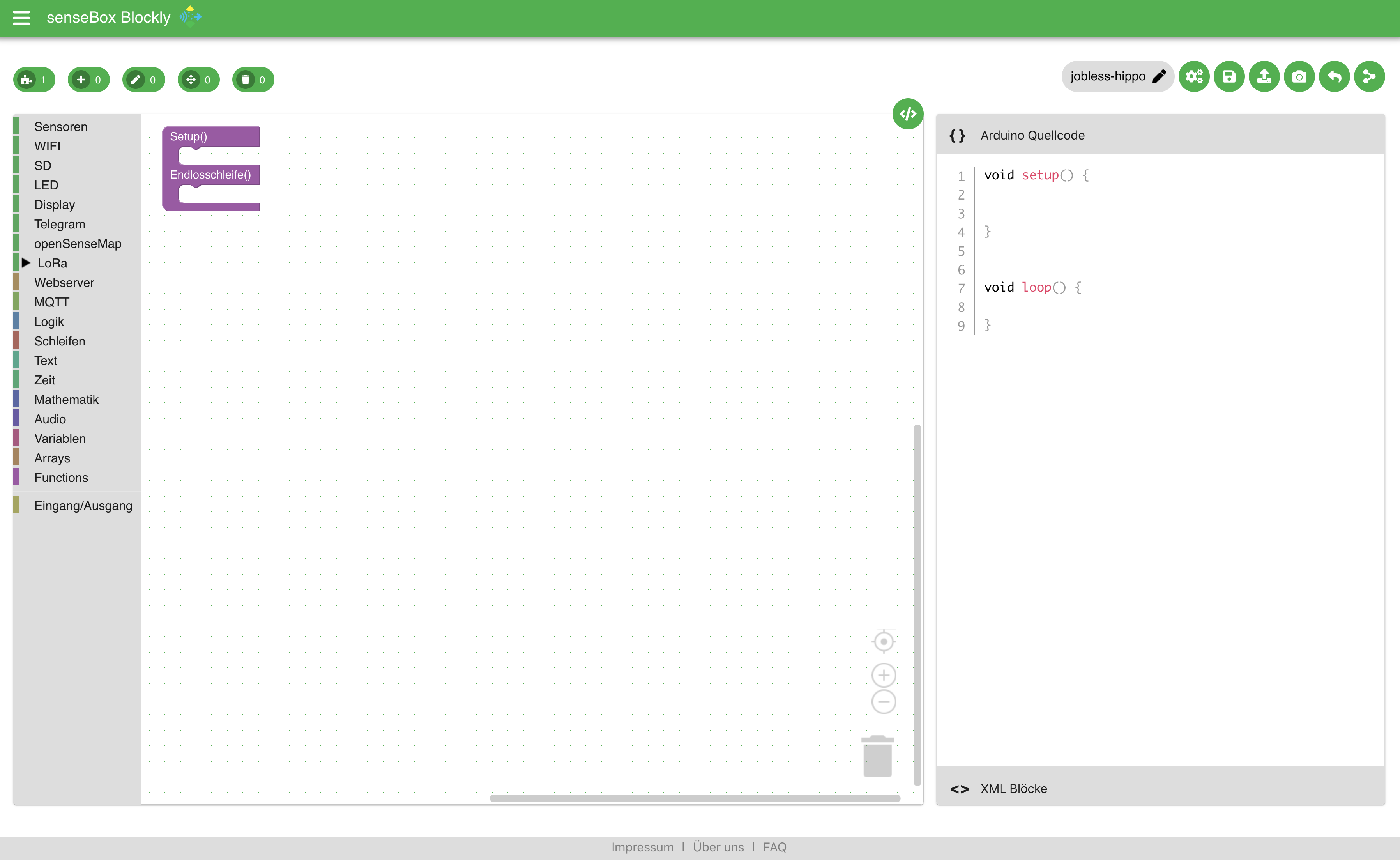
In den letzten Wochen haben wir eine komplett neue Lern- und Programmierumgebung für die senseBox geschaffen. Die Basis bildet hierbei weiterhin Google Blockly und das Frontend wird über React realisiert. Fast alle Blöcke wurden bereits aus der alten Version in die neue Version migriert.
|
||||
|
||||
|
||||
|
||||
|
||||
|
||||
|
||||
## Blockly Core
|
||||
Nachdem die bisherige Version, die unter [blockly.sensebox.de](https://blockly.sensebox.de) verfügbar ist, auf einen Google Blockly Core von 2016 aufbaut, wurde es Zeit ein großes Update durchzuführen. Durch den neuen Blockly Core lassen sich auch andere Renderer der Blöcke verwenden. In den Einstellungen kannst du zwischen den zwei Renderern Geras und Zelos auswählen. Geras ist der klassische Blockly Renderer während Zelos vor allem für Touchoberfläche optimiert worden ist.
|
||||
|
||||
### Typed Variablen
|
||||
|
||||
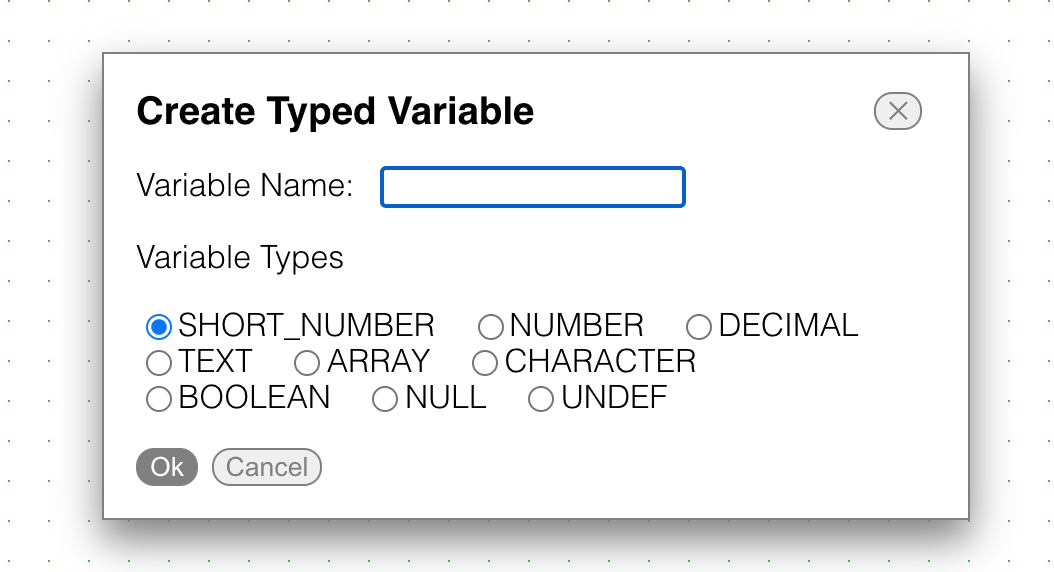
Neue Variablen werden nun direkt mit einem bestimmten Datentyp angelegt. Ein einfacher Check überprüft ob der zurückgegeben Typ eines Blockes mit dem der Variablen kompatibel ist.
|
||||
|
||||
|
||||
|
||||
|
||||
### Funktionen (funktioniert aktuell nicht!)
|
||||
|
||||
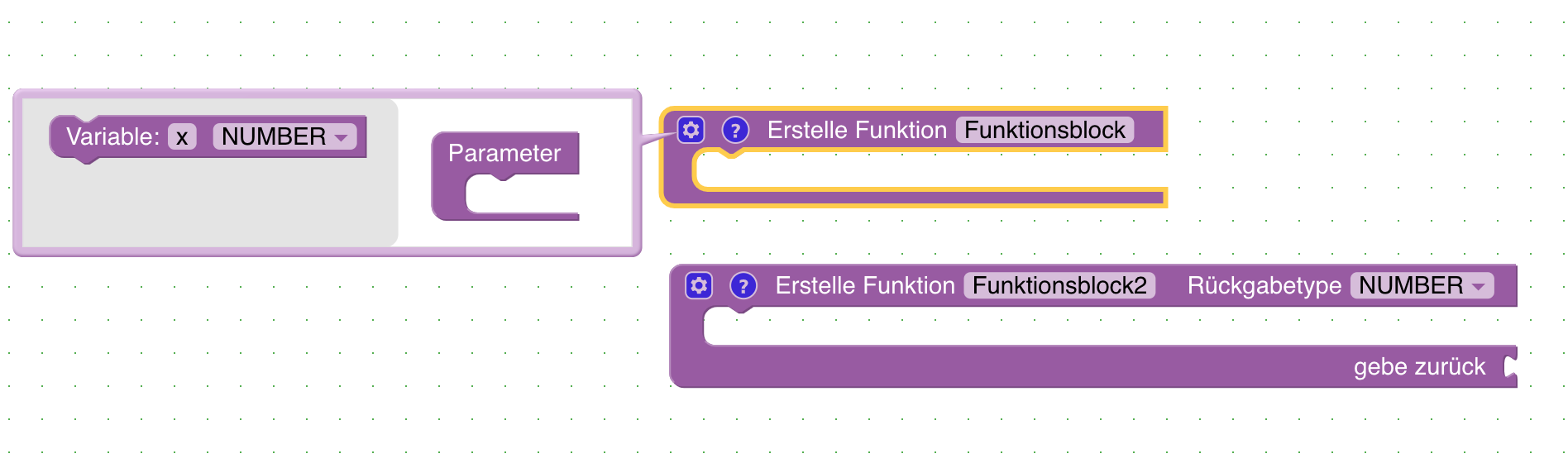
Funktionen mit Rückgabe Wert und Eingabeparametern können angelegt werden. Durch die Verwendung von Funktionen lassen sich auch komplexere Programme übersichtlicher darstellen und bearbeiten. Beim Anlegen einer Funktion kann über das Zahnrad weitere Eingabeparameter hinzuefügt werden.
|
||||
|
||||
|
||||
|
||||
|
||||
### GPS
|
||||
|
||||
Der Code für das GPS Modul wurde neu aufgebaut und ermöglicht es deutlich schneller einen GPS Fix zu bekommen. Zusätzlich lassen sich bald! die Koordinaten in zwei verschiedenen Formaten zurückgebenlassen. Zum einen als Kommazahl zum anderen als Zahl ohne nachkommastellen
|
||||
|
||||
### MQTT
|
||||
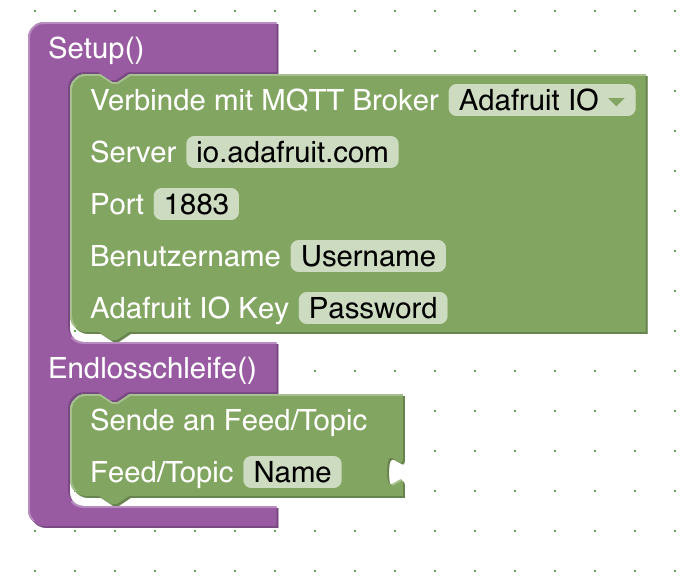
Zwei einfache Blöcke ermöglichen es nun die Daten über MQTT an einen Broker zu versenden. Zwei Broker sind bereits "vorprogrammiert" (Adafruit IO und DIOTY). Natürlich können auch eigene Broker verwendet werden. Falls ihr gute freie Broker kennt, die wir hinzufügen sollten meldet euch einfach bei uns.
|
||||
|
||||
|
||||
|
||||
|
||||
### TTN Mapper
|
||||
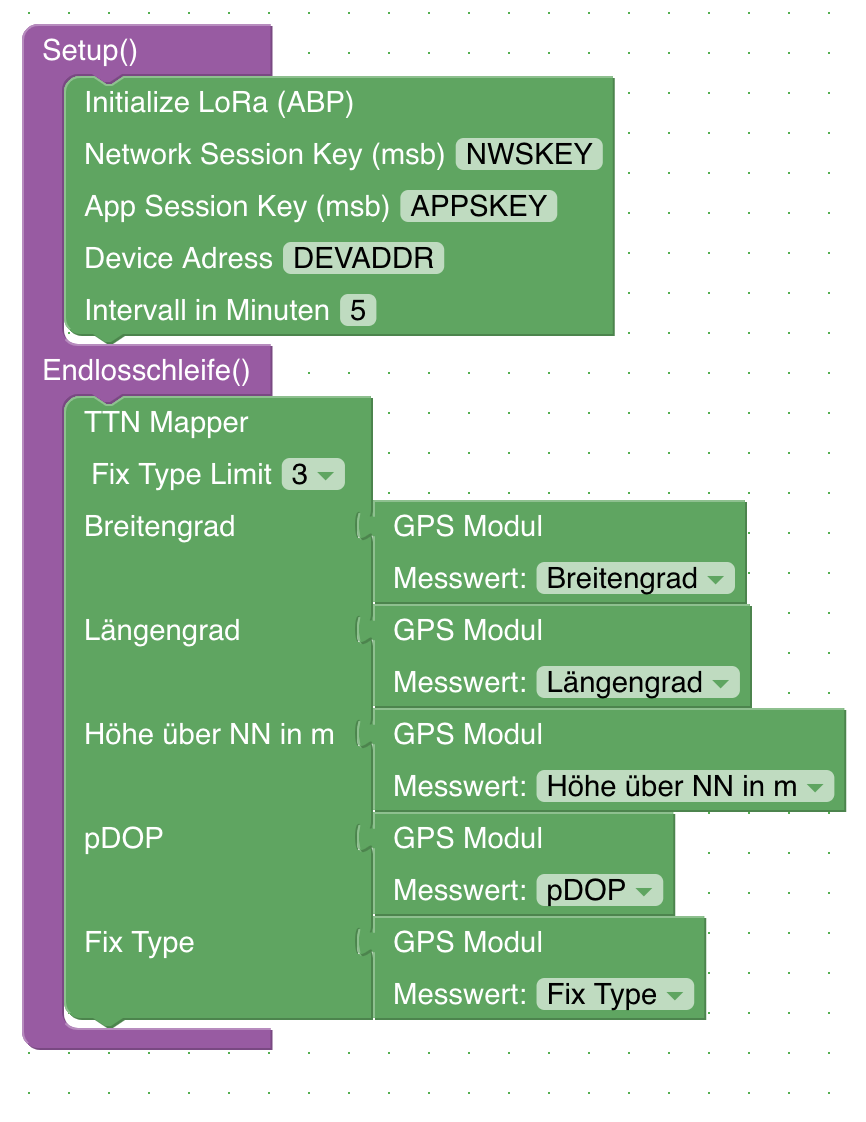
Bisher war es möglich einen "kleinen" TTN Mapper zu bauen, der die Daten als Cayenne Payload versendet hat. Es gibt nun einen Block der es direkt ermöglicht einen vollständigen TTN Mapper zu Programmieren, der die Daten auch auf [TTNMapper](https://ttnmapper.org/) veröffentlichen kann.
|
||||
|
||||
|
||||
|
||||
|
||||
## Fronted
|
||||
|
||||
In der Oberfläche gibt es einige Neuigkeiten. Ziel ist es Blockly für die senseBox zu einer vollständigen Lern- und Programmierumgebung weiterzuentwickeln.
|
||||
|
||||
Die Codeanzeige ist standardmäßig ausgeblendet kann aber einfach durch eine Klick auf das `</>` Icon hinzugefügt werden.
|
||||
|
||||
### Login mit openSenseMap/senseBox Account
|
||||
|
||||
Im Menü unter Login könnt ihr euch mit eurem openSenseMap Account anmelden. Sobald ihr angemeldet seid habt ihr die Möglichkeit Projekte online zu speichern.
|
||||
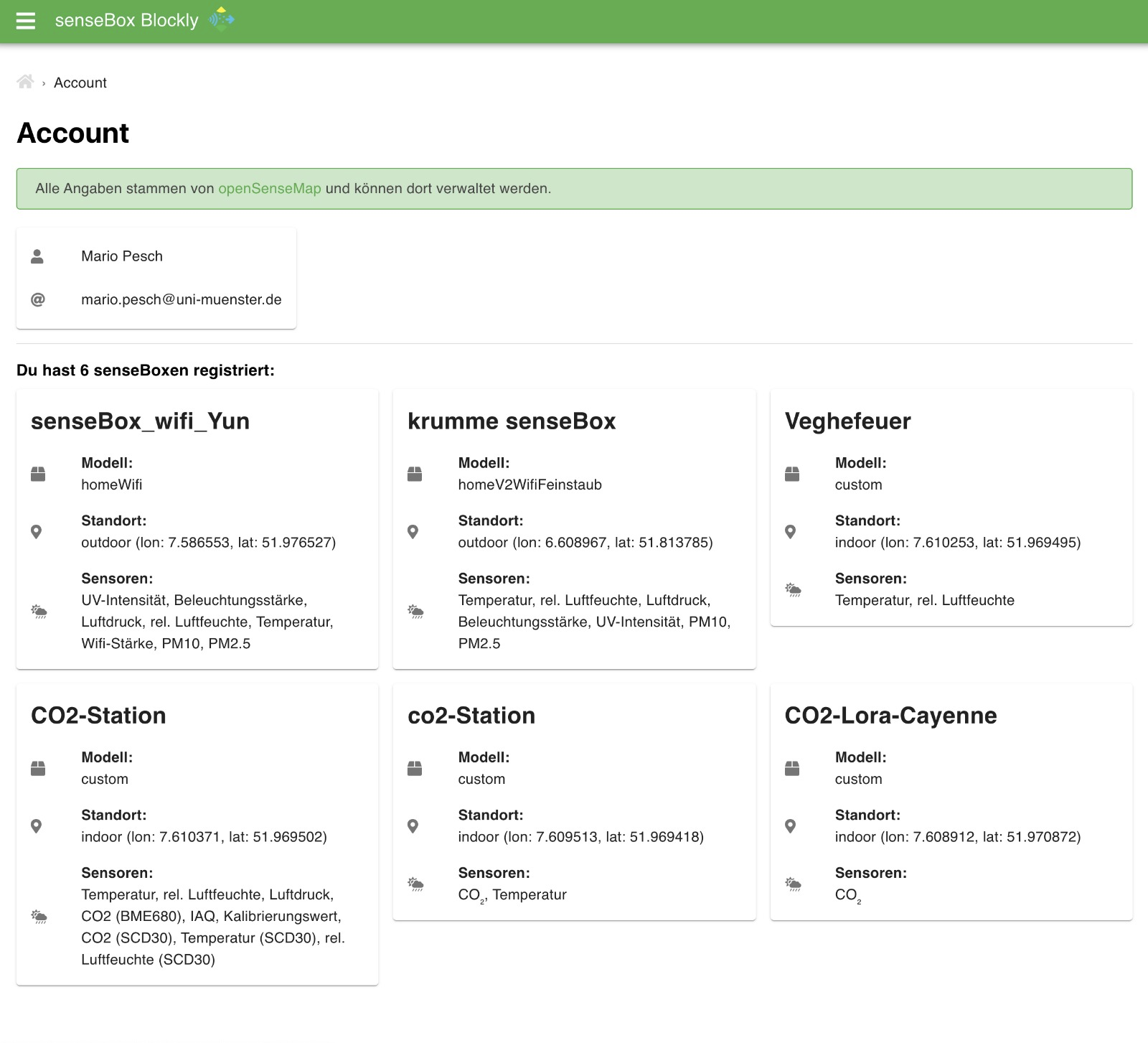
Sobald der Login mit dem openSenseMap Account erfolgreich war lassen sich die bereits registrierten senseBox unter Account einsehen.
|
||||
|
||||
|
||||
|
||||
|
||||
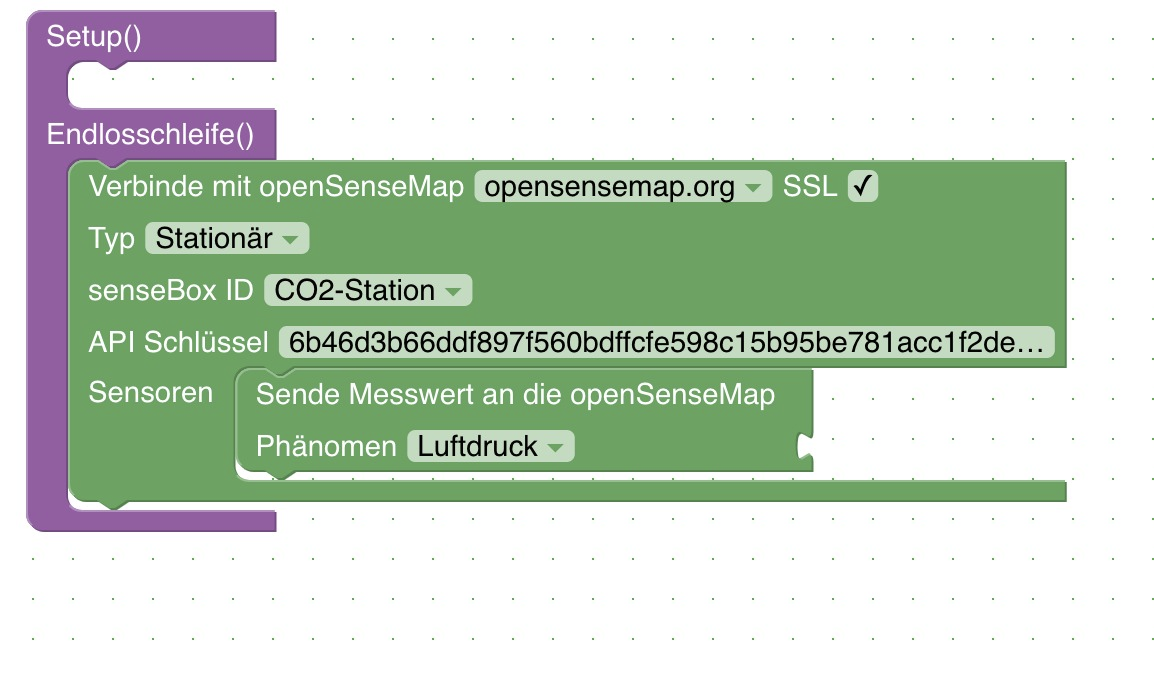
Im Block zum senden an die openSenseMap müssen dann auch keine IDs mehr ausgewählt werden sondern die registrierten senseBox können einfach aus dem Dropdown Menü ausgewählt werden.
|
||||
|
||||
|
||||
|
||||
### Speichern von Projekten
|
||||
|
||||
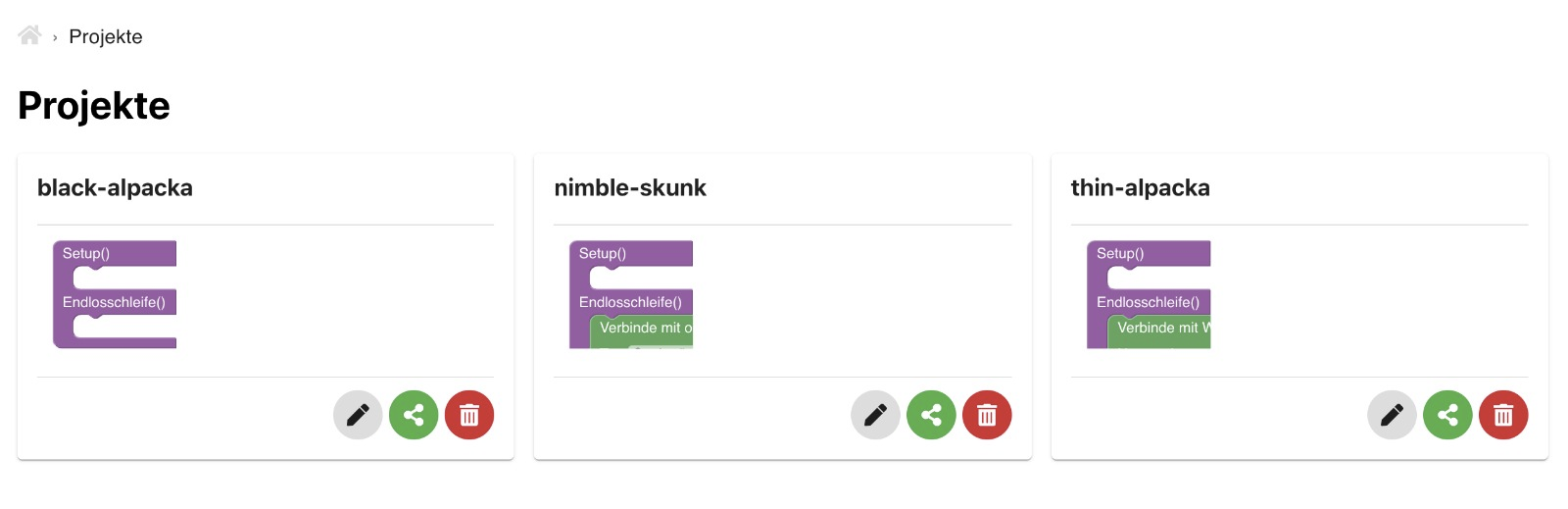
Nach dem Login über den openSenseMap Account lassen sich Projekte online speichern und wieder abrufen
|
||||
|
||||
|
||||
|
||||
|
||||
### Tutorials
|
||||
|
||||
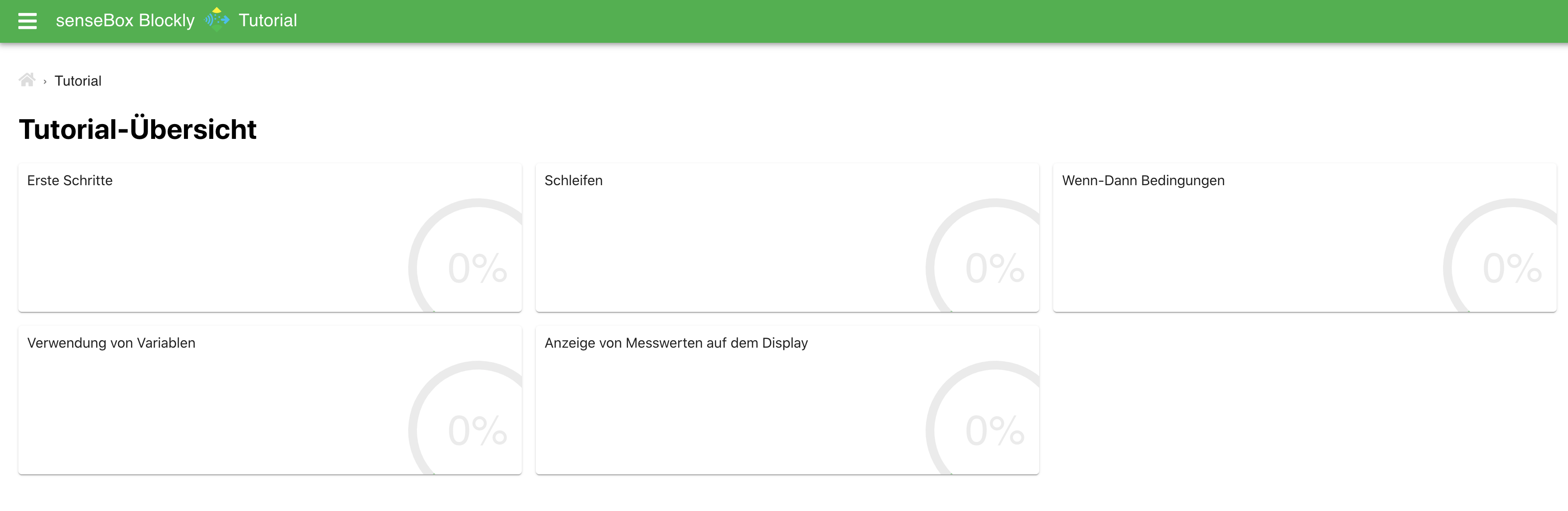
Es gibt jetzt Tutorials! Eine reihe von verschiedenen Tutorials zeigt dir die ersten Schritte in der Programmierung mit Blockly. (Inhalte werden noch ausgebaut)
|
||||
|
||||
|
||||
|
||||
### Gallery
|
||||
|
||||
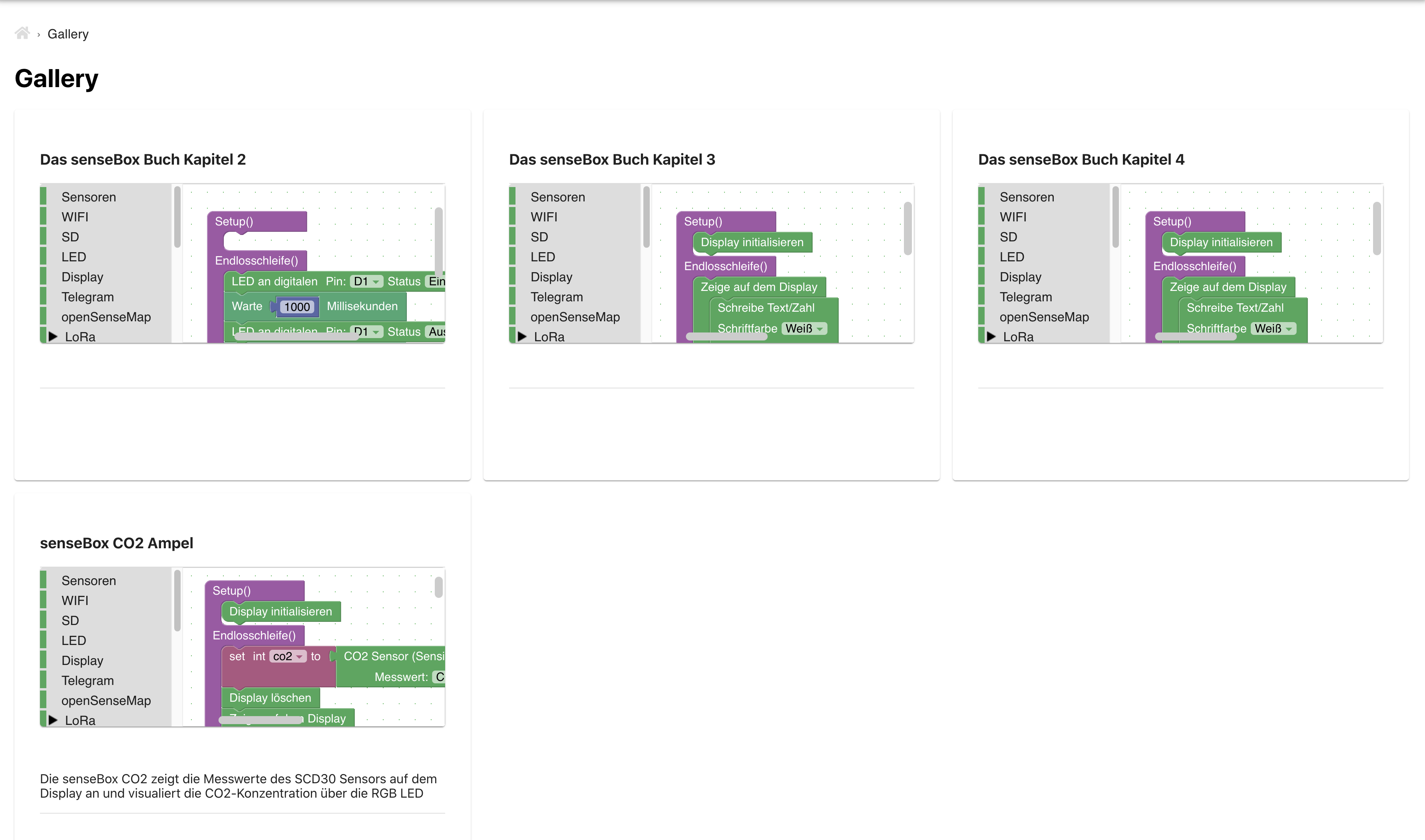
In der Gallery finden sich Beispiele mit verschiedenen Programmen. Die Beispiele können direkt in Blockly geöffnet werden, um Änderungen vorzunehmen oder das Programm direkt auf deine senseBox zu übertragen.
|
||||
|
||||
|
||||
|
||||
|
||||
### Teilen von Programmen
|
||||
|
||||
Über den Share Button kann ein Link zum Teilen der aktuellen Blöcke erstellt werden. Wann immer du dein Projekt mit anderen Teilen willst musst du nicht mehr eine XML Datei erstellen und verschicken sondern kannst einen Link erstellen, der direkt zu deinem Programm führt. Beachte, dass vor dem Teilen von Blöcken sämtliche sensiblen Daten, wie zum Beispiel Passwörter, Netzwerknamen, Lora oder openSenseMap Keys entfernt werden sollten. Die Links zum teilen von Programmen laufen nach 30 Tagen ab.
|
||||
|
||||

|
||||
|
||||
|
||||
## Fehler
|
||||
|
||||
Falls ihr Fehler findet legt bitte ein Issue in folgendem Repository an: https://github.com/sensebox/React-Ardublockly/issues
|
||||
|
||||
@@ -2,18 +2,18 @@
|
||||
|
||||
# React Ardublockly
|
||||
|
||||
This repository contains the source code and documentation of [sensebox-ardublockly](https://sensebox-ardublockly.netlify.app/).
|
||||
This repository contains the source code and documentation of [sensebox-ardublockly](https://sensebox-ardublockly.netlify.app/) :rocket:.
|
||||
|
||||
This project was created with [Create React App](https://github.com/facebook/create-react-app) and represents the continuation or improvement of [blockly.sensebox.de](https://blockly.sensebox.de/ardublockly/?lang=de&board=sensebox-mcu).
|
||||
|
||||
|
||||
## Getting Started
|
||||
|
||||
1. [Download](https://github.com/sensebox/React-Ardublockly/archive/master.zip) or clone the GitHub Repository ``git clone https://github.com/sensebox/React-Ardublockly`` and checkout to branch ``master``.
|
||||
1. [Download](https://github.com/sensebox/React-Ardublockly/archive/bachelor.zip) or clone the GitHub Repository ``git clone https://github.com/sensebox/React-Ardublockly`` and checkout to branch ``bachelor``.
|
||||
|
||||
2. install [Node.js v10.xx](https://nodejs.org/en/) on your local machine
|
||||
|
||||
3. open shell and navigate inside folder ``React-Ardublockly``
|
||||
3. open shell and navigate inside folder ``React-Ardublockly`` or rather ``Quellcode``
|
||||
* run ``npm install``
|
||||
* run ``npm start``
|
||||
4. open [localhost:3000](http://localhost:3000)
|
||||
@@ -22,7 +22,7 @@ This project was created with [Create React App](https://github.com/facebook/cre
|
||||
Ensure that line 14 in [store.js](https://github.com/sensebox/React-Ardublockly/blob/master/src/store.js#L14) is commented out or otherwise you have installed [Redux DevTools Extension](http://extension.remotedev.io/).
|
||||
|
||||
## Demo
|
||||
A demo of the current status of the master branch can be accessed via [sensebox-ardublockly.netlify.app](https://sensebox-ardublockly.netlify.app/) :rocket:.
|
||||
A demo of the current status of the bachelor branch can be accessed via [sensebox-ardublockly.netlify.app](https://sensebox-ardublockly.netlify.app/) :rocket:.
|
||||
* [Home](https://sensebox-ardublockly.netlify.app/)
|
||||
* [Tutorial Overview](https://sensebox-ardublockly.netlify.app/tutorial)
|
||||
* [Tutorial-Builder](https://sensebox-ardublockly.netlify.app/tutorial/builder)
|
||||
|
||||
@@ -5,42 +5,28 @@
|
||||
"dependencies": {
|
||||
"@blockly/block-plus-minus": "^2.0.10",
|
||||
"@blockly/field-slider": "^2.1.1",
|
||||
"@blockly/plugin-scroll-options": "^1.0.2",
|
||||
"@blockly/plugin-typed-variable-modal": "^3.1.26",
|
||||
"@blockly/zoom-to-fit": "^2.0.7",
|
||||
"@blockly/plugin-typed-variable-modal": "^3.1.1",
|
||||
"@fortawesome/fontawesome-svg-core": "^1.2.30",
|
||||
"@fortawesome/free-solid-svg-icons": "^5.14.0",
|
||||
"@fortawesome/react-fontawesome": "^0.1.11",
|
||||
"@material-ui/core": "^4.11.0",
|
||||
"@sentry/react": "^6.0.0",
|
||||
"@sentry/tracing": "^6.0.0",
|
||||
"@testing-library/jest-dom": "^4.2.4",
|
||||
"@testing-library/react": "^9.5.0",
|
||||
"@testing-library/user-event": "^7.2.1",
|
||||
"axios": "^0.21.0",
|
||||
"blockly": "^6.20210701.0",
|
||||
"blockly": "^3.20200924.0",
|
||||
"file-saver": "^2.0.2",
|
||||
"mnemonic-id": "^3.2.7",
|
||||
"moment": "^2.28.0",
|
||||
"prismjs": "^1.24.0",
|
||||
"react": "^17.0.2",
|
||||
"react-cookie-consent": "^5.2.0",
|
||||
"react-dom": "^17.0.2",
|
||||
"react-markdown": "^5.0.2",
|
||||
"react-mde": "^11.5.0",
|
||||
"react-redux": "^7.2.4",
|
||||
"prismjs": "^1.20.0",
|
||||
"react": "^16.13.1",
|
||||
"react-dom": "^16.13.1",
|
||||
"react-redux": "^7.2.0",
|
||||
"react-router-dom": "^5.2.0",
|
||||
"react-scripts": "^4.0.3",
|
||||
"reactour": "^1.18.0",
|
||||
"react-scripts": "3.4.1",
|
||||
"redux": "^4.0.5",
|
||||
"redux-thunk": "^2.3.0",
|
||||
"rich-markdown-editor": "^11.17.7",
|
||||
"styled-components": "^5.0.0",
|
||||
"uuid": "^8.3.1"
|
||||
"redux-thunk": "^2.3.0"
|
||||
},
|
||||
"scripts": {
|
||||
"start": "react-scripts start",
|
||||
"dev": "set \"REACT_APP_BLOCKLY_API=http://localhost:8080\" && npm start",
|
||||
"build": "react-scripts build",
|
||||
"test": "react-scripts test",
|
||||
"eject": "react-scripts eject"
|
||||
|
||||
@@ -24,13 +24,6 @@
|
||||
</head>
|
||||
<body>
|
||||
<noscript>You need to enable JavaScript to run this app.</noscript>
|
||||
<!-- Matomo Image Tracker-->
|
||||
<img
|
||||
src="https://piwik.sensebox.kaufen/matomo.php?idsite=9&rec=1"
|
||||
style="border: 0; display: none"
|
||||
alt=""
|
||||
/>
|
||||
<!-- End Matomo -->
|
||||
<div id="root"></div>
|
||||
<!--
|
||||
This HTML file is a template.
|
||||
|
||||

|
Before Width: | Height: | Size: 54 KiB After Width: | Height: | Size: 199 KiB |

|
Before Width: | Height: | Size: 90 KiB After Width: | Height: | Size: 381 KiB |

|
Before Width: | Height: | Size: 16 KiB After Width: | Height: | Size: 57 KiB |

|
Before Width: | Height: | Size: 106 KiB |

|
Before Width: | Height: | Size: 50 KiB After Width: | Height: | Size: 197 KiB |

|
Before Width: | Height: | Size: 46 KiB After Width: | Height: | Size: 185 KiB |

|
Before Width: | Height: | Size: 41 KiB After Width: | Height: | Size: 239 KiB |

|
Before Width: | Height: | Size: 45 KiB After Width: | Height: | Size: 319 KiB |

|
Before Width: | Height: | Size: 61 KiB After Width: | Height: | Size: 274 KiB |

|
Before Width: | Height: | Size: 22 KiB After Width: | Height: | Size: 85 KiB |

|
Before Width: | Height: | Size: 20 KiB After Width: | Height: | Size: 96 KiB |

|
Before Width: | Height: | Size: 84 KiB |

|
Before Width: | Height: | Size: 26 KiB After Width: | Height: | Size: 112 KiB |

|
Before Width: | Height: | Size: 47 KiB After Width: | Height: | Size: 196 KiB |

|
Before Width: | Height: | Size: 18 KiB After Width: | Height: | Size: 54 KiB |

|
Before Width: | Height: | Size: 26 KiB After Width: | Height: | Size: 69 KiB |

|
Before Width: | Height: | Size: 28 KiB After Width: | Height: | Size: 72 KiB |

|
Before Width: | Height: | Size: 41 KiB After Width: | Height: | Size: 197 KiB |

|
Before Width: | Height: | Size: 286 KiB |

|
Before Width: | Height: | Size: 52 KiB After Width: | Height: | Size: 218 KiB |

|
Before Width: | Height: | Size: 163 KiB After Width: | Height: | Size: 641 KiB |

|
Before Width: | Height: | Size: 54 KiB |

|
Before Width: | Height: | Size: 69 KiB |

|
Before Width: | Height: | Size: 46 KiB After Width: | Height: | Size: 171 KiB |

|
Before Width: | Height: | Size: 47 KiB After Width: | Height: | Size: 189 KiB |

|
Before Width: | Height: | Size: 59 KiB After Width: | Height: | Size: 253 KiB |

|
Before Width: | Height: | Size: 117 KiB |

|
Before Width: | Height: | Size: 47 KiB |
@@ -5,47 +5,3 @@
|
||||
position: relative;
|
||||
padding-bottom: 60px; /* height of your footer + 30px*/
|
||||
}
|
||||
|
||||
|
||||
.tutorial img{
|
||||
display: flex;
|
||||
align-items: center;
|
||||
max-height: 40vH;
|
||||
max-width: 100%;
|
||||
margin: auto;
|
||||
}
|
||||
|
||||
.news img{
|
||||
display: flex;
|
||||
align-items: center;
|
||||
max-height: 40vH;
|
||||
max-width: 100%;
|
||||
margin: auto;
|
||||
}
|
||||
|
||||
.tutorial blockquote{
|
||||
background: #f9f9f9;
|
||||
border-left: 10px solid#4EAF47;
|
||||
margin: 1.5em 10px;
|
||||
padding: 0.5em 10px;
|
||||
quotes: "\201C""\201D""\2018""\2019";
|
||||
}
|
||||
blockquote:before {
|
||||
color:#4EAF47;
|
||||
content: open-quote;
|
||||
font-size: 4em;
|
||||
line-height: 0.1em;
|
||||
margin-right: 0.25em;
|
||||
vertical-align: -0.4em;
|
||||
}
|
||||
blockquote p {
|
||||
display: inline;
|
||||
}
|
||||
|
||||
.overlay {
|
||||
display: flex;
|
||||
flex-direction: column;
|
||||
align-items: center;
|
||||
}
|
||||
|
||||
|
||||
|
||||
@@ -1,17 +1,18 @@
|
||||
import React, { Component } from 'react';
|
||||
import React from 'react';
|
||||
|
||||
import { BrowserRouter as Router } from 'react-router-dom';
|
||||
import { createBrowserHistory } from "history";
|
||||
|
||||
import { Provider } from 'react-redux';
|
||||
import store from './store';
|
||||
import { loadUser } from './actions/authActions';
|
||||
|
||||
import './App.css';
|
||||
|
||||
import { ThemeProvider, createMuiTheme } from '@material-ui/core/styles';
|
||||
|
||||
import Content from './components/Content';
|
||||
import Navbar from './components/Navbar';
|
||||
import Footer from './components/Footer';
|
||||
import Routes from './components/Routes';
|
||||
|
||||
const theme = createMuiTheme({
|
||||
palette: {
|
||||
@@ -21,31 +22,27 @@ const theme = createMuiTheme({
|
||||
},
|
||||
secondary: {
|
||||
main: '#DDDDDD'
|
||||
},
|
||||
button: {
|
||||
compile: '#e27136'
|
||||
}
|
||||
}
|
||||
});
|
||||
|
||||
class App extends Component {
|
||||
const customHistory = createBrowserHistory();
|
||||
|
||||
componentDidMount() {
|
||||
store.dispatch(loadUser());
|
||||
}
|
||||
|
||||
render() {
|
||||
const customHistory = createBrowserHistory();
|
||||
function App() {
|
||||
return (
|
||||
<ThemeProvider theme={theme}>
|
||||
<Provider store={store}>
|
||||
<Router history={customHistory}>
|
||||
<Content />
|
||||
<div className="wrapper">
|
||||
<Navbar />
|
||||
<Routes />
|
||||
<Footer />
|
||||
</div>
|
||||
</Router>
|
||||
</Provider>
|
||||
</ThemeProvider>
|
||||
);
|
||||
}
|
||||
}
|
||||
|
||||
export default App;
|
||||
|
||||
@@ -1,264 +0,0 @@
|
||||
import {
|
||||
GET_STATUS,
|
||||
USER_LOADED,
|
||||
USER_LOADING,
|
||||
AUTH_ERROR,
|
||||
LOGIN_SUCCESS,
|
||||
LOGIN_FAIL,
|
||||
LOGOUT_SUCCESS,
|
||||
LOGOUT_FAIL,
|
||||
REFRESH_TOKEN_SUCCESS,
|
||||
} from "../actions/types";
|
||||
|
||||
import axios from "axios";
|
||||
import { returnErrors, returnSuccess } from "./messageActions";
|
||||
import { setLanguage } from "./generalActions";
|
||||
|
||||
// Check token & load user
|
||||
export const loadUser = () => (dispatch) => {
|
||||
// user loading
|
||||
dispatch({
|
||||
type: USER_LOADING,
|
||||
});
|
||||
const config = {
|
||||
success: (res) => {
|
||||
dispatch({
|
||||
type: GET_STATUS,
|
||||
payload: res.data.user.status,
|
||||
});
|
||||
dispatch(setLanguage(res.data.user.language));
|
||||
dispatch({
|
||||
type: USER_LOADED,
|
||||
payload: res.data.user,
|
||||
});
|
||||
},
|
||||
error: (err) => {
|
||||
if (err.response) {
|
||||
dispatch(returnErrors(err.response.data.message, err.response.status));
|
||||
}
|
||||
var status = [];
|
||||
if (window.localStorage.getItem("status")) {
|
||||
status = JSON.parse(window.localStorage.getItem("status"));
|
||||
}
|
||||
dispatch({
|
||||
type: GET_STATUS,
|
||||
payload: status,
|
||||
});
|
||||
dispatch({
|
||||
type: AUTH_ERROR,
|
||||
});
|
||||
},
|
||||
};
|
||||
axios
|
||||
.get(
|
||||
`${process.env.REACT_APP_BLOCKLY_API}/user`,
|
||||
config,
|
||||
dispatch(authInterceptor())
|
||||
)
|
||||
.then((res) => {
|
||||
res.config.success(res);
|
||||
})
|
||||
.catch((err) => {
|
||||
err.config.error(err);
|
||||
});
|
||||
};
|
||||
|
||||
var logoutTimerId;
|
||||
const timeToLogout = 14.9 * 60 * 1000; // nearly 15 minutes corresponding to the API
|
||||
|
||||
// Login user
|
||||
export const login =
|
||||
({ email, password }) =>
|
||||
(dispatch) => {
|
||||
dispatch({
|
||||
type: USER_LOADING,
|
||||
});
|
||||
// Headers
|
||||
const config = {
|
||||
headers: {
|
||||
"Content-Type": "application/json",
|
||||
},
|
||||
};
|
||||
// Request Body
|
||||
const body = JSON.stringify({ email, password });
|
||||
axios
|
||||
.post(`${process.env.REACT_APP_BLOCKLY_API}/user`, body, config)
|
||||
.then((res) => {
|
||||
// Logout automatically if refreshToken "expired"
|
||||
const logoutTimer = () =>
|
||||
setTimeout(() => dispatch(logout()), timeToLogout);
|
||||
logoutTimerId = logoutTimer();
|
||||
dispatch(setLanguage(res.data.user.language));
|
||||
dispatch({
|
||||
type: LOGIN_SUCCESS,
|
||||
payload: res.data,
|
||||
});
|
||||
dispatch({
|
||||
type: GET_STATUS,
|
||||
payload: res.data.user.status,
|
||||
});
|
||||
dispatch(returnSuccess(res.data.message, res.status, "LOGIN_SUCCESS"));
|
||||
})
|
||||
.catch((err) => {
|
||||
dispatch(
|
||||
returnErrors(
|
||||
err.response.data.message,
|
||||
err.response.status,
|
||||
"LOGIN_FAIL"
|
||||
)
|
||||
);
|
||||
dispatch({
|
||||
type: LOGIN_FAIL,
|
||||
});
|
||||
var status = [];
|
||||
if (window.localStorage.getItem("status")) {
|
||||
status = JSON.parse(window.localStorage.getItem("status"));
|
||||
}
|
||||
dispatch({
|
||||
type: GET_STATUS,
|
||||
payload: status,
|
||||
});
|
||||
});
|
||||
};
|
||||
|
||||
// Logout User
|
||||
export const logout = () => (dispatch) => {
|
||||
const config = {
|
||||
success: (res) => {
|
||||
dispatch({
|
||||
type: LOGOUT_SUCCESS,
|
||||
});
|
||||
var status = [];
|
||||
if (window.localStorage.getItem("status")) {
|
||||
status = JSON.parse(window.localStorage.getItem("status"));
|
||||
}
|
||||
dispatch({
|
||||
type: GET_STATUS,
|
||||
payload: status,
|
||||
});
|
||||
var locale = "en_US";
|
||||
if (window.localStorage.getItem("locale")) {
|
||||
locale = window.localStorage.getItem("locale");
|
||||
} else if (navigator.language === "de-DE") {
|
||||
locale = "de_DE";
|
||||
}
|
||||
dispatch(setLanguage(locale));
|
||||
dispatch(returnSuccess(res.data.message, res.status, "LOGOUT_SUCCESS"));
|
||||
clearTimeout(logoutTimerId);
|
||||
},
|
||||
error: (err) => {
|
||||
dispatch(
|
||||
returnErrors(
|
||||
err.response.data.message,
|
||||
err.response.status,
|
||||
"LOGOUT_FAIL"
|
||||
)
|
||||
);
|
||||
dispatch({
|
||||
type: LOGOUT_FAIL,
|
||||
});
|
||||
var status = [];
|
||||
if (window.localStorage.getItem("status")) {
|
||||
status = JSON.parse(window.localStorage.getItem("status"));
|
||||
}
|
||||
dispatch({
|
||||
type: GET_STATUS,
|
||||
payload: status,
|
||||
});
|
||||
clearTimeout(logoutTimerId);
|
||||
},
|
||||
};
|
||||
axios
|
||||
.post("https://api.opensensemap.org/users/sign-out", {}, config)
|
||||
.then((res) => {
|
||||
res.config.success(res);
|
||||
})
|
||||
.catch((err) => {
|
||||
if (err.response && err.response.status !== 401) {
|
||||
err.config.error(err);
|
||||
}
|
||||
});
|
||||
};
|
||||
|
||||
export const authInterceptor = () => (dispatch, getState) => {
|
||||
// Add a request interceptor
|
||||
axios.interceptors.request.use(
|
||||
(config) => {
|
||||
config.headers["Content-Type"] = "application/json";
|
||||
const token = getState().auth.token;
|
||||
if (token) {
|
||||
config.headers["Authorization"] = `Bearer ${token}`;
|
||||
}
|
||||
return config;
|
||||
},
|
||||
(error) => {
|
||||
Promise.reject(error);
|
||||
}
|
||||
);
|
||||
|
||||
// Add a response interceptor
|
||||
axios.interceptors.response.use(
|
||||
(response) => {
|
||||
// request was successfull
|
||||
return response;
|
||||
},
|
||||
(error) => {
|
||||
const originalRequest = error.config;
|
||||
const refreshToken = getState().auth.refreshToken;
|
||||
if (refreshToken) {
|
||||
// try to refresh the token failed
|
||||
if (error.response.status === 401 && originalRequest._retry) {
|
||||
// router.push('/login');
|
||||
return Promise.reject(error);
|
||||
}
|
||||
// token was not valid and 1st try to refresh the token
|
||||
if (error.response.status === 401 && !originalRequest._retry) {
|
||||
originalRequest._retry = true;
|
||||
const refreshToken = getState().auth.refreshToken;
|
||||
// request to refresh the token, in request-body is the refreshToken
|
||||
axios
|
||||
.post("https://api.opensensemap.org/users/refresh-auth", {
|
||||
token: refreshToken,
|
||||
})
|
||||
.then((res) => {
|
||||
if (res.status === 200) {
|
||||
clearTimeout(logoutTimerId);
|
||||
const logoutTimer = () =>
|
||||
setTimeout(() => dispatch(logout()), timeToLogout);
|
||||
logoutTimerId = logoutTimer();
|
||||
dispatch({
|
||||
type: REFRESH_TOKEN_SUCCESS,
|
||||
payload: res.data,
|
||||
});
|
||||
axios.defaults.headers.common["Authorization"] =
|
||||
"Bearer " + getState().auth.token;
|
||||
// request was successfull, new request with the old parameters and the refreshed token
|
||||
return axios(originalRequest)
|
||||
.then((res) => {
|
||||
originalRequest.success(res);
|
||||
})
|
||||
.catch((err) => {
|
||||
originalRequest.error(err);
|
||||
});
|
||||
}
|
||||
return Promise.reject(error);
|
||||
})
|
||||
.catch((err) => {
|
||||
// request failed, token could not be refreshed
|
||||
if (err.response) {
|
||||
dispatch(
|
||||
returnErrors(err.response.data.message, err.response.status)
|
||||
);
|
||||
}
|
||||
dispatch({
|
||||
type: AUTH_ERROR,
|
||||
});
|
||||
return Promise.reject(error);
|
||||
});
|
||||
}
|
||||
}
|
||||
// request status was unequal to 401, no possibility to refresh the token
|
||||
return Promise.reject(error);
|
||||
}
|
||||
);
|
||||
};
|
||||
@@ -1,4 +1,4 @@
|
||||
import { VISIT, LANGUAGE, RENDERER, STATISTICS } from './types';
|
||||
import { VISIT } from './types';
|
||||
|
||||
|
||||
export const visitPage = () => (dispatch) => {
|
||||
@@ -6,27 +6,3 @@ export const visitPage = () => (dispatch) => {
|
||||
type: VISIT
|
||||
});
|
||||
};
|
||||
|
||||
export const setLanguage = (language) => (dispatch, getState) => {
|
||||
if(!getState().auth.progress && !getState().auth.isAuthenticated){
|
||||
window.localStorage.setItem('locale', language);
|
||||
}
|
||||
dispatch({
|
||||
type: LANGUAGE,
|
||||
payload: language
|
||||
});
|
||||
};
|
||||
|
||||
export const setRenderer = (renderer) => (dispatch) => {
|
||||
dispatch({
|
||||
type: RENDERER,
|
||||
payload: renderer
|
||||
});
|
||||
};
|
||||
|
||||
export const setStatistics = (showStatistics) => (dispatch) => {
|
||||
dispatch({
|
||||
type: STATISTICS,
|
||||
payload: showStatistics
|
||||
});
|
||||
};
|
||||
|
||||
@@ -1,32 +0,0 @@
|
||||
import { GET_ERRORS, CLEAR_MESSAGES, GET_SUCCESS } from './types';
|
||||
|
||||
// RETURN Errors
|
||||
export const returnErrors = (msg, status, id = null) => {
|
||||
return {
|
||||
type: GET_ERRORS,
|
||||
payload: {
|
||||
msg: msg,
|
||||
status: status,
|
||||
id: id
|
||||
}
|
||||
};
|
||||
};
|
||||
|
||||
// RETURN Success
|
||||
export const returnSuccess = (msg, status, id = null) => {
|
||||
return {
|
||||
type: GET_SUCCESS,
|
||||
payload: {
|
||||
msg: msg,
|
||||
status: status,
|
||||
id: id
|
||||
}
|
||||
};
|
||||
};
|
||||
|
||||
// CLEAR_MESSAGES
|
||||
export const clearMessages = () => {
|
||||
return {
|
||||
type: CLEAR_MESSAGES
|
||||
};
|
||||
};
|
||||
@@ -1,204 +0,0 @@
|
||||
import { PROJECT_PROGRESS, GET_PROJECT, GET_PROJECTS, PROJECT_TYPE, PROJECT_DESCRIPTION } from './types';
|
||||
|
||||
import axios from 'axios';
|
||||
import { returnErrors, returnSuccess } from './messageActions';
|
||||
|
||||
export const setType = (type) => (dispatch) => {
|
||||
dispatch({
|
||||
type: PROJECT_TYPE,
|
||||
payload: type
|
||||
});
|
||||
};
|
||||
|
||||
export const setDescription = (description) => (dispatch) => {
|
||||
dispatch({
|
||||
type: PROJECT_DESCRIPTION,
|
||||
payload: description
|
||||
});
|
||||
};
|
||||
|
||||
export const getProject = (type, id) => (dispatch) => {
|
||||
dispatch({ type: PROJECT_PROGRESS });
|
||||
dispatch(setType(type));
|
||||
const config = {
|
||||
success: res => {
|
||||
var data = type === 'share' ? 'content' : type;
|
||||
var project = res.data[data];
|
||||
if (project) {
|
||||
dispatch({
|
||||
type: GET_PROJECT,
|
||||
payload: project
|
||||
});
|
||||
dispatch({
|
||||
type: PROJECT_DESCRIPTION,
|
||||
payload: project.description
|
||||
});
|
||||
dispatch({ type: PROJECT_PROGRESS });
|
||||
dispatch(returnSuccess(res.data.message, res.status, 'GET_PROJECT_SUCCESS'));
|
||||
}
|
||||
else {
|
||||
dispatch({ type: PROJECT_PROGRESS });
|
||||
dispatch(returnErrors(res.data.message, res.status, 'PROJECT_EMPTY'));
|
||||
}
|
||||
},
|
||||
error: err => {
|
||||
if (err.response) {
|
||||
dispatch(returnErrors(err.response.data.message, err.response.status, 'GET_PROJECT_FAIL'));
|
||||
}
|
||||
dispatch({ type: PROJECT_PROGRESS });
|
||||
}
|
||||
};
|
||||
axios.get(`${process.env.REACT_APP_BLOCKLY_API}/${type}/${id}`, config)
|
||||
.then(res => {
|
||||
res.config.success(res);
|
||||
})
|
||||
.catch(err => {
|
||||
err.config.error(err);
|
||||
});
|
||||
};
|
||||
|
||||
export const getProjects = (type) => (dispatch) => {
|
||||
dispatch({ type: PROJECT_PROGRESS });
|
||||
const config = {
|
||||
success: res => {
|
||||
var data = type === 'project' ? 'projects' : 'galleries';
|
||||
var projects = res.data[data];
|
||||
dispatch({
|
||||
type: GET_PROJECTS,
|
||||
payload: projects
|
||||
});
|
||||
dispatch({ type: PROJECT_PROGRESS });
|
||||
dispatch(returnSuccess(res.data.message, res.status));
|
||||
},
|
||||
error: err => {
|
||||
if (err.response) {
|
||||
dispatch(returnErrors(err.response.data.message, err.response.status, 'GET_PROJECTS_FAIL'));
|
||||
}
|
||||
dispatch({ type: PROJECT_PROGRESS });
|
||||
}
|
||||
};
|
||||
axios.get(`${process.env.REACT_APP_BLOCKLY_API}/${type}`, config)
|
||||
.then(res => {
|
||||
res.config.success(res);
|
||||
})
|
||||
.catch(err => {
|
||||
err.config.error(err);
|
||||
});
|
||||
};
|
||||
|
||||
export const updateProject = (type, id) => (dispatch, getState) => {
|
||||
var workspace = getState().workspace;
|
||||
var body = {
|
||||
xml: workspace.code.xml,
|
||||
title: workspace.name
|
||||
};
|
||||
var project = getState().project;
|
||||
if (type === 'gallery') {
|
||||
body.description = project.description;
|
||||
}
|
||||
const config = {
|
||||
success: res => {
|
||||
var project = res.data[type];
|
||||
var projects = getState().project.projects;
|
||||
var index = projects.findIndex(res => res._id === project._id);
|
||||
projects[index] = project;
|
||||
dispatch({
|
||||
type: GET_PROJECTS,
|
||||
payload: projects
|
||||
});
|
||||
if (type === 'project') {
|
||||
dispatch(returnSuccess(res.data.message, res.status, 'PROJECT_UPDATE_SUCCESS'));
|
||||
} else {
|
||||
dispatch(returnSuccess(res.data.message, res.status, 'GALLERY_UPDATE_SUCCESS'));
|
||||
}
|
||||
},
|
||||
error: err => {
|
||||
if (err.response) {
|
||||
if (type === 'project') {
|
||||
dispatch(returnErrors(err.response.data.message, err.response.status, 'PROJECT_UPDATE_FAIL'));
|
||||
} else {
|
||||
dispatch(returnErrors(err.response.data.message, err.response.status, 'GALLERY_UPDATE_FAIL'));
|
||||
}
|
||||
}
|
||||
}
|
||||
};
|
||||
axios.put(`${process.env.REACT_APP_BLOCKLY_API}/${type}/${id}`, body, config)
|
||||
.then(res => {
|
||||
res.config.success(res);
|
||||
})
|
||||
.catch(err => {
|
||||
err.config.error(err);
|
||||
});
|
||||
};
|
||||
|
||||
export const deleteProject = (type, id) => (dispatch, getState) => {
|
||||
const config = {
|
||||
success: res => {
|
||||
var projects = getState().project.projects;
|
||||
var index = projects.findIndex(res => res._id === id);
|
||||
projects.splice(index, 1)
|
||||
dispatch({
|
||||
type: GET_PROJECTS,
|
||||
payload: projects
|
||||
});
|
||||
if (type === 'project') {
|
||||
dispatch(returnSuccess(res.data.message, res.status, 'PROJECT_DELETE_SUCCESS'));
|
||||
} else {
|
||||
dispatch(returnSuccess(res.data.message, res.status, 'GALLERY_DELETE_SUCCESS'));
|
||||
}
|
||||
},
|
||||
error: err => {
|
||||
dispatch(returnErrors(err.response.data.message, err.response.status, 'PROJECT_DELETE_FAIL'));
|
||||
}
|
||||
};
|
||||
axios.delete(`${process.env.REACT_APP_BLOCKLY_API}/${type}/${id}`, config)
|
||||
.then(res => {
|
||||
res.config.success(res);
|
||||
})
|
||||
.catch(err => {
|
||||
if (err.response && err.response.status !== 401) {
|
||||
err.config.error(err);
|
||||
}
|
||||
});
|
||||
};
|
||||
|
||||
|
||||
export const shareProject = (title, type, id) => (dispatch, getState) => {
|
||||
var body = {
|
||||
title: title
|
||||
};
|
||||
if (type === 'project') {
|
||||
body.projectId = id;
|
||||
} else {
|
||||
body.xml = getState().workspace.code.xml;
|
||||
}
|
||||
axios.post(`${process.env.REACT_APP_BLOCKLY_API}/share`, body)
|
||||
.then(res => {
|
||||
var shareContent = res.data.content;
|
||||
if (body.projectId) {
|
||||
var projects = getState().project.projects;
|
||||
var index = projects.findIndex(res => res._id === id);
|
||||
projects[index].shared = shareContent.expiresAt;
|
||||
dispatch({
|
||||
type: GET_PROJECTS,
|
||||
payload: projects
|
||||
});
|
||||
}
|
||||
dispatch(returnSuccess(res.data.message, shareContent._id, 'SHARE_SUCCESS'));
|
||||
})
|
||||
.catch(err => {
|
||||
if (err.response) {
|
||||
dispatch(returnErrors(err.response.data.message, err.response.status, 'SHARE_FAIL'));
|
||||
}
|
||||
});
|
||||
};
|
||||
|
||||
|
||||
export const resetProject = () => (dispatch) => {
|
||||
dispatch({
|
||||
type: GET_PROJECTS,
|
||||
payload: []
|
||||
});
|
||||
dispatch(setType(''));
|
||||
dispatch(setDescription(''));
|
||||
};
|
||||
@@ -1,274 +1,61 @@
|
||||
import {
|
||||
TUTORIAL_PROGRESS,
|
||||
GET_TUTORIAL,
|
||||
GET_TUTORIALS,
|
||||
TUTORIAL_SUCCESS,
|
||||
TUTORIAL_ERROR,
|
||||
TUTORIAL_CHANGE,
|
||||
TUTORIAL_XML,
|
||||
TUTORIAL_STEP,
|
||||
} from "./types";
|
||||
import { TUTORIAL_SUCCESS, TUTORIAL_ERROR, TUTORIAL_CHANGE, TUTORIAL_XML, TUTORIAL_ID, TUTORIAL_STEP } from './types';
|
||||
|
||||
import axios from "axios";
|
||||
import { returnErrors, returnSuccess } from "./messageActions";
|
||||
|
||||
export const tutorialProgress = () => (dispatch) => {
|
||||
dispatch({ type: TUTORIAL_PROGRESS });
|
||||
};
|
||||
|
||||
export const getTutorial = (id) => (dispatch, getState) => {
|
||||
axios
|
||||
.get(`${process.env.REACT_APP_BLOCKLY_API}/tutorial/${id}`)
|
||||
.then((res) => {
|
||||
var tutorial = res.data.tutorial;
|
||||
existingTutorial(tutorial, getState().tutorial.status).then((status) => {
|
||||
dispatch({
|
||||
type: TUTORIAL_SUCCESS,
|
||||
payload: status,
|
||||
});
|
||||
dispatch(updateStatus(status));
|
||||
dispatch({
|
||||
type: GET_TUTORIAL,
|
||||
payload: tutorial,
|
||||
});
|
||||
dispatch({ type: TUTORIAL_PROGRESS });
|
||||
dispatch(returnSuccess(res.data.message, res.status));
|
||||
});
|
||||
})
|
||||
.catch((err) => {
|
||||
if (err.response) {
|
||||
dispatch(
|
||||
returnErrors(
|
||||
err.response.data.message,
|
||||
err.response.status,
|
||||
"GET_TUTORIAL_FAIL"
|
||||
)
|
||||
);
|
||||
}
|
||||
dispatch({ type: TUTORIAL_PROGRESS });
|
||||
});
|
||||
};
|
||||
|
||||
export const getTutorials = () => (dispatch, getState) => {
|
||||
axios
|
||||
.get(`${process.env.REACT_APP_BLOCKLY_API}/tutorial`)
|
||||
.then((res) => {
|
||||
var tutorials = res.data.tutorials;
|
||||
existingTutorials(tutorials, getState().tutorial.status).then(
|
||||
(status) => {
|
||||
dispatch({
|
||||
type: TUTORIAL_SUCCESS,
|
||||
payload: status,
|
||||
});
|
||||
dispatch(updateStatus(status));
|
||||
dispatch({
|
||||
type: GET_TUTORIALS,
|
||||
payload: tutorials,
|
||||
});
|
||||
dispatch({ type: TUTORIAL_PROGRESS });
|
||||
dispatch(returnSuccess(res.data.message, res.status));
|
||||
}
|
||||
);
|
||||
})
|
||||
.catch((err) => {
|
||||
if (err.response) {
|
||||
dispatch(
|
||||
returnErrors(
|
||||
err.response.data.message,
|
||||
err.response.status,
|
||||
"GET_TUTORIALS_FAIL"
|
||||
)
|
||||
);
|
||||
}
|
||||
dispatch({ type: TUTORIAL_PROGRESS });
|
||||
});
|
||||
};
|
||||
|
||||
export const updateStatus = (status) => (dispatch, getState) => {
|
||||
if (getState().auth.isAuthenticated) {
|
||||
// update user account in database - sync with redux store
|
||||
axios
|
||||
.put(`${process.env.REACT_APP_BLOCKLY_API}/user/status`, {
|
||||
status: status,
|
||||
})
|
||||
.then((res) => {})
|
||||
.catch((err) => {
|
||||
if (err.response) {
|
||||
// dispatch(returnErrors(err.response.data.message, err.response.status, 'UPDATE_STATUS_FAIL'));
|
||||
}
|
||||
});
|
||||
} else {
|
||||
// update locale storage - sync with redux store
|
||||
window.localStorage.setItem("status", JSON.stringify(status));
|
||||
}
|
||||
};
|
||||
|
||||
export const deleteTutorial = (id) => (dispatch, getState) => {
|
||||
var tutorial = getState().tutorial;
|
||||
var id = getState().builder.id;
|
||||
const config = {
|
||||
success: (res) => {
|
||||
var tutorials = tutorial.tutorials;
|
||||
var index = tutorials.findIndex((res) => res._id === id);
|
||||
tutorials.splice(index, 1);
|
||||
dispatch({
|
||||
type: GET_TUTORIALS,
|
||||
payload: tutorials,
|
||||
});
|
||||
dispatch(
|
||||
returnSuccess(res.data.message, res.status, "TUTORIAL_DELETE_SUCCESS")
|
||||
);
|
||||
},
|
||||
error: (err) => {
|
||||
dispatch(
|
||||
returnErrors(
|
||||
err.response.data.message,
|
||||
err.response.status,
|
||||
"TUTORIAL_DELETE_FAIL"
|
||||
)
|
||||
);
|
||||
},
|
||||
};
|
||||
axios
|
||||
.delete(`${process.env.REACT_APP_BLOCKLY_API}/tutorial/${id}`, config)
|
||||
.then((res) => {
|
||||
res.config.success(res);
|
||||
})
|
||||
.catch((err) => {
|
||||
if (err.response && err.response.status !== 401) {
|
||||
err.config.error(err);
|
||||
}
|
||||
});
|
||||
};
|
||||
|
||||
export const resetTutorial = () => (dispatch) => {
|
||||
dispatch({
|
||||
type: GET_TUTORIALS,
|
||||
payload: [],
|
||||
});
|
||||
dispatch({
|
||||
type: TUTORIAL_STEP,
|
||||
payload: 0,
|
||||
});
|
||||
};
|
||||
import tutorials from '../data/tutorials';
|
||||
|
||||
export const tutorialChange = () => (dispatch) => {
|
||||
dispatch({
|
||||
type: TUTORIAL_CHANGE,
|
||||
type: TUTORIAL_CHANGE
|
||||
});
|
||||
};
|
||||
|
||||
export const tutorialCheck = (status, step) => (dispatch, getState) => {
|
||||
var tutorialsStatus = getState().tutorial.status;
|
||||
var id = getState().tutorial.tutorials[0]._id;
|
||||
var tutorialsStatusIndex = tutorialsStatus.findIndex(
|
||||
(tutorialStatus) => tutorialStatus._id === id
|
||||
);
|
||||
var tasksIndex = tutorialsStatus[tutorialsStatusIndex].tasks.findIndex(
|
||||
(task) => task._id === step._id
|
||||
);
|
||||
var id = getState().tutorial.currentId;
|
||||
var tutorialsStatusIndex = tutorialsStatus.findIndex(tutorialStatus => tutorialStatus.id === id);
|
||||
var tasksIndex = tutorialsStatus[tutorialsStatusIndex].tasks.findIndex(task => task.id === step.id);
|
||||
tutorialsStatus[tutorialsStatusIndex].tasks[tasksIndex] = {
|
||||
...tutorialsStatus[tutorialsStatusIndex].tasks[tasksIndex],
|
||||
type: status,
|
||||
type: status
|
||||
};
|
||||
dispatch({
|
||||
type: status === "success" ? TUTORIAL_SUCCESS : TUTORIAL_ERROR,
|
||||
payload: tutorialsStatus,
|
||||
type: status === 'success' ? TUTORIAL_SUCCESS : TUTORIAL_ERROR,
|
||||
payload: tutorialsStatus
|
||||
});
|
||||
dispatch(updateStatus(tutorialsStatus));
|
||||
dispatch(tutorialChange());
|
||||
dispatch(returnSuccess("", "", "TUTORIAL_CHECK_SUCCESS"));
|
||||
};
|
||||
|
||||
export const storeTutorialXml = (code) => (dispatch, getState) => {
|
||||
var tutorial = getState().tutorial.tutorials[0];
|
||||
if (tutorial) {
|
||||
var id = tutorial._id;
|
||||
var id = getState().tutorial.currentId;
|
||||
if (id !== null) {
|
||||
var activeStep = getState().tutorial.activeStep;
|
||||
var steps = tutorial.steps;
|
||||
if (steps && steps[activeStep].type === "task") {
|
||||
var steps = tutorials.filter(tutorial => tutorial.id === id)[0].steps;
|
||||
if (steps[activeStep].type === 'task') {
|
||||
var tutorialsStatus = getState().tutorial.status;
|
||||
var tutorialsStatusIndex = tutorialsStatus.findIndex(
|
||||
(tutorialStatus) => tutorialStatus._id === id
|
||||
);
|
||||
var tasksIndex = tutorialsStatus[tutorialsStatusIndex].tasks.findIndex(
|
||||
(task) => task._id === steps[activeStep]._id
|
||||
);
|
||||
var tutorialsStatusIndex = tutorialsStatus.findIndex(tutorialStatus => tutorialStatus.id === id);
|
||||
var tasksIndex = tutorialsStatus[tutorialsStatusIndex].tasks.findIndex(task => task.id === steps[activeStep].id);
|
||||
tutorialsStatus[tutorialsStatusIndex].tasks[tasksIndex] = {
|
||||
...tutorialsStatus[tutorialsStatusIndex].tasks[tasksIndex],
|
||||
xml: code,
|
||||
xml: code
|
||||
};
|
||||
dispatch({
|
||||
type: TUTORIAL_XML,
|
||||
payload: tutorialsStatus,
|
||||
payload: tutorialsStatus
|
||||
});
|
||||
dispatch(updateStatus(tutorialsStatus));
|
||||
}
|
||||
}
|
||||
};
|
||||
|
||||
|
||||
export const tutorialId = (id) => (dispatch) => {
|
||||
dispatch({
|
||||
type: TUTORIAL_ID,
|
||||
payload: id
|
||||
});
|
||||
};
|
||||
|
||||
export const tutorialStep = (step) => (dispatch) => {
|
||||
dispatch({
|
||||
type: TUTORIAL_STEP,
|
||||
payload: step,
|
||||
payload: step
|
||||
});
|
||||
};
|
||||
|
||||
const existingTutorials = (tutorials, status) =>
|
||||
new Promise(function (resolve, reject) {
|
||||
var newstatus;
|
||||
new Promise(function (resolve, reject) {
|
||||
var existingTutorialIds = tutorials.map((tutorial, i) => {
|
||||
existingTutorial(tutorial, status).then((status) => {
|
||||
newstatus = status;
|
||||
});
|
||||
return tutorial._id;
|
||||
});
|
||||
resolve(existingTutorialIds);
|
||||
}).then((existingTutorialIds) => {
|
||||
// deleting old tutorials which do not longer exist
|
||||
if (existingTutorialIds.length > 0) {
|
||||
status = newstatus.filter(
|
||||
(status) => existingTutorialIds.indexOf(status._id) > -1
|
||||
);
|
||||
}
|
||||
resolve(status);
|
||||
});
|
||||
});
|
||||
|
||||
const existingTutorial = (tutorial, status) =>
|
||||
new Promise(function (resolve, reject) {
|
||||
var tutorialsId = tutorial._id;
|
||||
var statusIndex = status.findIndex((status) => status._id === tutorialsId);
|
||||
if (statusIndex > -1) {
|
||||
var tasks = tutorial.steps.filter((step) => step.type === "task");
|
||||
var existingTaskIds = tasks.map((task, j) => {
|
||||
var tasksId = task._id;
|
||||
if (
|
||||
status[statusIndex].tasks.findIndex(
|
||||
(task) => task._id === tasksId
|
||||
) === -1
|
||||
) {
|
||||
// task does not exist
|
||||
status[statusIndex].tasks.push({ _id: tasksId });
|
||||
}
|
||||
return tasksId;
|
||||
});
|
||||
// deleting old tasks which do not longer exist
|
||||
if (existingTaskIds.length > 0) {
|
||||
status[statusIndex].tasks = status[statusIndex].tasks.filter(
|
||||
(task) => existingTaskIds.indexOf(task._id) > -1
|
||||
);
|
||||
}
|
||||
} else {
|
||||
status.push({
|
||||
_id: tutorialsId,
|
||||
tasks: tutorial.steps
|
||||
.filter((step) => step.type === "task")
|
||||
.map((task) => {
|
||||
return { _id: task._id };
|
||||
}),
|
||||
});
|
||||
}
|
||||
resolve(status);
|
||||
});
|
||||
|
||||
@@ -1,36 +1,24 @@
|
||||
import {
|
||||
PROGRESS,
|
||||
JSON_STRING,
|
||||
BUILDER_CHANGE,
|
||||
BUILDER_ERROR,
|
||||
BUILDER_TITLE,
|
||||
BUILDER_ID,
|
||||
BUILDER_ADD_STEP,
|
||||
BUILDER_DELETE_STEP,
|
||||
BUILDER_CHANGE_STEP,
|
||||
BUILDER_CHANGE_ORDER,
|
||||
BUILDER_DELETE_PROPERTY,
|
||||
} from "./types";
|
||||
import { PROGRESS, JSON_STRING, BUILDER_CHANGE, BUILDER_ERROR, BUILDER_TITLE, BUILDER_ID, BUILDER_ADD_STEP, BUILDER_DELETE_STEP, BUILDER_CHANGE_STEP, BUILDER_CHANGE_ORDER, BUILDER_DELETE_PROPERTY } from './types';
|
||||
|
||||
import data from "../data/hardware.json";
|
||||
import data from '../data/hardware.json';
|
||||
|
||||
export const changeTutorialBuilder = () => (dispatch) => {
|
||||
dispatch({
|
||||
type: BUILDER_CHANGE,
|
||||
type: BUILDER_CHANGE
|
||||
});
|
||||
};
|
||||
|
||||
export const jsonString = (json) => (dispatch) => {
|
||||
dispatch({
|
||||
type: JSON_STRING,
|
||||
payload: json,
|
||||
payload: json
|
||||
});
|
||||
};
|
||||
|
||||
export const tutorialTitle = (title) => (dispatch) => {
|
||||
dispatch({
|
||||
type: BUILDER_TITLE,
|
||||
payload: title,
|
||||
payload: title
|
||||
});
|
||||
dispatch(changeTutorialBuilder());
|
||||
};
|
||||
@@ -38,7 +26,7 @@ export const tutorialTitle = (title) => (dispatch) => {
|
||||
export const tutorialSteps = (steps) => (dispatch) => {
|
||||
dispatch({
|
||||
type: BUILDER_ADD_STEP,
|
||||
payload: steps,
|
||||
payload: steps
|
||||
});
|
||||
dispatch(changeTutorialBuilder());
|
||||
};
|
||||
@@ -46,7 +34,7 @@ export const tutorialSteps = (steps) => (dispatch) => {
|
||||
export const tutorialId = (id) => (dispatch) => {
|
||||
dispatch({
|
||||
type: BUILDER_ID,
|
||||
payload: id,
|
||||
payload: id
|
||||
});
|
||||
dispatch(changeTutorialBuilder());
|
||||
};
|
||||
@@ -55,14 +43,14 @@ export const addStep = (index) => (dispatch, getState) => {
|
||||
var steps = getState().builder.steps;
|
||||
var step = {
|
||||
id: index + 1,
|
||||
type: "instruction",
|
||||
headline: "",
|
||||
text: "",
|
||||
type: 'instruction',
|
||||
headline: '',
|
||||
text: ''
|
||||
};
|
||||
steps.splice(index, 0, step);
|
||||
dispatch({
|
||||
type: BUILDER_ADD_STEP,
|
||||
payload: steps,
|
||||
payload: steps
|
||||
});
|
||||
dispatch(addErrorStep(index));
|
||||
dispatch(changeTutorialBuilder());
|
||||
@@ -73,7 +61,7 @@ export const addErrorStep = (index) => (dispatch, getState) => {
|
||||
error.steps.splice(index, 0, {});
|
||||
dispatch({
|
||||
type: BUILDER_ERROR,
|
||||
payload: error,
|
||||
payload: error
|
||||
});
|
||||
};
|
||||
|
||||
@@ -82,7 +70,7 @@ export const removeStep = (index) => (dispatch, getState) => {
|
||||
steps.splice(index, 1);
|
||||
dispatch({
|
||||
type: BUILDER_DELETE_STEP,
|
||||
payload: steps,
|
||||
payload: steps
|
||||
});
|
||||
dispatch(removeErrorStep(index));
|
||||
dispatch(changeTutorialBuilder());
|
||||
@@ -93,12 +81,11 @@ export const removeErrorStep = (index) => (dispatch, getState) => {
|
||||
error.steps.splice(index, 1);
|
||||
dispatch({
|
||||
type: BUILDER_ERROR,
|
||||
payload: error,
|
||||
payload: error
|
||||
});
|
||||
};
|
||||
|
||||
export const changeContent =
|
||||
(content, index, property1, property2) => (dispatch, getState) => {
|
||||
export const changeContent = (content, index, property1, property2) => (dispatch, getState) => {
|
||||
var steps = getState().builder.steps;
|
||||
var step = steps[index];
|
||||
if (property2) {
|
||||
@@ -112,13 +99,12 @@ export const changeContent =
|
||||
}
|
||||
dispatch({
|
||||
type: BUILDER_CHANGE_STEP,
|
||||
payload: steps,
|
||||
payload: steps
|
||||
});
|
||||
dispatch(changeTutorialBuilder());
|
||||
};
|
||||
};
|
||||
|
||||
export const deleteProperty =
|
||||
(index, property1, property2) => (dispatch, getState) => {
|
||||
export const deleteProperty = (index, property1, property2) => (dispatch, getState) => {
|
||||
var steps = getState().builder.steps;
|
||||
var step = steps[index];
|
||||
if (property2) {
|
||||
@@ -130,10 +116,10 @@ export const deleteProperty =
|
||||
}
|
||||
dispatch({
|
||||
type: BUILDER_DELETE_PROPERTY,
|
||||
payload: steps,
|
||||
payload: steps
|
||||
});
|
||||
dispatch(changeTutorialBuilder());
|
||||
};
|
||||
};
|
||||
|
||||
export const changeStepIndex = (fromIndex, toIndex) => (dispatch, getState) => {
|
||||
var steps = getState().builder.steps;
|
||||
@@ -142,34 +128,34 @@ export const changeStepIndex = (fromIndex, toIndex) => (dispatch, getState) => {
|
||||
steps.splice(toIndex, 0, step);
|
||||
dispatch({
|
||||
type: BUILDER_CHANGE_ORDER,
|
||||
payload: steps,
|
||||
payload: steps
|
||||
});
|
||||
dispatch(changeErrorStepIndex(fromIndex, toIndex));
|
||||
dispatch(changeTutorialBuilder());
|
||||
};
|
||||
|
||||
export const changeErrorStepIndex =
|
||||
(fromIndex, toIndex) => (dispatch, getState) => {
|
||||
export const changeErrorStepIndex = (fromIndex, toIndex) => (dispatch, getState) => {
|
||||
var error = getState().builder.error;
|
||||
var errorStep = error.steps[fromIndex];
|
||||
error.steps.splice(fromIndex, 1);
|
||||
error.steps.splice(toIndex, 0, errorStep);
|
||||
dispatch({
|
||||
type: BUILDER_ERROR,
|
||||
payload: error,
|
||||
payload: error
|
||||
});
|
||||
};
|
||||
};
|
||||
|
||||
export const setError = (index, property) => (dispatch, getState) => {
|
||||
var error = getState().builder.error;
|
||||
if (index !== undefined) {
|
||||
error.steps[index][property] = true;
|
||||
} else {
|
||||
}
|
||||
else {
|
||||
error[property] = true;
|
||||
}
|
||||
dispatch({
|
||||
type: BUILDER_ERROR,
|
||||
payload: error,
|
||||
payload: error
|
||||
});
|
||||
dispatch(changeTutorialBuilder());
|
||||
};
|
||||
@@ -178,12 +164,13 @@ export const deleteError = (index, property) => (dispatch, getState) => {
|
||||
var error = getState().builder.error;
|
||||
if (index !== undefined) {
|
||||
delete error.steps[index][property];
|
||||
} else {
|
||||
}
|
||||
else {
|
||||
delete error[property];
|
||||
}
|
||||
dispatch({
|
||||
type: BUILDER_ERROR,
|
||||
payload: error,
|
||||
payload: error
|
||||
});
|
||||
dispatch(changeTutorialBuilder());
|
||||
};
|
||||
@@ -193,11 +180,8 @@ export const setSubmitError = () => (dispatch, getState) => {
|
||||
// if(builder.id === undefined || builder.id === ''){
|
||||
// dispatch(setError(undefined, 'id'));
|
||||
// }
|
||||
if (builder.title === "") {
|
||||
dispatch(setError(undefined, "title"));
|
||||
}
|
||||
if (builder.title === null) {
|
||||
dispatch(setError(undefined, "title"));
|
||||
if (builder.id === undefined || builder.title === '') {
|
||||
dispatch(setError(undefined, 'title'));
|
||||
}
|
||||
var type = builder.steps.map((step, i) => {
|
||||
// media and xml are directly checked for errors in their components and
|
||||
@@ -205,43 +189,36 @@ export const setSubmitError = () => (dispatch, getState) => {
|
||||
step.id = i + 1;
|
||||
if (i === 0) {
|
||||
if (step.requirements && step.requirements.length > 0) {
|
||||
var requirements = step.requirements.filter((requirement) =>
|
||||
/^[0-9a-fA-F]{24}$/.test(requirement)
|
||||
);
|
||||
var requirements = step.requirements.filter(requirement => typeof (requirement) === 'number');
|
||||
if (requirements.length < step.requirements.length) {
|
||||
dispatch(changeContent(requirements, i, "requirements"));
|
||||
dispatch(changeContent(requirements, i, 'requirements'));
|
||||
}
|
||||
}
|
||||
if (step.hardware === undefined || step.hardware.length < 1) {
|
||||
dispatch(setError(i, "hardware"));
|
||||
} else {
|
||||
var hardwareIds = data.map((hardware) => hardware.id);
|
||||
var hardware = step.hardware.filter((hardware) =>
|
||||
hardwareIds.includes(hardware)
|
||||
);
|
||||
dispatch(setError(i, 'hardware'));
|
||||
}
|
||||
else {
|
||||
var hardwareIds = data.map(hardware => hardware.id);
|
||||
var hardware = step.hardware.filter(hardware => hardwareIds.includes(hardware));
|
||||
if (hardware.length < step.hardware.length) {
|
||||
dispatch(changeContent(hardware, i, "hardware"));
|
||||
dispatch(changeContent(hardware, i, 'hardware'));
|
||||
}
|
||||
}
|
||||
}
|
||||
if (step.headline === undefined || step.headline === "") {
|
||||
dispatch(setError(i, "headline"));
|
||||
if (step.headline === undefined || step.headline === '') {
|
||||
dispatch(setError(i, 'headline'));
|
||||
}
|
||||
if (step.text === undefined || step.text === "") {
|
||||
dispatch(setError(i, "text"));
|
||||
if (step.text === undefined || step.text === '') {
|
||||
dispatch(setError(i, 'text'));
|
||||
}
|
||||
return step.type;
|
||||
});
|
||||
if (
|
||||
!(
|
||||
type.filter((item) => item === "task").length > 0 &&
|
||||
type.filter((item) => item === "instruction").length > 0
|
||||
)
|
||||
) {
|
||||
dispatch(setError(undefined, "type"));
|
||||
if (!(type.filter(item => item === 'task').length > 0 && type.filter(item => item === 'instruction').length > 0)) {
|
||||
dispatch(setError(undefined, 'type'));
|
||||
}
|
||||
};
|
||||
|
||||
|
||||
export const checkError = () => (dispatch, getState) => {
|
||||
dispatch(setSubmitError());
|
||||
var error = getState().builder.error;
|
||||
@@ -250,37 +227,39 @@ export const checkError = () => (dispatch, getState) => {
|
||||
}
|
||||
for (var i = 0; i < error.steps.length; i++) {
|
||||
if (Object.keys(error.steps[i]).length > 0) {
|
||||
return true;
|
||||
return true
|
||||
}
|
||||
}
|
||||
return false;
|
||||
};
|
||||
}
|
||||
|
||||
export const progress = (inProgress) => (dispatch) => {
|
||||
dispatch({
|
||||
type: PROGRESS,
|
||||
payload: inProgress,
|
||||
});
|
||||
payload: inProgress
|
||||
})
|
||||
};
|
||||
|
||||
export const resetTutorial = () => (dispatch, getState) => {
|
||||
dispatch(jsonString(""));
|
||||
dispatch(tutorialTitle(""));
|
||||
dispatch(jsonString(''));
|
||||
dispatch(tutorialTitle(''));
|
||||
dispatch(tutorialId(''));
|
||||
var steps = [
|
||||
{
|
||||
type: "instruction",
|
||||
headline: "",
|
||||
text: "",
|
||||
id: 1,
|
||||
type: 'instruction',
|
||||
headline: '',
|
||||
text: '',
|
||||
hardware: [],
|
||||
requirements: [],
|
||||
},
|
||||
requirements: []
|
||||
}
|
||||
];
|
||||
dispatch(tutorialSteps(steps));
|
||||
dispatch({
|
||||
type: BUILDER_ERROR,
|
||||
payload: {
|
||||
steps: [{}],
|
||||
},
|
||||
steps: [{}]
|
||||
}
|
||||
});
|
||||
};
|
||||
|
||||
@@ -289,18 +268,16 @@ export const readJSON = (json) => (dispatch, getState) => {
|
||||
dispatch({
|
||||
type: BUILDER_ERROR,
|
||||
payload: {
|
||||
steps: json.steps.map(() => {
|
||||
return {};
|
||||
}),
|
||||
},
|
||||
steps: json.steps.map(() => { return {}; })
|
||||
}
|
||||
});
|
||||
// accept only valid attributes
|
||||
var steps = json.steps.map((step, i) => {
|
||||
var object = {
|
||||
_id: step._id,
|
||||
id: step.id,
|
||||
type: step.type,
|
||||
headline: step.headline,
|
||||
text: step.text,
|
||||
text: step.text
|
||||
};
|
||||
if (i === 0) {
|
||||
object.hardware = step.hardware;
|
||||
@@ -309,17 +286,19 @@ export const readJSON = (json) => (dispatch, getState) => {
|
||||
if (step.xml) {
|
||||
object.xml = step.xml;
|
||||
}
|
||||
if (step.media && step.type === "instruction") {
|
||||
if (step.media && step.type === 'instruction') {
|
||||
object.media = {};
|
||||
if (step.media.picture) {
|
||||
object.media.picture = step.media.picture;
|
||||
} else if (step.media.youtube) {
|
||||
}
|
||||
else if (step.media.youtube) {
|
||||
object.media.youtube = step.media.youtube;
|
||||
}
|
||||
}
|
||||
return object;
|
||||
});
|
||||
dispatch(tutorialTitle(json.title));
|
||||
dispatch(tutorialId(json.id));
|
||||
dispatch(tutorialSteps(steps));
|
||||
dispatch(setSubmitError());
|
||||
dispatch(progress(false));
|
||||
|
||||
@@ -1,59 +1,32 @@
|
||||
// authentication
|
||||
export const USER_LOADING = "USER_LOADING";
|
||||
export const USER_LOADED = "USER_LOADED";
|
||||
export const AUTH_ERROR = "AUTH_ERROR";
|
||||
export const LOGIN_SUCCESS = "LOGIN_SUCCESS";
|
||||
export const LOGIN_FAIL = "LOGIN_FAIL";
|
||||
export const LOGOUT_SUCCESS = "LOGOUT_SUCCESS";
|
||||
export const LOGOUT_FAIL = "LOGOUT_FAIL";
|
||||
export const REFRESH_TOKEN_FAIL = "REFRESH_TOKEN_FAIL";
|
||||
export const REFRESH_TOKEN_SUCCESS = "REFRESH_TOKEN_SUCCESS";
|
||||
export const NEW_CODE = 'NEW_CODE';
|
||||
export const CHANGE_WORKSPACE = 'CHANGE_WORKSPACE';
|
||||
export const CREATE_BLOCK = 'CREATE_BLOCK';
|
||||
export const MOVE_BLOCK = 'MOVE_BLOCK';
|
||||
export const CHANGE_BLOCK = 'CHANGE_BLOCK';
|
||||
export const DELETE_BLOCK = 'DELETE_BLOCK';
|
||||
export const CLEAR_STATS = 'CLEAR_STATS';
|
||||
export const NAME = 'NAME';
|
||||
|
||||
export const NEW_CODE = "NEW_CODE";
|
||||
export const CHANGE_WORKSPACE = "CHANGE_WORKSPACE";
|
||||
export const CREATE_BLOCK = "CREATE_BLOCK";
|
||||
export const MOVE_BLOCK = "MOVE_BLOCK";
|
||||
export const CHANGE_BLOCK = "CHANGE_BLOCK";
|
||||
export const DELETE_BLOCK = "DELETE_BLOCK";
|
||||
export const CLEAR_STATS = "CLEAR_STATS";
|
||||
export const NAME = "NAME";
|
||||
|
||||
export const TUTORIAL_PROGRESS = "TUTORIAL_PROGRESS";
|
||||
export const GET_TUTORIAL = "GET_TUTORIAL";
|
||||
export const GET_TUTORIALS = "GET_TUTORIALS";
|
||||
export const GET_STATUS = "GET_STATUS";
|
||||
export const TUTORIAL_SUCCESS = "TUTORIAL_SUCCESS";
|
||||
export const TUTORIAL_ERROR = "TUTORIAL_ERROR";
|
||||
export const TUTORIAL_CHANGE = "TUTORIAL_CHANGE";
|
||||
export const TUTORIAL_XML = "TUTORIAL_XML";
|
||||
export const TUTORIAL_ID = "TUTORIAL_ID";
|
||||
export const TUTORIAL_STEP = "TUTORIAL_STEP";
|
||||
export const JSON_STRING = "JSON_STRING";
|
||||
export const TUTORIAL_SUCCESS = 'TUTORIAL_SUCCESS';
|
||||
export const TUTORIAL_ERROR = 'TUTORIAL_ERROR';
|
||||
export const TUTORIAL_CHANGE = 'TUTORIAL_CHANGE';
|
||||
export const TUTORIAL_XML = 'TUTORIAL_XML';
|
||||
export const TUTORIAL_ID = 'TUTORIAL_ID';
|
||||
export const TUTORIAL_STEP = 'TUTORIAL_STEP';
|
||||
export const JSON_STRING = 'JSON_STRING';
|
||||
|
||||
export const BUILDER_CHANGE = "BUILDER_CHANGE";
|
||||
export const BUILDER_TITLE = "BUILDER_TITLE";
|
||||
export const BUILDER_ID = "BUILDER_ID";
|
||||
export const BUILDER_ADD_STEP = "BUILDER_ADD_STEP";
|
||||
export const BUILDER_DELETE_STEP = "BUILDER_DELETE_STEP";
|
||||
export const BUILDER_CHANGE_STEP = "BUILDER_CHANGE_STEP";
|
||||
export const BUILDER_CHANGE_ORDER = "BUILDER_CHANGE_ORDER";
|
||||
export const BUILDER_DELETE_PROPERTY = "BUILDER_DELETE_PROPERTY";
|
||||
export const BUILDER_ERROR = "BUILDER_ERROR";
|
||||
export const PROGRESS = "PROGRESS";
|
||||
|
||||
export const VISIT = "VISIT";
|
||||
export const LANGUAGE = "LANGUAGE";
|
||||
export const RENDERER = "RENDERER";
|
||||
export const STATISTICS = "STATISTICS";
|
||||
export const BUILDER_CHANGE = 'BUILDER_CHANGE';
|
||||
export const BUILDER_TITLE = 'BUILDER_TITLE';
|
||||
export const BUILDER_ID = 'BUILDER_ID';
|
||||
export const BUILDER_ADD_STEP = 'BUILDER_ADD_STEP';
|
||||
export const BUILDER_DELETE_STEP = 'BUILDER_DELETE_STEP';
|
||||
export const BUILDER_CHANGE_STEP = 'BUILDER_CHANGE_STEP';
|
||||
export const BUILDER_CHANGE_ORDER = 'BUILDER_CHANGE_ORDER';
|
||||
export const BUILDER_DELETE_PROPERTY = 'BUILDER_DELETE_PROPERTY';
|
||||
export const BUILDER_ERROR = 'BUILDER_ERROR';
|
||||
export const PROGRESS = 'PROGRESS';
|
||||
|
||||
// messages
|
||||
export const GET_ERRORS = "GET_ERRORS";
|
||||
export const GET_SUCCESS = "GET_SUCCESS";
|
||||
export const CLEAR_MESSAGES = "CLEAR_MESSAGES";
|
||||
|
||||
// projects: share, gallery, project
|
||||
export const PROJECT_PROGRESS = "PROJECT_PROGRESS";
|
||||
export const GET_PROJECT = "GET_PROJECT";
|
||||
export const GET_PROJECTS = "GET_PROJECTS";
|
||||
export const PROJECT_TYPE = "PROJECT_TYPE";
|
||||
export const PROJECT_DESCRIPTION = "PROJECT_DESCRIPTION";
|
||||
export const VISIT = 'VISIT';
|
||||
|
||||
@@ -16,16 +16,6 @@ export const onChangeCode = () => (dispatch, getState) => {
|
||||
code.arduino = Blockly.Arduino.workspaceToCode(workspace);
|
||||
var xmlDom = Blockly.Xml.workspaceToDom(workspace);
|
||||
code.xml = Blockly.Xml.domToPrettyText(xmlDom);
|
||||
var selectedBlock = Blockly.selected
|
||||
if (selectedBlock !== null) {
|
||||
code.helpurl = selectedBlock.helpUrl
|
||||
code.tooltip = selectedBlock.tooltip
|
||||
} else if (selectedBlock === null) {
|
||||
code.tooltip = Blockly.Msg.tooltip_hint
|
||||
code.helpurl = ''
|
||||
}
|
||||
|
||||
|
||||
dispatch({
|
||||
type: NEW_CODE,
|
||||
payload: code
|
||||
|
||||
@@ -1,34 +0,0 @@
|
||||
import React, { Component } from 'react';
|
||||
|
||||
import { withStyles } from '@material-ui/core/styles';
|
||||
import { fade } from '@material-ui/core/styles/colorManipulator';
|
||||
|
||||
import Typography from '@material-ui/core/Typography';
|
||||
|
||||
const styles = (theme) => ({
|
||||
alert: {
|
||||
marginBottom: '20px',
|
||||
border: `1px solid ${theme.palette.primary.main}`,
|
||||
padding: '10px 20px',
|
||||
borderRadius: '4px',
|
||||
background: fade(theme.palette.primary.main, 0.3),
|
||||
color: 'rgb(70,70,70)'
|
||||
}
|
||||
});
|
||||
|
||||
|
||||
export class Alert extends Component {
|
||||
|
||||
render(){
|
||||
return(
|
||||
<div className={this.props.classes.alert}>
|
||||
<Typography>
|
||||
{this.props.children}
|
||||
</Typography>
|
||||
</div>
|
||||
);
|
||||
}
|
||||
}
|
||||
|
||||
|
||||
export default withStyles(styles, { withTheme: true })(Alert);
|
||||
@@ -21,48 +21,40 @@
|
||||
* @author samelh@google.com (Sam El-Husseini)
|
||||
*/
|
||||
|
||||
import React from "react";
|
||||
import React from 'react';
|
||||
|
||||
import Blockly from "blockly/core";
|
||||
import "blockly/blocks";
|
||||
import Toolbox from "./toolbox/Toolbox";
|
||||
import Blockly from 'blockly/core';
|
||||
import locale from 'blockly/msg/en';
|
||||
import 'blockly/blocks';
|
||||
import Toolbox from './toolbox/Toolbox';
|
||||
|
||||
import { Card } from "@material-ui/core";
|
||||
import {
|
||||
ScrollOptions,
|
||||
ScrollBlockDragger,
|
||||
ScrollMetricsManager,
|
||||
} from "@blockly/plugin-scroll-options";
|
||||
import { Card } from '@material-ui/core';
|
||||
|
||||
|
||||
Blockly.setLocale(locale);
|
||||
|
||||
class BlocklyComponent extends React.Component {
|
||||
|
||||
constructor(props) {
|
||||
super(props);
|
||||
this.blocklyDiv = React.createRef();
|
||||
this.toolbox = React.createRef();
|
||||
this.state = { workspace: undefined };
|
||||
this.state = {workspace: undefined};
|
||||
}
|
||||
|
||||
componentDidMount() {
|
||||
const { initialXml, children, ...rest } = this.props;
|
||||
this.primaryWorkspace = Blockly.inject(this.blocklyDiv.current, {
|
||||
this.primaryWorkspace = Blockly.inject(
|
||||
this.blocklyDiv.current,
|
||||
{
|
||||
toolbox: this.toolbox.current,
|
||||
plugins: {
|
||||
// These are both required.
|
||||
blockDragger: ScrollBlockDragger,
|
||||
metricsManager: ScrollMetricsManager,
|
||||
...rest
|
||||
},
|
||||
...rest,
|
||||
});
|
||||
// Initialize plugin.
|
||||
|
||||
this.setState({ workspace: this.primaryWorkspace });
|
||||
const plugin = new ScrollOptions(this.workspace);
|
||||
plugin.init({ enableWheelScroll: true, enableEdgeScroll: false });
|
||||
if (initialXml) {
|
||||
Blockly.Xml.domToWorkspace(
|
||||
Blockly.Xml.textToDom(initialXml),
|
||||
this.primaryWorkspace
|
||||
);
|
||||
this.setState({workspace: this.primaryWorkspace})
|
||||
|
||||
if (initialXml) {
|
||||
Blockly.Xml.domToWorkspace(Blockly.Xml.textToDom(initialXml), this.primaryWorkspace);
|
||||
}
|
||||
}
|
||||
|
||||
@@ -71,23 +63,14 @@ class BlocklyComponent extends React.Component {
|
||||
}
|
||||
|
||||
setXml(xml) {
|
||||
Blockly.Xml.domToWorkspace(
|
||||
Blockly.Xml.textToDom(xml),
|
||||
this.primaryWorkspace
|
||||
);
|
||||
Blockly.Xml.domToWorkspace(Blockly.Xml.textToDom(xml), this.primaryWorkspace);
|
||||
}
|
||||
|
||||
render() {
|
||||
return (
|
||||
<React.Fragment>
|
||||
<Card
|
||||
ref={this.blocklyDiv}
|
||||
id="blocklyDiv"
|
||||
style={this.props.style ? this.props.style : {}}
|
||||
/>
|
||||
return <React.Fragment>
|
||||
<Card ref={this.blocklyDiv} id="blocklyDiv" style={this.props.style ? this.props.style : {}}/>
|
||||
<Toolbox toolbox={this.toolbox} workspace={this.state.workspace} />
|
||||
</React.Fragment>
|
||||
);
|
||||
</React.Fragment>;
|
||||
}
|
||||
}
|
||||
|
||||
|
||||
@@ -53,6 +53,7 @@ class BlocklySvg extends Component {
|
||||
var css = '<defs><style type="text/css" xmlns="http://www.w3.org/1999/xhtml"><![CDATA[' + cssContent + ']]></style></defs>';
|
||||
var bbox = document.getElementsByClassName("blocklyBlockCanvas")[0].getBBox();
|
||||
var content = new XMLSerializer().serializeToString(canvas);
|
||||
|
||||
var xml = `<svg version="1.1" xmlns="http://www.w3.org/2000/svg" xmlns:xlink="http://www.w3.org/1999/xlink"
|
||||
width="${bbox.width}" height="${bbox.height}" viewBox="${bbox.x} ${bbox.y} ${bbox.width} ${bbox.height}">
|
||||
${css}">${content}</svg>`;
|
||||
@@ -64,7 +65,7 @@ class BlocklySvg extends Component {
|
||||
render() {
|
||||
return (
|
||||
<div
|
||||
style={{display: 'inline-flex', justifyContent: 'center', transform: 'scale(0.8) translate(0, calc(100% * -0.2 / 2))'}}
|
||||
style={{display: 'flex', justifyContent: 'center', transform: 'scale(0.8) translate(0, calc(100% * -0.2 / 2))'}}
|
||||
dangerouslySetInnerHTML={{ __html: this.state.svg }}
|
||||
/>
|
||||
);
|
||||
|
||||
@@ -1,21 +1,24 @@
|
||||
import React, { Component } from "react";
|
||||
import PropTypes from "prop-types";
|
||||
import { connect } from "react-redux";
|
||||
import { onChangeWorkspace, clearStats } from "../../actions/workspaceActions";
|
||||
import React, { Component } from 'react';
|
||||
import PropTypes from 'prop-types';
|
||||
import { connect } from 'react-redux';
|
||||
import { onChangeWorkspace, clearStats } from '../../actions/workspaceActions';
|
||||
// import * as De from 'blockly/msg/de';
|
||||
import {De} from './msg/de';
|
||||
import BlocklyComponent from './BlocklyComponent';
|
||||
import BlocklySvg from './BlocklySvg';
|
||||
import * as Blockly from 'blockly/core';
|
||||
import './blocks/index';
|
||||
import './generator/index';
|
||||
import { initialXml } from './initialXml.js';
|
||||
|
||||
import BlocklyComponent from "./BlocklyComponent";
|
||||
import BlocklySvg from "./BlocklySvg";
|
||||
|
||||
import * as Blockly from "blockly/core";
|
||||
import "./blocks/index";
|
||||
import "./generator/index";
|
||||
import { ZoomToFitControl } from "@blockly/zoom-to-fit";
|
||||
import { initialXml } from "./initialXml.js";
|
||||
|
||||
class BlocklyWindow extends Component {
|
||||
|
||||
constructor(props) {
|
||||
super(props);
|
||||
this.simpleWorkspace = React.createRef();
|
||||
Blockly.setLocale(De);
|
||||
}
|
||||
|
||||
componentDidMount() {
|
||||
@@ -31,8 +34,6 @@ class BlocklyWindow extends Component {
|
||||
}
|
||||
});
|
||||
Blockly.svgResize(workspace);
|
||||
const zoomToFit = new ZoomToFitControl(workspace);
|
||||
zoomToFit.init();
|
||||
}
|
||||
|
||||
componentDidUpdate(props) {
|
||||
@@ -45,88 +46,52 @@ class BlocklyWindow extends Component {
|
||||
if (!xml) xml = initialXml;
|
||||
Blockly.Xml.domToWorkspace(Blockly.Xml.textToDom(xml), workspace);
|
||||
}
|
||||
if (props.language !== this.props.language) {
|
||||
// change language
|
||||
if (!xml) xml = initialXml;
|
||||
var xmlDom = Blockly.Xml.textToDom(xml);
|
||||
Blockly.Xml.clearWorkspaceAndLoadFromXml(xmlDom, workspace);
|
||||
// var toolbox = workspace.getToolbox();
|
||||
// workspace.updateToolbox(toolbox.toolboxDef_);
|
||||
}
|
||||
Blockly.svgResize(workspace);
|
||||
}
|
||||
|
||||
render() {
|
||||
return (
|
||||
<div>
|
||||
<BlocklyComponent
|
||||
ref={this.simpleWorkspace}
|
||||
<BlocklyComponent ref={this.simpleWorkspace}
|
||||
style={this.props.svg ? { height: 0 } : this.props.blocklyCSS}
|
||||
readOnly={
|
||||
this.props.readOnly !== undefined ? this.props.readOnly : false
|
||||
}
|
||||
trashcan={
|
||||
this.props.trashcan !== undefined ? this.props.trashcan : true
|
||||
}
|
||||
renderer={this.props.renderer}
|
||||
zoom={{
|
||||
// https://developers.google.com/blockly/guides/configure/web/zoom
|
||||
controls:
|
||||
this.props.zoomControls !== undefined
|
||||
? this.props.zoomControls
|
||||
: true,
|
||||
readOnly={this.props.readOnly !== undefined ? this.props.readOnly : false}
|
||||
trashcan={this.props.trashcan !== undefined ? this.props.trashcan : true}
|
||||
renderer='geras'
|
||||
zoom={{ // https://developers.google.com/blockly/guides/configure/web/zoom
|
||||
controls: this.props.zoomControls !== undefined ? this.props.zoomControls : true,
|
||||
wheel: false,
|
||||
startScale: 1,
|
||||
maxScale: 3,
|
||||
minScale: 0.3,
|
||||
scaleSpeed: 1.2,
|
||||
scaleSpeed: 1.2
|
||||
}}
|
||||
grid={
|
||||
this.props.grid !== undefined && !this.props.grid
|
||||
? {}
|
||||
: {
|
||||
// https://developers.google.com/blockly/guides/configure/web/grid
|
||||
grid={this.props.grid !== undefined && !this.props.grid ? {} :
|
||||
{ // https://developers.google.com/blockly/guides/configure/web/grid
|
||||
spacing: 20,
|
||||
length: 1,
|
||||
colour: "#4EAF47", // senseBox-green
|
||||
snap: false,
|
||||
}
|
||||
}
|
||||
media={"/media/blockly/"}
|
||||
move={
|
||||
this.props.move !== undefined && !this.props.move
|
||||
? {}
|
||||
: {
|
||||
// https://developers.google.com/blockly/guides/configure/web/move
|
||||
colour: '#4EAF47', // senseBox-green
|
||||
snap: false
|
||||
}}
|
||||
media={'/media/blockly/'}
|
||||
move={this.props.move !== undefined && !this.props.move ? {} :
|
||||
{ // https://developers.google.com/blockly/guides/configure/web/move
|
||||
scrollbars: true,
|
||||
drag: true,
|
||||
wheel: true,
|
||||
}
|
||||
}
|
||||
initialXml={
|
||||
this.props.initialXml ? this.props.initialXml : initialXml
|
||||
}
|
||||
></BlocklyComponent>
|
||||
{this.props.svg && this.props.initialXml ? (
|
||||
<BlocklySvg initialXml={this.props.initialXml} />
|
||||
) : null}
|
||||
wheel: false
|
||||
}}
|
||||
initialXml={this.props.initialXml ? this.props.initialXml : initialXml}
|
||||
>
|
||||
</BlocklyComponent >
|
||||
{this.props.svg && this.props.initialXml ? <BlocklySvg initialXml={this.props.initialXml} /> : null}
|
||||
</div>
|
||||
);
|
||||
}
|
||||
};
|
||||
}
|
||||
|
||||
BlocklyWindow.propTypes = {
|
||||
onChangeWorkspace: PropTypes.func.isRequired,
|
||||
clearStats: PropTypes.func.isRequired,
|
||||
renderer: PropTypes.string.isRequired,
|
||||
language: PropTypes.string.isRequired,
|
||||
clearStats: PropTypes.func.isRequired
|
||||
};
|
||||
|
||||
const mapStateToProps = (state) => ({
|
||||
renderer: state.general.renderer,
|
||||
language: state.general.language,
|
||||
});
|
||||
|
||||
export default connect(mapStateToProps, { onChangeWorkspace, clearStats })(
|
||||
BlocklyWindow
|
||||
);
|
||||
export default connect(null, { onChangeWorkspace, clearStats })(BlocklyWindow);
|
||||
|
||||
@@ -1,26 +1,21 @@
|
||||
import "./loops";
|
||||
import "./sensebox";
|
||||
import "./logic";
|
||||
import "./sensebox-sensors";
|
||||
import "./sensebox-telegram";
|
||||
import "./sensebox-osem";
|
||||
import "./sensebox-web";
|
||||
import "./sensebox-display";
|
||||
import "./sensebox-lora";
|
||||
import "./sensebox-led";
|
||||
import "./sensebox-rtc";
|
||||
import "./sensebox-ble";
|
||||
import "./sensebox-sd";
|
||||
import "./mqtt";
|
||||
import "./text";
|
||||
import "./io";
|
||||
import "./audio";
|
||||
import "./math";
|
||||
import "./map";
|
||||
import "./procedures";
|
||||
import "./time";
|
||||
import "./variables";
|
||||
import "./lists";
|
||||
import "./webserver";
|
||||
import './loops';
|
||||
import './sensebox';
|
||||
import './logic';
|
||||
import './sensebox-sensors';
|
||||
import './sensebox-telegram';
|
||||
import './sensebox-osem';
|
||||
import './sensebox-web';
|
||||
import './sensebox-display';
|
||||
import './sensebox-lora';
|
||||
import './sensebox-led';
|
||||
import './sensebox-sd';
|
||||
import './text';
|
||||
import './io';
|
||||
import './audio';
|
||||
import './math';
|
||||
import './map';
|
||||
import './procedures';
|
||||
import './time';
|
||||
import './variables';
|
||||
|
||||
import "../helpers/types";
|
||||
import '../helpers/types'
|
||||
@@ -1,59 +0,0 @@
|
||||
import Blockly, { FieldDropdown } from 'blockly/core'
|
||||
import * as Types from '../helpers/types'
|
||||
import { getColour } from '../helpers/colour';
|
||||
|
||||
Blockly.Blocks['lists_create_empty'] = {
|
||||
/**
|
||||
* Elapsed time in milliseconds block definition
|
||||
* @this Blockly.Block
|
||||
*/
|
||||
init: function () {
|
||||
this.setHelpUrl('http://arduino.cc/en/Reference/Millis');
|
||||
this.setColour(getColour().arrays);
|
||||
this.appendDummyInput()
|
||||
.appendField("create List with")
|
||||
this.appendValueInput('NUMBER');
|
||||
this.appendDummyInput()
|
||||
.appendField("Items of Type")
|
||||
.appendField(new FieldDropdown(Types.VARIABLE_TYPES), 'type');
|
||||
this.setOutput(true, Types.ARRAY.typeId);
|
||||
this.setTooltip(Blockly.Msg.ARD_TIME_MILLIS_TIP);
|
||||
},
|
||||
};
|
||||
|
||||
|
||||
Blockly.Blocks['array_getIndex'] = {
|
||||
/**
|
||||
* Elapsed time in milliseconds block definition
|
||||
* @this Blockly.Block
|
||||
*/
|
||||
init: function () {
|
||||
this.setHelpUrl('http://arduino.cc/en/Reference/Millis');
|
||||
this.setColour(getColour().arrays);
|
||||
this.appendDummyInput()
|
||||
.appendField(new Blockly.FieldVariable(
|
||||
'X',
|
||||
null,
|
||||
['Array'],
|
||||
'Array'
|
||||
), 'FIELDNAME');
|
||||
this.setOutput(true, Types.ARRAY.typeId);
|
||||
this.setTooltip(Blockly.Msg.ARD_TIME_MILLIS_TIP);
|
||||
},
|
||||
};
|
||||
|
||||
Blockly.Blocks['lists_length'] = {
|
||||
/**
|
||||
* Elapsed time in milliseconds block definition
|
||||
* @this Blockly.Block
|
||||
*/
|
||||
init: function () {
|
||||
this.setHelpUrl('http://arduino.cc/en/Reference/Millis');
|
||||
this.setColour(getColour().arrays);
|
||||
this.appendValueInput('ARRAY')
|
||||
.appendField('length of')
|
||||
.setCheck(Types.ARRAY.compatibleTypes);
|
||||
this.setOutput(true, Types.NUMBER.typeName);
|
||||
this.setTooltip(Blockly.Msg.ARD_TIME_MILLIS_TIP);
|
||||
},
|
||||
};
|
||||
@@ -4,240 +4,6 @@ import * as Types from '../helpers/types';
|
||||
import { getCompatibleTypes } from '../helpers/types';
|
||||
|
||||
|
||||
|
||||
Blockly.Blocks['controls_if'] = {
|
||||
/**
|
||||
* Block for if/elseif/else condition.
|
||||
* @this Blockly.Block
|
||||
*/
|
||||
init: function () {
|
||||
this.setHelpUrl(Blockly.Msg.CONTROLS_IF_HELPURL);
|
||||
this.setColour(getColour().logic);
|
||||
this.appendValueInput('IF0')
|
||||
.setCheck(Types.getCompatibleTypes('boolean'))
|
||||
.appendField(Blockly.Msg.CONTROLS_IF_MSG_IF);
|
||||
this.appendStatementInput('DO0')
|
||||
.appendField(Blockly.Msg.CONTROLS_IF_MSG_THEN);
|
||||
this.setPreviousStatement(true);
|
||||
this.setNextStatement(true);
|
||||
this.setMutator(new Blockly.Mutator(['controls_if_elseif',
|
||||
'controls_if_else']));
|
||||
// Assign 'this' to a variable for use in the tooltip closure below.
|
||||
var thisBlock = this;
|
||||
this.setTooltip(function () {
|
||||
if (!thisBlock.elseifCount_ && !thisBlock.elseCount_) {
|
||||
return Blockly.Msg.CONTROLS_IF_TOOLTIP_1;
|
||||
} else if (!thisBlock.elseifCount_ && thisBlock.elseCount_) {
|
||||
return Blockly.Msg.CONTROLS_IF_TOOLTIP_2;
|
||||
} else if (thisBlock.elseifCount_ && !thisBlock.elseCount_) {
|
||||
return Blockly.Msg.CONTROLS_IF_TOOLTIP_3;
|
||||
} else if (thisBlock.elseifCount_ && thisBlock.elseCount_) {
|
||||
return Blockly.Msg.CONTROLS_IF_TOOLTIP_4;
|
||||
}
|
||||
return '';
|
||||
});
|
||||
this.elseifCount_ = 0;
|
||||
this.elseCount_ = 0;
|
||||
},
|
||||
/**
|
||||
* Create XML to represent the number of else-if and else inputs.
|
||||
* @return {Element} XML storage element.
|
||||
* @this Blockly.Block
|
||||
*/
|
||||
mutationToDom: function () {
|
||||
if (!this.elseifCount_ && !this.elseCount_) {
|
||||
return null;
|
||||
}
|
||||
var container = document.createElement('mutation');
|
||||
if (this.elseifCount_) {
|
||||
container.setAttribute('elseif', this.elseifCount_);
|
||||
}
|
||||
if (this.elseCount_) {
|
||||
container.setAttribute('else', 1);
|
||||
}
|
||||
return container;
|
||||
},
|
||||
/**
|
||||
* Parse XML to restore the else-if and else inputs.
|
||||
* @param {!Element} xmlElement XML storage element.
|
||||
* @this Blockly.Block
|
||||
*/
|
||||
domToMutation: function (xmlElement) {
|
||||
this.elseifCount_ = parseInt(xmlElement.getAttribute('elseif'), 10) || 0;
|
||||
this.elseCount_ = parseInt(xmlElement.getAttribute('else'), 10) || 0;
|
||||
this.updateShape_();
|
||||
},
|
||||
/**
|
||||
* Populate the mutator's dialog with this block's components.
|
||||
* @param {!Blockly.Workspace} workspace Mutator's workspace.
|
||||
* @return {!Blockly.Block} Root block in mutator.
|
||||
* @this Blockly.Block
|
||||
*/
|
||||
decompose: function (workspace) {
|
||||
var containerBlock = workspace.newBlock('controls_if_if');
|
||||
containerBlock.initSvg();
|
||||
var connection = containerBlock.nextConnection;
|
||||
for (var i = 1; i <= this.elseifCount_; i++) {
|
||||
var elseifBlock = workspace.newBlock('controls_if_elseif');
|
||||
elseifBlock.initSvg();
|
||||
connection.connect(elseifBlock.previousConnection);
|
||||
connection = elseifBlock.nextConnection;
|
||||
}
|
||||
if (this.elseCount_) {
|
||||
var elseBlock = workspace.newBlock('controls_if_else');
|
||||
elseBlock.initSvg();
|
||||
connection.connect(elseBlock.previousConnection);
|
||||
}
|
||||
return containerBlock;
|
||||
},
|
||||
/**
|
||||
* Reconfigure this block based on the mutator dialog's components.
|
||||
* @param {!Blockly.Block} containerBlock Root block in mutator.
|
||||
* @this Blockly.Block
|
||||
*/
|
||||
compose: function (containerBlock) {
|
||||
var clauseBlock = containerBlock.nextConnection.targetBlock();
|
||||
// Count number of inputs.
|
||||
this.elseifCount_ = 0;
|
||||
this.elseCount_ = 0;
|
||||
var valueConnections = [null];
|
||||
var statementConnections = [null];
|
||||
var elseStatementConnection = null;
|
||||
while (clauseBlock) {
|
||||
switch (clauseBlock.type) {
|
||||
case 'controls_if_elseif':
|
||||
this.elseifCount_++;
|
||||
valueConnections.push(clauseBlock.valueConnection_);
|
||||
statementConnections.push(clauseBlock.statementConnection_);
|
||||
break;
|
||||
case 'controls_if_else':
|
||||
this.elseCount_++;
|
||||
elseStatementConnection = clauseBlock.statementConnection_;
|
||||
break;
|
||||
default:
|
||||
throw new Error('Unknown block type.');
|
||||
}
|
||||
clauseBlock = clauseBlock.nextConnection &&
|
||||
clauseBlock.nextConnection.targetBlock();
|
||||
}
|
||||
this.updateShape_();
|
||||
// Reconnect any child blocks.
|
||||
for (var i = 1; i <= this.elseifCount_; i++) {
|
||||
Blockly.Mutator.reconnect(valueConnections[i], this, 'IF' + i);
|
||||
Blockly.Mutator.reconnect(statementConnections[i], this, 'DO' + i);
|
||||
}
|
||||
Blockly.Mutator.reconnect(elseStatementConnection, this, 'ELSE');
|
||||
},
|
||||
/**
|
||||
* Store pointers to any connected child blocks.
|
||||
* @param {!Blockly.Block} containerBlock Root block in mutator.
|
||||
* @this Blockly.Block
|
||||
*/
|
||||
saveConnections: function (containerBlock) {
|
||||
var clauseBlock = containerBlock.nextConnection.targetBlock();
|
||||
var i = 1;
|
||||
var inputDo;
|
||||
while (clauseBlock) {
|
||||
switch (clauseBlock.type) {
|
||||
case 'controls_if_elseif':
|
||||
var inputIf = this.getInput('IF' + i);
|
||||
inputDo = this.getInput('DO' + i);
|
||||
clauseBlock.valueConnection_ =
|
||||
inputIf && inputIf.connection.targetConnection;
|
||||
clauseBlock.statementConnection_ =
|
||||
inputDo && inputDo.connection.targetConnection;
|
||||
i++;
|
||||
break;
|
||||
case 'controls_if_else':
|
||||
inputDo = this.getInput('ELSE');
|
||||
clauseBlock.statementConnection_ =
|
||||
inputDo && inputDo.connection.targetConnection;
|
||||
break;
|
||||
default:
|
||||
throw new Error('Unknown block type.');
|
||||
}
|
||||
clauseBlock = clauseBlock.nextConnection &&
|
||||
clauseBlock.nextConnection.targetBlock();
|
||||
}
|
||||
},
|
||||
/**
|
||||
* Modify this block to have the correct number of inputs.
|
||||
* @private
|
||||
* @this Blockly.Block
|
||||
*/
|
||||
updateShape_: function () {
|
||||
// Delete everything.
|
||||
if (this.getInput('ELSE')) {
|
||||
this.removeInput('ELSE');
|
||||
}
|
||||
var j = 1;
|
||||
while (this.getInput('IF' + j)) {
|
||||
this.removeInput('IF' + j);
|
||||
this.removeInput('DO' + j);
|
||||
j++;
|
||||
}
|
||||
// Rebuild block.
|
||||
for (var i = 1; i <= this.elseifCount_; i++) {
|
||||
this.appendValueInput('IF' + i)
|
||||
.setCheck(Types.getCompatibleTypes('boolean'))
|
||||
.appendField(Blockly.Msg.CONTROLS_IF_MSG_ELSEIF);
|
||||
this.appendStatementInput('DO' + i)
|
||||
.appendField(Blockly.Msg.CONTROLS_IF_MSG_THEN);
|
||||
}
|
||||
if (this.elseCount_) {
|
||||
this.appendStatementInput('ELSE')
|
||||
.appendField(Blockly.Msg.CONTROLS_IF_MSG_ELSE);
|
||||
}
|
||||
}
|
||||
};
|
||||
|
||||
Blockly.Blocks['controls_if_if'] = {
|
||||
/**
|
||||
* Mutator block for if container.
|
||||
* @this Blockly.Block
|
||||
*/
|
||||
init: function () {
|
||||
this.setColour(getColour().logic);
|
||||
this.appendDummyInput()
|
||||
.appendField(Blockly.Msg.CONTROLS_IF_IF_TITLE_IF);
|
||||
this.setNextStatement(true);
|
||||
this.setTooltip(Blockly.Msg.CONTROLS_IF_IF_TOOLTIP);
|
||||
this.contextMenu = false;
|
||||
}
|
||||
};
|
||||
|
||||
Blockly.Blocks['controls_if_elseif'] = {
|
||||
/**
|
||||
* Mutator bolck for else-if condition.
|
||||
* @this Blockly.Block
|
||||
*/
|
||||
init: function () {
|
||||
this.setColour(getColour().logic);
|
||||
this.appendDummyInput()
|
||||
.appendField(Blockly.Msg.CONTROLS_IF_ELSEIF_TITLE_ELSEIF);
|
||||
this.setPreviousStatement(true);
|
||||
this.setNextStatement(true);
|
||||
this.setTooltip(Blockly.Msg.CONTROLS_IF_ELSEIF_TOOLTIP);
|
||||
this.contextMenu = false;
|
||||
}
|
||||
};
|
||||
|
||||
Blockly.Blocks['controls_if_else'] = {
|
||||
/**
|
||||
* Mutator block for else condition.
|
||||
* @this Blockly.Block
|
||||
*/
|
||||
init: function () {
|
||||
this.setColour(getColour().logic);
|
||||
this.appendDummyInput()
|
||||
.appendField(Blockly.Msg.CONTROLS_IF_ELSE_TITLE_ELSE);
|
||||
this.setPreviousStatement(true);
|
||||
this.setTooltip(Blockly.Msg.CONTROLS_IF_ELSE_TOOLTIP);
|
||||
this.contextMenu = false;
|
||||
}
|
||||
};
|
||||
|
||||
|
||||
Blockly.defineBlocksWithJsonArray([ // BEGIN JSON EXTRACT
|
||||
// Block for boolean data type: true and false.
|
||||
{
|
||||
@@ -258,6 +24,32 @@ Blockly.defineBlocksWithJsonArray([ // BEGIN JSON EXTRACT
|
||||
"tooltip": "%{BKY_LOGIC_BOOLEAN_TOOLTIP}",
|
||||
"helpUrl": "%{BKY_LOGIC_BOOLEAN_HELPURL}"
|
||||
},
|
||||
// Block for if/elseif/else condition.
|
||||
{
|
||||
"type": "controls_if",
|
||||
"message0": "%{BKY_CONTROLS_IF_MSG_IF} %1",
|
||||
"args0": [
|
||||
{
|
||||
"type": "input_value",
|
||||
"name": "IF0",
|
||||
"check": Types.getCompatibleTypes('boolean')
|
||||
}
|
||||
],
|
||||
"message1": "%{BKY_CONTROLS_IF_MSG_THEN} %1",
|
||||
"args1": [
|
||||
{
|
||||
"type": "input_statement",
|
||||
"name": "DO0"
|
||||
}
|
||||
],
|
||||
"previousStatement": null,
|
||||
"nextStatement": null,
|
||||
"style": "logic_blocks",
|
||||
"helpUrl": "%{BKY_CONTROLS_IF_HELPURL}",
|
||||
"mutator": "controls_if_mutator",
|
||||
"extensions": ["controls_if_tooltip"]
|
||||
},
|
||||
// If/else block that does not use a mutator.
|
||||
{
|
||||
"type": "controls_ifelse",
|
||||
"message0": "%{BKY_CONTROLS_IF_MSG_IF} %1",
|
||||
@@ -391,16 +183,14 @@ Blockly.defineBlocksWithJsonArray([ // BEGIN JSON EXTRACT
|
||||
"args1": [
|
||||
{
|
||||
"type": "input_value",
|
||||
"name": "THEN",
|
||||
"check": Types.getCompatibleTypes('boolean'),
|
||||
"name": "THEN"
|
||||
}
|
||||
],
|
||||
"message2": "%{BKY_LOGIC_TERNARY_IF_FALSE} %1",
|
||||
"args2": [
|
||||
{
|
||||
"type": "input_value",
|
||||
"name": "ELSE",
|
||||
"check": Types.getCompatibleTypes('boolean'),
|
||||
"name": "ELSE"
|
||||
}
|
||||
],
|
||||
"output": null,
|
||||
@@ -411,6 +201,36 @@ Blockly.defineBlocksWithJsonArray([ // BEGIN JSON EXTRACT
|
||||
}
|
||||
]); // END JSON EXTRACT (Do not delete this comment.)
|
||||
|
||||
Blockly.defineBlocksWithJsonArray([ // Mutator blocks. Do not extract.
|
||||
// Block representing the if statement in the controls_if mutator.
|
||||
{
|
||||
"type": "controls_if_if",
|
||||
"message0": "%{BKY_CONTROLS_IF_IF_TITLE_IF}",
|
||||
"nextStatement": null,
|
||||
"enableContextMenu": false,
|
||||
"style": "logic_blocks",
|
||||
"tooltip": "%{BKY_CONTROLS_IF_IF_TOOLTIP}"
|
||||
},
|
||||
// Block representing the else-if statement in the controls_if mutator.
|
||||
{
|
||||
"type": "controls_if_elseif",
|
||||
"message0": "%{BKY_CONTROLS_IF_ELSEIF_TITLE_ELSEIF}",
|
||||
"previousStatement": null,
|
||||
"nextStatement": null,
|
||||
"enableContextMenu": false,
|
||||
"style": "logic_blocks",
|
||||
"tooltip": "%{BKY_CONTROLS_IF_ELSEIF_TOOLTIP}"
|
||||
},
|
||||
// Block representing the else statement in the controls_if mutator.
|
||||
{
|
||||
"type": "controls_if_else",
|
||||
"message0": "%{BKY_CONTROLS_IF_ELSE_TITLE_ELSE}",
|
||||
"previousStatement": null,
|
||||
"enableContextMenu": false,
|
||||
"style": "logic_blocks",
|
||||
"tooltip": "%{BKY_CONTROLS_IF_ELSE_TOOLTIP}"
|
||||
}
|
||||
]);
|
||||
|
||||
Blockly.Blocks['logic_compare'] = {
|
||||
/**
|
||||
@@ -484,7 +304,6 @@ Blockly.Blocks['switch_case'] = {
|
||||
init: function () {
|
||||
this.setColour(getColour().logic);
|
||||
this.setPreviousStatement(true);
|
||||
this.setTooltip(Blockly.Msg.cases_tooltip);
|
||||
this.setNextStatement(true);
|
||||
this.appendValueInput('CONDITION')
|
||||
.appendField(Blockly.Msg.cases_switch);
|
||||
@@ -493,6 +312,7 @@ Blockly.Blocks['switch_case'] = {
|
||||
this.appendStatementInput('CASE0')
|
||||
.appendField(Blockly.Msg.cases_do);
|
||||
this.setMutator(new Blockly.Mutator(['case_incaseof', 'case_default']));
|
||||
this.setTooltip('Does something if the condition is true. If there isn\'t a matching case the default function will be executed.');
|
||||
this.caseCount_ = 0;
|
||||
this.defaultCount_ = 0;
|
||||
},
|
||||
|
||||
@@ -2,7 +2,7 @@
|
||||
import Blockly from 'blockly';
|
||||
import { getColour } from '../helpers/colour';
|
||||
import { getCompatibleTypes } from '../helpers/types'
|
||||
import * as Types from '../helpers/types';
|
||||
|
||||
|
||||
Blockly.Blocks['controls_whileUntil'] = {
|
||||
/**
|
||||
@@ -16,7 +16,7 @@ Blockly.Blocks['controls_whileUntil'] = {
|
||||
this.setHelpUrl(Blockly.Msg.CONTROLS_WHILEUNTIL_HELPURL);
|
||||
this.setColour(getColour().loops);
|
||||
this.appendValueInput('BOOL')
|
||||
.setCheck(getCompatibleTypes('boolean'))
|
||||
.setCheck(getCompatibleTypes(Boolean))
|
||||
.appendField(new Blockly.FieldDropdown(OPERATORS), 'MODE');
|
||||
this.appendStatementInput('DO')
|
||||
.appendField(Blockly.Msg.CONTROLS_WHILEUNTIL_INPUT_DO);
|
||||
@@ -47,25 +47,24 @@ Blockly.Blocks['controls_for'] = {
|
||||
{
|
||||
"type": "field_variable",
|
||||
"name": "VAR",
|
||||
"defaultType": Types.NUMBER.typeName,
|
||||
"variable": null
|
||||
},
|
||||
{
|
||||
"type": "input_value",
|
||||
"name": "FROM",
|
||||
"check": getCompatibleTypes('int'),
|
||||
"check": getCompatibleTypes(Number),
|
||||
"align": "RIGHT"
|
||||
},
|
||||
{
|
||||
"type": "input_value",
|
||||
"name": "TO",
|
||||
"check": getCompatibleTypes('int'),
|
||||
"check": getCompatibleTypes(Number),
|
||||
"align": "RIGHT"
|
||||
},
|
||||
{
|
||||
"type": "input_value",
|
||||
"name": "BY",
|
||||
"check": getCompatibleTypes('int'),
|
||||
"check": getCompatibleTypes(Number),
|
||||
"align": "RIGHT"
|
||||
}
|
||||
],
|
||||
@@ -98,13 +97,12 @@ Blockly.Blocks['controls_forEach'] = {
|
||||
{
|
||||
"type": "field_variable",
|
||||
"name": "VAR",
|
||||
"defaultType": Types.NUMBER.typeName,
|
||||
"variable": null
|
||||
},
|
||||
{
|
||||
"type": "input_value",
|
||||
"name": "LIST",
|
||||
"check": getCompatibleTypes('Array')
|
||||
"check": getCompatibleTypes(Array)
|
||||
}
|
||||
],
|
||||
"previousStatement": null,
|
||||
@@ -197,7 +195,7 @@ Blockly.Blocks['controls_repeat_ext'] = {
|
||||
{
|
||||
"type": "input_value",
|
||||
"name": "TIMES",
|
||||
"check": getCompatibleTypes('int'),
|
||||
"check": getCompatibleTypes(Number),
|
||||
}
|
||||
],
|
||||
"previousStatement": null,
|
||||
|
||||
@@ -287,8 +287,7 @@ Blockly.Blocks['math_change'] = {
|
||||
{
|
||||
"type": "field_variable",
|
||||
"name": "VAR",
|
||||
"defaultType": Types.NUMBER.typeName,
|
||||
"variable": null
|
||||
"variable": Blockly.Msg.MATH_CHANGE_TITLE_ITEM
|
||||
},
|
||||
{
|
||||
"type": "input_value",
|
||||
|
||||
@@ -1,86 +0,0 @@
|
||||
import * as Blockly from 'blockly/core';
|
||||
import { getColour } from '../helpers/colour';
|
||||
|
||||
/**
|
||||
* MQTT Blocks
|
||||
*/
|
||||
|
||||
Blockly.Blocks["sensebox_mqtt_setup"] = {
|
||||
init: function () {
|
||||
|
||||
//this.setTooltip(Blockly.Msg.senseBox_wifi_);
|
||||
this.setHelpUrl('');
|
||||
this.setColour(getColour().mqtt);
|
||||
this.appendDummyInput()
|
||||
.appendField(Blockly.Msg.senseBox_mqtt_init)
|
||||
.appendField(new Blockly.FieldDropdown([["Adafruit IO", 'adafruitio'], ["DIOTY", 'dioty'], ["Other Service", 'custom']]), "service");
|
||||
this.appendDummyInput()
|
||||
.setAlign(Blockly.ALIGN_LEFT)
|
||||
.appendField(Blockly.Msg.senseBox_mqtt_server)
|
||||
.appendField(new Blockly.FieldTextInput("Server"), "server");
|
||||
this.appendDummyInput()
|
||||
.setAlign(Blockly.ALIGN_LEFT)
|
||||
.appendField(Blockly.Msg.senseBox_mqtt_port)
|
||||
.appendField(new Blockly.FieldTextInput("Port"), "port");
|
||||
this.appendDummyInput()
|
||||
.setAlign(Blockly.ALIGN_LEFT)
|
||||
.appendField(Blockly.Msg.senseBox_mqtt_username)
|
||||
.appendField(new Blockly.FieldTextInput("Username"), "username");
|
||||
this.appendDummyInput()
|
||||
.setAlign(Blockly.ALIGN_LEFT)
|
||||
.appendField(Blockly.Msg.senseBox_mqtt_password, "passwordmsg")
|
||||
.appendField(new Blockly.FieldTextInput("Password"), "password");
|
||||
this.setPreviousStatement(true, null);
|
||||
this.setNextStatement(true, null);
|
||||
this.setTooltip(Blockly.Msg.senseBox_mqtt_init_tooltip);
|
||||
},
|
||||
onchange: function (e) {
|
||||
let service = this.getFieldValue('service');
|
||||
switch (service) {
|
||||
case 'adafruitio':
|
||||
this.getField('server').setValue("io.adafruit.com");
|
||||
this.getField('port').setValue("1883");
|
||||
this.getField('passwordmsg').setValue("Adafruit IO Key");
|
||||
break;
|
||||
case 'dioty':
|
||||
this.getField('server').setValue("mqtt.dioty.co");
|
||||
this.getField('port').setValue("1883");
|
||||
this.getField('passwordmsg').setValue(Blockly.Msg.senseBox_mqtt_password);
|
||||
break;
|
||||
|
||||
case "custom":
|
||||
break;
|
||||
default:
|
||||
|
||||
break;
|
||||
}
|
||||
}
|
||||
};
|
||||
|
||||
|
||||
Blockly.Blocks["sensebox_mqtt_publish"] = {
|
||||
init: function () {
|
||||
this.setColour(getColour().mqtt);
|
||||
this.appendDummyInput()
|
||||
.appendField(Blockly.Msg.senseBox_mqtt_publish);
|
||||
this.appendValueInput('value')
|
||||
.setCheck(null)
|
||||
.appendField('Feed/Topic')
|
||||
.appendField(new Blockly.FieldTextInput('Name'), 'publishfeed');
|
||||
this.setPreviousStatement(true, null);
|
||||
this.setNextStatement(true, null);
|
||||
this.setTooltip(Blockly.Msg.senseBox_mqtt_publish_tooltip);
|
||||
}
|
||||
};
|
||||
|
||||
Blockly.Blocks["sensebox_mqtt_subscribe"] = {
|
||||
init: function () {
|
||||
this.setColour(getColour().mqtt);
|
||||
this.appendDummyInput()
|
||||
.appendField(Blockly.Msg.sensebox_mqtt_subscribe);
|
||||
this.appendDummyInput()
|
||||
.appendField(new Blockly.FieldTextInput('Feedname'), 'subscribefeed');
|
||||
this.setOutput(true, null);
|
||||
}
|
||||
};
|
||||
|
||||
@@ -1,145 +0,0 @@
|
||||
import * as Blockly from "blockly";
|
||||
import { getColour } from "../helpers/colour";
|
||||
|
||||
Blockly.Blocks["sensebox_phyphox_init"] = {
|
||||
init: function () {
|
||||
this.setColour(getColour().phyphox);
|
||||
this.appendDummyInput()
|
||||
.appendField(Blockly.Msg.sensebox_phyphox_init)
|
||||
.appendField(new Blockly.FieldTextInput("Geräte Name"), "devicename");
|
||||
|
||||
this.setPreviousStatement(true, null);
|
||||
this.setNextStatement(true, null);
|
||||
this.setTooltip(Blockly.Msg.sensebox_phyphox_init_tooltip);
|
||||
},
|
||||
};
|
||||
|
||||
Blockly.Blocks["sensebox_phyphox_experiment"] = {
|
||||
init: function () {
|
||||
this.setColour(getColour().phyphox);
|
||||
this.appendDummyInput().appendField(
|
||||
Blockly.Msg.sensebox_phyphox_createExperiment
|
||||
);
|
||||
this.appendDummyInput()
|
||||
.appendField(Blockly.Msg.sensebox_phyphox_experimentTitle)
|
||||
.appendField(new Blockly.FieldTextInput("Experiment Title"), "title");
|
||||
this.appendDummyInput()
|
||||
.appendField(Blockly.Msg.sensebox_phyphox_experimentDescription)
|
||||
.appendField(
|
||||
new Blockly.FieldTextInput(
|
||||
Blockly.Msg.sensebox_phyphox_experiment_description
|
||||
),
|
||||
"description"
|
||||
);
|
||||
this.appendStatementInput("view").appendField(
|
||||
Blockly.Msg.sensebox_phyphox_createView
|
||||
);
|
||||
this.setPreviousStatement(true, null);
|
||||
this.setNextStatement(true, null);
|
||||
this.setTooltip(Blockly.Msg.sensebox_phyphox_experiment_tooltip);
|
||||
},
|
||||
};
|
||||
|
||||
Blockly.Blocks["sensebox_phyphox_graph"] = {
|
||||
init: function () {
|
||||
this.setColour(getColour().phyphox);
|
||||
this.appendDummyInput()
|
||||
.appendField(Blockly.Msg.sensebox_phyphox_createGraph)
|
||||
.appendField(Blockly.Msg.sensebox_phyphox_graphLabel)
|
||||
.appendField(new Blockly.FieldTextInput("Label"), "label");
|
||||
this.appendDummyInput()
|
||||
.appendField(Blockly.Msg.sensebox_phyphox_unitx)
|
||||
.appendField(new Blockly.FieldTextInput("Unit X"), "unitx");
|
||||
this.appendDummyInput()
|
||||
.appendField(Blockly.Msg.sensebox_phyphox_unity)
|
||||
.appendField(new Blockly.FieldTextInput("Unit Y"), "unity");
|
||||
this.appendDummyInput()
|
||||
.appendField(Blockly.Msg.sensebox_phyphox_labelx)
|
||||
.appendField(new Blockly.FieldTextInput("Label X"), "labelx");
|
||||
this.appendDummyInput()
|
||||
.appendField(Blockly.Msg.sensebox_phyphox_labely)
|
||||
.appendField(new Blockly.FieldTextInput("Label Y"), "labely");
|
||||
this.appendDummyInput()
|
||||
.appendField(Blockly.Msg.sensebox_phyphox_graphStyle)
|
||||
.appendField(
|
||||
new Blockly.FieldDropdown([
|
||||
[Blockly.Msg.sensebox_phyphox_style_dots, "dots"],
|
||||
[Blockly.Msg.sensebox_phyphox_style_line, "line"],
|
||||
]),
|
||||
"style"
|
||||
);
|
||||
this.appendValueInput("channel0").appendField(
|
||||
Blockly.Msg.sensebox_phyphox_channel0
|
||||
);
|
||||
this.appendValueInput("channel1").appendField(
|
||||
Blockly.Msg.sensebox_phyphox_channel1
|
||||
);
|
||||
this.setPreviousStatement(true, null);
|
||||
this.setNextStatement(true, null);
|
||||
this.setTooltip(Blockly.Msg.sensebox_phyphox_graph_tooltip);
|
||||
},
|
||||
};
|
||||
|
||||
Blockly.Blocks["sensebox_phyphox_timestamp"] = {
|
||||
init: function () {
|
||||
this.setColour(getColour().phyphox);
|
||||
this.appendDummyInput().appendField(Blockly.Msg.sensebox_phyphox_timestamp);
|
||||
this.setOutput(true);
|
||||
this.setTooltip(Blockly.Msg.sensebox_phyphox_timestamp_tooltip);
|
||||
},
|
||||
};
|
||||
|
||||
Blockly.Blocks["sensebox_phyphox_channel"] = {
|
||||
init: function () {
|
||||
this.setColour(getColour().phyphox);
|
||||
this.appendDummyInput()
|
||||
.appendField(Blockly.Msg.sensebox_phyphox_channel)
|
||||
.appendField(
|
||||
new Blockly.FieldDropdown([
|
||||
["1", "1"],
|
||||
["2", "2"],
|
||||
["3", "3"],
|
||||
["4", "4"],
|
||||
["5", "5"],
|
||||
]),
|
||||
"channel"
|
||||
);
|
||||
|
||||
this.setOutput(true);
|
||||
this.setTooltip(Blockly.Msg.sensebox_phyphox_channel_tooltip);
|
||||
},
|
||||
};
|
||||
|
||||
Blockly.Blocks["sensebox_phyphox_sendchannel"] = {
|
||||
init: function () {
|
||||
this.setColour(getColour().phyphox);
|
||||
this.appendValueInput("value")
|
||||
.appendField(Blockly.Msg.sensebox_phyphox_sendchannel)
|
||||
.appendField(
|
||||
new Blockly.FieldDropdown([
|
||||
["1", "1"],
|
||||
["2", "2"],
|
||||
["3", "3"],
|
||||
["4", "4"],
|
||||
["5", "5"],
|
||||
]),
|
||||
"channel"
|
||||
);
|
||||
|
||||
this.setPreviousStatement(true, null);
|
||||
this.setNextStatement(true, null);
|
||||
this.setTooltip(Blockly.Msg.sensebox_phyphox_sendchannel_tooltip);
|
||||
},
|
||||
};
|
||||
|
||||
Blockly.Blocks["sensebox_phyphox_experiment_send"] = {
|
||||
init: function () {
|
||||
this.setColour(getColour().phyphox);
|
||||
this.appendStatementInput("sendValues").appendField(
|
||||
Blockly.Msg.sensebox_phyphox_writeValues
|
||||
);
|
||||
this.setPreviousStatement(true, null);
|
||||
this.setNextStatement(true, null);
|
||||
this.setTooltip(Blockly.Msg.sensebox_phyphox_experiment_send_tooltip);
|
||||
},
|
||||
};
|
||||
@@ -11,8 +11,8 @@ Blockly.Blocks['sensebox_display_beginDisplay'] = {
|
||||
this.setPreviousStatement(true, null);
|
||||
this.setNextStatement(true, null);
|
||||
this.setColour(getColour().sensebox);
|
||||
this.setTooltip(Blockly.Msg.senseBox_display_beginDisplay_tooltip);
|
||||
this.setHelpUrl(Blockly.Msg.senseBox_display_helpurl);
|
||||
this.setTooltip(Blockly.Msg.senseBox_display_beginDisplay_tip);
|
||||
this.setHelpUrl('https://sensebox.de/books');
|
||||
}
|
||||
};
|
||||
|
||||
@@ -23,8 +23,8 @@ Blockly.Blocks['sensebox_display_clearDisplay'] = {
|
||||
this.setPreviousStatement(true, null);
|
||||
this.setNextStatement(true, null);
|
||||
this.setColour(getColour().sensebox);
|
||||
this.setTooltip(Blockly.Msg.senseBox_display_clearDisplay_tooltip);
|
||||
this.setHelpUrl(Blockly.Msg.senseBox_display_helpurl);
|
||||
this.setTooltip(Blockly.Msg.senseBox_display_clearDisplay_tip);
|
||||
this.setHelpUrl('https://sensebox.de/books');
|
||||
}
|
||||
};
|
||||
|
||||
@@ -50,56 +50,10 @@ Blockly.Blocks['sensebox_display_printDisplay'] = {
|
||||
.setCheck(null);
|
||||
this.setPreviousStatement(true, null);
|
||||
this.setNextStatement(true, null);
|
||||
this.setTooltip(Blockly.Msg.senseBox_display_printDisplay_tooltip);
|
||||
this.setHelpUrl(Blockly.Msg.senseBox_display_helpurl);
|
||||
},
|
||||
/**
|
||||
* Called whenever anything on the workspace changes.
|
||||
* Add warning if block is not nested inside a the correct loop.
|
||||
* @param {!Blockly.Events.Abstract} e Change event.
|
||||
* @this Blockly.Block
|
||||
*/
|
||||
onchange: function (e) {
|
||||
var legal = false;
|
||||
// Is the block nested in a loop?
|
||||
var block = this;
|
||||
do {
|
||||
if (this.LOOP_TYPES.indexOf(block.type) !== -1) {
|
||||
legal = true;
|
||||
break;
|
||||
}
|
||||
block = block.getSurroundParent();
|
||||
} while (block);
|
||||
if (legal) {
|
||||
this.setWarningText(null);
|
||||
} else {
|
||||
this.setWarningText(Blockly.Msg.CONTROLS_FLOW_STATEMENTS_WARNING);
|
||||
}
|
||||
},
|
||||
LOOP_TYPES: ['sensebox_display_show'],
|
||||
};
|
||||
|
||||
Blockly.Blocks['sensebox_display_fastPrint'] = {
|
||||
init: function (block) {
|
||||
this.setColour(getColour().sensebox);
|
||||
this.appendDummyInput()
|
||||
.appendField(Blockly.Msg.senseBox_display_fastPrint_show);
|
||||
this.appendValueInput("Title1", 'Title1')
|
||||
.appendField(Blockly.Msg.senseBox_display_fastPrint_title);
|
||||
this.appendValueInput("Value1", 'Value1')
|
||||
.appendField(Blockly.Msg.senseBox_display_fastPrint_value);
|
||||
this.appendValueInput("Dimension1", 'Dimension1')
|
||||
.appendField(Blockly.Msg.senseBox_display_fastPrint_dimension);
|
||||
this.appendValueInput("Title2", 'Title2')
|
||||
.appendField(Blockly.Msg.senseBox_display_fastPrint_title);
|
||||
this.appendValueInput("Value2", 'Value2')
|
||||
.appendField(Blockly.Msg.senseBox_display_fastPrint_value);
|
||||
this.appendValueInput("Dimension2", 'Dimension2')
|
||||
.appendField(Blockly.Msg.senseBox_display_fastPrint_dimension);
|
||||
this.setPreviousStatement(true, null);
|
||||
this.setNextStatement(true, null);
|
||||
this.setTooltip(Blockly.Msg.sensebox_display_fastPrint_tooltip);
|
||||
this.setHelpUrl(Blockly.Msg.senseBox_display_helpurl);
|
||||
let variableName = this.getField('COLOR');
|
||||
console.log(variableName.getValue());
|
||||
this.setTooltip(Blockly.Msg.senseBox_display_printDisplay_tip);
|
||||
this.setHelpUrl('https://sensebox.de/books');
|
||||
},
|
||||
/**
|
||||
* Called whenever anything on the workspace changes.
|
||||
@@ -159,8 +113,8 @@ Blockly.Blocks['sensebox_display_plotDisplay'] = {
|
||||
.setCheck(null);
|
||||
this.setPreviousStatement(true, null);
|
||||
this.setNextStatement(true, null);
|
||||
this.setTooltip(Blockly.Msg.senseBox_display_printDisplay_tooltip);
|
||||
this.setHelpUrl(Blockly.Msg.senseBox_display_helpurl);
|
||||
this.setTooltip(Blockly.Msg.senseBox_display_printDisplay_tip);
|
||||
this.setHelpUrl('https://sensebox.de/books');
|
||||
},
|
||||
/**
|
||||
* Called whenever anything on the workspace changes.
|
||||
@@ -220,8 +174,6 @@ Blockly.Blocks['sensebox_display_fillCircle'] = {
|
||||
.appendField(Blockly.Msg.senseBox_display_filled)
|
||||
.appendField(new Blockly.FieldCheckbox("TRUE"), "FILL");
|
||||
this.setInputsInline(false);
|
||||
this.setTooltip(Blockly.Msg.senseBox_display_fillCircle_tooltip)
|
||||
this.setHelpUrl(Blockly.Msg.senseBox_display_helpurl)
|
||||
this.setPreviousStatement(true, null);
|
||||
this.setNextStatement(true, null);
|
||||
},
|
||||
@@ -272,8 +224,6 @@ Blockly.Blocks['sensebox_display_drawRectangle'] = {
|
||||
.appendField(Blockly.Msg.senseBox_display_filled)
|
||||
.appendField(new Blockly.FieldCheckbox("TRUE"), "FILL");
|
||||
this.setInputsInline(false);
|
||||
this.setTooltip(Blockly.Msg.senseBox_display_drawRectangle_tooltip)
|
||||
this.setHelpUrl(Blockly.Msg.senseBox_display_helpurl)
|
||||
this.setPreviousStatement(true, null);
|
||||
this.setNextStatement(true, null);
|
||||
},
|
||||
|
||||
@@ -1,7 +1,8 @@
|
||||
import * as Blockly from 'blockly';
|
||||
import { FieldSlider } from '@blockly/field-slider';
|
||||
import { getColour } from '../helpers/colour'
|
||||
import { selectedBoard } from '../helpers/board'
|
||||
import * as Types from '../helpers/types'
|
||||
|
||||
|
||||
|
||||
Blockly.Blocks['sensebox_led'] = {
|
||||
@@ -15,7 +16,7 @@ Blockly.Blocks['sensebox_led'] = {
|
||||
.appendField(new Blockly.FieldDropdown([[Blockly.Msg.senseBox_on, "HIGH"], [Blockly.Msg.senseBox_off, "LOW"]]), "STAT");
|
||||
this.setPreviousStatement(true, null);
|
||||
this.setNextStatement(true, null);
|
||||
this.setTooltip(Blockly.Msg.senseBox_led_tooltip);
|
||||
this.setTooltip(Blockly.Msg.senseBox_led_tip);
|
||||
}
|
||||
};
|
||||
|
||||
@@ -26,155 +27,18 @@ Blockly.Blocks['sensebox_rgb_led'] = {
|
||||
.appendField(Blockly.Msg.senseBox_rgb_led)
|
||||
.appendField("Pin:")
|
||||
.appendField(new Blockly.FieldDropdown(selectedBoard().digitalPins), "PIN");
|
||||
|
||||
this.appendValueInput("COLOR", 'Number')
|
||||
.appendField(Blockly.Msg.senseBox_ws2818_rgb_led_color)
|
||||
.setCheck("Colour");
|
||||
// this.appendValueInput("RED", 'Number')
|
||||
// .appendField(Blockly.Msg.COLOUR_RGB_RED);//Blockly.Msg.senseBox_basic_red
|
||||
// this.appendValueInput("GREEN", 'Number')
|
||||
// .appendField(Blockly.Msg.COLOUR_RGB_GREEN);//Blockly.Msg.senseBox_basic_green
|
||||
// this.appendValueInput("BLUE", 'Number')
|
||||
// .appendField(Blockly.Msg.COLOUR_RGB_BLUE);
|
||||
this.appendDummyInput()
|
||||
.appendField(Blockly.Msg.COLOUR_RGB_RED)//Blockly.Msg.senseBox_basic_red
|
||||
.appendField(new FieldSlider(255, 0, 255), "RED");
|
||||
this.appendDummyInput()
|
||||
.appendField(Blockly.Msg.COLOUR_RGB_GREEN)//Blockly.Msg.senseBox_basic_green
|
||||
.appendField(new FieldSlider(255, 0, 255), "GREEN");
|
||||
this.appendDummyInput()
|
||||
.appendField(Blockly.Msg.COLOUR_RGB_BLUE)//Blockly.Msg.senseBox_basic_green
|
||||
.appendField(new FieldSlider(255, 0, 255), "BLUE");
|
||||
this.setPreviousStatement(true, null);
|
||||
this.setNextStatement(true, null);
|
||||
this.setTooltip(Blockly.Msg.senseBox_rgb_led_tip);
|
||||
this.setHelpUrl('https://sensebox.de/books');
|
||||
}
|
||||
};
|
||||
|
||||
|
||||
Blockly.Blocks['sensebox_ws2818_led_init'] = {
|
||||
init: function () {
|
||||
|
||||
var dropdownOptions = [[Blockly.Msg.senseBox_ultrasonic_port_A, '1'],
|
||||
[Blockly.Msg.senseBox_ultrasonic_port_B, '3'], [Blockly.Msg.senseBox_ultrasonic_port_C, '5']];
|
||||
|
||||
this.setColour(getColour().sensebox);
|
||||
this.appendDummyInput()
|
||||
.appendField(Blockly.Msg.senseBox_ws2818_rgb_led_init)
|
||||
.appendField("Port:")
|
||||
.appendField(new Blockly.FieldDropdown(dropdownOptions), "Port")
|
||||
this.appendValueInput("BRIGHTNESS", "brightness")
|
||||
.appendField((Blockly.Msg.senseBox_ws2818_rgb_led_brightness));
|
||||
this.appendValueInput("NUMBER", "number")
|
||||
.appendField((Blockly.Msg.senseBox_ws2818_rgb_led_number));
|
||||
this.setPreviousStatement(true, null);
|
||||
this.setNextStatement(true, null);
|
||||
this.setTooltip(Blockly.Msg.senseBox_ws2818_rgb_led_init_tooltip);
|
||||
}
|
||||
};
|
||||
|
||||
Blockly.Blocks['sensebox_ws2818_led'] = {
|
||||
init: function () {
|
||||
|
||||
var dropdownOptions = [[Blockly.Msg.senseBox_ultrasonic_port_A, '1'],
|
||||
[Blockly.Msg.senseBox_ultrasonic_port_B, '3'], [Blockly.Msg.senseBox_ultrasonic_port_C, '5']];
|
||||
|
||||
this.setColour(getColour().sensebox);
|
||||
this.appendDummyInput()
|
||||
.appendField(Blockly.Msg.senseBox_ws2818_rgb_led)
|
||||
.appendField("Port:")
|
||||
.appendField(new Blockly.FieldDropdown(dropdownOptions), "Port")
|
||||
this.appendValueInput("POSITION", "position")
|
||||
.appendField((Blockly.Msg.senseBox_ws2818_rgb_led_position));
|
||||
this.appendValueInput("COLOR", 'Number')
|
||||
.appendField(Blockly.Msg.senseBox_ws2818_rgb_led_color)
|
||||
.setCheck("Colour");
|
||||
this.setPreviousStatement(true, null);
|
||||
this.setNextStatement(true, null);
|
||||
this.setTooltip(Blockly.Msg.senseBox_ws2818_rgb_led_tooltip);
|
||||
}
|
||||
};
|
||||
|
||||
|
||||
Blockly.defineBlocksWithJsonArray([ // BEGIN JSON EXTRACT
|
||||
// Block for colour picker.
|
||||
{
|
||||
"type": "colour_picker",
|
||||
"message0": "%1",
|
||||
"args0": [
|
||||
{
|
||||
"type": "field_colour",
|
||||
"name": "COLOUR",
|
||||
"colour": "#ff0000"
|
||||
}
|
||||
],
|
||||
"output": "Colour",
|
||||
"helpUrl": "%{BKY_COLOUR_PICKER_HELPURL}",
|
||||
"colour": getColour().sensebox,
|
||||
"tooltip": "%{BKY_COLOUR_PICKER_TOOLTIP}",
|
||||
"extensions": ["parent_tooltip_when_inline"]
|
||||
},
|
||||
|
||||
// Block for random colour.
|
||||
{
|
||||
"type": "colour_random",
|
||||
"message0": "%{BKY_COLOUR_RANDOM_TITLE}",
|
||||
"output": "Colour",
|
||||
"helpUrl": "%{BKY_COLOUR_RANDOM_HELPURL}",
|
||||
"colour": getColour().sensebox,
|
||||
"tooltip": "%{BKY_COLOUR_RANDOM_TOOLTIP}"
|
||||
},
|
||||
|
||||
// Block for composing a colour from RGB components.
|
||||
{
|
||||
"type": "colour_rgb",
|
||||
"message0": "%{BKY_COLOUR_RGB_TITLE} %{BKY_COLOUR_RGB_RED} %1 %{BKY_COLOUR_RGB_GREEN} %2 %{BKY_COLOUR_RGB_BLUE} %3",
|
||||
"args0": [
|
||||
{
|
||||
"type": "input_value",
|
||||
"name": "RED",
|
||||
"check": Types.getCompatibleTypes('int'),
|
||||
"align": "RIGHT"
|
||||
},
|
||||
{
|
||||
"type": "input_value",
|
||||
"name": "GREEN",
|
||||
"check": Types.getCompatibleTypes('int'),
|
||||
"align": "RIGHT"
|
||||
},
|
||||
{
|
||||
"type": "input_value",
|
||||
"name": "BLUE",
|
||||
"check": Types.getCompatibleTypes('int'),
|
||||
"align": "RIGHT"
|
||||
}
|
||||
],
|
||||
"output": "Colour",
|
||||
"helpUrl": "%{BKY_COLOUR_RGB_HELPURL}",
|
||||
"colour": getColour().sensebox,
|
||||
"tooltip": "%{BKY_COLOUR_RGB_TOOLTIP}"
|
||||
},
|
||||
|
||||
// Block for blending two colours together.
|
||||
{
|
||||
"type": "colour_blend",
|
||||
"message0": "%{BKY_COLOUR_BLEND_TITLE} %{BKY_COLOUR_BLEND_COLOUR1} " +
|
||||
"%1 %{BKY_COLOUR_BLEND_COLOUR2} %2 %{BKY_COLOUR_BLEND_RATIO} %3",
|
||||
"args0": [
|
||||
{
|
||||
"type": "input_value",
|
||||
"name": "COLOUR1",
|
||||
"check": "Colour",
|
||||
"align": "RIGHT"
|
||||
},
|
||||
{
|
||||
"type": "input_value",
|
||||
"name": "COLOUR2",
|
||||
"check": "Colour",
|
||||
"align": "RIGHT"
|
||||
},
|
||||
{
|
||||
"type": "input_value",
|
||||
"name": "RATIO",
|
||||
"check": "Number",
|
||||
"align": "RIGHT"
|
||||
}
|
||||
],
|
||||
"output": "Colour",
|
||||
"helpUrl": "%{BKY_COLOUR_BLEND_HELPURL}",
|
||||
"style": "colour_blocks",
|
||||
"tooltip": "%{BKY_COLOUR_BLEND_TOOLTIP}"
|
||||
}
|
||||
]); // END JSON EXTRACT (Do not delete this comment.)
|
||||
|
||||
|
||||
@@ -1,34 +1,31 @@
|
||||
import * as Blockly from "blockly/core";
|
||||
import { getColour } from "../helpers/colour";
|
||||
import * as Blockly from 'blockly/core';
|
||||
import { getColour } from '../helpers/colour';
|
||||
|
||||
|
||||
/*
|
||||
----------------------------------LoRa--------------------------------------------------
|
||||
*/
|
||||
|
||||
Blockly.Blocks["sensebox_lora_initialize_otaa"] = {
|
||||
Blockly.Blocks['sensebox_lora_initialize_otaa'] = {
|
||||
init: function () {
|
||||
this.setTooltip(Blockly.Msg.senseBox_LoRa_init_otaa_tooltip);
|
||||
this.setHelpUrl(Blockly.Msg.senseBox_LoRa_init_helpurl);
|
||||
this.setTooltip(Blockly.Msg.senseBox_LoRa_init_otaa_tip);
|
||||
this.setHelpUrl('');
|
||||
this.setColour(getColour().sensebox);
|
||||
this.appendDummyInput().appendField("Initialize LoRa (OTAA)");
|
||||
this.appendDummyInput()
|
||||
.appendField("Initialize LoRa (OTAA)");
|
||||
|
||||
this.appendDummyInput()
|
||||
.setAlign(Blockly.ALIGN_LEFT)
|
||||
.appendField(Blockly.Msg.senseBox_LoRa_device_id)
|
||||
.appendField("{")
|
||||
.appendField(new Blockly.FieldTextInput("DEVICE ID"), "DEVICEID")
|
||||
.appendField("}");
|
||||
.appendField(new Blockly.FieldTextInput("DEVICE ID"), "DEVICEID");
|
||||
this.appendDummyInput()
|
||||
.setAlign(Blockly.ALIGN_LEFT)
|
||||
.appendField(Blockly.Msg.senseBox_LoRa_app_id)
|
||||
.appendField("{")
|
||||
.appendField(new Blockly.FieldTextInput("APP ID"), "APPID")
|
||||
.appendField("}");
|
||||
.appendField(new Blockly.FieldTextInput("APP ID"), "APPID");
|
||||
this.appendDummyInput()
|
||||
.setAlign(Blockly.ALIGN_LEFT)
|
||||
.appendField(Blockly.Msg.senseBox_LoRa_app_key)
|
||||
.appendField("{")
|
||||
.appendField(new Blockly.FieldTextInput("APP KEY"), "APPKEY")
|
||||
.appendField("}");
|
||||
.appendField(new Blockly.FieldTextInput("APP KEY"), "APPKEY");
|
||||
this.appendDummyInput()
|
||||
.setAlign(Blockly.ALIGN_LEFT)
|
||||
.appendField(Blockly.Msg.senseBox_LoRa_interval)
|
||||
@@ -38,24 +35,21 @@ Blockly.Blocks["sensebox_lora_initialize_otaa"] = {
|
||||
},
|
||||
};
|
||||
|
||||
Blockly.Blocks["sensebox_lora_initialize_abp"] = {
|
||||
Blockly.Blocks['sensebox_lora_initialize_abp'] = {
|
||||
init: function () {
|
||||
this.setTooltip(Blockly.Msg.senseBox_LoRa_init_abp_tooltip);
|
||||
this.setHelpUrl(Blockly.Msg.senseBox_LoRa_init_helpurl);
|
||||
this.setTooltip(Blockly.Msg.senseBox_LoRa_init_abp_tip);
|
||||
this.setHelpUrl('');
|
||||
this.setColour(getColour().sensebox);
|
||||
this.appendDummyInput().appendField("Initialize LoRa (ABP)");
|
||||
this.appendDummyInput()
|
||||
.appendField("Initialize LoRa (ABP)");
|
||||
this.appendDummyInput()
|
||||
.setAlign(Blockly.ALIGN_LEFT)
|
||||
.appendField(Blockly.Msg.senseBox_LoRa_nwskey_id)
|
||||
.appendField("{")
|
||||
.appendField(new Blockly.FieldTextInput("NWSKEY"), "NWSKEY")
|
||||
.appendField("}");
|
||||
.appendField(new Blockly.FieldTextInput("NWSKEY"), "NWSKEY");
|
||||
this.appendDummyInput()
|
||||
.setAlign(Blockly.ALIGN_LEFT)
|
||||
.appendField(Blockly.Msg.senseBox_LoRa_appskey_id)
|
||||
.appendField("{")
|
||||
.appendField(new Blockly.FieldTextInput("APPSKEY"), "APPSKEY")
|
||||
.appendField("}");
|
||||
.appendField(new Blockly.FieldTextInput("APPSKEY"), "APPSKEY");
|
||||
this.appendDummyInput()
|
||||
.setAlign(Blockly.ALIGN_LEFT)
|
||||
.appendField(Blockly.Msg.senseBox_LoRa_devaddr_id)
|
||||
@@ -72,27 +66,26 @@ Blockly.Blocks["sensebox_lora_initialize_abp"] = {
|
||||
},
|
||||
};
|
||||
|
||||
Blockly.Blocks["sensebox_lora_message_send"] = {
|
||||
Blockly.Blocks['sensebox_lora_message_send'] = {
|
||||
init: function () {
|
||||
this.setTooltip(Blockly.Msg.senseBox_LoRa_message_tooltip);
|
||||
this.setHelpUrl("");
|
||||
this.setTooltip(Blockly.Msg.senseBox_LoRa_message_tip);
|
||||
this.setHelpUrl('');
|
||||
this.setColour(getColour().sensebox);
|
||||
this.appendStatementInput("DO")
|
||||
this.appendStatementInput('DO')
|
||||
.appendField(Blockly.Msg.senseBox_LoRa_send_message)
|
||||
.setCheck(null);
|
||||
this.setPreviousStatement(true, null);
|
||||
this.setNextStatement(true, null);
|
||||
},
|
||||
}
|
||||
};
|
||||
|
||||
Blockly.Blocks["sensebox_send_lora_sensor_value"] = {
|
||||
Blockly.Blocks['sensebox_send_lora_sensor_value'] = {
|
||||
init: function () {
|
||||
this.setTooltip(Blockly.Msg.senseBox_LoRa_sensor_tip);
|
||||
this.setHelpUrl("");
|
||||
this.setHelpUrl('');
|
||||
this.setColour(getColour().sensebox);
|
||||
this.appendValueInput("Value").appendField(
|
||||
Blockly.Msg.senseBox_measurement
|
||||
);
|
||||
this.appendValueInput('Value')
|
||||
.appendField(Blockly.Msg.senseBox_measurement)
|
||||
this.appendDummyInput()
|
||||
.setAlign(Blockly.ALIGN_LEFT)
|
||||
.appendField("Bytes")
|
||||
@@ -123,65 +116,28 @@ Blockly.Blocks["sensebox_send_lora_sensor_value"] = {
|
||||
this.setWarningText(Blockly.Msg.CONTROLS_FLOW_STATEMENTS_WARNING);
|
||||
}
|
||||
},
|
||||
LOOP_TYPES: ["sensebox_lora_message_send"],
|
||||
LOOP_TYPES: ['sensebox_lora_message_send'],
|
||||
};
|
||||
|
||||
Blockly.Blocks["sensebox_lora_ttn_mapper"] = {
|
||||
init: function (block) {
|
||||
this.setColour(getColour().sensebox);
|
||||
this.appendDummyInput().appendField("TTN Mapper");
|
||||
this.appendDummyInput()
|
||||
.setAlign(Blockly.ALIGN_RIGHT)
|
||||
.appendField("Fix Type Limit")
|
||||
.appendField(
|
||||
new Blockly.FieldDropdown(
|
||||
[
|
||||
["0", "0"],
|
||||
["1", "1"],
|
||||
["2", "2"],
|
||||
["3", "3"],
|
||||
].reverse()
|
||||
),
|
||||
"dropdown"
|
||||
);
|
||||
// reverse() because i want 3 be be at first and i'm to lazy to write the array again
|
||||
this.appendValueInput("Latitude")
|
||||
.appendField(Blockly.Msg.senseBox_gps_lat)
|
||||
.setCheck(null);
|
||||
this.appendValueInput("Longitude")
|
||||
.appendField(Blockly.Msg.senseBox_gps_lng)
|
||||
.setCheck(null);
|
||||
this.appendValueInput("Altitude")
|
||||
.appendField(Blockly.Msg.senseBox_gps_alt)
|
||||
.setCheck(null);
|
||||
this.appendValueInput("pDOP").appendField("pDOP").setCheck(null);
|
||||
this.appendValueInput("Fix Type").appendField("Fix Type").setCheck(null);
|
||||
this.setPreviousStatement(true, null);
|
||||
this.setNextStatement(true, null);
|
||||
this.setTooltip(Blockly.Msg.senseBox_display_printDisplay_tip);
|
||||
},
|
||||
};
|
||||
|
||||
Blockly.Blocks["sensebox_lora_cayenne_send"] = {
|
||||
Blockly.Blocks['sensebox_lora_cayenne_send'] = {
|
||||
init: function () {
|
||||
this.setTooltip(Blockly.Msg.senseBox_LoRa_cayenne_tip);
|
||||
this.setHelpUrl("");
|
||||
this.setHelpUrl('');
|
||||
this.setColour(getColour().sensebox);
|
||||
this.appendStatementInput("DO")
|
||||
this.appendStatementInput('DO')
|
||||
.appendField(Blockly.Msg.senseBox_LoRa_send_cayenne)
|
||||
.setCheck(null);
|
||||
this.setPreviousStatement(true, null);
|
||||
this.setNextStatement(true, null);
|
||||
},
|
||||
}
|
||||
};
|
||||
Blockly.Blocks["sensebox_lora_cayenne_temperature"] = {
|
||||
Blockly.Blocks['sensebox_lora_cayenne_temperature'] = {
|
||||
init: function () {
|
||||
this.setTooltip(Blockly.Msg.senseBox_LoRa_cayenne_temperature_tip);
|
||||
this.setHelpUrl("");
|
||||
this.setHelpUrl('');
|
||||
this.setColour(getColour().sensebox);
|
||||
this.appendValueInput("Value").appendField(
|
||||
Blockly.Msg.senseBox_LoRa_cayenne_temperature
|
||||
);
|
||||
this.appendValueInput('Value')
|
||||
.appendField(Blockly.Msg.senseBox_LoRa_cayenne_temperature)
|
||||
this.appendDummyInput()
|
||||
.setAlign(Blockly.ALIGN_LEFT)
|
||||
.appendField(Blockly.Msg.senseBox_LoRa_cayenne_channel)
|
||||
@@ -189,16 +145,15 @@ Blockly.Blocks["sensebox_lora_cayenne_temperature"] = {
|
||||
this.setPreviousStatement(true, null);
|
||||
this.setNextStatement(true, null);
|
||||
},
|
||||
LOOP_TYPES: ["sensebox_lora_cayenne_send"],
|
||||
LOOP_TYPES: ['sensebox_lora_cayenne_send'],
|
||||
};
|
||||
Blockly.Blocks["sensebox_lora_cayenne_humidity"] = {
|
||||
Blockly.Blocks['sensebox_lora_cayenne_humidity'] = {
|
||||
init: function () {
|
||||
this.setTooltip(Blockly.Msg.senseBox_LoRa_cayenne_humidity_tip);
|
||||
this.setHelpUrl("");
|
||||
this.setHelpUrl('');
|
||||
this.setColour(getColour().sensebox);
|
||||
this.appendValueInput("Value").appendField(
|
||||
Blockly.Msg.senseBox_LoRa_cayenne_humidity
|
||||
);
|
||||
this.appendValueInput('Value')
|
||||
.appendField(Blockly.Msg.senseBox_LoRa_cayenne_humidity)
|
||||
this.appendDummyInput()
|
||||
.setAlign(Blockly.ALIGN_LEFT)
|
||||
.appendField(Blockly.Msg.senseBox_LoRa_cayenne_channel)
|
||||
@@ -206,16 +161,15 @@ Blockly.Blocks["sensebox_lora_cayenne_humidity"] = {
|
||||
this.setPreviousStatement(true, null);
|
||||
this.setNextStatement(true, null);
|
||||
},
|
||||
LOOP_TYPES: ["sensebox_lora_cayenne_send"],
|
||||
LOOP_TYPES: ['sensebox_lora_cayenne_send'],
|
||||
};
|
||||
Blockly.Blocks["sensebox_lora_cayenne_pressure"] = {
|
||||
Blockly.Blocks['sensebox_lora_cayenne_pressure'] = {
|
||||
init: function () {
|
||||
this.setTooltip(Blockly.Msg.senseBox_LoRa_cayenne_pressure_tip);
|
||||
this.setHelpUrl("");
|
||||
this.setHelpUrl('');
|
||||
this.setColour(getColour().sensebox);
|
||||
this.appendValueInput("Value").appendField(
|
||||
Blockly.Msg.senseBox_LoRa_cayenne_pressure
|
||||
);
|
||||
this.appendValueInput('Value')
|
||||
.appendField(Blockly.Msg.senseBox_LoRa_cayenne_pressure)
|
||||
this.appendDummyInput()
|
||||
.setAlign(Blockly.ALIGN_LEFT)
|
||||
.appendField(Blockly.Msg.senseBox_LoRa_cayenne_channel)
|
||||
@@ -223,16 +177,15 @@ Blockly.Blocks["sensebox_lora_cayenne_pressure"] = {
|
||||
this.setPreviousStatement(true, null);
|
||||
this.setNextStatement(true, null);
|
||||
},
|
||||
LOOP_TYPES: ["sensebox_lora_cayenne_send"],
|
||||
LOOP_TYPES: ['sensebox_lora_cayenne_send'],
|
||||
};
|
||||
Blockly.Blocks["sensebox_lora_cayenne_luminosity"] = {
|
||||
Blockly.Blocks['sensebox_lora_cayenne_luminosity'] = {
|
||||
init: function () {
|
||||
this.setTooltip(Blockly.Msg.senseBox_LoRa_cayenne_luminosity_tip);
|
||||
this.setHelpUrl("");
|
||||
this.setHelpUrl('');
|
||||
this.setColour(getColour().sensebox);
|
||||
this.appendValueInput("Value").appendField(
|
||||
Blockly.Msg.senseBox_LoRa_cayenne_luminosity
|
||||
);
|
||||
this.appendValueInput('Value')
|
||||
.appendField(Blockly.Msg.senseBox_LoRa_cayenne_luminosity)
|
||||
this.appendDummyInput()
|
||||
.setAlign(Blockly.ALIGN_LEFT)
|
||||
.appendField(Blockly.Msg.senseBox_LoRa_cayenne_channel)
|
||||
@@ -240,16 +193,15 @@ Blockly.Blocks["sensebox_lora_cayenne_luminosity"] = {
|
||||
this.setPreviousStatement(true, null);
|
||||
this.setNextStatement(true, null);
|
||||
},
|
||||
LOOP_TYPES: ["sensebox_lora_cayenne_send"],
|
||||
LOOP_TYPES: ['sensebox_lora_cayenne_send'],
|
||||
};
|
||||
Blockly.Blocks["sensebox_lora_cayenne_sensor"] = {
|
||||
Blockly.Blocks['sensebox_lora_cayenne_sensor'] = {
|
||||
init: function () {
|
||||
this.setTooltip(Blockly.Msg.senseBox_LoRa_cayenne_analog_tip);
|
||||
this.setHelpUrl("");
|
||||
this.setHelpUrl('');
|
||||
this.setColour(getColour().sensebox);
|
||||
this.appendValueInput("Value").appendField(
|
||||
Blockly.Msg.senseBox_LoRa_cayenne_analog
|
||||
);
|
||||
this.appendValueInput('Value')
|
||||
.appendField(Blockly.Msg.senseBox_LoRa_cayenne_analog)
|
||||
this.appendDummyInput()
|
||||
.setAlign(Blockly.ALIGN_LEFT)
|
||||
.appendField(Blockly.Msg.senseBox_LoRa_cayenne_channel)
|
||||
@@ -257,16 +209,19 @@ Blockly.Blocks["sensebox_lora_cayenne_sensor"] = {
|
||||
this.setPreviousStatement(true, null);
|
||||
this.setNextStatement(true, null);
|
||||
},
|
||||
LOOP_TYPES: ["sensebox_lora_cayenne_send"],
|
||||
LOOP_TYPES: ['sensebox_lora_cayenne_send'],
|
||||
};
|
||||
Blockly.Blocks["sensebox_lora_cayenne_accelerometer"] = {
|
||||
Blockly.Blocks['sensebox_lora_cayenne_accelerometer'] = {
|
||||
init: function () {
|
||||
this.setTooltip(Blockly.Msg.senseBox_LoRa_cayenne_gyros_tip);
|
||||
this.setHelpUrl("");
|
||||
this.setHelpUrl('');
|
||||
this.setColour(getColour().sensebox);
|
||||
this.appendValueInput("X").appendField(Blockly.Msg.senseBox_LoRa_cayenne_x);
|
||||
this.appendValueInput("Y").appendField(Blockly.Msg.senseBox_LoRa_cayenne_y);
|
||||
this.appendValueInput("Z").appendField(Blockly.Msg.senseBox_LoRa_cayenne_z);
|
||||
this.appendValueInput('X')
|
||||
.appendField(Blockly.Msg.senseBox_LoRa_cayenne_x)
|
||||
this.appendValueInput('Y')
|
||||
.appendField(Blockly.Msg.senseBox_LoRa_cayenne_y)
|
||||
this.appendValueInput('Z')
|
||||
.appendField(Blockly.Msg.senseBox_LoRa_cayenne_z)
|
||||
this.appendDummyInput()
|
||||
.setAlign(Blockly.ALIGN_LEFT)
|
||||
.appendField(Blockly.Msg.senseBox_LoRa_cayenne_channel)
|
||||
@@ -274,22 +229,19 @@ Blockly.Blocks["sensebox_lora_cayenne_accelerometer"] = {
|
||||
this.setPreviousStatement(true, null);
|
||||
this.setNextStatement(true, null);
|
||||
},
|
||||
LOOP_TYPES: ["sensebox_lora_cayenne_send"],
|
||||
LOOP_TYPES: ['sensebox_lora_cayenne_send'],
|
||||
};
|
||||
Blockly.Blocks["sensebox_lora_cayenne_gps"] = {
|
||||
Blockly.Blocks['sensebox_lora_cayenne_gps'] = {
|
||||
init: function () {
|
||||
this.setTooltip(Blockly.Msg.senseBox_LoRa_cayenne_gps_tip);
|
||||
this.setHelpUrl("");
|
||||
this.setHelpUrl('');
|
||||
this.setColour(getColour().sensebox);
|
||||
this.appendValueInput("LAT").appendField(
|
||||
Blockly.Msg.senseBox_LoRa_cayenne_lat
|
||||
);
|
||||
this.appendValueInput("LNG").appendField(
|
||||
Blockly.Msg.senseBox_LoRa_cayenne_lng
|
||||
);
|
||||
this.appendValueInput("ALT").appendField(
|
||||
Blockly.Msg.senseBox_LoRa_cayenne_alt
|
||||
);
|
||||
this.appendValueInput('LAT')
|
||||
.appendField(Blockly.Msg.senseBox_LoRa_cayenne_lat)
|
||||
this.appendValueInput('LNG')
|
||||
.appendField(Blockly.Msg.senseBox_LoRa_cayenne_lng)
|
||||
this.appendValueInput('ALT')
|
||||
.appendField(Blockly.Msg.senseBox_LoRa_cayenne_alt)
|
||||
this.appendDummyInput()
|
||||
.setAlign(Blockly.ALIGN_LEFT)
|
||||
.appendField(Blockly.Msg.senseBox_LoRa_cayenne_channel)
|
||||
@@ -297,5 +249,5 @@ Blockly.Blocks["sensebox_lora_cayenne_gps"] = {
|
||||
this.setPreviousStatement(true, null);
|
||||
this.setNextStatement(true, null);
|
||||
},
|
||||
LOOP_TYPES: ["sensebox_lora_cayenne_send"],
|
||||
LOOP_TYPES: ['sensebox_lora_cayenne_send'],
|
||||
};
|
||||
|
||||
@@ -1,14 +1,6 @@
|
||||
import * as Blockly from 'blockly/core';
|
||||
import { getColour } from '../helpers/colour';
|
||||
|
||||
import store from '../../../store';
|
||||
|
||||
var boxes = store.getState().auth.user ? store.getState().auth.user.boxes : null;
|
||||
store.subscribe(() => {
|
||||
boxes = store.getState().auth.user ? store.getState().auth.user.boxes : null;
|
||||
});
|
||||
var selectedBox = '';
|
||||
|
||||
|
||||
Blockly.Blocks['sensebox_osem_connection'] = {
|
||||
init: function () {
|
||||
@@ -24,25 +16,10 @@ Blockly.Blocks['sensebox_osem_connection'] = {
|
||||
.setAlign(Blockly.ALIGN_LEFT)
|
||||
.appendField(Blockly.Msg.senseBox_osem_exposure)
|
||||
.appendField(new Blockly.FieldDropdown([[Blockly.Msg.senseBox_osem_stationary, 'Stationary'], [Blockly.Msg.senseBox_osem_mobile, 'Mobile']]), "type");
|
||||
if (!boxes) {
|
||||
this.appendDummyInput()
|
||||
.setAlign(Blockly.ALIGN_LEFT)
|
||||
.appendField("senseBox ID")
|
||||
.appendField(new Blockly.FieldTextInput("senseBox ID"), "BoxID");
|
||||
} else {
|
||||
var dropdown = []
|
||||
for (var i = 0; i < boxes.length; i++) {
|
||||
dropdown.push([boxes[i].name, boxes[i]._id])
|
||||
}
|
||||
this.appendDummyInput()
|
||||
.setAlign(Blockly.ALIGN_LEFT)
|
||||
.appendField("senseBox ID")
|
||||
.appendField(new Blockly.FieldDropdown(dropdown), 'BoxID');
|
||||
}
|
||||
this.appendDummyInput()
|
||||
.setAlign(Blockly.ALIGN_LEFT)
|
||||
.appendField(Blockly.Msg.senseBox_osem_access_token)
|
||||
.appendField(new Blockly.FieldTextInput("access_token"), "access_token");
|
||||
this.appendStatementInput('DO')
|
||||
.appendField(Blockly.Msg.senseBox_sensor)
|
||||
.setCheck(null);
|
||||
@@ -51,39 +28,9 @@ Blockly.Blocks['sensebox_osem_connection'] = {
|
||||
},
|
||||
onchange: function (e) {
|
||||
|
||||
var legal = false;
|
||||
// Is the block nested in a loop?
|
||||
var block = this;
|
||||
do {
|
||||
if (this.LOOP_TYPES.indexOf(block.type) !== -1) {
|
||||
legal = true;
|
||||
break;
|
||||
}
|
||||
block = block.getSurroundParent();
|
||||
} while (block);
|
||||
if (legal) {
|
||||
this.setWarningText(null);
|
||||
} else {
|
||||
this.setWarningText(Blockly.Msg.CONTROLS_FLOW_STATEMENTS_WARNING);
|
||||
}
|
||||
|
||||
/**
|
||||
* List of block types that are loops and thus do not need warnings.
|
||||
* To add a new loop type add this to your code:
|
||||
* Blockly.Blocks['controls_flow_statements'].LOOP_TYPES.push('custom_loop');
|
||||
*/
|
||||
selectedBox = this.getFieldValue('BoxID');
|
||||
if (selectedBox !== '' && boxes) {
|
||||
var accessToken = boxes.find(element => element._id === selectedBox).access_token
|
||||
if (accessToken !== undefined) {
|
||||
this.getField('access_token').setValue(accessToken)
|
||||
} else {
|
||||
this.getField('access_token').setValue('access_token')
|
||||
}
|
||||
}
|
||||
//Blockly.Blocks.sensebox.getDescendants = blocks;
|
||||
|
||||
},
|
||||
|
||||
mutationToDom: function () {
|
||||
var container = document.createElement('mutation');
|
||||
var input = this.getFieldValue('type');
|
||||
@@ -123,7 +70,6 @@ Blockly.Blocks['sensebox_osem_connection'] = {
|
||||
this.removeInput('timeStamp');
|
||||
}
|
||||
},
|
||||
LOOP_TYPES: ['sensebox_interval_timer']
|
||||
};
|
||||
Blockly.Blocks['sensebox_send_to_osem'] = {
|
||||
init: function () {
|
||||
@@ -132,51 +78,20 @@ Blockly.Blocks['sensebox_send_to_osem'] = {
|
||||
this.setColour(getColour().sensebox);
|
||||
this.appendDummyInput()
|
||||
.appendField(Blockly.Msg.senseBox_send_to_osem);
|
||||
if (boxes) {
|
||||
this.appendValueInput('Value')
|
||||
.appendField('Phänomen')
|
||||
.appendField(new Blockly.FieldDropdown(
|
||||
this.generateOptions), 'SensorID');
|
||||
} else {
|
||||
this.appendValueInput('Value')
|
||||
.setAlign(Blockly.ALIGN_LEFT)
|
||||
.appendField('Phänomen')
|
||||
.appendField(new Blockly.FieldTextInput(
|
||||
'sensorID'), 'SensorID')
|
||||
}
|
||||
|
||||
.setCheck(null)
|
||||
.appendField('Sensor ID')
|
||||
.appendField(new Blockly.FieldTextInput('Sensor ID'), 'SensorID');
|
||||
this.setPreviousStatement(true, null);
|
||||
this.setNextStatement(true, null);
|
||||
},
|
||||
|
||||
generateOptions: function () {
|
||||
var dropdown = [['', '']];
|
||||
var boxID = selectedBox;
|
||||
if (boxID !== '' && boxes) {
|
||||
|
||||
let box = boxes.find(el => el._id === boxID);
|
||||
if (box !== undefined) {
|
||||
for (var i = 0; i < box.sensors.length; i++) {
|
||||
dropdown.push([box.sensors[i].title, box.sensors[i]._id])
|
||||
}
|
||||
}
|
||||
if (dropdown.length > 1) {
|
||||
var options = dropdown.slice(1)
|
||||
return options
|
||||
} else {
|
||||
return dropdown
|
||||
}
|
||||
}
|
||||
return dropdown
|
||||
},
|
||||
/**
|
||||
* Called whenever anything on the workspace changes.
|
||||
* Add warning if block is not nested inside a the correct loop.
|
||||
* @param {!Blockly.Events.Abstract} e Change event.
|
||||
* @this Blockly.Block
|
||||
*/
|
||||
onchange: function () {
|
||||
|
||||
onchange: function (e) {
|
||||
var legal = false;
|
||||
// Is the block nested in a loop?
|
||||
var block = this;
|
||||
@@ -193,10 +108,5 @@ Blockly.Blocks['sensebox_send_to_osem'] = {
|
||||
this.setWarningText(Blockly.Msg.CONTROLS_FLOW_STATEMENTS_WARNING);
|
||||
}
|
||||
},
|
||||
/**
|
||||
* List of block types that are loops and thus do not need warnings.
|
||||
* To add a new loop type add this to your code:
|
||||
* Blockly.Blocks['controls_flow_statements'].LOOP_TYPES.push('custom_loop');
|
||||
*/
|
||||
LOOP_TYPES: ['sensebox_osem_connection']
|
||||
LOOP_TYPES: ['sensebox_osem_connection'],
|
||||
};
|
||||
@@ -1,78 +0,0 @@
|
||||
import * as Blockly from "blockly";
|
||||
import { getColour } from "../helpers/colour";
|
||||
import * as Types from "../helpers/types";
|
||||
|
||||
Blockly.Blocks["sensebox_rtc_init"] = {
|
||||
init: function () {
|
||||
this.setHelpUrl(Blockly.Msg.sensebox_rtc_helpurl);
|
||||
this.setColour(getColour().time);
|
||||
this.appendDummyInput().appendField(Blockly.Msg.sensebox_rtc_init);
|
||||
this.setPreviousStatement(true);
|
||||
this.setNextStatement(true);
|
||||
this.setTooltip(Blockly.Msg.sensebox_rtc_init_tooltip);
|
||||
},
|
||||
};
|
||||
|
||||
Blockly.Blocks["sensebox_rtc_set"] = {
|
||||
init: function () {
|
||||
this.setHelpUrl(Blockly.Msg.sensebox_rtc_helpurl);
|
||||
this.setColour(getColour().time);
|
||||
this.appendDummyInput().appendField(Blockly.Msg.sensebox_rtc_set);
|
||||
this.appendValueInput("second").appendField(
|
||||
Blockly.Msg.sensebox_rtc_second
|
||||
);
|
||||
this.appendValueInput("minutes").appendField(
|
||||
Blockly.Msg.sensebox_rtc_minutes
|
||||
);
|
||||
this.appendValueInput("hour").appendField(Blockly.Msg.sensebox_rtc_hour);
|
||||
this.appendValueInput("day").appendField(Blockly.Msg.sensebox_rtc_day);
|
||||
this.appendValueInput("month").appendField(Blockly.Msg.sensebox_rtc_month);
|
||||
this.appendValueInput("year").appendField(Blockly.Msg.sensebox_rtc_year);
|
||||
this.setPreviousStatement(true);
|
||||
this.setNextStatement(true);
|
||||
this.setTooltip(Blockly.Msg.sensebox_rtc_set_tooltip);
|
||||
},
|
||||
};
|
||||
|
||||
Blockly.Blocks["sensebox_rtc_set_ntp"] = {
|
||||
init: function () {
|
||||
this.setHelpUrl(Blockly.Msg.sensebox_rtc_helpurl);
|
||||
this.setColour(getColour().time);
|
||||
this.appendValueInput("time").appendField(Blockly.Msg.sensebox_rtc_set_ntp);
|
||||
this.setPreviousStatement(true);
|
||||
this.setNextStatement(true);
|
||||
this.setTooltip(Blockly.Msg.sensebox_rtc_set_ntp_tooltip);
|
||||
},
|
||||
};
|
||||
|
||||
Blockly.Blocks["sensebox_rtc_get"] = {
|
||||
init: function () {
|
||||
this.setHelpUrl(Blockly.Msg.sensebox_rtc_helpurl);
|
||||
this.setColour(getColour().time);
|
||||
this.appendDummyInput()
|
||||
.appendField(Blockly.Msg.sensebox_rtc_get)
|
||||
.appendField(
|
||||
new Blockly.FieldDropdown([
|
||||
[Blockly.Msg.sensebox_rtc_hour, "hour"],
|
||||
[Blockly.Msg.sensebox_rtc_minutes, "minutes"],
|
||||
[Blockly.Msg.sensebox_rtc_second, "seconds"],
|
||||
[Blockly.Msg.sensebox_rtc_day, "day"],
|
||||
[Blockly.Msg.sensebox_rtc_month, "month"],
|
||||
[Blockly.Msg.sensebox_rtc_year, "year"],
|
||||
]),
|
||||
"dropdown"
|
||||
);
|
||||
this.setOutput(true, Types.LARGE_NUMBER.typeId);
|
||||
this.setTooltip(Blockly.Msg.sensebox_rtc_get_tooltip);
|
||||
},
|
||||
};
|
||||
|
||||
Blockly.Blocks["sensebox_rtc_get_timestamp"] = {
|
||||
init: function () {
|
||||
this.setHelpUrl(Blockly.Msg.sensebox_rtc_helpurl);
|
||||
this.setColour(getColour().time);
|
||||
this.appendDummyInput().appendField(Blockly.Msg.sensebox_rtc_get_timestamp);
|
||||
this.setOutput(true);
|
||||
this.setTooltip(Blockly.Msg.sensebox_rtc_get_timestamp_tooltip);
|
||||
},
|
||||
};
|
||||
@@ -15,8 +15,8 @@ Blockly.Blocks['sensebox_sd_open_file'] = {
|
||||
this.setPreviousStatement(true, null);
|
||||
this.setNextStatement(true, null);
|
||||
this.setColour(getColour().sensebox);
|
||||
this.setTooltip(Blockly.Msg.senseBox_sd_open_file_tooltip);
|
||||
this.setHelpUrl('https://docs.sensebox.de/hardware/bee-sd/');
|
||||
this.setTooltip(Blockly.Msg.senseBox_output_safetosd_tip);
|
||||
this.setHelpUrl('https://sensebox.de/books');
|
||||
}
|
||||
};
|
||||
|
||||
@@ -32,8 +32,8 @@ Blockly.Blocks['sensebox_sd_create_file'] = {
|
||||
this.setPreviousStatement(true, null);
|
||||
this.setNextStatement(true, null);
|
||||
this.setColour(getColour().sensebox);
|
||||
this.setTooltip(Blockly.Msg.senseBox_sd_create_file_tooltip);
|
||||
this.setHelpUrl('https://docs.sensebox.de/hardware/bee-sd/');
|
||||
this.setTooltip(Blockly.Msg.senseBox_output_safetosd_tip);
|
||||
this.setHelpUrl('https://sensebox.de/books');
|
||||
}
|
||||
};
|
||||
|
||||
@@ -50,8 +50,8 @@ Blockly.Blocks['sensebox_sd_write_file'] = {
|
||||
this.setPreviousStatement(true, null);
|
||||
this.setNextStatement(true, null);
|
||||
this.setColour(getColour().sensebox);
|
||||
this.setTooltip(Blockly.Msg.senseBox_sd_write_file_tooltip);
|
||||
this.setHelpUrl('https://docs.sensebox.de/hardware/bee-sd/');
|
||||
this.setTooltip(Blockly.Msg.senseBox_output_safetosd_tip);
|
||||
this.setHelpUrl('https://sensebox.de/books');
|
||||
},
|
||||
/**
|
||||
* Called whenever anything on the workspace changes.
|
||||
|
||||
@@ -18,8 +18,8 @@ Blockly.Blocks['sensebox_sensor_temp_hum'] = {
|
||||
.appendField(new Blockly.FieldDropdown([[Blockly.Msg.senseBox_temp, "Temperature"], [Blockly.Msg.senseBox_hum, "Humidity"]]), "NAME");
|
||||
this.setOutput(true, Types.DECIMAL.typeName);
|
||||
this.setColour(getColour().sensebox);
|
||||
this.setTooltip(Blockly.Msg.senseBox_temp_hum_tooltip);
|
||||
this.setHelpUrl(Blockly.Msg.senseBox_temp_hum_helpurl);
|
||||
this.setTooltip(Blockly.Msg.senseBox_temp_hum_tip);
|
||||
this.setHelpUrl('https://edu.books.sensebox.de/de/projekte/diy_umweltstation/temp_und_luftfeuchte.html');
|
||||
}
|
||||
};
|
||||
|
||||
@@ -29,7 +29,6 @@ Blockly.Blocks['sensebox_sensor_temp_hum'] = {
|
||||
*/
|
||||
|
||||
|
||||
|
||||
Blockly.Blocks['sensebox_sensor_uv_light'] = {
|
||||
init: function () {
|
||||
this.appendDummyInput()
|
||||
@@ -40,8 +39,8 @@ Blockly.Blocks['sensebox_sensor_uv_light'] = {
|
||||
.appendField(new Blockly.FieldDropdown([[Blockly.Msg.senseBox_light, "Illuminance"], [Blockly.Msg.senseBox_uv, "UvIntensity"]]), "NAME");
|
||||
this.setOutput(true, Types.DECIMAL.typeName);
|
||||
this.setColour(getColour().sensebox);
|
||||
this.setTooltip(Blockly.Msg.senseBox_uv_light_tooltip);
|
||||
this.setHelpUrl(Blockly.Msg.senseBox_uv_light_helpurl);
|
||||
this.setTooltip(Blockly.Msg.senseBox_uv_light_tip);
|
||||
this.setHelpUrl('https://edu.books.sensebox.de/de/projekte/diy_umweltstation/temp_und_luftfeuchte.html');
|
||||
}
|
||||
};
|
||||
|
||||
@@ -63,8 +62,8 @@ Blockly.Blocks['sensebox_sensor_bmx055_accelerometer'] = {
|
||||
.appendField(new Blockly.FieldDropdown([[Blockly.Msg.senseBox_bmx055_accelerometer_range_2g, "0x3"], [Blockly.Msg.senseBox_bmx055_accelerometer_range_4g, "0x5"], [Blockly.Msg.senseBox_bmx055_accelerometer_range_8g, "0x8"], [Blockly.Msg.senseBox_bmx055_accelerometer_range_16g, "0x0C"]]), "RANGE");
|
||||
this.setOutput(true, Types.DECIMAL.typeName);
|
||||
this.setColour(getColour().sensebox);
|
||||
this.setTooltip(Blockly.Msg.senseBox_bmx055_accelerometer_tooltip);
|
||||
this.setHelpUrl(Blockly.Msg.senseBox_bmx055_helpurl);
|
||||
this.setTooltip(Blockly.Msg.senseBox_bmx055_accelerometer_tip);
|
||||
this.setHelpUrl('https://edu.books.sensebox.de/de/projekte/diy_umweltstation/temp_und_luftfeuchte.html');
|
||||
}
|
||||
};
|
||||
|
||||
@@ -85,8 +84,8 @@ Blockly.Blocks['sensebox_sensor_sds011'] = {
|
||||
.appendField(new Blockly.FieldDropdown([[Blockly.Msg.senseBox_sds011_serial1, "Serial1"], [Blockly.Msg.senseBox_sds011_serial2, "Serial2"]]), "SERIAL");
|
||||
this.setOutput(true, Types.DECIMAL.typeName);
|
||||
this.setColour(getColour().sensebox);
|
||||
this.setTooltip(Blockly.Msg.senseBox_sds011_tooltip);
|
||||
this.setHelpUrl(Blockly.Msg.senseBox_sds011_helpurl);
|
||||
this.setTooltip(Blockly.Msg.senseBox_sds011_tip);
|
||||
this.setHelpUrl('https://edu.books.sensebox.de/de/projekte/diy_umweltstation/temp_und_luftfeuchte.html');
|
||||
}
|
||||
};
|
||||
|
||||
@@ -111,8 +110,8 @@ Blockly.Blocks['sensebox_sensor_pressure'] = {
|
||||
.appendField(dropdown, "NAME");
|
||||
this.setColour(getColour().sensebox);
|
||||
this.setOutput(true, Types.DECIMAL.typeName);
|
||||
this.setTooltip(Blockly.Msg.senseBox_pressure_tooltip);
|
||||
this.setHelpUrl(Blockly.Msg.senseBox_pressure_helpurl);
|
||||
this.setTooltip(Blockly.Msg.senseBox_pressure_tip);
|
||||
this.setHelpUrl('https://edu.books.sensebox.de/de/projekte/diy_umweltstation/luftdruck.html');
|
||||
},
|
||||
/**
|
||||
* Parse XML to restore the number of pins available.
|
||||
@@ -176,8 +175,7 @@ Blockly.Blocks['sensebox_sensor_bme680_bsec'] = {
|
||||
.appendField(new Blockly.FieldDropdown(dropdownOptions), "dropdown")
|
||||
this.setOutput(true, Types.DECIMAL.typeName);
|
||||
this.setColour(getColour().sensebox);
|
||||
this.setTooltip(Blockly.Msg.senseBox_bme_tooltip);
|
||||
this.setHelpUrl(Blockly.Msg.senseBox_bme680_helpurl)
|
||||
this.setTooltip(Blockly.Msg.senseBox_bme_tip);
|
||||
}
|
||||
};
|
||||
|
||||
@@ -211,8 +209,8 @@ Blockly.Blocks['sensebox_sensor_ultrasonic_ranger'] = {
|
||||
.appendField(new Blockly.FieldDropdown(
|
||||
selectedBoard().digitalPins), 'ultrasonic_echo');
|
||||
this.setOutput(true, Types.NUMBER.typeName);
|
||||
this.setTooltip(Blockly.Msg.senseBox_ultrasonic_tooltip);
|
||||
this.setHelpUrl(Blockly.Msg.senseBox_ultrasonic_helpurl);
|
||||
this.setTooltip(Blockly.Msg.senseBox_ultrasonic_tip);
|
||||
this.setHelpUrl('https://sensebox.de/books');
|
||||
},
|
||||
/**
|
||||
* Parse XML to restore the number of pins available.
|
||||
@@ -276,8 +274,8 @@ Blockly.Blocks['sensebox_sensor_sound'] = {
|
||||
.appendField("Pin:")
|
||||
.appendField(new Blockly.FieldDropdown(selectedBoard().analogPins), "PIN")
|
||||
this.setOutput(true, Types.NUMBER.typeName);
|
||||
this.setHelpUrl(Blockly.Msg.senseBox_sound_helpurl);
|
||||
this.setTooltip(Blockly.Msg.senseBox_sound_tooltip);
|
||||
this.setHelpUrl(Blockly.Msg.senseBox_sound_tip);
|
||||
this.setTooltip('Dieser Sensor mist den Geräuschpegel.');
|
||||
}
|
||||
};
|
||||
|
||||
@@ -297,7 +295,8 @@ Blockly.Blocks['sensebox_button'] = {
|
||||
.appendField(new Blockly.FieldDropdown(selectedBoard().digitalPinsButton), "PIN");
|
||||
this.setOutput(true, Types.BOOLEAN.typeName);
|
||||
this.setColour(getColour().sensebox);
|
||||
this.setTooltip(Blockly.Msg.senseBox_button_tooltip);
|
||||
this.setTooltip(Blockly.Msg.senseBox_button_tip);
|
||||
this.setHelpUrl('https://sensebox.de/books');
|
||||
}
|
||||
};
|
||||
|
||||
@@ -310,7 +309,7 @@ Blockly.Blocks['sensebox_button'] = {
|
||||
|
||||
Blockly.Blocks['sensebox_scd30'] = {
|
||||
init: function () {
|
||||
var dropdownOptions = [[Blockly.Msg.senseBox_scd_co2, "CO2"], [Blockly.Msg.senseBox_temp, "temperature"], [Blockly.Msg.senseBox_hum, "humidity"]];
|
||||
var dropdownOptions = [[Blockly.Msg.senseBox_temp, "temperature"], [Blockly.Msg.senseBox_hum, "humidity"], [Blockly.Msg.senseBox_bme_co2, "CO2"]];
|
||||
this.appendDummyInput()
|
||||
.appendField(Blockly.Msg.senseBox_scd30);
|
||||
this.appendDummyInput()
|
||||
@@ -319,117 +318,6 @@ Blockly.Blocks['sensebox_scd30'] = {
|
||||
.appendField(new Blockly.FieldDropdown(dropdownOptions), "dropdown")
|
||||
this.setOutput(true, Types.NUMBER.typeName);
|
||||
this.setColour(getColour().sensebox);
|
||||
this.setTooltip(Blockly.Msg.senseBox_scd_tooltip);
|
||||
this.setHelpUrl(Blockly.Msg.senseBox_scd_helpurl);
|
||||
},
|
||||
onchange: function (e) {
|
||||
var dropdown = this.getFieldValue('dropdown');
|
||||
if (dropdown === 'temperature' || dropdown === 'humidity') {
|
||||
this.setOutput(true, Types.DECIMAL.typeName);
|
||||
} else if (dropdown === 'CO2') {
|
||||
this.setOutput(true, Types.NUMBER.typeName);
|
||||
}
|
||||
}
|
||||
};
|
||||
|
||||
|
||||
/**
|
||||
* GPS Module
|
||||
*
|
||||
*/
|
||||
|
||||
|
||||
Blockly.Blocks['sensebox_gps'] = {
|
||||
init: function () {
|
||||
var dropdownOptions = [[Blockly.Msg.senseBox_gps_lat, "latitude"], [Blockly.Msg.senseBox_gps_lng, "longitude"], [Blockly.Msg.senseBox_gps_alt, "altitude"], ["pDOP", "pDOP"], ["Fix Type", "fixType"]];
|
||||
this.appendDummyInput()
|
||||
.appendField("GPS Modul");
|
||||
this.appendDummyInput()
|
||||
.setAlign(Blockly.ALIGN_RIGHT)
|
||||
.appendField(Blockly.Msg.senseBox_value)
|
||||
.appendField(new Blockly.FieldDropdown(dropdownOptions), "dropdown")
|
||||
this.setOutput(true, Types.NUMBER.typeName);
|
||||
this.setColour(getColour().sensebox);
|
||||
this.setTooltip(Blockly.Msg.senseBox_gps_tooltip);
|
||||
}
|
||||
};
|
||||
|
||||
/**
|
||||
* Block for Truebner STM50
|
||||
*/
|
||||
|
||||
Blockly.Blocks['sensebox_sensor_truebner_smt50'] = {
|
||||
init: function () {
|
||||
var dropdownOptions = [[Blockly.Msg.senseBox_ultrasonic_port_A, 'A'],
|
||||
[Blockly.Msg.senseBox_ultrasonic_port_B, 'B'], [Blockly.Msg.senseBox_ultrasonic_port_C, 'C']];
|
||||
this.setColour(getColour().sensebox);
|
||||
this.appendDummyInput()
|
||||
.appendField(Blockly.Msg.senseBox_smt50);
|
||||
this.appendDummyInput()
|
||||
.appendField("Port:")
|
||||
.appendField(new Blockly.FieldDropdown(dropdownOptions), "Port")
|
||||
this.appendDummyInput()
|
||||
.appendField(Blockly.Msg.senseBox_value)
|
||||
.appendField(new Blockly.FieldDropdown([[Blockly.Msg.senseBox_temp, "temp"], [Blockly.Msg.senseBox_soil, "soil"]]), 'value')
|
||||
this.setOutput(true, Types.NUMBER.typeName);
|
||||
this.setTooltip(Blockly.Msg.senseBox_smt50_tooltip);
|
||||
this.setHelpUrl(Blockly.Msg.senseBox_smt50_helpurl);
|
||||
}
|
||||
};
|
||||
|
||||
|
||||
/**
|
||||
* DS18B20 Watertemperature
|
||||
*
|
||||
*/
|
||||
|
||||
Blockly.Blocks['sensebox_sensor_watertemperature'] = {
|
||||
init: function () {
|
||||
var dropdownOptions = [[Blockly.Msg.senseBox_ultrasonic_port_A, 'A'],
|
||||
[Blockly.Msg.senseBox_ultrasonic_port_B, 'B'], [Blockly.Msg.senseBox_ultrasonic_port_C, 'C']];
|
||||
this.setColour(getColour().sensebox);
|
||||
this.appendDummyInput()
|
||||
.appendField(Blockly.Msg.senseBox_watertemperature)
|
||||
.appendField("Port:")
|
||||
.appendField(new Blockly.FieldDropdown(dropdownOptions), "Port")
|
||||
this.setOutput(true, Types.NUMBER.typeName);
|
||||
this.setTooltip(Blockly.Msg.senseBox_watertemperature_tip);
|
||||
}
|
||||
};
|
||||
|
||||
/**
|
||||
* Windspeed
|
||||
* removed for now
|
||||
|
||||
|
||||
Blockly.Blocks['sensebox_windspeed'] = {
|
||||
init: function () {
|
||||
this.setColour(getColour().sensebox);
|
||||
this.appendDummyInput()
|
||||
.appendField(Blockly.Msg.senseBox_windspeed)
|
||||
.appendField("Pin:")
|
||||
.appendField(new Blockly.FieldDropdown(selectedBoard().analogPins), "PIN")
|
||||
this.setOutput(true, Types.DECIMAL.typeName);
|
||||
}
|
||||
};
|
||||
*/
|
||||
|
||||
/**
|
||||
* DF Robot Soundsensor
|
||||
*/
|
||||
|
||||
|
||||
Blockly.Blocks['sensebox_soundsensor_dfrobot'] = {
|
||||
init: function () {
|
||||
var dropdownOptions = [[Blockly.Msg.senseBox_ultrasonic_port_A, 'A'],
|
||||
[Blockly.Msg.senseBox_ultrasonic_port_B, 'B'], [Blockly.Msg.senseBox_ultrasonic_port_C, 'C']];
|
||||
this.setColour(getColour().sensebox);
|
||||
this.appendDummyInput()
|
||||
.appendField(Blockly.Msg.senseBox_soundsensor_dfrobot)
|
||||
.appendField("Port:")
|
||||
.appendField(new Blockly.FieldDropdown(dropdownOptions), "Port")
|
||||
this.setOutput(true, Types.DECIMAL.typeName);
|
||||
this.setTooltip(Blockly.Msg.senseBox_soundsensor_dfrobot_tooltip);
|
||||
this.setHelpUrl(Blockly.Msg.senseBox_soundsensor_dfrobot_helpurl)
|
||||
this.setTooltip(Blockly.Msg.senseBox_bme_tip);
|
||||
}
|
||||
};
|
||||
@@ -12,7 +12,6 @@ Blockly.Blocks["sensebox_telegram"] = {
|
||||
.appendField("telegram")
|
||||
.appendField(new Blockly.FieldTextInput("token"), "telegram_token");
|
||||
this.setPreviousStatement(true, null);
|
||||
this.setTooltip(Blockly.Msg.senseBox_telegram_init_tooltip);
|
||||
this.setNextStatement(true, null);
|
||||
}
|
||||
};
|
||||
@@ -25,7 +24,6 @@ Blockly.Blocks["sensebox_telegram_do"] = {
|
||||
this.appendStatementInput("telegram_do");
|
||||
this.setPreviousStatement(true, null);
|
||||
this.setNextStatement(true, null);
|
||||
this.setTooltip(Blockly.Msg.senseBox_telegram_do_tooltip)
|
||||
}
|
||||
};
|
||||
|
||||
@@ -38,7 +36,6 @@ Blockly.Blocks["sensebox_telegram_do_on_message"] = {
|
||||
.appendField(Blockly.Msg.senseBox_telegram_message)
|
||||
.appendField(new Blockly.FieldTextInput("/message"), 'telegram_message');
|
||||
this.appendStatementInput("telegram_do_on_message").setCheck(null);
|
||||
this.setTooltip(Blockly.Msg.senseBox_telegram_message_tooltip)
|
||||
this.setPreviousStatement(true, null);
|
||||
this.setNextStatement(true, null);
|
||||
}
|
||||
@@ -49,10 +46,8 @@ Blockly.Blocks["sensebox_telegram_send"] = {
|
||||
this.setColour(getColour().sensebox);
|
||||
this.appendDummyInput().appendField(Blockly.Msg.senseBox_telegram_send);
|
||||
this.appendValueInput("telegram_text_to_send").setCheck(null);
|
||||
this.setTooltip(Blockly.Msg.senseBox_telegram_send_tooltip)
|
||||
this.setPreviousStatement(true, null);
|
||||
this.setNextStatement(true, null);
|
||||
|
||||
},
|
||||
LOOP_TYPES: ["sensebox_telegram_do_on_message"]
|
||||
};
|
||||
@@ -3,7 +3,7 @@ import { getColour } from '../helpers/colour'
|
||||
|
||||
Blockly.Blocks['sensebox_wifi'] = {
|
||||
init: function () {
|
||||
this.setTooltip(Blockly.Msg.senseBox_wifi_tooltip);
|
||||
this.setTooltip(Blockly.Msg.senseBox_wifi_tip);
|
||||
this.setHelpUrl('');
|
||||
this.setColour(getColour().sensebox);
|
||||
this.appendDummyInput()
|
||||
@@ -16,7 +16,6 @@ Blockly.Blocks['sensebox_wifi'] = {
|
||||
.setAlign(Blockly.ALIGN_LEFT)
|
||||
.appendField(Blockly.Msg.senseBox_output_password)
|
||||
.appendField(new Blockly.FieldTextInput("Password"), "Password");
|
||||
this.setHelpUrl(Blockly.Msg.senseBox_wifi_helpurl)
|
||||
this.setPreviousStatement(true, null);
|
||||
this.setNextStatement(true, null);
|
||||
},
|
||||
@@ -44,7 +43,7 @@ Blockly.Blocks['sensebox_wifi'] = {
|
||||
|
||||
Blockly.Blocks['sensebox_startap'] = {
|
||||
init: function () {
|
||||
this.setTooltip(Blockly.Msg.senseBox_wifi_startap_tooltip);
|
||||
this.setTooltip(Blockly.Msg.senseBox_wifi_tip);
|
||||
this.setHelpUrl('');
|
||||
this.setColour(getColour().sensebox);
|
||||
this.appendDummyInput()
|
||||
@@ -53,7 +52,6 @@ Blockly.Blocks['sensebox_startap'] = {
|
||||
.setAlign(Blockly.ALIGN_LEFT)
|
||||
.appendField(Blockly.Msg.senseBox_wifi_ssid)
|
||||
.appendField(new Blockly.FieldTextInput("SSID"), "SSID");
|
||||
this.setHelpUrl(Blockly.Msg.senseBox_wifi_helpurl)
|
||||
this.setPreviousStatement(true, null);
|
||||
this.setNextStatement(true, null);
|
||||
}
|
||||
|
||||
@@ -1,36 +1,4 @@
|
||||
import * as Blockly from "blockly/core";
|
||||
import { getColour } from "../helpers/colour";
|
||||
import * as Types from "../helpers/types";
|
||||
|
||||
Blockly.Blocks["sensebox_multiplexer_init"] = {
|
||||
init: function () {
|
||||
this.appendDummyInput().appendField(Blockly.Msg.senseBox_multiplexer_init);
|
||||
this.appendValueInput("nrChannels").setCheck(
|
||||
Types.getCompatibleTypes("int")
|
||||
);
|
||||
this.appendDummyInput().appendField(
|
||||
Blockly.Msg.senseBox_multplexer_nchannels
|
||||
);
|
||||
this.setPreviousStatement(true, null);
|
||||
this.setNextStatement(true, null);
|
||||
this.setInputsInline("true");
|
||||
this.setColour(getColour().sensebox);
|
||||
this.setTooltip(Blockly.Msg.senseBox_multiplexer_init_tooltip);
|
||||
this.setHelpUrl(Blockly.Msg.senseBox_multiplexer_init_helpurl);
|
||||
},
|
||||
};
|
||||
|
||||
Blockly.Blocks["sensebox_multiplexer_changeChannel"] = {
|
||||
init: function () {
|
||||
this.appendDummyInput().appendField(
|
||||
Blockly.Msg.senseBox_multiplexer_changeChannel
|
||||
);
|
||||
this.appendValueInput("Channel").setCheck(Types.getCompatibleTypes("int"));
|
||||
this.setInputsInline("true");
|
||||
this.setPreviousStatement(true, null);
|
||||
this.setNextStatement(true, null);
|
||||
this.setColour(getColour().sensebox);
|
||||
this.setTooltip(Blockly.Msg.sensebox_multiplexer_changeChannel_tooltip);
|
||||
this.setHelpUrl(Blockly.Msg.sensebox_multiplexer_changeChannel_helpurl);
|
||||
},
|
||||
};
|
||||
|
||||
|
||||
|
||||
@@ -1,46 +1,43 @@
|
||||
import Blockly from "blockly/core";
|
||||
import { getColour } from "../helpers/colour";
|
||||
import { getCompatibleTypes } from "../helpers/types";
|
||||
import Blockly from 'blockly/core';
|
||||
import { getColour } from '../helpers/colour';
|
||||
import { getCompatibleTypes } from '../helpers/types'
|
||||
|
||||
Blockly.Blocks["variables_set_dynamic"] = {
|
||||
|
||||
Blockly.Blocks['variables_set_dynamic'] = {
|
||||
init: function () {
|
||||
|
||||
// const type = myVar.type;
|
||||
this.setColour(getColour().variables);
|
||||
this.setPreviousStatement(true, null);
|
||||
this.setNextStatement(true, null);
|
||||
this.appendValueInput("VALUE")
|
||||
.appendField("set", "set")
|
||||
.appendField("", "type")
|
||||
.appendField(new Blockly.FieldVariable("VAR"), "VAR")
|
||||
.appendField("to");
|
||||
this.appendValueInput('VALUE')
|
||||
.appendField('set', 'set')
|
||||
.appendField('', 'type')
|
||||
.appendField(new Blockly.FieldVariable('VAR'), 'VAR')
|
||||
.appendField('to');
|
||||
},
|
||||
onchange: function (e) {
|
||||
let variableID = this.getFieldValue("VAR");
|
||||
let variable = Blockly.getMainWorkspace()
|
||||
.getVariableMap()
|
||||
.getVariableById(variableID);
|
||||
if (variable !== null) {
|
||||
this.getField("type").setValue(variable.type);
|
||||
this.getInput("VALUE").setCheck(getCompatibleTypes(variable.type));
|
||||
}
|
||||
},
|
||||
};
|
||||
let variableID = this.getFieldValue('VAR');
|
||||
let variable = Blockly.getMainWorkspace().getVariableMap().getVariableById(variableID)
|
||||
this.getField('type').setValue(variable.type);
|
||||
this.getInput('VALUE').setCheck(getCompatibleTypes(variable.type));
|
||||
|
||||
Blockly.Blocks["variables_get_dynamic"] = {
|
||||
}
|
||||
}
|
||||
|
||||
Blockly.Blocks['variables_get_dynamic'] = {
|
||||
init: function () {
|
||||
this.setColour(getColour().variables);
|
||||
this.appendDummyInput()
|
||||
.appendField("", "type")
|
||||
.appendField(new Blockly.FieldVariable("VAR"), "VAR");
|
||||
.appendField('', 'type')
|
||||
.appendField(new Blockly.FieldVariable('VAR'), 'VAR');
|
||||
this.setOutput(true);
|
||||
},
|
||||
onchange: function (e) {
|
||||
let variableID = this.getFieldValue("VAR");
|
||||
let variable = Blockly.getMainWorkspace()
|
||||
.getVariableMap()
|
||||
.getVariableById(variableID);
|
||||
if (variable !== null) {
|
||||
this.getField("type").setValue(variable.type);
|
||||
let variableID = this.getFieldValue('VAR');
|
||||
let variable = Blockly.getMainWorkspace().getVariableMap().getVariableById(variableID)
|
||||
this.getField('type').setValue(variable.type);
|
||||
|
||||
}
|
||||
},
|
||||
};
|
||||
}
|
||||
|
||||
|
||||
@@ -1,334 +0,0 @@
|
||||
import Blockly from 'blockly/core';
|
||||
import { getColour } from '../helpers/colour';
|
||||
import { getCompatibleTypes } from '../helpers/types'
|
||||
import * as Types from '../helpers/types';
|
||||
|
||||
/**
|
||||
* Webserver Blocks By Lucas Steinmann
|
||||
* */
|
||||
|
||||
Blockly.Blocks['sensebox_initialize_http_server'] = {
|
||||
init: function () {
|
||||
this.setTooltip(Blockly.Msg.senseBox_init_http_server_tip);
|
||||
this.setHelpUrl('https://sensebox.de/books');
|
||||
this.setColour(getColour().webserver);
|
||||
this.appendDummyInput()
|
||||
.appendField(Blockly.Msg.senseBox_init_http_server);
|
||||
this.appendDummyInput()
|
||||
.setAlign(Blockly.ALIGN_LEFT)
|
||||
.appendField("Port")
|
||||
.appendField(new Blockly.FieldNumber(80), "Port");
|
||||
this.setPreviousStatement(true, null);
|
||||
this.setNextStatement(true, null);
|
||||
},
|
||||
onchange: function (e) {
|
||||
// Is the block nested in a loop?
|
||||
var block = this;
|
||||
do {
|
||||
if (this.LOOP_TYPES.indexOf(block.type) !== -1) {
|
||||
break;
|
||||
}
|
||||
block = block.getSurroundParent();
|
||||
} while (block);
|
||||
},
|
||||
LOOP_TYPES: ['arduino_functions'],
|
||||
};
|
||||
|
||||
|
||||
Blockly.Blocks['sensebox_http_on_client_connect'] = {
|
||||
init: function () {
|
||||
this.setTooltip(Blockly.Msg.senseBox_http_on_client_connect_tip);
|
||||
this.setColour(getColour().webserver);
|
||||
this.appendDummyInput().appendField(Blockly.Msg.senseBox_http_on_client_connect);
|
||||
this.appendStatementInput('ON_CONNECT');
|
||||
this.setHelpUrl('https://sensebox.de/books');
|
||||
this.setPreviousStatement(true, null);
|
||||
this.setNextStatement(true, null);
|
||||
}
|
||||
};
|
||||
|
||||
|
||||
Blockly.Blocks['sensebox_http_method'] = {
|
||||
init: function () {
|
||||
this.appendDummyInput()
|
||||
.appendField(Blockly.Msg.senseBox_http_method)
|
||||
this.setOutput(true, Types.TEXT.typeName);
|
||||
this.setColour(getColour().webserver);
|
||||
this.setTooltip(Blockly.Msg.senseBox_http_method_tip);
|
||||
this.setHelpUrl('https://sensebox.de/books');
|
||||
},
|
||||
getBlockType: function () {
|
||||
return Blockly.Types.TEXT;
|
||||
},
|
||||
};
|
||||
|
||||
|
||||
Blockly.Blocks['sensebox_http_uri'] = {
|
||||
init: function () {
|
||||
this.appendDummyInput()
|
||||
.appendField(Blockly.Msg.senseBox_http_uri)
|
||||
this.setOutput(true, Types.TEXT.typeName);
|
||||
this.setColour(getColour().webserver);
|
||||
this.setTooltip(Blockly.Msg.senseBox_http_uri_tip);
|
||||
this.setHelpUrl('https://sensebox.de/books');
|
||||
}
|
||||
};
|
||||
|
||||
|
||||
Blockly.Blocks['sensebox_http_protocol_version'] = {
|
||||
init: function () {
|
||||
this.appendDummyInput()
|
||||
.appendField(Blockly.Msg.senseBox_http_protocol_version)
|
||||
this.setOutput(true, Types.TEXT.typeName);
|
||||
this.setColour(getColour().webserver);
|
||||
this.setTooltip(Blockly.Msg.senseBox_http_protocol_version_tip);
|
||||
this.setHelpUrl('https://sensebox.de/books');
|
||||
}
|
||||
};
|
||||
|
||||
Blockly.Blocks['sensebox_ip_address'] = {
|
||||
init: function () {
|
||||
this.appendDummyInput()
|
||||
.appendField(Blockly.Msg.senseBox_ip_address);
|
||||
this.setTooltip(Blockly.Msg.senseBox_ip_address_tip);
|
||||
this.setHelpUrl('');
|
||||
this.setOutput(true, Types.TEXT.typeName);
|
||||
this.setColour(getColour().webserver);
|
||||
}
|
||||
};
|
||||
|
||||
Blockly.Blocks['sensebox_http_user_agent'] = {
|
||||
init: function () {
|
||||
this.appendDummyInput()
|
||||
.appendField(Blockly.Msg.senseBox_http_user_agent)
|
||||
this.setOutput(true, Types.TEXT.typeName);
|
||||
this.setColour(getColour().webserver);
|
||||
this.setTooltip(Blockly.Msg.senseBox_http_user_agent_tip);
|
||||
this.setHelpUrl('https://sensebox.de/books');
|
||||
}
|
||||
};
|
||||
|
||||
Blockly.Blocks['sensebox_generate_html_doc'] = {
|
||||
init: function () {
|
||||
this.appendDummyInput()
|
||||
.appendField(Blockly.Msg.senseBox_html_document);
|
||||
this.appendValueInput('HEADER')
|
||||
.setAlign(Blockly.ALIGN_LEFT)
|
||||
.setCheck(getCompatibleTypes('String'))
|
||||
.appendField(Blockly.Msg.senseBox_html_header);
|
||||
this.appendValueInput('BODY')
|
||||
.setAlign(Blockly.ALIGN_LEFT)
|
||||
.setCheck(getCompatibleTypes('String'))
|
||||
.appendField(Blockly.Msg.senseBox_html_body);
|
||||
this.setInputsInline(false);
|
||||
this.setOutput(true, Types.TEXT.typeName);
|
||||
this.setColour(getColour().webserver);
|
||||
this.setTooltip(Blockly.Msg.senseBox_html_document_tip);
|
||||
this.setHelpUrl('https://sensebox.de/books');
|
||||
},
|
||||
};
|
||||
|
||||
Blockly.Blocks['sensebox_generate_http_succesful_response'] = {
|
||||
init: function () {
|
||||
this.setColour(getColour().webserver);
|
||||
this.appendDummyInput()
|
||||
.appendField(Blockly.Msg.senseBox_http_success);
|
||||
this.appendDummyInput()
|
||||
.appendField(Blockly.Msg.senseBox_http_success_l2);
|
||||
this.appendValueInput('CONTENT')
|
||||
.appendField(Blockly.Msg.senseBox_http_success_buildhtml)
|
||||
.setCheck(getCompatibleTypes('String'));
|
||||
this.setTooltip(Blockly.Msg.senseBox_http_success_tip);
|
||||
this.setInputsInline(false);
|
||||
this.setHelpUrl('https://sensebox.de/books');
|
||||
this.setPreviousStatement(true, null);
|
||||
this.setNextStatement(true, null);
|
||||
}
|
||||
};
|
||||
|
||||
Blockly.Blocks['sensebox_generate_http_not_found_response'] = {
|
||||
init: function () {
|
||||
this.setTooltip(Blockly.Msg.senseBox);
|
||||
this.setColour(getColour().webserver);
|
||||
this.appendDummyInput().appendField(Blockly.Msg.senseBox_http_not_found);
|
||||
this.setTooltip(Blockly.Msg.senseBox_http_not_found_tip);
|
||||
this.setHelpUrl('https://sensebox.de/books');
|
||||
this.setPreviousStatement(true, null);
|
||||
this.setNextStatement(true, null);
|
||||
}
|
||||
};
|
||||
|
||||
|
||||
Blockly.Blocks['sensebox_general_html_tag'] = {
|
||||
init: function () {
|
||||
this.setTooltip(Blockly.Msg.senseBox_html_general_tag_tip);
|
||||
this.setColour(getColour().webserver);
|
||||
this.appendDummyInput()
|
||||
.appendField("<")
|
||||
.appendField(new Blockly.FieldTextInput("Tag"), "TAG")
|
||||
.appendField(">");
|
||||
this.appendValueInput('DO0')
|
||||
.setCheck(getCompatibleTypes('String'));
|
||||
this.setInputsInline(false);
|
||||
this.setOutput(true, Types.TEXT.typeName);
|
||||
this.setHelpUrl('https://sensebox.de/books');
|
||||
this.setPreviousStatement(false);
|
||||
this.setNextStatement(false);
|
||||
this.setMutator(new Blockly.Mutator(['additional_child']));
|
||||
this.additionalChildCount_ = 0;
|
||||
},
|
||||
/**
|
||||
* Create XML to represent the number of else-if and else inputs.
|
||||
* @return {Element} XML storage element.
|
||||
* @this Blockly.Block
|
||||
*/
|
||||
mutationToDom: function () {
|
||||
if (!this.additionalChildCount_) {
|
||||
return null;
|
||||
}
|
||||
var container = document.createElement('mutation');
|
||||
if (this.additionalChildCount_) {
|
||||
container.setAttribute('add_child', this.additionalChildCount_);
|
||||
}
|
||||
return container;
|
||||
},
|
||||
/**
|
||||
* Parse XML to restore the else-if and else inputs.
|
||||
* @param {!Element} xmlElement XML storage element.
|
||||
* @this Blockly.Block
|
||||
*/
|
||||
domToMutation: function (xmlElement) {
|
||||
this.additionalChildCount_ = parseInt(xmlElement.getAttribute('add_child'), 10) || 0;
|
||||
this.updateShape_();
|
||||
},
|
||||
/**
|
||||
* Populate the mutator's dialog with this block's components.
|
||||
* @param {!Blockly.Workspace} workspace Mutator's workspace.
|
||||
* @return {!Blockly.Block} Root block in mutator.
|
||||
* @this Blockly.Block
|
||||
*/
|
||||
decompose: function (workspace) {
|
||||
var containerBlock = workspace.newBlock('first_child');
|
||||
containerBlock.initSvg();
|
||||
var connection = containerBlock.nextConnection;
|
||||
for (var i = 1; i <= this.additionalChildCount_; i++) {
|
||||
var elseifBlock = workspace.newBlock('additional_child');
|
||||
elseifBlock.initSvg();
|
||||
connection.connect(elseifBlock.previousConnection);
|
||||
connection = elseifBlock.nextConnection;
|
||||
}
|
||||
return containerBlock;
|
||||
},
|
||||
/**
|
||||
* Reconfigure this block based on the mutator dialog's components.
|
||||
* @param {!Blockly.Block} containerBlock Root block in mutator.
|
||||
* @this Blockly.Block
|
||||
*/
|
||||
compose: function (containerBlock) {
|
||||
var clauseBlock = containerBlock.nextConnection.targetBlock();
|
||||
// Count number of inputs.
|
||||
this.additionalChildCount_ = 0;
|
||||
var statementConnections = [null];
|
||||
while (clauseBlock) {
|
||||
switch (clauseBlock.type) {
|
||||
case 'additional_child':
|
||||
this.additionalChildCount_++;
|
||||
statementConnections.push(clauseBlock.statementConnection_);
|
||||
break;
|
||||
default:
|
||||
throw new Error("Unknown block type.");
|
||||
}
|
||||
clauseBlock = clauseBlock.nextConnection &&
|
||||
clauseBlock.nextConnection.targetBlock();
|
||||
}
|
||||
this.updateShape_();
|
||||
// Reconnect any child blocks.
|
||||
for (var i = 1; i <= this.additionalChildCount_; i++) {
|
||||
Blockly.Mutator.reconnect(statementConnections[i], this, 'DO' + i);
|
||||
}
|
||||
},
|
||||
/**
|
||||
* Store pointers to any connected child blocks.
|
||||
* @param {!Blockly.Block} containerBlock Root block in mutator.
|
||||
* @this Blockly.Block
|
||||
*/
|
||||
saveConnections: function (containerBlock) {
|
||||
var clauseBlock = containerBlock.nextConnection.targetBlock();
|
||||
var i = 1;
|
||||
while (clauseBlock) {
|
||||
switch (clauseBlock.type) {
|
||||
case 'additional_child':
|
||||
var inputDo = this.getInput('DO' + i);
|
||||
clauseBlock.statementConnection_ =
|
||||
inputDo && inputDo.connection.targetConnection;
|
||||
i++;
|
||||
break;
|
||||
default:
|
||||
throw new Error('Unknown block type.');
|
||||
}
|
||||
clauseBlock = clauseBlock.nextConnection &&
|
||||
clauseBlock.nextConnection.targetBlock();
|
||||
}
|
||||
},
|
||||
/**
|
||||
* Modify this block to have the correct number of inputs.
|
||||
* @private
|
||||
* @this Blockly.Block
|
||||
*/
|
||||
updateShape_: function () {
|
||||
// Delete everything.
|
||||
var i = 1;
|
||||
while (this.getInput('DO' + i)) {
|
||||
this.removeInput('DO' + i);
|
||||
i++;
|
||||
}
|
||||
// Rebuild block.
|
||||
for (i = 1; i <= this.additionalChildCount_; i++) {
|
||||
this.appendValueInput('DO' + i, Blockly.Arduino.ORDER_NONE);
|
||||
}
|
||||
}
|
||||
};
|
||||
|
||||
Blockly.Blocks['first_child'] = {
|
||||
init: function () {
|
||||
this.setColour(getColour().webserver);
|
||||
this.appendDummyInput()
|
||||
.appendField("<Tag>");
|
||||
this.setNextStatement(true);
|
||||
this.setInputsInline(true);
|
||||
this.setTooltip(Blockly.Msg.senseBox_tag_first_mutator_tip);
|
||||
this.contextMenu = false;
|
||||
}
|
||||
};
|
||||
|
||||
|
||||
Blockly.Blocks['additional_child'] = {
|
||||
init: function () {
|
||||
this.setColour(getColour().webserver);
|
||||
this.appendDummyInput()
|
||||
.appendField("<Tag>");
|
||||
this.setPreviousStatement(true);
|
||||
this.setInputsInline(true);
|
||||
this.setNextStatement(true);
|
||||
this.setTooltip(Blockly.Msg.senseBox_tag_optional_mutator_tip);
|
||||
this.contextMenu = false;
|
||||
}
|
||||
};
|
||||
|
||||
// Additional Webserver Blocks
|
||||
|
||||
Blockly.Blocks['sensebox_web_readHTML'] = {
|
||||
init: function () {
|
||||
this.appendDummyInput()
|
||||
.appendField(Blockly.Msg.senseBox_sd_web_readHTML)
|
||||
.setAlign(Blockly.ALIGN_LEFT);
|
||||
this.appendDummyInput()
|
||||
.setAlign(Blockly.ALIGN_LEFT)
|
||||
.appendField(Blockly.Msg.sensebox_web_readHTML_filename)
|
||||
.appendField(new Blockly.FieldTextInput("index.txt"), "FILENAME");
|
||||
this.setOutput(true, Types.TEXT.typeName);
|
||||
this.setColour(getColour().webserver);
|
||||
this.setTooltip(Blockly.Msg.senseBox_output_safetosd_tip);
|
||||
this.setHelpUrl('https://sensebox.de/books');
|
||||
}
|
||||
};
|
||||
@@ -24,13 +24,13 @@
|
||||
// More on generating code:
|
||||
// https://developers.google.com/blockly/guides/create-custom-blocks/generating-code
|
||||
|
||||
import * as Blockly from "blockly/core";
|
||||
import * as Blockly from 'blockly/core';
|
||||
|
||||
/**
|
||||
* Arduino code generator.
|
||||
* @type !Blockly.Generator
|
||||
*/
|
||||
Blockly["Arduino"] = new Blockly.Generator("Arduino");
|
||||
Blockly['Arduino'] = new Blockly.Generator('Arduino');
|
||||
|
||||
/**
|
||||
* List of illegal variable names.
|
||||
@@ -39,46 +39,49 @@ Blockly["Arduino"] = new Blockly.Generator("Arduino");
|
||||
* accidentally clobbering a built-in object or function.
|
||||
* @private
|
||||
*/
|
||||
Blockly["Arduino"].addReservedWords(
|
||||
Blockly['Arduino'].addReservedWords(
|
||||
// http://arduino.cc/en/Reference/HomePage
|
||||
"setup,loop,if,else,for,switch,case,while," +
|
||||
"do,break,continue,return,goto,define,include," +
|
||||
"HIGH,LOW,INPUT,OUTPUT,INPUT_PULLUP,true,false," +
|
||||
"interger, constants,floating,point,void,boolean,char," +
|
||||
"unsigned,byte,int,word,long,float,double,string,String,array," +
|
||||
"static, volatile,const,sizeof,pinMode,digitalWrite,digitalRead," +
|
||||
"analogReference,analogRead,analogWrite,tone,noTone,shiftOut,shitIn," +
|
||||
"pulseIn,millis,micros,delay,delayMicroseconds,min,max,abs,constrain," +
|
||||
"map,pow,sqrt,sin,cos,tan,randomSeed,random,lowByte,highByte,bitRead," +
|
||||
"bitWrite,bitSet,bitClear,ultraSonicDistance,parseDouble,setNeoPixelColor," +
|
||||
"bit,attachInterrupt,detachInterrupt,interrupts,noInterrupts",
|
||||
"short",
|
||||
"isBtnPressed"
|
||||
'setup,loop,if,else,for,switch,case,while,' +
|
||||
'do,break,continue,return,goto,define,include,' +
|
||||
'HIGH,LOW,INPUT,OUTPUT,INPUT_PULLUP,true,false,' +
|
||||
'interger, constants,floating,point,void,bookean,char,' +
|
||||
'unsigned,byte,int,word,long,float,double,string,String,array,' +
|
||||
'static, volatile,const,sizeof,pinMode,digitalWrite,digitalRead,' +
|
||||
'analogReference,analogRead,analogWrite,tone,noTone,shiftOut,shitIn,' +
|
||||
'pulseIn,millis,micros,delay,delayMicroseconds,min,max,abs,constrain,' +
|
||||
'map,pow,sqrt,sin,cos,tan,randomSeed,random,lowByte,highByte,bitRead,' +
|
||||
'bitWrite,bitSet,bitClear,ultraSonicDistance,parseDouble,setNeoPixelColor,' +
|
||||
'bit,attachInterrupt,detachInterrupt,interrupts,noInterrupts',
|
||||
'short',
|
||||
'isBtnPressed'
|
||||
);
|
||||
|
||||
/**
|
||||
* Order of operation ENUMs.
|
||||
*
|
||||
*/
|
||||
Blockly["Arduino"].ORDER_ATOMIC = 0; // 0 "" ...
|
||||
Blockly["Arduino"].ORDER_UNARY_POSTFIX = 1; // expr++ expr-- () [] .
|
||||
Blockly["Arduino"].ORDER_UNARY_PREFIX = 2; // -expr !expr ~expr ++expr --expr
|
||||
Blockly["Arduino"].ORDER_MULTIPLICATIVE = 3; // * / % ~/
|
||||
Blockly["Arduino"].ORDER_ADDITIVE = 4; // + -
|
||||
Blockly["Arduino"].ORDER_LOGICAL_NOT = 4.4; // !
|
||||
Blockly["Arduino"].ORDER_SHIFT = 5; // << >>
|
||||
Blockly["Arduino"].ORDER_MODULUS = 5.3; // %
|
||||
Blockly["Arduino"].ORDER_RELATIONAL = 6; // is is! >= > <= <
|
||||
Blockly["Arduino"].ORDER_EQUALITY = 7; // === !== === !==
|
||||
Blockly["Arduino"].ORDER_BITWISE_AND = 8; // &
|
||||
Blockly["Arduino"].ORDER_BITWISE_XOR = 9; // ^
|
||||
Blockly["Arduino"].ORDER_BITWISE_OR = 10; // |
|
||||
Blockly["Arduino"].ORDER_LOGICAL_AND = 11; // &&
|
||||
Blockly["Arduino"].ORDER_LOGICAL_OR = 12; // ||
|
||||
Blockly["Arduino"].ORDER_CONDITIONAL = 13; // expr ? expr : expr
|
||||
Blockly["Arduino"].ORDER_ASSIGNMENT = 14; // = *= /= ~/= %= += -= <<= >>= &= ^= |=
|
||||
Blockly["Arduino"].ORDER_COMMA = 18; // ,
|
||||
Blockly["Arduino"].ORDER_NONE = 99; // (...)
|
||||
Blockly['Arduino'].ORDER_ATOMIC = 0; // 0 "" ...
|
||||
Blockly['Arduino'].ORDER_UNARY_POSTFIX = 1; // expr++ expr-- () [] .
|
||||
Blockly['Arduino'].ORDER_UNARY_PREFIX = 2; // -expr !expr ~expr ++expr --expr
|
||||
Blockly['Arduino'].ORDER_MULTIPLICATIVE = 3; // * / % ~/
|
||||
Blockly['Arduino'].ORDER_ADDITIVE = 4; // + -
|
||||
Blockly['Arduino'].ORDER_LOGICAL_NOT = 4.4; // !
|
||||
Blockly['Arduino'].ORDER_SHIFT = 5; // << >>
|
||||
Blockly['Arduino'].ORDER_MODULUS = 5.3; // %
|
||||
Blockly['Arduino'].ORDER_RELATIONAL = 6; // is is! >= > <= <
|
||||
Blockly['Arduino'].ORDER_EQUALITY = 7; // === !== === !==
|
||||
Blockly['Arduino'].ORDER_BITWISE_AND = 8; // &
|
||||
Blockly['Arduino'].ORDER_BITWISE_XOR = 9; // ^
|
||||
Blockly['Arduino'].ORDER_BITWISE_OR = 10; // |
|
||||
Blockly['Arduino'].ORDER_LOGICAL_AND = 11; // &&
|
||||
Blockly['Arduino'].ORDER_LOGICAL_OR = 12; // ||
|
||||
Blockly['Arduino'].ORDER_CONDITIONAL = 13; // expr ? expr : expr
|
||||
Blockly['Arduino'].ORDER_ASSIGNMENT = 14; // = *= /= ~/= %= += -= <<= >>= &= ^= |=
|
||||
Blockly['Arduino'].ORDER_COMMA = 18; // ,
|
||||
Blockly['Arduino'].ORDER_NONE = 99; // (...)
|
||||
|
||||
|
||||
|
||||
|
||||
/**
|
||||
*
|
||||
@@ -87,49 +90,46 @@ Blockly["Arduino"].ORDER_NONE = 99; // (...)
|
||||
* Blockly Types
|
||||
*/
|
||||
|
||||
|
||||
|
||||
|
||||
/**
|
||||
* Initialise the database of variable names.
|
||||
* @param {!Blockly.Workspace} workspace Workspace to generate code from.
|
||||
*/
|
||||
Blockly["Arduino"].init = function (workspace) {
|
||||
Blockly['Arduino'].init = function (workspace) {
|
||||
// Create a dictionary of definitions to be printed before the code.
|
||||
Blockly["Arduino"].libraries_ = Object.create(null);
|
||||
Blockly['Arduino'].libraries_ = Object.create(null);
|
||||
|
||||
Blockly["Arduino"].definitions_ = Object.create(null);
|
||||
Blockly['Arduino'].definitions_ = Object.create(null);
|
||||
|
||||
// creates a list of code to be setup before the setup block
|
||||
Blockly["Arduino"].setupCode_ = Object.create(null);
|
||||
|
||||
// creates a list of code to be setup before the setup block
|
||||
Blockly["Arduino"].phyphoxSetupCode_ = Object.create(null);
|
||||
|
||||
// creates a list of code to be setup before the setup block
|
||||
Blockly["Arduino"].loraSetupCode_ = Object.create(null);
|
||||
Blockly['Arduino'].setupCode_ = Object.create(null);
|
||||
|
||||
// creates a list of code for the loop to be runned once
|
||||
Blockly["Arduino"].loopCodeOnce_ = Object.create(null);
|
||||
Blockly['Arduino'].loopCodeOnce_ = Object.create(null)
|
||||
|
||||
// creates a list of code for the loop to be runned once
|
||||
Blockly["Arduino"].codeFunctions_ = Object.create(null);
|
||||
Blockly['Arduino'].codeFunctions_ = Object.create(null)
|
||||
|
||||
// creates a list of code variables
|
||||
Blockly["Arduino"].variables_ = Object.create(null);
|
||||
Blockly['Arduino'].variables_ = Object.create(null)
|
||||
|
||||
// Create a dictionary mapping desired function names in definitions_
|
||||
// to actual function names (to avoid collisions with user functions).
|
||||
Blockly["Arduino"].functionNames_ = Object.create(null);
|
||||
Blockly['Arduino'].functionNames_ = Object.create(null);
|
||||
|
||||
Blockly["Arduino"].variablesInitCode_ = "";
|
||||
Blockly['Arduino'].variablesInitCode_ = '';
|
||||
|
||||
if (!Blockly["Arduino"].variableDB_) {
|
||||
Blockly["Arduino"].variableDB_ = new Blockly.Names(
|
||||
Blockly["Arduino"].RESERVED_WORDS_
|
||||
if (!Blockly['Arduino'].variableDB_) {
|
||||
Blockly['Arduino'].variableDB_ = new Blockly.Names(
|
||||
Blockly['Arduino'].RESERVED_WORDS_
|
||||
);
|
||||
} else {
|
||||
Blockly["Arduino"].variableDB_.reset();
|
||||
Blockly['Arduino'].variableDB_.reset();
|
||||
}
|
||||
|
||||
Blockly["Arduino"].variableDB_.setVariableMap(workspace.getVariableMap());
|
||||
Blockly['Arduino'].variableDB_.setVariableMap(workspace.getVariableMap());
|
||||
|
||||
// We don't have developer variables for now
|
||||
// // Add developer variables (not created or named by the user).
|
||||
@@ -139,53 +139,53 @@ Blockly["Arduino"].init = function (workspace) {
|
||||
// Blockly.Names.DEVELOPER_VARIABLE_TYPE));
|
||||
// }
|
||||
|
||||
const doubleVariables = workspace.getVariablesOfType("Number");
|
||||
const doubleVariables = workspace.getVariablesOfType('Number');
|
||||
let i = 0;
|
||||
let variableCode = "";
|
||||
let variableCode = '';
|
||||
for (i = 0; i < doubleVariables.length; i += 1) {
|
||||
variableCode +=
|
||||
"double " +
|
||||
Blockly["Arduino"].variableDB_.getName(
|
||||
'double ' +
|
||||
Blockly['Arduino'].variableDB_.getName(
|
||||
doubleVariables[i].getId(),
|
||||
Blockly.Variables.NAME_TYPE
|
||||
) +
|
||||
" = 0; \n\n";
|
||||
' = 0; \n\n';
|
||||
}
|
||||
|
||||
const stringVariables = workspace.getVariablesOfType("String");
|
||||
const stringVariables = workspace.getVariablesOfType('String');
|
||||
for (i = 0; i < stringVariables.length; i += 1) {
|
||||
variableCode +=
|
||||
"String " +
|
||||
Blockly["Arduino"].variableDB_.getName(
|
||||
'String ' +
|
||||
Blockly['Arduino'].variableDB_.getName(
|
||||
stringVariables[i].getId(),
|
||||
Blockly.Variables.NAME_TYPE
|
||||
) +
|
||||
' = ""; \n\n';
|
||||
}
|
||||
|
||||
const booleanVariables = workspace.getVariablesOfType("Boolean");
|
||||
const booleanVariables = workspace.getVariablesOfType('Boolean');
|
||||
for (i = 0; i < booleanVariables.length; i += 1) {
|
||||
variableCode +=
|
||||
"boolean " +
|
||||
Blockly["Arduino"].variableDB_.getDistinctName(
|
||||
'boolean ' +
|
||||
Blockly['Arduino'].variableDB_.getDistinctName(
|
||||
booleanVariables[i].getId(),
|
||||
Blockly.Variables.NAME_TYPE
|
||||
) +
|
||||
" = false; \n\n";
|
||||
' = false; \n\n';
|
||||
}
|
||||
|
||||
const colourVariables = workspace.getVariablesOfType("Colour");
|
||||
const colourVariables = workspace.getVariablesOfType('Colour');
|
||||
for (i = 0; i < colourVariables.length; i += 1) {
|
||||
variableCode +=
|
||||
"RGB " +
|
||||
Blockly["Arduino"].variableDB_.getName(
|
||||
'RGB ' +
|
||||
Blockly['Arduino'].variableDB_.getName(
|
||||
colourVariables[i].getId(),
|
||||
Blockly.Variables.NAME_TYPE
|
||||
) +
|
||||
" = {0, 0, 0}; \n\n";
|
||||
' = {0, 0, 0}; \n\n';
|
||||
}
|
||||
|
||||
Blockly["Arduino"].variablesInitCode_ = variableCode;
|
||||
Blockly['Arduino'].variablesInitCode_ = variableCode;
|
||||
};
|
||||
|
||||
/**
|
||||
@@ -193,95 +193,79 @@ Blockly["Arduino"].init = function (workspace) {
|
||||
* @param {string} code Generated code.
|
||||
* @return {string} Completed code.
|
||||
*/
|
||||
Blockly["Arduino"].finish = function (code) {
|
||||
let libraryCode = "";
|
||||
let variablesCode = "";
|
||||
let codeFunctions = "";
|
||||
let functionsCode = "";
|
||||
let definitionsCode = "";
|
||||
let phyphoxSetupCode = "";
|
||||
let loopCodeOnce = "";
|
||||
let setupCode = "";
|
||||
let preSetupCode = "";
|
||||
let loraSetupCode = "";
|
||||
let devVariables = "\n";
|
||||
Blockly['Arduino'].finish = function (code) {
|
||||
let libraryCode = '';
|
||||
let variablesCode = '';
|
||||
let codeFunctions = '';
|
||||
let functionsCode = '';
|
||||
let definitionsCode = '';
|
||||
let loopCodeOnce = '';
|
||||
let setupCode = '';
|
||||
let preSetupCode = '';
|
||||
let devVariables = '\n';
|
||||
|
||||
for (const key in Blockly["Arduino"].libraries_) {
|
||||
libraryCode += Blockly["Arduino"].libraries_[key] + "\n";
|
||||
for (const key in Blockly['Arduino'].libraries_) {
|
||||
libraryCode += Blockly['Arduino'].libraries_[key] + '\n';
|
||||
}
|
||||
|
||||
for (const key in Blockly["Arduino"].variables_) {
|
||||
variablesCode += Blockly["Arduino"].variables_[key] + "\n";
|
||||
for (const key in Blockly['Arduino'].variables_) {
|
||||
variablesCode += Blockly['Arduino'].variables_[key] + '\n';
|
||||
}
|
||||
|
||||
for (const key in Blockly["Arduino"].definitions_) {
|
||||
definitionsCode += Blockly["Arduino"].definitions_[key] + "\n";
|
||||
for (const key in Blockly['Arduino'].definitions_) {
|
||||
definitionsCode += Blockly['Arduino'].definitions_[key] + '\n';
|
||||
}
|
||||
|
||||
for (const key in Blockly["Arduino"].loopCodeOnce_) {
|
||||
loopCodeOnce += Blockly["Arduino"].loopCodeOnce_[key] + "\n";
|
||||
for (const key in Blockly['Arduino'].loopCodeOnce_) {
|
||||
loopCodeOnce += Blockly['Arduino'].loopCodeOnce_[key] + '\n';
|
||||
}
|
||||
|
||||
for (const key in Blockly["Arduino"].codeFunctions_) {
|
||||
codeFunctions += Blockly["Arduino"].codeFunctions_[key] + "\n";
|
||||
for (const key in Blockly['Arduino'].codeFunctions_) {
|
||||
codeFunctions += Blockly['Arduino'].codeFunctions_[key] + '\n';
|
||||
}
|
||||
|
||||
for (const key in Blockly["Arduino"].functionNames_) {
|
||||
functionsCode += Blockly["Arduino"].functionNames_[key] + "\n";
|
||||
for (const key in Blockly['Arduino'].functionNames_) {
|
||||
functionsCode += Blockly['Arduino'].functionNames_[key] + '\n';
|
||||
}
|
||||
|
||||
for (const key in Blockly["Arduino"].setupCode_) {
|
||||
preSetupCode += Blockly["Arduino"].setupCode_[key] + "\n" || "";
|
||||
|
||||
|
||||
for (const key in Blockly['Arduino'].setupCode_) {
|
||||
preSetupCode += Blockly['Arduino'].setupCode_[key] || '';
|
||||
}
|
||||
setupCode = '\nvoid setup() { \n' + preSetupCode + '\n}\n';
|
||||
|
||||
for (const key in Blockly["Arduino"].loraSetupCode_) {
|
||||
loraSetupCode += Blockly["Arduino"].loraSetupCode_[key] + "\n" || "";
|
||||
}
|
||||
let loopCode = '\nvoid loop() { \n' + loopCodeOnce + code + '\n}\n';
|
||||
|
||||
setupCode =
|
||||
"\nvoid setup() { \n" + preSetupCode + "\n" + loraSetupCode + "\n}\n";
|
||||
for (const key in Blockly["Arduino"].phyphoxSetupCode_) {
|
||||
phyphoxSetupCode += Blockly["Arduino"].phyphoxSetupCode_[key] + "\n" || "";
|
||||
}
|
||||
|
||||
setupCode =
|
||||
"\nvoid setup() { \n" +
|
||||
preSetupCode +
|
||||
"\n" +
|
||||
phyphoxSetupCode +
|
||||
"\n" +
|
||||
loraSetupCode +
|
||||
"\n}\n";
|
||||
|
||||
let loopCode = "\nvoid loop() { \n" + loopCodeOnce + code + "\n}\n";
|
||||
|
||||
// Convert the definitions dictionary into a list.
|
||||
code =
|
||||
devVariables +
|
||||
"\n" +
|
||||
'\n' +
|
||||
libraryCode +
|
||||
"\n" +
|
||||
'\n' +
|
||||
variablesCode +
|
||||
"\n" +
|
||||
'\n' +
|
||||
definitionsCode +
|
||||
"\n" +
|
||||
'\n' +
|
||||
codeFunctions +
|
||||
"\n" +
|
||||
Blockly["Arduino"].variablesInitCode_ +
|
||||
"\n" +
|
||||
'\n' +
|
||||
Blockly['Arduino'].variablesInitCode_ +
|
||||
'\n' +
|
||||
functionsCode +
|
||||
"\n" +
|
||||
'\n' +
|
||||
setupCode +
|
||||
"\n" +
|
||||
loopCode;
|
||||
'\n' +
|
||||
loopCode
|
||||
;
|
||||
|
||||
// Clean up temporary data.
|
||||
delete Blockly["Arduino"].definitions_;
|
||||
delete Blockly["Arduino"].functionNames_;
|
||||
delete Blockly["Arduino"].loopCodeOnce_;
|
||||
delete Blockly["Arduino"].variablesInitCode_;
|
||||
delete Blockly["Arduino"].libraries_;
|
||||
Blockly["Arduino"].variableDB_.reset();
|
||||
delete Blockly['Arduino'].definitions_;
|
||||
delete Blockly['Arduino'].functionNames_;
|
||||
delete Blockly['Arduino'].loopCodeOnce_;
|
||||
delete Blockly['Arduino'].variablesInitCode_;
|
||||
delete Blockly['Arduino'].libraries_;
|
||||
Blockly['Arduino'].variableDB_.reset();
|
||||
|
||||
return code;
|
||||
};
|
||||
@@ -292,8 +276,8 @@ Blockly["Arduino"].finish = function (code) {
|
||||
* @param {string} line Line of generated code.
|
||||
* @return {string} Legal line of code.
|
||||
*/
|
||||
Blockly["Arduino"].scrubNakedValue = function (line) {
|
||||
return line + ";\n";
|
||||
Blockly['Arduino'].scrubNakedValue = function (line) {
|
||||
return line + ';\n';
|
||||
};
|
||||
|
||||
/**
|
||||
@@ -303,12 +287,12 @@ Blockly["Arduino"].scrubNakedValue = function (line) {
|
||||
* @return {string} Arduino string.
|
||||
* @private
|
||||
*/
|
||||
Blockly["Arduino"].quote_ = function (string) {
|
||||
Blockly['Arduino'].quote_ = function (string) {
|
||||
// Can't use goog.string.quote since Google's style guide recommends
|
||||
// JS string literals use single quotes.
|
||||
string = string
|
||||
.replace(/\\/g, "\\\\")
|
||||
.replace(/\n/g, "\\\n")
|
||||
.replace(/\\/g, '\\\\')
|
||||
.replace(/\n/g, '\\\n')
|
||||
.replace(/'/g, "\\'");
|
||||
return '"' + string + '"';
|
||||
};
|
||||
@@ -323,25 +307,26 @@ Blockly["Arduino"].quote_ = function (string) {
|
||||
* @return {string} Arduino code with comments and subsequent blocks added.
|
||||
* @private
|
||||
*/
|
||||
Blockly["Arduino"].scrub_ = function (block, code) {
|
||||
let commentCode = "";
|
||||
Blockly['Arduino'].scrub_ = function (block, code) {
|
||||
let commentCode = '';
|
||||
// Only collect comments for blocks that aren't inline.
|
||||
if (!block.outputConnection || !block.outputConnection.targetConnection) {
|
||||
// Collect comment for this block.
|
||||
let comment = block.getCommentText();
|
||||
//@ts-ignore
|
||||
comment = comment
|
||||
? Blockly.utils.string.wrap(comment, Blockly["Arduino"].COMMENT_WRAP - 3)
|
||||
: null;
|
||||
comment = comment ? Blockly.utils.string.wrap(
|
||||
comment,
|
||||
Blockly['Arduino'].COMMENT_WRAP - 3
|
||||
) : null;
|
||||
if (comment) {
|
||||
if (block.getProcedureDef) {
|
||||
// Use a comment block for function comments.
|
||||
commentCode +=
|
||||
"/**\n" +
|
||||
Blockly["Arduino"].prefixLines(comment + "\n", " * ") +
|
||||
" */\n";
|
||||
'/**\n' +
|
||||
Blockly['Arduino'].prefixLines(comment + '\n', ' * ') +
|
||||
' */\n';
|
||||
} else {
|
||||
commentCode += Blockly["Arduino"].prefixLines(comment + "\n", "// ");
|
||||
commentCode += Blockly['Arduino'].prefixLines(comment + '\n', '// ');
|
||||
}
|
||||
}
|
||||
// Collect comments for all value arguments.
|
||||
@@ -350,15 +335,15 @@ Blockly["Arduino"].scrub_ = function (block, code) {
|
||||
if (block.inputList[i].type === Blockly.INPUT_VALUE) {
|
||||
const childBlock = block.inputList[i].connection.targetBlock();
|
||||
if (childBlock) {
|
||||
const comment = Blockly["Arduino"].allNestedComments(childBlock);
|
||||
const comment = Blockly['Arduino'].allNestedComments(childBlock);
|
||||
if (comment) {
|
||||
commentCode += Blockly["Arduino"].prefixLines(comment, "// ");
|
||||
commentCode += Blockly['Arduino'].prefixLines(comment, '// ');
|
||||
}
|
||||
}
|
||||
}
|
||||
}
|
||||
}
|
||||
const nextBlock = block.nextConnection && block.nextConnection.targetBlock();
|
||||
const nextCode = Blockly["Arduino"].blockToCode(nextBlock);
|
||||
const nextCode = Blockly['Arduino'].blockToCode(nextBlock);
|
||||
return commentCode + code + nextCode;
|
||||
};
|
||||
@@ -1,25 +1,21 @@
|
||||
import "./generator";
|
||||
import "./loops";
|
||||
import "./sensebox-sensors";
|
||||
import "./sensebox-telegram";
|
||||
import "./sensebox-osem";
|
||||
import "./sensebox-web";
|
||||
import "./sensebox-display";
|
||||
import "./sensebox-lora";
|
||||
import "./sensebox-led";
|
||||
import "./sensebox";
|
||||
import "./sensebox-rtc";
|
||||
import "./sensebox-ble";
|
||||
import "./sensebox-sd";
|
||||
import "./mqtt";
|
||||
import "./logic";
|
||||
import "./text";
|
||||
import "./math";
|
||||
import "./map";
|
||||
import "./io";
|
||||
import "./audio";
|
||||
import "./procedures";
|
||||
import "./time";
|
||||
import "./variables";
|
||||
import "./lists";
|
||||
import "./webserver";
|
||||
import './generator';
|
||||
import './loops';
|
||||
import './sensebox-sensors';
|
||||
import './sensebox-telegram';
|
||||
import './sensebox-osem';
|
||||
import './sensebox-web';
|
||||
import './sensebox-display';
|
||||
import './sensebox-lora';
|
||||
import './sensebox-led';
|
||||
import './sensebox-sd';
|
||||
import './logic';
|
||||
import './text';
|
||||
import './math';
|
||||
import './map';
|
||||
import './io';
|
||||
import './audio';
|
||||
import './procedures';
|
||||
import './time';
|
||||
import './variables';
|
||||
|
||||
|
||||
|
||||
@@ -1,19 +0,0 @@
|
||||
import * as Blockly from 'blockly/core';
|
||||
|
||||
|
||||
Blockly.Arduino['lists_create_empty'] = function () {
|
||||
var code = '';
|
||||
return [code, Blockly.Arduino.ORDER_ATOMIC];
|
||||
}
|
||||
|
||||
Blockly.Arduino['array_getIndex'] = function () {
|
||||
var code = '';
|
||||
return [code, Blockly.Arduino.ORDER_ATOMIC];
|
||||
}
|
||||
|
||||
|
||||
Blockly.Arduino['lists_length'] = function () {
|
||||
var array = Blockly.Arduino.valueToCode(this, 'ARRAY', Blockly.Arduino.ORDER_ATOMIC);
|
||||
var code = `${array}.length`;
|
||||
return [code, Blockly.Arduino.ORDER_ATOMIC];
|
||||
}
|
||||
@@ -74,14 +74,14 @@ Blockly.Arduino['controls_if'] = function (Block) {
|
||||
conditionCode +
|
||||
') {\n' +
|
||||
branchCode +
|
||||
'}\n';
|
||||
'}';
|
||||
|
||||
++n;
|
||||
} while (Block.getInput('IF' + n));
|
||||
|
||||
if (Block.getInput('ELSE')) {
|
||||
branchCode = Blockly.Arduino.statementToCode(Block, 'ELSE');
|
||||
code += ' else {\n' + branchCode + '}\n';
|
||||
code += ' else {\n' + branchCode + '}';
|
||||
}
|
||||
return code + '\n';
|
||||
};
|
||||
@@ -106,14 +106,14 @@ Blockly.Arduino['controls_ifelse'] = function (Block) {
|
||||
conditionCode +
|
||||
') {\n' +
|
||||
branchCode +
|
||||
'}\n';
|
||||
'}';
|
||||
|
||||
++n;
|
||||
} while (Block.getInput('IF' + n));
|
||||
|
||||
if (Block.getInput('ELSE')) {
|
||||
branchCode = Blockly.Arduino.statementToCode(Block, 'ELSE');
|
||||
code += ' else {\n' + branchCode + '}\n';
|
||||
code += ' else {\n' + branchCode + '}';
|
||||
}
|
||||
return code + '\n';
|
||||
}
|
||||
@@ -127,6 +127,9 @@ Blockly.Arduino['logic_negate'] = function (Block) {
|
||||
};
|
||||
|
||||
|
||||
|
||||
|
||||
|
||||
Blockly.Arduino['switch_case'] = function (block) {
|
||||
var n = 0;
|
||||
var argument = Blockly.Arduino.valueToCode(this, 'CONDITION',
|
||||
|
||||
@@ -1,4 +1,5 @@
|
||||
import * as Blockly from "blockly/core";
|
||||
|
||||
import * as Blockly from 'blockly/core';
|
||||
|
||||
/**
|
||||
* @license Licensed under the Apache License, Version 2.0 (the "License"):
|
||||
@@ -18,13 +19,13 @@ import * as Blockly from "blockly/core";
|
||||
* @param {!Blockly.Block} block Block to generate the code from.
|
||||
* @return {array} Completed code with order of operation.
|
||||
*/
|
||||
Blockly.Arduino["math_number"] = function (block) {
|
||||
Blockly.Arduino['math_number'] = function (block) {
|
||||
// Numeric value.
|
||||
var code = parseFloat(block.getFieldValue("NUM"));
|
||||
var code = parseFloat(block.getFieldValue('NUM'));
|
||||
if (code === Infinity) {
|
||||
code = "INFINITY";
|
||||
code = 'INFINITY';
|
||||
} else if (code === -Infinity) {
|
||||
code = "-INFINITY";
|
||||
code = '-INFINITY';
|
||||
}
|
||||
return [code, Blockly.Arduino.ORDER_ATOMIC];
|
||||
};
|
||||
@@ -36,23 +37,23 @@ Blockly.Arduino["math_number"] = function (block) {
|
||||
* @param {!Blockly.Block} block Block to generate the code from.
|
||||
* @return {array} Completed code with order of operation.
|
||||
*/
|
||||
Blockly.Arduino["math_arithmetic"] = function (block) {
|
||||
Blockly.Arduino['math_arithmetic'] = function (block) {
|
||||
var OPERATORS = {
|
||||
ADD: [" + ", Blockly.Arduino.ORDER_ADDITIVE],
|
||||
MINUS: [" - ", Blockly.Arduino.ORDER_ADDITIVE],
|
||||
MULTIPLY: [" * ", Blockly.Arduino.ORDER_MULTIPLICATIVE],
|
||||
DIVIDE: [" / ", Blockly.Arduino.ORDER_MULTIPLICATIVE],
|
||||
POWER: [null, Blockly.Arduino.ORDER_NONE], // Handle power separately.
|
||||
ADD: [' + ', Blockly.Arduino.ORDER_ADDITIVE],
|
||||
MINUS: [' - ', Blockly.Arduino.ORDER_ADDITIVE],
|
||||
MULTIPLY: [' * ', Blockly.Arduino.ORDER_MULTIPLICATIVE],
|
||||
DIVIDE: [' / ', Blockly.Arduino.ORDER_MULTIPLICATIVE],
|
||||
POWER: [null, Blockly.Arduino.ORDER_NONE] // Handle power separately.
|
||||
};
|
||||
var tuple = OPERATORS[block.getFieldValue("OP")];
|
||||
var tuple = OPERATORS[block.getFieldValue('OP')];
|
||||
var operator = tuple[0];
|
||||
var order = tuple[1];
|
||||
var argument0 = Blockly.Arduino.valueToCode(block, "A", order) || "0";
|
||||
var argument1 = Blockly.Arduino.valueToCode(block, "B", order) || "0";
|
||||
var argument0 = Blockly.Arduino.valueToCode(block, 'A', order) || '0';
|
||||
var argument1 = Blockly.Arduino.valueToCode(block, 'B', order) || '0';
|
||||
var code;
|
||||
// Power in C++ requires a special case since it has no operator.
|
||||
if (!operator) {
|
||||
code = "Math.pow(" + argument0 + ", " + argument1 + ")";
|
||||
code = 'Math.pow(' + argument0 + ', ' + argument1 + ')';
|
||||
return [code, Blockly.Arduino.ORDER_UNARY_POSTFIX];
|
||||
}
|
||||
code = argument0 + operator + argument1;
|
||||
@@ -65,78 +66,65 @@ Blockly.Arduino["math_arithmetic"] = function (block) {
|
||||
* @param {!Blockly.Block} block Block to generate the code from.
|
||||
* @return {array} Completed code with order of operation.
|
||||
*/
|
||||
Blockly.Arduino["math_single"] = function (block) {
|
||||
var operator = block.getFieldValue("OP");
|
||||
Blockly.Arduino['math_single'] = function (block) {
|
||||
var operator = block.getFieldValue('OP');
|
||||
var code;
|
||||
var arg;
|
||||
if (operator === "NEG") {
|
||||
if (operator === 'NEG') {
|
||||
// Negation is a special case given its different operator precedents.
|
||||
arg =
|
||||
Blockly.Arduino.valueToCode(
|
||||
block,
|
||||
"NUM",
|
||||
Blockly.Arduino.ORDER_UNARY_PREFIX
|
||||
) || "0";
|
||||
if (arg[0] === "-") {
|
||||
arg = Blockly.Arduino.valueToCode(block, 'NUM',
|
||||
Blockly.Arduino.ORDER_UNARY_PREFIX) || '0';
|
||||
if (arg[0] === '-') {
|
||||
// --3 is not legal in C++ in this context.
|
||||
arg = " " + arg;
|
||||
arg = ' ' + arg;
|
||||
}
|
||||
code = "-" + arg;
|
||||
code = '-' + arg;
|
||||
return [code, Blockly.Arduino.ORDER_UNARY_PREFIX];
|
||||
}
|
||||
if (operator === "ABS" || operator.substring(0, 5) === "ROUND") {
|
||||
arg =
|
||||
Blockly.Arduino.valueToCode(
|
||||
block,
|
||||
"NUM",
|
||||
Blockly.Arduino.ORDER_UNARY_POSTFIX
|
||||
) || "0";
|
||||
} else if (operator === "SIN" || operator === "COS" || operator === "TAN") {
|
||||
arg =
|
||||
Blockly.Arduino.valueToCode(
|
||||
block,
|
||||
"NUM",
|
||||
Blockly.Arduino.ORDER_MULTIPLICATIVE
|
||||
) || "0";
|
||||
if (operator === 'ABS' || operator.substring(0, 5) === 'ROUND') {
|
||||
arg = Blockly.Arduino.valueToCode(block, 'NUM',
|
||||
Blockly.Arduino.ORDER_UNARY_POSTFIX) || '0';
|
||||
} else if (operator === 'SIN' || operator === 'COS' || operator === 'TAN') {
|
||||
arg = Blockly.Arduino.valueToCode(block, 'NUM',
|
||||
Blockly.Arduino.ORDER_MULTIPLICATIVE) || '0';
|
||||
} else {
|
||||
arg =
|
||||
Blockly.Arduino.valueToCode(block, "NUM", Blockly.Arduino.ORDER_NONE) ||
|
||||
"0";
|
||||
arg = Blockly.Arduino.valueToCode(block, 'NUM',
|
||||
Blockly.Arduino.ORDER_NONE) || '0';
|
||||
}
|
||||
// First, handle cases which generate values that don't need parentheses.
|
||||
switch (operator) {
|
||||
case "ABS":
|
||||
code = "abs(" + arg + ")";
|
||||
case 'ABS':
|
||||
code = 'abs(' + arg + ')';
|
||||
break;
|
||||
case "ROOT":
|
||||
code = "sqrt(" + arg + ")";
|
||||
case 'ROOT':
|
||||
code = 'sqrt(' + arg + ')';
|
||||
break;
|
||||
case "LN":
|
||||
code = "log(" + arg + ")";
|
||||
case 'LN':
|
||||
code = 'log(' + arg + ')';
|
||||
break;
|
||||
case "EXP":
|
||||
code = "exp(" + arg + ")";
|
||||
case 'EXP':
|
||||
code = 'exp(' + arg + ')';
|
||||
break;
|
||||
case "POW10":
|
||||
code = "pow(10," + arg + ")";
|
||||
case 'POW10':
|
||||
code = 'pow(10,' + arg + ')';
|
||||
break;
|
||||
case "ROUND":
|
||||
code = "round(" + arg + ")";
|
||||
case 'ROUND':
|
||||
code = 'round(' + arg + ')';
|
||||
break;
|
||||
case "ROUNDUP":
|
||||
code = "ceil(" + arg + ")";
|
||||
case 'ROUNDUP':
|
||||
code = 'ceil(' + arg + ')';
|
||||
break;
|
||||
case "ROUNDDOWN":
|
||||
code = "floor(" + arg + ")";
|
||||
case 'ROUNDDOWN':
|
||||
code = 'floor(' + arg + ')';
|
||||
break;
|
||||
case "SIN":
|
||||
code = "sin(" + arg + " / 180 * Math.PI)";
|
||||
case 'SIN':
|
||||
code = 'sin(' + arg + ' / 180 * Math.PI)';
|
||||
break;
|
||||
case "COS":
|
||||
code = "cos(" + arg + " / 180 * Math.PI)";
|
||||
case 'COS':
|
||||
code = 'cos(' + arg + ' / 180 * Math.PI)';
|
||||
break;
|
||||
case "TAN":
|
||||
code = "tan(" + arg + " / 180 * Math.PI)";
|
||||
case 'TAN':
|
||||
code = 'tan(' + arg + ' / 180 * Math.PI)';
|
||||
break;
|
||||
default:
|
||||
break;
|
||||
@@ -146,20 +134,20 @@ Blockly.Arduino["math_single"] = function (block) {
|
||||
}
|
||||
// Second, handle cases which generate values that may need parentheses.
|
||||
switch (operator) {
|
||||
case "LOG10":
|
||||
code = "log(" + arg + ") / log(10)";
|
||||
case 'LOG10':
|
||||
code = 'log(' + arg + ') / log(10)';
|
||||
break;
|
||||
case "ASIN":
|
||||
code = "asin(" + arg + ") / M_PI * 180";
|
||||
case 'ASIN':
|
||||
code = 'asin(' + arg + ') / M_PI * 180';
|
||||
break;
|
||||
case "ACOS":
|
||||
code = "acos(" + arg + ") / M_PI * 180";
|
||||
case 'ACOS':
|
||||
code = 'acos(' + arg + ') / M_PI * 180';
|
||||
break;
|
||||
case "ATAN":
|
||||
code = "atan(" + arg + ") / M_PI * 180";
|
||||
case 'ATAN':
|
||||
code = 'atan(' + arg + ') / M_PI * 180';
|
||||
break;
|
||||
default:
|
||||
throw new Error("Unknown math operator: " + operator);
|
||||
throw new Error('Unknown math operator: ' + operator);
|
||||
}
|
||||
return [code, Blockly.Arduino.ORDER_MULTIPLICATIVE];
|
||||
};
|
||||
@@ -173,16 +161,16 @@ Blockly.Arduino["math_single"] = function (block) {
|
||||
* @param {!Blockly.Block} block Block to generate the code from.
|
||||
* @return {string} Completed code.
|
||||
*/
|
||||
Blockly.Arduino["math_constant"] = function (block) {
|
||||
Blockly.Arduino['math_constant'] = function (block) {
|
||||
var CONSTANTS = {
|
||||
PI: ["M_PI", Blockly.Arduino.ORDER_UNARY_POSTFIX],
|
||||
E: ["M_E", Blockly.Arduino.ORDER_UNARY_POSTFIX],
|
||||
GOLDEN_RATIO: ["(1 + sqrt(5)) / 2", Blockly.Arduino.ORDER_MULTIPLICATIVE],
|
||||
SQRT2: ["M_SQRT2", Blockly.Arduino.ORDER_UNARY_POSTFIX],
|
||||
SQRT1_2: ["M_SQRT1_2", Blockly.Arduino.ORDER_UNARY_POSTFIX],
|
||||
INFINITY: ["INFINITY", Blockly.Arduino.ORDER_ATOMIC],
|
||||
'PI': ['M_PI', Blockly.Arduino.ORDER_UNARY_POSTFIX],
|
||||
'E': ['M_E', Blockly.Arduino.ORDER_UNARY_POSTFIX],
|
||||
'GOLDEN_RATIO': ['(1 + sqrt(5)) / 2', Blockly.Arduino.ORDER_MULTIPLICATIVE],
|
||||
'SQRT2': ['M_SQRT2', Blockly.Arduino.ORDER_UNARY_POSTFIX],
|
||||
'SQRT1_2': ['M_SQRT1_2', Blockly.Arduino.ORDER_UNARY_POSTFIX],
|
||||
'INFINITY': ['INFINITY', Blockly.Arduino.ORDER_ATOMIC]
|
||||
};
|
||||
return CONSTANTS[block.getFieldValue("CONSTANT")];
|
||||
return CONSTANTS[block.getFieldValue('CONSTANT')];
|
||||
};
|
||||
|
||||
/**
|
||||
@@ -192,67 +180,58 @@ Blockly.Arduino["math_constant"] = function (block) {
|
||||
* @param {!Blockly.Block} block Block to generate the code from.
|
||||
* @return {array} Completed code with order of operation.
|
||||
*/
|
||||
Blockly.Arduino["math_number_property"] = function (block) {
|
||||
var number_to_check =
|
||||
Blockly.Arduino.valueToCode(
|
||||
block,
|
||||
"NUMBER_TO_CHECK",
|
||||
Blockly.Arduino.ORDER_MULTIPLICATIVE
|
||||
) || "0";
|
||||
var dropdown_property = block.getFieldValue("PROPERTY");
|
||||
Blockly.Arduino['math_number_property'] = function (block) {
|
||||
var number_to_check = Blockly.Arduino.valueToCode(block, 'NUMBER_TO_CHECK',
|
||||
Blockly.Arduino.ORDER_MULTIPLICATIVE) || '0';
|
||||
var dropdown_property = block.getFieldValue('PROPERTY');
|
||||
var code;
|
||||
if (dropdown_property === "PRIME") {
|
||||
if (dropdown_property === 'PRIME') {
|
||||
var func = [
|
||||
"boolean " + Blockly.Arduino.DEF_FUNC_NAME + "(int n) {",
|
||||
" // https://en.wikipedia.org/wiki/Primality_test#Naive_methods",
|
||||
" if (n == 2 || n == 3) {",
|
||||
" return true;",
|
||||
" }",
|
||||
" // False if n is NaN, negative, is 1.",
|
||||
" // And false if n is divisible by 2 or 3.",
|
||||
" if (isnan(n) || (n <= 1) || (n == 1) || (n % 2 == 0) || " +
|
||||
"(n % 3 == 0)) {",
|
||||
" return false;",
|
||||
" }",
|
||||
" // Check all the numbers of form 6k +/- 1, up to sqrt(n).",
|
||||
" for (int x = 6; x <= sqrt(n) + 1; x += 6) {",
|
||||
" if (n % (x - 1) == 0 || n % (x + 1) == 0) {",
|
||||
" return false;",
|
||||
" }",
|
||||
" }",
|
||||
" return true;",
|
||||
"}",
|
||||
];
|
||||
var funcName = Blockly.Arduino.addFunction("mathIsPrime", func.join("\n"));
|
||||
Blockly.Arduino.addInclude("math", "#include <math.h>");
|
||||
code = funcName + "(" + number_to_check + ")";
|
||||
'boolean ' + Blockly.Arduino.DEF_FUNC_NAME + '(int n) {',
|
||||
' // https://en.wikipedia.org/wiki/Primality_test#Naive_methods',
|
||||
' if (n == 2 || n == 3) {',
|
||||
' return true;',
|
||||
' }',
|
||||
' // False if n is NaN, negative, is 1.',
|
||||
' // And false if n is divisible by 2 or 3.',
|
||||
' if (isnan(n) || (n <= 1) || (n == 1) || (n % 2 == 0) || ' +
|
||||
'(n % 3 == 0)) {',
|
||||
' return false;',
|
||||
' }',
|
||||
' // Check all the numbers of form 6k +/- 1, up to sqrt(n).',
|
||||
' for (int x = 6; x <= sqrt(n) + 1; x += 6) {',
|
||||
' if (n % (x - 1) == 0 || n % (x + 1) == 0) {',
|
||||
' return false;',
|
||||
' }',
|
||||
' }',
|
||||
' return true;',
|
||||
'}'];
|
||||
var funcName = Blockly.Arduino.addFunction('mathIsPrime', func.join('\n'));
|
||||
Blockly.Arduino.addInclude('math', '#include <math.h>');
|
||||
code = funcName + '(' + number_to_check + ')';
|
||||
return [code, Blockly.Arduino.ORDER_UNARY_POSTFIX];
|
||||
}
|
||||
switch (dropdown_property) {
|
||||
case "EVEN":
|
||||
code = number_to_check + " % 2 == 0";
|
||||
case 'EVEN':
|
||||
code = number_to_check + ' % 2 == 0';
|
||||
break;
|
||||
case "ODD":
|
||||
code = number_to_check + " % 2 == 1";
|
||||
case 'ODD':
|
||||
code = number_to_check + ' % 2 == 1';
|
||||
break;
|
||||
case "WHOLE":
|
||||
Blockly.Arduino.addInclude("math", "#include <math.h>");
|
||||
code = "(floor(" + number_to_check + ") == " + number_to_check + ")";
|
||||
case 'WHOLE':
|
||||
Blockly.Arduino.addInclude('math', '#include <math.h>');
|
||||
code = '(floor(' + number_to_check + ') == ' + number_to_check + ')';
|
||||
break;
|
||||
case "POSITIVE":
|
||||
code = number_to_check + " > 0";
|
||||
case 'POSITIVE':
|
||||
code = number_to_check + ' > 0';
|
||||
break;
|
||||
case "NEGATIVE":
|
||||
code = number_to_check + " < 0";
|
||||
case 'NEGATIVE':
|
||||
code = number_to_check + ' < 0';
|
||||
break;
|
||||
case "DIVISIBLE_BY":
|
||||
var divisor =
|
||||
Blockly.Arduino.valueToCode(
|
||||
block,
|
||||
"DIVISOR",
|
||||
Blockly.Arduino.ORDER_MULTIPLICATIVE
|
||||
) || "0";
|
||||
code = number_to_check + " % " + divisor + " == 0";
|
||||
case 'DIVISIBLE_BY':
|
||||
var divisor = Blockly.Arduino.valueToCode(block, 'DIVISOR',
|
||||
Blockly.Arduino.ORDER_MULTIPLICATIVE) || '0';
|
||||
code = number_to_check + ' % ' + divisor + ' == 0';
|
||||
break;
|
||||
default:
|
||||
break;
|
||||
@@ -268,25 +247,19 @@ Blockly.Arduino["math_number_property"] = function (block) {
|
||||
* @param {!Blockly.Block} block Block to generate the code from.
|
||||
* @return {array} Completed code with order of operation.
|
||||
*/
|
||||
Blockly.Arduino["math_change"] = function (block) {
|
||||
var argument0 =
|
||||
Blockly.Arduino.valueToCode(
|
||||
block,
|
||||
"DELTA",
|
||||
Blockly.Arduino.ORDER_ADDITIVE
|
||||
) || "0";
|
||||
Blockly.Arduino['math_change'] = function (block) {
|
||||
var argument0 = Blockly.Arduino.valueToCode(block, 'DELTA',
|
||||
Blockly.Arduino.ORDER_ADDITIVE) || '0';
|
||||
var varName = Blockly.Arduino.variableDB_.getName(
|
||||
block.getFieldValue("VAR"),
|
||||
Blockly.Variables.NAME_TYPE
|
||||
);
|
||||
return varName + " += " + argument0 + ";\n";
|
||||
block.getFieldValue('VAR'), Blockly.Variables.NAME_TYPE);
|
||||
return varName + ' += ' + argument0 + ';\n';
|
||||
};
|
||||
|
||||
/** Rounding functions have a single operand. */
|
||||
Blockly.Arduino["math_round"] = Blockly.Arduino["math_single"];
|
||||
Blockly.Arduino['math_round'] = Blockly.Arduino['math_single'];
|
||||
|
||||
/** Trigonometry functions have a single operand. */
|
||||
Blockly.Arduino["math_trig"] = Blockly.Arduino["math_single"];
|
||||
Blockly.Arduino['math_trig'] = Blockly.Arduino['math_single'];
|
||||
|
||||
/**
|
||||
* Generator for the math function to a list.
|
||||
@@ -295,7 +268,7 @@ Blockly.Arduino["math_trig"] = Blockly.Arduino["math_single"];
|
||||
* @param {!Blockly.Block} block Block to generate the code from.
|
||||
* @return {array} Completed code with order of operation.
|
||||
*/
|
||||
Blockly.Arduino["math_on_list"] = Blockly.Arduino.noGeneratorCodeInline;
|
||||
Blockly.Arduino['math_on_list'] = Blockly.Arduino.noGeneratorCodeInline;
|
||||
|
||||
/**
|
||||
* Generator for the math modulo function (calculates remainder of X/Y).
|
||||
@@ -303,20 +276,12 @@ Blockly.Arduino["math_on_list"] = Blockly.Arduino.noGeneratorCodeInline;
|
||||
* @param {!Blockly.Block} block Block to generate the code from.
|
||||
* @return {array} Completed code with order of operation.
|
||||
*/
|
||||
Blockly.Arduino["math_modulo"] = function (block) {
|
||||
var argument0 =
|
||||
Blockly.Arduino.valueToCode(
|
||||
block,
|
||||
"DIVIDEND",
|
||||
Blockly.Arduino.ORDER_MULTIPLICATIVE
|
||||
) || "0";
|
||||
var argument1 =
|
||||
Blockly.Arduino.valueToCode(
|
||||
block,
|
||||
"DIVISOR",
|
||||
Blockly.Arduino.ORDER_MULTIPLICATIVE
|
||||
) || "0";
|
||||
var code = argument0 + " % " + argument1;
|
||||
Blockly.Arduino['math_modulo'] = function (block) {
|
||||
var argument0 = Blockly.Arduino.valueToCode(block, 'DIVIDEND',
|
||||
Blockly.Arduino.ORDER_MULTIPLICATIVE) || '0';
|
||||
var argument1 = Blockly.Arduino.valueToCode(block, 'DIVISOR',
|
||||
Blockly.Arduino.ORDER_MULTIPLICATIVE) || '0';
|
||||
var code = argument0 + ' % ' + argument1;
|
||||
return [code, Blockly.Arduino.ORDER_MULTIPLICATIVE];
|
||||
};
|
||||
|
||||
@@ -326,33 +291,17 @@ Blockly.Arduino["math_modulo"] = function (block) {
|
||||
* @param {!Blockly.Block} block Block to generate the code from.
|
||||
* @return {array} Completed code with order of operation.
|
||||
*/
|
||||
Blockly.Arduino["math_constrain"] = function (block) {
|
||||
Blockly.Arduino['math_constrain'] = function (block) {
|
||||
// Constrain a number between two limits.
|
||||
var argument0 =
|
||||
Blockly.Arduino.valueToCode(block, "VALUE", Blockly.Arduino.ORDER_NONE) ||
|
||||
"0";
|
||||
var argument1 =
|
||||
Blockly.Arduino.valueToCode(block, "LOW", Blockly.Arduino.ORDER_NONE) ||
|
||||
"0";
|
||||
var argument2 =
|
||||
Blockly.Arduino.valueToCode(block, "HIGH", Blockly.Arduino.ORDER_NONE) ||
|
||||
"0";
|
||||
var code =
|
||||
"(" +
|
||||
argument0 +
|
||||
" < " +
|
||||
argument1 +
|
||||
" ? " +
|
||||
argument1 +
|
||||
" : ( " +
|
||||
argument0 +
|
||||
" > " +
|
||||
argument2 +
|
||||
" ? " +
|
||||
argument2 +
|
||||
" : " +
|
||||
argument0 +
|
||||
"))";
|
||||
var argument0 = Blockly.Arduino.valueToCode(block, 'VALUE',
|
||||
Blockly.Arduino.ORDER_NONE) || '0';
|
||||
var argument1 = Blockly.Arduino.valueToCode(block, 'LOW',
|
||||
Blockly.Arduino.ORDER_NONE) || '0';
|
||||
var argument2 = Blockly.Arduino.valueToCode(block, 'HIGH',
|
||||
Blockly.Arduino.ORDER_NONE) || '0';
|
||||
var code = '(' + argument0 + ' < ' + argument1 + ' ? ' + argument1 +
|
||||
' : ( ' + argument0 + ' > ' + argument2 + ' ? ' + argument2 + ' : ' +
|
||||
argument0 + '))';
|
||||
return [code, Blockly.Arduino.ORDER_UNARY_POSTFIX];
|
||||
};
|
||||
|
||||
@@ -363,26 +312,28 @@ Blockly.Arduino["math_constrain"] = function (block) {
|
||||
* @param {!Blockly.Block} block Block to generate the code from.
|
||||
* @return {array} Completed code with order of operation.
|
||||
*/
|
||||
Blockly.Arduino["math_random_int"] = function (block) {
|
||||
var argument0 =
|
||||
Blockly.Arduino.valueToCode(block, "FROM", Blockly.Arduino.ORDER_NONE) ||
|
||||
"0";
|
||||
var argument1 =
|
||||
Blockly.Arduino.valueToCode(block, "TO", Blockly.Arduino.ORDER_NONE) || "0";
|
||||
Blockly.Arduino.setupCode_["init_rand"] = "randomSeed(analogRead(0));";
|
||||
Blockly.Arduino.functionNames_[
|
||||
"math_random_int"
|
||||
] = `int mathRandomInt (int min, int max) {\n
|
||||
if (min > max) {
|
||||
int temp = min;
|
||||
min = max;
|
||||
max = temp;
|
||||
}
|
||||
return min + (rand() % (max - min + 1));
|
||||
}
|
||||
`;
|
||||
var code = `mathRandomInt(${argument0},${argument1});`;
|
||||
return [code, Blockly.Arduino.ORDER_ATOMIC];
|
||||
Blockly.Arduino['math_random_int'] = function (block) {
|
||||
var argument0 = Blockly.Arduino.valueToCode(block, 'FROM',
|
||||
Blockly.Arduino.ORDER_NONE) || '0';
|
||||
var argument1 = Blockly.Arduino.valueToCode(block, 'TO',
|
||||
Blockly.Arduino.ORDER_NONE) || '0';
|
||||
var functionName = Blockly.Arduino.variableDB_.getDistinctName(
|
||||
'math_random_int', Blockly.Generator.NAME_TYPE);
|
||||
Blockly.Arduino.setups_['init_rand'] = 'randomSeed(analogRead(0));';
|
||||
Blockly.Arduino.math_random_int.random_function = functionName;
|
||||
var func = [
|
||||
'int ' + Blockly.Arduino.DEF_FUNC_NAME + '(int min, int max) {',
|
||||
' if (min > max) {',
|
||||
' // Swap min and max to ensure min is smaller.',
|
||||
' int temp = min;',
|
||||
' min = max;',
|
||||
' max = temp;',
|
||||
' }',
|
||||
' return min + (rand() % (max - min + 1));',
|
||||
'}'];
|
||||
var funcName = Blockly.Arduino.addFunction('mathRandomInt', func.join('\n'));
|
||||
var code = funcName + '(' + argument0 + ', ' + argument1 + ')';
|
||||
return [code, Blockly.Arduino.ORDER_UNARY_POSTFIX];
|
||||
};
|
||||
|
||||
/**
|
||||
@@ -391,6 +342,6 @@ Blockly.Arduino["math_random_int"] = function (block) {
|
||||
* @param {!Blockly.Block} block Block to generate the code from.
|
||||
* @return {string} Completed code.
|
||||
*/
|
||||
Blockly.Arduino["math_random_float"] = function (block) {
|
||||
return ["(rand() / RAND_MAX)", Blockly.Arduino.ORDER_UNARY_POSTFIX];
|
||||
Blockly.Arduino['math_random_float'] = function (block) {
|
||||
return ['(rand() / RAND_MAX)', Blockly.Arduino.ORDER_UNARY_POSTFIX];
|
||||
};
|
||||
|
||||
@@ -1,81 +0,0 @@
|
||||
import * as Blockly from 'blockly/core';
|
||||
/**
|
||||
* MQTT Blocks
|
||||
*/
|
||||
|
||||
let service;
|
||||
|
||||
Blockly.Arduino.sensebox_mqtt_setup = function () {
|
||||
var server = this.getFieldValue('server');
|
||||
var port = this.getFieldValue('port');
|
||||
var username = this.getFieldValue('username');
|
||||
var pass = this.getFieldValue('password');
|
||||
service = this.getFieldValue('service');
|
||||
Blockly.Arduino.libraries_['library_senseBoxMCU'] = '#include "SenseBoxMCU.h"';
|
||||
Blockly.Arduino.libraries_['library_adafruitmqtt'] = '#include "Adafruit_MQTT.h"';
|
||||
Blockly.Arduino.libraries_['library_adafruitmqttclient'] = '#include "Adafruit_MQTT_Client.h"';
|
||||
Blockly.Arduino.definitions_['mqtt_server'] = '#define SERVER "' + server + '"';
|
||||
Blockly.Arduino.definitions_['mqtt_port'] = '#define SERVERPORT ' + port + '';
|
||||
Blockly.Arduino.definitions_['mqtt_username'] = '#define USERNAME "' + username + '"';
|
||||
Blockly.Arduino.definitions_['mqtt_pass'] = '#define PASS "' + pass + '"';
|
||||
Blockly.Arduino.definitions_['wifi_client'] = 'WiFiClient client;';
|
||||
Blockly.Arduino.definitions_['mqtt_client'] = 'Adafruit_MQTT_Client mqtt(&client, SERVER, SERVERPORT, USERNAME, PASS);'
|
||||
var code = '';
|
||||
return code;
|
||||
};
|
||||
|
||||
Blockly.Arduino.sensebox_mqtt_publish = function (block) {
|
||||
var feedname = this.getFieldValue('publishfeed');
|
||||
var res = feedname.split("/");
|
||||
var feed_client = res[res.length - 1];
|
||||
var value = Blockly.Arduino.valueToCode(this, 'value', Blockly.Arduino.ORDER_ATOMIC) || '"No Block connected"';
|
||||
|
||||
switch (service) {
|
||||
case 'adafruitio':
|
||||
Blockly.Arduino.definitions_['mqtt_' + feed_client + ''] = 'Adafruit_MQTT_Publish ' + feed_client + ' = Adafruit_MQTT_Publish(&mqtt, USERNAME "/feeds/' + feedname + '");'
|
||||
break;
|
||||
case 'dioty':
|
||||
Blockly.Arduino.definitions_['mqtt_' + feed_client + ''] = 'Adafruit_MQTT_Publish ' + feed_client + ' = Adafruit_MQTT_Publish(&mqtt, "/"USERNAME"/' + feedname + '");'
|
||||
break;
|
||||
case 'custom':
|
||||
Blockly.Arduino.definitions_['mqtt_' + feed_client + ''] = 'Adafruit_MQTT_Publish ' + feed_client + ' = Adafruit_MQTT_Publish(&mqtt, "' + feedname + '");'
|
||||
break;
|
||||
default:
|
||||
break;
|
||||
|
||||
}
|
||||
|
||||
//Blockly.Arduino.definitions_['mqtt_' + feed_client + ''] = 'Adafruit_MQTT_Publish ' + feed_client + ' = Adafruit_MQTT_Publish(&mqtt, USERNAME "/feeds/' + feedname + '");'
|
||||
Blockly.Arduino.codeFunctions_['mqtt_connect_function'] = `// Function to connect and reconnect as necessary to the MQTT server.
|
||||
// Should be called in the loop function and it will take care if connecting.
|
||||
void MQTT_connect() {
|
||||
int8_t ret;
|
||||
// Stop if already connected.
|
||||
if (mqtt.connected()) {
|
||||
return;
|
||||
}
|
||||
while ((ret = mqtt.connect()) != 0) { // connect will return 0 for connected
|
||||
mqtt.disconnect();
|
||||
delay(5000); // wait 5 seconds
|
||||
}
|
||||
}`;
|
||||
Blockly.Arduino.loopCodeOnce_['mqtt_connect'] = 'MQTT_connect();';
|
||||
var code = '' + feed_client + '.publish(' + value + ');';
|
||||
return code
|
||||
};
|
||||
|
||||
Blockly.Arduino.sensebox_mqtt_subscribe = function (block) {
|
||||
var feedname = this.getFieldValue('subscribefeed');
|
||||
var x = 5, feed_client;
|
||||
feed_client = feedname.substr(feedname.length - x, x);
|
||||
Blockly.Arduino.definitions_['mqtt_' + feed_client + ''] = 'Adafruit_MQTT_Subscribe ' + feed_client + '= Adafruit_MQTT_Subscribe(&mqtt,' + feedname + ');';
|
||||
Blockly.Arduino.codeFunctions_['mqtt_' + feed_client + 'callbackFunction'] = `void ` + feed_client + `Callback (double x){
|
||||
Serial.println(x);
|
||||
}`;
|
||||
Blockly.Arduino.setupCode_['mqtt_' + feed_client + '_callback'] = '' + feed_client + '.setCallback(' + feed_client + 'Callback);';
|
||||
Blockly.Arduino.setupCode_['mqtt_' + feed_client + '_subscribe'] = 'mqtt.subscribe(&' + feed_client + ');';
|
||||
Blockly.Arduino.loopCodeOnce_['mqtt_processPackages'] = 'mqtt.processPackets(10);';
|
||||
var code = '';
|
||||
return code;
|
||||
};
|
||||
|
||||
@@ -28,100 +28,3 @@ Blockly.Arduino['arduino_functions'] = function (block) {
|
||||
//var loopcode = Blockly.Arduino.scrub_(block, loopBranch); No comment block
|
||||
return loopBranch;
|
||||
};
|
||||
|
||||
Blockly.Arduino['procedures_defreturn'] = function (block) {
|
||||
// Define a procedure with a return value.
|
||||
const funcName = Blockly.Arduino.variableDB_.getName(
|
||||
block.getFieldValue('NAME'),
|
||||
Blockly.Procedures.NAME_TYPE
|
||||
);
|
||||
const branch = Blockly.Arduino.statementToCode(block, 'STACK');
|
||||
const returnType = block.getFieldValue('RETURN TYPE') || 'void';
|
||||
|
||||
let returnValue =
|
||||
Blockly.Arduino.valueToCode(block, 'RETURN', Blockly.Arduino.ORDER_NONE) ||
|
||||
'';
|
||||
if (returnValue) {
|
||||
returnValue = Blockly.Arduino.INDENT + 'return ' + returnValue + ';\n';
|
||||
}
|
||||
const args = [];
|
||||
for (let i = 0; i < block.argumentVarModels_.length; i++) {
|
||||
args[i] =
|
||||
translateType(block.argumentVarModels_[i].type) +
|
||||
' ' +
|
||||
block.argumentVarModels_[i].name;
|
||||
}
|
||||
let code =
|
||||
translateType(returnType) +
|
||||
' ' +
|
||||
funcName +
|
||||
'(' +
|
||||
args.join(', ') +
|
||||
') {\n' +
|
||||
branch +
|
||||
returnValue +
|
||||
'}';
|
||||
code = Blockly.Arduino.scrub_(block, code);
|
||||
// Add % so as not to collide with helper functions in definitions list.
|
||||
Blockly.Arduino.functionNames_['%' + funcName] = code;
|
||||
return null;
|
||||
};
|
||||
|
||||
function translateType(type) {
|
||||
switch (type) {
|
||||
|
||||
case 'int':
|
||||
return 'int';
|
||||
case 'String':
|
||||
return 'String';
|
||||
case 'void':
|
||||
return 'void';
|
||||
case 'boolean':
|
||||
return 'boolean';
|
||||
case 'float':
|
||||
return 'float'
|
||||
default:
|
||||
throw new Error('Invalid Parameter Type');
|
||||
}
|
||||
}
|
||||
|
||||
Blockly.Arduino['procedures_defnoreturn'] =
|
||||
Blockly.Arduino['procedures_defreturn'];
|
||||
|
||||
Blockly.Arduino['procedures_callreturn'] = function (block) {
|
||||
// Call a procedure with a return value.
|
||||
const funcName = Blockly.Arduino.variableDB_.getName(
|
||||
block.getFieldValue('NAME'),
|
||||
Blockly.Procedures.NAME_TYPE
|
||||
);
|
||||
const args = [];
|
||||
for (let i = 0; i < block.arguments_.length; i++) {
|
||||
args[i] =
|
||||
Blockly.Arduino.valueToCode(
|
||||
block,
|
||||
'ARG' + i,
|
||||
Blockly.Arduino.ORDER_COMMA
|
||||
) || 'null';
|
||||
}
|
||||
const code = funcName + '(' + args.join(', ') + ')';
|
||||
return [code, Blockly.Arduino.ORDER_ATOMIC];
|
||||
};
|
||||
|
||||
Blockly.Arduino['procedures_callnoreturn'] = function (block) {
|
||||
// Call a procedure with no return value.
|
||||
const funcName = Blockly.Arduino.variableDB_.getName(
|
||||
block.getFieldValue('NAME'),
|
||||
Blockly.Procedures.NAME_TYPE
|
||||
);
|
||||
const args = [];
|
||||
for (let i = 0; i < block.arguments_.length; i++) {
|
||||
args[i] =
|
||||
Blockly.Arduino.valueToCode(
|
||||
block,
|
||||
'ARG' + i,
|
||||
Blockly.Arduino.ORDER_COMMA
|
||||
) || 'null';
|
||||
}
|
||||
|
||||
return funcName + '(' + args.join(', ') + ');\n';
|
||||
};
|
||||
@@ -1,127 +0,0 @@
|
||||
import * as Blockly from "blockly/core";
|
||||
|
||||
Blockly.Arduino.sensebox_phyphox_init = function () {
|
||||
var name = this.getFieldValue("devicename");
|
||||
Blockly.Arduino.libraries_["phyphox_library"] = `#include <phyphoxBle.h>`;
|
||||
Blockly.Arduino.libraries_["library_senseBoxMCU"] =
|
||||
'#include "SenseBoxMCU.h"';
|
||||
Blockly.Arduino.phyphoxSetupCode_[
|
||||
"phyphox_start"
|
||||
] = `PhyphoxBLE::start("${name}");`;
|
||||
var code = ``;
|
||||
return code;
|
||||
};
|
||||
|
||||
Blockly.Arduino.sensebox_phyphox_experiment = function () {
|
||||
var experimentname = "experiment";
|
||||
var title = this.getFieldValue("title").replace(/[^a-zA-Z0-9]/g, "");
|
||||
var description = this.getFieldValue("description");
|
||||
var branch = Blockly.Arduino.statementToCode(this, "view");
|
||||
Blockly.Arduino.phyphoxSetupCode_[
|
||||
`PhyphoxBleExperiment_${experimentname}`
|
||||
] = `PhyphoxBleExperiment ${experimentname};`;
|
||||
Blockly.Arduino.phyphoxSetupCode_[
|
||||
`setTitle_${title}`
|
||||
] = `${experimentname}.setTitle("${title}");`;
|
||||
Blockly.Arduino.phyphoxSetupCode_[
|
||||
`setCategory_senseBoxExperiments}`
|
||||
] = `${experimentname}.setCategory("senseBox Experimente");`;
|
||||
Blockly.Arduino.phyphoxSetupCode_[
|
||||
`setDescription_${description}`
|
||||
] = `${experimentname}.setDescription("${description}");`;
|
||||
Blockly.Arduino.phyphoxSetupCode_[
|
||||
`addView_${experimentname}`
|
||||
] = `PhyphoxBleExperiment::View firstView;\nfirstView.setLabel("Messwerte"); //Create a "view"`;
|
||||
Blockly.Arduino.phyphoxSetupCode_[`addGraph`] = `${branch}`;
|
||||
Blockly.Arduino.phyphoxSetupCode_[
|
||||
`addView_firstview`
|
||||
] = `${experimentname}.addView(firstView);`; //Attach view to experiment
|
||||
Blockly.Arduino.phyphoxSetupCode_[
|
||||
`addExperiment_${experimentname}`
|
||||
] = `PhyphoxBLE::addExperiment(${experimentname});`; //Attach experiment to server
|
||||
|
||||
var code = ``;
|
||||
return code;
|
||||
};
|
||||
|
||||
Blockly.Arduino["sensebox_phyphox_timestamp"] = function () {
|
||||
var code = 0;
|
||||
return [code, Blockly.Arduino.ORDER_ATOMIC];
|
||||
};
|
||||
|
||||
Blockly.Arduino["sensebox_phyphox_channel"] = function () {
|
||||
var channel = parseFloat(this.getFieldValue("channel"));
|
||||
var code = channel;
|
||||
return [code, Blockly.Arduino.ORDER_ATOMIC];
|
||||
};
|
||||
|
||||
Blockly.Arduino.sensebox_phyphox_sendchannel = function (block) {
|
||||
var channel = this.getFieldValue("channel");
|
||||
var value =
|
||||
Blockly.Arduino.valueToCode(this, "value", Blockly.Arduino.ORDER_ATOMIC) ||
|
||||
"1";
|
||||
|
||||
var code = `float channel${channel} = ${value};\n`;
|
||||
return code;
|
||||
};
|
||||
|
||||
Blockly.Arduino.sensebox_phyphox_graph = function () {
|
||||
var label = this.getFieldValue("label").replace(/[^a-zA-Z0-9]/g, "");
|
||||
var unitx = this.getFieldValue("unitx");
|
||||
var unity = this.getFieldValue("unity");
|
||||
var labelx = this.getFieldValue("labelx");
|
||||
var labely = this.getFieldValue("labely");
|
||||
var style = this.getFieldValue("style");
|
||||
var channelX =
|
||||
Blockly.Arduino.valueToCode(
|
||||
this,
|
||||
"channel0",
|
||||
Blockly.Arduino.ORDER_ATOMIC
|
||||
) || 0;
|
||||
var channelY =
|
||||
Blockly.Arduino.valueToCode(
|
||||
this,
|
||||
"channel1",
|
||||
Blockly.Arduino.ORDER_ATOMIC
|
||||
) || 1;
|
||||
|
||||
var code = `PhyphoxBleExperiment::Graph ${label};\n`; //Create graph which will plot random numbers over time
|
||||
code += `${label}.setLabel("${label}");\n`;
|
||||
code += `${label}.setUnitX("${unitx}");\n`;
|
||||
code += `${label}.setUnitY("${unity}");\n`;
|
||||
code += `${label}.setLabelX("${labelx}");\n`;
|
||||
code += `${label}.setLabelY("${labely}");\n`;
|
||||
code += `${label}.setStyle("${style}");\n`;
|
||||
code += `${label}.setChannel(${channelX}, ${channelY});\n`;
|
||||
code += `firstView.addElement(${label});\n`;
|
||||
return code;
|
||||
};
|
||||
|
||||
Blockly.Arduino.sensebox_phyphox_experiment_send = function () {
|
||||
var branch = Blockly.Arduino.statementToCode(this, "sendValues");
|
||||
var blocks = this.getDescendants();
|
||||
console.log(blocks);
|
||||
var count = 0;
|
||||
if (blocks !== undefined) {
|
||||
for (var i = 0; i < blocks.length; i++) {
|
||||
if (blocks[i].type === "sensebox_phyphox_sendchannel") {
|
||||
count++;
|
||||
}
|
||||
}
|
||||
}
|
||||
if (count === 5) {
|
||||
}
|
||||
var string = "";
|
||||
|
||||
for (var j = 1; j <= count; j++) {
|
||||
console.log("append");
|
||||
if (string === "") {
|
||||
string += `channel${j}`;
|
||||
} else if (string !== "") {
|
||||
string += `, channel${j}`;
|
||||
}
|
||||
}
|
||||
Blockly.Arduino.loopCodeOnce_["phyphox_poll"] = `PhyphoxBLE::poll();`;
|
||||
var code = `${branch}\nPhyphoxBLE::write(${string});`;
|
||||
return code;
|
||||
};
|
||||
@@ -19,10 +19,10 @@ Blockly.Arduino.sensebox_display_clearDisplay = function () {
|
||||
};
|
||||
|
||||
Blockly.Arduino.sensebox_display_printDisplay = function () {
|
||||
var x = this.getFieldValue('X');
|
||||
var y = this.getFieldValue('Y');
|
||||
var x = Blockly.Arduino.valueToCode(this, 'X', Blockly.Arduino.ORDER_ATOMIC) || '0'
|
||||
var y = Blockly.Arduino.valueToCode(this, 'Y', Blockly.Arduino.ORDER_ATOMIC) || '0'
|
||||
var printDisplay = Blockly.Arduino.valueToCode(this, 'printDisplay', Blockly.Arduino.ORDER_ATOMIC) || '"Keine Eingabe"';
|
||||
var size = this.getFieldValue('SIZE');
|
||||
var size = Blockly.Arduino.valueToCode(this, 'SIZE', Blockly.Arduino.ORDER_ATOMIC) || '1'
|
||||
var color = this.getFieldValue('COLOR');
|
||||
var code = 'display.setCursor(' + x + ',' + y + ');\n';
|
||||
code += 'display.setTextSize(' + size + ');\n';
|
||||
@@ -31,42 +31,6 @@ Blockly.Arduino.sensebox_display_printDisplay = function () {
|
||||
return code;
|
||||
};
|
||||
|
||||
|
||||
Blockly.Arduino.sensebox_display_fastPrint = function () {
|
||||
var title1 = Blockly.Arduino.valueToCode(this, 'Title1', Blockly.Arduino.ORDER_ATOMIC) || '0'
|
||||
var value1 = Blockly.Arduino.valueToCode(this, 'Value1', Blockly.Arduino.ORDER_ATOMIC);
|
||||
var dimension1 = Blockly.Arduino.valueToCode(this, 'Dimension1', Blockly.Arduino.ORDER_ATOMIC) || '0'
|
||||
var title2 = Blockly.Arduino.valueToCode(this, 'Title2', Blockly.Arduino.ORDER_ATOMIC) || '0'
|
||||
var value2 = Blockly.Arduino.valueToCode(this, 'Value2', Blockly.Arduino.ORDER_ATOMIC);
|
||||
var dimension2 = Blockly.Arduino.valueToCode(this, 'Dimension2', Blockly.Arduino.ORDER_ATOMIC) || '0'
|
||||
Blockly.Arduino.codeFunctions_['sensebox_fastPrint'] = `
|
||||
void printOnDisplay(String title1, String measurement1, String unit1, String title2, String measurement2, String unit2) {
|
||||
|
||||
display.setCursor(0, 0);
|
||||
display.setTextSize(1);
|
||||
display.setTextColor(WHITE, BLACK);
|
||||
display.println(title1);
|
||||
display.setCursor(0, 10);
|
||||
display.setTextSize(2);
|
||||
display.print(measurement1);
|
||||
display.print(" ");
|
||||
display.setTextSize(1);
|
||||
display.println(unit1);
|
||||
display.setCursor(0, 30);
|
||||
display.setTextSize(1);
|
||||
display.println(title2);
|
||||
display.setCursor(0, 40);
|
||||
display.setTextSize(2);
|
||||
display.print(measurement2);
|
||||
display.print(" ");
|
||||
display.setTextSize(1);
|
||||
display.println(unit2);
|
||||
}
|
||||
`
|
||||
var code = ` printOnDisplay(${title1}, String(${value1}), ${dimension1}, ${title2}, String(${value2}), ${dimension2});\n`;
|
||||
return code;
|
||||
};
|
||||
|
||||
Blockly.Arduino.sensebox_display_show = function (block) {
|
||||
var show = Blockly.Arduino.statementToCode(block, 'SHOW');
|
||||
var code = '';
|
||||
|
||||
@@ -10,57 +10,13 @@ Blockly.Arduino.sensebox_led = function () {
|
||||
|
||||
Blockly.Arduino.sensebox_rgb_led = function () {
|
||||
var dropdown_pin = this.getFieldValue('PIN');
|
||||
var color = Blockly.Arduino.valueToCode(this, 'COLOR', Blockly.Arduino.ORDER_ATOMIC) || '0'
|
||||
var red = this.getFieldValue('RED') || '0'
|
||||
var green = this.getFieldValue('GREEN') || '0'
|
||||
var blue = this.getFieldValue('BLUE') || '0'
|
||||
Blockly.Arduino.libraries_['define_rgb_led' + dropdown_pin] = '#include <Adafruit_NeoPixel.h>\n Adafruit_NeoPixel rgb_led_' + dropdown_pin + ' = Adafruit_NeoPixel(1,' + dropdown_pin + ',NEO_RGB + NEO_KHZ800);\n';
|
||||
Blockly.Arduino.setupCode_['setup_rgb_led' + dropdown_pin] = 'rgb_led_' + dropdown_pin + '.begin();';
|
||||
var code = 'rgb_led_' + dropdown_pin + '.setPixelColor(0,rgb_led_' + dropdown_pin + '.Color(' + color + '));\n';
|
||||
|
||||
var code = 'rgb_led_' + dropdown_pin + '.setPixelColor(0,rgb_led_' + dropdown_pin + '.Color(' + red + ',' + green + ',' + blue + '));\n';
|
||||
code += 'rgb_led_' + dropdown_pin + '.show();';
|
||||
return code;
|
||||
};
|
||||
|
||||
|
||||
Blockly.Arduino.sensebox_ws2818_led_init = function () {
|
||||
var dropdown_pin = this.getFieldValue('Port');
|
||||
var numPixel = Blockly.Arduino.valueToCode(this, 'NUMBER', Blockly.Arduino.ORDER_ATOMIC) || '1';
|
||||
var brightness = Blockly.Arduino.valueToCode(this, 'BRIGHTNESS', Blockly.Arduino.ORDER_ATOMIC) || '50'
|
||||
Blockly.Arduino.definitions_['define_rgb_led' + dropdown_pin] = `#include <Adafruit_NeoPixel.h>\n Adafruit_NeoPixel rgb_led_${dropdown_pin}= Adafruit_NeoPixel(${numPixel}, ${dropdown_pin},NEO_GRB + NEO_KHZ800);\n`;
|
||||
Blockly.Arduino.setupCode_['setup_rgb_led' + dropdown_pin] = 'rgb_led_' + dropdown_pin + '.begin();\n';
|
||||
Blockly.Arduino.setupCode_['setup_rgb_led_brightness' + dropdown_pin] = `rgb_led_${dropdown_pin}.setBrightness(${brightness});\n`;
|
||||
return '';
|
||||
};
|
||||
|
||||
Blockly.Arduino.sensebox_ws2818_led = function () {
|
||||
var dropdown_pin = this.getFieldValue('Port');
|
||||
var position = Blockly.Arduino.valueToCode(this, 'POSITION', Blockly.Arduino.ORDER_ATOMIC) || '0';
|
||||
var color = Blockly.Arduino.valueToCode(this, 'COLOR', Blockly.Arduino.ORDER_ATOMIC) || '0'
|
||||
var code = `rgb_led_${dropdown_pin}.setPixelColor(${position},rgb_led_${dropdown_pin}.Color(${color}));\nrgb_led_${dropdown_pin}.show();\n`;
|
||||
return code;
|
||||
};
|
||||
|
||||
|
||||
function hexToRgb(hex) {
|
||||
const result = /^#?([a-f\d]{2})([a-f\d]{2})([a-f\d]{2})$/i.exec(hex);
|
||||
return result ? {
|
||||
r: parseInt(result[1], 16),
|
||||
g: parseInt(result[2], 16),
|
||||
b: parseInt(result[3], 16)
|
||||
} : null;
|
||||
}
|
||||
|
||||
Blockly.Arduino['colour_picker'] = function (block) {
|
||||
const rgb = hexToRgb(block.getFieldValue('COLOUR'));
|
||||
|
||||
return [rgb.r + ', ' + rgb.g + ', ' + rgb.b, Blockly.Arduino.ORDER_ATOMIC];
|
||||
};
|
||||
|
||||
Blockly.Arduino['colour_random'] = function (block) {
|
||||
return ['random(0, 255), random(0, 255), random(0, 255)', Blockly.Arduino.ORDER_ATOMIC];
|
||||
};
|
||||
|
||||
Blockly.Arduino['colour_rgb'] = function (block) {
|
||||
const red = Blockly.Arduino.valueToCode(block, 'RED', Blockly.Arduino.ORDER_ATOMIC);
|
||||
const green = Blockly.Arduino.valueToCode(block, 'GREEN', Blockly.Arduino.ORDER_ATOMIC);
|
||||
const blue = Blockly.Arduino.valueToCode(block, 'BLUE', Blockly.Arduino.ORDER_ATOMIC);
|
||||
|
||||
return [red + ', ' + green + ', ' + blue, Blockly.Arduino.ORDER_ATOMIC];
|
||||
};
|
||||
@@ -1,27 +1,27 @@
|
||||
import * as Blockly from "blockly/core";
|
||||
import * as Blockly from 'blockly/core';
|
||||
|
||||
|
||||
Blockly.Arduino.sensebox_lora_initialize_otaa = function (block) {
|
||||
var deivceID = this.getFieldValue("DEVICEID");
|
||||
var appID = this.getFieldValue("APPID");
|
||||
var appKey = this.getFieldValue("APPKEY");
|
||||
var interval = this.getFieldValue("INTERVAL");
|
||||
Blockly.Arduino.libraries_["library_senseBoxMCU"] =
|
||||
'#include "SenseBoxMCU.h"';
|
||||
Blockly.Arduino.libraries_["library_spi"] = "#include <SPI.h>";
|
||||
Blockly.Arduino.libraries_["library_lmic"] = "#include <lmic.h>";
|
||||
Blockly.Arduino.libraries_["library_hal"] = "#include <hal/hal.h>";
|
||||
Blockly.Arduino.definitions_["define_LoRaVariablesOTAA"] = `
|
||||
static const u1_t PROGMEM APPEUI[8]= {${appID}};
|
||||
var deivceID = this.getFieldValue('DEVICEID');
|
||||
var appID = this.getFieldValue('APPID');
|
||||
var appKey = this.getFieldValue('APPKEY');
|
||||
var interval = this.getFieldValue('INTERVAL');
|
||||
Blockly.Arduino.libraries_['library_senseBoxMCU'] = '#include "SenseBoxMCU.h"';
|
||||
Blockly.Arduino.libraries_['library_spi'] = '#include <SPI.h>';
|
||||
Blockly.Arduino.libraries_['library_lmic'] = '#include <lmic.h>';
|
||||
Blockly.Arduino.libraries_['library_hal'] = '#include <hal/hal.h>';
|
||||
Blockly.Arduino.definitions_['define_LoRaVariablesOTAA'] = `
|
||||
static const u1_t PROGMEM APPEUI[8]= `+ appID + ` ;
|
||||
void os_getArtEui (u1_t* buf) { memcpy_P(buf, APPEUI , 8);}
|
||||
|
||||
static const u1_t PROGMEM DEVEUI[8]= {${deivceID}};
|
||||
static const u1_t PROGMEM DEVEUI[8]= `+ deivceID + `;
|
||||
void os_getDevEui (u1_t* buf) { memcpy_P(buf, DEVEUI , 8);}
|
||||
|
||||
// This key should be in big endian format (or, since it is not really a
|
||||
// number but a block of memory, endianness does not really apply). In
|
||||
// practice, a key taken from ttnctl can be copied as-is.
|
||||
// The key shown here is the semtech default key.
|
||||
static const u1_t PROGMEM APPKEY[16] = {${appKey}};
|
||||
static const u1_t PROGMEM APPKEY[16] = `+ appKey + `;
|
||||
void os_getDevKey (u1_t* buf) { memcpy_P(buf, APPKEY , 16);}
|
||||
|
||||
static osjob_t sendjob;
|
||||
@@ -38,7 +38,7 @@ Blockly.Arduino.sensebox_lora_initialize_otaa = function (block) {
|
||||
.dio = {PIN_XB1_INT, PIN_XB1_INT, LMIC_UNUSED_PIN},
|
||||
};`;
|
||||
|
||||
Blockly.Arduino.codeFunctions_["functions_initLora"] = `
|
||||
Blockly.Arduino.codeFunctions_['functions_initLora'] = `
|
||||
void initLora() {
|
||||
delay(2000);
|
||||
// LMIC init
|
||||
@@ -48,9 +48,9 @@ Blockly.Arduino.sensebox_lora_initialize_otaa = function (block) {
|
||||
|
||||
// Start job (sending automatically starts OTAA too)
|
||||
do_send(&sendjob);
|
||||
}`;
|
||||
}`
|
||||
|
||||
Blockly.Arduino.codeFunctions_["functions_onEvent"] = `
|
||||
Blockly.Arduino.codeFunctions_['functions_onEvent'] = `
|
||||
void onEvent (ev_t ev) {
|
||||
Serial.print(os_getTime());
|
||||
Serial.print(": ");
|
||||
@@ -120,18 +120,16 @@ Blockly.Arduino.sensebox_lora_initialize_otaa = function (block) {
|
||||
break;
|
||||
}
|
||||
}`;
|
||||
Blockly.Arduino.loraSetupCode_["initLora"] = "initLora();\n";
|
||||
Blockly.Arduino.setupCode_["serial.begin"] =
|
||||
"Serial.begin(9600);\ndelay(1000);\n";
|
||||
var code = "";
|
||||
Blockly.Arduino.setupCode_['initLora'] = 'initLora();';
|
||||
Blockly.Arduino.setupCode_['serial.begin'] = 'Serial.begin(9600);';
|
||||
var code = ''
|
||||
return code;
|
||||
};
|
||||
|
||||
Blockly.Arduino.sensebox_lora_message_send = function (block) {
|
||||
Blockly.Arduino.libraries_["library_lora_message"] =
|
||||
"#include <LoraMessage.h>";
|
||||
var lora_sensor_values = Blockly.Arduino.statementToCode(block, "DO");
|
||||
Blockly.Arduino.functionNames_["functions_do_send"] = `
|
||||
Blockly.Arduino.libraries_['library_lora_message'] = '#include <LoraMessage.h>';
|
||||
var lora_sensor_values = Blockly.Arduino.statementToCode(block, 'DO');
|
||||
Blockly.Arduino.functionNames_['functions_do_send'] = `
|
||||
void do_send(osjob_t* j){
|
||||
// Check if there is not a current TX/RX job running
|
||||
if (LMIC.opmode & OP_TXRXPEND) {
|
||||
@@ -146,41 +144,39 @@ Blockly.Arduino.sensebox_lora_message_send = function (block) {
|
||||
}
|
||||
// Next TX is scheduled after TX_COMPLETE event.
|
||||
}`;
|
||||
Blockly.Arduino.loopCodeOnce_["os_runloop"] = "os_runloop_once();";
|
||||
return "";
|
||||
};
|
||||
Blockly.Arduino.loopCodeOnce_['os_runloop'] = 'os_runloop_once();'
|
||||
return ''
|
||||
}
|
||||
|
||||
/**
|
||||
* Block send Data to TTN
|
||||
*/
|
||||
Blockly.Arduino.sensebox_send_lora_sensor_value = function (block) {
|
||||
const reading =
|
||||
Blockly.Arduino.valueToCode(this, "Value", Blockly.Arduino.ORDER_ATOMIC) ||
|
||||
'"Keine Eingabe"';
|
||||
var messageBytes = this.getFieldValue("MESSAGE_BYTES");
|
||||
var code = "";
|
||||
const reading = Blockly.Arduino.valueToCode(this, 'Value', Blockly.Arduino.ORDER_ATOMIC) || '"Keine Eingabe"';
|
||||
var messageBytes = this.getFieldValue('MESSAGE_BYTES');
|
||||
var code = ''
|
||||
switch (Number(messageBytes)) {
|
||||
case 1:
|
||||
code = `message.addUint8(${reading});\n`;
|
||||
code = `message.addUint8(${reading});\n`
|
||||
break;
|
||||
case 2:
|
||||
code = `message.addUint16(${reading});\n`;
|
||||
code = `message.addUint16(${reading});\n`
|
||||
break;
|
||||
case 3:
|
||||
code = `message.addUint8(${reading});
|
||||
message.addUint16(${reading} >> 8);\n`;
|
||||
message.addUint16(${reading} >> 8);\n`
|
||||
break;
|
||||
default:
|
||||
code = `message.addUint16(${reading});\n`;
|
||||
code = `message.addUint16(${reading});\n`
|
||||
}
|
||||
return code;
|
||||
};
|
||||
|
||||
Blockly.Arduino.sensebox_lora_cayenne_send = function (block) {
|
||||
Blockly.Arduino.libraries_["library_cayene"] = "#include <CayenneLPP.h>";
|
||||
Blockly.Arduino.variables_["variable_cayenne"] = "CayenneLPP lpp(51);";
|
||||
var lora_sensor_values = Blockly.Arduino.statementToCode(block, "DO");
|
||||
Blockly.Arduino.functionNames_["functions_do_send"] = `
|
||||
Blockly.Arduino.libraries_['library_cayene'] = '#include <CayenneLPP.h>';
|
||||
Blockly.Arduino.variables_['variable_cayenne'] = 'CayenneLPP lpp(51);'
|
||||
var lora_sensor_values = Blockly.Arduino.statementToCode(block, 'DO');
|
||||
Blockly.Arduino.functionNames_['functions_do_send'] = `
|
||||
void do_send(osjob_t* j){
|
||||
// Check if there is not a current TX/RX job running
|
||||
if (LMIC.opmode & OP_TXRXPEND) {
|
||||
@@ -195,104 +191,29 @@ Blockly.Arduino.sensebox_lora_cayenne_send = function (block) {
|
||||
}
|
||||
// Next TX is scheduled after TX_COMPLETE event.
|
||||
}`;
|
||||
Blockly.Arduino.loopCodeOnce_["os_runloop"] = "os_runloop_once();";
|
||||
return "";
|
||||
};
|
||||
|
||||
Blockly.Arduino.sensebox_lora_ttn_mapper = function (block) {
|
||||
var latitude = Blockly.Arduino.valueToCode(
|
||||
this,
|
||||
"Latitude",
|
||||
Blockly.Arduino.ORDER_ATOMIC
|
||||
);
|
||||
var longitude = Blockly.Arduino.valueToCode(
|
||||
this,
|
||||
"Longitude",
|
||||
Blockly.Arduino.ORDER_ATOMIC
|
||||
);
|
||||
var altitude = Blockly.Arduino.valueToCode(
|
||||
this,
|
||||
"Altitude",
|
||||
Blockly.Arduino.ORDER_ATOMIC
|
||||
);
|
||||
var pDOP = Blockly.Arduino.valueToCode(
|
||||
this,
|
||||
"pDOP",
|
||||
Blockly.Arduino.ORDER_ATOMIC
|
||||
);
|
||||
var fixType = Blockly.Arduino.valueToCode(
|
||||
this,
|
||||
"Fix Type",
|
||||
Blockly.Arduino.ORDER_ATOMIC
|
||||
);
|
||||
var fixTypeLimit = this.getFieldValue("dropdown");
|
||||
Blockly.Arduino.functionNames_["functions_do_send"] = `
|
||||
void do_send(osjob_t* j){
|
||||
// Check if there is not a current TX/RX job running
|
||||
if (LMIC.opmode & OP_TXRXPEND) {
|
||||
Serial.println(F("OP_TXRXPEND, not sending"));
|
||||
} else {
|
||||
|
||||
int fixType = ${fixType};
|
||||
if (fixType >= ${fixTypeLimit}) { // we have a 3D fix
|
||||
int32_t latitude = ${latitude}; // in degrees * 10^-7
|
||||
int32_t longitude = ${longitude}; // in degrees * 10^-7
|
||||
int32_t altitude = ${altitude} / 100; // in dm above mean sea level
|
||||
uint16_t pDOP = ${pDOP}; // positional dillution of precision
|
||||
|
||||
uint8_t data[12];
|
||||
|
||||
data[0] = latitude;
|
||||
data[1] = latitude >> 8;
|
||||
data[2] = latitude >> 16;
|
||||
data[3] = latitude >> 24;
|
||||
|
||||
data[4] = longitude;
|
||||
data[5] = longitude >> 8;
|
||||
data[6] = longitude >> 16;
|
||||
data[7] = longitude >> 24;
|
||||
|
||||
data[8] = altitude;
|
||||
data[9] = altitude >> 8;
|
||||
|
||||
data[10] = pDOP;
|
||||
data[11] = pDOP >> 8;
|
||||
|
||||
|
||||
// Prepare upstream data transmission at the next possible time.
|
||||
LMIC_setTxData2(1, data, sizeof(data), 0);
|
||||
Serial.println(F("Packet queued"));
|
||||
} else {
|
||||
// wait for better fix type
|
||||
os_setTimedCallback(&sendjob, os_getTime() + sec2osticks(TX_INTERVAL), do_send);
|
||||
}
|
||||
}
|
||||
// Next TX is scheduled after TX_COMPLETE event.
|
||||
}`;
|
||||
Blockly.Arduino.loopCodeOnce_["os_runloop"] = "os_runloop_once();";
|
||||
return "";
|
||||
};
|
||||
Blockly.Arduino.loopCodeOnce_['os_runloop'] = 'os_runloop_once();'
|
||||
return '';
|
||||
}
|
||||
|
||||
Blockly.Arduino.sensebox_lora_initialize_abp = function (block) {
|
||||
var nwskey = this.getFieldValue("NWSKEY");
|
||||
var appskey = this.getFieldValue("APPSKEY");
|
||||
var devaddr = this.getFieldValue("DEVADDR");
|
||||
var interval = this.getFieldValue("INTERVAL");
|
||||
Blockly.Arduino.libraries_["library_senseBoxMCU"] =
|
||||
'#include "SenseBoxMCU.h"';
|
||||
Blockly.Arduino.libraries_["library_spi"] = "#include <SPI.h>";
|
||||
Blockly.Arduino.libraries_["library_lmic"] = "#include <lmic.h>";
|
||||
Blockly.Arduino.libraries_["library_hal"] = "#include <hal/hal.h>";
|
||||
Blockly.Arduino.definitions_["define_LoRaVariablesABP"] = `
|
||||
var nwskey = this.getFieldValue('NWSKEY');
|
||||
var appskey = this.getFieldValue('APPSKEY');
|
||||
var devaddr = this.getFieldValue('DEVADDR');
|
||||
var interval = this.getFieldValue('INTERVAL');
|
||||
Blockly.Arduino.libraries_['library_senseBoxMCU'] = '#include "SenseBoxMCU.h"';
|
||||
Blockly.Arduino.libraries_['library_spi'] = '#include <SPI.h>';
|
||||
Blockly.Arduino.libraries_['library_lmic'] = '#include <lmic.h>';
|
||||
Blockly.Arduino.libraries_['library_hal'] = '#include <hal/hal.h>';
|
||||
Blockly.Arduino.definitions_['define_LoRaVariablesABP'] = `
|
||||
// LoRaWAN NwkSKey, network session key
|
||||
// This is the default Semtech key, which is used by the early prototype TTN
|
||||
// network.
|
||||
static const PROGMEM u1_t NWKSKEY[16] = { ${nwskey} };
|
||||
static const PROGMEM u1_t NWKSKEY[16] = ${nwskey};
|
||||
|
||||
// LoRaWAN AppSKey, application session key
|
||||
// This is the default Semtech key, which is used by the early prototype TTN
|
||||
// network.
|
||||
static const u1_t PROGMEM APPSKEY[16] = { ${appskey} };
|
||||
static const u1_t PROGMEM APPSKEY[16] = ${appskey};
|
||||
|
||||
// LoRaWAN end-device address (DevAddr)
|
||||
static const u4_t DEVADDR = 0x${devaddr};
|
||||
@@ -318,7 +239,7 @@ Blockly.Arduino.sensebox_lora_initialize_abp = function (block) {
|
||||
.dio = {PIN_XB1_INT, PIN_XB1_INT, LMIC_UNUSED_PIN},
|
||||
};`;
|
||||
|
||||
Blockly.Arduino.codeFunctions_["functions_initLora"] = `
|
||||
Blockly.Arduino.codeFunctions_['functions_initLora'] = `
|
||||
void initLora() {
|
||||
delay(2000);
|
||||
// LMIC init
|
||||
@@ -384,9 +305,9 @@ Blockly.Arduino.sensebox_lora_initialize_abp = function (block) {
|
||||
|
||||
// Start job
|
||||
do_send(&sendjob);
|
||||
}`;
|
||||
}`
|
||||
|
||||
Blockly.Arduino.codeFunctions_["functions_onEvent"] = `
|
||||
Blockly.Arduino.codeFunctions_['functions_onEvent'] = `
|
||||
void onEvent (ev_t ev) {
|
||||
Serial.print(os_getTime());
|
||||
Serial.print(": ");
|
||||
@@ -451,77 +372,60 @@ Blockly.Arduino.sensebox_lora_initialize_abp = function (block) {
|
||||
break;
|
||||
}
|
||||
}`;
|
||||
Blockly.Arduino.loraSetupCode_["initLora"] = "initLora();\n";
|
||||
Blockly.Arduino.setupCode_["serial.begin"] =
|
||||
"Serial.begin(9600);\ndelay(1000);\n";
|
||||
return "";
|
||||
};
|
||||
Blockly.Arduino.setupCode_['initLora'] = 'initLora();';
|
||||
Blockly.Arduino.setupCode_['serial.begin'] = 'Serial.begin(9600);';
|
||||
return '';
|
||||
}
|
||||
|
||||
Blockly.Arduino.sensebox_lora_cayenne_temperature = function (block) {
|
||||
var temperature =
|
||||
Blockly.Arduino.valueToCode(this, "Value", Blockly.Arduino.ORDER_ATOMIC) ||
|
||||
0;
|
||||
var channel = this.getFieldValue("CHANNEL");
|
||||
var temperature = Blockly.Arduino.valueToCode(this, 'Value', Blockly.Arduino.ORDER_ATOMIC) || 0
|
||||
var channel = this.getFieldValue('CHANNEL');
|
||||
var code = `lpp.addTemperature(${channel}, ${temperature});\n`;
|
||||
return code;
|
||||
};
|
||||
}
|
||||
|
||||
Blockly.Arduino.sensebox_lora_cayenne_humidity = function (block) {
|
||||
var humidity =
|
||||
Blockly.Arduino.valueToCode(this, "Value", Blockly.Arduino.ORDER_ATOMIC) ||
|
||||
0;
|
||||
var channel = this.getFieldValue("CHANNEL");
|
||||
var humidity = Blockly.Arduino.valueToCode(this, 'Value', Blockly.Arduino.ORDER_ATOMIC) || 0
|
||||
var channel = this.getFieldValue('CHANNEL');
|
||||
var code = `lpp.addRelativeHumidity(${channel}, ${humidity});\n`;
|
||||
return code;
|
||||
};
|
||||
}
|
||||
|
||||
Blockly.Arduino.sensebox_lora_cayenne_pressure = function (block) {
|
||||
var pressure =
|
||||
Blockly.Arduino.valueToCode(this, "Value", Blockly.Arduino.ORDER_ATOMIC) ||
|
||||
0;
|
||||
var channel = this.getFieldValue("CHANNEL");
|
||||
var pressure = Blockly.Arduino.valueToCode(this, 'Value', Blockly.Arduino.ORDER_ATOMIC) || 0
|
||||
var channel = this.getFieldValue('CHANNEL');
|
||||
var code = `lpp.addBarometricPressure(${channel}, ${pressure});\n`;
|
||||
return code;
|
||||
};
|
||||
}
|
||||
|
||||
Blockly.Arduino.sensebox_lora_cayenne_luminosity = function (block) {
|
||||
var luminosity =
|
||||
Blockly.Arduino.valueToCode(this, "Value", Blockly.Arduino.ORDER_ATOMIC) ||
|
||||
0;
|
||||
var channel = this.getFieldValue("CHANNEL");
|
||||
var luminosity = Blockly.Arduino.valueToCode(this, 'Value', Blockly.Arduino.ORDER_ATOMIC) || 0
|
||||
var channel = this.getFieldValue('CHANNEL');
|
||||
var code = `lpp.addLuminosity(${channel}, ${luminosity});\n`;
|
||||
return code;
|
||||
};
|
||||
}
|
||||
|
||||
Blockly.Arduino.sensebox_lora_cayenne_sensor = function (block) {
|
||||
var sensorValue =
|
||||
Blockly.Arduino.valueToCode(this, "Value", Blockly.Arduino.ORDER_ATOMIC) ||
|
||||
0;
|
||||
var channel = this.getFieldValue("CHANNEL");
|
||||
var sensorValue = Blockly.Arduino.valueToCode(this, 'Value', Blockly.Arduino.ORDER_ATOMIC) || 0
|
||||
var channel = this.getFieldValue('CHANNEL');
|
||||
var code = `lpp.addAnalogInput(${channel}, ${sensorValue});\n`;
|
||||
return code;
|
||||
};
|
||||
}
|
||||
|
||||
Blockly.Arduino.sensebox_lora_cayenne_accelerometer = function (block) {
|
||||
var x =
|
||||
Blockly.Arduino.valueToCode(this, "X", Blockly.Arduino.ORDER_ATOMIC) || 0;
|
||||
var y =
|
||||
Blockly.Arduino.valueToCode(this, "Y", Blockly.Arduino.ORDER_ATOMIC) || 0;
|
||||
var z =
|
||||
Blockly.Arduino.valueToCode(this, "Z", Blockly.Arduino.ORDER_ATOMIC) || 0;
|
||||
var channel = this.getFieldValue("CHANNEL");
|
||||
var x = Blockly.Arduino.valueToCode(this, 'X', Blockly.Arduino.ORDER_ATOMIC) || 0
|
||||
var y = Blockly.Arduino.valueToCode(this, 'Y', Blockly.Arduino.ORDER_ATOMIC) || 0
|
||||
var z = Blockly.Arduino.valueToCode(this, 'Z', Blockly.Arduino.ORDER_ATOMIC) || 0
|
||||
var channel = this.getFieldValue('CHANNEL');
|
||||
var code = `lpp.addAccelerometer(${channel}, ${x}, ${y}, ${z});\n`;
|
||||
return code;
|
||||
};
|
||||
}
|
||||
|
||||
Blockly.Arduino.sensebox_lora_cayenne_gps = function (block) {
|
||||
var lat =
|
||||
Blockly.Arduino.valueToCode(this, "LAT", Blockly.Arduino.ORDER_ATOMIC) || 0;
|
||||
var lng =
|
||||
Blockly.Arduino.valueToCode(this, "LNG", Blockly.Arduino.ORDER_ATOMIC) || 0;
|
||||
var alt =
|
||||
Blockly.Arduino.valueToCode(this, "ALT", Blockly.Arduino.ORDER_ATOMIC) || 0;
|
||||
var channel = this.getFieldValue("CHANNEL");
|
||||
var code = `lpp.addGPS(${channel}, ${lat}, ${lng}, ${alt});\n`;
|
||||
var lat = Blockly.Arduino.valueToCode(this, 'LAT', Blockly.Arduino.ORDER_ATOMIC) || 0
|
||||
var lng = Blockly.Arduino.valueToCode(this, 'LNG', Blockly.Arduino.ORDER_ATOMIC) || 0
|
||||
var alt = Blockly.Arduino.valueToCode(this, 'ALT', Blockly.Arduino.ORDER_ATOMIC) || 0
|
||||
var channel = this.getFieldValue('CHANNEL');
|
||||
var code = `lpp.addGPS(${channel}, ${lat}, ${lng}, ${alt});\n`
|
||||
return code;
|
||||
};
|
||||
}
|
||||
@@ -18,20 +18,17 @@ Blockly.Arduino.sensebox_osem_connection = function (Block) {
|
||||
var box_id = this.getFieldValue('BoxID');
|
||||
var host = this.getFieldValue('host');
|
||||
var branch = Blockly.Arduino.statementToCode(Block, 'DO');
|
||||
var access_token = this.getFieldValue('access_token');
|
||||
var blocks = this.getDescendants();
|
||||
//var blocks = Blockly.Block.getDescendants;
|
||||
var type = this.getFieldValue('type');
|
||||
var ssl = this.getFieldValue('SSL');
|
||||
var port = 0;
|
||||
var count = 0;
|
||||
if (blocks !== undefined) {
|
||||
for (var i = 0; i < blocks.length; i++) {
|
||||
if (blocks[i].type === 'sensebox_send_to_osem') {
|
||||
count++;
|
||||
// for (var i = 0; i < blocks.length; i++) {
|
||||
// if (blocks[i].type === 'sensebox_send_to_osem') {
|
||||
// count++;
|
||||
|
||||
}
|
||||
}
|
||||
}
|
||||
// }
|
||||
// }
|
||||
var num_sensors = count;
|
||||
Blockly.Arduino.libraries_['library_senseBoxMCU'] = '#include "SenseBoxMCU.h"';
|
||||
Blockly.Arduino.definitions_['num_sensors'] = 'static const uint8_t NUM_SENSORS = ' + num_sensors + ';'
|
||||
@@ -87,7 +84,7 @@ Blockly.Arduino.sensebox_osem_connection = function (Block) {
|
||||
if (connected == true) {
|
||||
// construct the HTTP POST request:
|
||||
sprintf_P(buffer,
|
||||
PSTR("POST /boxes/%s/data HTTP/1.1\\nAuthorization: ${access_token}\\nHost: %s\\nContent-Type: "
|
||||
PSTR("POST /boxes/%s/data HTTP/1.1\\nHost: %s\\nContent-Type: "
|
||||
"text/csv\\nConnection: close\\nContent-Length: %i\\n\\n"),
|
||||
SENSEBOX_ID, server, num_measurements * lengthMultiplikator);
|
||||
// send the HTTP POST request:
|
||||
@@ -147,7 +144,7 @@ Blockly.Arduino.sensebox_osem_connection = function (Block) {
|
||||
if (connected == true) {
|
||||
// construct the HTTP POST request:
|
||||
sprintf_P(buffer,
|
||||
PSTR("POST /boxes/%s/data HTTP/1.1\\nAuthorization: ${access_token}\\nHost: %s\\nContent-Type: "
|
||||
PSTR("POST /boxes/%s/data HTTP/1.1\\nHost: %s\\nContent-Type: "
|
||||
"text/csv\\nConnection: close\\nContent-Length: %i\\n\\n"),
|
||||
SENSEBOX_ID, server, num_measurements * lengthMultiplikator);
|
||||
// send the HTTP POST request:
|
||||
|
||||
@@ -1,96 +0,0 @@
|
||||
import Blockly from "blockly";
|
||||
|
||||
Blockly.Arduino.sensebox_rtc_init = function () {
|
||||
Blockly.Arduino.libraries_["RV8523"] = `#include <RV8523.h>`;
|
||||
Blockly.Arduino.definitions_["RTC"] = `RV8523 rtc;`;
|
||||
Blockly.Arduino.libraries_["library_senseBoxMCU"] =
|
||||
'#include "SenseBoxMCU.h"';
|
||||
Blockly.Arduino.setupCode_["rtc.begin"] = `rtc.begin();`;
|
||||
var code = ``;
|
||||
return code;
|
||||
};
|
||||
|
||||
Blockly.Arduino.sensebox_rtc_set = function () {
|
||||
var second =
|
||||
Blockly.Arduino.valueToCode(this, "second", Blockly.Arduino.ORDER_ATOMIC) ||
|
||||
"0";
|
||||
var minutes =
|
||||
Blockly.Arduino.valueToCode(this, "second", Blockly.Arduino.ORDER_ATOMIC) ||
|
||||
"0";
|
||||
var hour =
|
||||
Blockly.Arduino.valueToCode(this, "second", Blockly.Arduino.ORDER_ATOMIC) ||
|
||||
"0";
|
||||
var day =
|
||||
Blockly.Arduino.valueToCode(this, "second", Blockly.Arduino.ORDER_ATOMIC) ||
|
||||
"0";
|
||||
var month =
|
||||
Blockly.Arduino.valueToCode(this, "second", Blockly.Arduino.ORDER_ATOMIC) ||
|
||||
"0";
|
||||
var year =
|
||||
Blockly.Arduino.valueToCode(this, "second", Blockly.Arduino.ORDER_ATOMIC) ||
|
||||
"0";
|
||||
Blockly.Arduino.libraries_["RV8523"] = `#include <RV8523.h>`;
|
||||
Blockly.Arduino.setupCode_["rtc.start"] = `rtc.start();`;
|
||||
Blockly.Arduino.setupCode_[
|
||||
"rtc.batterySwitchOver"
|
||||
] = `rtc.batterySwitchOver(1);`;
|
||||
Blockly.Arduino.setupCode_[
|
||||
"rtc.set"
|
||||
] = `rtc.set(${second}, ${minutes}, ${hour}, ${day}, ${month}, ${year});`;
|
||||
var code = ``;
|
||||
return code;
|
||||
};
|
||||
|
||||
Blockly.Arduino.sensebox_rtc_ntp = function () {
|
||||
Blockly.Arduino.libraries_["RV8523"] = `#include <RV8523.h>`;
|
||||
Blockly.Arduino.setupCode_["rtc.start"] = `rtc.start();`;
|
||||
Blockly.Arduino.setupCode_[
|
||||
"rtc.batterySwitchOver"
|
||||
] = `rtc.batterySwitchOver(1);`;
|
||||
Blockly.Arduino.setupCode_[
|
||||
"rtc.set"
|
||||
] = `rtc.set(SECOND, MINUTE, HOUR, DAY, MONTH, YEAR);`;
|
||||
var code = ``;
|
||||
return code;
|
||||
};
|
||||
|
||||
Blockly.Arduino.sensebox_rtc_get = function () {
|
||||
var dropdown = this.getFieldValue("dropdown");
|
||||
Blockly.Arduino.libraries_["RV8523"] = `#include <RV8523.h>`;
|
||||
Blockly.Arduino.setupCode_["rtc.start"] = `rtc.start();`;
|
||||
Blockly.Arduino.setupCode_[
|
||||
"rtc.batterySwitchOver"
|
||||
] = `rtc.batterySwitchOver(1);`;
|
||||
Blockly.Arduino.loopCodeOnce_[
|
||||
"rtc_variables"
|
||||
] = `uint8_t sec, min, hour, day, month;\nuint16_t year;`;
|
||||
|
||||
Blockly.Arduino.loopCodeOnce_[
|
||||
"rtc_get"
|
||||
] = `rtc.get(&sec, &min, &hour, &day, &month, &year);`;
|
||||
|
||||
var code = `${dropdown}`;
|
||||
return [code, Blockly.Arduino.ORDER_ATOMIC];
|
||||
};
|
||||
|
||||
Blockly.Arduino.sensebox_rtc_get_timestamp = function () {
|
||||
Blockly.Arduino.libraries_["RV8523"] = `#include <RV8523.h>`;
|
||||
Blockly.Arduino.setupCode_["rtc.start"] = `rtc.start();`;
|
||||
Blockly.Arduino.setupCode_[
|
||||
"rtc.batterySwitchOver"
|
||||
] = `rtc.batterySwitchOver(1);`;
|
||||
Blockly.Arduino.loopCodeOnce_[
|
||||
"rtc_variables"
|
||||
] = `uint8_t sec, min, hour, day, month;\nuint16_t year;`;
|
||||
Blockly.Arduino.variables_["rtc_timestamp"] = `char timestamp[20];`;
|
||||
Blockly.Arduino.loopCodeOnce_[
|
||||
"rtc_get"
|
||||
] = `rtc.get(&sec, &min, &hour, &day, &month, &year);`;
|
||||
|
||||
Blockly.Arduino.loopCodeOnce_[
|
||||
""
|
||||
] = `sprintf(timestamp, "%02d-%02d-%02dT%02d:%02d:%02dZ", year, month, day, hour, min, sec);`;
|
||||
|
||||
var code = `timestamp`;
|
||||
return [code, Blockly.Arduino.ORDER_ATOMIC];
|
||||
};
|
||||
@@ -28,23 +28,15 @@ Blockly.Arduino.sensebox_sensor_uv_light = function () {
|
||||
Blockly.Arduino.setupCode_['sensebox_sensor_uv_light'] = 'veml.begin();'
|
||||
code = 'veml.get' + dropdown_name + '()';
|
||||
}
|
||||
// if (dropdown_name === 'Illuminance') {
|
||||
// Blockly.Arduino.definitions_['define_tsl'] = 'TSL45315 tsl;'
|
||||
// Blockly.Arduino.setupCode_['sensebox_sensor_illuminance'] = 'tsl.begin();'
|
||||
// code = 'tsl.get' + dropdown_name + '()';
|
||||
// }
|
||||
if (dropdown_name === 'Illuminance') {
|
||||
Blockly.Arduino.definitions_['define_lightsensor'] = 'Lightsensor lightsensor;'
|
||||
Blockly.Arduino.setupCode_['sensebox_sensor_illuminance'] = 'lightsensor.begin();'
|
||||
code = 'lightsensor.get' + dropdown_name + '()';
|
||||
Blockly.Arduino.definitions_['define_tsl'] = 'TSL45315 tsl;'
|
||||
Blockly.Arduino.setupCode_['sensebox_sensor_illuminance'] = 'tsl.begin();'
|
||||
code = 'tsl.get' + dropdown_name + '()';
|
||||
}
|
||||
|
||||
return [code, Blockly.Arduino.ORDER_ATOMIC];
|
||||
};
|
||||
|
||||
|
||||
|
||||
|
||||
/**
|
||||
* BMX055 Accelerometer
|
||||
*
|
||||
@@ -271,22 +263,32 @@ Blockly.Arduino.sensebox_scd30 = function () {
|
||||
Blockly.Arduino.libraries_['scd30_library'] = '#include "SparkFun_SCD30_Arduino_Library.h"'
|
||||
Blockly.Arduino.libraries_['library_senseBoxMCU'] = '#include "SenseBoxMCU.h"';
|
||||
Blockly.Arduino.definitions_['SCD30'] = 'SCD30 airSensor;';
|
||||
Blockly.Arduino.variables_['scd30_temp'] = 'float scd30_temp;';
|
||||
Blockly.Arduino.variables_['scd30_humi'] = 'float scd30_humi;';
|
||||
Blockly.Arduino.variables_['scd30_co2'] = 'float scd30_co2;';
|
||||
Blockly.Arduino.setupCode_['init_scd30'] = ` Wire.begin();
|
||||
if (airSensor.begin() == false)
|
||||
{
|
||||
Serial.println("Air sensor not detected. Please check wiring. Freezing...");
|
||||
while (1)
|
||||
;
|
||||
}`;
|
||||
Blockly.Arduino.loopCodeOnce_['scd30_getData'] = `if (airSensor.dataAvailable())
|
||||
{
|
||||
scd30_co2 = airSensor.getCO2();
|
||||
scd30_temp = airSensor.getTemperature();
|
||||
scd30_humi = airSensor.getHumidity();
|
||||
}`
|
||||
var code = '';
|
||||
switch (dropdown) {
|
||||
case 'temperature':
|
||||
code = 'airSensor.getTemperature()';
|
||||
code = 'scd30_temp';
|
||||
break;
|
||||
case 'humidity':
|
||||
code = 'airSensor.getHumiditiy()';
|
||||
code = 'scd30_humi';
|
||||
break;
|
||||
case 'CO2':
|
||||
code = 'airSensor.getCO2()';
|
||||
code = 'scd30_co2';
|
||||
break;
|
||||
default:
|
||||
code = ''
|
||||
@@ -294,177 +296,3 @@ Blockly.Arduino.sensebox_scd30 = function () {
|
||||
return [code, Blockly.Arduino.ORDER_ATOMIC];
|
||||
|
||||
}
|
||||
|
||||
|
||||
/**
|
||||
* GPS Module
|
||||
*
|
||||
*/
|
||||
|
||||
Blockly.Arduino.sensebox_gps = function () {
|
||||
var dropdown = this.getFieldValue('dropdown');
|
||||
Blockly.Arduino.libraries_['gps_library'] = '#include <SparkFun_u-blox_GNSS_Arduino_Library.h>'
|
||||
Blockly.Arduino.libraries_['library_wire'] = '#include <Wire.h>';
|
||||
Blockly.Arduino.libraries_['library_senseBoxMCU'] = '#include "SenseBoxMCU.h"';
|
||||
Blockly.Arduino.definitions_['GPS'] = 'SFE_UBLOX_GNSS myGNSS;';
|
||||
Blockly.Arduino.setupCode_['init_gps'] = ` Wire.begin();
|
||||
|
||||
if (myGNSS.begin() == false) //Connect to the Ublox module using Wire port
|
||||
{
|
||||
Serial.println(F("Ublox GPS not detected at default I2C address. Please check wiring. Freezing."));
|
||||
while (1);
|
||||
}
|
||||
|
||||
myGNSS.setI2COutput(COM_TYPE_UBX); //Set the I2C port to output UBX only (turn off NMEA noise)
|
||||
myGNSS.saveConfiguration(); //Save the current settings to flash and BBR`;
|
||||
var code = '';
|
||||
switch (dropdown) {
|
||||
case 'latitude':
|
||||
code = 'myGNSS.getLatitude()';
|
||||
break;
|
||||
case 'longitude':
|
||||
code = 'myGNSS.getLongitude()';
|
||||
break;
|
||||
case 'altitude':
|
||||
code = 'myGNSS.getAltitudeMSL()';
|
||||
break;
|
||||
case 'pDOP':
|
||||
code = 'myGNSS.getPDOP()';
|
||||
break;
|
||||
case 'fixType':
|
||||
code = 'myGNSS.getFixType()';
|
||||
break;
|
||||
default:
|
||||
code = ''
|
||||
}
|
||||
return [code, Blockly.Arduino.ORDER_ATOMIC];
|
||||
|
||||
}
|
||||
|
||||
/**
|
||||
* Block for Truebner STM50
|
||||
*/
|
||||
|
||||
|
||||
Blockly.Arduino.sensebox_sensor_truebner_smt50 = function () {
|
||||
var dropdown_port = this.getFieldValue('Port')
|
||||
var dropdown_value = this.getFieldValue('value');
|
||||
var dropdown_pin = 1;
|
||||
var code = '';
|
||||
if (dropdown_value === 'temp') {
|
||||
if (dropdown_port === 'A') {
|
||||
dropdown_pin = 1;
|
||||
}
|
||||
if (dropdown_port === 'B') {
|
||||
dropdown_pin = 3;
|
||||
}
|
||||
if (dropdown_port === 'C') {
|
||||
dropdown_pin = 5;
|
||||
}
|
||||
Blockly.Arduino.codeFunctions_['sensebox_smt50_temp'] = 'float getSMT50Temperature(int analogPin){\n int sensorValue = analogRead(analogPin);\n float voltage = sensorValue * (3.3 / 1024.0);\n return (voltage - 0.5) * 100;\n}';
|
||||
code = 'getSMT50Temperature(' + dropdown_pin + ')';
|
||||
return [code, Blockly.Arduino.ORDER_ATOMIC];
|
||||
}
|
||||
else if (dropdown_value === 'soil') {
|
||||
if (dropdown_port === 'A') {
|
||||
dropdown_pin = 2;
|
||||
}
|
||||
if (dropdown_port === 'B') {
|
||||
dropdown_pin = 4;
|
||||
}
|
||||
if (dropdown_port === 'C') {
|
||||
dropdown_pin = 6;
|
||||
}
|
||||
Blockly.Arduino.codeFunctions_['sensebox_smt50_soil'] = 'float getSMT50Moisture(int analogPin){\n int sensorValue = analogRead(analogPin);\n float voltage = sensorValue * (3.3 / 1024.0);\n return (voltage * 50) / 3;\n}';
|
||||
code = 'getSMT50Moisture(' + dropdown_pin + ')';
|
||||
return [code, Blockly.Arduino.ORDER_ATOMIC];
|
||||
}
|
||||
|
||||
};
|
||||
|
||||
/**
|
||||
* DS18B20 Watertemperature
|
||||
*
|
||||
*/
|
||||
|
||||
Blockly.Arduino.sensebox_sensor_watertemperature = function () {
|
||||
|
||||
var dropdown_port = this.getFieldValue('Port');
|
||||
var dropdown_pin = 1;
|
||||
if (dropdown_port === 'A') {
|
||||
dropdown_pin = 1;
|
||||
}
|
||||
if (dropdown_port === 'B') {
|
||||
dropdown_pin = 3;
|
||||
}
|
||||
if (dropdown_port === 'C') {
|
||||
dropdown_pin = 5;
|
||||
}
|
||||
Blockly.Arduino.libraries_['library_oneWire'] = '#include "OneWire.h"';
|
||||
Blockly.Arduino.libraries_['library_oneDallasTemperature'] = '#include "DallasTemperature.h"';
|
||||
Blockly.Arduino.definitions_['define_OneWire'] = '#define ONE_WIRE_BUS ' + dropdown_pin + '\nOneWire oneWire(ONE_WIRE_BUS);\nDallasTemperature sensors(&oneWire);';
|
||||
Blockly.Arduino.setupCode_['sensebox_oneWireSetup'] = 'sensors.begin();';
|
||||
Blockly.Arduino.codeFunctions_['sensebox_requestTemp'] = 'float getWaterTemp(){\nsensors.requestTemperatures();\nsensors.getTempCByIndex(0);\n}';
|
||||
var code = 'getWaterTemp()';
|
||||
return [code, Blockly.Arduino.ORDER_ATOMIC];
|
||||
};
|
||||
|
||||
/**
|
||||
* Windspeed
|
||||
* remove for now
|
||||
|
||||
|
||||
|
||||
Blockly.Arduino.sensebox_windspeed = function () {
|
||||
var dropdown_pin = this.getFieldValue('PIN');
|
||||
Blockly.Arduino.codeFunctions_['windspeed'] = `
|
||||
float getWindspeed(){
|
||||
float voltageWind = analogRead(`+ dropdown_pin + `) * (3.3 / 1024.0);
|
||||
float windspeed = 0.0;
|
||||
if (voltageWind >= 0.018){
|
||||
float poly1 = pow(voltageWind, 3);
|
||||
poly1 = 17.0359801998299 * poly1;
|
||||
float poly2 = pow(voltageWind, 2);
|
||||
poly2 = 47.9908168343362 * poly2;
|
||||
float poly3 = 122.899677524413 * voltageWind;
|
||||
float poly4 = 0.657504127272728;
|
||||
windspeed = poly1 - poly2 + poly3 - poly4;
|
||||
windspeed = windspeed * 0.2777777777777778; //conversion in m/s
|
||||
}
|
||||
return windspeed;
|
||||
}`
|
||||
var code = 'getWindspeed()';
|
||||
return [code, Blockly.Arduino.ORDER_ATOMIC];
|
||||
};
|
||||
*/
|
||||
|
||||
/**
|
||||
* DF Robot Soundsensor
|
||||
*/
|
||||
|
||||
/**
|
||||
*
|
||||
*
|
||||
*/
|
||||
|
||||
Blockly.Arduino.sensebox_soundsensor_dfrobot = function () {
|
||||
var dropdown_port = this.getFieldValue('Port');
|
||||
var dropdown_pin = 1;
|
||||
if (dropdown_port === 'A') {
|
||||
dropdown_pin = 1;
|
||||
}
|
||||
if (dropdown_port === 'B') {
|
||||
dropdown_pin = 3;
|
||||
}
|
||||
if (dropdown_port === 'C') {
|
||||
dropdown_pin = 5;
|
||||
}
|
||||
Blockly.Arduino.codeFunctions_['soundsensor'] = `
|
||||
float getSoundValue(){
|
||||
float v = analogRead(`+ dropdown_pin + `) * (3.3 / 1024.0);
|
||||
float decibel = v * 50;
|
||||
return decibel;
|
||||
}`
|
||||
var code = 'getSoundValue()';
|
||||
return [code, Blockly.Arduino.ORDER_ATOMIC];
|
||||
};
|
||||
@@ -1,38 +1,3 @@
|
||||
import * as Blockly from "blockly/core";
|
||||
import * as Blockly from 'blockly/core';
|
||||
import { Block } from 'blockly';
|
||||
|
||||
/*
|
||||
* Multiplexer
|
||||
*/
|
||||
Blockly.Arduino.sensebox_multiplexer_init = function () {
|
||||
// Blockly.Arduino.libraries_['library_spi'] = '#include <SPI.h>';
|
||||
var nrChannels =
|
||||
Blockly.Arduino.valueToCode(
|
||||
this,
|
||||
"nrChannels",
|
||||
Blockly.Arduino.ORDER_ATOMIC
|
||||
) | 0;
|
||||
var array = [];
|
||||
for (var i = 0; i < nrChannels; i++) {
|
||||
array.push(i);
|
||||
}
|
||||
Blockly.Arduino.libraries_["library_wire"] = "#include <Wire.h>";
|
||||
Blockly.Arduino.definitions_[
|
||||
"define_multiplexer"
|
||||
] = `byte multiplexAddress = 0x77;
|
||||
byte channels[] = {${array}};`;
|
||||
// Blockly.Arduino.setupCode_['sensebox_display_begin'] = 'senseBoxIO.powerI2C(true);\ndelay(2000);\ndisplay.begin(SSD1306_SWITCHCAPVCC, 0x3D);\ndisplay.display();\ndelay(100);\ndisplay.clearDisplay();';
|
||||
var code = "";
|
||||
return code;
|
||||
};
|
||||
|
||||
Blockly.Arduino.sensebox_multiplexer_changeChannel = function () {
|
||||
var channel = Blockly.Arduino.valueToCode(
|
||||
this,
|
||||
"Channel",
|
||||
Blockly.Arduino.ORDER_ATOMIC
|
||||
);
|
||||
var code = `Wire.beginTransmission(0x77);
|
||||
Wire.write(1 << channels[${channel - 1}]);
|
||||
Wire.endTransmission();`;
|
||||
return code;
|
||||
};
|
||||
|
||||
@@ -1,60 +1,33 @@
|
||||
import Blockly from "blockly";
|
||||
import Blockly from 'blockly';
|
||||
|
||||
const setVariableFunction = function (defaultValue) {
|
||||
return function (block) {
|
||||
const variableName = Blockly["Arduino"].variableDB_.getName(
|
||||
block.getFieldValue("VAR"),
|
||||
const variableName = Blockly['Arduino'].variableDB_.getName(
|
||||
block.getFieldValue('VAR'),
|
||||
Blockly.Variables.NAME_TYPE
|
||||
);
|
||||
const variableValue = Blockly["Arduino"].valueToCode(
|
||||
const variableValue = Blockly['Arduino'].valueToCode(
|
||||
block,
|
||||
"VALUE",
|
||||
Blockly["Arduino"].ORDER_ATOMIC
|
||||
'VALUE',
|
||||
Blockly['Arduino'].ORDER_ATOMIC
|
||||
);
|
||||
|
||||
const allVars = Blockly.getMainWorkspace()
|
||||
.getVariableMap()
|
||||
.getAllVariables();
|
||||
const myVar = allVars.filter((v) => v.name === variableName)[0];
|
||||
var code = "";
|
||||
const allVars = Blockly.getMainWorkspace().getVariableMap().getAllVariables();
|
||||
const myVar = allVars.filter(v => v.name === variableName)[0]
|
||||
|
||||
switch (myVar.type) {
|
||||
default:
|
||||
Blockly.Arduino.variables_[variableName + myVar.type] =
|
||||
myVar.type + " " + myVar.name + ";\n";
|
||||
code = variableName + " = " + (variableValue || defaultValue) + ";\n";
|
||||
break;
|
||||
case "Array":
|
||||
var arrayType;
|
||||
var number;
|
||||
|
||||
if (this.getChildren().length > 0) {
|
||||
if (this.getChildren()[0].type === "lists_create_empty") {
|
||||
arrayType = this.getChildren()[0].getFieldValue("type");
|
||||
number = Blockly.Arduino.valueToCode(
|
||||
this.getChildren()[0],
|
||||
"NUMBER",
|
||||
Blockly["Arduino"].ORDER_ATOMIC
|
||||
);
|
||||
Blockly.Arduino.variables_[
|
||||
myVar + myVar.type
|
||||
] = `${arrayType} ${myVar.name} [${number}];\n`;
|
||||
}
|
||||
}
|
||||
break;
|
||||
}
|
||||
return code;
|
||||
Blockly.Arduino.variables_[myVar + myVar.type] = myVar.type + " " + myVar.name + ';\n';
|
||||
return variableName + ' = ' + (variableValue || defaultValue) + ';\n';
|
||||
};
|
||||
};
|
||||
|
||||
const getVariableFunction = function (block) {
|
||||
const variableName = Blockly["Arduino"].variableDB_.getName(
|
||||
block.getFieldValue("VAR"),
|
||||
const variableName = Blockly['Arduino'].variableDB_.getName(
|
||||
block.getFieldValue('VAR'),
|
||||
Blockly.Variables.NAME_TYPE
|
||||
);
|
||||
var code = variableName;
|
||||
return [code, Blockly["Arduino"].ORDER_ATOMIC];
|
||||
|
||||
return [variableName, Blockly['Arduino'].ORDER_ATOMIC];
|
||||
};
|
||||
|
||||
Blockly["Arduino"]["variables_set_dynamic"] = setVariableFunction();
|
||||
Blockly["Arduino"]["variables_get_dynamic"] = getVariableFunction;
|
||||
Blockly['Arduino']['variables_set_dynamic'] = setVariableFunction()
|
||||
Blockly['Arduino']['variables_get_dynamic'] = getVariableFunction;
|
||||
@@ -1,114 +0,0 @@
|
||||
import Blockly from 'blockly';
|
||||
/**
|
||||
* Webserver Blocks by Lucas Steinmann
|
||||
*
|
||||
*/
|
||||
|
||||
Blockly.Arduino.sensebox_initialize_http_server = function (block) {
|
||||
var box_id = this.getFieldValue('Port');
|
||||
Blockly.Arduino.libraries_['library_senseBoxMCU'] = '#include "SenseBoxMCU.h"';
|
||||
Blockly.Arduino.codeFunctions_['define_wifi_server'] = 'WiFiServer server(' + box_id + ');';
|
||||
Blockly.Arduino.setupCode_['sensebox_wifi_server_beging'] = 'server.begin();';
|
||||
return '';
|
||||
};
|
||||
|
||||
Blockly.Arduino.sensebox_http_on_client_connect = function (block) {
|
||||
var onConnect = Blockly.Arduino.statementToCode(block, 'ON_CONNECT');
|
||||
var code = '';
|
||||
code += 'WiFiClient client = server.available();\n';
|
||||
code += 'if (client && client.available()) {\n';
|
||||
code += ' String request_string = listenClient(client);\n';
|
||||
code += ' Request request;\n';
|
||||
code += ' if (parseRequestSafe(request_string, request)) {\n';
|
||||
code += onConnect;
|
||||
code += ' }\n';
|
||||
code += ' delay(1);\n';
|
||||
code += ' client.stop();\n';
|
||||
code += ' delay(1);\n';
|
||||
code += '}\n';
|
||||
return code;
|
||||
};
|
||||
|
||||
Blockly.Arduino.sensebox_http_method = function (block) {
|
||||
var code = "request.method";
|
||||
return [code, Blockly.Arduino.ORDER_ATOMIC];
|
||||
};
|
||||
|
||||
|
||||
Blockly.Arduino.sensebox_http_uri = function (block) {
|
||||
var code = "request.uri";
|
||||
return [code, Blockly.Arduino.ORDER_ATOMIC];
|
||||
};
|
||||
|
||||
Blockly.Arduino.sensebox_http_protocol_version = function (block) {
|
||||
var code = "request.protocol_version";
|
||||
return [code, Blockly.Arduino.ORDER_ATOMIC];
|
||||
};
|
||||
|
||||
Blockly.Arduino.sensebox_http_user_agent = function (block) {
|
||||
var code = "request.user_agent";
|
||||
return [code, Blockly.Arduino.ORDER_ATOMIC];
|
||||
};
|
||||
|
||||
Blockly.Arduino.sensebox_generate_html_doc = function (block) {
|
||||
var header = Blockly.Arduino.valueToCode(block, 'HEADER', Blockly.Arduino.ORDER_NONE) || '""';
|
||||
var body = Blockly.Arduino.valueToCode(block, 'BODY', Blockly.Arduino.ORDER_NONE) || '""';
|
||||
var code = 'buildHTML(' + header + ', ' + body + ')';
|
||||
return [code, Blockly.Arduino.ORDER_ATOMIC];
|
||||
};
|
||||
|
||||
Blockly.Arduino.sensebox_generate_http_succesful_response = function (block) {
|
||||
var content = Blockly.Arduino.valueToCode(block, 'CONTENT', Blockly.Arduino.ORDER_NONE) || '""';
|
||||
var code = 'client.println(buildSuccessfulResponse(request, ' + content + '));\n';
|
||||
return code;
|
||||
};
|
||||
|
||||
Blockly.Arduino.sensebox_generate_http_not_found_response = function (block) {
|
||||
var code = 'client.println(buildNotFoundResponse(request));\n';
|
||||
return code;
|
||||
};
|
||||
|
||||
|
||||
Blockly.Arduino.sensebox_ip_address = function (block) {
|
||||
var code = "b->getIpAddress()";
|
||||
return [code, Blockly.Arduino.ORDER_ATOMIC];
|
||||
};
|
||||
|
||||
Blockly.Arduino.sensebox_general_html_tag = function (block) {
|
||||
var tag = this.getFieldValue('TAG');
|
||||
var code = 'buildTag("' + tag + '",';
|
||||
var n = 0;
|
||||
var branch = Blockly.Arduino.valueToCode(block, 'DO' + n, Blockly.Arduino.ORDER_NONE);
|
||||
if (branch.length > 0) {
|
||||
code += '\n ' + branch;
|
||||
} else {
|
||||
code += '""';
|
||||
}
|
||||
for (n = 1; n <= block.additionalChildCount_; n++) {
|
||||
branch = Blockly.Arduino.valueToCode(block, 'DO' + n, Blockly.Arduino.ORDER_NONE);
|
||||
code += ' +' + branch;
|
||||
}
|
||||
return [code + ')', Blockly.Arduino.ORDER_ATOMIC];
|
||||
};
|
||||
|
||||
Blockly.Arduino.sensebox_web_readHTML = function (block) {
|
||||
var filename = this.getFieldValue('FILENAME');
|
||||
Blockly.Arduino.libraries_['library_spi'] = '#include <SPI.h>';
|
||||
Blockly.Arduino.libraries_['library_sd'] = '#include <SD.h>';
|
||||
Blockly.Arduino.codeFunctions_['define_sd' + filename] = 'File webFile;';
|
||||
Blockly.Arduino.setupCode_['sensebox_sd'] = 'SD.begin(28);';
|
||||
var func = [
|
||||
'String generateHTML(){',
|
||||
' webFile = SD.open("' + filename + '", FILE_READ);',
|
||||
' String finalString ="";',
|
||||
' while (webFile.available())',
|
||||
' {',
|
||||
' finalString+=(char)webFile.read();',
|
||||
' }',
|
||||
' return finalString;',
|
||||
'}'];
|
||||
var functionName = Blockly.Arduino.addFunction(
|
||||
'generateHTML', func.join('\n'));
|
||||
var code = functionName + '()';
|
||||
return [code, Blockly.Arduino.ORDER_ATOMIC];
|
||||
};
|
||||
@@ -1,3 +1,4 @@
|
||||
|
||||
const colours = {
|
||||
sensebox: 120,
|
||||
logic: 210,
|
||||
@@ -9,12 +10,10 @@ const colours = {
|
||||
text: 160,
|
||||
variables: 330,
|
||||
audio: 250,
|
||||
arrays: 33,
|
||||
mqtt: 90,
|
||||
webserver: 40,
|
||||
phyphox: 25,
|
||||
};
|
||||
}
|
||||
|
||||
|
||||
export const getColour = () => {
|
||||
return colours;
|
||||
};
|
||||
|
||||
|
||||
@@ -60,7 +60,7 @@ export const DECIMAL = {
|
||||
/** Array/List of items. */
|
||||
export const ARRAY = {
|
||||
typeId: 'Array',
|
||||
typeName: 'Array',
|
||||
typeName: 'array',
|
||||
typeMsgName: 'ARD_TYPE_ARRAY',
|
||||
compatibleTypes: []
|
||||
}
|
||||
@@ -87,16 +87,14 @@ export const CHILD_BLOCK_MISSING = {
|
||||
}
|
||||
|
||||
const compatibleTypes = {
|
||||
Array: ['Array'],
|
||||
boolean: ['boolean'],
|
||||
int: ['int', 'long', 'double', 'float'],
|
||||
int: ['int'],
|
||||
char: ['char'],
|
||||
String: ['String'],
|
||||
void: ['void'],
|
||||
long: ['int', 'long'],
|
||||
double: ['int', 'long', 'double'],
|
||||
float: ['int', 'long', 'double', 'float'],
|
||||
null: ['null']
|
||||
float: ['int', 'long', 'double', 'float']
|
||||
|
||||
}
|
||||
|
||||
@@ -105,3 +103,135 @@ export const getCompatibleTypes = (type) => {
|
||||
};
|
||||
|
||||
export const VARIABLE_TYPES = [['SHORT_NUMBER', 'char'], ['NUMBER', 'int'], ['DECIMAL', 'long'], ['TEXT', 'String'], ['CHARACTER', 'char'], ['BOOLEAN', 'boolean'], ['NULL', 'void'], ['UNDEF', 'undefined']];
|
||||
|
||||
// /**
|
||||
// * Some Types have circular dependencies on their compatibilities, so add them
|
||||
// * after declaration.
|
||||
// */
|
||||
// Blockly.Types.NUMBER.addCompatibleTypes([
|
||||
// Blockly.Types.BOOLEAN,
|
||||
// Blockly.Types.SHORT_NUMBER,
|
||||
// Blockly.Types.LARGE_NUMBER,
|
||||
// Blockly.Types.DECIMAL]);
|
||||
|
||||
// Blockly.Types.SHORT_NUMBER.addCompatibleTypes([
|
||||
// Blockly.Types.BOOLEAN,
|
||||
// Blockly.Types.NUMBER,
|
||||
// Blockly.Types.LARGE_NUMBER,
|
||||
// Blockly.Types.DECIMAL]);
|
||||
|
||||
// Blockly.Types.LARGE_NUMBER.addCompatibleTypes([
|
||||
// Blockly.Types.BOOLEAN,
|
||||
// Blockly.Types.SHORT_NUMBER,
|
||||
// Blockly.Types.NUMBER,
|
||||
// Blockly.Types.DECIMAL]);
|
||||
|
||||
// /**
|
||||
// * Adds another type to the Blockly.Types collection.
|
||||
// * @param {string} typeId_ Identifiable name of the type.
|
||||
// * @param {string} typeMsgName_ Name of the member variable from Blockly.Msg
|
||||
// * object to identify the translateble string.for the Type name.
|
||||
// * @param {Array<Blockly.Type>} compatibleTypes_ List of types this Type is
|
||||
// * compatible with.
|
||||
// */
|
||||
// Blockly.Types.addType = function (typeId_, typeMsgName_, compatibleTypes_) {
|
||||
// // The Id is used as the key from the value pair in the BlocklyTypes object
|
||||
// var key = typeId_.toUpperCase().replace(/ /g, '_');
|
||||
// if (Blockly.Types[key] !== undefined) {
|
||||
// throw 'The Blockly type ' + key + ' already exists.';
|
||||
// }
|
||||
// Blockly.Types[key] = new Blockly.Type({
|
||||
// typeId: typeId_,
|
||||
// typeName: typeMsgName_,
|
||||
// compatibleTypes: compatibleTypes_
|
||||
// });
|
||||
// };
|
||||
|
||||
// /**
|
||||
// * Converts the static types dictionary in to a an array with 2-item arrays.
|
||||
// * This array only contains the valid types, excluding any error or temp types.
|
||||
// * @return {!Array<Array<string>>} Blockly types in the format described above.
|
||||
// */
|
||||
// Blockly.Types.getValidTypeArray = function () {
|
||||
// var typesArray = [];
|
||||
// for (var typeKey in Blockly.Types) {
|
||||
// if ((typeKey !== 'UNDEF') && (typeKey !== 'CHILD_BLOCK_MISSING') &&
|
||||
// (typeKey !== 'NULL') && (typeKey !== 'ARRAY') &&
|
||||
// (typeof Blockly.Types[typeKey] !== 'function') &&
|
||||
// !(Blockly.Types[typeKey] instanceof RegExp)) {
|
||||
// typesArray.push([Blockly.Types[typeKey].typeName, typeKey]);
|
||||
// }
|
||||
// }
|
||||
// return typesArray;
|
||||
// };
|
||||
|
||||
// /**
|
||||
// * Navigates through child blocks of the argument block to get this block type.
|
||||
// * @param {!Blockly.Block} block Block to navigate through children.
|
||||
// * @return {Blockly.Type} Type of the input block.
|
||||
// */
|
||||
// Blockly.Types.getChildBlockType = function (block) {
|
||||
// var blockType = null;
|
||||
// var nextBlock = block;
|
||||
// // Only checks first input block, so it decides the type. Incoherences amongst
|
||||
// // multiple inputs dealt at a per-block level with their own block warnings
|
||||
// while (nextBlock && (nextBlock.getBlockType === undefined) &&
|
||||
// (nextBlock.inputList.length > 0) &&
|
||||
// (nextBlock.inputList[0].connection)) {
|
||||
// nextBlock = nextBlock.inputList[0].connection.targetBlock();
|
||||
// }
|
||||
// if (nextBlock === block) {
|
||||
// // Set variable block is empty, so no type yet
|
||||
// blockType = Blockly.Types.CHILD_BLOCK_MISSING;
|
||||
// } else if (nextBlock === null) {
|
||||
// // Null return from targetBlock indicates no block connected
|
||||
// blockType = Blockly.Types.CHILD_BLOCK_MISSING;
|
||||
// } else {
|
||||
// var func = nextBlock.getBlockType;
|
||||
// if (func) {
|
||||
// blockType = nextBlock.getBlockType();
|
||||
// } else {
|
||||
// // Most inner block, supposed to define a type, is missing getBlockType()
|
||||
// blockType = Blockly.Types.NULL;
|
||||
// }
|
||||
// }
|
||||
// return blockType;
|
||||
// };
|
||||
|
||||
// /**
|
||||
// * Regular expressions to identify an integer.
|
||||
// * @private
|
||||
// */
|
||||
// Blockly.Types.regExpInt_ = new RegExp(/^-?\d+$/);
|
||||
|
||||
// /**
|
||||
// * Regular expressions to identify a decimal.
|
||||
// * @private
|
||||
// */
|
||||
// Blockly.Types.regExpFloat_ = new RegExp(/^-?[0-9]*[.][0-9]+$/);
|
||||
|
||||
// /**
|
||||
// * Uses regular expressions to identify if the input number is an integer or a
|
||||
// * floating point.
|
||||
// * @param {string} numberString String of the number to identify.
|
||||
// * @return {!Blockly.Type} Blockly type.
|
||||
// */
|
||||
// Blockly.Types.identifyNumber = function (numberString) {
|
||||
// if (Blockly.Types.regExpInt_.test(numberString)) {
|
||||
// var intValue = parseInt(numberString);
|
||||
// if (isNaN(intValue)) {
|
||||
// return Blockly.Types.NULL;
|
||||
// }
|
||||
// if (intValue > 32767 || intValue < -32768) {
|
||||
// return Blockly.Types.LARGE_NUMBER;
|
||||
// }
|
||||
// return Blockly.Types.NUMBER;
|
||||
// } else if (Blockly.Types.regExpFloat_.test(numberString)) {
|
||||
// return Blockly.Types.DECIMAL;
|
||||
// }
|
||||
// return Blockly.Types.NULL;
|
||||
// };
|
||||
|
||||
|
||||
|
||||
|
||||
|
||||
@@ -1,53 +1,777 @@
|
||||
import { AUDIO } from "./de/audio";
|
||||
import { BLE } from "./de/sensebox-ble";
|
||||
import { FAQ } from "./de/faq";
|
||||
import { IO } from "./de/io";
|
||||
import { LOGIC } from "./de/logic";
|
||||
import { LOOPS } from "./de/loops";
|
||||
import { MATH } from "./de/math";
|
||||
import { MQTT } from "./de/mqtt";
|
||||
import { DISPLAY } from "./de/sensebox-display";
|
||||
import { LED } from "./de/sensebox-led";
|
||||
import { LORA } from "./de/sensebox-lora";
|
||||
import { OSEM } from "./de/sensebox-osem";
|
||||
import { RTC } from "./de/sensebox-rtc";
|
||||
import { SD } from "./de/sensebox-sd";
|
||||
import { SENSORS } from "./de/sensebox-sensors";
|
||||
import { SENSEBOX } from "./de/sensebox";
|
||||
import { TELEGRAM } from "./de/sensebox-telegram";
|
||||
import { WEB } from "./de/sensebox-web";
|
||||
import { TEXT } from "./de/text";
|
||||
import { TIME } from "./de/time";
|
||||
import { TOURS } from "./de/tours";
|
||||
import { TRANSLATIONS } from "./de/translations";
|
||||
import { UI } from "./de/ui";
|
||||
import { VARIABLES } from "./de/variables";
|
||||
import { WEBSERVER } from "./de/webserver";
|
||||
// import * as Blockly from 'blockly/core';
|
||||
|
||||
export const De = {
|
||||
...AUDIO,
|
||||
...BLE,
|
||||
...FAQ,
|
||||
...IO,
|
||||
...LOGIC,
|
||||
...LOOPS,
|
||||
...MATH,
|
||||
...MQTT,
|
||||
...DISPLAY,
|
||||
...LED,
|
||||
...LORA,
|
||||
...OSEM,
|
||||
...RTC,
|
||||
...SD,
|
||||
...SENSORS,
|
||||
...SENSEBOX,
|
||||
...TELEGRAM,
|
||||
...WEB,
|
||||
...TEXT,
|
||||
...TIME,
|
||||
...TOURS,
|
||||
...TRANSLATIONS,
|
||||
...UI,
|
||||
...VARIABLES,
|
||||
...WEBSERVER,
|
||||
};
|
||||
// https://developers.google.com/blockly/guides/configure/web/translations
|
||||
|
||||
const Blockly = {};
|
||||
Blockly.Msg = {};
|
||||
|
||||
Blockly.Msg.ADD_COMMENT = "Kommentar hinzufügen";
|
||||
Blockly.Msg.AUTH = "Bitte autorisiere diese App zum Aktivieren der Speicherung deiner Arbeit und zum Teilen.";
|
||||
Blockly.Msg.CHANGE_VALUE_TITLE = "Wert ändern:";
|
||||
Blockly.Msg.CHAT = "Chatte mit unserem Mitarbeiter durch Eingeben von Text in diesen Kasten!";
|
||||
Blockly.Msg.CLEAN_UP = "Blöcke aufräumen";
|
||||
Blockly.Msg.COLLAPSE_ALL = "Alle Blöcke zusammenfalten";
|
||||
Blockly.Msg.COLLAPSE_BLOCK = "Block zusammenfalten";
|
||||
Blockly.Msg.COLOUR_BLEND_COLOUR1 = "Farbe 1";
|
||||
Blockly.Msg.COLOUR_BLEND_COLOUR2 = "mit Farbe 2";
|
||||
Blockly.Msg.COLOUR_BLEND_HELPURL = "http://meyerweb.com/eric/tools/color-blend/";
|
||||
Blockly.Msg.COLOUR_BLEND_RATIO = "im Verhältnis";
|
||||
Blockly.Msg.COLOUR_BLEND_TITLE = "mische";
|
||||
Blockly.Msg.COLOUR_BLEND_TOOLTIP = "Vermische 2 Farben mit konfigurierbaren Farbverhältnis (0.0 - 1.0).";
|
||||
Blockly.Msg.COLOUR_PICKER_HELPURL = "https://de.wikipedia.org/wiki/Farbe";
|
||||
Blockly.Msg.COLOUR_PICKER_TOOLTIP = "Wähle eine Farbe aus der Palette.";
|
||||
Blockly.Msg.COLOUR_RANDOM_HELPURL = "http://randomcolour.com"; // untranslated
|
||||
Blockly.Msg.COLOUR_RANDOM_TITLE = "zufällige Farbe";
|
||||
Blockly.Msg.COLOUR_RANDOM_TOOLTIP = "Wähle eine Farbe nach dem Zufallsprinzip.";
|
||||
Blockly.Msg.COLOUR_RGB_BLUE = "blau";
|
||||
Blockly.Msg.COLOUR_RGB_GREEN = "grün";
|
||||
Blockly.Msg.COLOUR_RGB_HELPURL = "https://de.wikipedia.org/wiki/RGB-Farbraum";
|
||||
Blockly.Msg.COLOUR_RGB_RED = "rot";
|
||||
Blockly.Msg.COLOUR_RGB_TITLE = "Farbe mit";
|
||||
Blockly.Msg.COLOUR_RGB_TOOLTIP = "Erstelle eine Farbe mit selbst definierten Rot-, Grün- und Blauwerten. Alle Werte müssen zwischen 0 und 100 liegen.";
|
||||
Blockly.Msg.CONTROLS_FLOW_STATEMENTS_HELPURL = "https://de.wikipedia.org/wiki/Kontrollstruktur";
|
||||
Blockly.Msg.CONTROLS_FLOW_STATEMENTS_OPERATOR_BREAK = "Die Schleife abbrechen";
|
||||
Blockly.Msg.CONTROLS_FLOW_STATEMENTS_OPERATOR_CONTINUE = "mit der nächsten Iteration der Schleife fortfahren";
|
||||
Blockly.Msg.CONTROLS_FLOW_STATEMENTS_TOOLTIP_BREAK = "Die umgebende Schleife beenden.";
|
||||
Blockly.Msg.CONTROLS_FLOW_STATEMENTS_TOOLTIP_CONTINUE = "Diese Anweisung abbrechen und mit dem nächsten Schleifendurchlauf fortfahren.";
|
||||
Blockly.Msg.CONTROLS_FLOW_STATEMENTS_WARNING = "Warnung: Dieser Block sollte nur in einer Schleife verwendet werden.";
|
||||
Blockly.Msg.CONTROLS_FOREACH_HELPURL = "https://de.wikipedia.org/wiki/For-Schleife";
|
||||
Blockly.Msg.CONTROLS_FOREACH_TITLE = "Für Wert %1 aus der Liste %2";
|
||||
Blockly.Msg.CONTROLS_FOREACH_TOOLTIP = "Führe eine Anweisung für jeden Wert in der Liste aus und setzte dabei die Variable \"%1\" auf den aktuellen Listenwert.";
|
||||
Blockly.Msg.CONTROLS_FOR_HELPURL = "https://de.wikipedia.org/wiki/For-Schleife";
|
||||
Blockly.Msg.CONTROLS_FOR_TITLE = "Zähle %1 von %2 bis %3 mit %4";
|
||||
Blockly.Msg.CONTROLS_FOR_TOOLTIP = "Zähle die Variable \"%1\" von einem Startwert bis zu einem Zielwert und führe für jeden Wert eine Anweisung aus.";
|
||||
Blockly.Msg.CONTROLS_IF_ELSEIF_TOOLTIP = "Eine weitere Bedingung hinzufügen.";
|
||||
Blockly.Msg.CONTROLS_IF_ELSE_TOOLTIP = "Eine sonst-Bedingung hinzufügen, führt eine Anweisung aus, falls keine Bedingung zutrifft.";
|
||||
Blockly.Msg.CONTROLS_IF_HELPURL = "https://github.com/google/blockly/wiki/IfElse"; // untranslated
|
||||
Blockly.Msg.CONTROLS_IF_IF_TOOLTIP = "Hinzufügen, entfernen oder sortieren von Sektionen";
|
||||
Blockly.Msg.CONTROLS_IF_MSG_ELSE = "sonst";
|
||||
Blockly.Msg.CONTROLS_IF_MSG_ELSEIF = "sonst wenn";
|
||||
Blockly.Msg.CONTROLS_IF_MSG_IF = "wenn";
|
||||
Blockly.Msg.CONTROLS_IF_TOOLTIP_1 = "Wenn eine Bedingung wahr (true) ist, dann führe eine Anweisung aus.";
|
||||
Blockly.Msg.CONTROLS_IF_TOOLTIP_2 = "Wenn eine Bedingung wahr (true) ist, dann führe die erste Anweisung aus. Ansonsten führe die zweite Anweisung aus.";
|
||||
Blockly.Msg.CONTROLS_IF_TOOLTIP_3 = "Wenn die erste Bedingung wahr (true) ist, dann führe die erste Anweisung aus. Oder wenn die zweite Bedingung wahr (true) ist, dann führe die zweite Anweisung aus.";
|
||||
Blockly.Msg.CONTROLS_IF_TOOLTIP_4 = "Wenn die erste Bedingung wahr (true) ist, dann führe die erste Anweisung aus. Oder wenn die zweite Bedingung wahr (true) ist, dann führe die zweite Anweisung aus. Falls keine der beiden Bedingungen wahr (true) ist, dann führe die dritte Anweisung aus.";
|
||||
Blockly.Msg.CONTROLS_REPEAT_HELPURL = "https://de.wikipedia.org/wiki/For-Schleife";
|
||||
Blockly.Msg.CONTROLS_REPEAT_INPUT_DO = "mache";
|
||||
Blockly.Msg.CONTROLS_REPEAT_TITLE = "Wiederhole %1 mal";
|
||||
Blockly.Msg.CONTROLS_REPEAT_TOOLTIP = "Eine Anweisung mehrfach ausführen.";
|
||||
Blockly.Msg.CONTROLS_WHILEUNTIL_HELPURL = "https://de.wikipedia.org/wiki/Schleife_%28Programmierung%29";
|
||||
Blockly.Msg.CONTROLS_WHILEUNTIL_OPERATOR_UNTIL = "Wiederhole bis";
|
||||
Blockly.Msg.CONTROLS_WHILEUNTIL_OPERATOR_WHILE = "Wiederhole solange";
|
||||
Blockly.Msg.CONTROLS_WHILEUNTIL_TOOLTIP_UNTIL = "Führe die Anweisung solange aus wie die Bedingung falsch (false) ist.";
|
||||
Blockly.Msg.CONTROLS_WHILEUNTIL_TOOLTIP_WHILE = "Führe die Anweisung solange aus wie die Bedingung wahr (true) ist.";
|
||||
Blockly.Msg.DELETE_ALL_BLOCKS = "Alle %1 Bausteine löschen?";
|
||||
Blockly.Msg.DELETE_BLOCK = "Block löschen";
|
||||
Blockly.Msg.DELETE_X_BLOCKS = "Block %1 löschen";
|
||||
Blockly.Msg.DISABLE_BLOCK = "Block deaktivieren";
|
||||
Blockly.Msg.DUPLICATE_BLOCK = "Kopieren";
|
||||
Blockly.Msg.ENABLE_BLOCK = "Block aktivieren";
|
||||
Blockly.Msg.EXPAND_ALL = "Alle Blöcke entfalten";
|
||||
Blockly.Msg.EXPAND_BLOCK = "Block entfalten";
|
||||
Blockly.Msg.EXTERNAL_INPUTS = "externe Eingänge";
|
||||
Blockly.Msg.HELP = "Hilfe";
|
||||
Blockly.Msg.INLINE_INPUTS = "interne Eingänge";
|
||||
Blockly.Msg.LISTS_CREATE_EMPTY_HELPURL = "https://github.com/google/blockly/wiki/Lists#create-empty-list";
|
||||
Blockly.Msg.LISTS_CREATE_EMPTY_TITLE = "Erzeuge eine leere Liste";
|
||||
Blockly.Msg.LISTS_CREATE_EMPTY_TOOLTIP = "Erzeugt eine leere Liste ohne Inhalt.";
|
||||
Blockly.Msg.LISTS_CREATE_WITH_CONTAINER_TITLE_ADD = "Liste";
|
||||
Blockly.Msg.LISTS_CREATE_WITH_CONTAINER_TOOLTIP = "Hinzufügen, entfernen und sortieren von Elementen.";
|
||||
Blockly.Msg.LISTS_CREATE_WITH_HELPURL = "https://github.com/google/blockly/wiki/Lists#create-list-with";
|
||||
Blockly.Msg.LISTS_CREATE_WITH_INPUT_WITH = "Erzeuge Liste mit";
|
||||
Blockly.Msg.LISTS_CREATE_WITH_ITEM_TOOLTIP = "Ein Element zur Liste hinzufügen.";
|
||||
Blockly.Msg.LISTS_CREATE_WITH_TOOLTIP = "Erzeugt eine List mit konfigurierten Elementen.";
|
||||
Blockly.Msg.LISTS_GET_INDEX_FIRST = "erstes";
|
||||
Blockly.Msg.LISTS_GET_INDEX_FROM_END = "#tes von hinten";
|
||||
Blockly.Msg.LISTS_GET_INDEX_FROM_START = "#tes";
|
||||
Blockly.Msg.LISTS_GET_INDEX_GET = "nimm";
|
||||
Blockly.Msg.LISTS_GET_INDEX_GET_REMOVE = "nimm und entferne";
|
||||
Blockly.Msg.LISTS_GET_INDEX_LAST = "letztes";
|
||||
Blockly.Msg.LISTS_GET_INDEX_RANDOM = "zufälliges";
|
||||
Blockly.Msg.LISTS_GET_INDEX_REMOVE = "entferne";
|
||||
Blockly.Msg.LISTS_GET_INDEX_TAIL = "";
|
||||
Blockly.Msg.LISTS_GET_INDEX_TOOLTIP_GET_FIRST = "Extrahiere das erste Element aus der Liste.";
|
||||
Blockly.Msg.LISTS_GET_INDEX_TOOLTIP_GET_FROM_END = "Extrahiere das #1te Element aus Ende der Liste.";
|
||||
Blockly.Msg.LISTS_GET_INDEX_TOOLTIP_GET_FROM_START = "Extrahiere das #1te Element aus der Liste.";
|
||||
Blockly.Msg.LISTS_GET_INDEX_TOOLTIP_GET_LAST = "Extrahiere das letzte Element aus der Liste.";
|
||||
Blockly.Msg.LISTS_GET_INDEX_TOOLTIP_GET_RANDOM = "Extrahiere ein zufälliges Element aus der Liste.";
|
||||
Blockly.Msg.LISTS_GET_INDEX_TOOLTIP_GET_REMOVE_FIRST = "Extrahiere und entfernt das erste Element aus der Liste.";
|
||||
Blockly.Msg.LISTS_GET_INDEX_TOOLTIP_GET_REMOVE_FROM_END = "Extrahiere und entfernt das #1te Element aus Ende der Liste.";
|
||||
Blockly.Msg.LISTS_GET_INDEX_TOOLTIP_GET_REMOVE_FROM_START = "Extrahiere und entfernt das #1te Element aus der Liste.";
|
||||
Blockly.Msg.LISTS_GET_INDEX_TOOLTIP_GET_REMOVE_LAST = "Extrahiere und entfernt das letzte Element aus der Liste.";
|
||||
Blockly.Msg.LISTS_GET_INDEX_TOOLTIP_GET_REMOVE_RANDOM = "Extrahiere und entfernt ein zufälliges Element aus der Liste.";
|
||||
Blockly.Msg.LISTS_GET_INDEX_TOOLTIP_REMOVE_FIRST = "Entfernt das erste Element von der Liste.";
|
||||
Blockly.Msg.LISTS_GET_INDEX_TOOLTIP_REMOVE_FROM_END = "Entfernt das #1te Element von Ende der Liste.";
|
||||
Blockly.Msg.LISTS_GET_INDEX_TOOLTIP_REMOVE_FROM_START = "Entfernt das #1te Element von der Liste.";
|
||||
Blockly.Msg.LISTS_GET_INDEX_TOOLTIP_REMOVE_LAST = "Entfernt das letzte Element von der Liste.";
|
||||
Blockly.Msg.LISTS_GET_INDEX_TOOLTIP_REMOVE_RANDOM = "Entfernt ein zufälliges Element von der Liste.";
|
||||
Blockly.Msg.LISTS_GET_SUBLIST_END_FROM_END = "bis zu # von hinten";
|
||||
Blockly.Msg.LISTS_GET_SUBLIST_END_FROM_START = "bis zu #";
|
||||
Blockly.Msg.LISTS_GET_SUBLIST_END_LAST = "bis zum Ende";
|
||||
Blockly.Msg.LISTS_GET_SUBLIST_HELPURL = "http://publib.boulder.ibm.com/infocenter/lnxpcomp/v8v101/index.jsp?topic=%2Fcom.ibm.xlcpp8l.doc%2Flanguage%2Fref%2Farsubex.htm";
|
||||
Blockly.Msg.LISTS_GET_SUBLIST_START_FIRST = "erhalte Unterliste vom Anfang";
|
||||
Blockly.Msg.LISTS_GET_SUBLIST_START_FROM_END = "erhalte Unterliste von # von hinten";
|
||||
Blockly.Msg.LISTS_GET_SUBLIST_START_FROM_START = "erhalte Unterliste von #";
|
||||
Blockly.Msg.LISTS_GET_SUBLIST_TAIL = "";
|
||||
Blockly.Msg.LISTS_GET_SUBLIST_TOOLTIP = "Erstellt eine Kopie mit dem angegebenen Abschnitt der Liste.";
|
||||
Blockly.Msg.LISTS_INDEX_OF_FIRST = "suche erstes Auftreten von";
|
||||
Blockly.Msg.LISTS_INDEX_OF_HELPURL = "http://publib.boulder.ibm.com/infocenter/lnxpcomp/v8v101/index.jsp?topic=%2Fcom.ibm.xlcpp8l.doc%2Flanguage%2Fref%2Farsubex.htm";
|
||||
Blockly.Msg.LISTS_INDEX_OF_LAST = "suche letztes Auftreten von";
|
||||
Blockly.Msg.LISTS_INDEX_OF_TOOLTIP = "Sucht die Position (index) eines Elementes in der Liste. Gibt 0 zurück, falls kein Element gefunden wurde.";
|
||||
Blockly.Msg.LISTS_INLIST = "von der Liste";
|
||||
Blockly.Msg.LISTS_ISEMPTY_HELPURL = "https://github.com/google/blockly/wiki/Lists#is-empty"; // untranslated
|
||||
Blockly.Msg.LISTS_ISEMPTY_TITLE = "%1 ist leer?";
|
||||
Blockly.Msg.LISTS_ISEMPTY_TOOLTIP = "Ist wahr (true), wenn die Liste leer ist.";
|
||||
Blockly.Msg.LISTS_LENGTH_HELPURL = "https://github.com/google/blockly/wiki/Lists#length-of"; // untranslated
|
||||
Blockly.Msg.LISTS_LENGTH_TITLE = "Länge von %1";
|
||||
Blockly.Msg.LISTS_LENGTH_TOOLTIP = "Die Anzahl von Elementen in der Liste.";
|
||||
Blockly.Msg.LISTS_REPEAT_HELPURL = "http://publib.boulder.ibm.com/infocenter/lnxpcomp/v8v101/index.jsp?topic=%2Fcom.ibm.xlcpp8l.doc%2Flanguage%2Fref%2Farsubex.htm";
|
||||
Blockly.Msg.LISTS_REPEAT_TITLE = "Erzeuge Liste mit Element %1 wiederhole es %2 mal";
|
||||
Blockly.Msg.LISTS_REPEAT_TOOLTIP = "Erzeugt eine Liste mit einer variablen Anzahl von Elementen";
|
||||
Blockly.Msg.LISTS_SET_INDEX_HELPURL = "http://publib.boulder.ibm.com/infocenter/lnxpcomp/v8v101/index.jsp?topic=%2Fcom.ibm.xlcpp8l.doc%2Flanguage%2Fref%2Farsubex.htm";
|
||||
Blockly.Msg.LISTS_SET_INDEX_INPUT_TO = "ein";
|
||||
Blockly.Msg.LISTS_SET_INDEX_INSERT = "füge";
|
||||
Blockly.Msg.LISTS_SET_INDEX_SET = "setze";
|
||||
Blockly.Msg.LISTS_SET_INDEX_TOOLTIP_INSERT_FIRST = "Fügt das Element an den Anfang der Liste an.";
|
||||
Blockly.Msg.LISTS_SET_INDEX_TOOLTIP_INSERT_FROM_END = "Fügt das Element an der angegebenen Position in der Liste ein. #1 ist das letzte Element.";
|
||||
Blockly.Msg.LISTS_SET_INDEX_TOOLTIP_INSERT_FROM_START = "Fügt das Element an der angegebenen Position in der Liste ein. #1 ist die erste Element.";
|
||||
Blockly.Msg.LISTS_SET_INDEX_TOOLTIP_INSERT_LAST = "Fügt das Element ans Ende der Liste an.";
|
||||
Blockly.Msg.LISTS_SET_INDEX_TOOLTIP_INSERT_RANDOM = "Fügt das Element zufällig in die Liste ein.";
|
||||
Blockly.Msg.LISTS_SET_INDEX_TOOLTIP_SET_FIRST = "Setzt das erste Element in der Liste.";
|
||||
Blockly.Msg.LISTS_SET_INDEX_TOOLTIP_SET_FROM_END = "Setzt das Element an der angegebenen Position in der Liste. #1 ist das letzte Element.";
|
||||
Blockly.Msg.LISTS_SET_INDEX_TOOLTIP_SET_FROM_START = "Setzte das Element an der angegebenen Position in der Liste. #1 ist das erste Element.";
|
||||
Blockly.Msg.LISTS_SET_INDEX_TOOLTIP_SET_LAST = "Setzt das letzte Element in der Liste.";
|
||||
Blockly.Msg.LISTS_SET_INDEX_TOOLTIP_SET_RANDOM = "Setzt ein zufälliges Element in der Liste.";
|
||||
Blockly.Msg.LISTS_SORT_HELPURL = "https://github.com/google/blockly/wiki/Lists#sorting-a-list";
|
||||
Blockly.Msg.LISTS_SORT_ORDER_ASCENDING = "aufsteigend";
|
||||
Blockly.Msg.LISTS_SORT_ORDER_DESCENDING = "absteigend";
|
||||
Blockly.Msg.LISTS_SORT_TITLE = "%1 %2 %3 sortieren";
|
||||
Blockly.Msg.LISTS_SORT_TOOLTIP = "Eine Kopie einer Liste sortieren.";
|
||||
Blockly.Msg.LISTS_SORT_TYPE_IGNORECASE = "alphabetisch, Schreibung ignorieren";
|
||||
Blockly.Msg.LISTS_SORT_TYPE_NUMERIC = "numerisch";
|
||||
Blockly.Msg.LISTS_SORT_TYPE_TEXT = "alphabetisch";
|
||||
Blockly.Msg.LISTS_SPLIT_HELPURL = "https://github.com/google/blockly/wiki/Lists#splitting-strings-and-joining-lists";
|
||||
Blockly.Msg.LISTS_SPLIT_LIST_FROM_TEXT = "Liste aus Text erstellen";
|
||||
Blockly.Msg.LISTS_SPLIT_TEXT_FROM_LIST = "Text aus Liste erstellen";
|
||||
Blockly.Msg.LISTS_SPLIT_TOOLTIP_JOIN = "Liste mit Texten in einen Text vereinen, getrennt durch ein Trennzeichen.";
|
||||
Blockly.Msg.LISTS_SPLIT_TOOLTIP_SPLIT = "Text in eine Liste mit Texten aufteilen, unterbrochen bei jedem Trennzeichen.";
|
||||
Blockly.Msg.LISTS_SPLIT_WITH_DELIMITER = "mit Trennzeichen";
|
||||
Blockly.Msg.LOGIC_BOOLEAN_FALSE = "falsch";
|
||||
Blockly.Msg.LOGIC_BOOLEAN_HELPURL = "https://github.com/google/blockly/wiki/Logic#values"; // untranslated
|
||||
Blockly.Msg.LOGIC_BOOLEAN_TOOLTIP = "Ist entweder wahr (true) oder falsch (false)";
|
||||
Blockly.Msg.LOGIC_BOOLEAN_TRUE = "wahr";
|
||||
Blockly.Msg.LOGIC_COMPARE_HELPURL = "https://de.wikipedia.org/wiki/Vergleich_%28Zahlen%29";
|
||||
Blockly.Msg.LOGIC_COMPARE_TOOLTIP_EQ = "Ist wahr (true), wenn beide Werte gleich sind.";
|
||||
Blockly.Msg.LOGIC_COMPARE_TOOLTIP_GT = "Ist wahr (true), wenn der erste Wert größer als der zweite Wert ist.";
|
||||
Blockly.Msg.LOGIC_COMPARE_TOOLTIP_GTE = "Ist wahr (true), wenn der erste Wert größer als oder gleich groß wie der zweite Wert ist.";
|
||||
Blockly.Msg.LOGIC_COMPARE_TOOLTIP_LT = "Ist wahr (true), wenn der erste Wert kleiner als der zweite Wert ist.";
|
||||
Blockly.Msg.LOGIC_COMPARE_TOOLTIP_LTE = "Ist wahr (true), wenn der erste Wert kleiner als oder gleich groß wie der zweite Wert ist.";
|
||||
Blockly.Msg.LOGIC_COMPARE_TOOLTIP_NEQ = "Ist wahr (true), wenn beide Werte unterschiedlich sind.";
|
||||
Blockly.Msg.LOGIC_NEGATE_HELPURL = "https://github.com/google/blockly/wiki/Logic#not"; // untranslated
|
||||
Blockly.Msg.LOGIC_NEGATE_TITLE = "nicht %1";
|
||||
Blockly.Msg.LOGIC_NEGATE_TOOLTIP = "Ist wahr (true), wenn der Eingabewert falsch (false) ist. Ist falsch (false), wenn der Eingabewert wahr (true) ist.";
|
||||
Blockly.Msg.LOGIC_NULL = "null";
|
||||
Blockly.Msg.LOGIC_NULL_HELPURL = "https://de.wikipedia.org/wiki/Nullwert";
|
||||
Blockly.Msg.LOGIC_NULL_TOOLTIP = "Ist NULL.";
|
||||
Blockly.Msg.LOGIC_OPERATION_AND = "und";
|
||||
Blockly.Msg.LOGIC_OPERATION_HELPURL = "https://github.com/google/blockly/wiki/Logic#logical-operations"; // untranslated
|
||||
Blockly.Msg.LOGIC_OPERATION_OR = "oder";
|
||||
Blockly.Msg.LOGIC_OPERATION_TOOLTIP_AND = "Ist wahr (true), wenn beide Werte wahr (true) sind.";
|
||||
Blockly.Msg.LOGIC_OPERATION_TOOLTIP_OR = "Ist wahr (true), wenn einer der beiden Werte wahr (true) ist.";
|
||||
Blockly.Msg.LOGIC_TERNARY_CONDITION = "teste";
|
||||
Blockly.Msg.LOGIC_TERNARY_HELPURL = "https://de.wikipedia.org/wiki/%3F:#Auswahloperator";
|
||||
Blockly.Msg.LOGIC_TERNARY_IF_FALSE = "wenn falsch";
|
||||
Blockly.Msg.LOGIC_TERNARY_IF_TRUE = "wenn wahr";
|
||||
Blockly.Msg.LOGIC_TERNARY_TOOLTIP = "Überprüft eine Bedingung \"teste\". Wenn die Bedingung wahr ist, wird der \"wenn wahr\" Wert zurückgegeben, andernfalls der \"wenn falsch\" Wert";
|
||||
Blockly.Msg.MATH_ADDITION_SYMBOL = "+"; // untranslated
|
||||
Blockly.Msg.MATH_ARITHMETIC_HELPURL = "https://de.wikipedia.org/wiki/Grundrechenart";
|
||||
Blockly.Msg.MATH_ARITHMETIC_TOOLTIP_ADD = "Ist die Summe zweier Werte.";
|
||||
Blockly.Msg.MATH_ARITHMETIC_TOOLTIP_DIVIDE = "Ist der Quotient zweier Werte.";
|
||||
Blockly.Msg.MATH_ARITHMETIC_TOOLTIP_MINUS = "Ist die Differenz zweier Werte.";
|
||||
Blockly.Msg.MATH_ARITHMETIC_TOOLTIP_MULTIPLY = "Ist das Produkt zweier Werte.";
|
||||
Blockly.Msg.MATH_ARITHMETIC_TOOLTIP_POWER = "Ist der erste Wert potenziert mit dem zweiten Wert.";
|
||||
Blockly.Msg.MATH_CHANGE_HELPURL = "https://de.wikipedia.org/wiki/Inkrement_und_Dekrement";
|
||||
Blockly.Msg.MATH_CHANGE_TITLE = "erhöhe %1 um %2";
|
||||
Blockly.Msg.MATH_CHANGE_TOOLTIP = "Addiert einen Wert zur Variable \"%1\" hinzu.";
|
||||
Blockly.Msg.MATH_CONSTANT_HELPURL = "https://de.wikipedia.org/wiki/Mathematische_Konstante";
|
||||
Blockly.Msg.MATH_CONSTANT_TOOLTIP = "Mathematische Konstanten wie: π (3.141…), e (2.718…), φ (1.618…), sqrt(2) (1.414…), sqrt(½) (0.707…) oder ∞ (unendlich).";
|
||||
Blockly.Msg.MATH_CONSTRAIN_HELPURL = "https://en.wikipedia.org/wiki/Clamping_%28graphics%29"; // untranslated
|
||||
Blockly.Msg.MATH_CONSTRAIN_TITLE = "begrenze %1 von %2 bis %3";
|
||||
Blockly.Msg.MATH_CONSTRAIN_TOOLTIP = "Begrenzt den Wertebereich auf den \"von\"-Wert bis einschließlich zum \"bis\"-Wert. (inklusiv)";
|
||||
Blockly.Msg.MATH_DIVISION_SYMBOL = "÷"; // untranslated
|
||||
Blockly.Msg.MATH_IS_DIVISIBLE_BY = "ist teilbar durch";
|
||||
Blockly.Msg.MATH_IS_EVEN = "ist gerade";
|
||||
Blockly.Msg.MATH_IS_NEGATIVE = "ist negativ";
|
||||
Blockly.Msg.MATH_IS_ODD = "ist ungerade";
|
||||
Blockly.Msg.MATH_IS_POSITIVE = "ist positiv";
|
||||
Blockly.Msg.MATH_IS_PRIME = "ist eine Primzahl";
|
||||
Blockly.Msg.MATH_IS_TOOLTIP = "Überprüft ob eine Zahl gerade, ungerade, eine Primzahl, ganzzahlig, positiv, negativ oder durch eine zweite Zahl teilbar ist. Gibt wahr (true) oder falsch (false) zurück.";
|
||||
Blockly.Msg.MATH_IS_WHOLE = "ist eine ganze Zahl";
|
||||
Blockly.Msg.MATH_MODULO_HELPURL = "https://de.wikipedia.org/wiki/Modulo";
|
||||
Blockly.Msg.MATH_MODULO_TITLE = "Rest von %1 ÷ %2";
|
||||
Blockly.Msg.MATH_MODULO_TOOLTIP = "Der Rest nach einer Division.";
|
||||
Blockly.Msg.MATH_MULTIPLICATION_SYMBOL = "×";
|
||||
Blockly.Msg.MATH_NUMBER_HELPURL = "https://de.wikipedia.org/wiki/Zahl";
|
||||
Blockly.Msg.MATH_NUMBER_TOOLTIP = "Eine Zahl.";
|
||||
Blockly.Msg.MATH_ONLIST_HELPURL = "http://www.sysplus.ch/einstieg.php?links=menu&seite=4125&grad=Crash&prog=Excel";
|
||||
Blockly.Msg.MATH_ONLIST_OPERATOR_AVERAGE = "Mittelwert einer Liste";
|
||||
Blockly.Msg.MATH_ONLIST_OPERATOR_MAX = "Maximalwert einer Liste";
|
||||
Blockly.Msg.MATH_ONLIST_OPERATOR_MEDIAN = "Median einer Liste";
|
||||
Blockly.Msg.MATH_ONLIST_OPERATOR_MIN = "Minimalwert einer Liste";
|
||||
Blockly.Msg.MATH_ONLIST_OPERATOR_MODE = "am häufigsten in Liste";
|
||||
Blockly.Msg.MATH_ONLIST_OPERATOR_RANDOM = "Zufallswert einer Liste";
|
||||
Blockly.Msg.MATH_ONLIST_OPERATOR_STD_DEV = "Standardabweichung einer Liste";
|
||||
Blockly.Msg.MATH_ONLIST_OPERATOR_SUM = "Summe einer Liste";
|
||||
Blockly.Msg.MATH_ONLIST_TOOLTIP_AVERAGE = "Ist der Durchschnittswert aller Werte in einer Liste.";
|
||||
Blockly.Msg.MATH_ONLIST_TOOLTIP_MAX = "Ist der größte Wert in einer Liste.";
|
||||
Blockly.Msg.MATH_ONLIST_TOOLTIP_MEDIAN = "Ist der Median aller Werte in einer Liste.";
|
||||
Blockly.Msg.MATH_ONLIST_TOOLTIP_MIN = "Ist der kleinste Wert in einer Liste.";
|
||||
Blockly.Msg.MATH_ONLIST_TOOLTIP_MODE = "Findet den am häufigsten vorkommenden Wert in einer Liste. Falls kein Wert öfter vorkommt als alle anderen, wird die originale Liste zurückgeben";
|
||||
Blockly.Msg.MATH_ONLIST_TOOLTIP_RANDOM = "Gebe einen zufälligen Wert aus der Liste zurück.";
|
||||
Blockly.Msg.MATH_ONLIST_TOOLTIP_STD_DEV = "Ist die standardisierte Standardabweichung aller Werte in der Liste";
|
||||
Blockly.Msg.MATH_ONLIST_TOOLTIP_SUM = "Ist die Summe aller Werte in einer Liste.";
|
||||
Blockly.Msg.MATH_POWER_SYMBOL = "^";
|
||||
Blockly.Msg.MATH_RANDOM_FLOAT_HELPURL = "https://de.wikipedia.org/wiki/Zufallszahlen";
|
||||
Blockly.Msg.MATH_RANDOM_FLOAT_TITLE_RANDOM = "Zufallszahl (0.0 -1.0)";
|
||||
Blockly.Msg.MATH_RANDOM_FLOAT_TOOLTIP = "Erzeuge eine Zufallszahl zwischen 0.0 (inklusiv) und 1.0 (exklusiv).";
|
||||
Blockly.Msg.MATH_RANDOM_INT_HELPURL = "https://de.wikipedia.org/wiki/Zufallszahlen";
|
||||
Blockly.Msg.MATH_RANDOM_INT_TITLE = "ganzzahliger Zufallswert zwischen %1 bis %2";
|
||||
Blockly.Msg.MATH_RANDOM_INT_TOOLTIP = "Erzeuge einen ganzzahligen Zufallswert zwischen zwei Werten (inklusiv).";
|
||||
Blockly.Msg.MATH_ROUND_HELPURL = "https://de.wikipedia.org/wiki/Runden";
|
||||
Blockly.Msg.MATH_ROUND_OPERATOR_ROUND = "runden";
|
||||
Blockly.Msg.MATH_ROUND_OPERATOR_ROUNDDOWN = "abrunden";
|
||||
Blockly.Msg.MATH_ROUND_OPERATOR_ROUNDUP = "aufrunden";
|
||||
Blockly.Msg.MATH_ROUND_TOOLTIP = "Eine Zahl auf- oder abrunden.";
|
||||
Blockly.Msg.MATH_SINGLE_HELPURL = "https://de.wikipedia.org/wiki/Quadratwurzel";
|
||||
Blockly.Msg.MATH_SINGLE_OP_ABSOLUTE = "Absolutwert";
|
||||
Blockly.Msg.MATH_SINGLE_OP_ROOT = "Quadratwurzel";
|
||||
Blockly.Msg.MATH_SINGLE_TOOLTIP_ABS = "Ist der Absolutwert eines Wertes.";
|
||||
Blockly.Msg.MATH_SINGLE_TOOLTIP_EXP = "Ist Wert der Exponentialfunktion eines Wertes.";
|
||||
Blockly.Msg.MATH_SINGLE_TOOLTIP_LN = "Ist der natürliche Logarithmus eines Wertes.";
|
||||
Blockly.Msg.MATH_SINGLE_TOOLTIP_LOG10 = "Ist der dekadische Logarithmus eines Wertes.";
|
||||
Blockly.Msg.MATH_SINGLE_TOOLTIP_NEG = "Negiert einen Wert.";
|
||||
Blockly.Msg.MATH_SINGLE_TOOLTIP_POW10 = "Rechnet 10 hoch Eingabewert.";
|
||||
Blockly.Msg.MATH_SINGLE_TOOLTIP_ROOT = "Ist die Quadratwurzel eines Wertes.";
|
||||
Blockly.Msg.MATH_SUBTRACTION_SYMBOL = "-";
|
||||
Blockly.Msg.MATH_TRIG_ACOS = "acos";
|
||||
Blockly.Msg.MATH_TRIG_ASIN = "asin";
|
||||
Blockly.Msg.MATH_TRIG_ATAN = "atan";
|
||||
Blockly.Msg.MATH_TRIG_COS = "cos";
|
||||
Blockly.Msg.MATH_TRIG_HELPURL = "https://de.wikipedia.org/wiki/Trigonometrie";
|
||||
Blockly.Msg.MATH_TRIG_SIN = "sin";
|
||||
Blockly.Msg.MATH_TRIG_TAN = "tan";
|
||||
Blockly.Msg.MATH_TRIG_TOOLTIP_ACOS = "Ist der Arkuskosinus des Eingabewertes.";
|
||||
Blockly.Msg.MATH_TRIG_TOOLTIP_ASIN = "Ist der Arkussinus des Eingabewertes.";
|
||||
Blockly.Msg.MATH_TRIG_TOOLTIP_ATAN = "Ist der Arkustangens des Eingabewertes.";
|
||||
Blockly.Msg.MATH_TRIG_TOOLTIP_COS = "Ist der Kosinus des Winkels.";
|
||||
Blockly.Msg.MATH_TRIG_TOOLTIP_SIN = "Ist der Sinus des Winkels.";
|
||||
Blockly.Msg.MATH_TRIG_TOOLTIP_TAN = "Ist der Tangens des Winkels.";
|
||||
Blockly.Msg.ME = "Ich";
|
||||
Blockly.Msg.NEW_VARIABLE = "Neue Variable...";
|
||||
Blockly.Msg.NEW_VARIABLE_TITLE = "Name der neuen Variable:";
|
||||
Blockly.Msg.ORDINAL_NUMBER_SUFFIX = "";
|
||||
Blockly.Msg.PROCEDURES_ALLOW_STATEMENTS = "Aussagen erlauben";
|
||||
Blockly.Msg.PROCEDURES_BEFORE_PARAMS = "mit:";
|
||||
Blockly.Msg.PROCEDURES_CALLNORETURN_HELPURL = "https://de.wikipedia.org/wiki/Prozedur_%28Programmierung%29";
|
||||
Blockly.Msg.PROCEDURES_CALLNORETURN_TOOLTIP = "Rufe einen Funktionsblock ohne Rückgabewert auf.";
|
||||
Blockly.Msg.PROCEDURES_CALLRETURN_HELPURL = "https://de.wikipedia.org/wiki/Prozedur_%28Programmierung%29";
|
||||
Blockly.Msg.PROCEDURES_CALLRETURN_TOOLTIP = "Rufe einen Funktionsblock mit Rückgabewert auf.";
|
||||
Blockly.Msg.PROCEDURES_CALL_BEFORE_PARAMS = "mit:";
|
||||
Blockly.Msg.PROCEDURES_CREATE_DO = "Erzeuge \"Aufruf %1\"";
|
||||
Blockly.Msg.PROCEDURES_DEFNORETURN_COMMENT = "Beschreibe diese Funktion …";
|
||||
Blockly.Msg.PROCEDURES_DEFNORETURN_DO = "";
|
||||
Blockly.Msg.PROCEDURES_DEFNORETURN_HELPURL = "https://de.wikipedia.org/wiki/Prozedur_%28Programmierung%29";
|
||||
Blockly.Msg.PROCEDURES_DEFNORETURN_PROCEDURE = "Funktionsblock";
|
||||
Blockly.Msg.PROCEDURES_DEFNORETURN_TITLE = "zu";
|
||||
Blockly.Msg.PROCEDURES_DEFNORETURN_TOOLTIP = "Ein Funktionsblock ohne Rückgabewert.";
|
||||
Blockly.Msg.PROCEDURES_DEFRETURN_HELPURL = "https://de.wikipedia.org/wiki/Prozedur_%28Programmierung%29";
|
||||
Blockly.Msg.PROCEDURES_DEFRETURN_RETURN = "gebe zurück";
|
||||
Blockly.Msg.PROCEDURES_DEFRETURN_TOOLTIP = "Ein Funktionsblock mit Rückgabewert.";
|
||||
Blockly.Msg.PROCEDURES_DEF_DUPLICATE_WARNING = "Warnung: dieser Funktionsblock hat zwei gleich benannte Parameter.";
|
||||
Blockly.Msg.PROCEDURES_HIGHLIGHT_DEF = "Markiere Funktionsblock";
|
||||
Blockly.Msg.PROCEDURES_IFRETURN_HELPURL = "http://c2.com/cgi/wiki?GuardClause";
|
||||
Blockly.Msg.PROCEDURES_IFRETURN_TOOLTIP = "Wenn der erste Wert wahr (true) ist, Gebe den zweiten Wert zurück.";
|
||||
Blockly.Msg.PROCEDURES_IFRETURN_WARNING = "Warnung: Dieser Block darf nur innerhalb eines Funktionsblock genutzt werden.";
|
||||
Blockly.Msg.PROCEDURES_MUTATORARG_TITLE = "Variable:";
|
||||
Blockly.Msg.PROCEDURES_MUTATORARG_TOOLTIP = "Eine Eingabe zur Funktion hinzufügen.";
|
||||
Blockly.Msg.PROCEDURES_MUTATORCONTAINER_TITLE = "Parameter";
|
||||
Blockly.Msg.PROCEDURES_MUTATORCONTAINER_TOOLTIP = "Die Eingaben zu dieser Funktion hinzufügen, entfernen oder neu anordnen.";
|
||||
Blockly.Msg.REDO = "Wiederholen";
|
||||
Blockly.Msg.REMOVE_COMMENT = "Kommentar entfernen";
|
||||
Blockly.Msg.RENAME_VARIABLE = "Variable umbenennen...";
|
||||
Blockly.Msg.RENAME_VARIABLE_TITLE = "Alle \"%1\" Variablen umbenennen in:";
|
||||
Blockly.Msg.TEXT_APPEND_APPENDTEXT = "Text anhängen";
|
||||
Blockly.Msg.TEXT_APPEND_HELPURL = "https://github.com/google/blockly/wiki/Text#text-modification"; // untranslated
|
||||
Blockly.Msg.TEXT_APPEND_TO = "An";
|
||||
Blockly.Msg.TEXT_APPEND_TOOLTIP = "Text an die Variable \"%1\" anhängen.";
|
||||
Blockly.Msg.TEXT_CHANGECASE_HELPURL = "https://github.com/google/blockly/wiki/Text#adjusting-text-case"; // untranslated
|
||||
Blockly.Msg.TEXT_CHANGECASE_OPERATOR_LOWERCASE = "umwandeln in kleinbuchstaben";
|
||||
Blockly.Msg.TEXT_CHANGECASE_OPERATOR_TITLECASE = "umwandeln in Substantive";
|
||||
Blockly.Msg.TEXT_CHANGECASE_OPERATOR_UPPERCASE = "umwandeln in GROSSBUCHSTABEN";
|
||||
Blockly.Msg.TEXT_CHANGECASE_TOOLTIP = "Wandelt Schreibweise von Texten um, in Großbuchstaben, Kleinbuchstaben oder den ersten Buchstaben jedes Wortes groß und die anderen klein.";
|
||||
Blockly.Msg.TEXT_CHARAT_FIRST = "Nehme ersten Buchstaben";
|
||||
Blockly.Msg.TEXT_CHARAT_FROM_END = "Nehme #ten Buchstaben von hinten";
|
||||
Blockly.Msg.TEXT_CHARAT_FROM_START = "Nehme #ten Buchstaben";
|
||||
Blockly.Msg.TEXT_CHARAT_HELPURL = "http://publib.boulder.ibm.com/infocenter/lnxpcomp/v8v101/index.jsp?topic=%2Fcom.ibm.xlcpp8l.doc%2Flanguage%2Fref%2Farsubex.htm";
|
||||
Blockly.Msg.TEXT_CHARAT_INPUT_INTEXT = "vom Text";
|
||||
Blockly.Msg.TEXT_CHARAT_LAST = "Nehme letzten Buchstaben";
|
||||
Blockly.Msg.TEXT_CHARAT_RANDOM = "Nehme zufälligen Buchstaben";
|
||||
Blockly.Msg.TEXT_CHARAT_TAIL = "";
|
||||
Blockly.Msg.TEXT_CHARAT_TOOLTIP = "Extrahiere einen Buchstaben von einer spezifizierten Position.";
|
||||
Blockly.Msg.TEXT_CREATE_JOIN_ITEM_TOOLTIP = "Ein Element zum Text hinzufügen.";
|
||||
Blockly.Msg.TEXT_CREATE_JOIN_TITLE_JOIN = "verbinden";
|
||||
Blockly.Msg.TEXT_CREATE_JOIN_TOOLTIP = "Hinzufügen, entfernen und sortieren von Elementen.";
|
||||
Blockly.Msg.TEXT_GET_SUBSTRING_END_FROM_END = "bis zum #ten Buchstaben von hinten";
|
||||
Blockly.Msg.TEXT_GET_SUBSTRING_END_FROM_START = "bis zum #ten Buchstaben";
|
||||
Blockly.Msg.TEXT_GET_SUBSTRING_END_LAST = "bis zum letzten Buchstaben";
|
||||
Blockly.Msg.TEXT_GET_SUBSTRING_HELPURL = "http://publib.boulder.ibm.com/infocenter/lnxpcomp/v8v101/index.jsp?topic=%2Fcom.ibm.xlcpp8l.doc%2Flanguage%2Fref%2Farsubex.htm";
|
||||
Blockly.Msg.TEXT_GET_SUBSTRING_INPUT_IN_TEXT = "in Text";
|
||||
Blockly.Msg.TEXT_GET_SUBSTRING_START_FIRST = "vom ersten Buchstaben";
|
||||
Blockly.Msg.TEXT_GET_SUBSTRING_START_FROM_END = "vom #ten Buchstaben von hinten";
|
||||
Blockly.Msg.TEXT_GET_SUBSTRING_START_FROM_START = "vom #ten Buchstaben";
|
||||
Blockly.Msg.TEXT_GET_SUBSTRING_TAIL = "";
|
||||
Blockly.Msg.TEXT_GET_SUBSTRING_TOOLTIP = "Gibt den angegebenen Textabschnitt zurück.";
|
||||
Blockly.Msg.TEXT_INDEXOF_HELPURL = "http://publib.boulder.ibm.com/infocenter/lnxpcomp/v8v101/index.jsp?topic=%2Fcom.ibm.xlcpp8l.doc%2Flanguage%2Fref%2Farsubex.htm";
|
||||
Blockly.Msg.TEXT_INDEXOF_INPUT_INTEXT = "im Text";
|
||||
Blockly.Msg.TEXT_INDEXOF_OPERATOR_FIRST = "Suche erstes Auftreten des Begriffs";
|
||||
Blockly.Msg.TEXT_INDEXOF_OPERATOR_LAST = "Suche letztes Auftreten des Begriffs";
|
||||
Blockly.Msg.TEXT_INDEXOF_TAIL = "";
|
||||
Blockly.Msg.TEXT_INDEXOF_TOOLTIP = "Findet das erste / letzte Auftreten eines Suchbegriffs in einem Text. Gibt die Position des Begriffs oder 0 zurück.";
|
||||
Blockly.Msg.TEXT_ISEMPTY_HELPURL = "https://github.com/google/blockly/wiki/Text#checking-for-empty-text"; // untranslated
|
||||
Blockly.Msg.TEXT_ISEMPTY_TITLE = "%1 ist leer?";
|
||||
Blockly.Msg.TEXT_ISEMPTY_TOOLTIP = "Ist wahr (true), wenn der Text keine Zeichen enthält ist.";
|
||||
Blockly.Msg.TEXT_JOIN_HELPURL = "";
|
||||
Blockly.Msg.TEXT_JOIN_TITLE_CREATEWITH = "Erstelle Text aus";
|
||||
Blockly.Msg.TEXT_JOIN_TOOLTIP = "Erstellt einen Text durch das Verbinden von mehreren Textelementen.";
|
||||
Blockly.Msg.TEXT_LENGTH_HELPURL = "https://github.com/google/blockly/wiki/Text#text-modification"; // untranslated
|
||||
Blockly.Msg.TEXT_LENGTH_TITLE = "Länge %1";
|
||||
Blockly.Msg.TEXT_LENGTH_TOOLTIP = "Die Anzahl von Zeichen in einem Text. (inkl. Leerzeichen)";
|
||||
Blockly.Msg.TEXT_PRINT_HELPURL = "https://github.com/google/blockly/wiki/Text#printing-text"; // untranslated
|
||||
Blockly.Msg.TEXT_PRINT_TITLE = "Ausgabe %1";
|
||||
Blockly.Msg.TEXT_PRINT_TOOLTIP = "Gib den Inhalt einer Variable aus.";
|
||||
Blockly.Msg.TEXT_PROMPT_HELPURL = "https://github.com/google/blockly/wiki/Text#getting-input-from-the-user"; // untranslated
|
||||
Blockly.Msg.TEXT_PROMPT_TOOLTIP_NUMBER = "Fragt den Benutzer nach einer Zahl.";
|
||||
Blockly.Msg.TEXT_PROMPT_TOOLTIP_TEXT = "Fragt den Benutzer nach einem Text.";
|
||||
Blockly.Msg.TEXT_PROMPT_TYPE_NUMBER = "Fragt nach Zahl mit Hinweis";
|
||||
Blockly.Msg.TEXT_PROMPT_TYPE_TEXT = "Fragt nach Text mit Hinweis";
|
||||
Blockly.Msg.TEXT_TEXT_HELPURL = "https://de.wikipedia.org/wiki/Zeichenkette";
|
||||
Blockly.Msg.TEXT_TEXT_TOOLTIP = "Ein Buchstabe, Text oder Satz.";
|
||||
Blockly.Msg.TEXT_TRIM_HELPURL = "https://github.com/google/blockly/wiki/Text#trimming-removing-spaces"; // untranslated
|
||||
Blockly.Msg.TEXT_TRIM_OPERATOR_BOTH = "entferne Leerzeichen vom Anfang und vom Ende (links und rechts)";
|
||||
Blockly.Msg.TEXT_TRIM_OPERATOR_LEFT = "entferne Leerzeichen vom Anfang (links)";
|
||||
Blockly.Msg.TEXT_TRIM_OPERATOR_RIGHT = "entferne Leerzeichen vom Ende (rechts)";
|
||||
Blockly.Msg.TEXT_TRIM_TOOLTIP = "Entfernt Leerzeichen vom Anfang und / oder Ende eines Textes.";
|
||||
Blockly.Msg.TODAY = "Heute";
|
||||
Blockly.Msg.UNDO = "Rückgängig";
|
||||
Blockly.Msg.VARIABLES_DEFAULT_NAME = "Element";
|
||||
Blockly.Msg.VARIABLES_GET_CREATE_SET = "Erzeuge \"Schreibe %1\"";
|
||||
Blockly.Msg.VARIABLES_GET_HELPURL = "https://de.wikipedia.org/wiki/Variable_%28Programmierung%29";
|
||||
Blockly.Msg.VARIABLES_GET_TOOLTIP = "Gibt den Wert der Variable zurück.";
|
||||
Blockly.Msg.VARIABLES_SET = "Schreibe %1 %2";
|
||||
Blockly.Msg.VARIABLES_SET_CREATE_GET = "Erzeuge \"Lese %1\"";
|
||||
Blockly.Msg.VARIABLES_SET_HELPURL = "https://de.wikipedia.org/wiki/Variable_%28Programmierung%29";
|
||||
Blockly.Msg.VARIABLES_SET_TOOLTIP = "Setzt den Wert einer Variable.";
|
||||
Blockly.Msg.MATH_CHANGE_TITLE_ITEM = Blockly.Msg.VARIABLES_DEFAULT_NAME;
|
||||
Blockly.Msg.PROCEDURES_DEFRETURN_TITLE = Blockly.Msg.PROCEDURES_DEFNORETURN_TITLE;
|
||||
Blockly.Msg.CONTROLS_IF_IF_TITLE_IF = Blockly.Msg.CONTROLS_IF_MSG_IF;
|
||||
Blockly.Msg.CONTROLS_WHILEUNTIL_INPUT_DO = Blockly.Msg.CONTROLS_REPEAT_INPUT_DO;
|
||||
Blockly.Msg.CONTROLS_IF_MSG_THEN = Blockly.Msg.CONTROLS_REPEAT_INPUT_DO;
|
||||
Blockly.Msg.CONTROLS_IF_ELSE_TITLE_ELSE = Blockly.Msg.CONTROLS_IF_MSG_ELSE;
|
||||
Blockly.Msg.PROCEDURES_DEFRETURN_PROCEDURE = Blockly.Msg.PROCEDURES_DEFNORETURN_PROCEDURE;
|
||||
Blockly.Msg.LISTS_GET_SUBLIST_INPUT_IN_LIST = Blockly.Msg.LISTS_INLIST;
|
||||
Blockly.Msg.LISTS_GET_INDEX_INPUT_IN_LIST = Blockly.Msg.LISTS_INLIST;
|
||||
Blockly.Msg.PROCEDURES_DEFRETURN_DO = Blockly.Msg.PROCEDURES_DEFNORETURN_DO;
|
||||
Blockly.Msg.CONTROLS_IF_ELSEIF_TITLE_ELSEIF = Blockly.Msg.CONTROLS_IF_MSG_ELSEIF;
|
||||
Blockly.Msg.LISTS_GET_INDEX_HELPURL = Blockly.Msg.LISTS_INDEX_OF_HELPURL;
|
||||
Blockly.Msg.CONTROLS_FOREACH_INPUT_DO = Blockly.Msg.CONTROLS_REPEAT_INPUT_DO;
|
||||
Blockly.Msg.LISTS_SET_INDEX_INPUT_IN_LIST = Blockly.Msg.LISTS_INLIST;
|
||||
Blockly.Msg.CONTROLS_FOR_INPUT_DO = Blockly.Msg.CONTROLS_REPEAT_INPUT_DO;
|
||||
Blockly.Msg.LISTS_CREATE_WITH_ITEM_TITLE = Blockly.Msg.VARIABLES_DEFAULT_NAME;
|
||||
Blockly.Msg.TEXT_APPEND_VARIABLE = Blockly.Msg.VARIABLES_DEFAULT_NAME;
|
||||
Blockly.Msg.TEXT_CREATE_JOIN_ITEM_TITLE_ITEM = Blockly.Msg.VARIABLES_DEFAULT_NAME;
|
||||
Blockly.Msg.LISTS_INDEX_OF_INPUT_IN_LIST = Blockly.Msg.LISTS_INLIST;
|
||||
Blockly.Msg.PROCEDURES_DEFRETURN_COMMENT = Blockly.Msg.PROCEDURES_DEFNORETURN_COMMENT;
|
||||
|
||||
// Ardublockly strings
|
||||
Blockly.Msg.ARD_ANALOGREAD = "lese analogen Pin#";
|
||||
Blockly.Msg.ARD_ANALOGREAD_TIP = "Gibt einen Wert zwischen 0 und 1024 zurüch";
|
||||
Blockly.Msg.ARD_ANALOGWRITE = "setzte analogen Pin#";
|
||||
Blockly.Msg.ARD_ANALOGWRITE_TIP = "Schreibe analogen Wert zwischen 0 und 255 an einen spezifischen PWM Port";
|
||||
Blockly.Msg.ARD_BUILTIN_LED = "eingebaute LED";
|
||||
Blockly.Msg.ARD_BUILTIN_LED_TIP = "Schaltet die interne LED An oder Aus";
|
||||
Blockly.Msg.ARD_COMPONENT_WARN1 = "A %1 configuration block with the same %2 name must be added to use this block!";
|
||||
Blockly.Msg.ARD_DEFINE = "Definiere";
|
||||
Blockly.Msg.ARD_DIGITALREAD = "lesen digitalen Pin#";
|
||||
Blockly.Msg.ARD_DIGITALREAD_TIP = "Lese Wert an digitalen Pin: HIGH(1) oder LOW(0)";
|
||||
Blockly.Msg.ARD_DIGITALWRITE = "setzte digitalen Pin#";
|
||||
Blockly.Msg.ARD_DIGITALWRITE_TIP = "Schreibe digitalen Wert HIGH (1) oder LOW(0) an spezifischen Port";
|
||||
Blockly.Msg.ARD_FUN_RUN_LOOP = "Endlosschleife()";
|
||||
Blockly.Msg.ARD_FUN_RUN_SETUP = "Setup()";
|
||||
Blockly.Msg.ARD_FUN_RUN_TIP = "Definiert die setup() und loop() Funktionen";
|
||||
Blockly.Msg.ARD_HIGH = "HIGH";
|
||||
Blockly.Msg.ARD_HIGHLOW_TIP = "Setzt einen Status auf HIGH oder LOWSet a pin state logic High or Low.";
|
||||
Blockly.Msg.ARD_LOW = "LOW";
|
||||
Blockly.Msg.ARD_MAP = "Verteile Wert";
|
||||
Blockly.Msg.ARD_MAP_FROMMIN = "von Minimum";
|
||||
Blockly.Msg.ARD_MAP_FROMMAX = "bis maximum";
|
||||
Blockly.Msg.ARD_MAP_TOMIN = "auf Minimum";
|
||||
Blockly.Msg.ARD_MAP_TOMAX = "bis Maximum";
|
||||
Blockly.Msg.ARD_MAP_TIP = "Verteilt Werte zwischen [0-1024] zu andere.";
|
||||
Blockly.Msg.ARD_MAP_VAL = "Wert zu [0-";
|
||||
Blockly.Msg.ARD_NOTONE = "Schalte Ton aus an Pin";
|
||||
Blockly.Msg.ARD_NOTONE_PIN = "keinen Ton an Pin";
|
||||
Blockly.Msg.ARD_NOTONE_PIN_TIP = "Stoppe die Tonerzeugung an Pin";
|
||||
Blockly.Msg.ARD_NOTONE_TIP = "Schaltet den Ton am ausgewählten Pin aus";
|
||||
Blockly.Msg.ARD_PIN_WARN1 = "Pin %1 wird benötigt für %2 als Pin %3. Bereitsgenutzt als %4.";
|
||||
Blockly.Msg.ARD_PULSETIMEOUT_TIP = "Misst die Laufzeit eines Impulses am ausgewählten Pin, wenn die Zeit ist in Microsekunden.";
|
||||
Blockly.Msg.ARD_PULSE_READ = "Misst %1 Impuls an Pin #%2";
|
||||
Blockly.Msg.ARD_PULSE_READ_TIMEOUT = "Misst %1 Impuls an Pin #%2 (Unterbrechung nach %3 μs)";
|
||||
Blockly.Msg.ARD_PULSE_TIP = "Misst die Zeit eines Impulses an dem ausgewählten Pin.";
|
||||
Blockly.Msg.ARD_SERIAL_BPS = "bps";
|
||||
Blockly.Msg.ARD_SERIAL_PRINT = "schreibe";
|
||||
Blockly.Msg.ARD_SERIAL_PRINT_NEWLINE = "neue Zeile hinzufügen";
|
||||
Blockly.Msg.ARD_SERIAL_PRINT_TIP = "Prints data to the console/serial port as human-readable ASCII text."; // untranslated
|
||||
Blockly.Msg.ARD_SERIAL_PRINT_WARN = "A setup block for %1 must be added to the workspace to use this block!"; // untranslated
|
||||
Blockly.Msg.ARD_SERIAL_SETUP = "Setup";
|
||||
Blockly.Msg.ARD_SERIAL_SETUP_TIP = "Selects the speed for a specific Serial peripheral"; // untranslated
|
||||
Blockly.Msg.ARD_SERIAL_SPEED = ": Übertragungsgeschwindigkeit zu";
|
||||
Blockly.Msg.ARD_SERVO_READ = "liest SERVO an PIN#";
|
||||
Blockly.Msg.ARD_SERVO_READ_TIP = "Liest den Winkel des Servomotors aus";
|
||||
Blockly.Msg.ARD_SERVO_WRITE = "setzt SERVO an Pin";
|
||||
Blockly.Msg.ARD_SERVO_WRITE_DEG_180 = "Winkel (0~180)";
|
||||
Blockly.Msg.ARD_SERVO_WRITE_TIP = "Set a Servo to an specified angle"; // untranslated
|
||||
Blockly.Msg.ARD_SERVO_WRITE_TO = ""; // untranslated
|
||||
Blockly.Msg.ARD_SETTONE = "Spiele Ton an Pin"; // untranslated
|
||||
Blockly.Msg.ARD_SPI_SETUP = "Setup";
|
||||
Blockly.Msg.ARD_SPI_SETUP_CONF = "Konfiguration:";
|
||||
Blockly.Msg.ARD_SPI_SETUP_DIVIDE = "clock divide"; // untranslated
|
||||
Blockly.Msg.ARD_SPI_SETUP_LSBFIRST = "LSBFIRST"; // untranslated
|
||||
Blockly.Msg.ARD_SPI_SETUP_MODE = "SPI mode (idle - edge)"; // untranslated
|
||||
Blockly.Msg.ARD_SPI_SETUP_MODE0 = "0 (LOW - Fallend)";
|
||||
Blockly.Msg.ARD_SPI_SETUP_MODE1 = "1 (LOW - Steigend)";
|
||||
Blockly.Msg.ARD_SPI_SETUP_MODE2 = "2 (HIGH - Fallend)";
|
||||
Blockly.Msg.ARD_SPI_SETUP_MODE3 = "3 (HIGH - Steigend)";
|
||||
Blockly.Msg.ARD_SPI_SETUP_MSBFIRST = "MSBFIRST"; // untranslated
|
||||
Blockly.Msg.ARD_SPI_SETUP_SHIFT = "data shift"; // untranslated
|
||||
Blockly.Msg.ARD_SPI_SETUP_TIP = "Configures the SPI peripheral."; // untranslated
|
||||
Blockly.Msg.ARD_SPI_TRANSRETURN_TIP = "Send a SPI message to an specified slave device and get data back."; // untranslated
|
||||
Blockly.Msg.ARD_SPI_TRANS_NONE = "none"; // untranslated
|
||||
Blockly.Msg.ARD_SPI_TRANS_SLAVE = "to slave pin"; // untranslated
|
||||
Blockly.Msg.ARD_SPI_TRANS_TIP = "Send a SPI message to an specified slave device."; // untranslated
|
||||
Blockly.Msg.ARD_SPI_TRANS_VAL = "transfer"; // untranslated
|
||||
Blockly.Msg.ARD_SPI_TRANS_WARN1 = "A setup block for %1 must be added to the workspace to use this block!"; // untranslated
|
||||
Blockly.Msg.ARD_SPI_TRANS_WARN2 = "Old pin value %1 is no longer available."; // untranslated
|
||||
Blockly.Msg.ARD_STEPPER_COMPONENT = "stepper"; // untranslated
|
||||
Blockly.Msg.ARD_STEPPER_DEFAULT_NAME = "MyStepper"; // untranslated
|
||||
Blockly.Msg.ARD_STEPPER_FOUR_PINS = "4"; // untranslated
|
||||
Blockly.Msg.ARD_STEPPER_MOTOR = "stepper motor:"; // untranslated
|
||||
Blockly.Msg.ARD_STEPPER_NUMBER_OF_PINS = "Number of pins"; // untranslated
|
||||
Blockly.Msg.ARD_STEPPER_PIN1 = "pin1#"; // untranslated
|
||||
Blockly.Msg.ARD_STEPPER_PIN2 = "pin2#"; // untranslated
|
||||
Blockly.Msg.ARD_STEPPER_PIN3 = "pin3#"; // untranslated
|
||||
Blockly.Msg.ARD_STEPPER_PIN4 = "pin4#"; // untranslated
|
||||
Blockly.Msg.ARD_STEPPER_REVOLVS = "how many steps per revolution"; // untranslated
|
||||
Blockly.Msg.ARD_STEPPER_SETUP = "Setup stepper motor"; // untranslated
|
||||
Blockly.Msg.ARD_STEPPER_SETUP_TIP = "Configures a stepper motor pinout and other settings."; // untranslated
|
||||
Blockly.Msg.ARD_STEPPER_SPEED = "set speed (rpm) to"; // untranslated
|
||||
Blockly.Msg.ARD_STEPPER_STEP = "move stepper"; // untranslated
|
||||
Blockly.Msg.ARD_STEPPER_STEPS = "steps"; // untranslated
|
||||
Blockly.Msg.ARD_STEPPER_STEP_TIP = "Turns the stepper motor a specific number of steps."; // untranslated
|
||||
Blockly.Msg.ARD_STEPPER_TWO_PINS = "2"; // untranslated
|
||||
Blockly.Msg.ARD_TIME_DELAY = "Warte";
|
||||
Blockly.Msg.ARD_TIME_DELAY_MICROS = "Mikrosekunden";
|
||||
Blockly.Msg.ARD_TIME_DELAY_MICRO_TIP = "Warte eine spezifischen Zeit in Microsekunden";
|
||||
Blockly.Msg.ARD_TIME_DELAY_TIP = "Warte spezifische Zeit in Millisekunden";
|
||||
Blockly.Msg.ARD_TIME_INF = "Warte für immer (Beende Programm)";
|
||||
Blockly.Msg.ARD_TIME_INF_TIP = "Stoppt das Programm.";
|
||||
Blockly.Msg.ARD_TIME_MICROS = "Bereits vergangen Zeit (Mikrosekunden)";
|
||||
Blockly.Msg.ARD_TIME_MICROS_TIP = "Gibt eine Zahl in Microsekunden zurück, die der Zeitdauer des Aktuellen Programms entspricht. Muss als positiven Integer gespeichert werden"; // untranslated
|
||||
Blockly.Msg.ARD_TIME_MILLIS = "Bereits vergangen Zeit (Millisekunden)";
|
||||
Blockly.Msg.ARD_TIME_MILLIS_TIP = "Gibt eine Zahl in Millisekunden zurück, die der Zeitdauer des Aktuellen Programms entspricht. Muss als positiven Integer gespeichert werden"; // untranslated
|
||||
Blockly.Msg.ARD_TIME_MS = "Millisekunden";
|
||||
Blockly.Msg.ARD_TONEFREQ = "mit Frequenz";
|
||||
Blockly.Msg.ARD_TONE_FREQ = "Frequenz";
|
||||
Blockly.Msg.ARD_TONE_PIN = "Ton PIN#";
|
||||
Blockly.Msg.ARD_TONE_PIN_TIP = "Erzeugt einen Ton an Pin";
|
||||
Blockly.Msg.ARD_TONE_TIP = "Erzeugt einen Ton an Pin mit einer spezifischen Frequenz zwischen 31 - 65535";
|
||||
Blockly.Msg.ARD_TONE_WARNING = "Frequenz muss zwischen 31 - 65535 liegen";
|
||||
Blockly.Msg.ARD_TYPE_ARRAY = "Array";
|
||||
Blockly.Msg.ARD_TYPE_BOOL = "Boolean";
|
||||
Blockly.Msg.ARD_TYPE_CHAR = "Zeichen";
|
||||
Blockly.Msg.ARD_TYPE_CHILDBLOCKMISSING = "ChildBlockMissing"; // untranslated
|
||||
Blockly.Msg.ARD_TYPE_DECIMAL = "Dezimalzahl";
|
||||
Blockly.Msg.ARD_TYPE_LONG = "große Zahl";
|
||||
Blockly.Msg.ARD_TYPE_NULL = "Null";
|
||||
Blockly.Msg.ARD_TYPE_NUMBER = "Zahl";
|
||||
Blockly.Msg.ARD_TYPE_SHORT = "kurze Zahl";
|
||||
Blockly.Msg.ARD_TYPE_TEXT = "Text";
|
||||
Blockly.Msg.ARD_TYPE_UNDEF = "Undefiniert";
|
||||
Blockly.Msg.ARD_VAR_AS = "als";
|
||||
Blockly.Msg.ARD_VAR_AS_TIP = "Wert einem spezififischen Datentyp zuordnen";
|
||||
Blockly.Msg.ARD_WRITE_TO = "zu";
|
||||
Blockly.Msg.NEW_INSTANCE = "Neue Instanz...";
|
||||
Blockly.Msg.NEW_INSTANCE_TITLE = "Neue Instanz mit Name:";
|
||||
Blockly.Msg.RENAME_INSTANCE = "Instanz umbenennen...";
|
||||
Blockly.Msg.RENAME_INSTANCE_TITLE = "Benenne alle '%1' Instanzen zu:";
|
||||
|
||||
/*senseBox Blockly Translations*/
|
||||
|
||||
Blockly.Msg.senseBox_basic_blue = "Blau";
|
||||
Blockly.Msg.senseBox_basic_green = "Grün";
|
||||
Blockly.Msg.senseBox_basic_red = "Rot";
|
||||
Blockly.Msg.senseBox_basic_state = "Status";
|
||||
Blockly.Msg.senseBox_off = "Aus";
|
||||
Blockly.Msg.senseBox_on = "Ein";
|
||||
Blockly.Msg.senseBox_sensor = "Sensoren"
|
||||
Blockly.Msg.senseBox_output_filename = "Daten";
|
||||
Blockly.Msg.senseBox_output_format = "Format:";
|
||||
Blockly.Msg.senseBox_sd_create_file = "Erstelle Datei auf SD-Karte";
|
||||
Blockly.Msg.senseBox_sd_write_file = " Schreibe Daten auf SD-Karte";
|
||||
Blockly.Msg.senseBox_sd_open_file = "Öffne eine Datei auf der SD-Karte";
|
||||
Blockly.Msg.sensebox_sd_filename = "Daten";
|
||||
Blockly.Msg.senseBox_SD_COMPONENT = "SD-Block";
|
||||
Blockly.Msg.senseBox_sd_decimals = "Dezimalen";
|
||||
Blockly.Msg.senseBox_output_linebreak = "Zeilenumbruch";
|
||||
Blockly.Msg.senseBox_output_networkid = "NetzwerkID";
|
||||
Blockly.Msg.senseBox_output_password = "Passwort";
|
||||
Blockly.Msg.senseBox_output_safetosd = "Auf SD Karte speichern";
|
||||
Blockly.Msg.senseBox_output_safetosd_tip = "Speichert Messwerte auf SD Karte"
|
||||
Blockly.Msg.senseBox_output_serialprint = "Auf Kommandozeile ausgeben";
|
||||
Blockly.Msg.senseBox_serial_tip = "Gibt Messwerte oder Daten auf dem Seriellen Monitor der Arduino IDE aus. Praktisch um ohne Display zu arbeiten";
|
||||
Blockly.Msg.senseBox_output_timestamp = "Zeitstempel";
|
||||
Blockly.Msg.senseBox_button = "Button";
|
||||
Blockly.Msg.senseBox_button_tip = "Liest den Zustand des Buttons";
|
||||
Blockly.Msg.senseBox_led = "LED an digitalen";
|
||||
Blockly.Msg.senseBox_led_tip = "Einfache LED. Beim Anschluss sollte immer ein Vorwiderstand verwendet werden";
|
||||
Blockly.Msg.senseBox_piezo = "Piezo an digital";
|
||||
Blockly.Msg.senseBox_piezo_tip = "Piezo an digital PIN. Beim Anschluss sollte immer ein Vorwiderstand verwendet werden";
|
||||
Blockly.Msg.senseBox_foto = "Fotowiderstand";
|
||||
Blockly.Msg.senseBox_foto_tip = "Fotowiderstand";
|
||||
Blockly.Msg.senseBox_hum = "Luftfeuchtigkeit in %";
|
||||
Blockly.Msg.senseBox_hum_tip = "Luftfeuchtigkeit";
|
||||
Blockly.Msg.senseBox_ir = "Infrarot Abstandssensor";
|
||||
Blockly.Msg.senseBox_ir_tip = "Infrarot Abstandssensor";
|
||||
Blockly.Msg.senseBox_lux = "Helligkeitssensor";
|
||||
Blockly.Msg.senseBox_lux_tip = "Helligkeitssensor";
|
||||
Blockly.Msg.senseBox_poti = "Potenziometer";
|
||||
Blockly.Msg.senseBox_poti_tip = "Potenziometer";
|
||||
Blockly.Msg.senseBox_pressure_sensor = "Luftdruck-/Temperatursensor (BMP280)";
|
||||
Blockly.Msg.senseBox_pressure = "Luftdruck in Pa";
|
||||
Blockly.Msg.senseBox_pressure_dimension = "Luftdruck in Pa";
|
||||
Blockly.Msg.senseBox_pressure_tip = "Luftdrucksensor";
|
||||
Blockly.Msg.senseBox_pressure_referencePressure = "Luftdruck auf NN";
|
||||
Blockly.Msg.senseBox_pressure_referencePressure_dim = "hPa";
|
||||
Blockly.Msg.senseBox_sound = "Mikrofon";
|
||||
Blockly.Msg.senseBox_sound_tip = "Gibt den Messwert des Mikrofons in Volt zurück";
|
||||
Blockly.Msg.senseBox_rgb_led = "RGB-LED"
|
||||
Blockly.Msg.senseBox_rgb_led_tip = "RGB-LED benötigt einen digitalen Pin und eine Stromkreis ";
|
||||
Blockly.Msg.senseBox_temp = "Temperatur in °C";
|
||||
Blockly.Msg.senseBox_temp_hum = "Temperatur-/Luftfeuchtigkeitssensor (HDC1080)";
|
||||
Blockly.Msg.senseBox_temp_hum_tip = "Sensor misst Temperatur und Luftfeuchtigkeit";
|
||||
Blockly.Msg.senseBox_ultrasonic = "Ultraschall-Abstandssensor an Port";
|
||||
Blockly.Msg.senseBox_ultrasonic_port_A = "A";
|
||||
Blockly.Msg.senseBox_ultrasonic_port_B = "B";
|
||||
Blockly.Msg.senseBox_ultrasonic_port_C = "C";
|
||||
Blockly.Msg.senseBox_ultrasonic_tip = "Misst die Distanz mithilfe von Ultraschall in cm";
|
||||
Blockly.Msg.senseBox_value = "Messwert:";
|
||||
Blockly.Msg.senseBox_uv_light = "Helligkeit-/UV-Sensor";
|
||||
Blockly.Msg.senseBox_uv_light_tip = "Sensor misst UV-Licht oder die Helligkeit";
|
||||
Blockly.Msg.senseBox_uv = "UV-Intensität in µW/cm²";
|
||||
Blockly.Msg.senseBox_light = "Beleuchtungsstärke in Lux";
|
||||
Blockly.Msg.senseBox_bmx055_compass = "Lage Sensor";
|
||||
Blockly.Msg.senseBox_bmx055_accelerometer = "Beschleunigungssensor";
|
||||
Blockly.Msg.senseBox_bmx055_accelerometer_range = "Messbereich";
|
||||
Blockly.Msg.senseBox_bmx055_accelerometer_range_2g = "2g";
|
||||
Blockly.Msg.senseBox_bmx055_accelerometer_range_4g = "4g";
|
||||
Blockly.Msg.senseBox_bmx055_accelerometer_range_8g = "8g";
|
||||
Blockly.Msg.senseBox_bmx055_accelerometer_range_16g = "16g";
|
||||
Blockly.Msg.senseBox_bmx055_accelerometer_direction = "Richtung";
|
||||
Blockly.Msg.senseBox_bmx055_accelerometer_direction_x = "X-Achse";
|
||||
Blockly.Msg.senseBox_bmx055_accelerometer_direction_y = "Y-Achse";
|
||||
Blockly.Msg.senseBox_bmx055_accelerometer_direction_z = "Z-Achse";
|
||||
Blockly.Msg.senseBox_bmx055_accelerometer_direction_total = "Gesamt";
|
||||
Blockly.Msg.senseBox_bmx055_gyroscope = "Lage Sensor";
|
||||
Blockly.Msg.senseBox_bmx055_accelerometer_tip = "Lage Sensor";
|
||||
Blockly.Msg.senseBox_bmx055_compass_tip = "Lage Sensor";
|
||||
Blockly.Msg.senseBox_bmx055_gyroscope_tip = "Lage Sensor";
|
||||
Blockly.Msg.senseBox_bmx055_x = "X-Richtung";
|
||||
Blockly.Msg.senseBox_bmx055_y = "Y-Richtung";
|
||||
Blockly.Msg.senseBox_wifi_connect = "Verbinde mit WLAN";
|
||||
Blockly.Msg.senseBox_wifi_ssid = "Netzwerkname";
|
||||
Blockly.Msg.senseBox_wifi_tip = "stellt eine WLAN verbindung her";
|
||||
Blockly.Msg.senseBox_wifi_startap = "Initialisiere WLAN Access Point";
|
||||
Blockly.Msg.senseBox_osem_connection_tip = "stellt eine WLAN verbindung her";
|
||||
Blockly.Msg.senseBox_send_to_osem_tip = "sende Messwert an";
|
||||
Blockly.Msg.senseBox_send_to_osem = "Sende Messwert an die openSenseMap";
|
||||
Blockly.Msg.senseBox_osem_connection = "Verbinde mit openSenseMap:";
|
||||
Blockly.Msg.senseBox_osem_host = "opensensemap.org";
|
||||
Blockly.Msg.senseBox_osem_host_workshop = "workshop.opensensemap.org";
|
||||
Blockly.Msg.senseBox_osem_connection = "Verbinde mit openSenseMap";
|
||||
Blockly.Msg.senseBox_osem_exposure = "Typ";
|
||||
Blockly.Msg.senseBox_osem_stationary = "Stationär";
|
||||
Blockly.Msg.senseBox_osem_mobile = "Mobil";
|
||||
Blockly.Msg.senseBox_sds011 = "Feinstaubsensor";
|
||||
Blockly.Msg.senseBox_sds011_dimension = "in µg/m³ an";
|
||||
Blockly.Msg.senseBox_sds011_pm25 = "PM2.5";
|
||||
Blockly.Msg.senseBox_sds011_pm10 = "PM10";
|
||||
Blockly.Msg.senseBox_sds011_tip = "Misst die Feinstaubbelastung";
|
||||
Blockly.Msg.senseBox_sds011_serial1 = "Serial1";
|
||||
Blockly.Msg.senseBox_sds011_serial2 = "Serial2";
|
||||
/*Display*/
|
||||
Blockly.Msg.senseBox_display_beginDisplay = "Display initialisieren";
|
||||
Blockly.Msg.senseBox_display_clearDisplay_tip = "Starten die Ausgabe auf dem Display";
|
||||
Blockly.Msg.senseBox_display_clearDisplay = "Display löschen";
|
||||
Blockly.Msg.senseBox_display_clearDisplay_tip = "Löscht den Inhalt des Displays";
|
||||
Blockly.Msg.senseBox_display_printDisplay = "Schreibe Text/Zahl";
|
||||
Blockly.Msg.senseBox_display_printDisplay_tip = "zeigt Wert auf dem Display an.";
|
||||
Blockly.Msg.senseBox_display_printDisplay_x = "x-Koordinate";
|
||||
Blockly.Msg.senseBox_display_printDisplay_y = "y-Koordinate";
|
||||
Blockly.Msg.senseBox_display_printDisplay_value = "Wert";
|
||||
Blockly.Msg.senseBox_display_setSize = "Schriftgröße";
|
||||
Blockly.Msg.senseBox_display_setSize_tip = "Ändere die Schriftgröße auf einen Wert zwischen 1 und 10.";
|
||||
Blockly.Msg.senseBox_display_color = "Schriftfarbe";
|
||||
Blockly.Msg.senseBox_display_white = "Weiß";
|
||||
Blockly.Msg.senseBox_display_black = "Schwarz";
|
||||
Blockly.Msg.sensebox_display_show = "Zeige auf dem Display";
|
||||
Blockly.Msg.sensebox_display_show_tip = "Zeigt den Nachfolgenden Inhalt auf dem Bildschirm";
|
||||
Blockly.Msg.senseBox_dipslay_plotTitle = "Titel";
|
||||
Blockly.Msg.senseBox_display_plotDisplay = "Zeichne Diagramm";
|
||||
Blockly.Msg.senseBox_display_plotXLabel = "X-Achsen Beschriftung";
|
||||
Blockly.Msg.senseBox_display_plotYLabel = "Y-Achsen Beschriftung";
|
||||
Blockly.Msg.senseBox_display_plotXRange1 = "X-Wertebereich Anfang";
|
||||
Blockly.Msg.senseBox_display_plotXRange2 = "X-Wertebereich Ende";
|
||||
Blockly.Msg.senseBox_display_plotYRange1 = "Y-Wertebereich Anfang";
|
||||
Blockly.Msg.senseBox_display_plotYRange2 = "Y-Wertebereich Ende";
|
||||
Blockly.Msg.senseBox_display_plotXTick = "X-Linienabstand";
|
||||
Blockly.Msg.senseBox_display_plotYTick = "Y-Linienabstand";
|
||||
Blockly.Msg.senseBox_display_plotTimeFrame = "Zeitabschnitt";
|
||||
Blockly.Msg.sensebox_display_fillCircle = "Zeichne Punkt";
|
||||
Blockly.Msg.sensebox_display_fillCircle_radius = "Radius";
|
||||
Blockly.Msg.sensebox_display_drawRectangle = "Zeichne Rechteck";
|
||||
Blockly.Msg.sensebox_display_drawRectangle_width = "Breite";
|
||||
Blockly.Msg.sensebox_display_drawRectangle_height = "Höhe";
|
||||
Blockly.Msg.senseBox_display_filled = "Ausgefüllt"
|
||||
// GPS
|
||||
Blockly.Msg.senseBox_gps_getValues = "GPS Modul";
|
||||
Blockly.Msg.senseBox_gps_getValues_tip = "ruft das GPS Signal ab";
|
||||
Blockly.Msg.senseBox_gps_lat = "Breitengrad";
|
||||
Blockly.Msg.senseBox_gps_lng = "Längengrad";
|
||||
Blockly.Msg.senseBox_gps_alt = "Höhe über NN in m";
|
||||
Blockly.Msg.senseBox_gps_speed = "Geschwindigkeit in km/h";
|
||||
Blockly.Msg.senseBox_gps_date = "Datum";
|
||||
Blockly.Msg.senseBox_gps_time = "Uhrzeit";
|
||||
Blockly.Msg.senseBox_gps_timeStamp = "Zeitstempel (RFC 3339)";
|
||||
// openSenseMap
|
||||
Blockly.Msg.senseBox_send_mobile_to_osem = "Sende Messwert und Standort an die openSenseMap";
|
||||
Blockly.Msg.senseBox_send_mobile_to_osem_tip = "Sende Messwert und Standort an die openSenseMap";
|
||||
Blockly.Msg.senseBox_interval_timer = "Messintervall";
|
||||
Blockly.Msg.senseBox_interval = "ms"
|
||||
Blockly.Msg.senseBox_interval_timer_tip = "Intervall";
|
||||
Blockly.Msg.senseBox_soil = "Bodenfeuchte";
|
||||
Blockly.Msg.senseBox_watertemperature = "Wassertemperatur"
|
||||
// Cases
|
||||
Blockly.Msg.cases_do = "Führe aus";
|
||||
Blockly.Msg.cases_condition = "Fall (Variable) = ";
|
||||
Blockly.Msg.cases_switch = "Variable";
|
||||
Blockly.Msg.cases_add = "Fall";
|
||||
//Button
|
||||
Blockly.Msg.senseBox_button_isPressed = "ist gedrückt";
|
||||
Blockly.Msg.senseBox_button_switch = "als Schalter";
|
||||
Blockly.Msg.senseBox_button_wasPressed = "wurde gedrückt";
|
||||
//Webserver
|
||||
Blockly.Msg.senseBox_ip_address = "IP-Adresse";
|
||||
Blockly.Msg.senseBox_ip_address_tip = "Gibt die IP-Adresse als Zeichenkette zurück.";
|
||||
Blockly.Msg.senseBox_init_http_server_tip = "Initialisiert einen http-Server auf dem angegebenen Port";
|
||||
Blockly.Msg.senseBox_init_http_server = "HTTP-Server initialisieren";
|
||||
Blockly.Msg.senseBox_http_on_client_connect = "Wenn Client verbunden ist:";
|
||||
Blockly.Msg.senseBox_http_on_client_connect_tip = "Überprüft, ob ein Client verbunden ist und führt in diesem Fall die angegebene Anweisung aus";
|
||||
Blockly.Msg.senseBox_http_method = "Methode";
|
||||
Blockly.Msg.senseBox_http_method_tip = "Methode des aktuellen HTTP-Requests";
|
||||
Blockly.Msg.senseBox_http_uri = "URI";
|
||||
Blockly.Msg.senseBox_http_uri_tip = "URI der angeforderten Ressource der aktuellen HTTP-Anfrage";
|
||||
Blockly.Msg.senseBox_http_user_agent = "User-Agent";
|
||||
Blockly.Msg.senseBox_http_user_agent_tip = "Der Benutzer-Agent sendet zusammen mit der aktuellen HTTP-Anfrage";
|
||||
Blockly.Msg.senseBox_http_protocol_version = "HTTP Version";
|
||||
Blockly.Msg.senseBox_http_protocol_version_tip = "The HTTP Version of the current HTTP request";
|
||||
Blockly.Msg.senseBox_http_success_tip = "Senden einer erfolgreichen HTTP-Antwort mit Inhalt";
|
||||
Blockly.Msg.senseBox_http_not_found_tip = "Senden einer vordefinierten 404 HTTP-Antwort.";
|
||||
Blockly.Msg.senseBox_http_success = "Erfolgreiche";
|
||||
Blockly.Msg.senseBox_http_success_l2 = "HTTP-Antwort";
|
||||
Blockly.Msg.senseBox_http_success_buildhtml = "HTML:"
|
||||
Blockly.Msg.senseBox_http_not_found = "404 Fehler";
|
||||
Blockly.Msg.senseBox_html_document = "HTML";
|
||||
Blockly.Msg.senseBox_html_header = "<head>";
|
||||
Blockly.Msg.senseBox_html_header_end = "</head>";
|
||||
Blockly.Msg.senseBox_html_body = "<body>";
|
||||
Blockly.Msg.senseBox_html_body_end = "</body>";
|
||||
Blockly.Msg.senseBox_html_general_tag_tip = "Ein allgemeiner HTML-Tag-Baustein.";
|
||||
Blockly.Msg.senseBox_html_document_tip = "Ein Block zum Erzeugen eines HTML-Dokuments...";
|
||||
Blockly.Msg.senseBox_tag_first_mutator_tip = "Mögliche Erweiterungen zu diesem Block...";
|
||||
Blockly.Msg.senseBox_tag_optional_mutator_tip = "Mehr Tags zum Block hinzufügen";
|
||||
Blockly.Msg.senseBox_sd_web_readHTML = "Lese HTML von SD Karte";
|
||||
Blockly.Msg.sensebox_web_readHTML_filename = "Datei:";
|
||||
Blockly.Msg.senseBox_bme680 = "Umweltsensor (BME680)";
|
||||
Blockly.Msg.senseBox_bme680_tip = "Gibt Messwerte des BME680 zurück";
|
||||
Blockly.Msg.senseBox_bme680_warning = "Achtung. Gas (VOC) kann nicht gleichzeitig mit anderen Parametern gemessen werden"
|
||||
Blockly.Msg.senseBox_gas = "Gas (VOC)";
|
||||
Blockly.Msg.sensebox_soil_smt50 = "Bodenfeuchte/-temperatur (SMT50)";
|
||||
// LoRa
|
||||
Blockly.Msg.senseBox_LoRa_connect = "Zu TTN senden";
|
||||
Blockly.Msg.senseBox_LoRa_device_id = "Device EUI (lsb)";
|
||||
Blockly.Msg.senseBox_LoRa_app_id = "Application EUI (lsb)";
|
||||
Blockly.Msg.senseBox_LoRa_app_key = "App Key (msb)";
|
||||
Blockly.Msg.senseBox_LoRa_nwskey_id = "Network Session Key (msb)";
|
||||
Blockly.Msg.senseBox_LoRa_appskey_id = "App Session Key (msb)";
|
||||
Blockly.Msg.senseBox_LoRa_devaddr_id = "Device Adress";
|
||||
Blockly.Msg.senseBox_LoRa_interval = "Intervall in Minuten"
|
||||
Blockly.Msg.senseBox_measurement = "Messung";
|
||||
Blockly.Msg.senseBox_measurements = "Messungen";
|
||||
|
||||
Blockly.Msg.senseBox_LoRa_send_message = "Sende als Lora Nachricht";
|
||||
Blockly.Msg.senseBox_LoRa_send_cayenne = "Sende als Cayenne Nachricht";
|
||||
Blockly.Msg.senseBox_LoRa_cayenne_temperature = "Temperatur";
|
||||
Blockly.Msg.senseBox_LoRa_cayenne_channel = "Kanal";
|
||||
Blockly.Msg.senseBox_LoRa_cayenne_humidity = "Luftfeuchtigkeit"
|
||||
Blockly.Msg.senseBox_LoRa_cayenne_pressure = "Luftdruck";
|
||||
Blockly.Msg.senseBox_LoRa_cayenne_luminosity = "Helligkeit";
|
||||
Blockly.Msg.senseBox_LoRa_cayenne_analog = "Analoger Wert";
|
||||
Blockly.Msg.senseBox_LoRa_cayenne_x = "X Wert";
|
||||
Blockly.Msg.senseBox_LoRa_cayenne_y = "Y Wert";
|
||||
Blockly.Msg.senseBox_LoRa_cayenne_z = "Z Wert";
|
||||
Blockly.Msg.senseBox_LoRa_cayenne_lat = "Breitengrad";
|
||||
Blockly.Msg.senseBox_LoRa_cayenne_lng = "Längengrad";
|
||||
Blockly.Msg.senseBox_LoRa_cayenne_alt = "Höhe";
|
||||
|
||||
Blockly.Msg.senseBox_LoRa_cayenne_tip = "Sende Daten als Cayenne Payload Format"
|
||||
Blockly.Msg.senseBox_LoRa_cayenne_gps_tip = "Sende GPS";
|
||||
Blockly.Msg.senseBox_LoRa_cayenne_temperature_tip = "Sendet Temperaturwert mit einer Nachkommastelle";
|
||||
Blockly.Msg.senseBox_LoRa_cayenne_pressure_tip = "Sendet Luftdruck mit einer Nachkommastelle";
|
||||
Blockly.Msg.senseBox_LoRa_cayenne_luminosity_tip = "Sendet Helligkeitswert";
|
||||
Blockly.Msg.senseBox_LoRa_cayenne_analog_tip = "Sendet einen Dezimalwert mit einer Nachkommastelle";
|
||||
|
||||
Blockly.Msg.senseBox_LoRa_message_tip = "Sende eine Nachricht über LoRa";
|
||||
Blockly.Msg.senseBox_LoRa_sensor_tip = "Sende eine Sensorwert mit einer bestimmten Anzahl an Bytes";
|
||||
Blockly.Msg.senseBox_LoRa_init_abp_tip = "Initialisiere die LoRa übertragung. Kopiere die ID's im lsb Format";
|
||||
Blockly.Msg.senseBox_LoRa_init_otaa_tip = "Initialisiere die LoRa übertragung. Kopiere die ID's im lsb Format";
|
||||
|
||||
//BME680
|
||||
Blockly.Msg.senseBox_bme680 = "Umweltsensor (BME680)";
|
||||
Blockly.Msg.senseBox_bme_iaq = "Innenraumluftqualität (IAQ)";
|
||||
Blockly.Msg.senseBox_bme_iaq_accuracy = "Kalibrierungswert";
|
||||
Blockly.Msg.senseBox_bme_co2 = "CO2 Äquivalent";
|
||||
Blockly.Msg.senseBox_bme_breatheVocEquivalent = "Atemluft VOC Äquivalent";
|
||||
Blockly.Msg.senseBox_bme_tip = "Gibt Messwerte des BME680 zurück";
|
||||
|
||||
Blockly.Msg.senseBox_gas = "Gas (VOC)";
|
||||
Blockly.Msg.sensebox_soil_stm50 = "Bodenfeuchte/-temperatur (SMT50)";
|
||||
//Telegram
|
||||
Blockly.Msg.senseBox_telegram_init = "Telegram Bot initialisieren"
|
||||
Blockly.Msg.senseBox_telegram_token = "Token"
|
||||
Blockly.Msg.senseBox_telegram_do = "Telegram mache"
|
||||
Blockly.Msg.senseBox_telegram_do_on_message = "bei Nachricht"
|
||||
Blockly.Msg.senseBox_telegram_message = "Nachricht"
|
||||
Blockly.Msg.senseBox_telegram_send = "Sende Nachricht"
|
||||
|
||||
Blockly.Msg.senseBox_scd30 = "CO2 Sensor (Sensirion SCD30)";
|
||||
|
||||
export const De = Blockly.Msg;
|
||||
|
||||
@@ -1,10 +0,0 @@
|
||||
|
||||
export const AUDIO = {
|
||||
ARD_TONEFREQ: "mit Frequenz",
|
||||
ARD_TONE_FREQ: "Frequenz",
|
||||
ARD_TONE_PIN: "Ton PIN#",
|
||||
ARD_TONE_PIN_TIP: "Erzeugt einen Ton an Pin",
|
||||
ARD_TONE_TIP: "Erzeugt einen Ton an Pin mit einer spezifischen Frequenz zwischen 31 - 65535 Hz",
|
||||
ARD_TONE_WARNING: "Frequenz muss zwischen 31 - 65535 liegen",
|
||||
}
|
||||
|
||||
@@ -1,27 +0,0 @@
|
||||
export const FAQ = {
|
||||
/**
|
||||
* FAQ
|
||||
*/
|
||||
|
||||
faq_q1_question: `Wie kann ich mein Programm auf die senseBox kopieren?`,
|
||||
faq_q1_answer: `Um Programme auf die senseBox zu kopieren wird diese mit dem Micro USB Kabel an den Computer angeschlossen. Mache anschließend auf der senseBox MCU einen Doppelklick auf den roten Reset Button. Die senseBox wird nun als Wechseldatenträger an deinem Computer erkannt und die zuvor erstellen Programm können per Drag & Drop kopiert werden. Nach jeder Änderung des Programmcodes muss das Programm neu kompiliert und übertragen werden
|
||||
#### Lernmodus der MCU aktivieren
|
||||
<iframe width="560" height="315" src="https://www.youtube.com/embed/jzlOJ7Zuqqw" frameborder="0" allow="accelerometer; autoplay; clipboard-write; encrypted-media; gyroscope; picture-in-picture" allowfullscreen></iframe>
|
||||
|
||||
#### Kopieren von Programmen unter MacOS
|
||||
Das Kopieren der Programme unter MacOS funktioniert nicht über den Finder, es gibt es aber dennoch zwei verschiedene Möglichkeiten die Programme zu kopieren:
|
||||
- [senseBox Kopiertool](https://sensebox.de/docs/senseBox_Sketch_Uploader_DE.zip)
|
||||
- [muCommander](https://www.mucommander.com/)
|
||||
`,
|
||||
|
||||
faq_q2_question: `Mit welcher senseBox ist die Programmierumgebung kompatibel?`,
|
||||
faq_q2_answer: `
|
||||
Grundsätzlich kann die Programmierumgebung mit jeder senseBox mit senseBox MCU verwendet werden.
|
||||
`,
|
||||
|
||||
|
||||
faq_q3_question: `Ich habe einen Fehler gefunden oder etwas funktioniert nicht. Wo kann ich diesen melden?`,
|
||||
faq_q3_answer: `
|
||||
Am besten legst du dazu ein Issue auf [Github](https://github.com/sensebox/React-Ardublockly/issues) an. Alternativ kannst du uns auch eine Email an info(at)sensebox.de senden
|
||||
`,
|
||||
}
|
||||
@@ -1,108 +0,0 @@
|
||||
|
||||
export const IO = {
|
||||
|
||||
ARD_ANALOGREAD: "lese analogen Pin#",
|
||||
ARD_ANALOGREAD_TIP: "Gibt einen Wert zwischen 0 und 1024 zurüch",
|
||||
ARD_ANALOGWRITE: "setzte analogen Pin#",
|
||||
ARD_ANALOGWRITE_TIP: "Schreibe analogen Wert zwischen 0 und 255 an einen spezifischen PWM Port",
|
||||
ARD_BUILTIN_LED: "eingebaute LED",
|
||||
ARD_BUILTIN_LED_TIP: "Schaltet die interne LED An oder Aus",
|
||||
ARD_COMPONENT_WARN1: "A %1 configuration block with the same %2 name must be added to use this block!",
|
||||
ARD_DEFINE: "Definiere",
|
||||
ARD_DIGITALREAD: "lesen digitalen Pin#",
|
||||
ARD_DIGITALREAD_TIP: "Lese Wert an digitalen Pin: HIGH(1) oder LOW(0)",
|
||||
ARD_DIGITALWRITE: "setzte digitalen Pin#",
|
||||
ARD_DIGITALWRITE_TIP: "Schreibe digitalen Wert HIGH (1) oder LOW(0) an spezifischen Port",
|
||||
ARD_FUN_RUN_LOOP: "Endlosschleife()",
|
||||
ARD_FUN_RUN_SETUP: "Setup()",
|
||||
ARD_FUN_RUN_TIP: "Definiert die setup() und loop() Funktionen. Die setup()-Funktion wird beim starten **einmal** ausgeführt. Anschließend wir die loop()-Funktion in einer **Endlosschleife** ausgeführt. Füge in die Setup()-Funktion Blöcke ein, um z.B. das Display zu initalisieren, eine Verbindung zum WiFi-Netzwerk herzustellen oder um die LoRa Verbindung zu initialsieren.",
|
||||
ARD_HIGH: "HIGH",
|
||||
ARD_HIGHLOW_TIP: "Setzt einen Status auf HIGH oder LOWSet a pin state logic High or Low.",
|
||||
ARD_LOW: "LOW",
|
||||
ARD_MAP: "Verteile Wert",
|
||||
ARD_MAP_FROMMIN: "von Minimum",
|
||||
ARD_MAP_FROMMAX: "bis maximum",
|
||||
ARD_MAP_TOMIN: "auf Minimum",
|
||||
ARD_MAP_TOMAX: "bis Maximum",
|
||||
ARD_MAP_TIP: "Verteilt Werte zwischen [0-1024] zu andere.",
|
||||
ARD_MAP_VAL: "Wert zu [0-",
|
||||
ARD_NOTONE: "Schalte Ton aus an Pin",
|
||||
ARD_NOTONE_PIN: "keinen Ton an Pin",
|
||||
ARD_NOTONE_PIN_TIP: "Stoppe die Tonerzeugung an Pin",
|
||||
ARD_NOTONE_TIP: "Schaltet den Ton am ausgewählten Pin aus",
|
||||
ARD_PIN_WARN1: "Pin %1 wird benötigt für %2 als Pin %3. Bereitsgenutzt als %4.",
|
||||
ARD_PULSETIMEOUT_TIP: "Misst die Laufzeit eines Impulses am ausgewählten Pin, wenn die Zeit ist in Microsekunden.",
|
||||
ARD_PULSE_READ: "Misst %1 Impuls an Pin #%2",
|
||||
ARD_PULSE_READ_TIMEOUT: "Misst %1 Impuls an Pin #%2 (Unterbrechung nach %3 μs)",
|
||||
ARD_PULSE_TIP: "Misst die Zeit eines Impulses an dem ausgewählten Pin.",
|
||||
ARD_SERIAL_BPS: "bps",
|
||||
ARD_SERIAL_PRINT: "schreibe",
|
||||
ARD_SERIAL_PRINT_NEWLINE: "neue Zeile hinzufügen",
|
||||
ARD_SERIAL_PRINT_TIP: "Prints data to the console/serial port as human-readable ASCII text.", // untranslated
|
||||
ARD_SERIAL_PRINT_WARN: "A setup block for %1 must be added to the workspace to use this block!", // untranslated
|
||||
ARD_SERIAL_SETUP: "Setup",
|
||||
ARD_SERIAL_SETUP_TIP: "Selects the speed for a specific Serial peripheral", // untranslated
|
||||
ARD_SERIAL_SPEED: ": Übertragungsgeschwindigkeit zu",
|
||||
ARD_SERVO_READ: "liest SERVO an PIN#",
|
||||
ARD_SERVO_READ_TIP: "Liest den Winkel des Servomotors aus",
|
||||
ARD_SERVO_WRITE: "setzt SERVO an Pin",
|
||||
ARD_SERVO_WRITE_DEG_180: "Winkel (0~180)",
|
||||
ARD_SERVO_WRITE_TIP: "Set a Servo to an specified angle", // untranslated
|
||||
ARD_SERVO_WRITE_TO: "", // untranslated
|
||||
ARD_SETTONE: "Spiele Ton an Pin", // untranslated
|
||||
ARD_SPI_SETUP: "Setup",
|
||||
ARD_SPI_SETUP_CONF: "Konfiguration:",
|
||||
ARD_SPI_SETUP_DIVIDE: "clock divide", // untranslated
|
||||
ARD_SPI_SETUP_LSBFIRST: "LSBFIRST", // untranslated
|
||||
ARD_SPI_SETUP_MODE: "SPI mode (idle - edge)", // untranslated
|
||||
ARD_SPI_SETUP_MODE0: "0 (LOW - Fallend)",
|
||||
ARD_SPI_SETUP_MODE1: "1 (LOW - Steigend)",
|
||||
ARD_SPI_SETUP_MODE2: "2 (HIGH - Fallend)",
|
||||
ARD_SPI_SETUP_MODE3: "3 (HIGH - Steigend)",
|
||||
ARD_SPI_SETUP_MSBFIRST: "MSBFIRST", // untranslated
|
||||
ARD_SPI_SETUP_SHIFT: "data shift", // untranslated
|
||||
ARD_SPI_SETUP_TIP: "Configures the SPI peripheral.", // untranslated
|
||||
ARD_SPI_TRANSRETURN_TIP: "Send a SPI message to an specified slave device and get data back.", // untranslated
|
||||
ARD_SPI_TRANS_NONE: "none", // untranslated
|
||||
ARD_SPI_TRANS_SLAVE: "to slave pin", // untranslated
|
||||
ARD_SPI_TRANS_TIP: "Send a SPI message to an specified slave device.", // untranslated
|
||||
ARD_SPI_TRANS_VAL: "transfer", // untranslated
|
||||
ARD_SPI_TRANS_WARN1: "A setup block for %1 must be added to the workspace to use this block!", // untranslated
|
||||
ARD_SPI_TRANS_WARN2: "Old pin value %1 is no longer available.", // untranslated
|
||||
ARD_STEPPER_COMPONENT: "stepper", // untranslated
|
||||
ARD_STEPPER_DEFAULT_NAME: "MyStepper", // untranslated
|
||||
ARD_STEPPER_FOUR_PINS: "4", // untranslated
|
||||
ARD_STEPPER_MOTOR: "stepper motor:", // untranslated
|
||||
ARD_STEPPER_NUMBER_OF_PINS: "Number of pins", // untranslated
|
||||
ARD_STEPPER_PIN1: "pin1#", // untranslated
|
||||
ARD_STEPPER_PIN2: "pin2#", // untranslated
|
||||
ARD_STEPPER_PIN3: "pin3#", // untranslated
|
||||
ARD_STEPPER_PIN4: "pin4#", // untranslated
|
||||
ARD_STEPPER_REVOLVS: "how many steps per revolution", // untranslated
|
||||
ARD_STEPPER_SETUP: "Setup stepper motor", // untranslated
|
||||
ARD_STEPPER_SETUP_TIP: "Configures a stepper motor pinout and other settings.", // untranslated
|
||||
ARD_STEPPER_SPEED: "set speed (rpm) to", // untranslated
|
||||
ARD_STEPPER_STEP: "move stepper", // untranslated
|
||||
ARD_STEPPER_STEPS: "steps", // untranslated
|
||||
ARD_STEPPER_STEP_TIP: "Turns the stepper motor a specific number of steps.", // untranslated
|
||||
ARD_STEPPER_TWO_PINS: "2", // untranslated
|
||||
ARD_TYPE_ARRAY: "Array",
|
||||
ARD_TYPE_BOOL: "Boolean",
|
||||
ARD_TYPE_CHAR: "Zeichen",
|
||||
ARD_TYPE_CHILDBLOCKMISSING: "ChildBlockMissing", // untranslated
|
||||
ARD_TYPE_DECIMAL: "Dezimalzahl",
|
||||
ARD_TYPE_LONG: "große Zahl",
|
||||
ARD_TYPE_NULL: "Null",
|
||||
ARD_TYPE_NUMBER: "Zahl",
|
||||
ARD_TYPE_SHORT: "kurze Zahl",
|
||||
ARD_TYPE_TEXT: "Text",
|
||||
ARD_TYPE_UNDEF: "Undefiniert",
|
||||
ARD_VAR_AS: "als",
|
||||
ARD_VAR_AS_TIP: "Wert einem spezififischen Datentyp zuordnen",
|
||||
ARD_WRITE_TO: "zu",
|
||||
NEW_INSTANCE: "Neue Instanz...",
|
||||
NEW_INSTANCE_TITLE: "Neue Instanz mit Name:",
|
||||
RENAME_INSTANCE: "Instanz umbenennen...",
|
||||
RENAME_INSTANCE_TITLE: "Benenne alle '%1' Instanzen zu:",
|
||||
|
||||
}
|
||||
@@ -1,50 +0,0 @@
|
||||
export const LOGIC = {
|
||||
|
||||
CONTROLS_IF_ELSEIF_TOOLTIP: "Eine weitere Bedingung hinzufügen.",
|
||||
CONTROLS_IF_ELSE_TOOLTIP: "Eine sonst-Bedingung hinzufügen, führt eine Anweisung aus, falls keine Bedingung zutrifft.",
|
||||
CONTROLS_IF_HELPURL: "https://github.com/google/blockly/wiki/IfElse", // untranslated
|
||||
CONTROLS_IF_IF_TOOLTIP: "Hinzufügen, entfernen oder sortieren von Sektionen",
|
||||
CONTROLS_IF_MSG_ELSE: "sonst",
|
||||
CONTROLS_IF_MSG_ELSEIF: "sonst wenn",
|
||||
CONTROLS_IF_MSG_IF: "wenn",
|
||||
CONTROLS_IF_TOOLTIP_1: "Wenn eine Bedingung wahr (true) ist, dann führe eine Anweisung aus.",
|
||||
CONTROLS_IF_TOOLTIP_2: "Wenn eine Bedingung wahr (true) ist, dann führe die erste Anweisung aus. Ansonsten führe die zweite Anweisung aus.",
|
||||
CONTROLS_IF_TOOLTIP_3: "Wenn die erste Bedingung wahr (true) ist, dann führe die erste Anweisung aus. Oder wenn die zweite Bedingung wahr (true) ist, dann führe die zweite Anweisung aus.",
|
||||
CONTROLS_IF_TOOLTIP_4: "Wenn die erste Bedingung wahr (true) ist, dann führe die erste Anweisung aus. Oder wenn die zweite Bedingung wahr (true) ist, dann führe die zweite Anweisung aus. Falls keine der beiden Bedingungen wahr (true) ist, dann führe die dritte Anweisung aus.",
|
||||
LOGIC_BOOLEAN_HELPURL: "https://github.com/google/blockly/wiki/Logic#values", // untranslated
|
||||
LOGIC_BOOLEAN_TOOLTIP: "Ist entweder wahr (true) oder falsch (false)",
|
||||
LOGIC_BOOLEAN_TRUE: "wahr",
|
||||
LOGIC_COMPARE_HELPURL: "https://de.wikipedia.org/wiki/Vergleich_%28Zahlen%29",
|
||||
LOGIC_COMPARE_TOOLTIP_EQ: "Ist wahr (true), wenn beide Werte gleich sind.",
|
||||
LOGIC_COMPARE_TOOLTIP_GT: "Ist wahr (true), wenn der erste Wert größer als der zweite Wert ist.",
|
||||
LOGIC_COMPARE_TOOLTIP_GTE: "Ist wahr (true), wenn der erste Wert größer als oder gleich groß wie der zweite Wert ist.",
|
||||
LOGIC_COMPARE_TOOLTIP_LT: "Ist wahr (true), wenn der erste Wert kleiner als der zweite Wert ist.",
|
||||
LOGIC_COMPARE_TOOLTIP_LTE: "Ist wahr (true), wenn der erste Wert kleiner als oder gleich groß wie der zweite Wert ist.",
|
||||
LOGIC_COMPARE_TOOLTIP_NEQ: "Ist wahr (true), wenn beide Werte unterschiedlich sind.",
|
||||
LOGIC_NEGATE_HELPURL: "https://github.com/google/blockly/wiki/Logic#not", // untranslated
|
||||
LOGIC_NEGATE_TITLE: "nicht %1",
|
||||
LOGIC_NEGATE_TOOLTIP: "Ist wahr (true), wenn der Eingabewert falsch (false) ist. Ist falsch (false), wenn der Eingabewert wahr (true) ist.",
|
||||
LOGIC_NULL: "null",
|
||||
LOGIC_NULL_HELPURL: "https://de.wikipedia.org/wiki/Nullwert",
|
||||
LOGIC_NULL_TOOLTIP: "Ist NULL.",
|
||||
LOGIC_OPERATION_AND: "und",
|
||||
LOGIC_OPERATION_HELPURL: "https://github.com/google/blockly/wiki/Logic#logical-operations", // untranslated
|
||||
LOGIC_OPERATION_OR: "oder",
|
||||
LOGIC_OPERATION_TOOLTIP_AND: "Ist wahr (true), wenn beide Werte wahr (true) sind.",
|
||||
LOGIC_OPERATION_TOOLTIP_OR: "Ist wahr (true), wenn einer der beiden Werte wahr (true) ist.",
|
||||
LOGIC_TERNARY_CONDITION: "teste",
|
||||
LOGIC_TERNARY_HELPURL: "https://de.wikipedia.org/wiki/%3F:#Auswahloperator",
|
||||
LOGIC_TERNARY_IF_FALSE: "wenn falsch",
|
||||
LOGIC_TERNARY_IF_TRUE: "wenn wahr",
|
||||
LOGIC_TERNARY_TOOLTIP: "Überprüft eine Bedingung \"teste\". Wenn die Bedingung wahr ist, wird der \"wenn wahr\" Wert zurückgegeben, andernfalls der \"wenn falsch\" Wert",
|
||||
|
||||
|
||||
/**
|
||||
* Cases
|
||||
*/
|
||||
cases_do: "Führe aus",
|
||||
cases_condition: "Fall (Variable): ",
|
||||
cases_switch: "Variable",
|
||||
cases_add: "Fall",
|
||||
cases_tooltip: "Führt den entsprechenden Fall aus, wenn die Überprüfung der Variable TRUE ergibt. Über das Zahnrad kannst du weitere Fälle hinzufügen. Über den 'Default' fall kannst du bestimmen, was passieren soll wenn keiner der vorher definierten Fälle eingetreten ist.",
|
||||
}
|
||||
@@ -1,25 +0,0 @@
|
||||
|
||||
export const LOOPS = {
|
||||
CONTROLS_FLOW_STATEMENTS_HELPURL: "https://de.wikipedia.org/wiki/Kontrollstruktur",
|
||||
CONTROLS_FLOW_STATEMENTS_OPERATOR_BREAK: "Die Schleife abbrechen",
|
||||
CONTROLS_FLOW_STATEMENTS_OPERATOR_CONTINUE: "mit der nächsten Iteration der Schleife fortfahren",
|
||||
CONTROLS_FLOW_STATEMENTS_TOOLTIP_BREAK: "Die umgebende Schleife beenden.",
|
||||
CONTROLS_FLOW_STATEMENTS_TOOLTIP_CONTINUE: "Diese Anweisung abbrechen und mit dem nächsten Schleifendurchlauf fortfahren.",
|
||||
CONTROLS_FLOW_STATEMENTS_WARNING: "Warnung: Dieser Block sollte nur in einer Schleife verwendet werden.",
|
||||
CONTROLS_FOREACH_HELPURL: "https://de.wikipedia.org/wiki/For-Schleife",
|
||||
CONTROLS_FOREACH_TITLE: "Für Wert %1 aus der Liste %2",
|
||||
CONTROLS_FOREACH_TOOLTIP: "Führe eine Anweisung für jeden Wert in der Liste aus und setzte dabei die Variable \"%1\" auf den aktuellen Listenwert.",
|
||||
CONTROLS_FOR_HELPURL: "https://de.wikipedia.org/wiki/For-Schleife",
|
||||
CONTROLS_FOR_TITLE: "Zähle %1 von %2 bis %3 mit %4",
|
||||
CONTROLS_FOR_TOOLTIP: "Zähle die Variable \"%1\" von einem Startwert bis zu einem Zielwert und führe für jeden Wert eine Anweisung aus.",
|
||||
|
||||
CONTROLS_REPEAT_HELPURL: "https://de.wikipedia.org/wiki/For-Schleife",
|
||||
CONTROLS_REPEAT_INPUT_DO: "mache",
|
||||
CONTROLS_REPEAT_TITLE: "Wiederhole %1 mal",
|
||||
CONTROLS_REPEAT_TOOLTIP: "Eine Anweisung mehrfach ausführen.",
|
||||
CONTROLS_WHILEUNTIL_HELPURL: "https://de.wikipedia.org/wiki/Schleife_%28Programmierung%29",
|
||||
CONTROLS_WHILEUNTIL_OPERATOR_UNTIL: "Wiederhole bis",
|
||||
CONTROLS_WHILEUNTIL_OPERATOR_WHILE: "Wiederhole solange",
|
||||
CONTROLS_WHILEUNTIL_TOOLTIP_UNTIL: "Führe die Anweisung solange aus wie die Bedingung falsch (false) ist.",
|
||||
CONTROLS_WHILEUNTIL_TOOLTIP_WHILE: "Führe die Anweisung solange aus wie die Bedingung wahr (true) ist.",
|
||||
}
|
||||
@@ -1,86 +0,0 @@
|
||||
|
||||
export const MATH = {
|
||||
MATH_ADDITION_SYMBOL: "+", // untranslated
|
||||
MATH_ARITHMETIC_HELPURL: "https://de.wikipedia.org/wiki/Grundrechenart",
|
||||
MATH_ARITHMETIC_TOOLTIP_ADD: "Ist die Summe zweier Werte.",
|
||||
MATH_ARITHMETIC_TOOLTIP_DIVIDE: "Ist der Quotient zweier Werte.",
|
||||
MATH_ARITHMETIC_TOOLTIP_MINUS: "Ist die Differenz zweier Werte.",
|
||||
MATH_ARITHMETIC_TOOLTIP_MULTIPLY: "Ist das Produkt zweier Werte.",
|
||||
MATH_ARITHMETIC_TOOLTIP_POWER: "Ist der erste Wert potenziert mit dem zweiten Wert.",
|
||||
MATH_CHANGE_HELPURL: "https://de.wikipedia.org/wiki/Inkrement_und_Dekrement",
|
||||
MATH_CHANGE_TITLE: "erhöhe %1 um %2",
|
||||
MATH_CHANGE_TOOLTIP: "Addiert einen Wert zur Variable \"%1\" hinzu.",
|
||||
MATH_CONSTANT_HELPURL: "https://de.wikipedia.org/wiki/Mathematische_Konstante",
|
||||
MATH_CONSTANT_TOOLTIP: "Mathematische Konstanten wie: π (3.141…), e (2.718…), φ (1.618…), sqrt(2) (1.414…), sqrt(½) (0.707…) oder ∞ (unendlich).",
|
||||
MATH_CONSTRAIN_HELPURL: "https://en.wikipedia.org/wiki/Clamping_%28graphics%29", // untranslated
|
||||
MATH_CONSTRAIN_TITLE: "begrenze %1 von %2 bis %3",
|
||||
MATH_CONSTRAIN_TOOLTIP: "Begrenzt den Wertebereich auf den \"von\"-Wert bis einschließlich zum \"bis\"-Wert. (inklusiv)",
|
||||
MATH_DIVISION_SYMBOL: "÷", // untranslated
|
||||
MATH_IS_DIVISIBLE_BY: "ist teilbar durch",
|
||||
MATH_IS_EVEN: "ist gerade",
|
||||
MATH_IS_NEGATIVE: "ist negativ",
|
||||
MATH_IS_ODD: "ist ungerade",
|
||||
MATH_IS_POSITIVE: "ist positiv",
|
||||
MATH_IS_PRIME: "ist eine Primzahl",
|
||||
MATH_IS_TOOLTIP: "Überprüft ob eine Zahl gerade, ungerade, eine Primzahl, ganzzahlig, positiv, negativ oder durch eine zweite Zahl teilbar ist. Gibt wahr (true) oder falsch (false) zurück.",
|
||||
MATH_IS_WHOLE: "ist eine ganze Zahl",
|
||||
MATH_MODULO_HELPURL: "https://de.wikipedia.org/wiki/Modulo",
|
||||
MATH_MODULO_TITLE: "Rest von %1 ÷ %2",
|
||||
MATH_MODULO_TOOLTIP: "Der Rest nach einer Division.",
|
||||
MATH_MULTIPLICATION_SYMBOL: "×",
|
||||
MATH_NUMBER_HELPURL: "https://de.wikipedia.org/wiki/Zahl",
|
||||
MATH_NUMBER_TOOLTIP: "Eine Zahl.",
|
||||
MATH_ONLIST_HELPURL: "http://www.sysplus.ch/einstieg.php?links:menu&seite:4125&grad:Crash&prog:Excel",
|
||||
MATH_ONLIST_OPERATOR_AVERAGE: "Mittelwert einer Liste",
|
||||
MATH_ONLIST_OPERATOR_MAX: "Maximalwert einer Liste",
|
||||
MATH_ONLIST_OPERATOR_MEDIAN: "Median einer Liste",
|
||||
MATH_ONLIST_OPERATOR_MIN: "Minimalwert einer Liste",
|
||||
MATH_ONLIST_OPERATOR_MODE: "am häufigsten in Liste",
|
||||
MATH_ONLIST_OPERATOR_RANDOM: "Zufallswert einer Liste",
|
||||
MATH_ONLIST_OPERATOR_STD_DEV: "Standardabweichung einer Liste",
|
||||
MATH_ONLIST_OPERATOR_SUM: "Summe einer Liste",
|
||||
MATH_ONLIST_TOOLTIP_AVERAGE: "Ist der Durchschnittswert aller Werte in einer Liste.",
|
||||
MATH_ONLIST_TOOLTIP_MAX: "Ist der größte Wert in einer Liste.",
|
||||
MATH_ONLIST_TOOLTIP_MEDIAN: "Ist der Median aller Werte in einer Liste.",
|
||||
MATH_ONLIST_TOOLTIP_MIN: "Ist der kleinste Wert in einer Liste.",
|
||||
MATH_ONLIST_TOOLTIP_MODE: "Findet den am häufigsten vorkommenden Wert in einer Liste. Falls kein Wert öfter vorkommt als alle anderen, wird die originale Liste zurückgeben",
|
||||
MATH_ONLIST_TOOLTIP_RANDOM: "Gebe einen zufälligen Wert aus der Liste zurück.",
|
||||
MATH_ONLIST_TOOLTIP_STD_DEV: "Ist die standardisierte Standardabweichung aller Werte in der Liste",
|
||||
MATH_ONLIST_TOOLTIP_SUM: "Ist die Summe aller Werte in einer Liste.",
|
||||
MATH_POWER_SYMBOL: "^",
|
||||
MATH_RANDOM_FLOAT_HELPURL: "https://de.wikipedia.org/wiki/Zufallszahlen",
|
||||
MATH_RANDOM_FLOAT_TITLE_RANDOM: "Zufallszahl (0.0 -1.0)",
|
||||
MATH_RANDOM_FLOAT_TOOLTIP: "Erzeuge eine Zufallszahl zwischen 0.0 (inklusiv) und 1.0 (exklusiv).",
|
||||
MATH_RANDOM_INT_HELPURL: "https://de.wikipedia.org/wiki/Zufallszahlen",
|
||||
MATH_RANDOM_INT_TITLE: "ganzzahliger Zufallswert zwischen %1 bis %2",
|
||||
MATH_RANDOM_INT_TOOLTIP: "Erzeuge einen ganzzahligen Zufallswert zwischen zwei Werten (inklusiv).",
|
||||
MATH_ROUND_HELPURL: "https://de.wikipedia.org/wiki/Runden",
|
||||
MATH_ROUND_OPERATOR_ROUND: "runden",
|
||||
MATH_ROUND_OPERATOR_ROUNDDOWN: "abrunden",
|
||||
MATH_ROUND_OPERATOR_ROUNDUP: "aufrunden",
|
||||
MATH_ROUND_TOOLTIP: "Eine Zahl auf- oder abrunden.",
|
||||
MATH_SINGLE_HELPURL: "https://de.wikipedia.org/wiki/Quadratwurzel",
|
||||
MATH_SINGLE_OP_ABSOLUTE: "Absolutwert",
|
||||
MATH_SINGLE_OP_ROOT: "Quadratwurzel",
|
||||
MATH_SINGLE_TOOLTIP_ABS: "Ist der Absolutwert eines Wertes.",
|
||||
MATH_SINGLE_TOOLTIP_EXP: "Ist Wert der Exponentialfunktion eines Wertes.",
|
||||
MATH_SINGLE_TOOLTIP_LN: "Ist der natürliche Logarithmus eines Wertes.",
|
||||
MATH_SINGLE_TOOLTIP_LOG10: "Ist der dekadische Logarithmus eines Wertes.",
|
||||
MATH_SINGLE_TOOLTIP_NEG: "Negiert einen Wert.",
|
||||
MATH_SINGLE_TOOLTIP_POW10: "Rechnet 10 hoch Eingabewert.",
|
||||
MATH_SINGLE_TOOLTIP_ROOT: "Ist die Quadratwurzel eines Wertes.",
|
||||
MATH_SUBTRACTION_SYMBOL: "-",
|
||||
MATH_TRIG_ACOS: "acos",
|
||||
MATH_TRIG_ASIN: "asin",
|
||||
MATH_TRIG_ATAN: "atan",
|
||||
MATH_TRIG_COS: "cos",
|
||||
MATH_TRIG_HELPURL: "https://de.wikipedia.org/wiki/Trigonometrie",
|
||||
MATH_TRIG_SIN: "sin",
|
||||
MATH_TRIG_TAN: "tan",
|
||||
MATH_TRIG_TOOLTIP_ACOS: "Ist der Arkuskosinus des Eingabewertes.",
|
||||
MATH_TRIG_TOOLTIP_ASIN: "Ist der Arkussinus des Eingabewertes.",
|
||||
MATH_TRIG_TOOLTIP_ATAN: "Ist der Arkustangens des Eingabewertes.",
|
||||
MATH_TRIG_TOOLTIP_COS: "Ist der Kosinus des Winkels.",
|
||||
MATH_TRIG_TOOLTIP_SIN: "Ist der Sinus des Winkels.",
|
||||
MATH_TRIG_TOOLTIP_TAN: "Ist der Tangens des Winkels.",
|
||||
}
|
||||
@@ -1,15 +0,0 @@
|
||||
|
||||
export const MQTT = {
|
||||
/**
|
||||
* MQTT
|
||||
*/
|
||||
senseBox_mqtt_init: "Verbinde mit MQTT Broker",
|
||||
senseBox_mqtt_server: "Server",
|
||||
senseBox_mqtt_port: "Port",
|
||||
senseBox_mqtt_username: "Benutzername",
|
||||
senseBox_mqtt_password: "Passwort",
|
||||
sensebox_mqtt_subscribe: "Subscribe to Feed",
|
||||
senseBox_mqtt_publish: "Sende an Feed/Topic",
|
||||
senseBox_mqtt_init_tooltip: "Initialisiere die Verbindung zu dem MQTT Broker. Verwende diesen Block innerhalb der setup()-Funktion und stelle zuerst eine Verbindung mit dem Wlan Netzwerk her.",
|
||||
senseBox_mqtt_publish_tooltip: "Sende etwas an ein 'Topic' deines MQTT Brokers.",
|
||||
}
|
||||
@@ -1,41 +0,0 @@
|
||||
export const BLE = {
|
||||
/**
|
||||
* Phyphox Blöcke
|
||||
*/
|
||||
sensebox_phyphox_init: "Initialisiere Phyphox Gerät mit Namen:",
|
||||
sensebox_phyphox_createExperiment: "Erstelle Experiment",
|
||||
sensebox_phyphox_experimentName: "Name des Experiments",
|
||||
sensebox_phyphox_experimentTitle: "Titel",
|
||||
sensebox_phyphox_experimentCategory: "Kategorie",
|
||||
sensebox_phyphox_experimentDescription: "Beschreibung",
|
||||
sensebox_phyphox_experiment_description: "Kurze Beschreibung des Experiments",
|
||||
sensebox_phyphox_writeValues: "Sende Werte",
|
||||
sensebox_phyphox_createView: "Mit Graphen:",
|
||||
sensebox_phyphox_createGraph: "Erstelle Graph",
|
||||
sensebox_phyphox_graphLabel: "",
|
||||
sensebox_phyphox_unitx: "Einheit x-Achse",
|
||||
sensebox_phyphox_unity: "Einheit y-Achse",
|
||||
sensebox_phyphox_labelx: "Beschriftung x-Achse",
|
||||
sensebox_phyphox_labely: "Beschriftung y-Achse",
|
||||
sensebox_phyphox_channel0: "Wert x-Achse",
|
||||
sensebox_phyphox_channel1: "Wert y-Achse",
|
||||
sensebox_phyphox_style_dots: "Punkte",
|
||||
sensebox_phyphox_style_line: "Linie",
|
||||
sensebox_phyphox_timestamp: "Zeitstempel",
|
||||
sensebox_phyphox_channel: "Kanal",
|
||||
sensebox_phyphox_sendchannel: "sende an Kanal:",
|
||||
sensebox_phyphox_graphStyle: "Stil",
|
||||
|
||||
sensebox_phyphox_init_tooltip:
|
||||
"Initialisere das Bluetooth Bee. Stecke diese auf dem Steckplatz **XBEE1**. Gib dem Phphox Messgerät einen eindeutigen Namen, damit du dieses in der App wiederfindest",
|
||||
sensebox_phyphox_experiment_tooltip:
|
||||
"Erstelle ein Experiment und vergib einen eindeutigen Namen und eine kurze Beschreibung. Füge bis zu 5 verschiedene Graphen in der Ansicht hinzu. ",
|
||||
sensebox_phyphox_graph_tooltip:
|
||||
"Erstellt einen neuen Graph für das Experiment. Gibt die Einheit und Beschriftung für die Achsen an und wähle den Stil der Visualisuerng der Messwerte. Füge an die Schnittstellen für die Werte der X- und Y-Achse den Kanal an auf dem die Messwerte später gesendet werden. Möchtest du einen Zeitstempel über die Phyphox App erstellen lassen verbinde den Block *Zeitstempel*",
|
||||
sensebox_phyphox_timestamp_tooltip:
|
||||
"Verwende diesen Block, um einen Zeitstempel über die Phyphox App erstellen zu lassen",
|
||||
sensebox_phyphox_sendchannel_tooltip:
|
||||
"Sendet einen Messwert an den ausgewählten Kanal",
|
||||
sensebox_phyphox_experiment_send_tooltip:
|
||||
"Sendet die Messwerte an die Phyphox App",
|
||||
};
|
||||
@@ -1,51 +0,0 @@
|
||||
|
||||
export const DISPLAY = {
|
||||
/**
|
||||
* Display
|
||||
*/
|
||||
|
||||
senseBox_display_beginDisplay: "Display initialisieren",
|
||||
senseBox_display_beginDisplay_tooltip: `Initialisiert das Display. Dieser Block muss im Setup() verwendet werden.
|
||||
|
||||
**Anschluss:** I2C
|
||||
`,
|
||||
senseBox_display_clearDisplay_tooltip: "Löscht die Anzeige auf dem Display. Sollte immer zu Begin oder am Ende der Endlosschleife aufgerufen werden.",
|
||||
senseBox_display_clearDisplay: "Display löschen",
|
||||
senseBox_display_printDisplay: "Schreibe Text/Zahl",
|
||||
senseBox_display_printDisplay_tooltip: "Zeigt eine Zahl/Text auf dem Display an. Über die X- und Y-Koordinaten kann die Position auf dem Display bestimmt werden. Die Schriftgröße lässt sich in ganzzahligen Werten zwischen 1 und 4 einstellen. Das Display hat eine Auflösung von 128x64 Pixeln (X- und Y-Achse)",
|
||||
senseBox_display_printDisplay_x: "x-Koordinate",
|
||||
senseBox_display_printDisplay_y: "y-Koordinate",
|
||||
senseBox_display_printDisplay_value: "Wert",
|
||||
senseBox_display_setSize: "Schriftgröße",
|
||||
senseBox_display_setSize_tip: "Ändere die Schriftgröße auf einen Wert zwischen 1 und 10.",
|
||||
senseBox_display_color: "Schriftfarbe",
|
||||
senseBox_display_white: "Weiß",
|
||||
senseBox_display_black: "Schwarz",
|
||||
sensebox_display_show: "Zeige auf dem Display",
|
||||
sensebox_display_show_tip: "Zeigt den Nachfolgenden Inhalt auf dem Bildschirm",
|
||||
senseBox_dipslay_plotTitle: "Titel",
|
||||
senseBox_display_plotDisplay: "Zeichne Diagramm",
|
||||
senseBox_display_plotXLabel: "X-Achsen Beschriftung",
|
||||
senseBox_display_plotYLabel: "Y-Achsen Beschriftung",
|
||||
senseBox_display_plotXRange1: "X-Wertebereich Anfang",
|
||||
senseBox_display_plotXRange2: "X-Wertebereich Ende",
|
||||
senseBox_display_plotYRange1: "Y-Wertebereich Anfang",
|
||||
senseBox_display_plotYRange2: "Y-Wertebereich Ende",
|
||||
senseBox_display_plotXTick: "X-Linienabstand",
|
||||
senseBox_display_plotYTick: "Y-Linienabstand",
|
||||
senseBox_display_plotTimeFrame: "Zeitabschnitt",
|
||||
sensebox_display_fillCircle: "Zeichne Punkt",
|
||||
sensebox_display_fillCircle_radius: "Radius",
|
||||
senseBox_display_fillCircle_tooltip: "Mit diesem Block kann ein Punkt auf dem Display angezeigt werden. Über die Koordinaten kannst du den Punkt auf dem Display platzieren und mithilfe des Radius die Größe bestimmen.",
|
||||
sensebox_display_drawRectangle: "Zeichne Rechteck",
|
||||
sensebox_display_drawRectangle_width: "Breite",
|
||||
sensebox_display_drawRectangle_height: "Höhe",
|
||||
senseBox_display_drawRectangle_tooltip: "Dieser Block zeichnet ein Rechteck auf das Display. Mit den X- und Y-Koordinaten wird die Position der oberen linken Ecke des Rechtecks auf dem Display bestimmt. Die Höhe und Breite wird in Pixeln angegeben und mit der Checkbox 'Ausgefüllt' kann ausgewählt werden ob das Rechteck ausgefüllt oder nur als Rahmen angezeigt wird.",
|
||||
senseBox_display_filled: "Ausgefüllt",
|
||||
senseBox_display_fastPrint_show: "Zeige Messwerte",
|
||||
senseBox_display_fastPrint_title: "Titel",
|
||||
senseBox_display_fastPrint_value: "Messwert",
|
||||
senseBox_display_fastPrint_dimension: "Einheit",
|
||||
sensebox_display_fastPrint_tooltip: "Zeigt zwei Messwerte auf dem Display an. Wähle eine Überschrift für jeden Messwert und gib die Einheit an.",
|
||||
senseBox_display_helpurl: "https://docs.sensebox.de/blockly/blockly-display/"
|
||||
}
|
||||
@@ -1,40 +0,0 @@
|
||||
export const LED = {
|
||||
/**
|
||||
* WS2818 RGB LED
|
||||
*/
|
||||
senseBox_ws2818_rgb_led: "Setze RGB-LED an",
|
||||
senseBox_ws2818_rgb_led_init: "RGB LED (WS2818) initialisieren",
|
||||
senseBox_ws2818_rgb_led_position: "Position",
|
||||
senseBox_ws2818_rgb_led_brightness: "Helligkeit",
|
||||
senseBox_ws2818_rgb_led_tooltip:
|
||||
"Verändere mit diesem Block die Farbe deiner RGB-LED. Verbinde einen Block für die Farbe. Wenn mehrere RGB-LEDs miteinander verkettet werden kannst du über die Position bestimmen welche LED angesteuert wird. ",
|
||||
senseBox_ws2818_rgb_led_init_tooltip:
|
||||
"Schließe die RGB-LED an einen der drei **digital/analog Ports** an. Wenn mehrere RGB-LEDs miteinander verkettet werden kannst du über die Position bestimmen welche LED angesteuert wird. ",
|
||||
senseBox_ws2818_rgb_led_color: "Farbe",
|
||||
senseBox_ws2818_rgb_led_number: "Anzahl",
|
||||
|
||||
/**
|
||||
* Color
|
||||
*/
|
||||
|
||||
COLOUR_BLEND_COLOUR1: "Farbe 1",
|
||||
COLOUR_BLEND_COLOUR2: "mit Farbe 2",
|
||||
COLOUR_BLEND_HELPURL: "http://meyerweb.com/eric/tools/color-blend/",
|
||||
COLOUR_BLEND_RATIO: "im Verhältnis",
|
||||
COLOUR_BLEND_TITLE: "mische",
|
||||
COLOUR_BLEND_TOOLTIP:
|
||||
"Vermische 2 Farben mit konfigurierbaren Farbverhältnis (0.0 - 1.0).",
|
||||
COLOUR_PICKER_HELPURL: "https://de.wikipedia.org/wiki/Farbe",
|
||||
COLOUR_PICKER_TOOLTIP:
|
||||
"Wähle eine Farbe aus der Palette. Die Farbe wird automatisch in RGB-Werte konvertiert.",
|
||||
COLOUR_RANDOM_HELPURL: "http://randomcolour.com", // untranslated
|
||||
COLOUR_RANDOM_TITLE: "zufällige Farbe",
|
||||
COLOUR_RANDOM_TOOLTIP: "Erstelle eine Farbe nach dem Zufallsprinzip.",
|
||||
COLOUR_RGB_BLUE: "blau",
|
||||
COLOUR_RGB_GREEN: "grün",
|
||||
COLOUR_RGB_HELPURL: "https://de.wikipedia.org/wiki/RGB-Farbraum",
|
||||
COLOUR_RGB_RED: "rot",
|
||||
COLOUR_RGB_TITLE: "Farbe mit",
|
||||
COLOUR_RGB_TOOLTIP:
|
||||
"Erstelle eine Farbe mit selbst definierten Rot-, Grün- und Blauwerten. Alle Werte müssen zwischen 0 und 255 liegen. 0 ist hierbei die geringte Intensität der Farbe 255 die höchste.",
|
||||
};
|
||||
@@ -1,44 +0,0 @@
|
||||
export const LORA = {
|
||||
/*
|
||||
* LoRa Blöcke
|
||||
*/
|
||||
|
||||
senseBox_LoRa_connect: "Zu TTN senden",
|
||||
senseBox_LoRa_device_id: "Device EUI (lsb)",
|
||||
senseBox_LoRa_app_id: "Application EUI (lsb)",
|
||||
senseBox_LoRa_app_key: "App Key (msb)",
|
||||
senseBox_LoRa_nwskey_id: "Network Session Key (msb)",
|
||||
senseBox_LoRa_appskey_id: "App Session Key (msb)",
|
||||
senseBox_LoRa_devaddr_id: "Device Adress",
|
||||
senseBox_LoRa_interval: "Intervall in Minuten",
|
||||
senseBox_measurement: "Messung",
|
||||
senseBox_measurements: "Messungen",
|
||||
|
||||
senseBox_LoRa_send_message: "Sende als Lora Nachricht",
|
||||
senseBox_LoRa_send_cayenne: "Sende als Cayenne Nachricht",
|
||||
senseBox_LoRa_cayenne_temperature: "Temperatur",
|
||||
senseBox_LoRa_cayenne_channel: "Kanal",
|
||||
senseBox_LoRa_cayenne_humidity: "Luftfeuchtigkeit",
|
||||
senseBox_LoRa_cayenne_pressure: "Luftdruck",
|
||||
senseBox_LoRa_cayenne_luminosity: "Helligkeit",
|
||||
senseBox_LoRa_cayenne_analog: "Analoger Wert",
|
||||
senseBox_LoRa_cayenne_x: "X Wert",
|
||||
senseBox_LoRa_cayenne_y: "Y Wert",
|
||||
senseBox_LoRa_cayenne_z: "Z Wert",
|
||||
senseBox_LoRa_cayenne_lat: "Breitengrad",
|
||||
senseBox_LoRa_cayenne_lng: "Längengrad",
|
||||
senseBox_LoRa_cayenne_alt: "Höhe",
|
||||
|
||||
senseBox_LoRa_cayenne_tip: "Sende Daten als Cayenne Payload Format",
|
||||
senseBox_LoRa_cayenne_gps_tip: "Sende GPS",
|
||||
senseBox_LoRa_cayenne_temperature_tip: "Sendet Temperaturwert mit einer Nachkommastelle",
|
||||
senseBox_LoRa_cayenne_pressure_tip: "Sendet Luftdruck mit einer Nachkommastelle",
|
||||
senseBox_LoRa_cayenne_luminosity_tip: "Sendet Helligkeitswert",
|
||||
senseBox_LoRa_cayenne_analog_tip: "Sendet einen Dezimalwert mit einer Nachkommastelle",
|
||||
|
||||
senseBox_LoRa_message_tooltip: "Sende eine Nachricht über LoRa",
|
||||
senseBox_LoRa_sensor_tip: "Sende einen Sensorwert mit einer bestimmten Anzahl an Bytes",
|
||||
senseBox_LoRa_init_abp_tooltip: "Initialisiere die LoRa übertragung. Die Aktivierung erfolgt über ABP. Registriere eine Application auf [thethingsnetwork](https://thethingsnetwork.com) und kopiere den **Network Session Key** und den **App Session Key** im **msb Format** und die **Device ID** im **hex Format**.",
|
||||
senseBox_LoRa_init_helpurl: "https://docs.sensebox.de/blockly/blockly-web-lora/",
|
||||
senseBox_LoRa_init_otaa_tooltip: "Initialisiere die LoRa übertragung. Die Aktivierung erfolgt über OTAA. Registriere eine Application auf [thethingsnetwork](https://thethingsnetwork.com) und kopiere die **DEVICE EUI** und die **Application EUI** im **lsb Format** den **App Key** im **msb Format**.",
|
||||
}
|
||||
@@ -1,17 +0,0 @@
|
||||
export const OSEM = {
|
||||
/**
|
||||
* openSenseMap
|
||||
*/
|
||||
senseBox_osem_connection_tip: "stellt eine WLAN verbindung her",
|
||||
senseBox_send_to_osem_tip: "sende Messwert an",
|
||||
senseBox_send_to_osem: "Sende Messwert an die openSenseMap",
|
||||
senseBox_osem_connection: "Verbinde mit openSenseMap:",
|
||||
senseBox_osem_host: "opensensemap.org",
|
||||
senseBox_osem_host_workshop: "workshop.opensensemap.org",
|
||||
senseBox_osem_exposure: "Typ",
|
||||
senseBox_osem_stationary: "Stationär",
|
||||
senseBox_osem_mobile: "Mobil",
|
||||
senseBox_osem_access_token: "API Schlüssel",
|
||||
senseBox_send_mobile_to_osem: "Sende Messwert und Standort an die openSenseMap",
|
||||
senseBox_send_mobile_to_osem_tip: "Sende Messwert und Standort an die openSenseMap",
|
||||
}
|
||||